Troubleshooting SMS Delivery Issues
This article provides a structured troubleshooting framework for SMS delivery issues in HighLevel. You will learn how message delivery works across three layers, where to find error details, and how to resolve the most common failure scenarios.
Use this guide as your entry point for SMS troubleshooting, then reference the current error code dictionary and specialized articles for specific resolution steps.
How SMS Delivery Works
When you send an SMS through HighLevel, the message passes through three distinct layers before reaching the recipient. Understanding this flow helps you identify where a failure occurs and how to resolve it.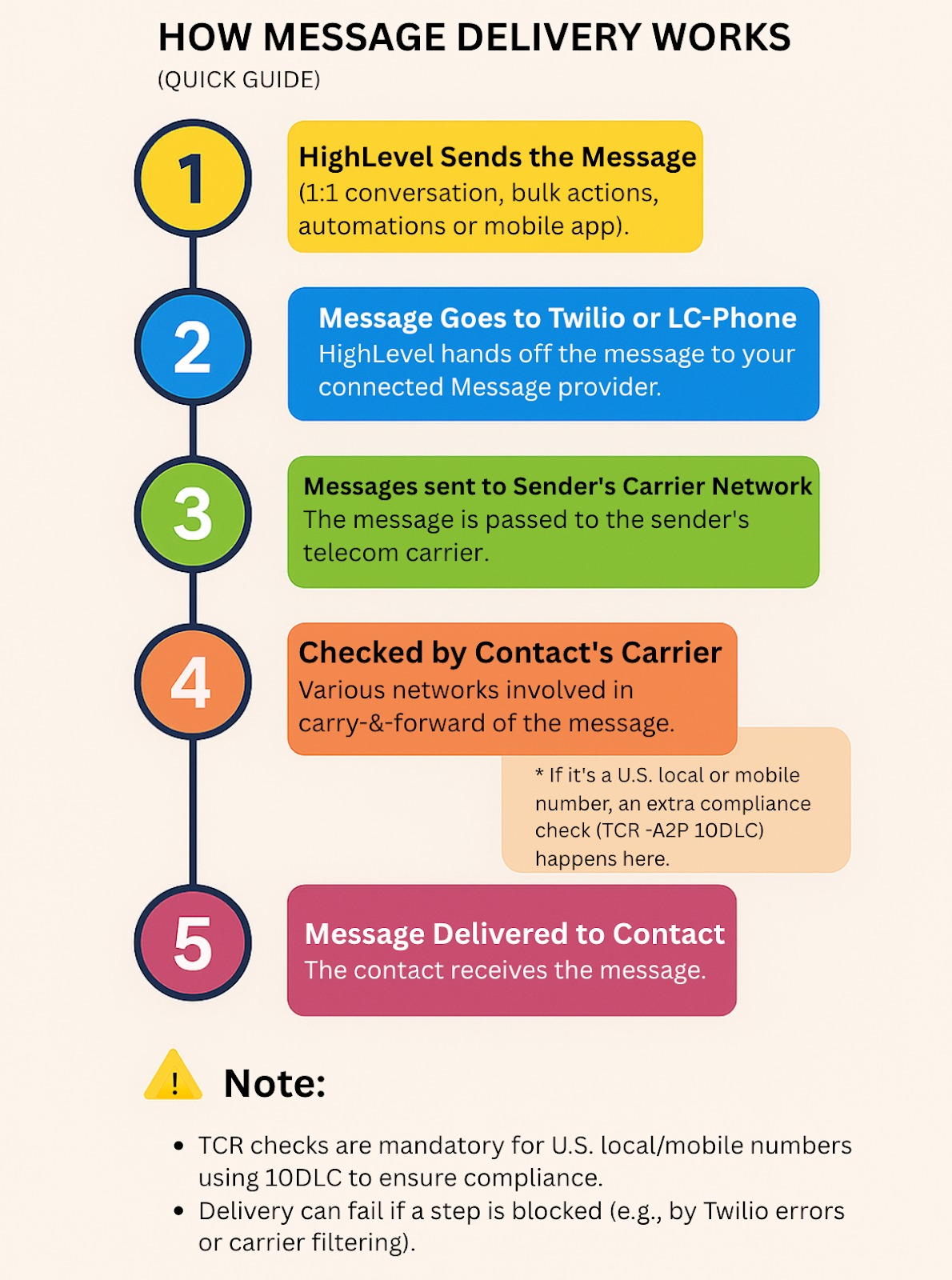
HighLevel validates the message format, checks contact opt-out status, enforces workflow rules, and applies account-level restrictions such as daily send caps or ramp-up limits.
LC Phone or Twilio (for BYOT accounts) validates the sender number, checks A2P or Toll-Free registration status, enforces geo-permissions, and may filter messages based on content or policy.
The recipient's mobile carrier delivers the message to the device. Carriers may apply their own filtering, block messages to invalid or inactive numbers, or reject messages due to handset issues.
Most delivery failures generate an error code that indicates the layer and reason for the failure. Use the error code to determine the correct resolution path.
Where to Find Error Messages
HighLevel surfaces SMS delivery errors in multiple locations depending on your workflow and account configuration.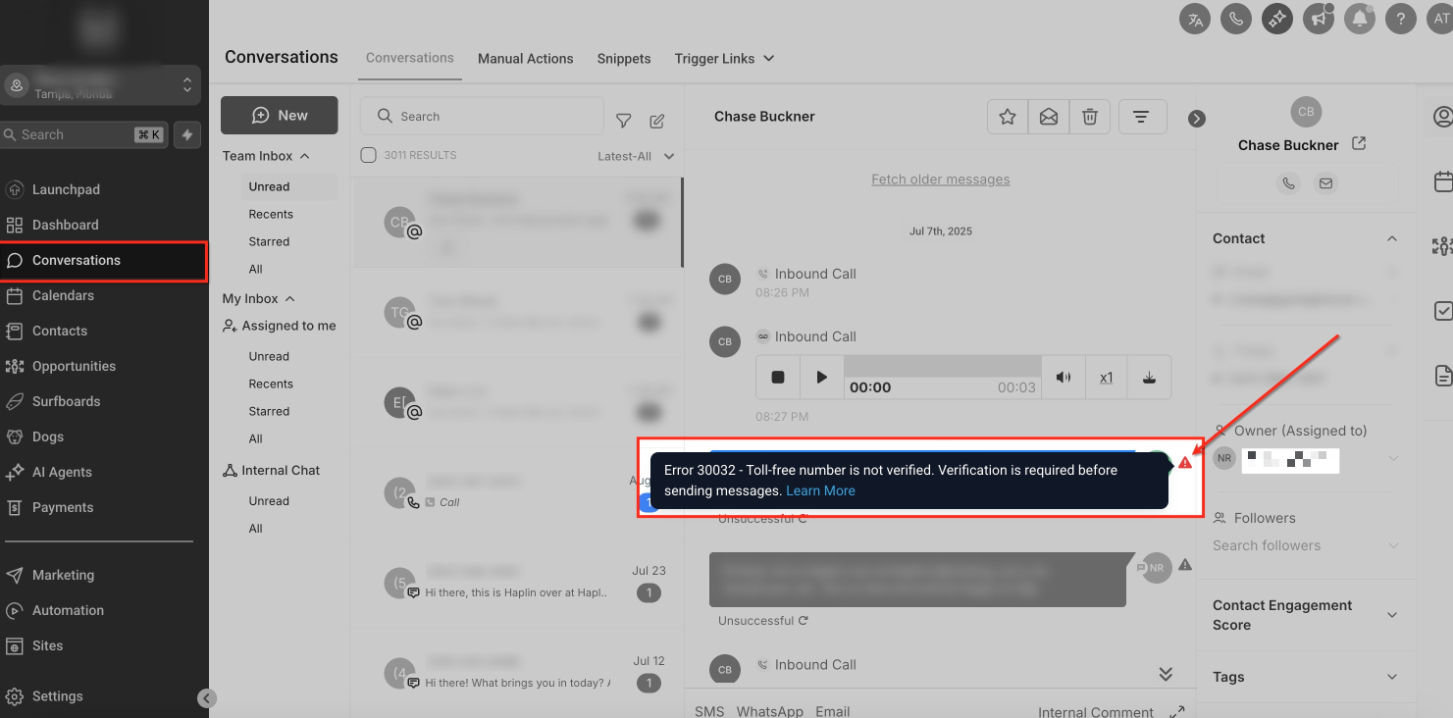
Always note the exact error code when troubleshooting. The code determines the root cause and the correct resolution steps.
Troubleshooting Checklist
Follow this structured checklist to diagnose and resolve SMS delivery failures efficiently.
Determine whether the failure affects one contact, one sending number, or all outbound messages. This helps you narrow the troubleshooting path.
Open the failed message in Conversations and note the status (e.g., failed, undelivered) and the exact error code displayed.
Verify the recipient's phone number is a valid mobile number, formatted correctly, SMS-capable, and not on the opt-out or Do Not Disturb list.
Confirm the sending number is SMS-capable, active, correctly configured for your location, and has valid A2P or Toll-Free registration status if required.
Review whether your account or sending number has hit daily send caps, is in a ramp-up period, is suspended, or lacks geo-permissions for the destination country.
Verify the message length is within carrier limits, MMS attachments are under 5 MB, URLs are valid, and content complies with messaging policy to avoid filtering.
Look up the displayed error code in the LC Phone System - Error Code and Warning Dictionary for the exact cause and recommended resolution.
After applying the fix, send a test message to confirm delivery. Avoid retrying repeatedly without addressing the root cause.
If the issue continues after troubleshooting, contact HighLevel Support with specific examples: the sending number, recipient number, timestamp, and error code.
Common SMS Delivery Failures
The following failure categories cover the majority of SMS delivery issues. Use the error code displayed in Conversations to identify the specific problem, then apply the recommended resolution.
If the recipient opted out by sending STOP or another supported keyword, outbound messaging remains blocked until they opt back in using a supported resubscribe keyword such as START, where applicable.
Resolution: The contact must send the resubscribe keyword to the same number. Review your consent practices to prevent future opt-outs.
Messages fail when the recipient number is a landline, invalid, disconnected, or formatted incorrectly.
Resolution: Confirm the destination is SMS-capable and use a valid mobile or message-capable number.
US local and toll-free numbers may require appropriate registration or verification before messaging. Common error codes include 30032 (Toll-Free number not verified), 30033 (A2P Campaign suspended), and 30034 (Number not fully registered or associated for A2P messaging).
Resolution: Confirm that the sender is properly registered and associated with the correct approved Campaign or verification record. Review the relevant A2P or Toll-Free registration articles in the Related Articles section.
Messages may be blocked when content appears spam-like, violates messaging policy, uses prohibited content, or triggers carrier filtering. Error code 30007 is a common indicator of filtering.
Resolution: Review the exact error code, your consent practices, message content, and current messaging-policy guidance before resending. Refer to the article How to Prevent SMS Filtering by Carriers: Error 30007 for detailed mitigation steps.
HighLevel enforces daily send caps, ramp-up periods, and account-level restrictions. New numbers or campaigns may be limited to lower volumes initially.
Resolution: Check your account's current daily cap and ramp-up status. If your account is suspended, contact HighLevel Support to resolve the underlying issue.
Sending messages to international destinations requires geo-permissions to be enabled for the destination country.
Resolution: Enable geo-permissions for the destination country in your account settings or contact HighLevel Support to request access.
MMS messages fail when attachments exceed carrier limits (typically 5 MB) or when the recipient's carrier does not support MMS.
Resolution: Reduce the attachment size below 5 MB or send the attachment as a link. Confirm the recipient's carrier supports MMS delivery.
The sending number may not be provisioned for SMS or may be inactive, suspended, or incorrectly configured.
Resolution: Verify the number is active, SMS-enabled, and correctly associated with your account. If the number is new, confirm it has completed provisioning.
This list covers broad failure categories. Always reference the LC Phone System - Error Code and Warning Dictionary for the exact cause and resolution steps associated with a specific error code.
Related Articles
For additional guidance on SMS delivery, error codes, and messaging best practices, review the following articles:
Frequently Asked Questions
Was this article helpful?
That’s Great!
Thank you for your feedback
Sorry! We couldn't be helpful
Thank you for your feedback
Feedback sent
We appreciate your effort and will try to fix the article