If your team manages multiple WhatsApp numbers, it’s easy to message from the wrong business identity. HighLevel now helps reduce errors by automatically selecting the correct WhatsApp From number in Conversations and applying compliance guardrails when needed.
TABLE OF CONTENTS
- What is To and From Number?
- Key Benefits of To and From Number Selection
- How to Use To and From Number
What is To and From Number?
WhatsApp To and From number selection handling improves how Conversations chooses the numbers used for WhatsApp messaging:
From number: The business WhatsApp number used to send messages.
To Number: The contact phone number you are messaging.
HighLevel automatically:
- Pre-selects the correct default WhatsApp From number when you start a new conversation.
- Detects and locks the correct From number for active conversations based on the current WhatsApp 24-hour session.
- Maintains independent WhatsApp conversation states for contacts with multiple phone numbers.
- Transitions to approved template messaging when a user intentionally switches the From number and compliance requires it.
Key Benefits of To and From Number Selection
- Reduces Mistakes: Helps prevent messaging from the wrong WhatsApp business number.
- Improves Agent Efficiency: Removes guesswork and manual switching in the composer.
- Increases Consistency: Keeps conversations aligned to the correct business identity and contact number.
- Built-in Compliance: Uses template messaging when required, using existing compliance logic.
- Cleaner Multi-Number Workflows: Avoids confusion when contacts have multiple phone numbers and multiple active threads.
How to Use To and From Number
Start a new WhatsApp conversation
1. Go to Conversations.
2. Start a new message to a contact.
3. Verify the WhatsApp From number shown in the composer.
4. Send your message.
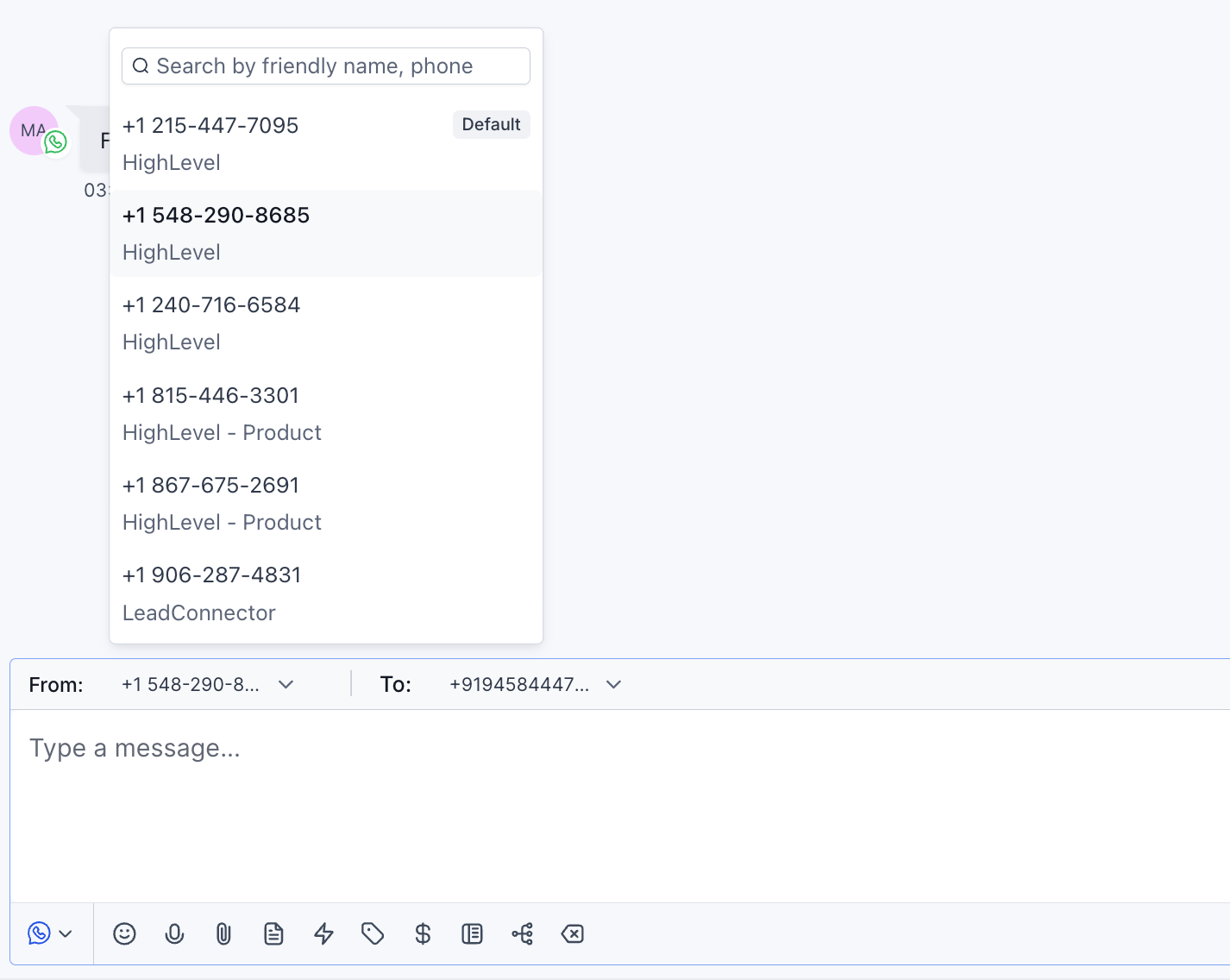
The correct default WhatsApp number will be automatically pre-selected.

HighLevel automatically detects and uses the correct WhatsApp From number tied to the active 24-hour session, reducing the risk of replying from the wrong number.

When you change the From number, HighLevel transitions to template messaging when required to stay compliant.

HighLevel also maintains independent conversation states per contact phone number and updates the WhatsApp routing automatically when you switch the contact’s phone number.
Frequently Asked Questions
Q. Why is the WhatsApp From number pre-selected?
To remove ambiguity and reduce accidental sends from the wrong WhatsApp business identity—especially for locations with multiple WhatsApp numbers.
Q. Why can’t I change the WhatsApp From number in some conversations?
In active conversations, HighLevel locks the From number to the correct WhatsApp number based on the current 24-hour session to prevent compliance and routing issues.
Q. What happens if I switch the WhatsApp From number?
If compliance requires it, HighLevel transitions the message to **approved template messaging** using existing compliance logic.
Q. If a contact has multiple phone numbers, will it affect WhatsApp conversations?
Yes. HighLevel maintains independent WhatsApp conversation states for each contact phone number. When you switch the contact’s phone number, the WhatsApp routing updates automatically.
Relevant Articles
Was this article helpful?
That’s Great!
Thank you for your feedback
Sorry! We couldn't be helpful
Thank you for your feedback
Feedback sent
We appreciate your effort and will try to fix the article