HighLevel offers AI tools to help businesses create content, build websites, automate workflows, manage customer conversations, and more. Many AI assistants are included with HighLevel agency plans at no additional cost with fair-usage protections, while other AI products require an AI Employee subscription or are billed based on usage.
This article explains which AI features are included with HighLevel, compares AI Employee plans, provides detailed pricing for individual AI products, and explains how AI usage and billing work.
Always use the product-specific section below before quoting pricing, estimating usage, or setting up rebilling.
Important: Pricing and model availability may change. Third-party model/provider rates may also change based on provider updates, model version, service tier, or HighLevel implementation. When quoting pricing externally, confirm the current in-app pricing and billing settings first.TABLE OF CONTENTS
- AI Features Included with HighLevel
- AI Employee Plans and Pricing
- AI Features
- Billing and Administration
- Glossary
- Frequently Asked Questions
- Related Articles
AI Features Included with HighLevel
For agency users on all HighLevel agency plans ($97, $297, and $497), AI products fall into two main categories:
AI Assistants (Included for Agency Users): Tools that help users create, build, and manage their business, such as Ask AI and AI Studio. These are included at no additional cost, subject to fair-use limits.
AI Agents (Paid): Tools that perform ongoing tasks on behalf of a business, such as handling customer conversations, answering calls, and managing reviews. These remain paid products and may be billed through subscriptions or pay-per-use pricing.
Sub-account users have different AI pricing. Some AI assistants are available at no additional cost, while others, including Ask AI, AI Studio, and Content AI, are billed based on usage unless the sub-account has an AI Employee subscription. Eligible AI Employee plans also include allowances for certain paid AI agents.
The table below compares which AI features are included without purchasing an additional AI Employee subscription.
| AI Feature | Agency Users ($97/$297/$497 Plans) | Sub-Account Users |
|---|---|---|
| Ask AI | Free* | Paid |
| AI Studio | Free* | Paid |
| Creator Studio | Free* | Paid |
| Content AI | Free* | Paid |
| Funnel & Website AI | Free* | Free* |
| Email AI | Free* | Free* |
| Calendar AI | Free* | Free* |
| Layout AI | Free* | Free* |
| Knowledge Base | Free* | Free* |
| Workflow AI Builder | Free* | Free* |
| AI Agents (Conversation AI, Conversation AI Prompt Optimizer, Voice AI, Voice AI Prompt Optimizer, Reviews AI, Managed Agents, Workflow AI Actions) | Paid | Paid |
*Fair Usage Policy: Free AI features are subject to fair-use limits. Agency users on higher-tier plans receive increased allowances, and the $497 agency plan includes access to advanced Creator Studio models.
AI Employee Plans and Pricing
HighLevel offers three AI Employee subscription plans for sub-accounts: Starter ($20/month), Growth ($50/month), and Unlimited ($97/month). These plans provide included AI usage for all users within a subscribed sub-account, with higher tiers offering increased usage allowances and additional AI agent capabilities.
Sub-accounts can also use supported AI products through Pay-Per-Use billing without purchasing an AI Employee subscription. Charges are based on actual usage, with individual product rates detailed in the sections below.
The table below compares the features and usage allowances included in each AI Employee plan. All prices are in USD.
Important: The Starter plan is available exclusively to agencies subscribed to HighLevel's $497 Founder's plan. Growth and Unlimited are available to eligible sub-accounts across agency plans.| Feature | AI Employee Starter ($20/month) | AI Employee Growth ($50/month) | AI Employee Unlimited ($97/month) |
|---|---|---|---|
| Ask AI | Included | 2x Included | 5x Included |
| AI Studio | Included | 2x Included | 5x Included |
| Creator Studio | Included | 2x Included | 5x Included |
| Content AI | Unlimited* | Unlimited* | Unlimited* |
| Funnel & Website AI | Free* | Free* | Free* |
| Email AI | Free* | Free* | Free* |
| Calendar AI | Free* | Free* | Free* |
| Layout AI | Free* | Free* | Free* |
| Knowledge Base | Free* | Free* | Free* |
| Workflow AI Builder | Free* | Free* | Free* |
| Workflow AI Actions | — | — | — |
| Conversation AI | — | 1,000 responses/month | Unlimited* |
| Conversation AI Prompt Optimizer | — | 500 msg/month | Unlimited* |
| Voice AI | — | 100 min/month | Unlimited* |
| Voice AI Prompt Optimizer | — | 100 min/month | Unlimited* |
| Reviews AI | — | Unlimited* | Unlimited* |
| Managed Agents | — | 100 runs/month | 1,000 runs/month |
*Fair Use Policy: Free and unlimited usage is subject to HighLevel's Terms of Service, including excessive-use restrictions. If usage is excessive, abusive, or negatively affects platform performance, HighLevel may throttle, limit, require service upgrades, or terminate access with or without notice.
Additional Usage: By default, additional usage is paused when an AI Employee plan's included allowance is reached. To continue using supported AI products beyond the included allowance, agencies must enable Extra Usage in AI Suite. Additional usage is billed at the applicable pay-per-use rates.
For instructions on managing usage limits and additional charges, see AI Usage Limits.
Note: Phone System charges still apply to all phone calls regardless of plan. Text and call charges are billed separately.
AI Employee Starter Plan
Build with AI using standard models and quality.
The AI Employee Starter plan costs $20/month per sub-account and is available exclusively to agencies subscribed to HighLevel's $497 Founder's plan.
Starter focuses on AI Assistants that help users create content, build websites, and set up their business. Unlike the Growth and Unlimited plans, it does not include usage allowances for Conversation AI, Voice AI, Reviews AI, Managed Agents, Conversation AI Prompt Optimizer, or Voice AI Prompt Optimizer. These products are billed separately at applicable pay-per-use rates when used.
AI Employee Growth Plan
Build with AI using advanced models and quality, plus AI Agents.
The AI Employee Growth plan costs $50/month per sub-account and is designed for businesses that want to build with AI while using AI Agents to handle ongoing tasks, such as customer conversations and calls. It includes increased AI Assistant usage and monthly allowances for supported AI Agents.
AI Employee Unlimited Plan
Your AI team, without limits.
The AI Employee Unlimited plan costs $97/month per sub-account and is designed for businesses with higher AI usage needs. It provides the highest included AI Assistant allowances and very high included usage of supported AI Agents. Features described as Unlimited remain subject to HighLevel's Fair Usage Policy.
Pay-Per-Use
Pay-per-use pricing applies to supported AI products based on the user's access type, subscription, and included usage allowances.
Agency users: Supported AI Assistants are included with agency plans at no additional cost, subject to fair-use limits. Additional charges may apply when included allowances are exhausted and Extra Usage is enabled.
Sub-account users: Supported AI products are billed at pay-per-use rates when they are not covered by an AI Employee subscription or when included allowances are exceeded and additional usage is enabled.
Charges vary by product and may be calculated using tokens, generated content, minutes, or other usage-based units. For exact rates and billing calculations, see the product-specific sections below.
Ask AI
Ask AI is included at no additional cost for agency admins and users, while sub-account users can access it through an AI Employee subscription or pay-per-use billing.
Usage Limits: Ask AI usage is measured in rolling five-hour windows. Included usage depends on the user's access type and subscription.
| User Type / Plan | Included Usage |
|---|---|
| Agency Admins & Users ($97, $297 & $497 plans) | Free, subject to fair use |
| Sub-Account Users (without an AI Employee plan) | Not Included; Pay-per-use |
| AI Employee Starter ($20/month) | Usage Included |
| AI Employee Growth ($50/month) | 2x Usage Included |
| AI Employee Unlimited ($97/month) | 5x Usage Included |
When the included allowance is reached, additional usage is paused by default. To continue at applicable pay-per-use rates, enable Extra Usage in AI Suite.
Pay-Per-Use Pricing: Ask AI charges are based on the AI models, resources, and actions used during a session. Costs can vary depending on:
- Task complexity
- Number of user messages
- Number of AI turns
- Number of actions prepared or completed
- Whether approvals are required
- Whether visual rendering or image generation is used
- Whether external data, web content, or connected platform data is used
- Whether the task creates or updates assets inside HighLevel
For detailed cost examples, see Ask AI Sessions Pricing Overview.
AI Studio
AI Studio generations are included at no additional cost for agency admins and users, subject to fair use. Sub-account users can access AI Studio through an AI Employee subscription or pay-per-use billing.
Usage Limits: Usage is measured in 5-hour windows. Each plan has its own usage limit within that window. If a limit is reached, access resets at the end of the 5-hour window.
| User Type / Plan | Included Usage |
|---|---|
| Agency Admins & Users ($97, $297 & $497 plans) | Free, subject to fair use |
| Sub-Account Users (without an AI Employee plan) | Not Included; Pay-per-use |
| AI Employee Starter ($20/month) | Usage Included |
| AI Employee Growth ($50/month) | 2x Usage Included |
| AI Employee Unlimited ($97/month) | 5x Usage Included |
When the included allowance is reached, AI Studio usage is paused by default. To continue at applicable pay-per-use rates, enable Extra Usage in AI Suite.
Pay-Per-Use Pricing: AI Studio charges are based on the AI models, tokens, and resources used during a session. Costs can vary depending on:
Project complexity
Number and complexity of prompts
AI models and tokens consumed
Amount of code or content generated
Resources and actions required to complete a task
For detailed generation cost examples, see AI Studio – Pricing.
AI Studio Cloud Hosting: Cloud hosting is billed separately from AI Studio generations. Nano hosting is free, while Micro and higher cloud tiers have additional charges, regardless of the AI Employee subscription. For more information, see AI Studio Cloud Pricing.
Creator Studio
Creator Studio is included at no additional cost for agency admins and users, while sub-account users can access it through an AI Employee subscription or pay-per-use billing.
Usage Limits: Creator Studio usage is measured in rolling five-hour windows. Included usage depends on the user's access type and AI Employee subscription.
| User Type / Plan | Included Usage |
|---|---|
| Agency Admins & Users ($97, $297 & $497 plans) | Free, subject to fair use |
| Sub-Account Users (without an AI Employee plan) | Not Included; Pay-per-use |
| AI Employee Starter ($20/month) | Usage Included |
| AI Employee Growth ($50/month) | 2x Usage Included |
| AI Employee Unlimited ($97/month) | 5x Usage Included |
When the included allowance is reached, Creator Studio usage is paused by default. To continue at applicable pay-per-use rates, enable Extra Usage in AI Suite.
Content AI
Content AI is included at no additional cost for agency admins and users, subject to fair use. Sub-account users can access Content AI through an AI Employee subscription or pay-per-use billing.
| User Type / Plan | Included Usage |
|---|---|
| Agency Admins & Users ($97, $297 & $497 plans) | Free, subject to fair use |
| Sub-Account Users (without an AI Employee plan) | Not Included; Pay-per-use |
| AI Employee Starter ($20/month) | Unlimited, subject to fair use |
| AI Employee Growth ($50/month) | Unlimited, subject to fair use |
| AI Employee Unlimited ($97/month) | Unlimited, subject to fair use |
When an applicable usage limit is reached, access to AI generation may pause until the allowance resets.
Funnel & Website AI
Funnel & Website AI is included at no additional cost for agency and sub-account users, regardless of whether they have an AI Employee subscription.
| User Type / Plan | Included Usage |
|---|---|
| Agency & Sub-Account Users (without an AI Employee plan) | Free, subject to fair use |
| AI Employee Starter ($20/month) | Free, subject to fair use |
| AI Employee Growth ($50/month) | Free, subject to fair use |
| AI Employee Unlimited ($97/month) | Free, subject to fair use |
When an applicable usage limit is reached, access to AI generation may pause until the allowance resets.
Email AI
Email AI is included at no additional cost for agency and sub-account users, regardless of whether they have an AI Employee subscription.
| User Type / Plan | Included Usage |
|---|---|
| Agency & Sub-Account Users (without an AI Employee plan) | Free, subject to fair use |
| AI Employee Starter ($20/month) | Free, subject to fair use |
| AI Employee Growth ($50/month) | Free, subject to fair use |
| AI Employee Unlimited ($97/month) | Free, subject to fair use |
When an applicable usage limit is reached, access to AI generation may pause until the allowance resets.
Knowledge Base
Knowledge Base is included at no additional cost for agency and sub-account users, regardless of whether they have an AI Employee subscription.
| User Type / Plan | Included Usage |
|---|---|
| Agency & Sub-Account Users (without an AI Employee plan) | Included, subject to fair use |
| AI Employee Starter ($20/month) | Included, subject to fair use |
| AI Employee Growth ($50/month) | Included, subject to fair use |
| AI Employee Unlimited ($97/month) | Included, subject to fair use |
Workflow AI Builder
HighLevel includes free AI tools that help users create automations and generate workflow content without manually building everything from scratch. These tools include:
Workflow AI Builder: Creates workflows from natural-language prompts, allowing users to describe what they want to automate.
Generate with AI: Generates content for SMS, emails, code, and other workflow-related tasks.
Both tools are available at no additional cost for agency and sub-account users, regardless of their AI Employee subscription, subject to fair-use limits.
| User Type / Plan | Included Usage |
|---|---|
| Agency & Sub-Account Users (without an AI Employee plan) | Free, subject to fair use |
| AI Employee Starter ($20/month) | Free, subject to fair use |
| AI Employee Growth ($50/month) | Free, subject to fair use |
| AI Employee Unlimited ($97/month) | Free, subject to fair use |
When an allowance is reached, access to the free AI tools may pause until the usage limit resets.
Workflow AI Actions
Workflow AI Actions allow businesses to use AI models within automations to analyze information, generate responses, and complete tasks. Unlike Workflow AI Builder and Generate with AI, Workflow AI Actions are billed at pay-per-use rates regardless of the user type or AI Employee subscription.
Premium Workflow AI Actions
AI-powered workflow actions are billed at $0.01 per execution.
| Workflow AI Action | Pricing |
|---|---|
| Decision Maker | $0.01/execution |
| Intent Detection | $0.01/execution |
| Summarize Text | $0.01/execution |
| Translate | $0.01/execution |
External AI Model Actions
Workflows can also use external AI models, such as supported OpenAI models, to generate responses and process information. These actions are billed based on the selected model and the number of input and output tokens processed. Actual charges vary depending on the model, prompt size, generated output, and usage.
AI Agent Workflow Action
The AI Agent workflow action can perform multi-step tasks using AI models and configured tools. This is a paid action, and additional charges may apply based on execution and tool usage.
For details, see Workflow Action – AI Agent.
Note: AI Agent actions use automatic token optimizations that can reduce execution costs by up to 50%, depending on the workflow, model, context, and tools used. These optimizations apply automatically to new and existing AI Agent actions and require no configuration changes.
Conversation AI
Conversation AI is not included for agency or sub-account users without an eligible AI Employee subscription. Usage is billed at pay-per-use rates unless covered by an AI Employee plan.
Usage Limits: Conversation AI usage is measured by the number of AI Agent responses. Included usage depends on the sub-account's AI Employee subscription.
| User Type / Plan | Included Usage |
|---|---|
| Agency & Sub-Account Users (without an AI Employee plan) | Not Included; Pay-per-use |
| AI Employee Starter ($20/month) | Not included; Pay-per-use |
| AI Employee Growth ($50/month) | 1,000 Agent responses/month |
| AI Employee Unlimited ($97/month) | Unlimited, subject to fair use |
When the included allowance is reached, additional usage is paused by default. To continue at applicable pay-per-use rates, enable Extra Usage in AI Suite.
Pay-Per-Use Pricing: Conversation AI charges are calculated using the input and output tokens processed during conversations. Costs vary depending on the AI model, conversation length, and amount of information processed. See information below for more details on how pay-per-use pricing is calculated.
Conversation AI Token Rates
| Provider | Model | Input / 1M Tokens | Output / 1M Tokens |
|---|---|---|---|
| OpenAI | GPT 4.1 | $2.00 | $8.00 |
| OpenAI | GPT 4.1 Mini | $0.40 | $1.60 |
| OpenAI | GPT 6.1 Sol | $2.00 | $10.00 |
| OpenAI | GPT 6 Sol | $2.00 | $10.00 |
| OpenAI | GPT 6 Luna | $0.10 | $0.50 |
| OpenAI | GPT 5.6 Sol | $4.00 | $20.00 |
| OpenAI | GPT 5.6 Luna | $0.20 | $1.20 |
| OpenAI | GPT 5.5 | $5.00 | $30.00 |
| OpenAI | GPT 5.4 | $2.50 | $15.00 |
| OpenAI | GPT 5.4 Mini | $0.75 | $4.50 |
| OpenAI | GPT 5.4 Nano | $0.20 | $1.25 |
| OpenAI | GPT 5.2 | $1.75 | $14.00 |
| OpenAI | GPT 5.1 | $1.25 | $10.00 |
| Anthropic | Claude Opus 5.5 | $4.40 | $22.00 |
| Anthropic | Claude Sonnet 5.5 | $2.20 | $11.00 |
| Anthropic | Claude Haiku 5.5 | $0.11 | $0.55 |
| Anthropic | Claude Haiku 4.5 | $1.10 | $5.50 |
| Google | Gemini 3.8 Flash | $0.75 | $3.75 |
| Google | Gemini 3.7 Flash | $0.75 | $3.75 |
| Google | Gemini 3.5 Flash Lite | $0.30 | $2.50 |
| OpenAI | GPT 5 | $1.25 | $10.00 |
| OpenAI | GPT 5 Mini | $0.25 | $2.00 |
How Conversation AI Cost Is Calculated
Conversation AI pricing is based on token usage. Tokens are small units of text used to measure how much information is sent to the AI model and how much text the AI generates in response.
Conversation AI usage has two parts:
| Token type | What it means | Examples |
|---|---|---|
| Input tokens | Text sent to the AI model | Customer messages, conversation history, AI instructions, contact details, and knowledge-base content |
| Output tokens | Text generated by the AI model | AI replies, suggested responses, and generated messages |
To estimate Conversation AI cost, calculate the input token cost and output token cost separately, then add them together.
| Step | What to calculate | Formula |
|---|---|---|
| 1 | Input token cost | Input tokens ÷ 1,000,000 × input token price |
| 2 | Output token cost | Output tokens ÷ 1,000,000 × output token price |
| 3 | Total estimated cost | Input token cost + output token cost |
Example: If a conversation uses 100,000 input tokens and 25,000 output tokens on a model priced at $1.25 per 1M input tokens and $10.00 per 1M output tokens, the estimated cost would be $0.375.
| Usage type | Tokens used | Rate | Calculation | Cost |
|---|---|---|---|---|
| Input tokens | 100,000 | $1.25 / 1M tokens | 100,000 ÷ 1,000,000 × $1.25 | $0.125 |
| Output tokens | 25,000 | $10.00 / 1M tokens | 25,000 ÷ 1,000,000 × $10.00 | $0.25 |
| Total estimated cost | — | — | $0.125 + $0.25 | $0.375 |
Why Two Conversation AI Conversations May Cost Different Amounts
Two Conversation AI conversations can have different costs because pricing is based on token usage.
A conversation with short messages and short AI replies will usually use fewer tokens. A conversation with more back-and-forth messages, longer AI replies, more conversation history, or larger knowledge-base content will usually use more tokens.
Because of this, two conversations using the same AI model can still have different costs depending on how much text is processed and generated.
Conversation AI Prompt Optimizer
Conversation AI Prompt Optimizer is not included for agency or sub-account users without an eligible AI Employee subscription. Usage is billed at pay-per-use rates unless covered by an AI Employee plan.
Usage Limits: Conversation AI Prompt Optimizer usage is measured in messages. Included usage depends on the sub-account's AI Employee subscription.
| User Type / Plan | Included Usage |
|---|---|
| Agency & Sub-Account Users (without an AI Employee plan) | Not Included; Pay-per-use |
| AI Employee Starter ($20/month) | Not Included; Pay-per-use |
| AI Employee Growth ($50/month) | 500 messages/month |
| AI Employee Unlimited ($97/month) | Unlimited, subject to fair use |
When the included allowance is reached, additional usage is paused by default. To continue at applicable pay-per-use rates, enable Extra Usage in AI Suite.
Pay-Per-Use Pricing: Conversation AI Prompt Optimizer usage is billed at the applicable Conversation AI pay-per-use rates. Charges depend on the selected AI model, provider, and usage. See the Conversation AI section above for detailed rates and cost calculations.
Voice AI
Voice AI is not included for agency or sub-account users without an eligible AI Employee subscription. Usage is billed at pay-per-use rates unless covered by an AI Employee plan.
Usage Limits: Voice AI usage is measured in AI Agent minutes, with inbound, outbound, and widget usage combined. Included usage depends on the sub-account's AI Employee subscription.
| User Type / Plan | Included Usage |
|---|---|
| Agency & Sub-Account Users (without an AI Employee plan) | Not included; Pay-per-use |
| AI Employee Starter ($20/month) | Not included; Pay-per-use |
| AI Employee Growth ($50/month) | 100 AI Agent minutes/month |
| AI Employee Unlimited ($97/month) | Unlimited, subject to fair use |
When the included allowance is reached, additional usage is paused by default. To continue at applicable pay-per-use rates, enable Extra Usage in AI Suite.
Pay-Per-Use Pricing: Voice AI costs depend on the voice technology, selected AI model, and usage duration. Speech-to-Speech models use a per-minute rate, while traditional Voice AI combines Voice Engine, Text-to-Speech (TTS), and language model costs.
Important: Phone system charges apply separately to phone calls, regardless of the AI Employee subscription.Speech-to-Speech Cost Calculations
Why use Speech-to-Speech Voice AI?
Speech-to-Speech Voice AI lets your agent hear audio and respond with audio through a single realtime model. Traditional Voice AI converts speech to text, processes it, then converts text back to speech — a multi-step pipeline that adds latency at every hop. S2S removes those steps entirely.
The difference shows up in the conversation itself. Your agents pick up on tone and emotion that plain text loses, respond with noticeably lower latency, and can adapt when a caller switches languages mid-call. The result sounds far closer to talking with a person than to querying a system.
All-in-one per-minute rate
We've bundled audio, text, cache tokens, transcripts, and infrastructure into a single, predictable per-minute price.
With most Voice AI models, cost swings based on how the conversation goes. S2S gives you one rate for every minute — which makes it far easier to understand your costs, price confidently for clients, and scale without surprises.
Note: Agent prompts are capped at 15K tokens on both models. This applies to your agent's instructions, not to call length or conversation history.| Provider | Model | S2S Rate |
|---|---|---|
| Google | gemini-3.1-flash-live-preview | $0.10/min |
| OpenAI | gpt-realtime-2/2.1 | $0.20/min |
How Text-to-Speech Cost is Calculated
| Step | What to calculate | Formula |
|---|---|---|
| 1 | Voice Engine cost | Call duration in minutes × Voice Engine rate |
| 2 | TTS cost | Call duration in minutes × selected TTS rate |
| 3 | LLM token cost | Total call tokens ÷ 1,000,000 × selected LLM model price |
| 4 | Total estimated cost | Voice Engine cost + TTS cost + LLM token cost + applicable Phone System charges |
Voice AI Cost Formula
Use this formula to estimate the total cost of a pay-per-use Voice AI call:
Total estimated cost = call duration in minutes × (Voice Engine rate + selected TTS rate) + LLM token cost + applicable Phone System charges
Where:
| Formula item | Meaning |
|---|---|
| Call duration | Total length of the Voice AI call or session in minutes |
| Voice Engine rate | Refer to chart below |
| Selected TTS rate | The per-minute rate for the selected TTS provider/model |
| LLM token cost | Cost based on the AI model used and the number of tokens processed |
| Phone System charges | Separate telephony charges that may apply to phone calls |
Example: If a Voice AI call lasts 10 minutes and uses OpenAI TTS, the estimated AI voice cost would be $0.60 before LLM token usage and Phone System charges.
| Cost component | Rate | Calculation | Cost |
|---|---|---|---|
| Voice Engine | $0.045/min | 10 × $0.045 | $0.45 |
| OpenAI TTS | $0.015/min | 10 × $0.015 | $0.15 |
| Estimated AI voice cost | — | $0.45 + $0.15 | $0.60 |
Why Two Voice AI Calls May Cost Different Amounts
Two Voice AI calls with the same duration can still have different costs because the final cost depends on more than call length.
Voice AI cost can vary based on the selected TTS provider, selected AI model, token usage, and any applicable Phone System charges. For example, a call using a premium TTS provider or a higher-cost AI model may cost more than another call of the same length.
Calls with more back-and-forth conversation, larger knowledge-base context, or longer AI responses may also use more tokens, which can increase the final cost.
Voice Engine Rate
The Voice Engine rate is the per-minute HighLevel Voice AI processing charge. If you are reviewing historical usage before May 20, 2026, you may see older bundled Voice AI pricing.
| Effective date | Voice Engine rate |
|---|---|
| May 20, 2026 onward | $0.045/min |
TTS Provider Rates
TTS, or text-to-speech, is the provider/model cost for generating the AI’s spoken response.
| TTS provider | Model | TTS rate | Effective date |
|---|---|---|---|
| OpenAI | TTS | $0.015/min | April 20, 2026 |
| Cartesia | TTS | $0.015/min | April 20, 2026 |
| ElevenLabs | V3 | $0.170/min | April 20, 2026 |
| ElevenLabs | V2.5 | $0.035/min | May 20, 2026 |
External Voice AI model pricing
If you choose an external AI model such as Google Gemini, OpenAI GPT, or Anthropic Claude to power HighLevel Voice AI, model usage is billed based on the selected model.
| Provider | Model | LLM model price / 1M tokens |
|---|---|---|
| Google | Gemini 2.0 Flash | $0.10 |
| Google | Gemini 2.0 Flash Lite | $0.075 |
| Google | Gemini 2.5 Flash | $0.30 |
| Google | Gemini 2.5 Flash Lite | $0.10 |
| OpenAI | GPT-4o Mini | $0.15 |
| OpenAI | GPT-4o | $2.50 |
| OpenAI | GPT-4.1 Nano | $0.10 |
| OpenAI | GPT-4.1 Mini | $0.40 |
| OpenAI | GPT-4.1 | $2.00 |
| OpenAI | GPT-5 Nano | $0.05 |
| OpenAI | GPT-5 Mini | $0.25 |
| OpenAI | GPT-5 | $1.25 |
| Anthropic | Claude 4.5 Sonnet | $3.00 |
| Anthropic | Claude 4.0 Sonnet | $3.00 |
| Anthropic | Claude 3.7 Sonnet | $3.00 |
| Anthropic | Claude 3.5 Haiku | $0.80 |
Note: Two Voice AI calls with the same duration can cost different amounts. The TTS provider, AI model, token usage, and Phone System charges all affect the final cost.Voice AI Prompt Optimizer
Voice AI Prompt Optimizer is not included for agency or sub-account users without an eligible AI Employee subscription. Usage is billed at pay-per-use rates unless covered by an AI Employee plan.
Usage Limits: Voice AI Prompt Optimizer usage is measured in minutes. Included usage depends on the sub-account's AI Employee subscription.
| User Type / Plan | Included Usage |
|---|---|
| Agency & Sub-Account Users (without an AI Employee plan) | Not Included; Pay-per-use |
| AI Employee Starter ($20/month) | Not included; Pay-per-use |
| AI Employee Growth ($50/month) | 100 minutes/month |
| AI Employee Unlimited ($97/month) | Unlimited, subject to fair use |
When the included allowance is reached, additional usage is paused by default. To continue at applicable pay-per-use rates, enable Extra Usage in AI Suite.
Pay-Per-Use Pricing: Voice AI Prompt Optimizer usage is billed at the applicable Voice AI pay-per-use rates. Charges depend on the selected AI model, voice provider, and usage. See the Voice AI section above for detailed rates and cost calculations.
Flow Agents
Flow Agents are billed at pay-per-use rates for agency and sub-account users, regardless of their AI Employee subscription. No AI Employee plan includes an allowance for Flow Agent usage.
Agent Studio includes multimodal and specialized AI capabilities. Usage is charged based on model token usage, API usage, searches, or content-generation units depending on the feature used.
Agent response generation
| Provider | Model | Input price / 1M tokens | Output price / 1M tokens |
|---|---|---|---|
| OpenAI | GPT-5 | $1.25 | $10.00 |
| OpenAI | GPT-5 Mini | $0.25 | $2.00 |
| OpenAI | GPT-5 Nano | $0.05 | $0.40 |
| OpenAI | GPT-4.1 | $2.00 | $8.00 |
| OpenAI | GPT-4.1 Mini | $0.40 | $1.60 |
| OpenAI | GPT-4.1 Nano | $0.10 | $0.40 |
External APIs
| Feature | Provider | Price |
|---|---|---|
| Web Search | Tavily | $0.01/search |
Multimodal and specialized models:
All prices are in USD. Third-party model prices are subject to change by the provider and may vary based on model version, quality, modality, or service tier.
Video generation:
| Content type | Provider | Model | Price | Unit |
|---|---|---|---|---|
| Video | Gemini | Veo3 Fast | $0.15 | Second of video |
| Video | Gemini | Veo3 | $0.40 | Second of video |
Image generation:
| Content type | Provider | Model | Quality | Size | Price | Unit |
|---|---|---|---|---|---|---|
| Image | OpenAI | DALL-E 3 | Standard | 1024 × 1024 | $0.04 | Image output |
| Image | OpenAI | DALL-E 3 | Standard | 1024 × 1536 / 1536 × 1024 | $0.08 | Image output |
| Image | OpenAI | DALL-E 3 | HD | 1024 × 1024 | $0.08 | Image output |
| Image | OpenAI | DALL-E 3 | HD | 1024 × 1536 / 1536 × 1024 | $0.12 | Image output |
Text generation:
| Content type | Provider | Model | Input price / 1M tokens | Output price / 1M tokens |
|---|---|---|---|---|
| Text | OpenAI | GPT-4.1 | $2.00 | $8.00 |
| Text | OpenAI | GPT-5 Mini | $0.25 | $2.00 |
Speech:
| Content type | Provider | Model | Price | Unit |
|---|---|---|---|---|
| Speech | OpenAI LLM | GPT-4o Mini | $0.15 | 1M text tokens |
| Speech | OpenAI LLM + TTS | GPT-4o Mini | $0.60 | 1M text output tokens |
| Speech | OpenAI TTS | GPT-4o Mini TTS | $12.00 | 1M audio output tokens |
Reviews AI
Reviews AI is not included for agency or sub-account users without an eligible AI Employee subscription. Usage is billed at pay-per-use rates unless covered by an AI Employee plan.
| User Type / Plan | Included Usage |
|---|---|
| Agency & Sub-Account Users (without an AI Employee plan) | Not Included; Pay-per-use |
| AI Employee Starter ($20/month) | Not Included; Pay-per-use |
| AI Employee Growth ($50/month) | Unlimited, subject to fair use |
| AI Employee Unlimited ($97/month) | Unlimited, subject to fair use |
Pay-Per-Use Pricing: Reviews AI charges $0.01 per AI-assisted review reply sent.
Generating AI reply suggestions does not create a Pay-Per-Use charge. You can generate up to four suggestions for each review at no charge. The $0.01 charge applies when you send a reply that uses an AI-generated suggestion.
If you substantially rewrite the suggestion before sending it, the response is treated as a manual reply and does not incur the Reviews AI charge. Each sent AI-assisted reply is billed once. Retrying or resending the same reply does not create an additional charge. Auto-Pilot and Drip Mode continue to be billed once for each AI reply that is sent.
Managed Agents
Managed Agents are not included for agency or sub-account users without an eligible AI Employee subscription. Usage is billed at pay-per-use rates unless covered by an AI Employee plan.
Usage Limits: Managed Agent usage is measured by the number of agent runs. Included usage depends on the sub-account's AI Employee subscription.
| User Type / Plan | Included Usage |
|---|---|
| Agency & Sub-Account Users (without an AI Employee plan) | Not Included; Pay-per-use |
| AI Employee Starter ($20/month) | Not included; Pay-per-use |
| AI Employee Growth ($50/month) | 100 runs/month |
| AI Employee Unlimited ($97/month) | 1,000 runs/month |
When an included allowance is reached, additional runs may be billed at pay-per-use rates if additional usage is enabled.
Pay-Per-Use Pricing: Managed Agent charges are based on the AI models and tokens consumed during execution. Costs vary depending on the agent's tasks, complexity, and amount of information processed.
How Managed Agent Runs Are Counted
A run is one agent execution. How it is counted depends on how the agent was invoked.
| Invocation | One run = | Example |
|---|---|---|
| Chat/Conversation | One session | 2 sessions = 2 runs |
| Trigger - event | One event received and executed | Contact tag added → agent executes = 1 Run |
| Trigger - scheduled | One run per scheduled invocation | Daily at a fixed time = 30 runs in 30 days |
See the table below for examples.
| Scenario | Runs |
|---|---|
| One chat session | 1 |
| Three separate chat sessions | 3 |
| Tag-added trigger fires 12 times in a month | 12 |
| Daily scheduled trigger, 30-day month | 30 |
Free Test Run
30 free runs per month via the Test Section. Chat tests have a 400,000 - token session limit.
| Test Type | One test run = | Condition |
|---|---|---|
| Chat test | One session, up to 400,000 tokens | A 520,000-token session = 2 runs |
| Trigger test - event | One event received and executed | Contact tag added → agent executes = 1 Run |
| Trigger test - scheduled | One run per scheduled invocation | Daily at a fixed time = 30 runs in 30 days |
Billing and Administration
Rebilling AI Usage to Locations
AI usage may be charged to the agency first and then re-billed to locations when supported by the agency plan and rebilling settings.
AI Employee rebilling can be enabled in Agency settings. Agencies must be on the $497/month plan to rebill AI Employee usage.
Usage-based services are typically funded through the Agency Wallet. Common wallet-funded services include the Phone System, Email System, AI usage, Email Validation, Autocomplete Addresses, and Workflow Premium Features.
Important: For product-specific rebilling behavior, always review the relevant AI product section and confirm the agency's rebilling settings before quoting client-facing pricing.How to Review AI Usage and Charges
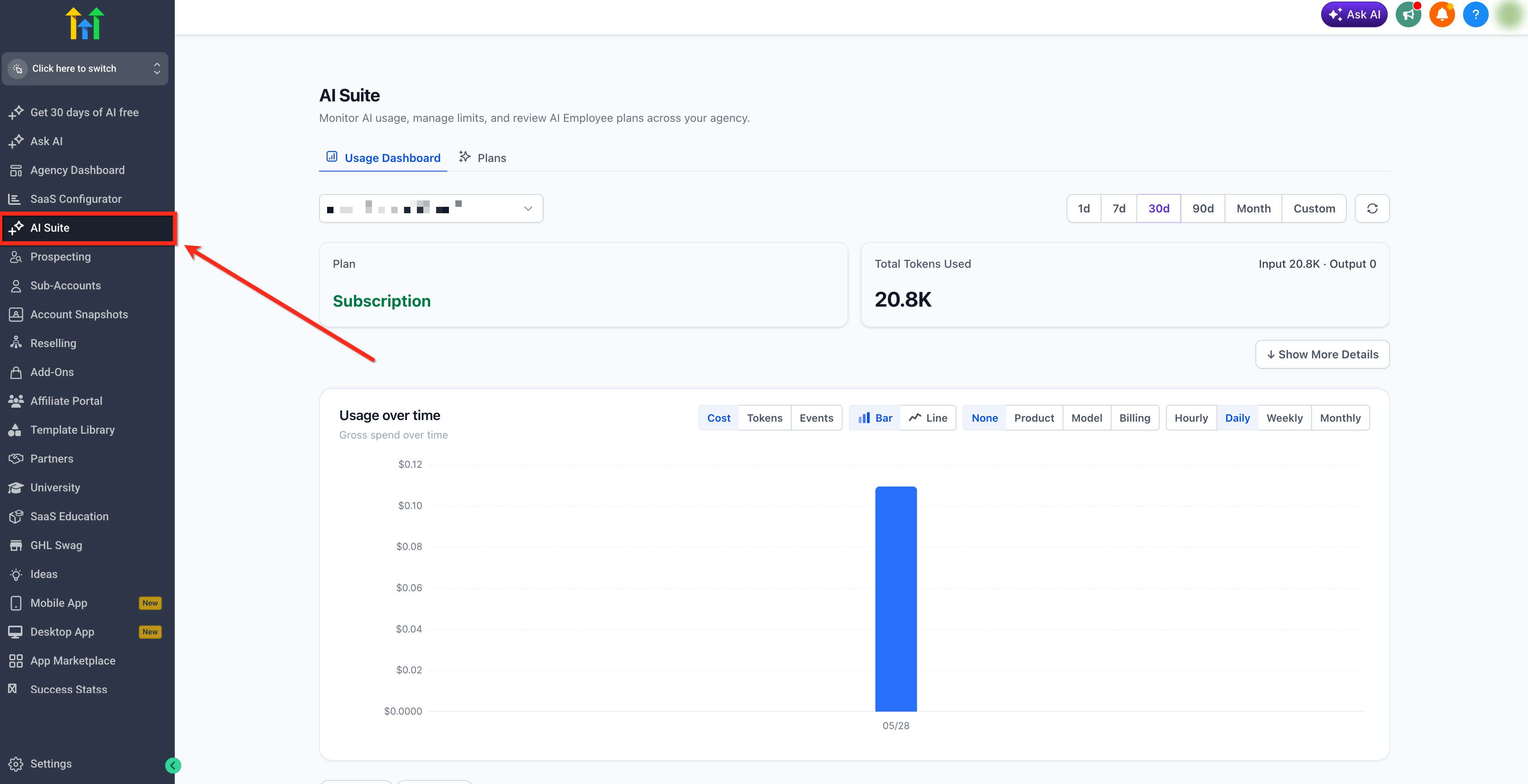
Agency Admins can review supported AI usage in the AI Suite. The AI Suite is available at the Agency level for Agency Admins. It includes location-level breakdowns, but it is not accessed from individual location pages.
Note: For more information, check out our detailed article on AI Usage Limits.The AI Suite provides an agency-level view of:
- AI spend
- Token usage
- Total transactions
- Pay-per-use charges
- Product-level usage
- Model-level usage
- Billing mode
- Cost breakdowns
- Transaction-level details
How Does the 5 Hour Window Work?
Ask AI, AI Studio, and Creator Studio use separate five-hour usage windows to manage included AI usage. Each product has its own allowance based on the user's access type and AI Employee subscription.
Here's how the usage windows work:
When it starts: A window begins when the first action is performed in the applicable AI product, rather than at a fixed time of day.
Rolling windows: Each five-hour window is anchored to the first action. Once the window ends, a new window begins with the next action.
Usage resets: The full included allowance becomes available again five hours after the window begins.
Unused usage: Remaining usage does not carry over into the next window.
Separate allowances: Ask AI, AI Studio, and Creator Studio each have their own usage allowance and five-hour window. Usage in one product does not reduce the allowance for another.
When an included allowance is exhausted, additional usage is paused by default. To continue using supported AI products at applicable pay-per-use rates, enable Extra Usage in AI Suite.
Glossary
Common billing and technical terms used throughout this document.
| Term | Meaning |
|---|---|
| Pay-per-use | Usage is billed only when a supported AI product generates billable activity. |
| Token | A unit used to measure AI model input and output. Longer prompts, longer responses, retrieved knowledge, and more conversation turns usually use more tokens. |
| Input tokens | Text, instructions, context, or knowledge sent to the AI model. |
| Output tokens | Text generated by the AI model. |
| Voice Engine | The HighLevel per-minute voice processing charge used in Voice AI pricing. |
| TTS | Text-to-speech. This is the per-minute voice provider/model cost used when the AI speaks during a call or voice session. |
| Phone System charges | Separate telephony charges for phone calls. These still apply even when Voice AI Inbound is covered by AI Employee Unlimited. |
| Fair usage | Usage protections that may throttle, limit, pause, or reset access after a usage threshold is reached. |
| Overage | Usage beyond the included allowance on a subscription plan. When Extra Usage is enabled, additional usage is billed at the applicable pay-per-use rates. |
| Agency Wallet | The funding source for usage-based services such as the Phone System, Email System, AI usage, and Workflow Premium Features. |
Frequently Asked Questions
Q: What happens when I reach my included AI Employee usage limit?
By default, additional usage is paused when your included allowance is exhausted. To continue using supported AI products beyond the included allowance, enable Extra Usage in AI Suite. Additional usage is billed at the applicable pay-per-use rates.
Q: What does "Usage Included" mean for Ask AI, AI Studio, and Creator Studio?
"Usage Included" means your AI Employee subscription provides an allowance for Ask AI, AI Studio, and Creator Studio at no additional usage charge. AI Employee Starter ($20/month) includes a base usage allowance, Growth ($50/month) provides 2x included usage, and Unlimited ($97/month) provides 5x included usage.
Each product has its own five-hour usage window. When an included allowance is exhausted, additional usage is paused by default unless Extra Usage is enabled in AI Suite. Additional usage is billed at applicable pay-per-use rates.
Q: What is "At token cost" on Pay per use?
"At token cost" means you are billed based on your actual AI usage with no monthly fee. Every action consumes a certain number of tokens, and you are charged based on the volume of tokens processed.
Q: Does the 100 Voice AI minutes on AI Employee Growth cover inbound, outbound, and widget calls?
Yes. The 100 AI Agent minutes on AI Employee Growth applies across all Voice AI usage types - inbound phone calls, outbound phone calls, and the Voice AI widget. Combined usage counts toward the same monthly limit.
Q: Why can Voice AI still create charges even on a subscription plan?
Subscription plans cover AI usage, but Phone System charges still apply to all phone calls. On AI Employee Growth, Voice Engine, TTS, and LLM token costs also apply once the 100-minute limit is exceeded.
Q: Why do two Voice AI calls with the same duration cost different amounts?
The time-based parts may be similar, but token usage can vary depending on the conversation length, number of turns, prompt size, retrieved context, and selected model.
Q: Where can I see AI usage charges?
Agency Admins can use the AI Suite at the Agency level to review supported AI product usage, token usage, transaction counts, pay-per-use charges, and transaction-level details.
Q: Are Workflow AI Builder and Generate with AI billed through AI credits?
No. These features are free with fair-usage protections. If a user reaches the daily limit, access resets within the reset window.
Q: Is Agent Studio (Flow Builder) included in any plan?
No. Agent Studio (Flow Builder) is pay-per-use across all plans (Pay-Per-Use, AI Employee Starter, AI Employee Growth, and AI Employee Unlimited).
Related Articles
Was this article helpful?
That’s Great!
Thank you for your feedback
Sorry! We couldn't be helpful
Thank you for your feedback
Feedback sent
We appreciate your effort and will try to fix the article