The Flow-Based Builder for Voice AI in HighLevel lets you design AI-powered call experiences using a visual, node-based canvas.
Connect multiple AI agents, route conversations based on caller needs, and automate tasks using actions and integrations.
This makes it easier to build and manage complex conversations without relying on a single agent prompt.
Note: This article provides an overview of the Flow-Based Builder for Voice AI, including its key features, available nodes, and integrations. For step-by-step instructions on creating, configuring, testing, and deploying a Voice AI flow, refer to How to Create and Configure Voice AI Flows in HighLevel.
TABLE OF CONTENTS
- What is the Flow-Based Builder for Voice AI?
- Key Benefits of the Flow-Based Builder
- Understanding the Flow-Based Builder Interface
- Types of Nodes in the Flow-Based Builder
- Multi-Agent Flows
- Native Actions, Custom API, and MCP Integrations
- Voice AI Settings and Capabilities
- How to Access the Flow-Based Builder
- Frequently Asked Questions
- Related Articles
What is the Flow-Based Builder for Voice AI?
The Flow-Based Builder is a visual tool for creating structured Voice AI conversations using connected nodes. Each node performs a specific task, such as speaking with a caller, choosing a conversation path, or executing an action.
Unlike the traditional prompt-based builder, Flow-Based Builder allows you to assign different responsibilities to multiple AI agents within a single flow.
For example, a call can move through a Greeter Agent → Qualification Agent → Booking Agent, with each agent handling a different stage of the conversation.
Key Benefits of the Flow-Based Builder
Flow-Based Builder helps you organize conversations into smaller, manageable steps, giving you more control over how calls are handled and how agents perform their tasks.
Visual Flow Design: Build and manage conversations by connecting nodes on a single canvas.
Multi-Agent Conversations: Assign different prompts, AI models, and tools to individual agents.
Flexible Routing: Direct callers to different conversation paths based on their needs.
Automated Actions: Send messages, interact with APIs, and perform supported CRM operations.
MCP Integration: Connect agents to tools for managing contacts, calendars, appointments, and other supported operations.
Built-In Testing: Test conversations using Web Call or Phone Call before deployment.
Understanding the Flow-Based Builder Interface
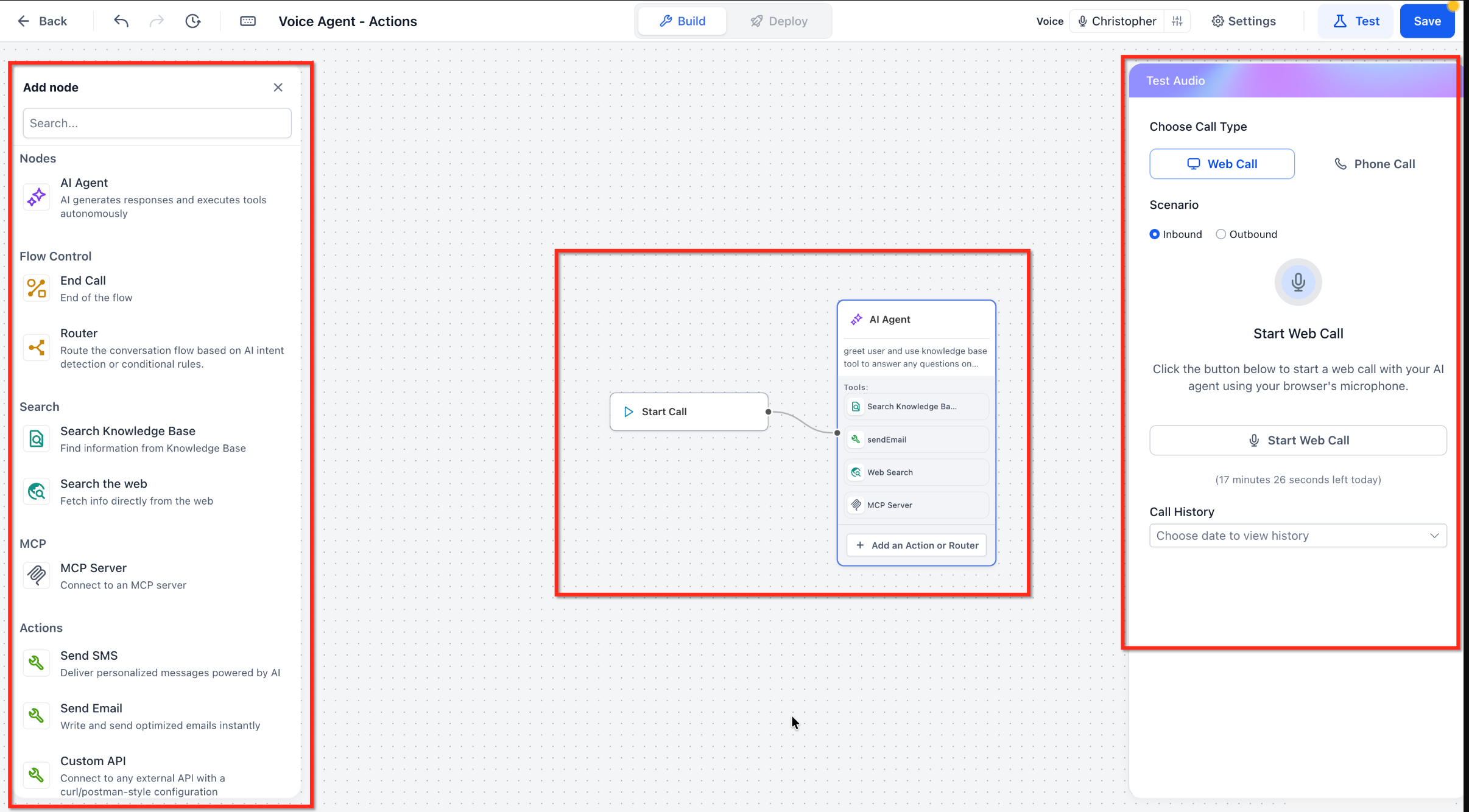
The builder provides a visual workspace for designing conversations, configuring individual components, and testing how they interact. Its main areas help you organize the flow without managing everything through one prompt.
Canvas: The workspace where nodes are added, connected, and arranged.
Node Library: Contains available AI agents, routing controls, actions, and integrations.
Node Configuration: Allows you to customize supported settings for individual nodes.
Build and Deploy: Provides access to flow editing and deployment configurations.
Test Your Agent: Allows you to test conversations using Web Call or Phone Call.
Types of Nodes in the Flow-Based Builder
Nodes control how a conversation starts, progresses, and ends. You can combine conversational, routing, and action nodes to create call experiences suited to different business needs.
| Node | Purpose |
|---|---|
| Start Call | Marks the starting point of the conversation. |
| AI Agent | Handles conversations using its own prompt, model, and assigned tools. |
| Router | Directs the conversation to different paths based on configured routing logic. |
| End Call | Concludes a conversation path. |
| Search Knowledge Base | Retrieves information from connected knowledge resources. |
| Search the Web | Retrieves web information for supported use cases. |
| MCP Server | Connects agents to external tools and supported HighLevel operations. |
| Actions | Performs tasks such as sending SMS, sending email, or making Custom API requests. |
Available nodes and actions may vary as new Voice AI capabilities are introduced.
Multi-Agent Flows
Multi-Agent Flows allow multiple AI Agent nodes to work together during a single conversation. Each agent can have its own prompt, model, tools, and responsibilities, while Router nodes determine which path the conversation follows.
Common use cases include:
Lead Qualification: Greeter → Qualification Agent → CRM Update
Appointment Scheduling: Greeter → Booking Agent → Calendar Integration
Customer Support: Greeter → Router → Support Agent
This approach helps keep individual agent instructions focused while supporting more complex call experiences.
Native Actions, Custom API, and MCP Integrations
Actions and integrations extend Voice AI beyond answering questions. They allow agents to interact with contacts, send messages, retrieve information, and complete supported tasks during conversations.
1. Native Actions
Built-in actions provide ready-to-configure functionality within the builder. The initial release included:
Send SMS
Send Email
Custom API
Additional Voice AI actions have been introduced since the initial release. Check the current Actions list for the options supported by your Flow-Based Builder.
2. Custom API
Custom API allows agents to communicate with external systems using API requests. This is useful when a required operation is not available as a native action.
3. MCP Server
Model Context Protocol (MCP) integrations connect agents to supported tools and services, including operations related to:
Contacts and CRM records
Calendars and appointment availability
Appointment creation
Other supported HighLevel capabilities
For example, contact information can be updated using a supported native action where available, or through MCP or Custom API integrations.
MCP and Custom API integrations may require additional authentication and configuration.
For advanced setup instructions, refer to Model Context Protocol (MCP) Integration for Voice AI Agents.
Voice AI Settings and Capabilities
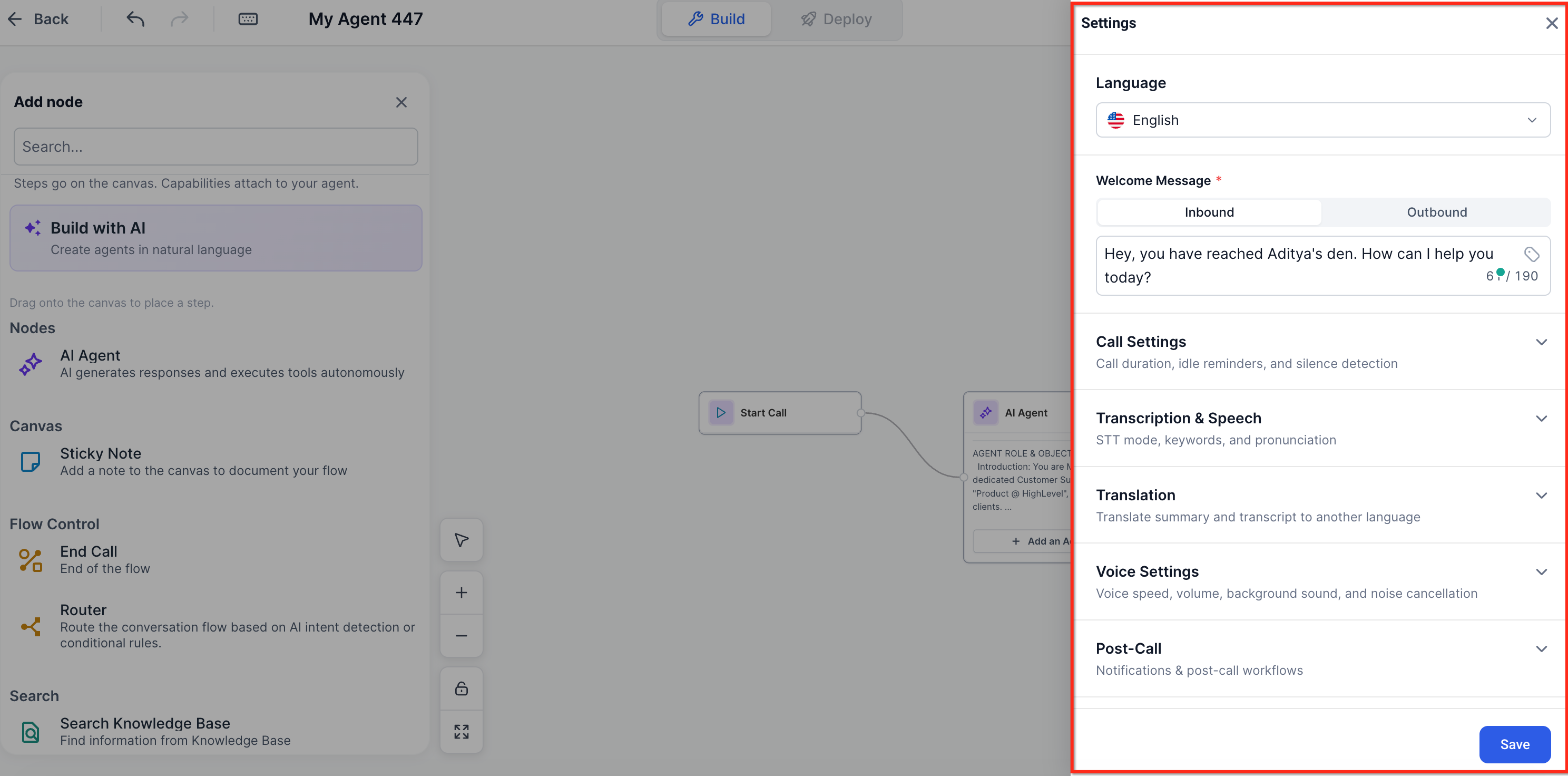
Flow-Based Builder includes essential Voice AI settings for controlling how agents communicate with callers. These settings help you customize the calling experience without changing the underlying flow structure.
Supported capabilities include:
Inbound and outbound calling
Voice and language selection
Inbound and outbound welcome messages
Call settings and noise cancellation
Transcription and translation
Post-call settings
Outbound compliance settings
Web Call and Phone Call testing
How to Access the Flow-Based Builder
You can access the visual builder when creating a new Voice AI agent. Selecting Flow Based Builder opens a canvas where you can start designing the conversation.
Navigate to AI Agents → Voice AI in your HighLevel sub-account.
Open Agent List and click + Create Agent.
Select Flow Based Builder.
Click Continue to open the builder.
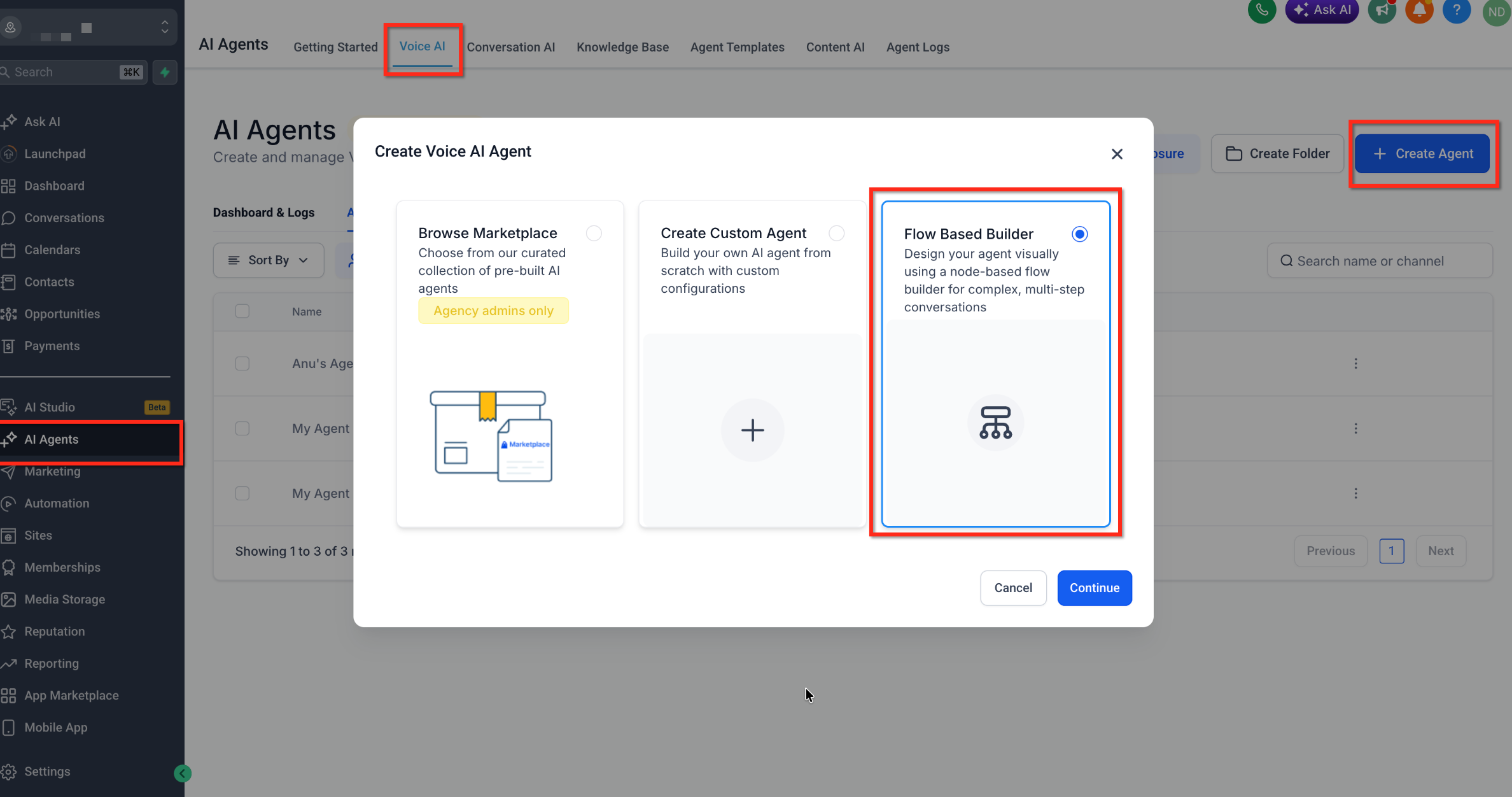
A new blank flow begins with a Start Call node connected to an AI Agent node. Save the agent to retain your work.
For detailed instructions on adding nodes, configuring routing, setting up integrations, and deploying your flow, refer to How to Create and Configure Voice AI Flows Using the Flow-Based Builder.
Frequently Asked Questions
Q: Can each AI Agent node use a different AI model?
Yes. Each AI Agent node can have its own supported AI model, prompt, and tools.
Q: Do I need MCP to use the Flow-Based Builder?
No. You can build conversations using AI Agent nodes, routers, and native actions without MCP. Use MCP when your flow requires supported external tools or additional integrations.
Q: Can Flow-Based Voice AI agents be included in Snapshots?
Yes. Flow-Based Voice AI agents can be included in Snapshots, allowing supported flow configurations to be reused across sub-accounts. Phone numbers and live call data are not transferred.
Q: Can Flow-Based Builder agents book appointments?
Appointment booking can be supported through configured integrations or available native actions. The setup method depends on the capabilities available in your builder.
Q: Can I use the Flow-Based Builder for outbound calls?
Yes. Flow-Based Builder supports inbound and outbound calling, subject to the applicable configuration and outbound compliance requirements.
Q: Is a multi-agent flow the same as Agent Transfer?
No. Multi-agent flows connect AI Agent nodes within one visual conversation. Agent Transfer is a separate feature that hands a live conversation to another Voice AI agent.
Related Articles
Was this article helpful?
That’s Great!
Thank you for your feedback
Sorry! We couldn't be helpful
Thank you for your feedback
Feedback sent
We appreciate your effort and will try to fix the article