HighLevel gives Agency Admins dedicated controls for managing Summer of AI offer visibility across eligible sub-accounts. The agency landing page provides promotion details and a direct way to choose which sub-accounts can see the offer.
The same offer-management workflow is also available from AI Employee settings, making it easier to update one account or several accounts in bulk. This guide focuses specifically on agency visibility and access control rather than the full trial, billing, or subscription workflow.
Summer of AI is a promotional offer. Availability, eligibility, and promotional dates can change. Use the offer details shown in HighLevel and the current Summer of AI help article as the source of truth for live eligibility and billing terms.
What is Summer of AI Agency Landing & Access Control?
Summer of AI Agency Landing & Access Control gives Agency Admins a centralized way to review the promotion and decide which eligible sub-accounts can see the offer. Admins can manage visibility from the dedicated Summer of AI landing page or through AI Employee settings.
When the offer is available, eligible sub-accounts may receive access to the Summer of AI AI Employee promotion. Hiding the offer prevents that promotion from being shown to the selected sub-account; it does not, by itself, remove existing AI Employee feature access.
Key Benefits of Summer of AI Agency Access Control
Agency-level access controls help teams decide how a promotion should appear across different client accounts before clients interact with the offer. This provides a faster way to align promotional visibility with client strategy, billing preferences, and account eligibility.
- Centralized Promotion Preview: Review Summer of AI information from an agency-only landing page.
- Granular Visibility Control: Decide which eligible sub-accounts can see the offer.
- Bulk Management: Update offer visibility for multiple sub-accounts in one workflow.
- Alternative Management Path: Use AI Employee settings when you prefer account-level or bulk controls outside the landing page.
- Cleaner Client Experience: Hide the promotion from accounts where the offer is not appropriate or should not be client-facing.
What Agency Admins Can Control
Summer of AI controls are designed around offer visibility rather than forcing one promotional experience across every client account. The available tools let Agency Admins review the offer, select sub-accounts, and manage whether eligible users can see it.
| Control | What It Does |
|---|---|
| Agency Landing Page | Provides agency-only promotion information and access-management controls. |
| Individual Selection | Lets you include or exclude specific sub-accounts from seeing the promotion. |
| Bulk Selection | Lets you apply the same visibility decision to several sub-accounts at once. |
| AI Employee Settings | Provides another place to manage Summer of AI offer visibility alongside AI Employee account settings. |
Offer Visibility vs. AI Employee Access
Summer of AI visibility and AI Employee feature access are separate concepts. This distinction matters when a client already uses AI Employee or when the agency wants to hide the promotion without changing the client's existing AI configuration.
Summer of AI Offer: Controls whether the promotion is shown to an eligible sub-account. AI Employee Feature: Controls access to AI Employee itself. Changing promotion visibility should not be treated as the same action as granting or revoking AI Employee access.
How To Setup Summer of AI Agency Landing & Access Control
Configure promotion visibility before directing clients to the offer. Start from the agency landing page when you want to review the promotion first, or use AI Employee settings when you need a more direct account-management view.
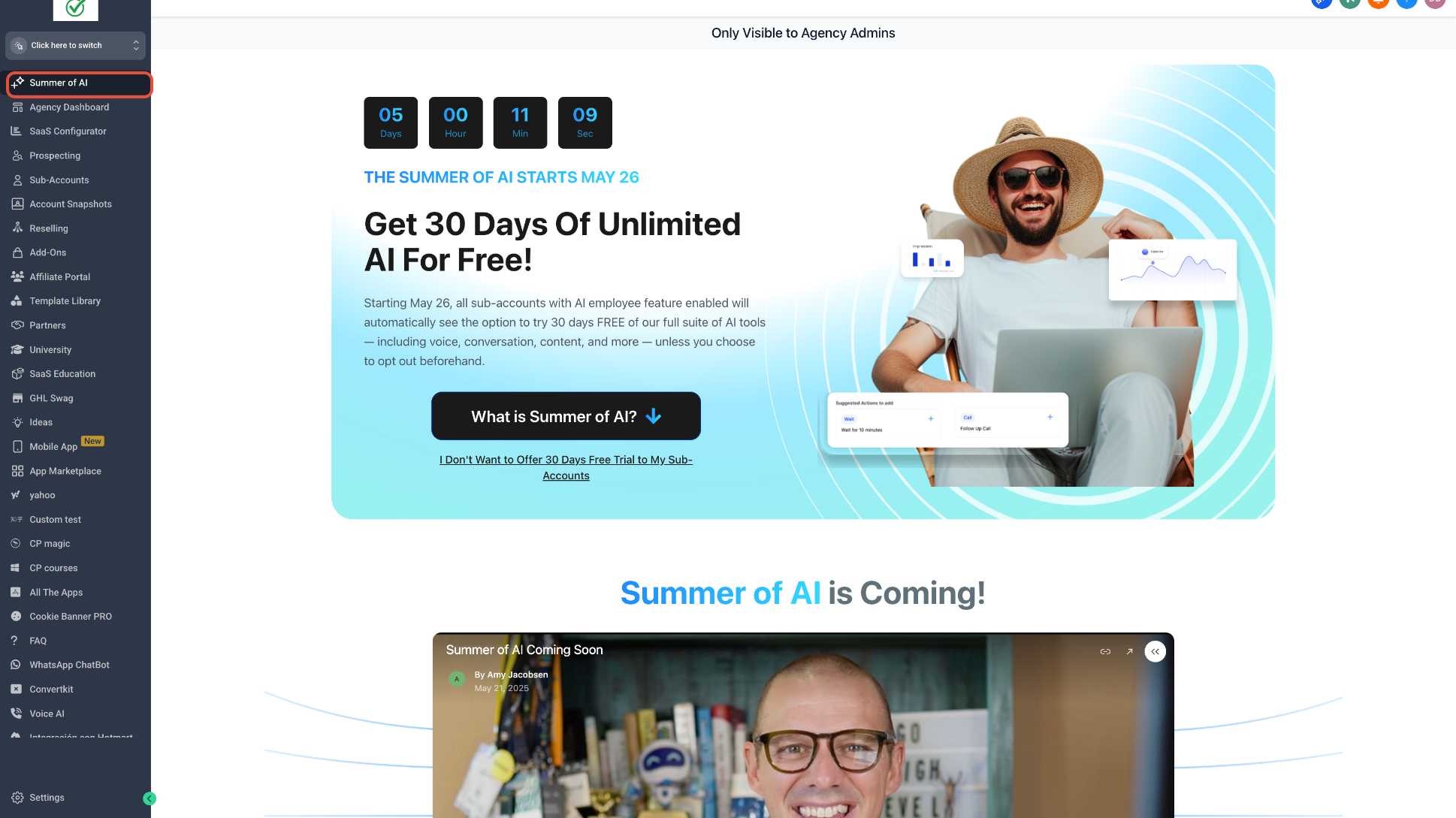
Step 1: Open the Summer of AI Agency Landing Page
The dedicated landing page is intended for Agency Admins and provides the promotion overview before you decide which sub-accounts should receive visibility.
- Switch to Agency View.
- Open the Summer of AI page when it is available in the agency navigation.
- Review the promotion details and available access-management controls.
Step 2: Select Which Sub-Accounts Can See the Offer
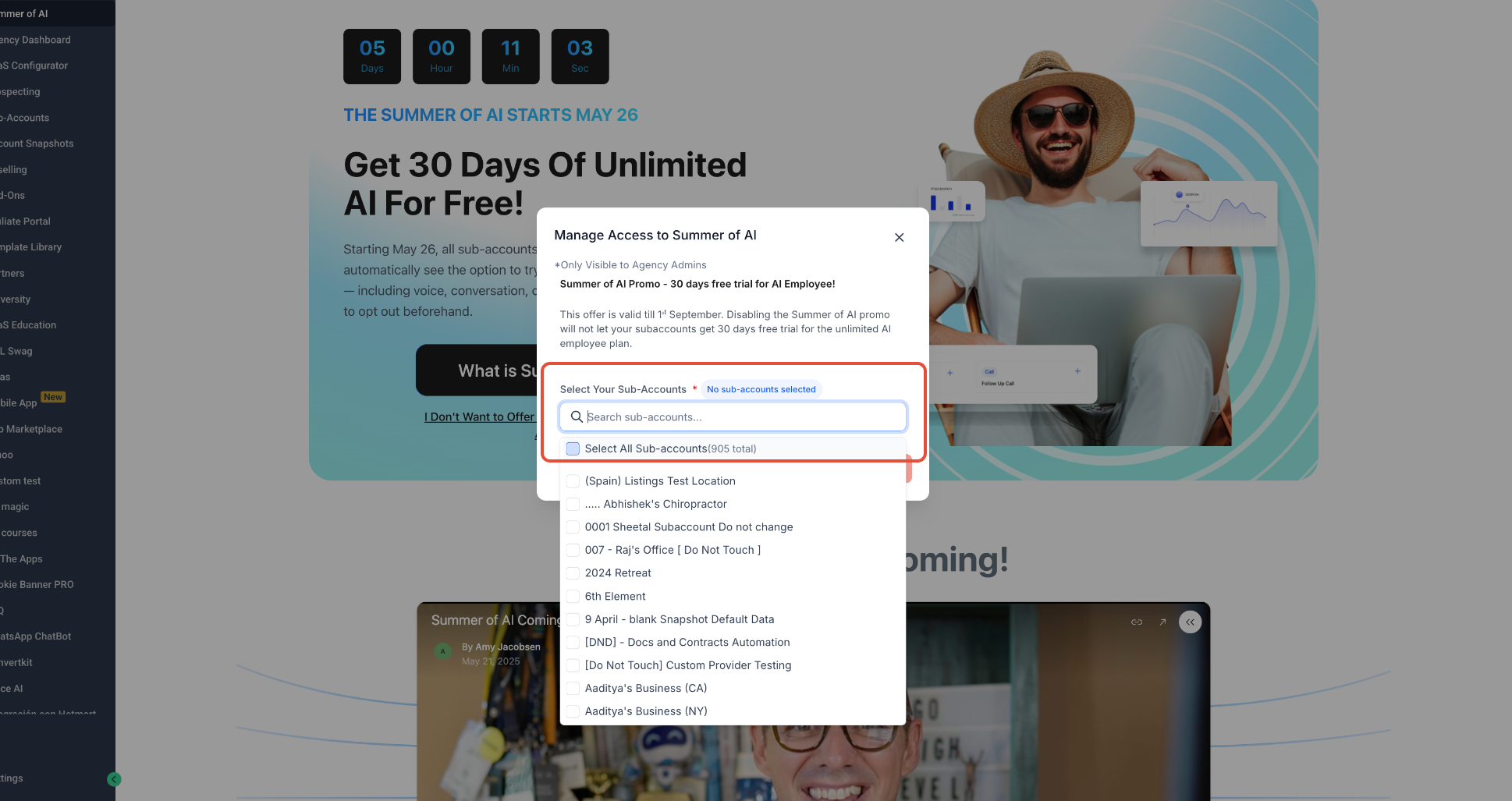
The access-management window lets you search for specific sub-accounts or make a broader selection. Use this control to prevent the promotion from appearing for accounts where the offer should not be shown.
- Open Manage Access to Summer of AI from the landing page.
- Search for a sub-account or use the available selection controls.
- Select the sub-accounts whose promotion visibility you want to manage.
- Review and confirm the access choice shown in the current workflow.
Step 3: Manage the Offer from AI Employee Settings
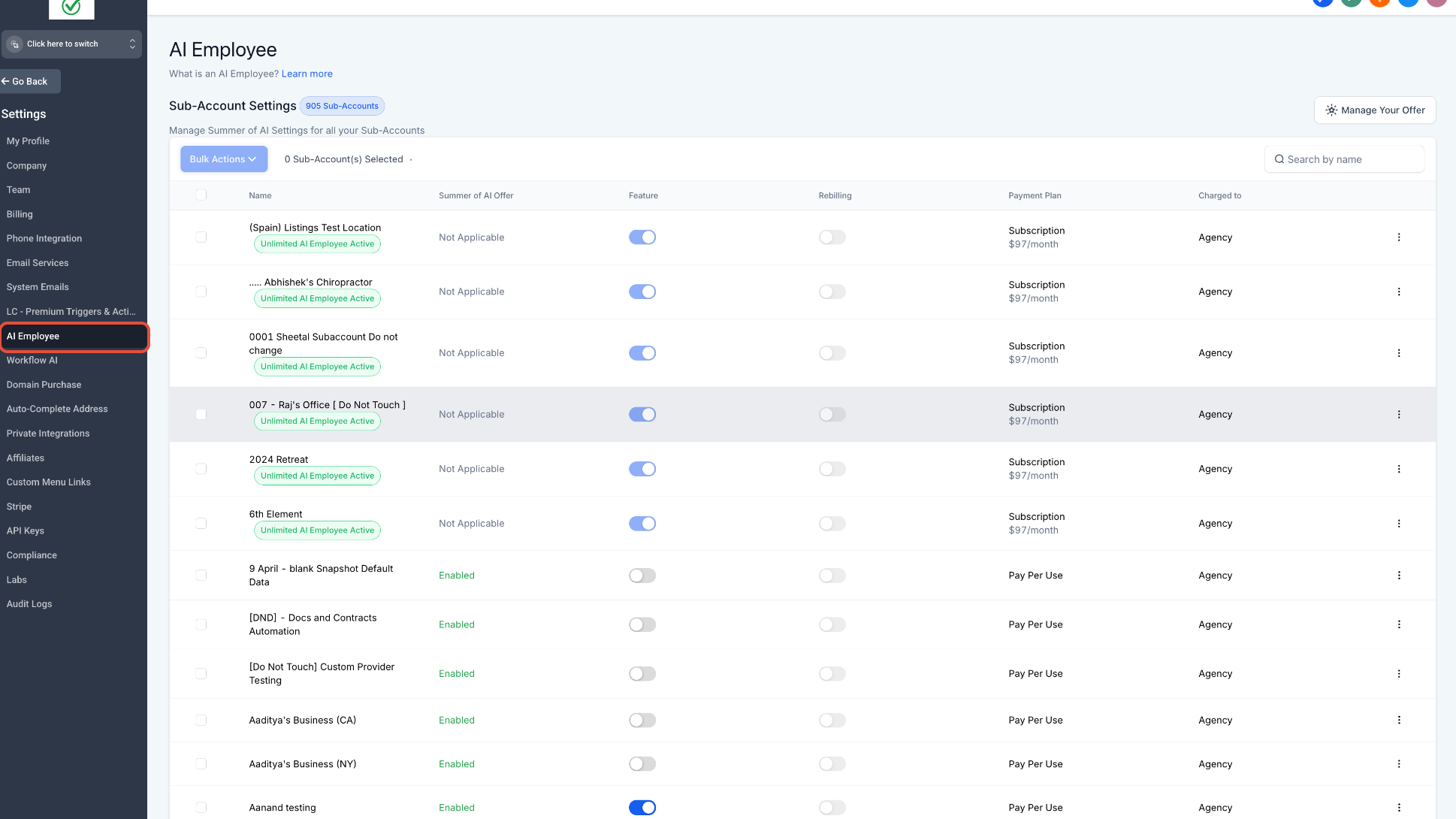
AI Employee settings provide an alternative management path when you want to review Summer of AI offer status alongside AI Employee feature, rebilling, payment-plan, and payer information for each sub-account.
- From Agency View, go to Settings → AI Employee.
- Locate the sub-account you want to manage.
- Use individual controls for one account or select multiple accounts and open Bulk Actions.
- Update the Summer of AI offer setting without changing unrelated AI Employee controls unless that is also intended.
Troubleshooting Summer of AI Access Control
If the promotion or its controls are missing, confirm both account eligibility and agency-level visibility settings before changing AI Employee access. A hidden or unavailable offer does not necessarily indicate an AI Employee feature problem.
| Issue | What to Check |
|---|---|
| The Summer of AI page is not visible | Confirm you are using an Agency Admin account and that the promotional page is currently available. |
| A sub-account cannot see the offer | Check the Summer of AI offer visibility setting and confirm the sub-account is eligible for the promotion. |
| The offer is hidden but AI Employee still works | This can be expected. Promotion visibility and AI Employee feature access are separate controls. |
| Bulk controls do not affect an account as expected | Confirm the intended sub-accounts were selected and review the current Summer of AI status for each account in AI Employee settings. |
Frequently Asked Questions
Was this article helpful?
That’s Great!
Thank you for your feedback
Sorry! We couldn't be helpful
Thank you for your feedback
Feedback sent
We appreciate your effort and will try to fix the article