Agencies often work inside client sub-accounts to build, configure, or manage AI-powered experiences. HighLevel identifies whether AI activity was performed by an agency user or a sub-account user, allowing agencies to control which eligible Ask AI and AI Studio usage is rebilled to a client.
Sub-account users can use Ask AI and AI Studio without a payment card on their sub-account when the features are available to them. If the sub-account has no active rebilling configuration, any billable usage is charged to the Agency Wallet. Adding a payment card is not required before starting pay-per-use activity in this scenario. Agencies should configure rebilling and AI usage limits to manage these charges.
TABLE OF CONTENTS
- What Is Rebill Usage From Sub-Account Users Only?
- What Happens Without a Payment Card or Rebilling?
- What Happens When the Setting Is On or Off?
- How to Set Up Separate Usage Rebilling
- How to Prevent Unexpected Agency Charges
- How Agency-User and Sub-Account-User AI Billing Differs
- Frequently Asked Questions
- Related Articles
What Is Rebill Usage From Sub-Account Users Only?
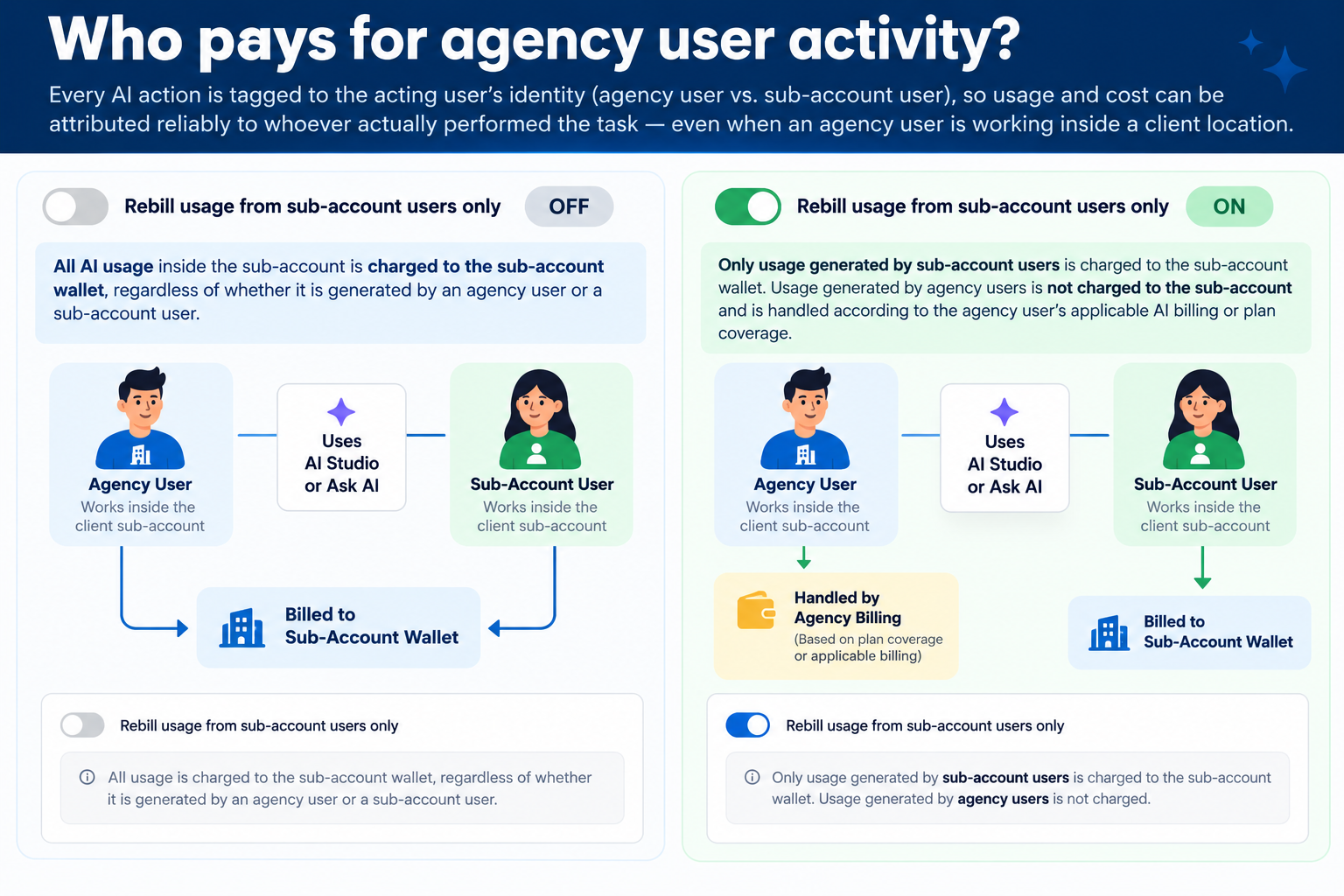
AI usage does not have to be attributed solely to the sub-account where it occurred. HighLevel distinguishes activity performed by an agency user from activity performed by a sub-account user (a client user).
When Rebill usage from sub-account users only is enabled for a supported AI product, agency-user activity is excluded from the client's rebilled usage. Eligible sub-account-user activity follows the sub-account's active usage-based rebilling settings.
Important: This toggle determines whose usage is included in client rebilling. It does not turn on rebilling, require clients to add a card before using AI, or stop underlying AI usage charges.
What Happens Without a Payment Card or Rebilling?
A sub-account and a sub-account user are different: the sub-account is the client's location, while sub-account users are the people signed in to that location.
If Ask AI or AI Studio is available to those users, the absence of a client payment card or active rebilling does not, by itself, block them from using the features. When they generate billable AI usage and no active client rebilling is configured, the charges are funded by the Agency Wallet.
For example, an agency enables AI Studio for a client whose sub-account has no payment card and no rebilling configuration. A client user builds a page with AI Studio. If that activity is billable, the charge falls on the Agency Wallet rather than waiting for the client to add a card.
| Sub-Account Billing Setup | What Happens |
|---|---|
| No client card and no active rebilling | Sub-account users can still use available Ask AI and AI Studio features. Billable usage is charged to the Agency Wallet. |
| Client card added, but rebilling not enabled | Having a card on file does not automatically enable rebilling. The agency remains responsible for usage that is not actively rebilled. |
| Active rebilling with a valid client payment method | Underlying usage is funded through the Agency Wallet, and the agency can recover eligible costs from the client according to the configured rebilling settings. |
| Rebilling configured but On Hold | If required payment setup is incomplete, rebilling can remain On Hold and sub-account access may be restricted until the setup is completed. |
Charges depend on billable activity and any applicable AI plan allowances; merely making a pay-per-use feature available is not itself a usage charge. A separately purchased AI subscription has its own billing terms. If the Agency Wallet balance runs low, wallet auto-recharge settings may charge the agency's payment card.
AI Studio Cloud charges: AI Studio Cloud infrastructure and storage charges are separate from AI Studio generation usage. Cloud follows the same rebilling configuration as AI Studio; paid Cloud instances or storage beyond the free allowances can create additional charges.
What Happens When the Setting Is On or Off?
The following options affect user attribution within an active rebilling arrangement. They are different from enabling or disabling rebilling for the sub-account.
| Setting | Sub-Account User Activity | Agency User Activity |
|---|---|---|
| OFF | Eligible usage can be included in the sub-account's rebilled usage. | Eligible usage performed inside the sub-account can also be included in the sub-account's rebilled usage. |
| ON | Eligible usage continues to follow the sub-account's active rebilling configuration. | Usage is excluded from the sub-account's rebilled usage and follows the agency user's applicable AI plan or billing coverage. |
Note: If client rebilling is not active, changing this toggle does not transfer charges from the Agency Wallet to the client.
How to Set Up Separate Usage Rebilling
First, ensure that the sub-account's rebilling configuration is active and that its required payment setup has been completed. Then choose whether agency-user activity should be excluded from the client's rebilled usage.
- From Agency View, go to Sub-Accounts.
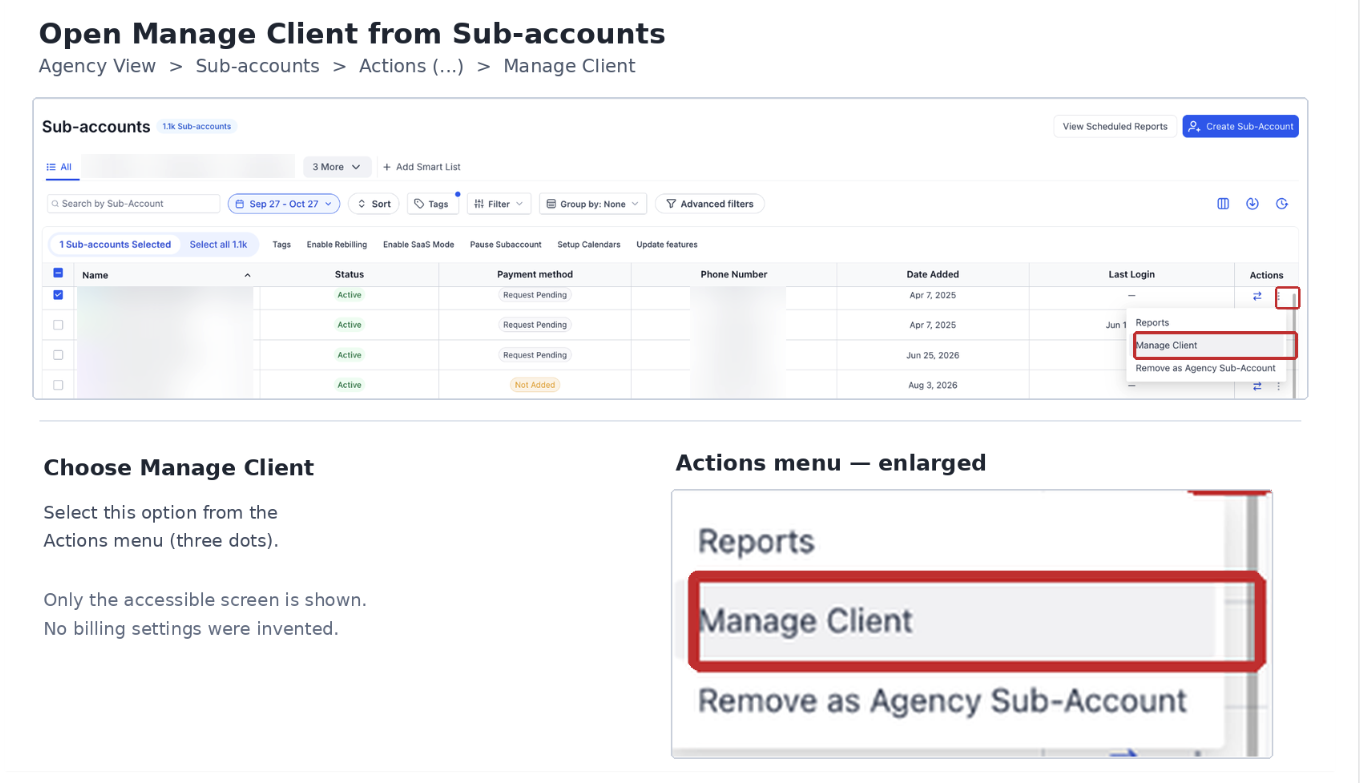
- Locate the sub-account, select the three-dot menu under Actions, and choose Manage Client.

- Open the Rebilling tab.
- Review the billing configuration for AI Studio or Ask AI, depending on the product you want to manage. If you intend to charge clients for usage, make sure its rebilling setup is enabled and active, with a valid required client payment method.
- Locate Rebill usage from sub-account users only.
- Choose the appropriate setting:
- OFF: Include eligible agency-user and sub-account-user activity in the client's applicable rebilled usage.
- ON: Rebill only eligible usage generated by sub-account users; exclude agency-user activity.
- OFF: Include eligible agency-user and sub-account-user activity in the client's applicable rebilled usage.
- Select Save changes and verify the rebilling status.
Important: A missing required client payment method may leave a newly configured rebilling arrangement On Hold. An On Hold rebilling setup is not the same as having no rebilling configured.
How to Prevent Unexpected Agency Charges
Agencies should review rebilling and control billable usage before allowing client users to use Ask AI or AI Studio.
- Check whether rebilling is active. In Agency View > Sub-Accounts > Manage Client > Rebilling, review Ask AI and AI Studio. If the agency intends to recover AI usage costs from the client, complete the supported rebilling setup and confirm the required client payment method is valid.
- Configure AI spending limits. Go to Agency View > AI Suite > Plans & Limits. Review agency defaults and any custom limit for the affected sub-account. Enable a monthly Spending Limitand enter the intended amount.
- Choose the blocking behavior. Under When the limit is reached, select Block AI at the limit if usage must stop at the configured threshold. Keep AI running, just notify sends alerts but allows AI activity to continue. Spending Limits are not configured by default, and sub-account custom settings can override agency defaults.
- Review charges and access. From Agency View > AI Suite > Usage Dashboard, filter by sub-account, product, and date to review applicable usage and wallet charges. If a client should not use an AI feature, restrict its access instead of relying on the absence of a payment card.
Note: An AI spending limit controls billable activity only after a limit has been configured; it does not retroactively remove charges already incurred.
How Agency-User and Sub-Account-User AI Billing Differs
AI plan coverage depends on the type of user and the current plan, not just the location where the activity occurs.
- Agency Admins and Agency Users: Under current HighLevel agency pricing, Ask AI and AI Studio are included at no additional cost, subject to fair-use protections. Additional billable activity may depend on applicable Extra Usage settings.
- Sub-Account Users with an AI Employee plan: Eligible Ask AI and AI Studio usage is covered up to the plan's included allowance. Any permitted additional usage follows the applicable pay-per-use and Extra Usage settings.
- Sub-Account Users without an AI Employee plan: Supported Ask AI and AI Studio activity is billed on a pay-per-use basis. Without active client rebilling, billable usage is funded by the Agency Wallet.
Note: The Rebill usage from sub-account users only setting identifies which user's activity can be passed to a client under active rebilling; it does not change the user's subscription or included allowances.
Frequently Asked Questions
Q: Can sub-account users access Ask AI or AI Studio without adding a payment card?
Yes. If the features are available to them and no rebilling is configured, sub-account users can still use Ask AI and AI Studio. Billable usage is charged to the Agency Wallet.
Q: Who pays if the sub-account has no payment card and rebilling is disabled?
The agency pays for billable Ask AI and AI Studio usage through the Agency Wallet. A missing client payment card does not automatically prevent the users from generating charges.
Q: Does turning on "Rebill usage from sub-account users only" enable rebilling?
No. The setting determines whether eligible agency-user usage is excluded from client rebilling. The sub-account must have active rebilling configured for eligible usage to be charged back to the client.
Q: What happens if the agency enables rebilling but the client has not added the required payment method?
Rebilling can remain On Hold until the required payment setup is completed. Sub-account access may be restricted while the configuration is On Hold. This differs from a sub-account that has never had rebilling enabled.
Q: Does enabling Ask AI or AI Studio immediately create a pay-per-use charge?
Pay-per-use charges are generated by billable activity, not simply by making the feature available. Separately purchased AI subscriptions have their own billing terms.
Q: How can an agency prevent unexpected Ask AI and AI Studio charges?
Confirm whether client rebilling is active, verify the required payment setup, configure an AI spending limit with Block AI at the limit, review the AI Usage Dashboard, and restrict access where a client should not use the feature. Notification-only limits do not block further usage.
Related Articles
Was this article helpful?
That’s Great!
Thank you for your feedback
Sorry! We couldn't be helpful
Thank you for your feedback
Feedback sent
We appreciate your effort and will try to fix the article