Smart Call Ending & Spam Caller Protection helps Voice AI agents end conversations naturally and reduce time spent on unwanted calls. You can control how the agent ends a call, detect likely spam while the call is happening, analyze completed inbound calls for spam, and automatically block repeat offenders. These controls can help reduce unnecessary Voice AI usage while keeping legitimate callers connected.
TABLE OF CONTENTS
- What is Smart Call Ending & Spam Caller Protection?
- Key Benefits of Smart Call Ending & Spam Caller Protection
- End Call Action and Hangup Prompt
- Default and Custom Hangup Prompts
- Spam Detection During the Call
- Spam Analysis After the Call
- Block Threshold and Automatic DND
- Block Notifications
- During-Call vs. After-Call Spam Protection
- How To Set Up Smart Call Ending & Spam Caller Protection
- Frequently Asked Questions
- Related Articles
What is Smart Call Ending & Spam Caller Protection?
Smart Call Ending & Spam Caller Protection gives Voice AI agents more control over when calls end and how unwanted callers are handled. The feature combines a configurable End Call action with spam detection that can work during a call, after a call, or both.
The feature includes:
A customizable Hangup prompt
Spam detection during live calls
Spam analysis after completed inbound calls
A configurable threshold for repeat spam callers
Automatic inbound Do-Not-Disturb (DND) blocking
Email notifications when a number is blocked
This allows your agent to finish legitimate conversations politely while cutting short obvious spam calls and preventing repeat offenders from continuing to call.
Key Benefits of Smart Call Ending & Spam Caller Protection
Spam calls can consume Voice AI minutes and create unnecessary activity in your account. These controls help your agent spend more time handling real customers while giving you control over how spam is detected and managed.
Reduce wasted call time: Voice AI can end clear telemarketing, robocall, or spam conversations early.
Control how calls end: Customize what the agent does or says before hanging up.
Protect against repeat callers: Automatically place repeat spam callers on inbound DND after they reach your configured threshold.
Detect more types of spam: Analyze calls during the conversation and again after completed inbound calls.
Stay informed: Send an email notification when a spam number is blocked.
Choose your protection level: Enable during-call detection, after-call analysis, or both.
Maintain control: Customize prompts, spam instructions, thresholds, and notification recipients for each agent.
End Call Action and Hangup Prompt
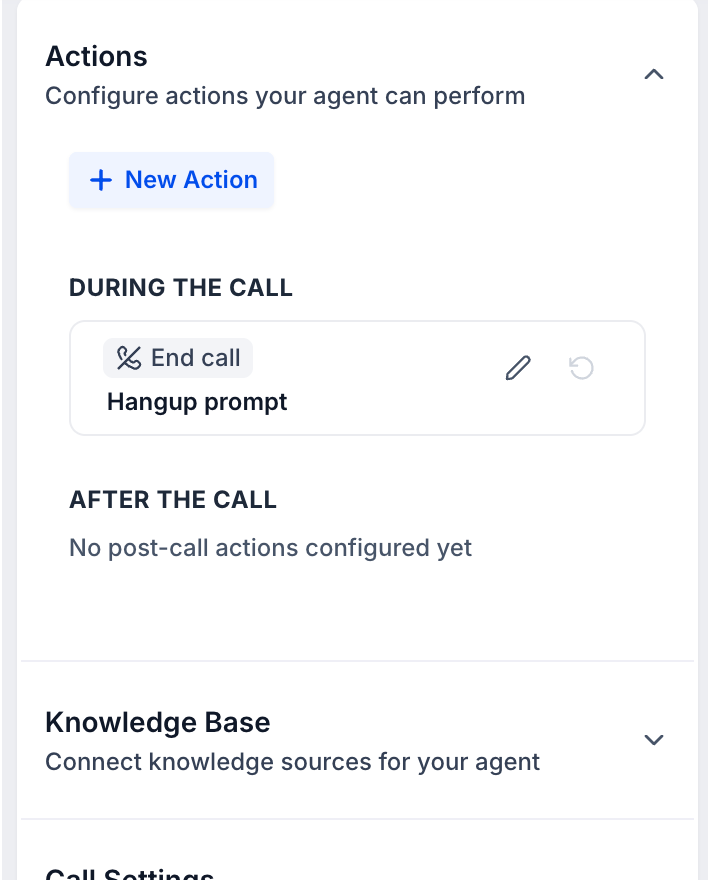
The End Call action controls how the Voice AI agent finishes a conversation. Its Hangup prompt gives the agent instructions for what should happen immediately before the call ends, helping the conversation close naturally instead of stopping abruptly.
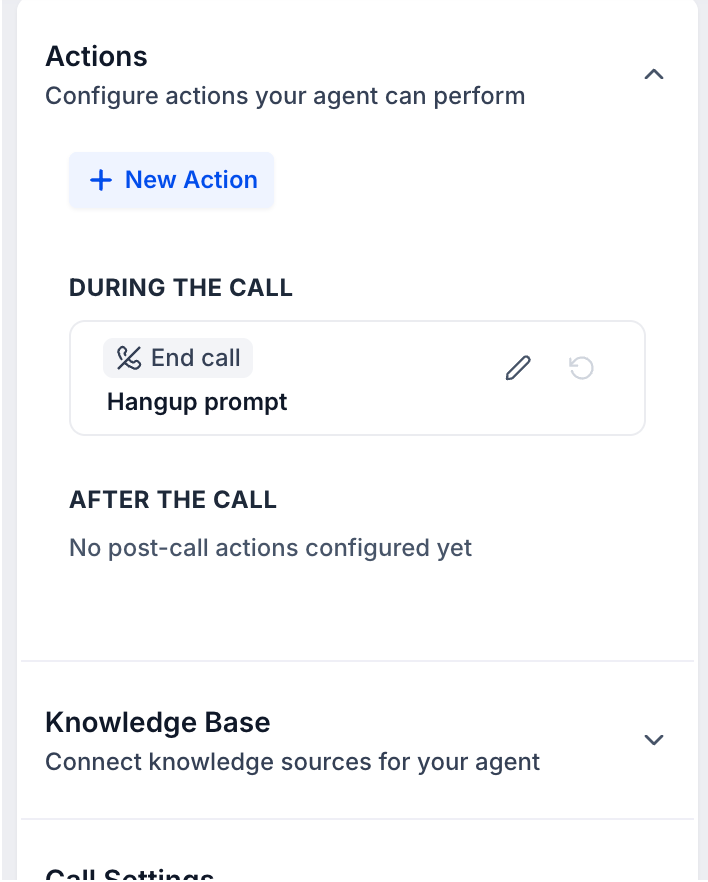
The End call action appears under During the Call in the Voice AI Agent Builder.
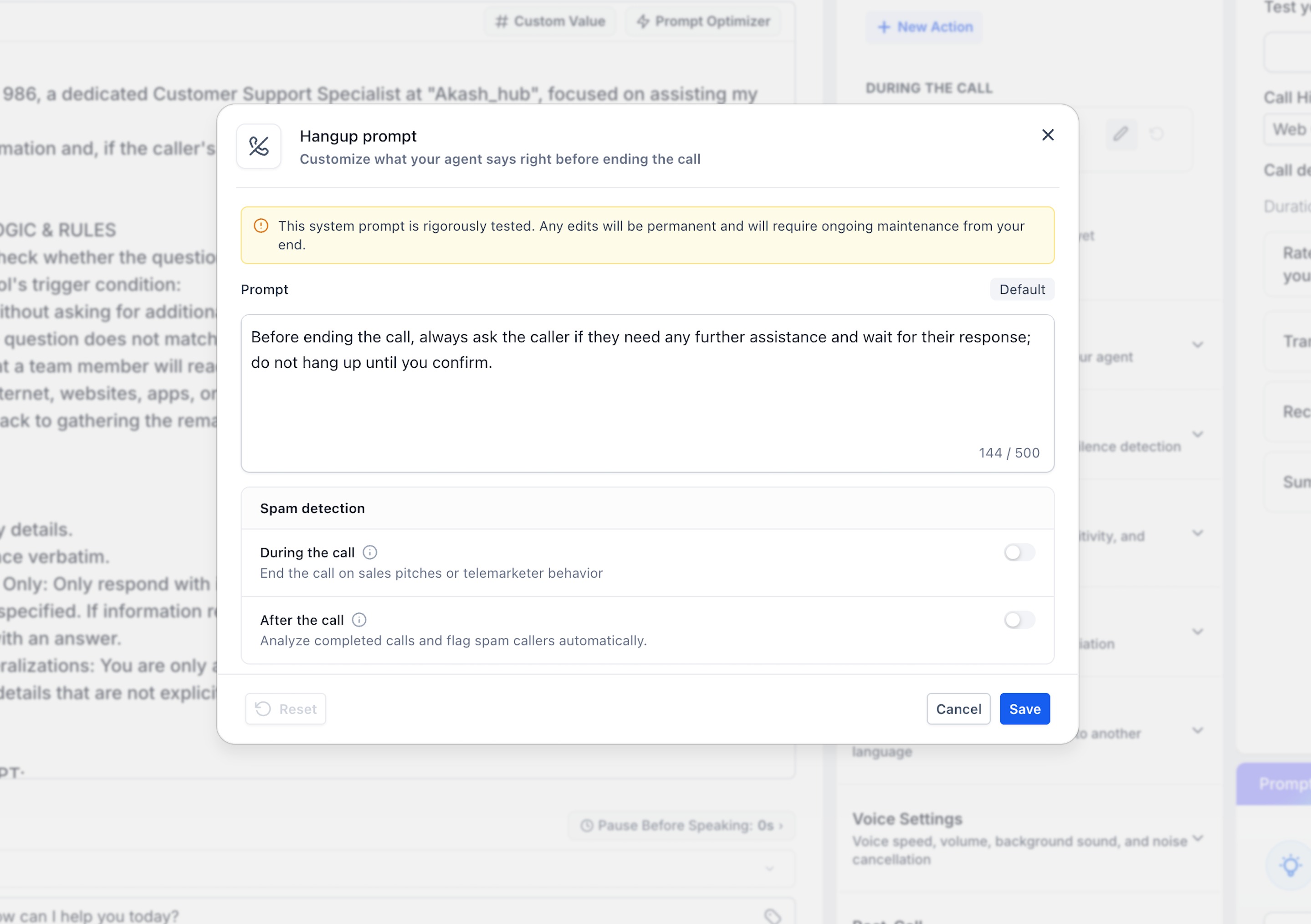
HighLevel provides a tested default Hangup prompt that instructs the agent to confirm whether the caller needs additional help before ending the call.
You can:
Keep the default prompt.
Edit the prompt to match your business needs.
Reset a customized prompt back to its default behavior.
Default and Custom Hangup Prompts
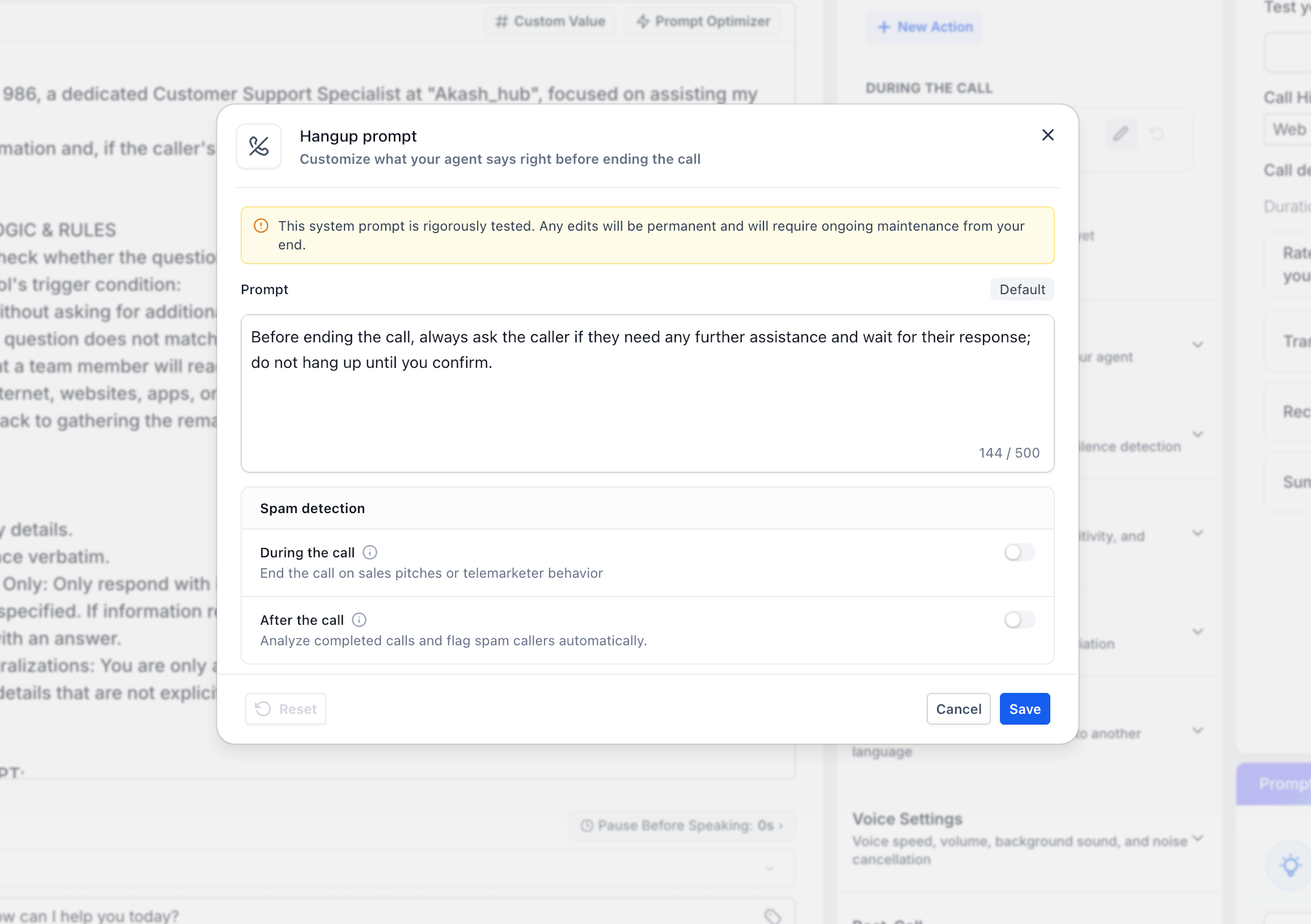
The default Hangup prompt provides a tested starting point for ending conversations appropriately. Customizing it gives you more control, but changes should be tested carefully because the custom behavior becomes part of how the agent decides to wrap up calls.
The default prompt shown in the Agent Builder instructs the agent to ask whether the caller needs anything else and wait for confirmation before hanging up.
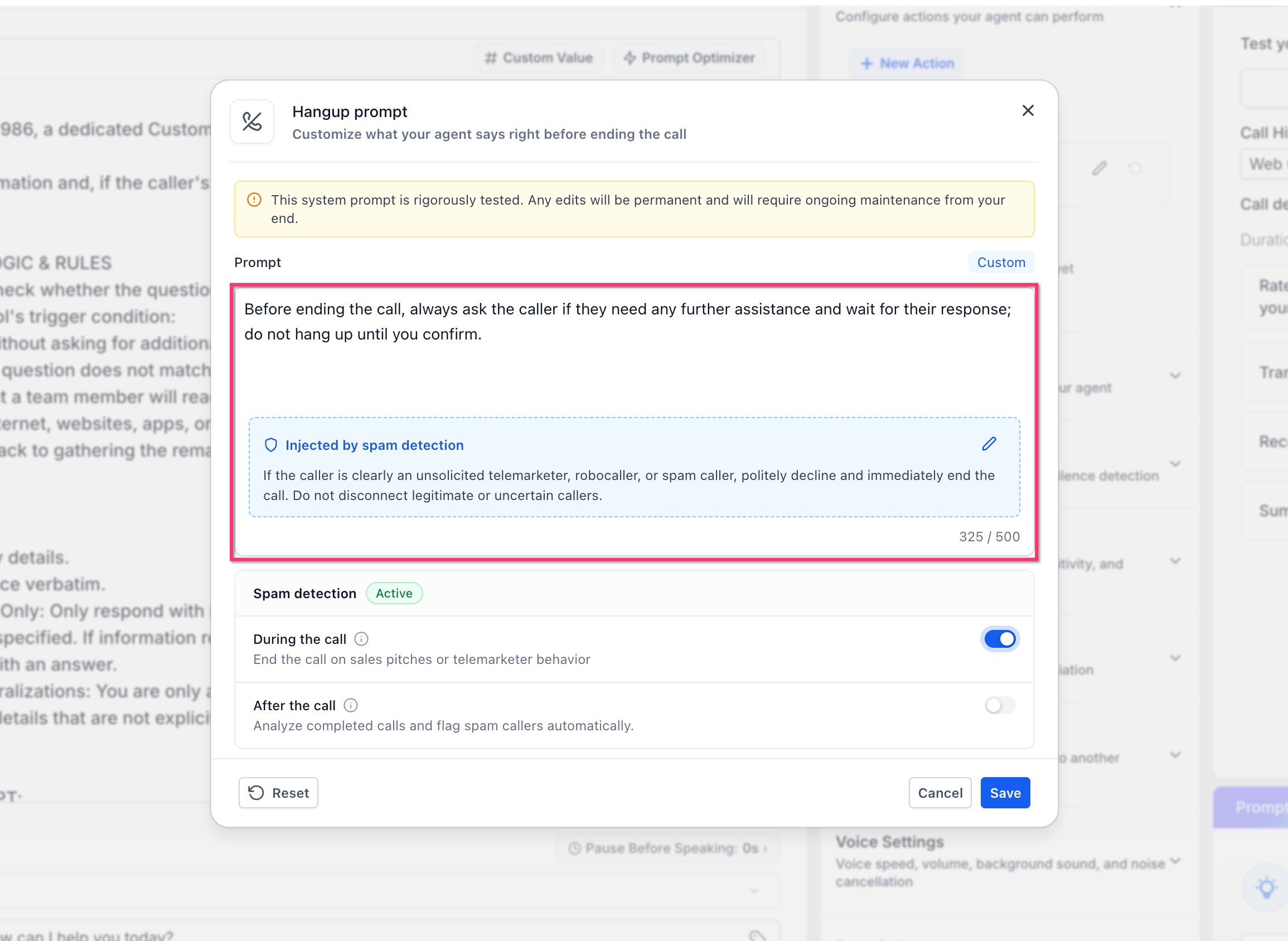
When you edit the prompt, HighLevel marks it as Custom.
Important: HighLevel warns that the system prompt has been rigorously tested. Editing it means you are responsible for maintaining and testing the customized behavior.
If you no longer want to use the customized prompt, use Reset to return to the default.
Spam Detection During the Call
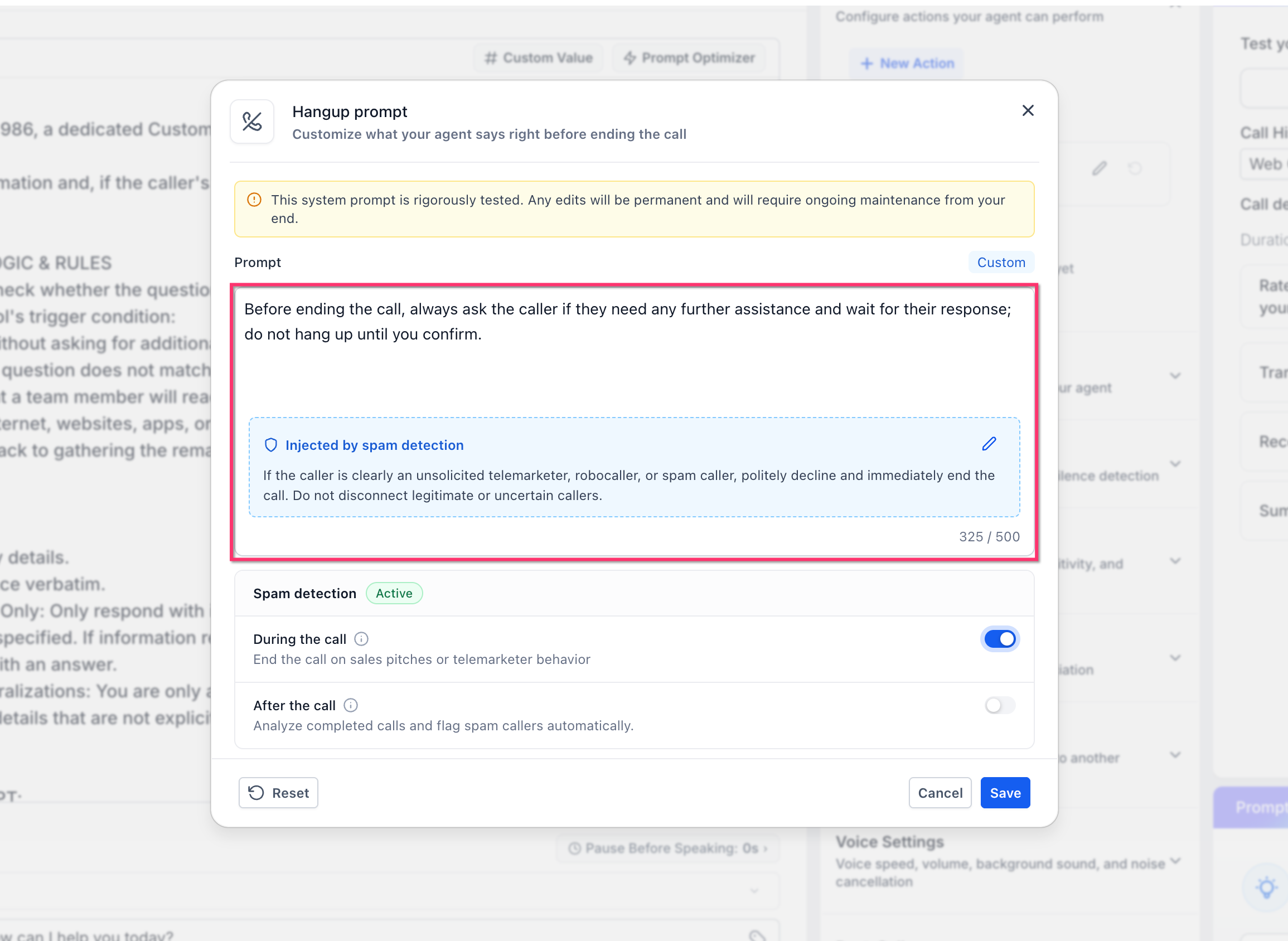
During-call spam detection helps the agent identify likely unwanted callers while the conversation is still happening. This is useful for obvious sales pitches, robocalls, or telemarketer behavior because the agent can stop the conversation instead of continuing to spend Voice AI minutes on it.
When During the call spam detection is enabled:
HighLevel adds spam-handling instructions to the Hangup prompt.
The agent evaluates the caller's behavior during the conversation.
If the caller is clearly identified as spam, the agent can politely decline and end the call.
Legitimate or uncertain callers should not be disconnected based only on suspicion.
The injected spam instruction can also be customized if you want the agent to use different wording or behavior.
Spam Analysis After the Call
After-call spam analysis provides a second layer of protection by reviewing completed inbound calls after they end. This can help identify spam behavior that may not have been obvious during the live conversation, including silent or automated probe calls.
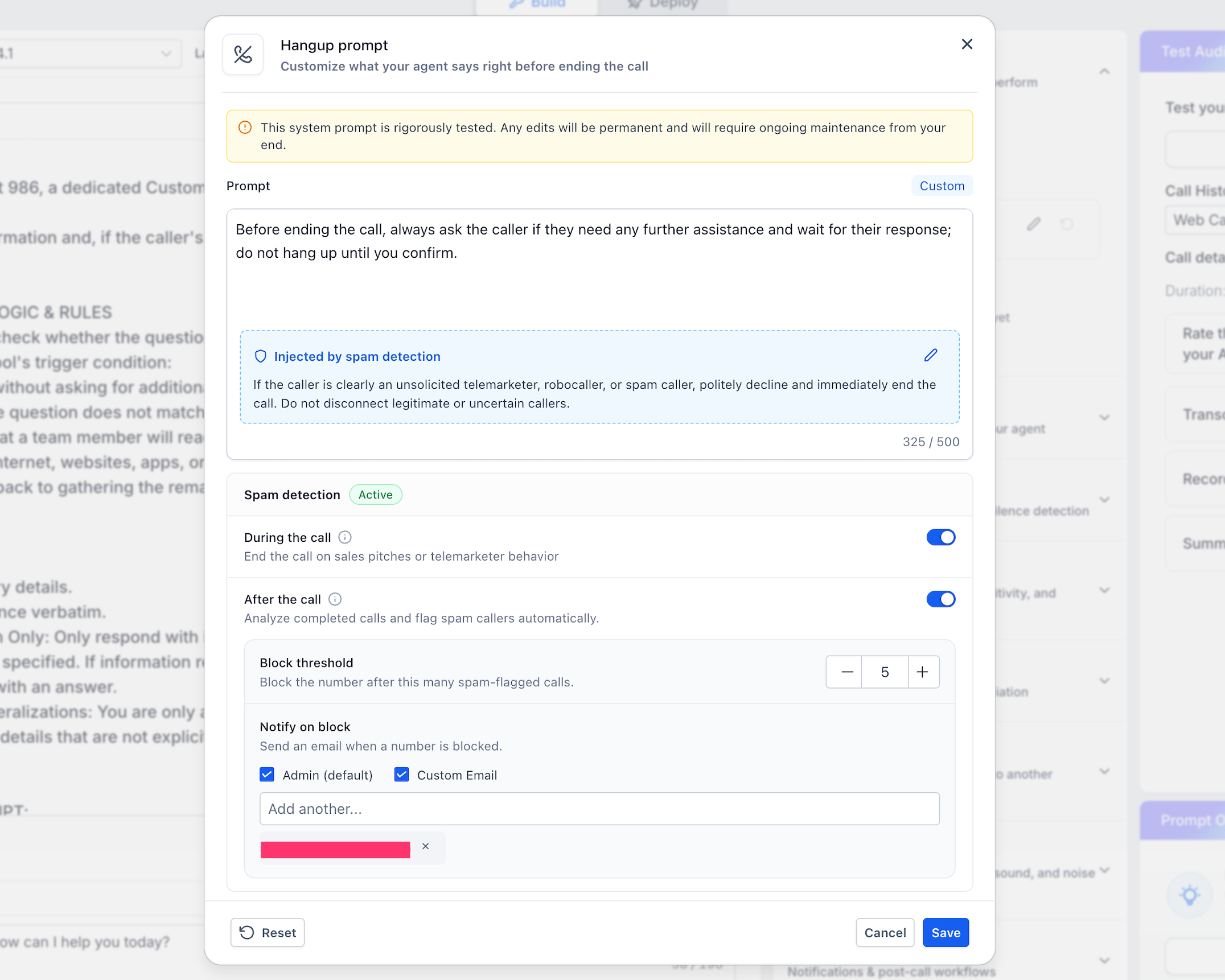
When After the call is enabled, HighLevel can analyze completed inbound calls and flag callers that appear to be spam.
Additional settings become available for:
Block threshold
Notify on block
You can use after-call analysis by itself or together with during-call detection.
Block Threshold and Automatic DND
The block threshold determines how many spam-flagged calls are required before HighLevel automatically blocks the caller. This lets you decide how quickly repeated spam activity should result in an inbound call restriction.
The release specifies that repeated spam flags are counted within a 24-hour window.
When the caller reaches the configured threshold:
HighLevel places the caller on Do-Not-Disturb for inbound calls.
Future inbound calls from that contact are blocked according to the DND setting.
This uses HighLevel's existing DND behavior rather than requiring a separate workflow.
For general DND management, see How to Use Do Not Disturb (DND).
Block Notifications
Block notifications let the appropriate team members know when HighLevel automatically blocks a repeat spam caller. This makes it easier to monitor spam activity without manually reviewing every call.
When After the call spam analysis is enabled, you can choose who receives an email notification when a number is blocked.
Available options shown in the Agent Builder include:
Admin (default)
Custom Email
Additional email addresses
You can select Admin, Custom Email, or both depending on who should receive the alert.
During-Call vs. After-Call Spam Protection
During-call and after-call protection solve different spam problems. Understanding the difference helps you decide whether to enable one method or both.
During the call is designed to stop obvious unwanted conversations while they are happening. This can reduce the amount of time the Voice AI agent spends speaking with a telemarketer or robocaller.
After the call reviews the completed inbound call for spam behavior. It can contribute to repeat-spam blocking even when the caller was not disconnected during the conversation.
You can configure:
During-call detection only
After-call analysis only
Both options together
Using both gives the agent live spam handling plus post-call analysis for repeated unwanted callers.
How To Set Up Smart Call Ending & Spam Caller Protection
Proper setup helps the agent end legitimate conversations naturally while applying spam protection only where you want it. Configure the End Call behavior first, then choose whether to enable live detection, post-call analysis, or both.
Step 1: Enable the Feature
Go to Settings > Labs.
Open the Sub-Account tab.
Find Voice AI: End Call & Spam Protection.
Click Activate Feature for the appropriate sub-account.
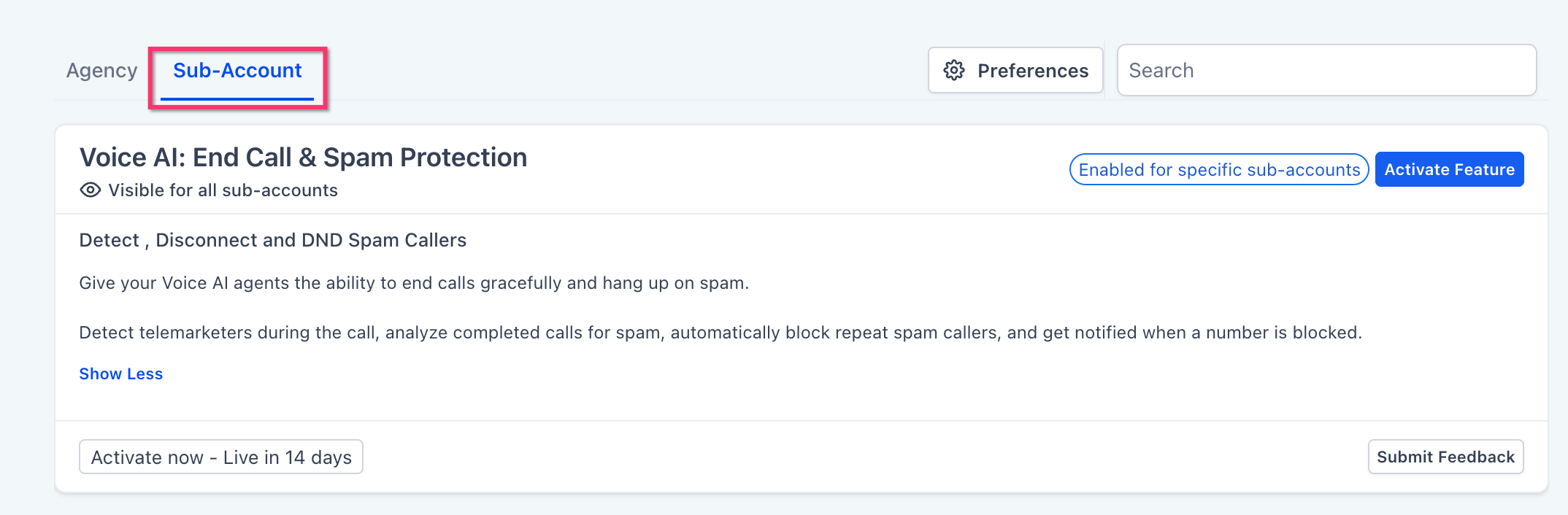
Note: This article reflects the current release requirement to enable the feature in Labs.
Step 2: Open the Voice AI Agent
Go to AI Agents > Voice AI.
Open the Voice AI agent you want to configure.
Go to the Actions area.
Locate End call under During the Call.
Step 3: Review the Hangup Prompt
Click the edit icon for Hangup prompt.
Review the default prompt.
Keep the default if it matches your needs.
Edit the prompt if you need different end-of-call behavior.
Click Save.
If you customize the prompt and later want the original behavior back, use Reset.
Step 4: Enable During-Call Spam Detection
Turn on During the call.
Review the spam instruction that HighLevel adds to the Hangup prompt.
Edit the injected spam instruction if needed.
Confirm that the instructions clearly describe when the agent should end the call.
Click Save.
The agent can then end calls when it detects clear sales-pitch, telemarketer, robocall, or other spam behavior.
Step 5: Enable After-Call Spam Analysis
Turn on After the call.
Review the additional spam-protection settings.
Choose the number of spam-flagged calls required in Block threshold.
Completed inbound calls can then be analyzed for spam after they end.
Step 6: Configure the Block Threshold
Use the - or + controls to set the threshold.
Choose how many spam-flagged calls should be required before the caller is blocked.
Remember that the release counts repeated spam flags within a 24-hour window.
When the threshold is reached, the caller is placed on inbound DND.
Step 7: Configure Email Notifications
Under Notify on block, select Admin (default) if administrators should receive the notification.
Select Custom Email to send the notification to other recipients.
Enter any additional email addresses as needed.
Click Save.
Step 8: Test the Agent
Save your changes.
Test the Voice AI agent using the available testing tools.
Confirm that normal calls end as expected.
Verify that the Hangup prompt sounds appropriate.
Review spam-handling behavior carefully before using the agent with live callers.
For broader testing guidance, see Create, Test, and Deploy a Voice AI Agent.
Frequently Asked Questions
Q: Do I have to customize the Hangup prompt?
A: No. You can keep the tested default prompt if it already matches the way you want the agent to end calls.
Q: Can I enable only during-call spam detection?
A: Yes. The during-call and after-call options are separate, so you can enable only during-call detection if that is all you need.
Q: Can I use only after-call spam analysis?
A: Yes. You can enable after-call analysis without enabling during-call spam detection.
Q: What happens when a caller reaches the spam threshold?
A: HighLevel places the caller on Do-Not-Disturb for inbound calls.
Q: Does the spam threshold count calls forever?
A: No. The release specifies that repeated spam flags are evaluated within a 24-hour window.
Q: Can I edit the spam-handling instructions?
A: Yes. The spam instruction injected into the Hangup prompt can be customized.
Q: Who receives the blocked-number notification?
A: You can configure notifications for the default admin recipients, custom email addresses, or both.
Q: Do I need a workflow to block repeat spam callers?
A: No. This Voice AI feature handles the automatic inbound DND behavior directly when the configured threshold is reached.
Q: Is this the same as HighLevel's inbound call-rate protection?
A: No. Call-rate protection is a separate infrastructure-level safeguard. Smart Call Ending & Spam Caller Protection evaluates caller behavior and spam outcomes within Voice AI.
Q: Does this feature guarantee that every spam caller will be detected?
A: No. Spam detection evaluates caller behavior, so the agent should be configured and tested carefully to avoid disconnecting legitimate or uncertain callers.
Related Articles
Was this article helpful?
That’s Great!
Thank you for your feedback
Sorry! We couldn't be helpful
Thank you for your feedback
Feedback sent
We appreciate your effort and will try to fix the article