The Voice AI Chat Widget includes automatic reCAPTCHA protection to help prevent repeated misuse and bot-like connection behavior. This safeguard helps keep browser-based Voice AI interactions secure, reliable, and available for genuine website visitors. The protection is built into the Voice AI Chat Widget and does not require manual setup.
TABLE OF CONTENTS
- What is reCAPTCHA Protection in Voice AI Chat Widget?
- Key Benefits of Voice AI Chat Widget reCAPTCHA Protection
- Voice AI Chat Widget reCAPTCHA Trigger Condition
- How reCAPTCHA Works During Testing
- Where reCAPTCHA Protection Applies
- Frequently Asked Questions
What is reCAPTCHA Protection in Voice AI Chat Widget?
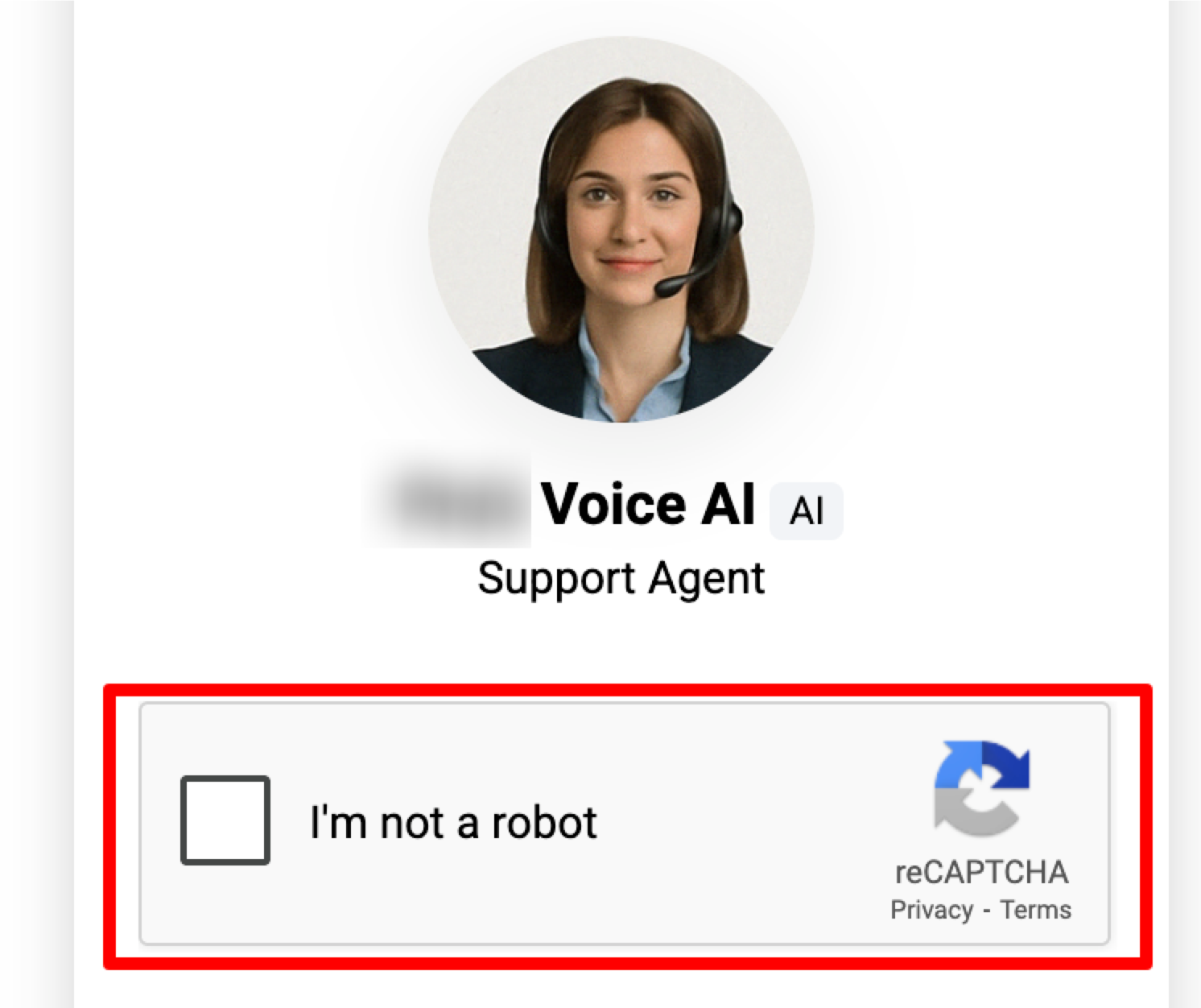
reCAPTCHA Protection in the Voice AI Chat Widget is an automatic security safeguard that appears when a visitor repeatedly starts and ends Voice AI widget calls in a short period of time. This helps HighLevel confirm that the interaction is coming from a real person rather than automated or abusive behavior.
The Voice AI Chat Widget lets visitors speak with a Voice AI agent directly through their browser using microphone and speaker access, without dialing a phone number or installing an app. Because the widget runs directly on websites and funnels, reCAPTCHA helps protect the experience from rapid repeated connection attempts that may affect reliability.
Key Benefits of Voice AI Chat Widget reCAPTCHA Protection
Automatic security checks help protect the Voice AI Chat Widget while keeping the experience simple for legitimate visitors. These safeguards reduce unnecessary repeated connection attempts and help preserve a smoother voice interaction experience.
- Bot Abuse Protection: Helps prevent automated or repeated misuse of the Voice AI Chat Widget.
- Improved System Reliability: Reduces rapid connection loops that may impact widget performance or resource availability.
- Better Visitor Experience: Allows genuine visitors to continue using the widget after completing the reCAPTCHA challenge.
- No Manual Setup Required: Protection is automatically active for the Voice AI Chat Widget type.
- Standard Chat Widget Separation: This protection applies specifically to the Voice AI Chat Widget and does not affect standard chat widget usage.
Voice AI Chat Widget reCAPTCHA Trigger Condition
The trigger condition helps identify repeated connection behavior that may indicate accidental testing loops, bot traffic, or misuse. Understanding the threshold can help admins and testers avoid unnecessary reCAPTCHA prompts during setup or quality checks.
reCAPTCHA is triggered when:
- A visitor starts a Voice AI Chat Widget call.
- The same visitor rapidly connects and disconnects 10 times within 60 seconds.
- HighLevel displays a reCAPTCHA challenge to confirm the visitor is human.
- After successfully passing the challenge, the visitor can continue using the Voice AI Chat Widget.
How reCAPTCHA Works During Testing
Repeated testing can look similar to abusive behavior when calls are started and ended quickly. Slowing down test attempts helps prevent unnecessary reCAPTCHA prompts while still allowing admins to confirm that the widget, microphone access, and AI agent responses are working correctly.
When testing the Voice AI Chat Widget:
- Avoid starting and ending calls repeatedly in rapid succession.
- Allow time between test calls when checking multiple scenarios.
- Test microphone permissions in different browsers as needed.
- If reCAPTCHA appears, complete the challenge before continuing.
- If frequent reCAPTCHA prompts continue, reduce the reconnection frequency during testing.
The Voice AI Chat Widget setup guide also notes that frequent reCAPTCHA prompts may happen when rapid connection attempts are detected.
Where reCAPTCHA Protection Applies
reCAPTCHA protection is designed for the Voice AI Chat Widget type, which is separate from standard text-based chat widgets. This distinction helps users understand why the challenge may appear for Voice AI interactions but not for regular live chat or web chat conversations.
How To Setup Voice AI Chat Widget reCAPTCHA Protection
No manual setup is required because reCAPTCHA protection is automatically included with the Voice AI Chat Widget. Admins only need to set up the Voice AI Chat Widget itself, and the protection will activate when the rapid connect/disconnect threshold is met.
To use the Voice AI Chat Widget:
- Go to Sites > Chat Widgets.
- Open an existing widget or create a new widget.
- Select Voice AI Agent under the Agent tab.
- Configure the Voice AI agent name and widget settings.
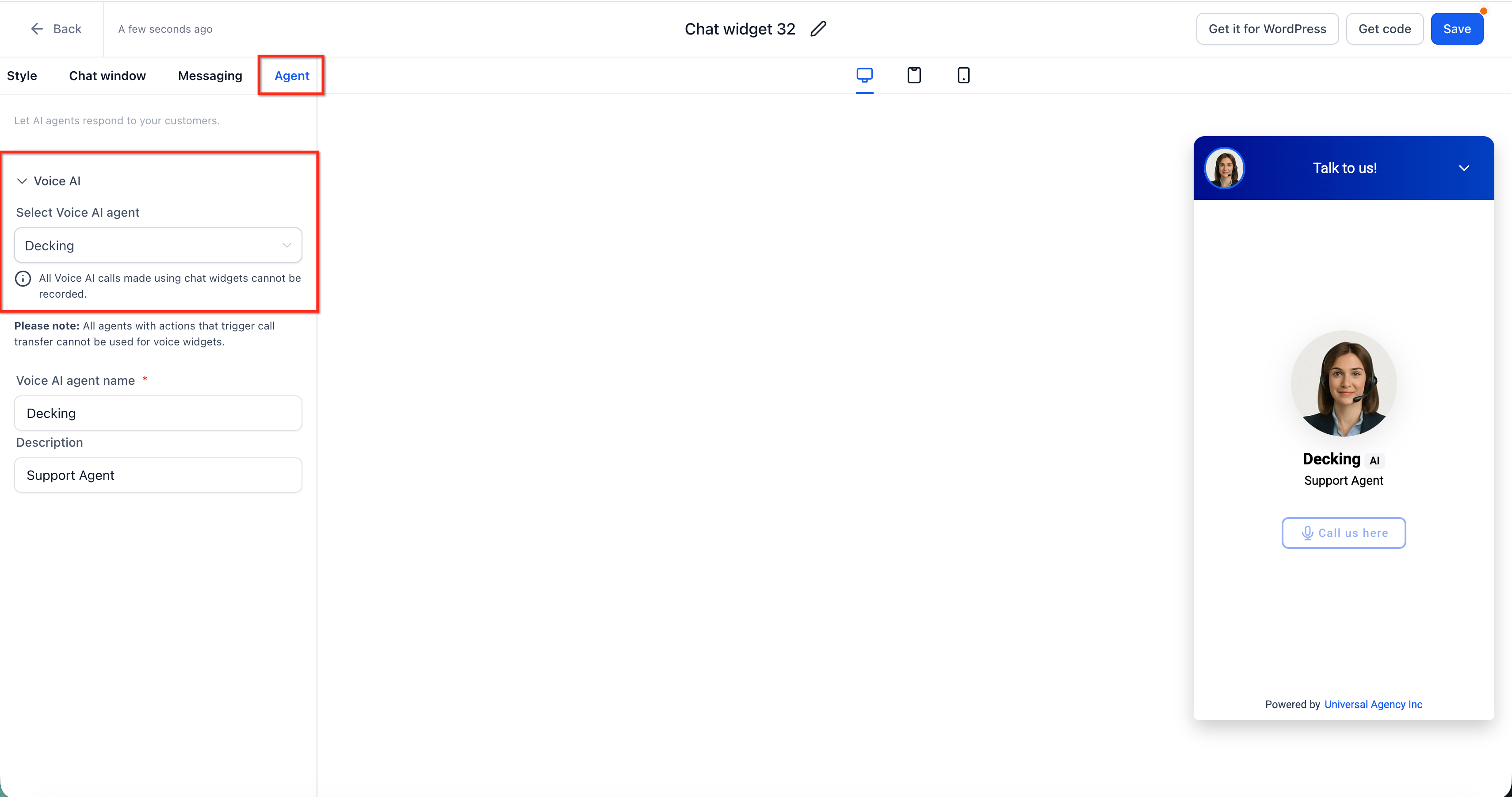
- Click Save.
- Add the widget script to your website or funnel.
- Publish the page and test the widget from the live site.
Frequently Asked Questions
Q: What triggers the reCAPTCHA challenge in the Voice AI Chat Widget?
A: reCAPTCHA is triggered when the same visitor rapidly connects and disconnects 10 times within 60 seconds.
Q: Does reCAPTCHA affect standard chat widget usage?
A: No. This protection applies specifically to the Voice AI Chat Widget type. Standard chat widget usage remains unaffected.
Q: Do I need to manually enable reCAPTCHA protection?
A: No. reCAPTCHA protection is automatically active for the Voice AI Chat Widget type.
Q: Can the rapid disconnect threshold be adjusted?
A: No. The threshold of 10 rapid connect/disconnect cycles within 60 seconds is fixed and is not currently configurable.
Q: Why did reCAPTCHA appear while I was testing the widget?
A: Repeatedly starting and ending Voice AI widget calls during testing can trigger reCAPTCHA. Slow down reconnection attempts and complete the challenge to continue testing.
Q: Can visitors continue after reCAPTCHA appears?
A: Yes. After successfully passing the reCAPTCHA challenge, the visitor can continue using the Voice AI Chat Widget.
Q: Does reCAPTCHA mean the widget is broken?
A: No. reCAPTCHA is expected behavior when rapid repeated connection activity is detected.
Q: Does reCAPTCHA apply to embedded Voice AI Chat Widgets?
A: Product confirmation is recommended before publishing a definitive answer. The current article confirms that protection applies to the Voice AI Chat Widget type but does not separately define sticky versus embedded placement behavior.
Related Articles
Was this article helpful?
That’s Great!
Thank you for your feedback
Sorry! We couldn't be helpful
Thank you for your feedback
Feedback sent
We appreciate your effort and will try to fix the article