A failed SMS or MMS normally includes an error code that identifies where delivery stopped. The cause may involve the recipient's number, consent status, carrier filtering, messaging registration, sender configuration, account status, or an unsupported media file.
Use this article as a quick-reference guide: find the failed message in Conversations, identify its error code, locate the code below, correct the underlying issue, and test again only when appropriate.
For a complete end-to-end diagnostic process when an error code does not explain the failure, use the Troubleshooting SMS Delivery Issues guide.
Do not repeatedly resend a failed message without identifying the cause. Repeated sends to opted-out, invalid, filtered, unregistered, or restricted destinations can create additional failures and negatively affect messaging health.
A failed SMS is not automatically guaranteed to retry later. Correct the underlying issue first, then resend or recover affected contacts only when appropriate.
What Are Common SMS Delivery Errors?
SMS delivery errors are status codes returned when a message cannot successfully reach its destination. The code helps identify whether the problem originated with the recipient, sending number, carrier route, messaging registration, account configuration, consent status, or message content.
Some failures affect only one recipient, while others can affect every outbound message from a number or sub-account. Determining that scope before retrying helps you avoid unnecessary sends and reach the correct resolution faster.
Key Benefits of Understanding SMS Errors
Understanding the returned error code helps you determine whether a message should be corrected, delayed, stopped entirely, or escalated to Support. This protects both deliverability and the recipient experience.
- Faster Diagnosis: Identify the likely source of a failed message without guessing.
- Safer Retrying: Know when retrying is appropriate and when messaging should stop.
- Improved Deliverability: Correct invalid numbers, filtering issues, registration gaps, and unsupported routes before they become recurring problems.
- Better Compliance: Respect opt-outs, DND settings, sender-registration requirements, and carrier restrictions.
- Proactive Monitoring: Use workflow triggers to automatically respond to selected messaging failures.
How to Identify and Interpret SMS Errors
Start with the exact failed message rather than troubleshooting from memory. Conversations displays the delivery failure and returned error code so you can match the failure to the correct resolution.
Step 1: Open the Failed Conversation
- Go to Conversations.
- Search for the contact whose SMS or MMS failed.
- Open the applicable conversation.
- Locate the message marked Unsuccessful.

Open Conversations and locate the unsuccessful outbound message.
Step 2: Open the Error Details
Hover over or select the red warning indicator beside the failed message. HighLevel displays the numeric error code and available description.

Use the warning indicator to open the delivery error details.
Step 3: Record the Error Code
Note the numerical code, such as 30034, 30007, or 21610. Then use the table below to identify what the code means and what action to take.
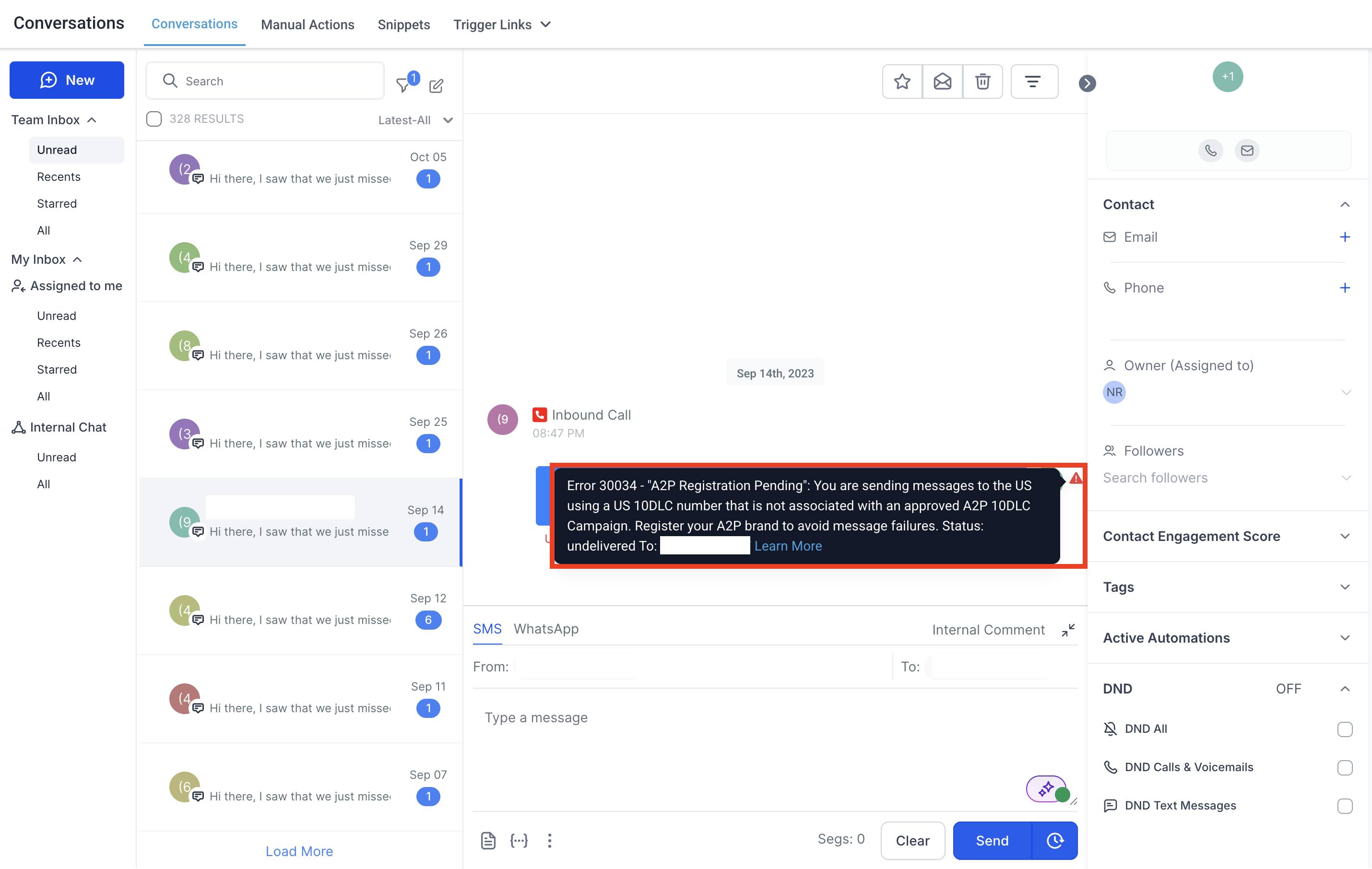
The failure details include the error code and a short explanation of the problem.
Common SMS Error Codes and Fixes
The table below summarizes frequently encountered errors and the safest first response. For the complete LC Phone catalog, use the LC Phone System - Error Code and Warning Dictionary.
| Error | What It Means | What to Check | Recommended Action |
|---|---|---|---|
| 21211 | Invalid “To” phone number | Recipient number is invalid, incorrectly formatted, or not a valid destination. | Correct the recipient number and use E.164 format: +[country code][number]. |
| 21408 | Messaging not allowed to destination region | The destination country or region is not enabled or is unsupported. | Confirm the destination is supported. Contact Support when messaging to the region should be available. |
| 21606 | Invalid or unavailable “From” number | Sender capability, ownership, formatting, porting/hosting status, or country restrictions. | Use an active SMS-capable number owned by the sub-account and confirm it is fully provisioned. |
| 21610 | Recipient unsubscribed or SMS DND is enforced | Whether the contact replied STOP, used another opt-out keyword, or has applicable DND enabled. | Do not continue sending. The recipient must validly opt back in, such as by sending START or another supported opt-in keyword. |
| 21612 | Current “To” and “From” combination cannot be used | E.164 formatting, destination-country restrictions, sender type, and route availability. | Correct number formatting or use a supported/local sender for the destination. Contact Support if the route should be supported. |
| 21614 | “To” number is not a valid mobile number | The destination may be invalid, incorrectly formatted, or a landline. | Verify the number is a valid mobile number and is formatted correctly. |
| 21635 | Destination is a landline | The recipient number was identified as a landline that cannot receive SMS. | Use another SMS-capable number for the contact. Contact Support if the number is known to be mobile. |
| 21661 | Sending number is not SMS-capable | Capabilities of the selected HighLevel phone number. | Select or purchase a phone number that supports SMS. |
| 30002 | Account suspended before message delivery | Account or sub-account suspension caused by balance or policy concerns. | Contact HighLevel Support. Do not direct LC Phone users to an external provider for this error. |
| 30003 | Number unreachable or out of service | Device power/signal, mobile capability, recipient carrier, or recurring carrier filtering. | Verify the number and retry later when appropriate. For repeated failures, collect at least 3 recent examples and contact Support. |
| 30004 | Destination blocked or unavailable | DND/opt-out status, destination signal, landline status, carrier issues, or regional DNC requirements. | Check the contact's SMS DND status and destination. If the error persists across valid recipients, collect 3 recent examples for Support. |
| 30005 | Recipient number inactive or does not exist | Correct phone number, E.164 formatting, active service, and mobile capability. | Correct or remove invalid destinations. If a known-valid number repeatedly fails, collect recent examples for Support. |
| 30006 | Landline or unreachable carrier | Whether the destination can receive SMS through the selected phone-number type. | Use a valid mobile destination or another supported route. |
| 30007 | Message filtered | Content, sender identification, consent, URLs, prohibited content, spam signals, and carrier rules. | Correct the underlying compliance/content issue before resending. If compliant traffic continues to fail, collect 3+ affected examples and contact Support. 30007 guide. |
| 30008 | Unknown delivery error | Message length, character encoding, content, and whether the issue affects multiple recipients. | Test a shorter, simple message. If the failure continues, provide Support with 3+ recent affected messages. |
| 30011 | MMS unsupported by destination or region | Recipient device MMS capability and regional MMS availability. | Send text-only SMS when MMS is unavailable, or use another supported destination/channel. |
| 30023 | Daily message cap reached | Current A2P brand messaging volume and whether the daily carrier cap has been reached. | Pause additional sending and contact Support if the limit is unexpected or requires investigation. |
| 30024 | Numeric Sender ID not provisioned | Whether the destination country requires sender registration and whether provisioning has completed. | If the sender should already be registered, collect at least 3 Message IDs showing Error 30024 and contact Support. |
| 30032 | Toll-Free number is not verified | Toll-Free Verification status for the sending number. | Complete Toll-Free Verification and wait for Verified (Approved) status before sending. Toll-Free Verification guide. |
| 30033 | A2P 10DLC campaign suspended | Campaign status and any compliance or registration issue associated with the campaign. | Contact Support to review the suspension reason and required recovery steps. |
| 30034 | Number not fully registered for A2P messaging | Approved campaign, number-to-campaign association, carrier activation period, and Sole Proprietor limitations. | Confirm the number is linked to the approved campaign. Allow up to 24 hours after approval for carrier activation. Sole Proprietor registrations support one local number per campaign. 30034 guide. |
| 30037 | Outbound messaging disabled | Whether outbound messaging has been disabled at the account level. | Contact Support if outbound messaging should be enabled. |
Need a code that is not listed here? Use the LC Phone System - Error Code and Warning Dictionary for the complete current reference.
Media and Attachment Errors
MMS failures can be caused by attachment size, unsupported media, destination capability, or a problem retrieving hosted media. These issues are related to messaging but should be diagnosed separately from normal carrier SMS-delivery failures.
The attached media is larger than the applicable messaging-provider or carrier limit.
Recommended action: Compress the attachment or send it as a hosted link. For broad carrier compatibility, HighLevel recommends keeping MMS attachments under approximately 500 KB, even though some sender types and carriers support larger files.
Error 11200 is an HTTP/media retrieval issue rather than a standard carrier SMS delivery error. It can occur when HighLevel cannot retrieve a hosted image or other resource used by the message.
If the failure involves a branded system-generated link or media domain, verify the branded-domain configuration under the Business Profile and review Branding System-Generated Links (API Domain).
How to Set Up Automatic SMS Error Monitoring
The Messaging Error - SMS workflow trigger can automatically respond when an SMS becomes undelivered with a selected error code. This is useful for notifying staff, tagging contacts, branching automations, or preventing repeated sends to destinations that are unlikely to succeed.
- Go to Automation → Workflows.
- Create a new workflow or open an existing workflow.
- Add the trigger Messaging Error - SMS.
- Add an Error Code filter when the workflow should react only to a specific failure.
- Choose the applicable error, such as 30007, 30034, 30032, 21610, or another supported code.
- Add the actions you want, such as an internal notification, tag, opportunity update, or routing logic.
- Save and publish the workflow.
Important: An error-handling workflow can detect and respond to failures, but it should not blindly resend every failed SMS. Build recovery logic around the specific error and whether the recipient is still eligible to receive messages.
Additional Troubleshooting Tips
Looking at the scope of the failure before changing settings helps separate recipient-specific problems from account-wide, registration, or carrier issues.
| What You See | Start Here |
|---|---|
| Only one contact fails | Check the recipient number, SMS DND/opt-out status, number type, and exact error code. |
| Several contacts on one carrier fail | Check for filtering, destination-carrier issues, and repeated 30003/30007 patterns. |
| All local-number SMS suddenly fails | Check A2P campaign status, number association, account restrictions, and errors such as 30033, 30034, or 30037. |
| All Toll-Free SMS fails | Check Toll-Free Verification status and Error 30032. |
| Only MMS fails | Check attachment size/type, destination MMS capability, and Errors 11751 or 30011. |
| Workflow SMS fails but manual SMS works | Review the workflow execution, sending number, contact DND state, and message content at the exact time the action ran. |
Applicable US local numbers should be connected to the correct approved A2P campaign. Toll-Free numbers require approved Toll-Free Verification before messaging US and Canada recipients.
Message only recipients who have valid consent, honor opt-outs, correct invalid numbers, and avoid repeatedly sending to destinations that consistently fail.
When Support investigation is required, provide the error code, affected sending and recipient numbers, message timestamps, relevant Message IDs, Location ID, and multiple recent examples when requested.
Frequently Asked Questions
Was this article helpful?
That’s Great!
Thank you for your feedback
Sorry! We couldn't be helpful
Thank you for your feedback
Feedback sent
We appreciate your effort and will try to fix the article