Why Calls or Messages May Appear Incorrectly in Conversations
Conversations can sometimes appear incorrect when caller identity, group message support, or third-party integrations affect how calls and messages are routed. This article explains three common scenarios that may look like a Conversations issue but are caused by expected platform or carrier behavior.
Use the examples below to identify the source before escalating to Support.
What Can Cause Conversations to Appear Incorrect?
Conversations relies on caller or sender identity and source information provided by carriers, messaging providers, and connected integrations. When that information is missing, limited, or routed differently, calls and messages can appear grouped, split, or unexpected even when the underlying activity is being processed as designed.
The three most common scenarios involve anonymous caller IDs grouping multiple unrelated callers together, international group text replies splitting into separate threads, and messages triggered by third-party integrations that appear without user action.
Watch it here, https://www.loom.com/share/3d4bfc5cc51c4712b63acec9bc5c3d89.
Anonymous Callers Appearing Under the Same Number
When multiple people call with anonymous or blocked caller IDs, their calls may all appear under a single placeholder number in Conversations. This happens because the carrier does not provide distinct caller information, so HighLevel groups all anonymous calls under the same generic identifier.
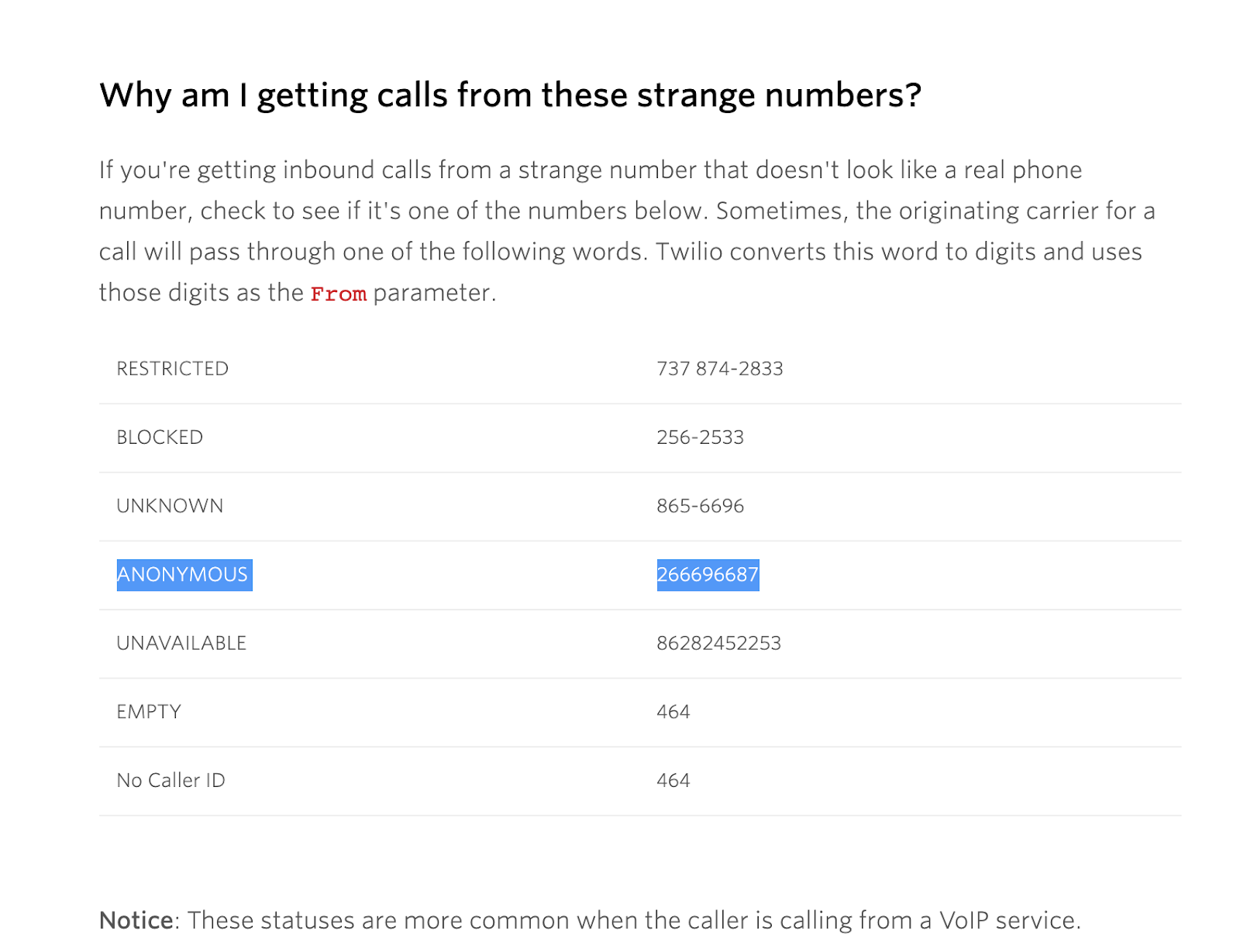
The exact placeholder number can vary depending on the carrier or provider. Common examples include generic numbers like +266696687 or similar system-generated identifiers.
When multiple anonymous calls arrive with the same placeholder caller ID, HighLevel may associate them with the same contact or conversation because the incoming calls do not contain distinct caller numbers. This is expected carrier behavior when caller ID is hidden or unavailable.
Anonymous caller IDs cannot be "unmasked" by HighLevel or the carrier. If you need to differentiate between callers, ask them to disable anonymous calling on their device or carrier settings before calling again.
International Group Text Replies Appearing as Separate Conversations
When you send a group text and recipients reply, their responses may appear in separate conversation threads instead of staying grouped together. This typically happens when using international numbers, toll-free numbers, or short codes that do not support group messaging.
Group Texting is supported for eligible +1 long code numbers in the US and Canada. Toll-free numbers, short codes, and international numbers are not supported for group texting through this workflow.
When group texting is not supported for your number type, the messaging provider treats each reply as an individual one-to-one message rather than part of a group thread. This causes replies to appear in separate conversations in HighLevel.
Use a US or Canada +1 long code number for group texting workflows. If you need to send messages to multiple recipients using a toll-free or international number, consider using broadcast messaging instead, where replies are expected to appear as individual conversations.
Check the Message Source Before Escalating
Sometimes messages appear unexpectedly in Conversations not because of a platform issue, but because they were triggered by a connected integration, custom messaging provider, or Marketplace app. Before reporting a message as erroneous, check the Message Details to confirm the source.
Click on the message in Conversations and select Message Details from the context menu or information panel.
Look for the source identifier, which may show a Marketplace app name, custom integration, workflow automation, or messaging provider. If the message was sent by an integration rather than a user or automation you recognize, this explains the unexpected activity.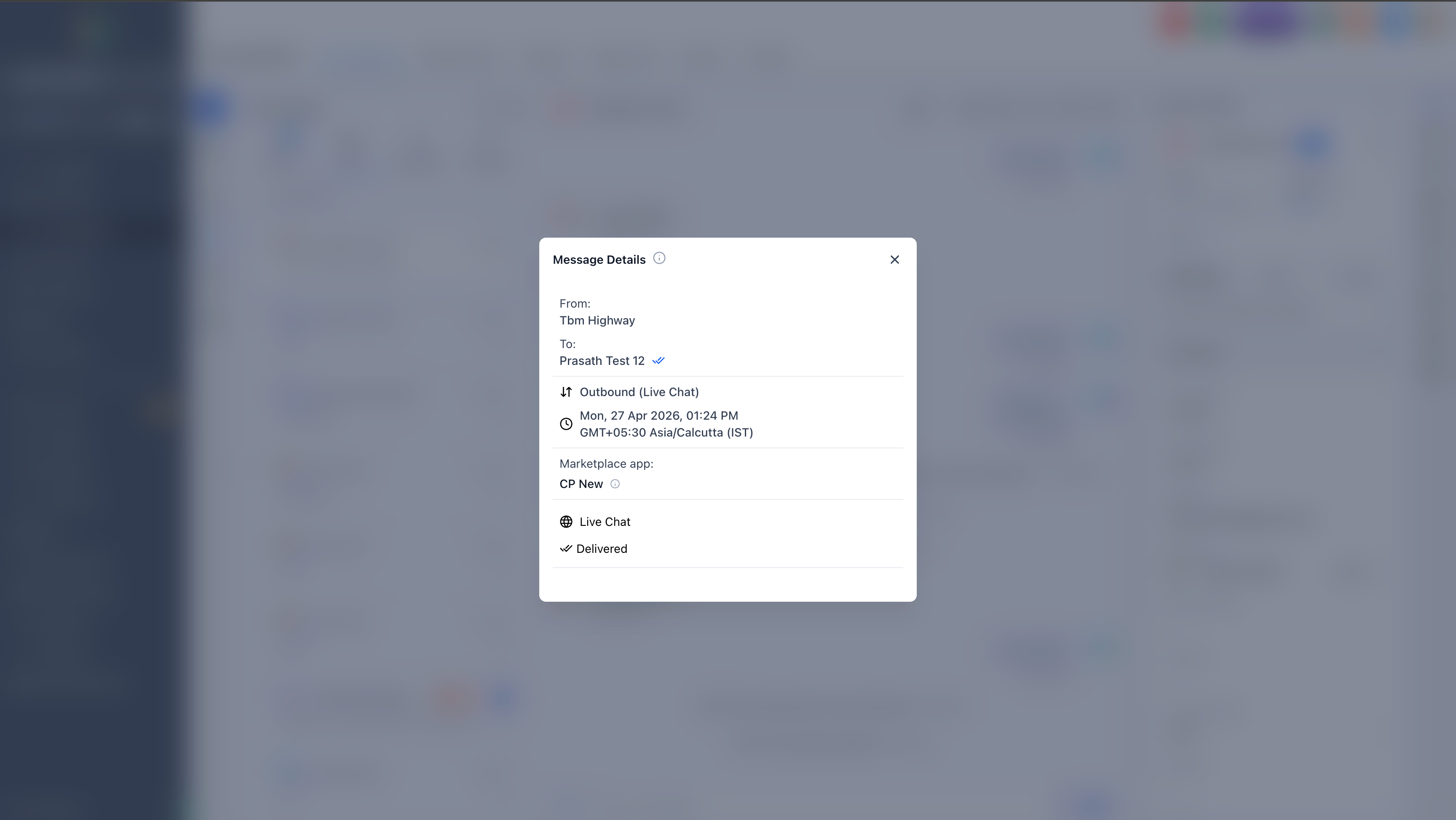
If the message source shows an unexpected integration, review your connected apps and workflow automations to determine whether the message was triggered intentionally. This can help you distinguish between a platform issue and expected integration behavior.
When to Contact Support
If you have confirmed that the issue is not caused by anonymous caller IDs, unsupported group texting, or integration-triggered messages, and the behavior persists, escalate to Support with the following information. Providing complete examples helps Support distinguish between a carrier limitation, integration source, or platform issue more quickly.
Frequently Asked Questions
Was this article helpful?
That’s Great!
Thank you for your feedback
Sorry! We couldn't be helpful
Thank you for your feedback
Feedback sent
We appreciate your effort and will try to fix the article