Billing questions are easier to resolve when you know where a charge originated and which records to review. This guide explains how to manage your HighLevel agency subscription, identify subscription and usage-based charges, review invoices, troubleshoot payments, and escalate a billing dispute. It also clarifies the difference between agency billing, Wallet activity, Marketplace purchases, and client payments.
IMPORTANT : If you purchased access through another agency rather than directly from HighLevel, contact that agency’s administrator for subscription changes or cancellations. HighLevel cannot cancel an account managed by another agency.


If you’re ready to cancel your HighLevel agency subscription and don’t need the rest of the billing guide, jump directly to. "How to Cancel Your HighLevel Subscription" in the article
Note: Agency accounts cannot be paused or placed on hold. To stop an Agency account, you must cancel the subscription. You can reactivate it later by resuming your subscription, and your data will be restored.
TABLE OF CONTENTS
- What is HighLevel Agency Billing?
- Key Benefits of HighLevel Agency Billing
- How to Set Up and Manage Billing in HighLevel
- How to Upgrade Your HighLevel Account
- Downgrade Your Agency Plan
- How to Cancel Your HighLevel Subscription
- How to Reactivate Your Account
- HighLevel Agency Plan Comparison
- Proration Explained (Immediate Charges After Upgrading)
- Financial Assistance Requests
- Error: "Please Update the Billing Address"
- Issues with Online Listing Services
- Accepted Card Payment Types
- Card Payment Issues
- Viewing Past Invoices
- Frequently Asked Questions
- Related Articles
What is HighLevel Agency Billing?
HighLevel Agency Billing gives agencies a central place to manage their subscription, payment method, invoices, Wallet activity, and eligible add-on services. Understanding where each charge is recorded helps you confirm its purpose, identify the sub-account or service responsible, and resolve billing questions faster.
Your billing information can include several different types of activity:
- Your recurring HighLevel agency subscription
- Plan upgrades or other prorated adjustments
- Agency Wallet recharges and usage
- Phone, messaging, email, AI, and workflow charges
- A2P registration and messaging fees
- Marketplace apps and other paid add-ons
- Services enabled for individual sub-accounts
Your HighLevel subscription and Agency Wallet are billed separately. Wallet credits cannot be used to pay the recurring agency subscription.
Note: For HighLevel Pricing refer to HighLevel Pricing Guide.
Key Benefits of HighLevel Agency Billing
- Centralized subscription management: Review or modify your agency subscription from Agency Settings.
- Invoice visibility: Access previous invoices and payment records from the Billing area.
- Usage transparency: Review Wallet-funded activity and identify which services or sub-accounts generated usage.
- Flexible plan management: Upgrade your subscription and choose an available monthly or annual billing cycle.
- Payment troubleshooting: Review failed invoices, correct card information, and complete bank authentication when required.
- Faster dispute resolution: Collect the right transaction details before contacting HighLevel Support.
How to Set Up and Manage Billing in HighLevel
Setting up and managing billing is straightforward in your agency account. Follow the steps below for common billing actions:
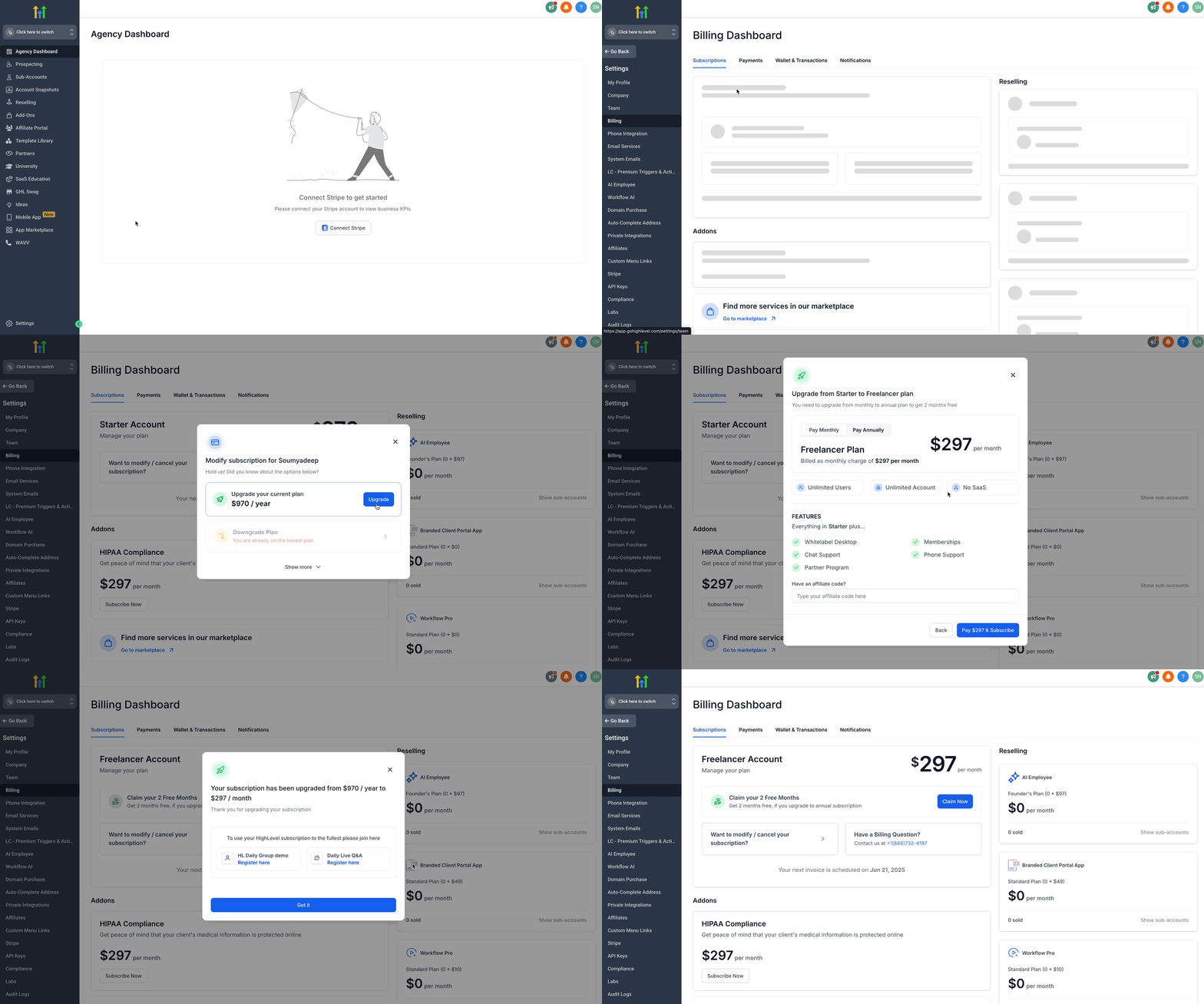
How to Upgrade Your HighLevel Account
- Go to your Agency Settings.
- Click on the Billing tab.
- Click on Want to Modify/Cancel Your Subscription? option.
- Click the Upgrade button.
- Toggle between Monthly and Yearly billing options and select a plan as per your needs.
- Click on the Upgrade Now button of your selected plan.
- Click on Pay (amount) & Subscribe button. (You’ll be charged a prorated amount immediately.)
Downgrade Your Agency Plan
Before downgrading, review which features and sub-account limits are included in the lower plan.
Go to Agency Settings > Billing.
Click Want to Modify/Cancel Your Subscription?
Select an available lower-tier plan.
Review the new price, effective date, and any prorated adjustment.
Confirm the change.
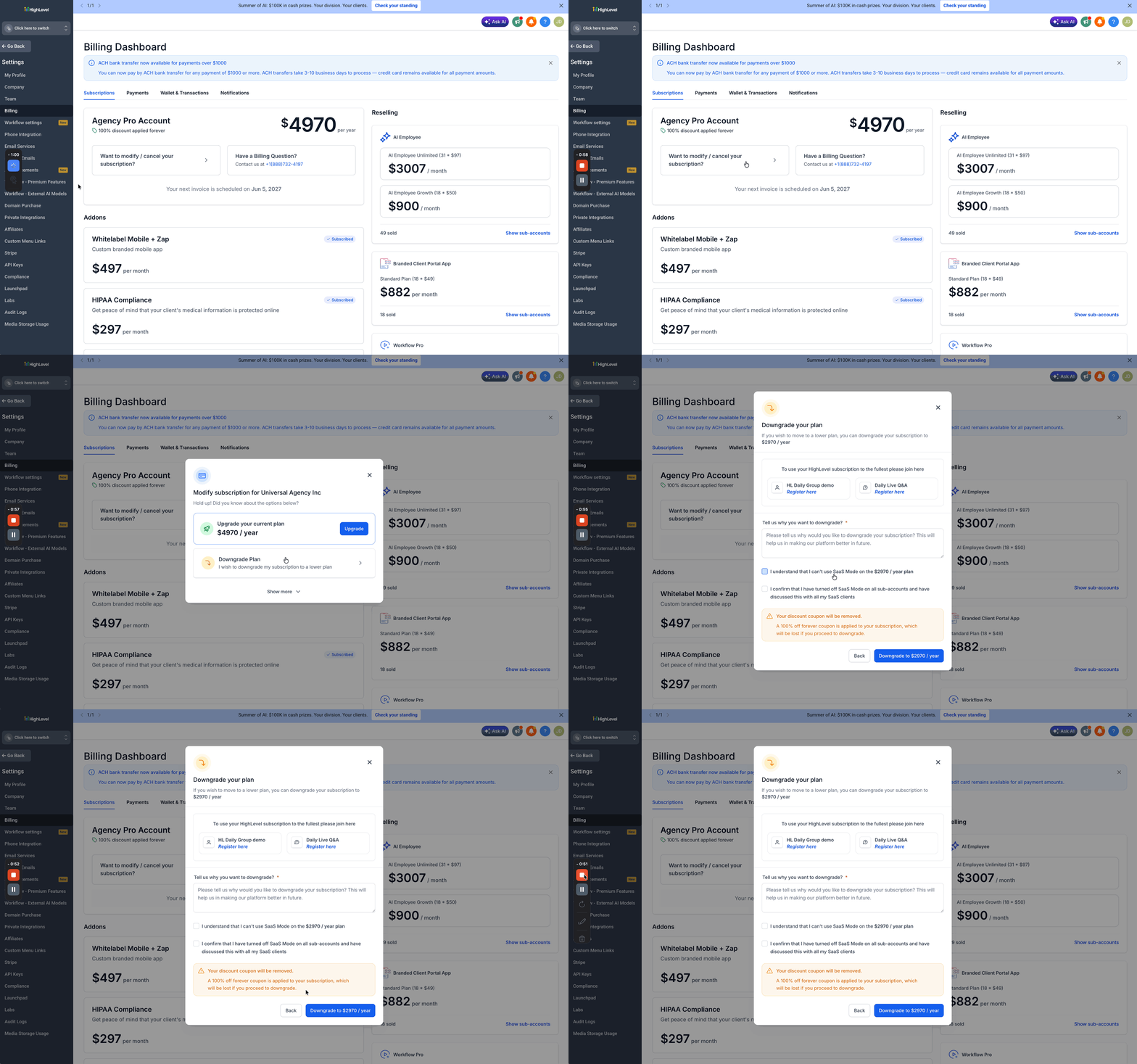
Important: Downgrading your plan does not automatically cancel add-ons, Marketplace apps, phone numbers, or other paid services.

 If the downgrade option is unavailable, contact HighLevel Support using the blue question-mark icon.
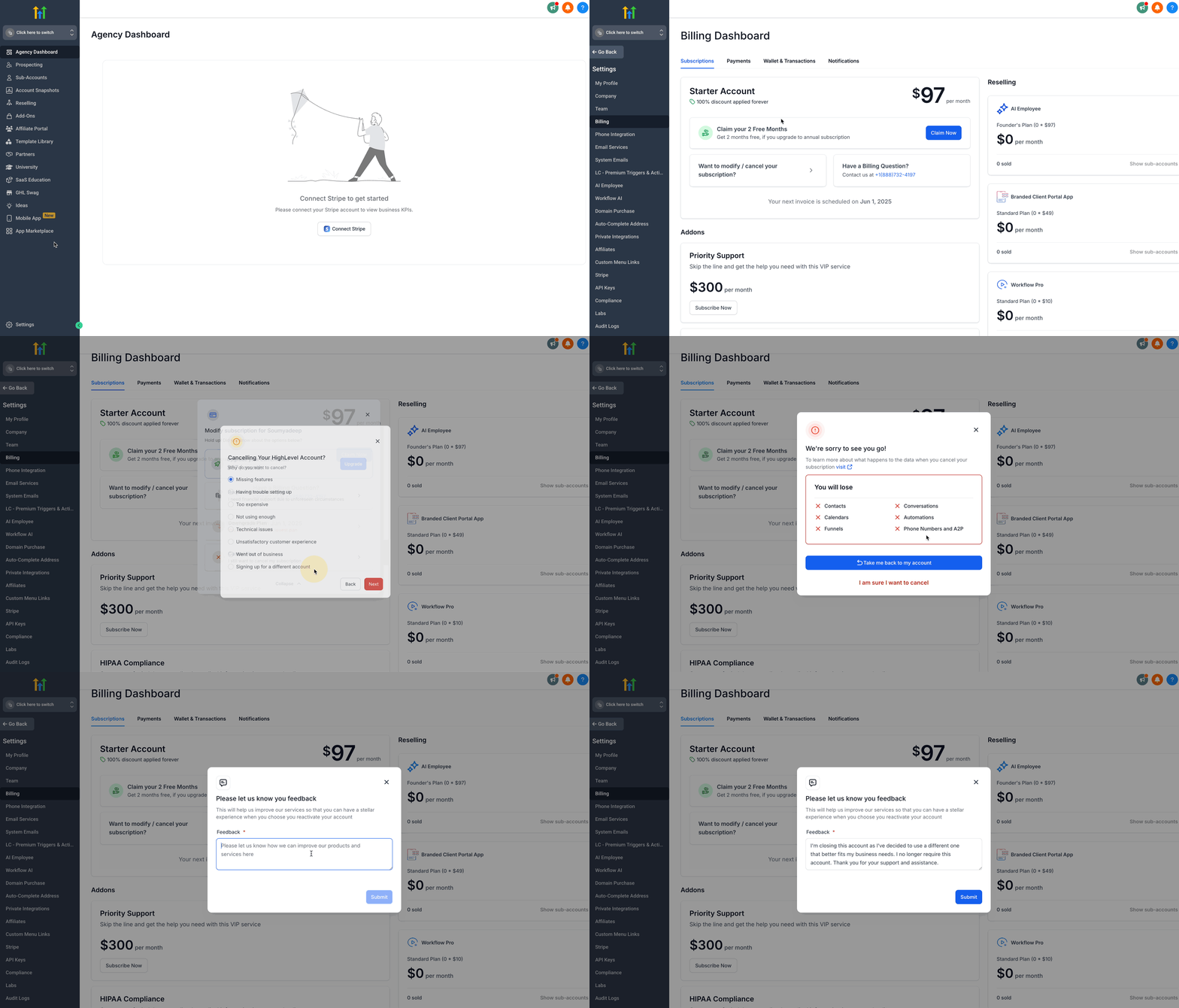
How to Cancel Your HighLevel Subscription
- Go to Agency Settings and click on Billing.
- Click on "Want to modify/cancel your subscription?"
- Click Show More in the pop-up.
- Select Cancel Plan.
- Choose your Reason for Cancellation, then click Next.
- Review the data loss warning.
- Click "I am sure I want to cancel".
- Provide feedback (minimum 30 words).
- Click Submit.
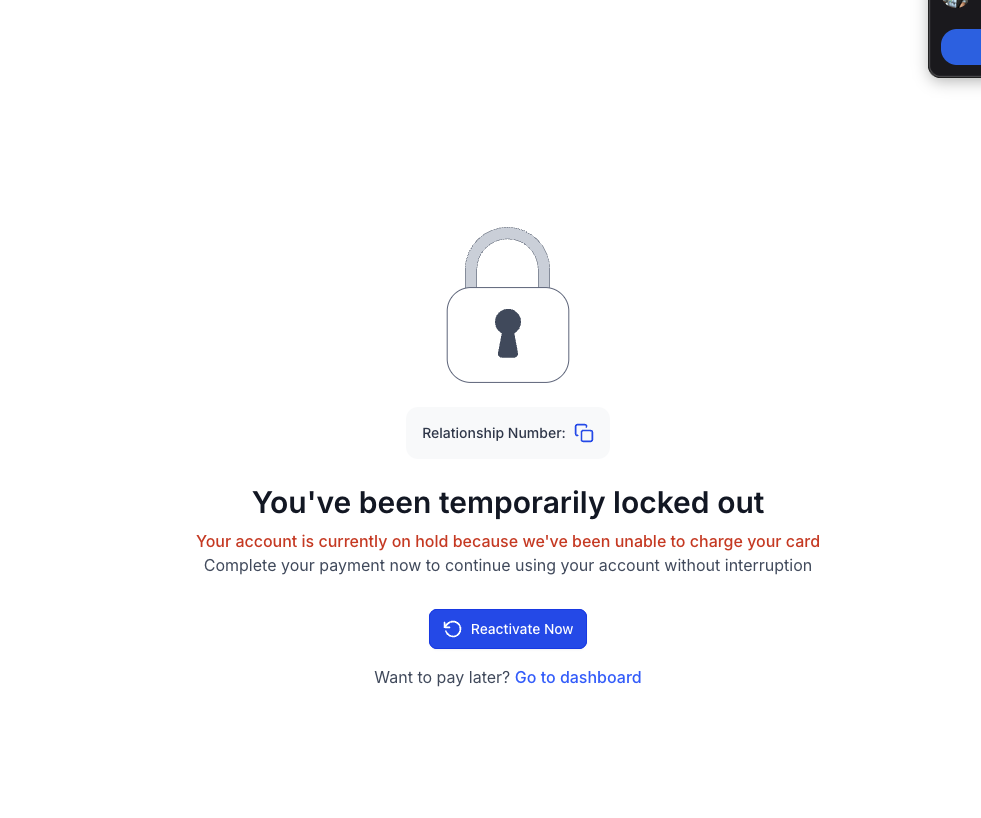
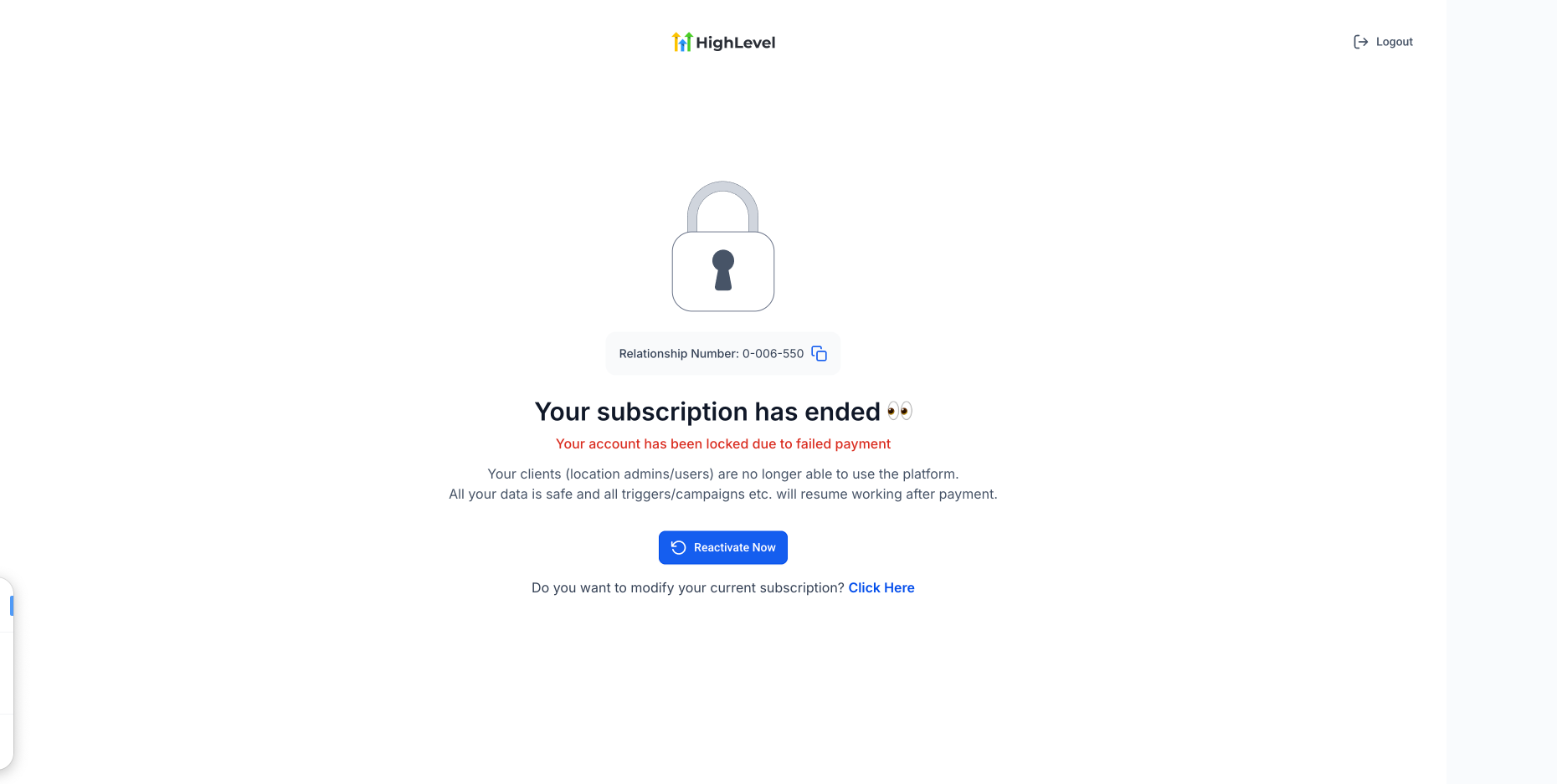
How to Reactivate Your Account
- Click Reactivate Account to reactivate instantly.
- Or select "To modify your current subscription, click here"
- You may be prompted to add a new payment method.
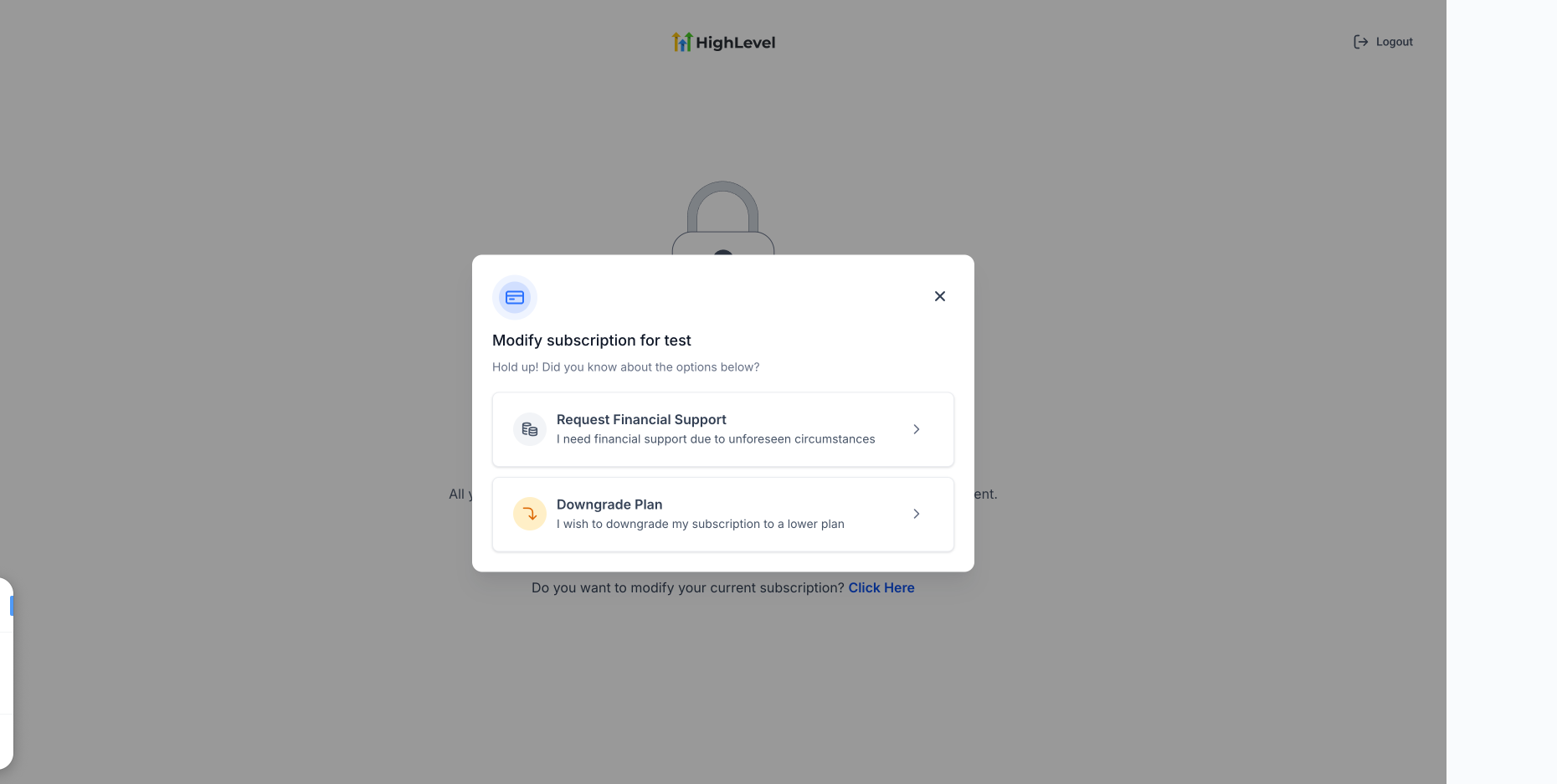
If your account is eligible, you can move to a lower-tier plan while reactivating your subscription without contacting Support.
- On the reactivation screen, select Click Here next to the option to modify your current subscription.
- In the subscription modification window, select Downgrade Plan.
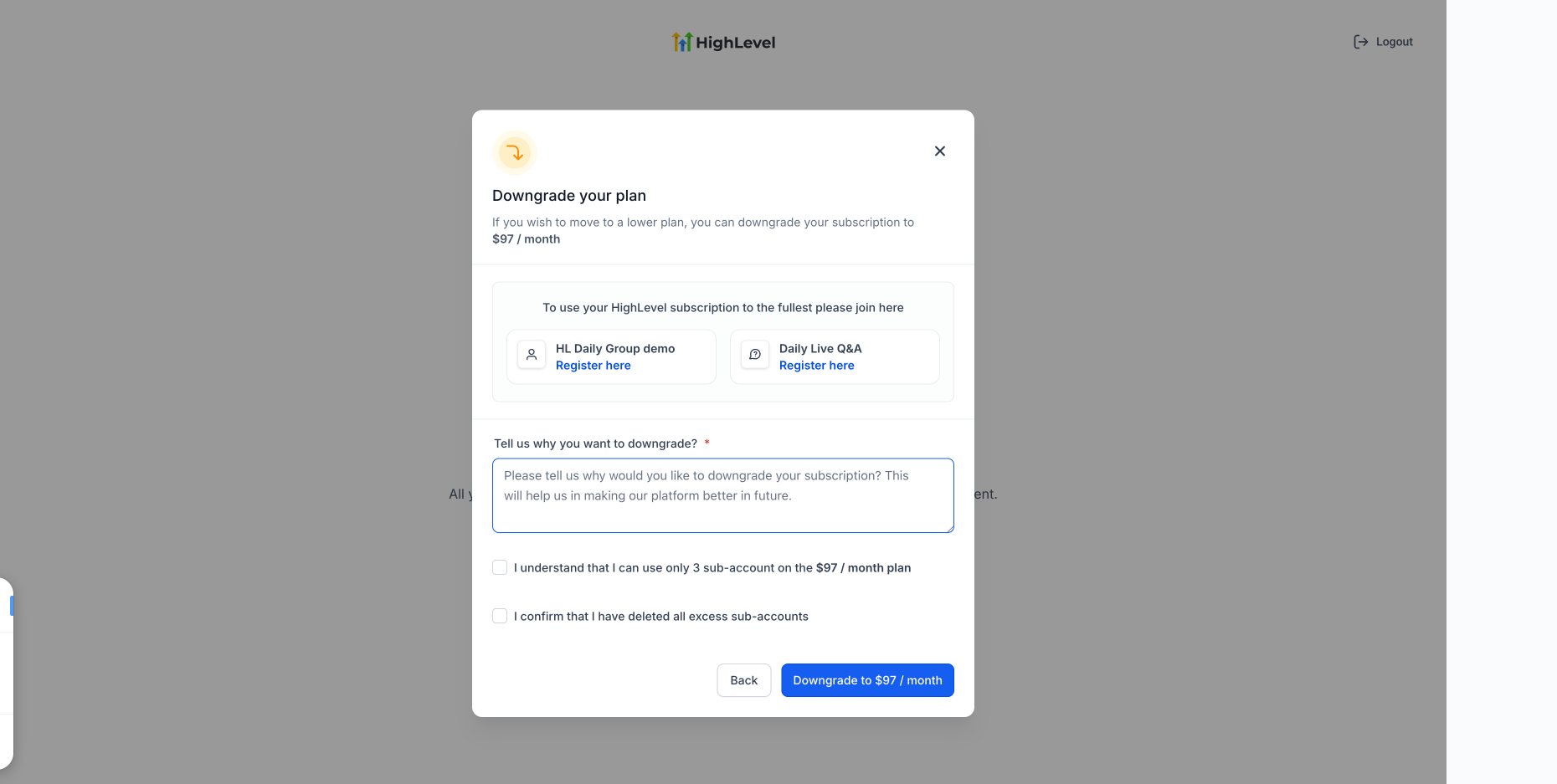
- Review the lower-tier plan available to your account.
- Complete the requested downgrade details and acknowledgements shown on the screen.
- Confirm the downgrade to reactivate your subscription on the lower-tier plan.
Payment and Reactivation Troubleshooting
If the payment shows “Processing payment,” avoid submitting multiple payment attempts. Check the payment status before retrying.
If the payment failed:
Confirm the card number, expiration date, CVV, billing address, and ZIP/postal code.
Confirm the bank is not blocking the charge.
Go to Agency Settings > Billing > Payments.
Locate the most recent failed subscription invoice and click Retry.
Complete any 3D Secure (3DS), OTP, or bank authentication prompt.
For more information, see How to make agency subscription payments with 3DS cards?.
Agency Settings > Billing > Payments showing a failed subscription invoice and the Retry option.
If the payment succeeds but the account does not reactivate, or the payment continues to fail, contact the HighLevel Billing team:
Email billing@gohighlevel.com
Call 1-888-732-4197 and select Option 2 for Billing
Include your agency name, agency login email, Agency Relationship Number if available, and relevant invoice or payment details.
Cross-Link for the Support Article
If your agency subscription payment failed or your account did not reactivate, review Payment and Reactivation Troubleshooting before contacting Billing.
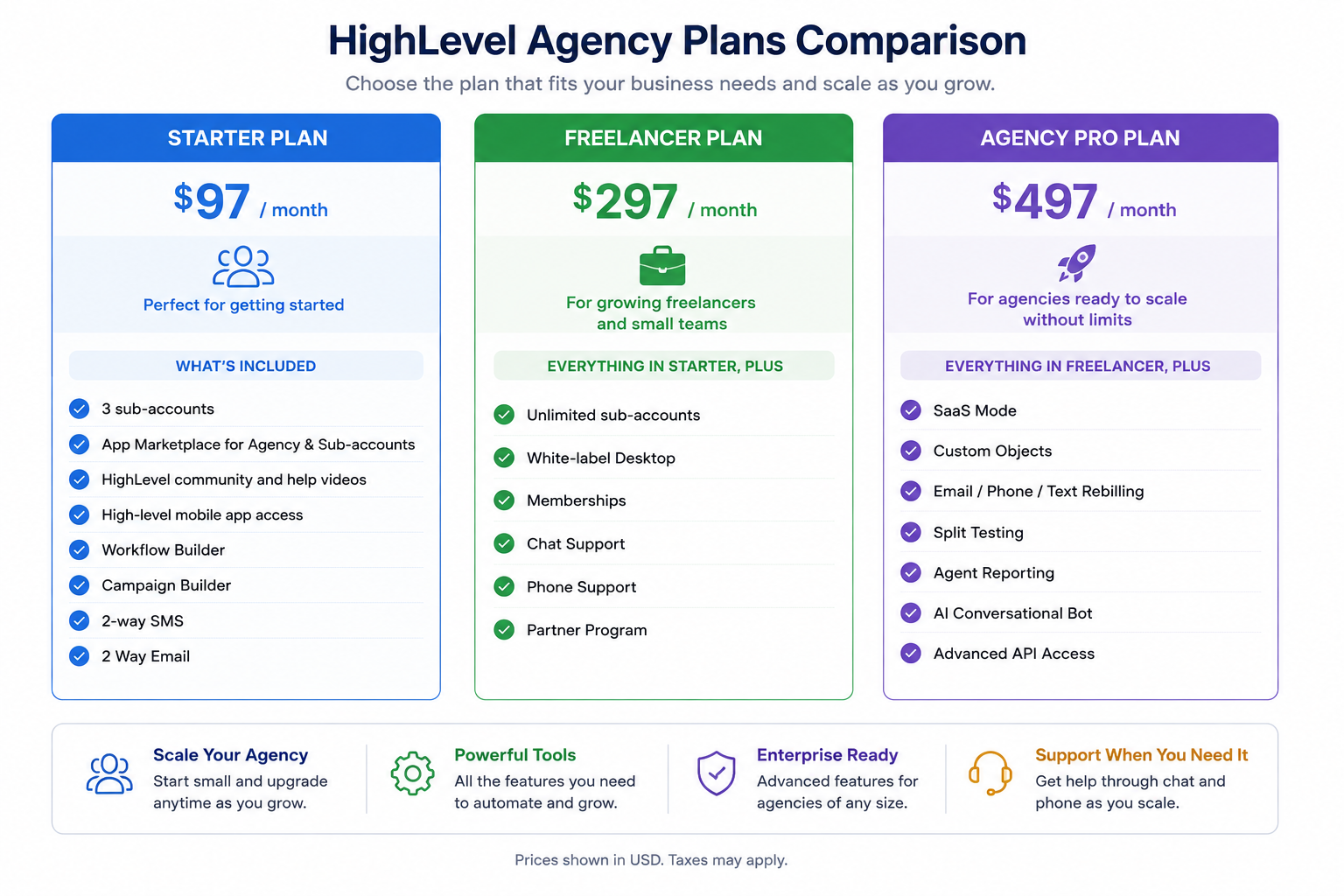
HighLevel Agency Plan Comparison
Billing Changes & Refunds
Update payment details: Go to Agency Settings > Billing and use the available billing or payment-method controls for your account. If you are reactivating an account, HighLevel may prompt you to add a new payment method during reactivation.
Fix a billing-address error: If you see the “Please Update the Billing Address” error, confirm that the postal code, address line, and CVV match the information your card issuer has on file. A mismatch between the billing details and card information can cause the payment to fail.
Make changes in HighLevel when the option is available: Eligible actions such as upgrading, downgrading, canceling, reactivating, or requesting financial assistance can be completed from Agency Settings > Billing when the corresponding option is available for your account.
Contact Support when a billing change is unavailable: Some subscription changes cannot be completed directly in the platform. For example, if a downgrade option is unavailable or you need to move an existing yearly subscription back to monthly billing, contact the HighLevel Billing team for assistance.
Request help with refunds or disputed charges: Refund requests and billing disputes require review by the HighLevel Billing team. Provide your agency name, agency login email, Agency Relationship Number if available, a brief explanation of the issue, and any relevant invoice or payment details to help the team investigate the charge.
For billing assistance, refer to 24/7 Customer Support Options.
Proration Explained (Immediate Charges After Upgrading)
HighLevel is a prepaid service. If you upgrade mid-cycle:
- You’re charged immediately for the new plan.
- A prorated credit is applied for unused time on the lower-tier plan.
- Example:
- Upgraded on March 15 from $297 to $497
- Used $297 plan for 10 days → credit = $99
- Charged for remaining 20 days at new plan → billed ~$133.33
- Upgraded on March 15 from $297 to $497
Financial Assistance Requests
HighLevel supports temporary relief for agencies needing financial help:
- Go to Settings and click on Billing.
- Click on Want to Modify/Cancel Your Subscription? button.
- Choose the Request Financial Support option.
- Please provide a detailed explanation of your reasons for requesting financial support.
- Check all the Acknowledgement boxes and click on Proceed.
- Check your next invoice details and click on Confirm and Apply.
- Approved accounts receive 1-month access at only 10% of their plan cost.
PLEASE NOTE: Financial assistance is a ONE time discount.
Error: "Please Update the Billing Address"
If you see this error:
- Stripe has flagged a mismatch between your billing address and the card information.
- Confirm that the postal code, address line, and CVV all match the card’s data.
Issues with Online Listing Services
To cancel your Online Listing service, submit the following details via chat:
- Location Name
- Location ID
- Reason for cancellation
A 3-month commitment applies to this service.
For any other issues with Online Listing Services, please contact HighLevel Support through in-app chat or by submitting a support ticket.
Accepted Card Payment Types
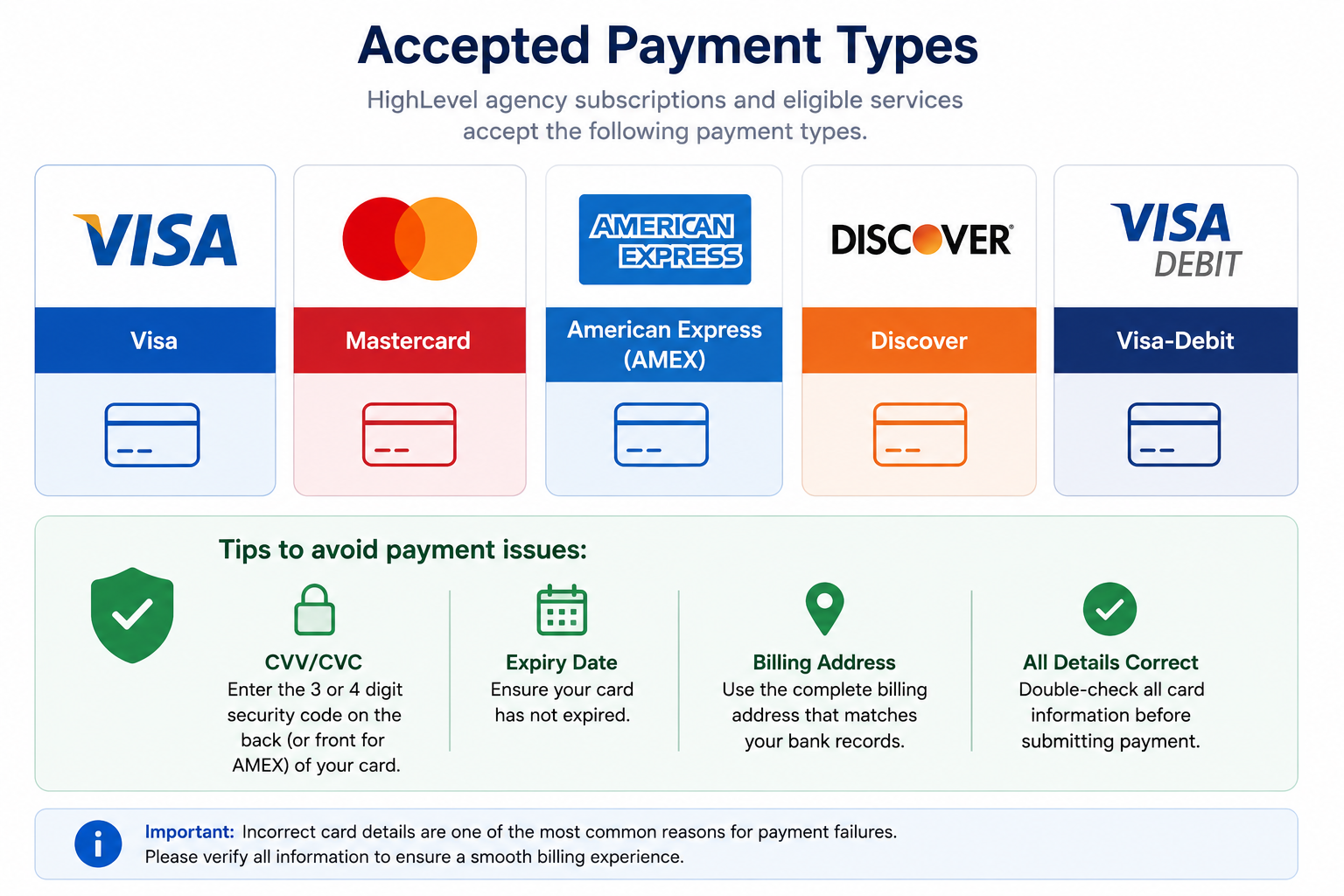
Please Note: We don’t accept PayPal, checks - ACH bank transfer now available for payments over $1000

You can now pay by ACH bank transfer for any payment of $1000 or more. ACH transfers take 3-10 business days to process — credit card remains available for all payment amounts.
Card Payment Issues
If your card payment fails or you receive a card payment error, please check the following before retrying:
- Confirm that the card number, expiration date, CVV, and billing address are entered correctly.
- Make sure the billing address and postal/ZIP code match the details on file with your card issuer.
- Verify that the card has sufficient funds or available credit.
- Check with your bank or card issuer to confirm the transaction is not being blocked or flagged.
- Confirm that the card is enabled for online, recurring, or international transactions, if applicable.
- Try using another accepted card payment type if the issue continues.
- Failed Payment Access & Dunning Period: If an agency subscription payment fails, the agency will continue to have account access for 21 days from the failed payment date. If the payment issue is not resolved within 21 days, account access will be locked. Payment retries will continue in the background for up to 1 month/30 days from the failed payment date.
Note: If you receive a general payment decline, try using an incognito window or a different browser. This often resolves browser-related issues that may be blocking the payment.
If the payment still does not go through after completing these checks, please contact HighLevel Support for further assistance.
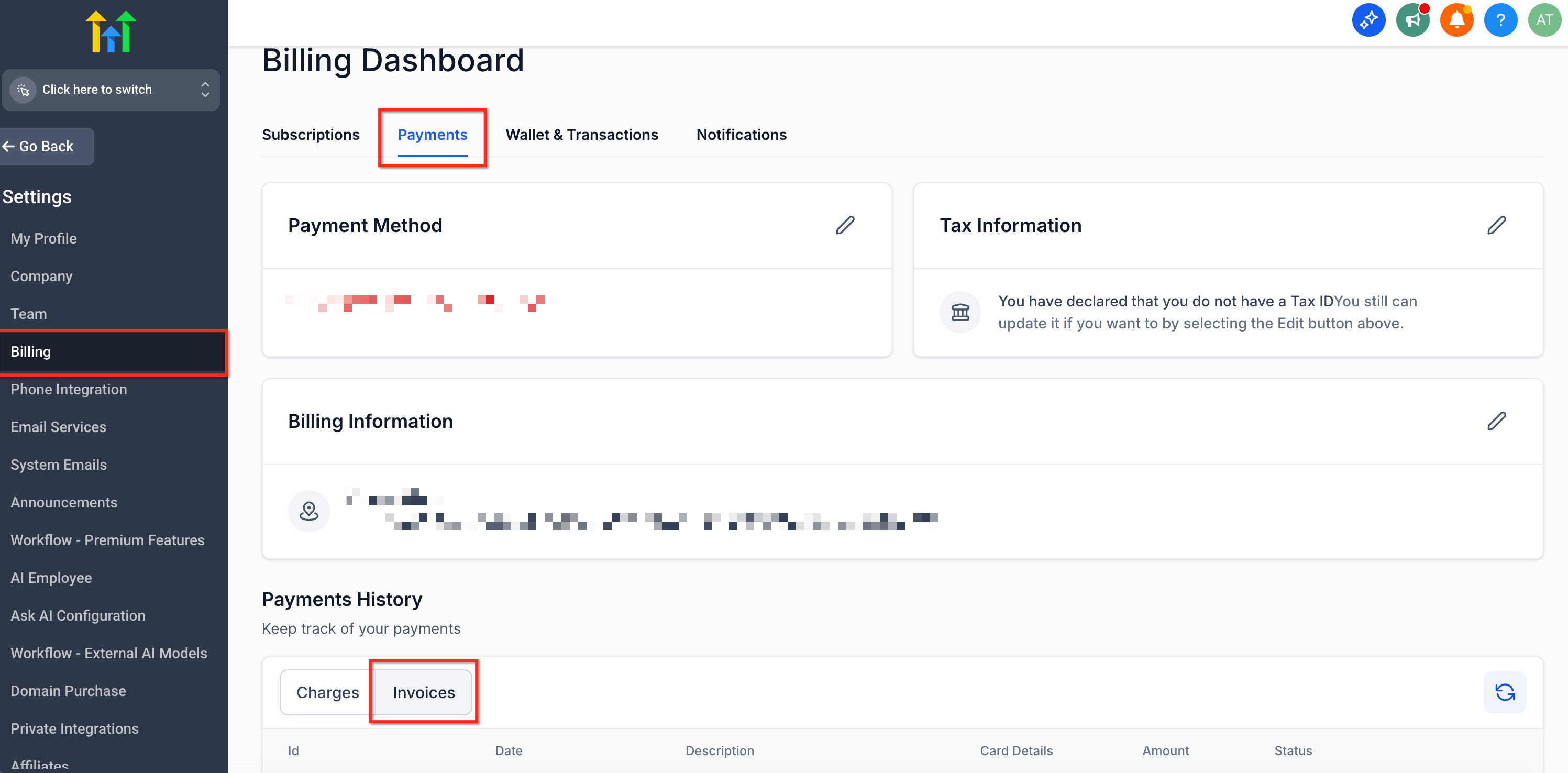
Viewing Past Invoices
To access invoice history:
- Go to Settings and click on Billing.
- Click on the Payments tab.
- Click on Invoices under Payment History.
Frequently Asked Questions
Q: Why was I charged twice this month?
You may have a prorated charge, a retried payment, or a separate subscription or add-on. Some services may have the same price as an agency plan, such as AI Employee at $97 or HIPAA at $297. Check your invoices and Wallet transactions to identify each charge.
Q: What if I signed up through another agency?
Contact your Agency Admin for subscription changes or cancellations. HighLevel cannot manage accounts purchased through another agency.
Q: Can I switch between monthly and yearly billing?
You can choose monthly or yearly billing when upgrading. Changing an existing yearly plan back to monthly is not available in the platform, so you must contact HighLevel Support.
Q: Will my data be deleted if I cancel?
Yes. Your data is deleted after 90 days. To keep your data, you can use the $27 per month Pause Plan instead of canceling.
Q: I cannot see the modify or cancel button. What should I do?
Contact HighLevel Support through Live Chat. They can review your account and help with the request.
Related Articles
Was this article helpful?
That’s Great!
Thank you for your feedback
Sorry! We couldn't be helpful
Thank you for your feedback
Feedback sent
We appreciate your effort and will try to fix the article