WhatsApp Conversation Routing
How Meta decides which connected integration receives your WhatsApp messages and who is allowed to reply — and what to check when messages do not arrive where you expect.
About this article: Conversation Routing is a Meta feature, announced in a Meta update dated November 3, 2026. It is configured in Meta Business Suite, not in the CRM. This article explains how Meta describes the feature and which settings to check if messages are not reaching the CRM.
Table of Contents
What Is Conversation Routing?
Conversation Routing lets a business control which connected partner, application, or AI agent receives its WhatsApp messages, and who is allowed to respond.
Previously, when several integrations were connected to the same WhatsApp number, they could all receive incoming messages. With Conversation Routing, the business chooses which integration handles each type of conversation, which one can take over an existing conversation, and which ones can only watch.
Example
A business has three things connected to one WhatsApp number:
Conversation Routing lets the business decide which of these systems receives incoming messages, which can take over a conversation, and which can only monitor it.
Important: Connecting your WhatsApp number to the CRM does not by itself guarantee that the CRM is the primary responder for every type of message. Your Conversation Routing settings in Meta Business Suite determine where each message type is delivered.
The Five Message Types You Can Route
Meta lets you choose a primary responder for each of five message types, also called entry points. Routing is set by message type, not by topic or by individual customer.
Each message type can have its own primary responder. Calls are routed independently of who owns the messaging thread.
In Meta Business Suite, these five types appear in the Manage who responds to messages window. Each type has its own dropdown, so different types can be assigned to different responders. The CRM appears in this list as LeadConnector.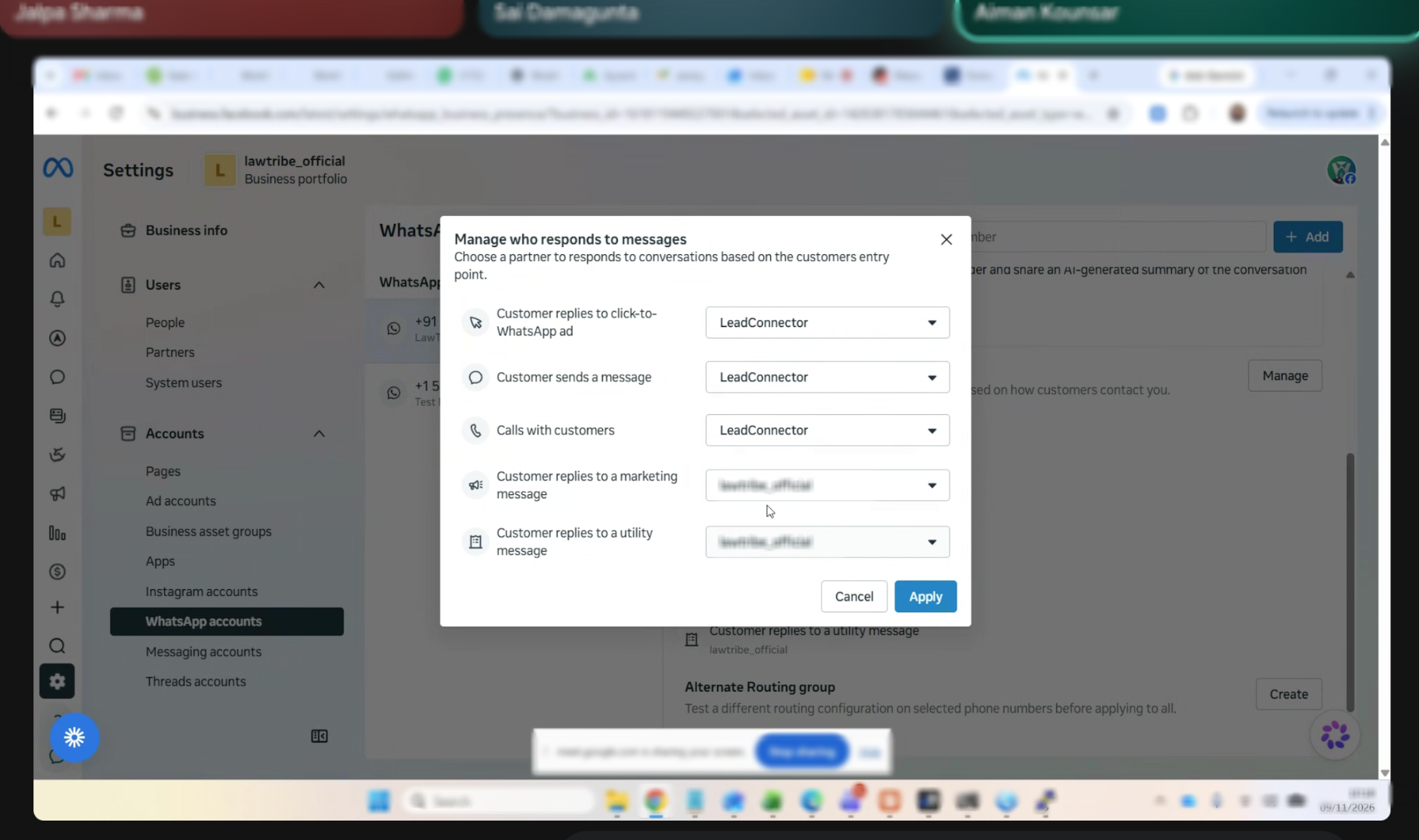
Example: the first three message types are assigned to the CRM, and replies to marketing and utility messages are assigned to a different responder (name hidden). In this setup, the CRM is not the primary responder for those two types.
Primary Responder, Escalation Partner, and Standby Partner
Primary Responder
The integration responsible for receiving messages when a conversation is idle. Each message type has one primary responder.
Escalation Partner
An integration that can take over an existing conversation. Only one escalation partner can be configured.
Standby Partner
An integration that can observe messages and status updates without owning the conversation. A standby partner cannot reply until it receives or takes control.
Example: The CRM can be the primary responder while another integration has standby visibility. Which roles each integration holds depends entirely on how the business configures routing.
How Routing Is Set Up
Meta describes five situations in which routing can be configured:
Meta's Terms of Service Requirement
To use advanced routing features, the business must accept the Meta Business Agents and Platform Terms of Service. Only the business can accept these terms.
What Happens When an Integration Is Disconnected
Fewer than two responders remain
Meta deletes the routing configuration and returns to the default behavior, where every connected responder receives everything.
Two or more responders remain
The removed partner is deleted from its routing assignments. Meta does not automatically choose a replacement primary responder or escalation partner.
Important: After removing a partner, the business must review and update its Conversation Routing configuration. If a message type is left without a primary responder, messages of that type may not reach the integration you expect.
Where Routing Is Configured
Conversation Routing is currently configured only in the Conversation Routing settings in Meta Business Suite. Meta does not provide a public API for configuring it, so it cannot be changed from the CRM.
How to open it in Meta Business Suite
Open Meta Business Settings and select the business portfolio that owns the WhatsApp account.
Go to Accounts → WhatsApp accounts and select your WhatsApp account.
Open the More menu and choose Conversation routing.
Under Message routing, click Manage to choose which responder handles each message type, then click Apply.
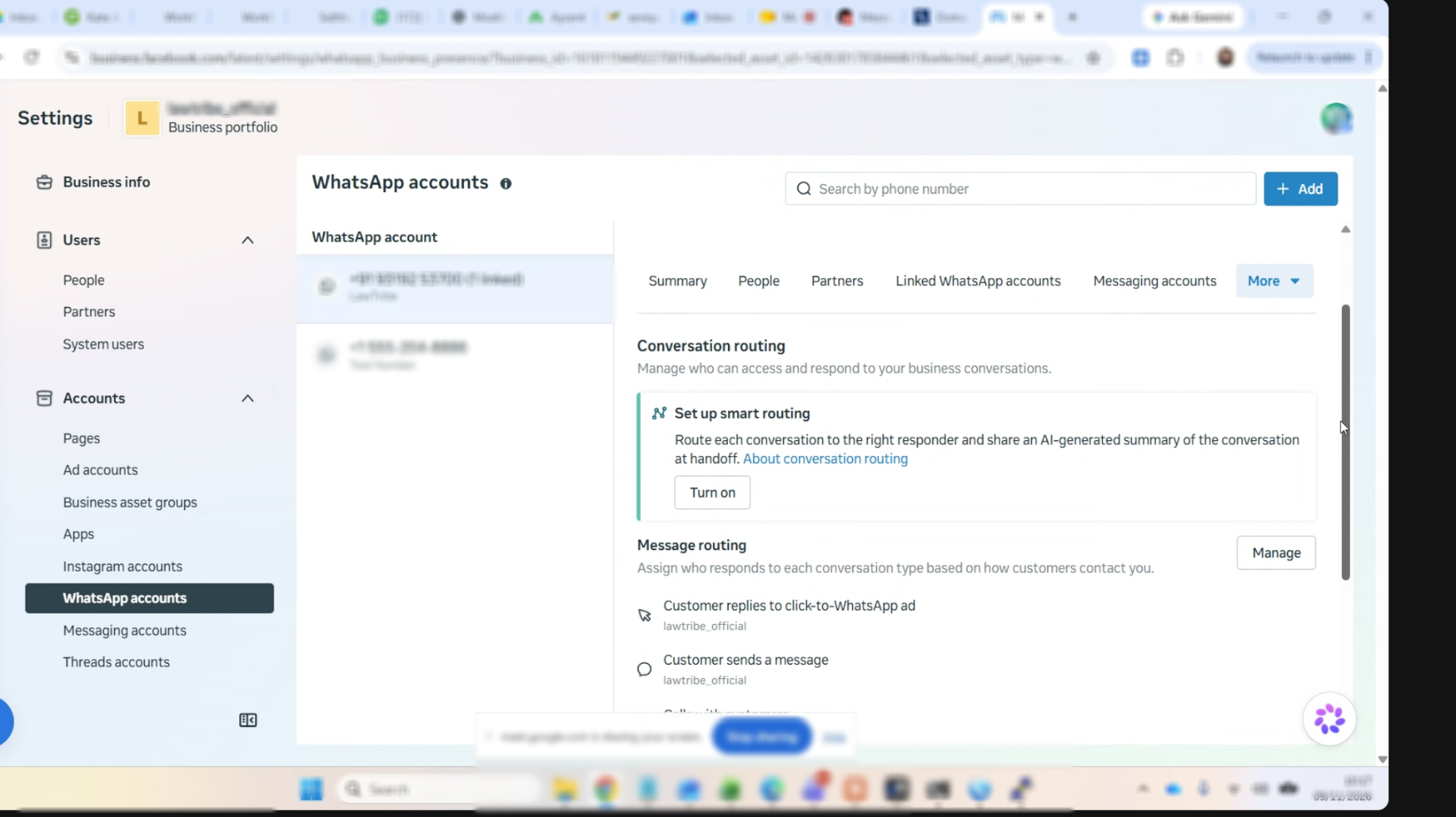
Other options you may see: This screen can also show Set up smart routing, which Meta describes as routing each conversation to the right responder and sharing an AI-generated summary at handoff, and an Alternate Routing group, which Meta describes as a way to test a different routing configuration on selected phone numbers before applying it to all. This article covers the standard message routing settings.
Thread control, which transfers ownership of a conversation between integrations, has its own separate API. Integrations that take part in routing also need the relevant webhook subscriptions, including messaging_handovers and standby where applicable. These are set up by the integration provider, not by the business.
Troubleshooting
If WhatsApp messages are not arriving or cannot be answered in the CRM, check your Conversation Routing settings in Meta Business Suite for these situations:
If the issue continues, contact Support and include: your Location ID, the WhatsApp number, the message type affected (for example Service or Calls), when the issue started, and a screenshot of your Conversation Routing screen in Meta Business Suite.
Frequently Asked Questions
Q: Can I configure Conversation Routing from the CRM?
No. Conversation Routing is configured in Meta Business Suite, and Meta does not currently offer a public API for it.
Q: Do I need to do anything if I only have the CRM connected?
Routing matters when more than one integration or AI agent is connected to the same WhatsApp number. If only one responder is connected, Meta's default behavior applies and that responder receives everything.
Q: Will connecting a new partner change my existing routing?
Not during normal partner onboarding. Existing routing configurations are not automatically overwritten. Enabling a Meta Business Agent is different, because it can become the primary responder and move existing responders to standby.
Q: Why can I see a conversation but not reply to it?
An integration in standby can observe messages and status updates, but it cannot reply until it receives or takes control of the conversation.
Q: Can I have more than one escalation partner?
No. Only one escalation partner can be configured.
Q: Are calls routed the same way as messages?
Calls have their own entry point and are routed independently of messaging thread ownership.
Q: Who can accept Meta's Terms of Service for advanced routing?
Only the business that owns the WhatsApp account can accept the Meta Business Agents and Platform Terms of Service. Without that acceptance, standby visibility and thread ownership transfers are not available.
Was this article helpful?
That’s Great!
Thank you for your feedback
Sorry! We couldn't be helpful
Thank you for your feedback
Feedback sent
We appreciate your effort and will try to fix the article