WhatsApp Voice Calling in HighLevel lets your team place and receive voice calls directly inside WhatsApp conversations. Instead of asking customers to switch apps, dial a separate number, or continue a long back-and-forth chat, users can move from message to voice in the same conversation thread. This helps teams resolve complex questions faster, support high-intent leads, and reduce drop-offs caused by channel switching.
Note: WhatsApp Voice Calling is currently available in closed beta and is web-only at this time. Mobile support may be added in a future release.TABLE OF CONTENTS
- What is WhatsApp Voice Calling?
- Key Benefits of WhatsApp Voice Calling
- Prerequisites for WhatsApp Voice Calling
- Inbound and Outbound WhatsApp Calls
- Inbound WhatsApp Calls
- Outbound WhatsApp Calls
- Callback on Missed Calls
- Call Buttons
- Call Permission Flows
- How To Setup WhatsApp Voice Calling
- Use Cases for WhatsApp Voice Calling
- Frequently Asked Questions
- Related Articles
What is WhatsApp Voice Calling?
WhatsApp Voice Calling allows users to have real-time voice conversations with customers through WhatsApp inside HighLevel. It keeps the customer conversation in one place, making it easier for sales, support, and service teams to move from chat to voice when a live conversation is more effective than text.
With WhatsApp Voice Calling, users can make outbound calls, receive inbound calls, show call buttons in the conversation view, and allow customers to request callbacks after missed calls.
Key capabilities include:
- Inbound WhatsApp voice calls
- Outbound WhatsApp voice calls
- Callback requests for missed calls
- Call buttons inside WhatsApp conversations
- Available call hours
- Temporarily unavailable call hours
- Call permission flows based on the WhatsApp service window
Key Benefits of WhatsApp Voice Calling
Voice calling helps teams handle conversations that are too urgent, complex, or high-value for text alone. By keeping calls inside WhatsApp, businesses can provide faster support while preserving the context of the existing chat conversation.
- Faster Issue Resolution: Resolve complex customer questions with a quick call instead of long message threads.
- Improved Lead Conversion: Connect with high-intent leads at the moment they are most engaged.
- Reduced Channel Switching: Keep the customer in WhatsApp instead of asking them to move to another app or phone call.
- Better Conversation Context: Continue from the existing WhatsApp chat so users can reference prior messages, files, and customer details.
- Missed Call Recovery: Allow customers to request a callback when a call is missed.
- Controlled Team Availability: Define when your team can receive calls using available and temporarily unavailable hours.
Prerequisites for WhatsApp Voice Calling
WhatsApp Voice Calling requires the connected WhatsApp number and WhatsApp Business Account to meet specific eligibility conditions. These requirements help ensure the number is properly connected, supported, and available for calling inside HighLevel.
Before enabling WhatsApp Voice Calling, confirm the following requirements for the sub-account:
- The WhatsApp phone number must be in a connected state.
- The WhatsApp Business Account messaging limit must be at the 2,000 tier or higher.
- The WhatsApp phone number must not be using WhatsApp Coexistence.
- The sub-account must have access to the closed beta.
- Users must configure calling from the HighLevel web app.
Important: WhatsApp Voice Calling inside HighLevel is not available for phone numbers using WhatsApp Coexistence. Coexistence may still allow calling from the WhatsApp Business App, but those calls are separate from HighLevel’s web-based WhatsApp Calling feature.Inbound and Outbound WhatsApp Calls
Inbound and outbound WhatsApp calls allow users to connect with customers by voice from the same WhatsApp conversation where messaging already happens. This is useful when a contact needs immediate help, wants clarification, or is ready to make a decision.
Inbound WhatsApp Calls
Customers can call the business through WhatsApp when calling is enabled and the business is available. Users can answer the call from the conversation experience in HighLevel.
Common inbound call scenarios include:
- A customer needs immediate help with an order, appointment, or service request.
- A lead wants to speak with a sales representative before purchasing.
- A client has a question that is easier to explain by voice.
Outbound WhatsApp Calls
Users can place WhatsApp voice calls from the customer conversation in HighLevel. This allows teams to escalate a chat into a live call without asking the customer to switch channels.
Common outbound call scenarios include:
- Calling a lead who asks a detailed question in chat.
- Following up with a customer after a missed call or callback request.
- Resolving a support issue that requires live troubleshooting.
Callback on Missed Calls
Callback on missed calls helps businesses recover missed WhatsApp voice calls by allowing customers to request a callback. This prevents missed calls from becoming lost opportunities and gives customers a simple way to continue the conversation.
Note: Callback on missed calls is different from Missed Call WhatsApp Back. Callback on missed calls applies to missed WhatsApp voice calls. Missed Call WhatsApp Back is a Phone System feature that sends a WhatsApp message after a regular phone call is missed.Call Buttons
Call buttons give users and customers an easy way to move from text messaging to a voice conversation. When enabled, call buttons appear inside the WhatsApp conversation experience so calls can be started without searching for another phone option.
Call Permission Flows
Call permission flows help manage whether a business can call a customer through WhatsApp based on the current WhatsApp conversation window. These flows help ensure calls are initiated appropriately depending on whether the service window is open or closed.
WhatsApp Voice Calling supports two call permission scenarios:
- Template-based call permission when the service window is closed
- Interactive call permission through automation when the service window is open
When the Service Window is Closed

When the WhatsApp service window is closed, call permission may require a template-based request. This helps businesses request permission before initiating a call outside the active messaging window.
When the Service Window is Open
When the WhatsApp service window is open, call permission may be handled through an interactive automation-based flow. This allows the customer to give permission while the conversation is active.How To Setup WhatsApp Voice Calling
Proper setup ensures that your WhatsApp number is eligible for voice calling and that customers can reach your team during the right hours. Before enabling calling, confirm that the phone number is connected, meets the required messaging-limit tier, and is not using coexistence.
Follow these steps to activate WhatsApp Voice Calling:
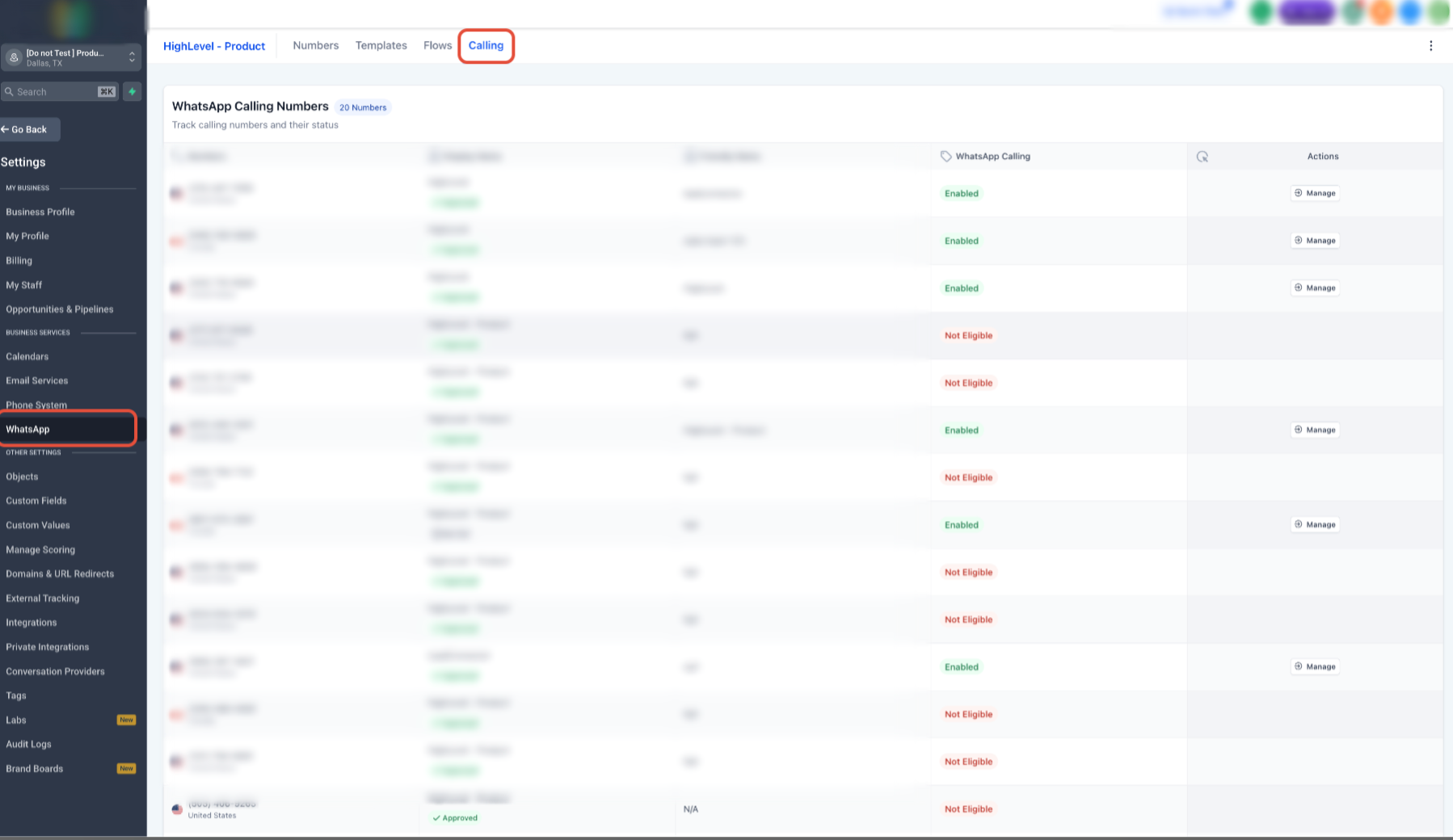
- Go to Settings in the sub-account.
- Select WhatsApp.
- Open the Calling tab.
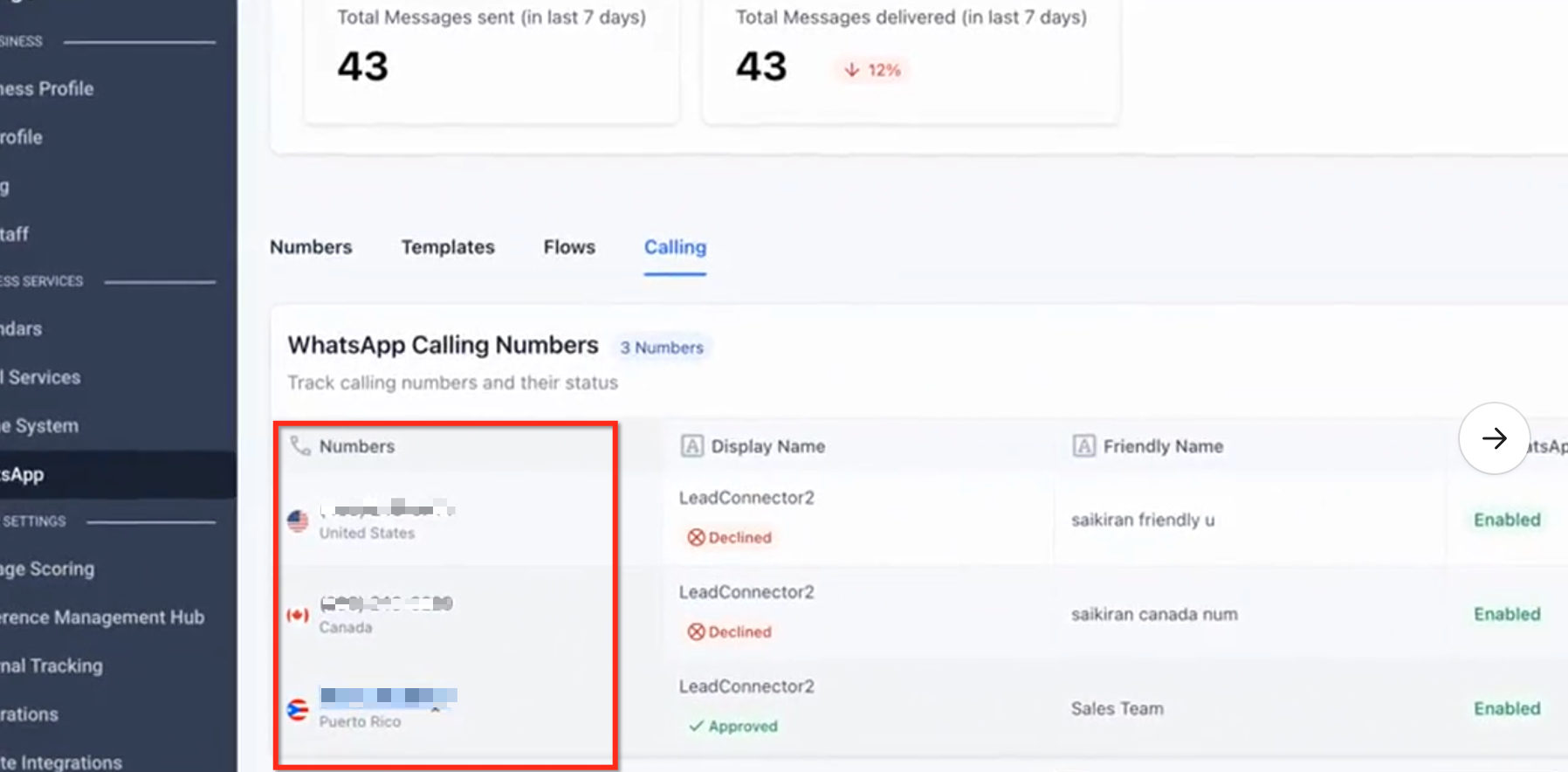
- Select the WhatsApp phone number you want to configure.
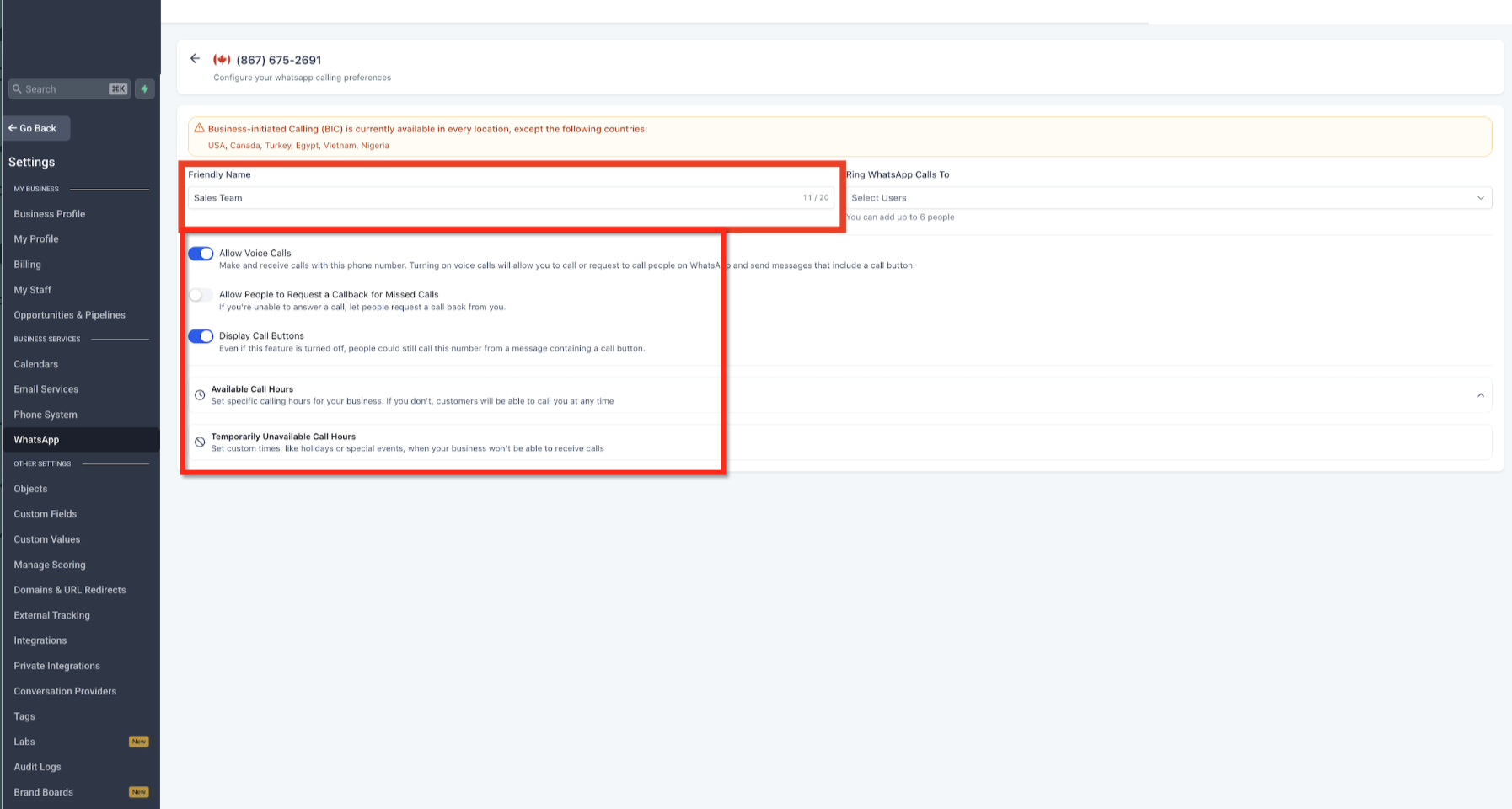
- Enable Allow calls. Configure Callback on missed calls, if you want customers to request callbacks after missed WhatsApp calls. Configure Call buttons, if you want call options to appear inside the conversation view.
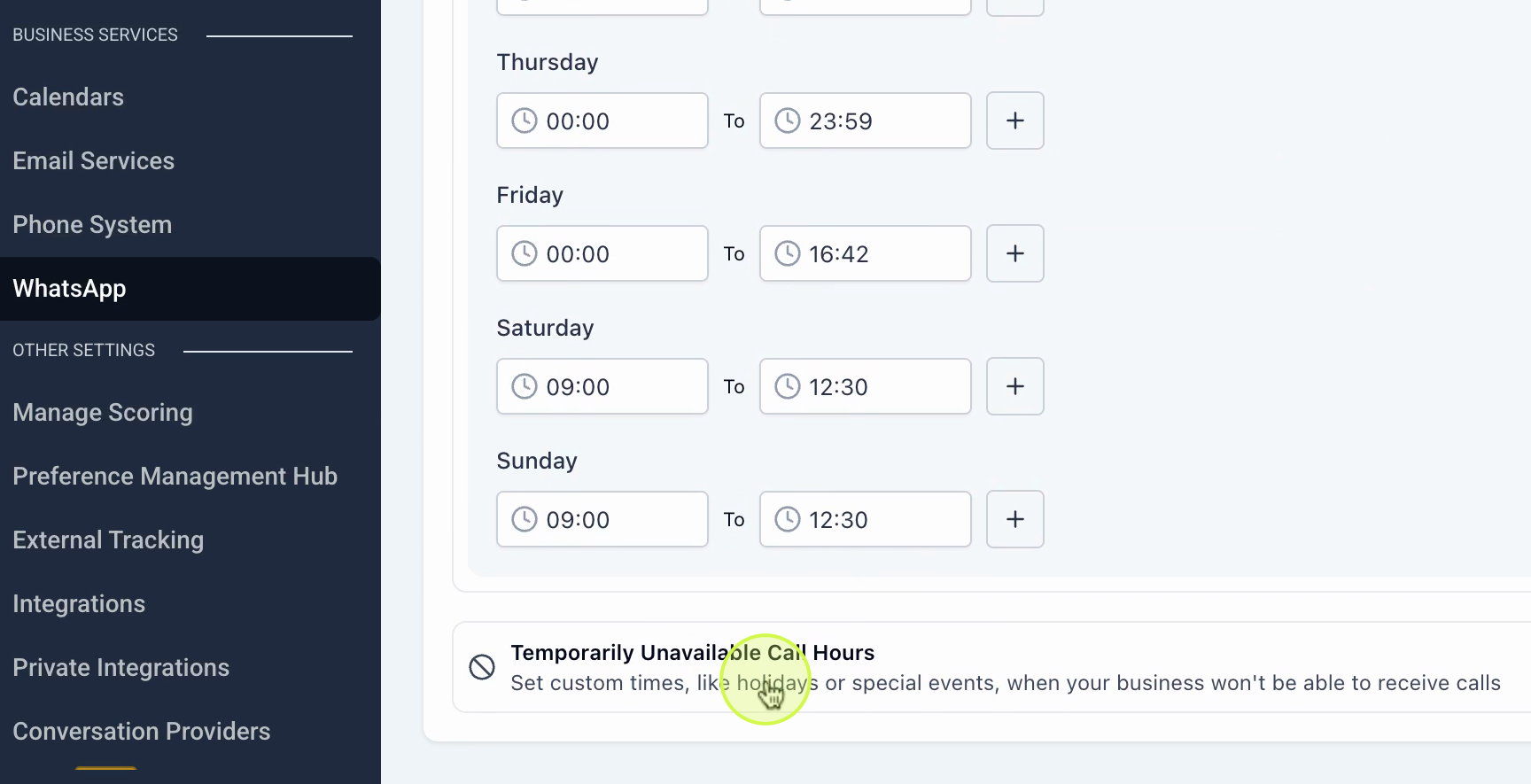
- Set your Available hours. Set any Temporarily unavailable hours.
- Save your changes.
Use Cases for WhatsApp Voice Calling
WhatsApp Voice Calling is useful for industries where customers often need quick answers, reassurance, or live guidance. Moving from chat to voice can reduce delays and help teams complete high-value conversations faster.
- Real Estate: Agents can call buyers from a property inquiry chat to discuss listing details, schedule site visits, or negotiate offers.
- Healthcare and Clinics: Front desk teams can confirm appointments, answer pre-consultation questions, or clarify patient requests while keeping related messages in the same WhatsApp thread.
- E-commerce and D2C Brands: Teams can call high-intent cart abandoners, resolve order disputes, or assist customers with refunds and exchanges.
- Education and EdTech: Counselors can call leads who downloaded brochures, started applications, or asked course-related questions.
- Financial Services and Insurance: Advisors, loan officers, and claims teams can walk customers through documents or verify details by voice.
- Travel and Hospitality: Teams can handle last-minute booking changes, itinerary questions, or urgent concierge requests.
- Automotive Dealerships: Sales reps can call test-drive leads, service teams can explain estimates, and finance teams can follow up with interested buyers.
- Home Services: Dispatchers can confirm appointment slots, technicians can clarify job details, and missed-call callbacks can help recover bookings.
- Agencies and SaaS Sales: Sales teams can move from inbound chat to discovery call quickly, reducing time-to-meeting.
- Legal and Professional Services: Attorneys, consultants, and advisors can take clarification calls while keeping documents and messages in the same conversation.
Frequently Asked Questions
Q: Why can’t I see the Calling tab under WhatsApp settings?
A: The sub-account may not have beta access, the WhatsApp number may not be connected, the WABA messaging limit may be below the required tier, or the number may be using WhatsApp Coexistence.
Q: What messaging limit is required for WhatsApp Voice Calling?
A: The WhatsApp Business Account must have a messaging limit of 2,000 tier or higher.
Q: Can I use WhatsApp Voice Calling with WhatsApp Coexistence?
A: No. HighLevel’s native WhatsApp Voice Calling feature is not available for phone numbers using WhatsApp Coexistence.
Q: What happens if a WhatsApp call is missed?
A: If Callback on missed calls is enabled, the customer can request a callback so your team can follow up.
Q: Are Callback on missed calls and Missed Call WhatsApp Back the same feature?
A: No. Callback on missed calls applies to missed WhatsApp voice calls. Missed Call WhatsApp Back applies to regular missed phone calls and sends a WhatsApp follow-up message.
Q: Can I control when my team receives WhatsApp calls?
A: Yes. You can configure available hours and temporarily unavailable hours from the WhatsApp Calling tab.
Q: Can users make outbound WhatsApp calls from conversations?
A: Yes. Users can place outbound WhatsApp voice calls from the conversation experience when calling is enabled and permission requirements are met.
Related Articles
Was this article helpful?
That’s Great!
Thank you for your feedback
Sorry! We couldn't be helpful
Thank you for your feedback
Feedback sent
We appreciate your effort and will try to fix the article