The AI Employee Starter plan gives your sub-account access to Ask AI and AI Studio for $20/month. You can upgrade a sub-account directly from your agency's AI Suite.
Important: The Starter plan is available exclusively to agencies subscribed to HighLevel's $497 Founder plan. Growth and Unlimited are available to eligible sub-accounts across agency plans.TABLE OF CONTENTS
How to Upgrade to the AI Employee Starter Plan
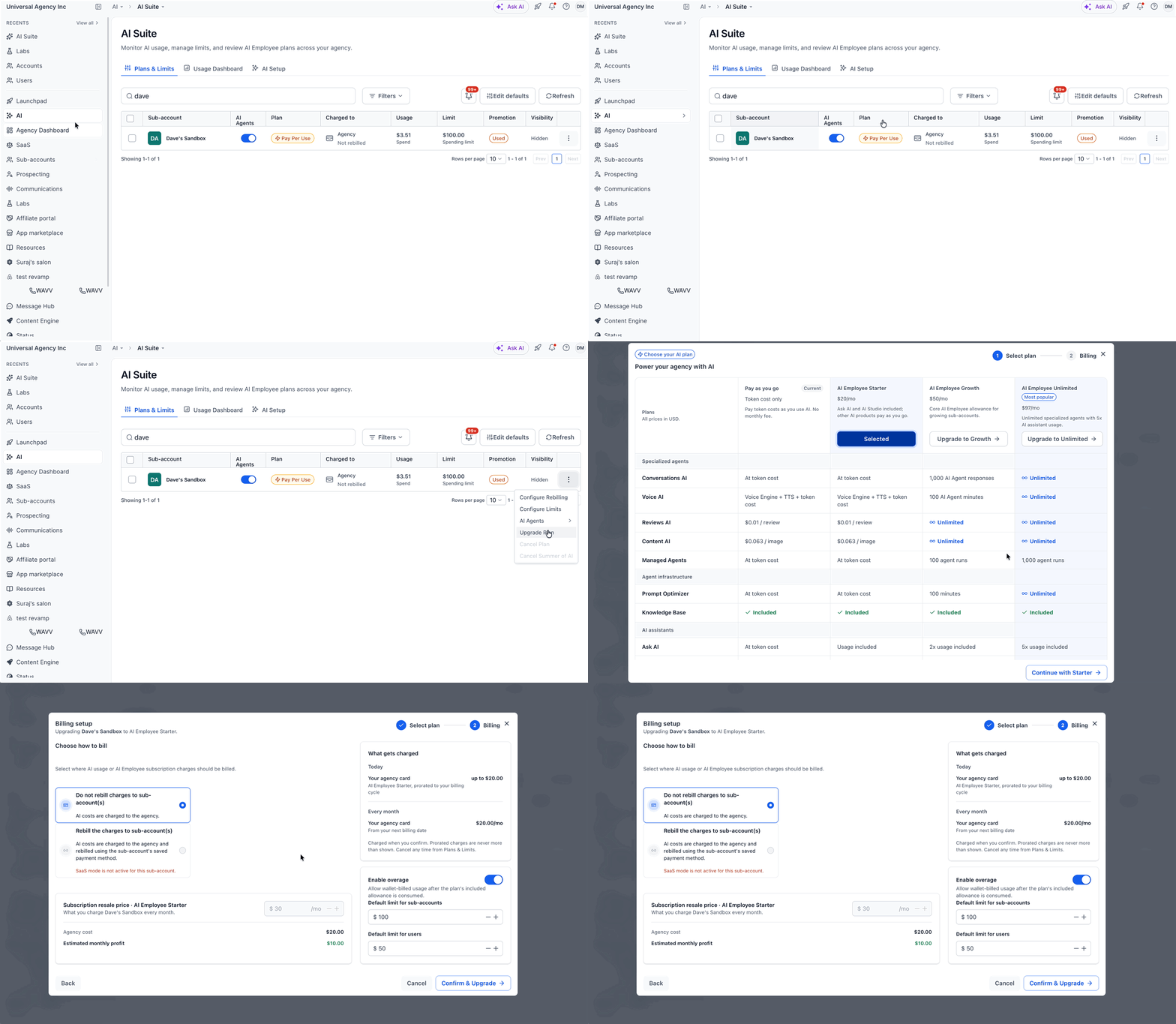
- Log in to HighLevel and switch to Agency View.
- From the left menu, go to AI > AI Suite.
- Under the Plans & Limits tab, find the sub-account you want to upgrade and click the three-dot menu on the right.
- Select Upgrade Plan.
- Find AI Employee Starter and click Continue with Starter.
- Continue to the billing setup to review the subscription details and complete the purchase using the available on-screen instructions. Then click Confirm & Upgrade.
Note: The AI Employee Starter plan costs $20/month per sub-account. Other AI products may have additional pay-per-use charges.
Related Articles
Was this article helpful?
That’s Great!
Thank you for your feedback
Sorry! We couldn't be helpful
Thank you for your feedback
Feedback sent
We appreciate your effort and will try to fix the article