Agency users can now access Email AI across locations, even when Email AI is disabled for location users in a specific location. This makes it easier for agencies to create and manage Email AI templates directly where they are needed instead of relying on enabled locations as a workaround. Location users continue to receive Email AI access according to their location's Labs configuration. The “Visible to Agency Users Only” indicator helps agency users understand when Email AI is not available to location users.
TABLE OF CONTENTS
- What is Email AI Access for Agency Users Across Locations?
- Key Benefits of Email AI Access for Agency Users
- How Email AI Access Works for Agency and Location Users
- Email AI Templates and Template Sharing
- Set Up Email AI for Agency Users
- Frequently Asked Questions
- Related Articles
What is Email AI Access for Agency Users Across Locations?
Email AI helps users create and refine emails in HighLevel using guided prompts, brand-aware styling, and conversational editing. Expanded agency-user access allows agencies to work with Email AI inside locations even when the location has not enabled Email AI for its own users, reducing unnecessary template duplication while preserving location-level controls.
Key Benefits of Email AI Access for Agency Users
Giving agency users consistent Email AI access reduces the administrative work required to create client email assets while maintaining separate controls for location users. Agencies can work more efficiently without enabling a Labs feature for client users who are not ready to use it.
Create templates where they are needed: Agency users can build and manage Email AI templates directly inside the applicable location.
Reduce duplicate work: Agencies no longer need to use an Email AI-enabled location as a workaround and then manually distribute templates solely because Email AI is disabled elsewhere.
Maintain location-level controls: Location users continue to receive Email AI access according to their location's Labs configuration.
Improve access clarity: The “Visible to Agency Users Only” tag helps agency users understand why they can see Email AI when a location user cannot.
How Email AI Access Works for Agency and Location Users
Email AI availability now considers both the user's context and the location's Labs configuration. Understanding that distinction helps agencies prepare templates for clients without unintentionally changing which features are available to the client's own users.
| User context | Email AI disabled for the location | Email AI enabled for the location |
|---|---|---|
| Agency user | Email AI remains accessible | Email AI is accessible |
| Location user | Email AI is unavailable | Email AI is available, subject to applicable permissions |
For location users, Email AI continues to follow the location's Labs configuration.
For additional information about Labs controls, see Labs Features - Complete Overview.
Important: Expanded Email AI availability does not give someone access to a location or module they otherwise cannot access. HighLevel user type, role, sub-account assignment, and module permissions continue to determine a user's broader account access.
Email AI Templates and Template Sharing
Direct Email AI access gives agencies more flexibility to create templates inside the location where the template will be used. Template sharing remains useful when an agency intentionally wants to copy an existing email template to other locations, but it is no longer required solely as a workaround for an agency user being unable to access Email AI in a location.
Use direct Email AI creation when you want to build or manage a template specifically for the current location. Use template sharing when you intentionally want to reuse or distribute an existing template across locations.
For instructions on copying an existing template, see Share Email Template across Agencies.
Set Up Email AI for Agency Users
Agency users can access Email AI in locations they already have access to, even when Email AI is disabled for location users.
Log in to HighLevel as an agency user.
Open the location where you want to create or manage an Email AI template.
Go to Marketing → Emails → Templates and Type in to Build with AI. The “Visible to Agency Users Only” tag is also visible here.
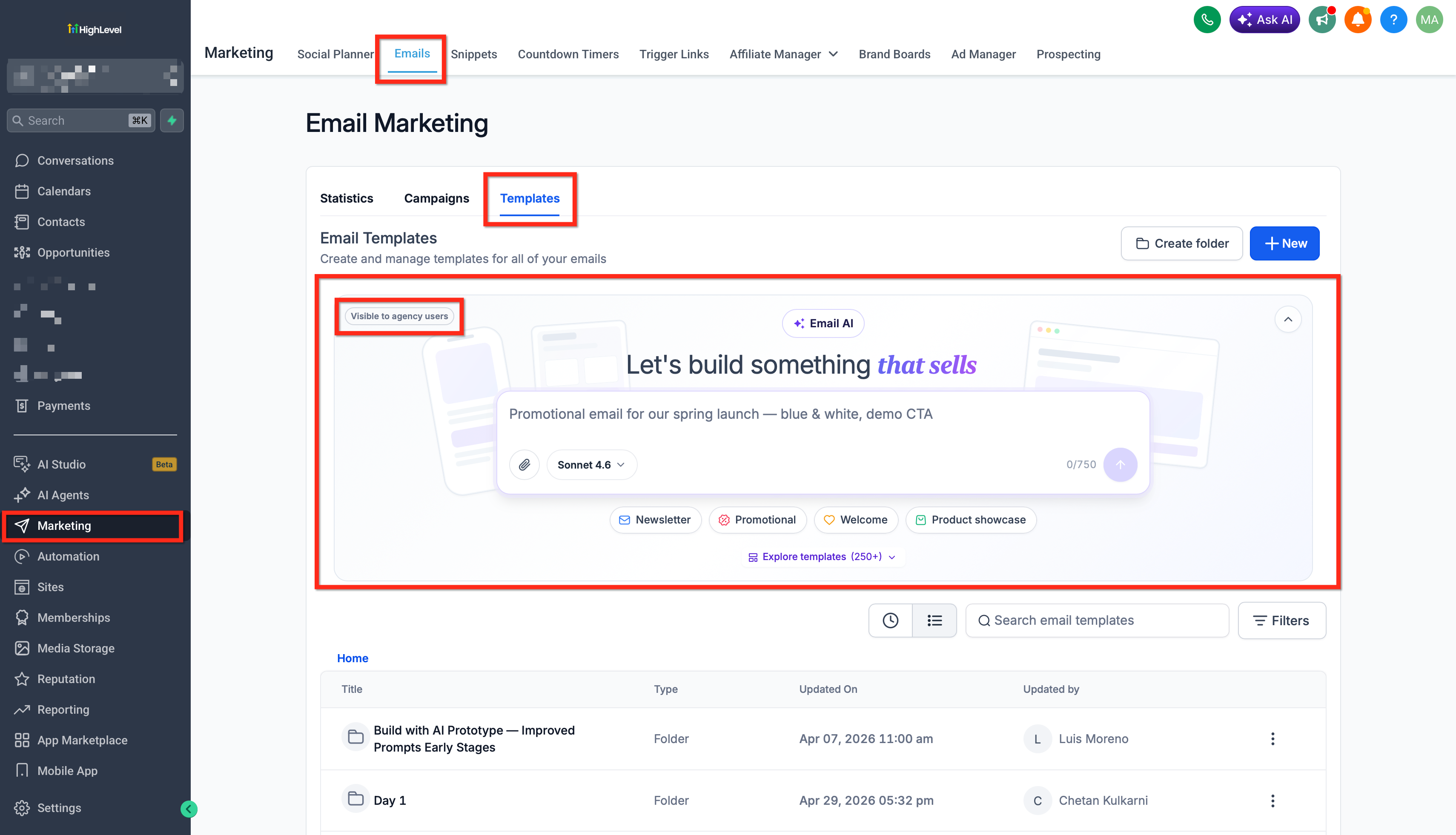
If Email AI is disabled for location users, look for the “Visible to Agency Users Only” tag.
The “Visible to Agency Users Only” tag helps prevent confusion when an agency user can access Email AI but the feature is disabled for the location's users. The indicator communicates that the agency user is seeing functionality that is not currently available to location users under that location's Email AI configuration.
Seeing this tag does not require the agency user to enable Email AI for the location before continuing their work. If location users also need Email AI access, the appropriate Email AI Labs configuration must be enabled for that location.
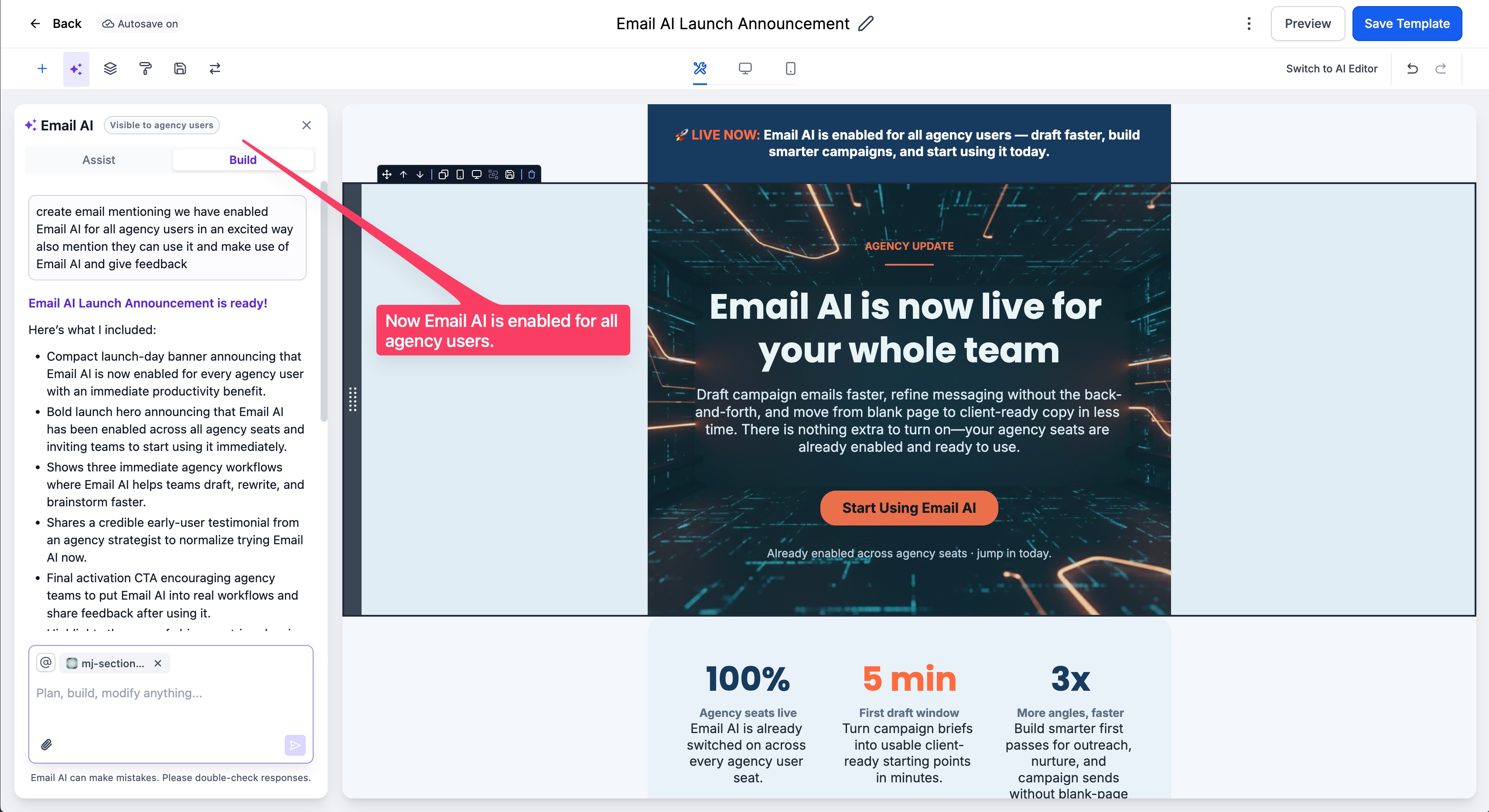
Create or update the template, then save your changes.
Frequently Asked Questions
Q: Does expanded Email AI access give an agency user access to locations they were not otherwise permitted to access?
No. Email AI access does not replace HighLevel's existing user type, role, account scope, or permission controls. Those settings continue to determine the accounts and modules a user can access.
Q: Does an Admin role inside a location automatically receive agency-user Email AI access?
Not simply because the user is a location Admin. HighLevel distinguishes between user scope and role, and sub-account users have permissions within their applicable location. The agency-user access described here applies to the agency-user context identified by this feature release.
Q: Does creating an Email AI template in one location automatically copy it to every other location?
No. Expanded access lets agency users create templates directly where they are needed; it does not automatically synchronize a template across locations. HighLevel's template-sharing workflow can still be used when you intentionally want to share or clone a template.
Q: Can agency users still use the existing email-template sharing feature?
Yes. Template sharing remains available as a separate workflow for reusing an existing email template across supported locations.
Q: Does this access enhancement remove other Email AI prerequisites?
No. It changes how Email AI availability works for agency users when the feature is disabled at the location level. Existing Email AI requirements and recommendations still apply.
Related Articles
Was this article helpful?
That’s Great!
Thank you for your feedback
Sorry! We couldn't be helpful
Thank you for your feedback
Feedback sent
We appreciate your effort and will try to fix the article