How Recipients can Resubscribe Email in HighLevel
A one-click path for contacts to opt back into your marketing emails — how it works, how DND and reporting are affected, and how to verify the change in the contact record.
Resubscribe gives contacts a simple way to opt back into marketing emails after they unsubscribe.
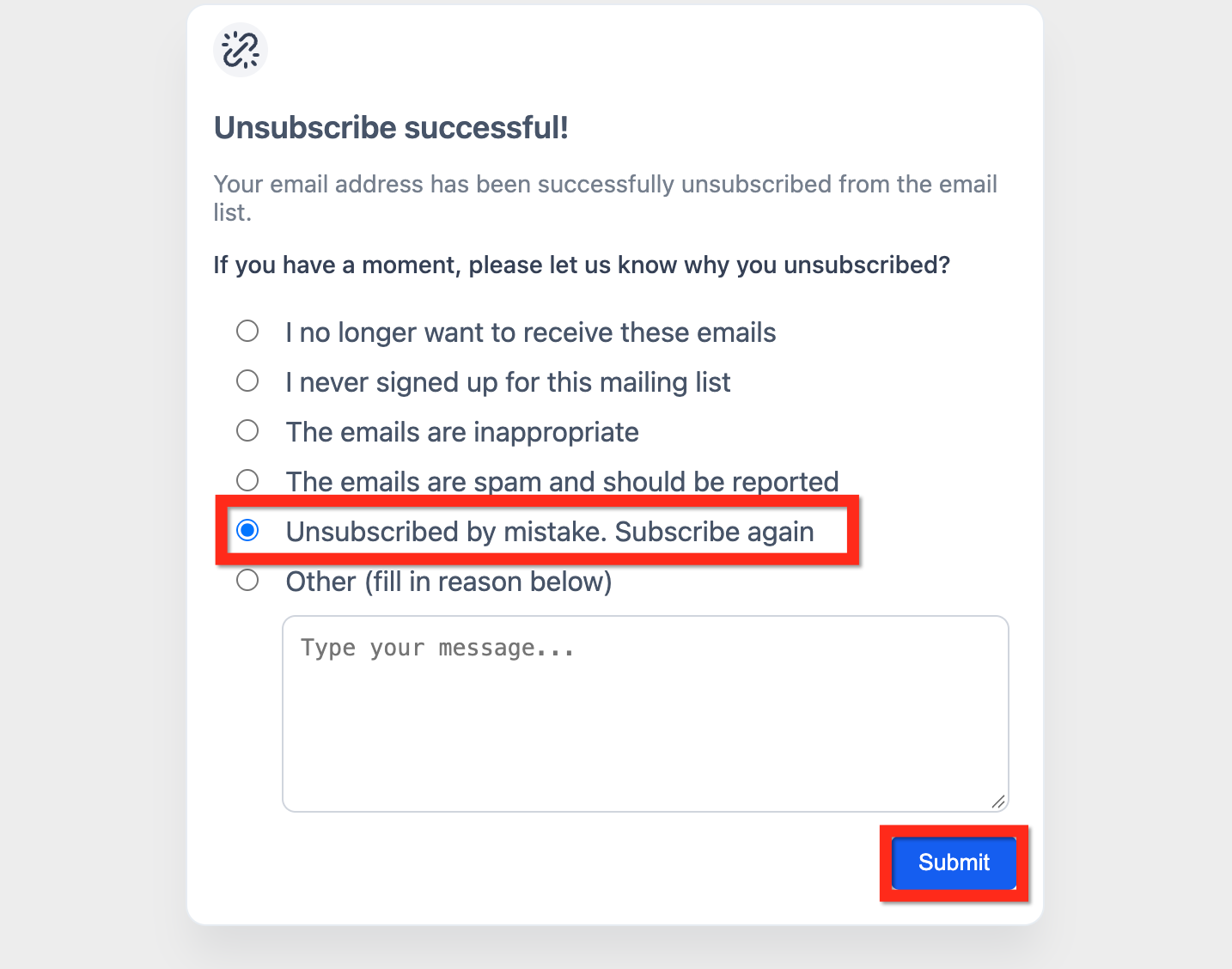
After unsubscribing, contacts can use the feedback questionnaire to select Unsubscribed by mistake, subscribe again and submit the form. HighLevel then restores their email subscription status.
This article explains how resubscription works and how to verify the change in the contact record.
Table of Contents
What is Resubscribe in HighLevel?
Resubscribe is a built-in option in the unsubscribe feedback questionnaire that lets contacts reverse an accidental unsubscribe.
After unsubscribing, the contact can select Unsubscribed by mistake, subscribe again and submit the feedback form. HighLevel then restores the contact's email subscription status.
Key Benefits of Resubscribe
- Simple consent recovery: Contacts can indicate that they unsubscribed by mistake and subscribe again directly from the unsubscribe feedback form.
- Cleaner CRM status: Updates the contact's email eligibility so you don't need manual DND toggles.
- Better campaign continuity: Enables clean re-engagement sequences once a contact opts back in.
- Compliance-friendly workflow: Captures a positive, contact-initiated action to help support consent records.
- Operational efficiency: Reduces support tickets asking, "Please add me back."
Where the Resubscribe Option Appears
After a contact unsubscribes from an email, the unsubscribe feedback questionnaire includes the option Unsubscribed by mistake, subscribe again.
The contact selects this option and submits the form to indicate that they want to receive emails again.

DND & Consent Updates
Resubscribe changes a contact's eligibility to receive email. Here's what to look for so you can verify the change and keep consent records clear.
- Selecting Unsubscribed by mistake, subscribe again and submitting the feedback form resubscribes the contact.
- Verify the change in the contact record after the form is submitted.
- Use notes or tags (e.g.,
Resubscribed - {date}) to preserve auditability for your team.
Tip
Compare the contact record before (Email = Unsubscribed / Blocked) and after (Email = Eligible / Not in DND) to confirm the update applied cleanly.
Reporting Notes
Campaign analytics may not immediately reconcile unsubscribe and resubscribe events. Set expectations with your team and choose the right reports when validating metrics.
- Some campaign statistics may still show the contact under unsubscribed for a period of time, even after they resubscribe.
- When validating performance, compare message-level and contact-level data, and check known timing/aggregation behavior in your email reporting documentation.
- Consider segmenting reports by current eligibility to get an accurate audience snapshot for future sends.
Automation Ideas (Optional)
Optional workflows you can layer on top of the core resubscribe flow to make the experience even smoother.
- Resubscribe confirmation email: Trigger a short "welcome back" email that acknowledges the choice and links to preference settings.
- Auto-tag for audit trail: Add a tag like
Resubscribedwith the date to simplify consent audits. - Gentle re-engagement sequence: Drip a low-volume series instead of adding contacts to large broadcasts immediately — respect the fresh consent.
- Internal team notification: Notify the assigned rep in Slack or an internal email when a lapsed lead resubscribes.
How To Set Up & Test Resubscribe
A quick test validates your unsubscribe flow, confirms the resubscribe link appears, and verifies the change in the contact record before you rely on it in production.
Step 1: Prepare a test contact
- Create a contact or identify one you can email.
- Confirm they can receive emails (not currently suppressed).
Step 2: Send a simple test email
- Include the default unsubscribe link in the footer (or your configured unsubscribe method).
- Send the email to your test contact.
Step 3: Unsubscribe using the email
- Open the email and click Unsubscribe.
- Complete the unsubscribe flow and reach the success page.
Step 4: Resubscribe from the feedback form
1. After unsubscribing, locate the feedback questionnaire.
2. Select Unsubscribed by mistake, subscribe again.
3. Click Submit.
Step 5: Verify the contact record
- Open the test contact and confirm email eligibility is restored (review DND and recent Activity entries).
- Add a tag or note such as
Resubscribed - {date}for internal tracking.

You're All Set
Resubscribe gives your audience a respectful way back in — without manual work for your team and with a clean audit trail. Test once, layer on a confirmation workflow, and trust the flow to handle the rest.
Frequently Asked Questions
Was this article helpful?
That’s Great!
Thank you for your feedback
Sorry! We couldn't be helpful
Thank you for your feedback
Feedback sent
We appreciate your effort and will try to fix the article