Temporarily stepping away from HighLevel does not have to mean rebuilding your account later. The Pause Account Plan lets you retain core account data and configurations for $27/month while access to the platform is paused.
TABLE OF CONTENTS
What is the Pause Account Feature
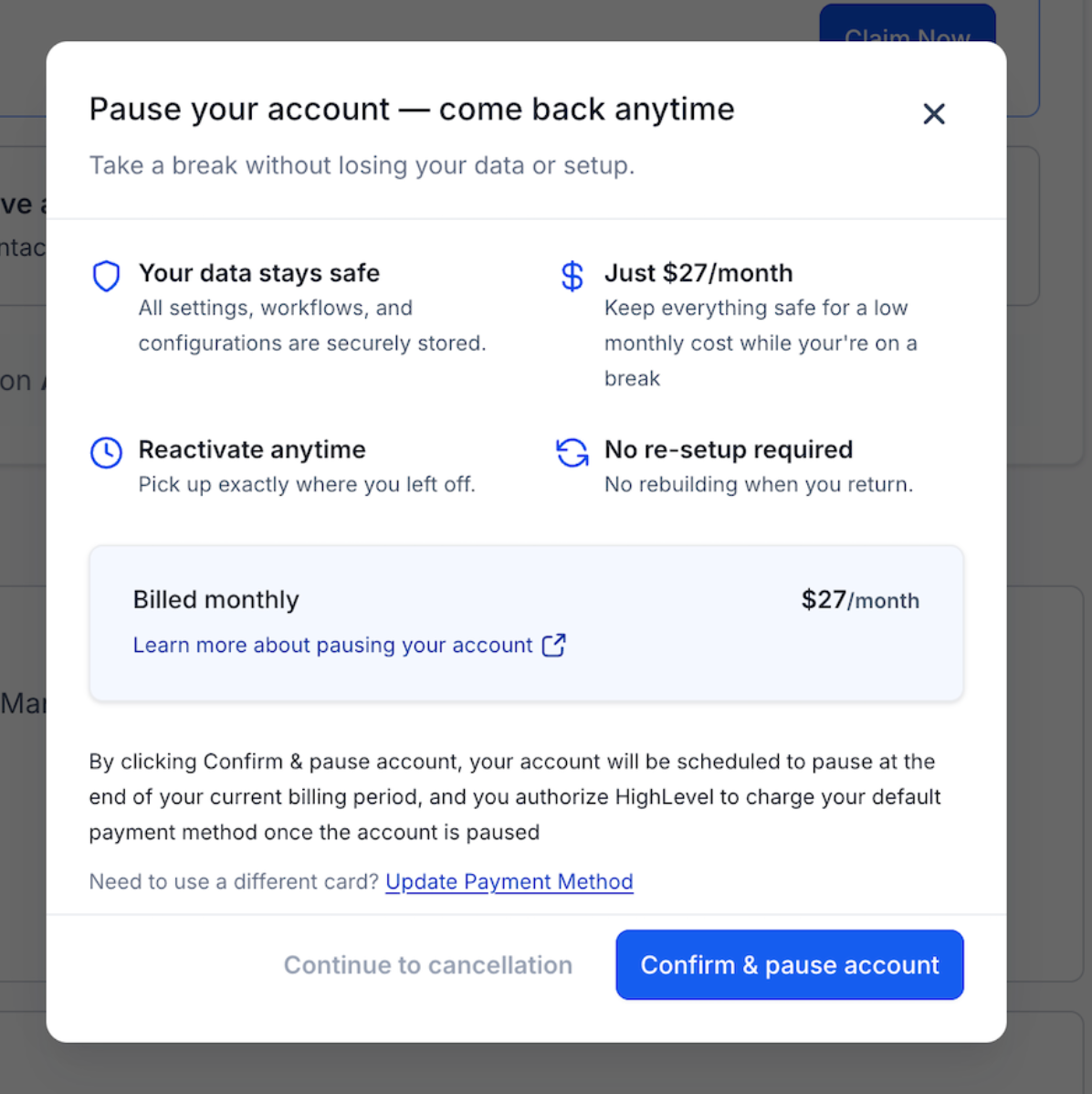
The Pause Account Feature is designed for Agency users who temporarily do not need an active HighLevel subscription but want to preserve their core account setup and data. While the account is paused, Agency users and sub-accounts cannot actively access the platform, but supported data, settings, and configurations remain preserved for future reactivation. The Pause Account Plan costs $27 per month, and you can reactivate, change, or cancel the plan when needed.
Pausing is different from canceling your HighLevel subscription. A canceled account enters a 90-day data-retention period, after which the Agency account, sub-accounts, and associated data are permanently deleted if the account is not reactivated. The Pause Account Plan is intended for users who want to step away temporarily while retaining supported account data.
What Happens When You Pause Your Account
During the pause period:
- You and your sub-accounts will not have active access to the platform.
- Your data, settings, and configurations will be securely preserved.
- You can reactivate, change, or cancel your plan anytime.
When you reactivate, all your progress will be restored so you can continue right where you left off.
What Is Preserved When Your Account Is Paused
We retain your core business assets so your work remains intact.
| Category | What Is Preserved | Notes |
|---|---|---|
| CRM Assets | Contacts, Conversations, Custom Objects, Tasks, Opportunities, Companies, Users | Core CRM data remains stored for reactivation |
| Funnels | Funnel configurations and settings | Published funnel pages are moved to Draft |
| Automations | Workflows and automation configurations | Published workflows are moved to Draft |
| Calendars | Calendar settings and configurations | Booking links are moved to Draft |
| Client Portal | Portal configuration settings | Client access is disabled during pause |
| Email Builder | Email templates and assets | Scheduled campaigns are moved to Draft |
| Media Storage | Images, videos, PDFs, documents, audio, and other uploads | All uploaded media remains stored |
| Snapshots | Saved snapshots and templates | Fully preserved for reuse |
| Subscriptions (Records) | Subscription records created via HighLevel checkouts | Does not include external subscription behavior |
| Transactions | Payment history and receipts | Includes imported and native transactions |
| Products | Product catalog, pricing, and variants | Fully preserved |
| Orders | Order records and related transaction data | Retained for reporting and history |
| Coupons | Active and expired coupon configurations | All coupon data remains stored |
| Gift Cards | Gift card products and order history | Fully preserved |
| Payment Settings | Taxes, receipts, notifications, and related settings | Configuration data remains intact |
What Is Not Included in the Pause Account Plan
Some HighLevel services depend on active subscriptions, registrations, renewals, or external infrastructure and are not preserved in the same way as core account data. Reviewing these items before pausing can help you avoid unexpected service loss or additional setup after reactivation.
| Category | What Happens During the Pause | What to Know |
| Phone Numbers | Phone numbers are deleted 14 days after the account enters Paused status | Deleted phone numbers may need to be obtained or configured again after reactivation |
| A2P Registration | A2P registrations are deleted 14 days after the account enters Paused status | Messaging registration may require additional setup after reactivation |
| Reselling Subscriptions | Reselling subscriptions are automatically canceled | You must resubscribe to affected services after reactivating the Agency account |
| Marketplace Subscriptions | Marketplace subscriptions are automatically canceled | Canceled subscriptions do not automatically resume after reactivation |
| SaaS Subscriptions | SaaS subscriptions are automatically canceled | Pausing the Agency account is different from pausing individual SaaS sub-accounts |
| Domains | Upcoming internal domain renewals fail while the account is paused | A domain that is not renewed can expire and may require recovery after reactivation |
How to Pause Your Account
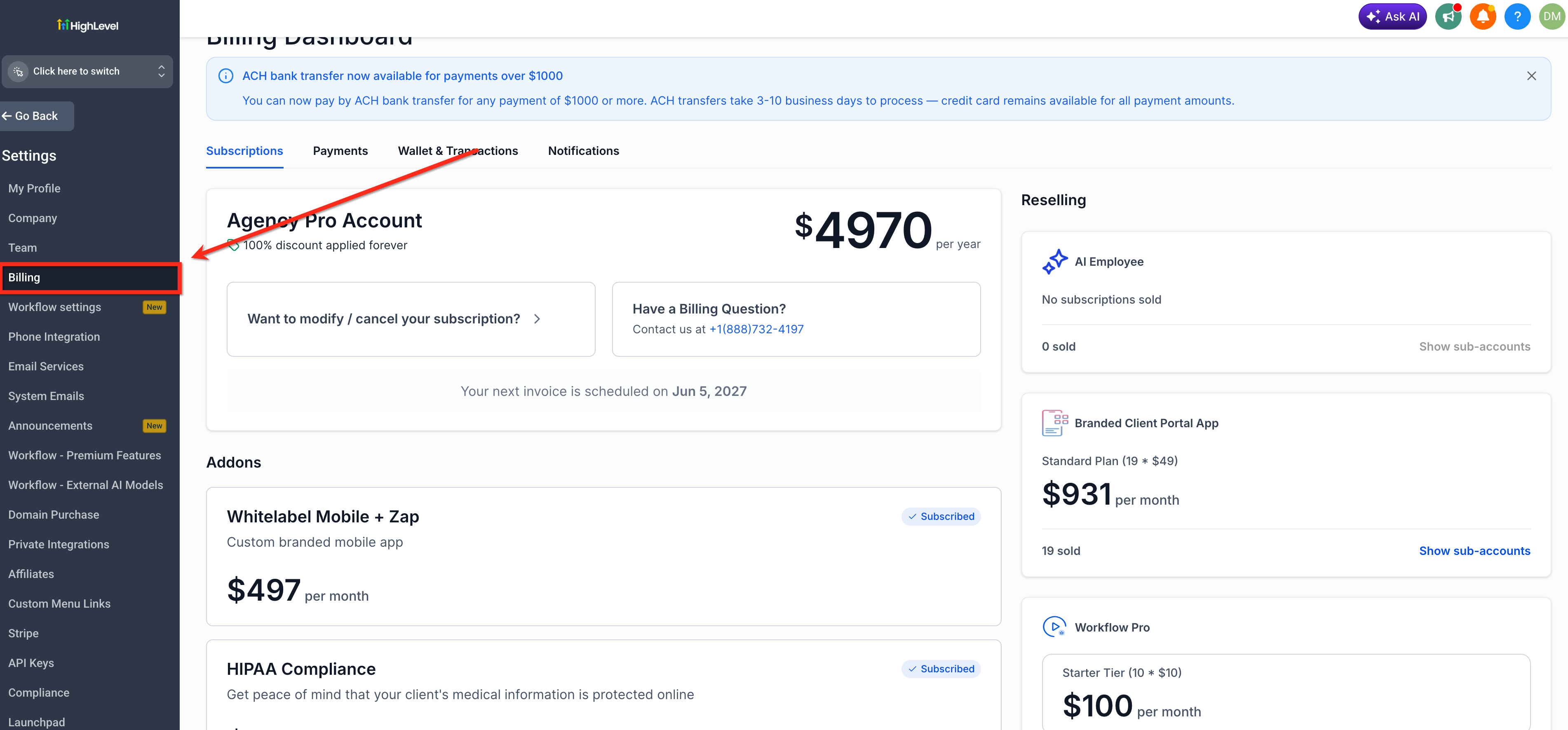
- From Agency View, go to Settings > Billing.
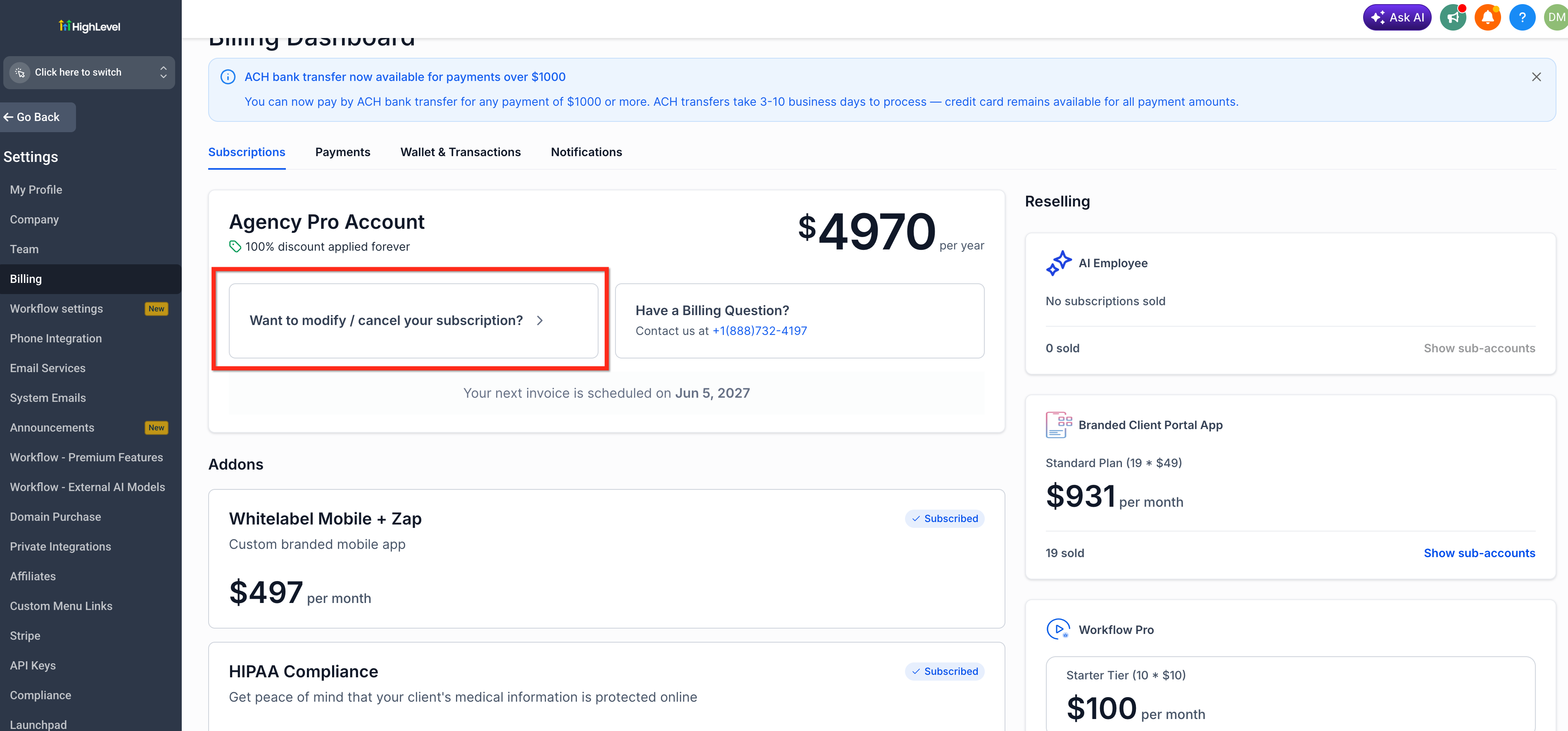
- Click Want to Modify/Cancel Your Subscription?
- Select the Pause Account option when presented.
How to Reactivate Your Paused Account
Reactivating your account is simple and takes just a few minutes.
- Go to the login page and sign in to your account.
- You’ll be presented with a Reactivate Account screen.
- Complete the payment process.
- Your account will immediately move from Paused to Active status.
Frequently Asked Questions
Q: Can my team or clients access HighLevel while the Agency account is paused?
No. The Agency and its sub-accounts do not have active platform access while the account is paused. Client Portal access is also unavailable during this period.
Q: Do my workflows continue running while my Agency account is paused?
No. Published workflows and automations are moved to Draft when the account is paused. Their configurations remain preserved so they can be reviewed and republished after reactivation.
Q: Do canceled Marketplace, reselling, or SaaS subscriptions restart automatically after reactivation?
No. These subscriptions are automatically canceled when the Agency account is paused. You must resubscribe to any affected services you want to use after reactivation.
Related Articles
Was this article helpful?
That’s Great!
Thank you for your feedback
Sorry! We couldn't be helpful
Thank you for your feedback
Feedback sent
We appreciate your effort and will try to fix the article