Mailbox providers like Gmail, Outlook, and Yahoo weigh dozens of signals before deciding whether a message reaches the inbox. This guide covers the most common reasons your emails end up in spam — and exactly how to fix each one.
It also includes a diagnostic workflow: how to read the email header, what SPF/DKIM/DMARC failures look like, and how to use Google Postmaster Tools to assess domain reputation.
Sending From a Public Domain
If you're sending messages from a free provider like gmail.com, yahoo.com, or outlook.com, most mailbox providers will route your emails to spam — because their DMARC policies forbid anyone except them from sending on behalf of those domains.
Send from a domain you own that matches your brand (e.g., hello@yourbrand.com). See the Dedicated Email Sending Domains Overview & Setup guide.
Missing SPF, DKIM, or DMARC Authentication
If your sending domain has a DMARC policy but you haven't authenticated it with your SMTP provider, messages will almost certainly fail alignment and land in spam. SPF and DKIM are how mailbox providers verify that the platform is authorized to send on your behalf.
| Record | What It Does |
|---|---|
| SPF | Lists which servers are allowed to send mail from your domain. |
| DKIM | Cryptographically signs your mail to prove it wasn't altered in transit. |
| DMARC | Tells receivers what to do when SPF/DKIM fail (none, quarantine, or reject). |
Verify your domain in the platform's Email Services settings, add the SPF and DKIM records to your DNS, and confirm DMARC alignment with your SMTP provider.
List Health & List Collection
Once the technical pieces are in place, list quality becomes the biggest deliverability factor. A dirty or unconsented list will sink even a perfectly authenticated sender.
- Everyone on your list gave direct consent to receive email marketing.
- Cold or unengaged subscribers are cleaned from your list on a regular cadence.
- Forms are secured with double opt-in and/or reCAPTCHA to prevent bot abuse.
Never buy lists. Remove hard bounces immediately. Suppress subscribers who haven't engaged in 90+ days, and run win-back campaigns before deleting. Read the Introduction to Email Deliverability for more.
Sending Internal Mail
Sending from and to the same domain — for example, info@exampledomain.com → susan@exampledomain.com — often lands in spam. Your mailbox sees a message "from itself" that it didn't actually send (the platform did), so it treats the message as spoofing.
For testing, use a free inbox like Gmail. For legitimate internal sends, ask your mail administrator to whitelist the IP address of your SMTP provider.
Sending Volume or Frequency Issues
Mailbox providers watch how often and how much you send. Sudden spikes — especially from a new or dormant domain — read as spammy and tank inbox placement.
- Warm up your sending domain gradually by increasing volume over time.
- Keep a consistent sending schedule — no dormant periods followed by massive blasts.
- Segment large lists and ramp sends in batches rather than dispatching everything at once.
Content Triggers Spam Filters
Even with perfect authentication, the content of your email can still trip filters — especially on newer or low-reputation domains.
Things that commonly cause issues:
- Overuse of promotional words (e.g., "Free $$$," "Act Now," "Limited Time," "Guaranteed")
- Too many images with very little text (image-heavy emails are a classic spam signal)
- Link shorteners like
bit.lyortinyurl - Large attachments or unsupported file formats
- Broken HTML, unclosed tags, or inline styles copied from Word
- ALL CAPS subject lines, excessive punctuation (!!!), or emoji overload
- Write in a clear, conversational tone.
- Balance images and text — if images fail to load, your message should still make sense.
- Always link directly to your website instead of using shorteners.
- Test your email in a spam checker before hitting send.
Poor Sender Reputation & High Complaint Rates
Every domain and IP has a reputation score that mailbox providers calculate from past sending behavior. If your spam complaint rate exceeds roughly 0.3%, or your bounce rate creeps above 5%, providers start filtering aggressively.
- Monitor reputation via Google Postmaster Tools and Microsoft SNDS.
- Immediately suppress contacts who mark you as spam.
- Only send to engaged contacts — shrink audience size if complaints spike.
- Check your domain against blacklists using MXToolbox.
Misleading Subject Lines & Missing From Name
Gimmicky subject lines like "Re: Your Order #2095642" may boost opens briefly, but they quickly erode trust — leading to complaints and long-term deliverability damage. A missing or generic From name has the same effect.
- Use a clear, honest subject that reflects the actual email content.
- Set a recognizable From name (e.g., "Sarah from Acme" rather than "noreply").
- Keep subject lines under ~50 characters for best mobile rendering.
Missing Unsubscribe Link or List-Unsubscribe Header
Gmail and Yahoo now require bulk senders to include a one-click List-Unsubscribe header. Without it (or without a visible unsubscribe link in the footer), your messages get throttled or dropped into spam.
Ensure every marketing email includes a visible unsubscribe link in the footer. The platform automatically adds the List-Unsubscribe header for LC Email sends — verify it's enabled in your Email Service settings.
Sending to Role-Based or Spam-Trap Addresses
Role-based addresses like info@, admin@, sales@, and support@ often belong to distribution lists that never opted in. Spam traps — dormant addresses reactivated by mailbox providers to catch senders with stale lists — do even more damage.
- Filter out role-based addresses from your list or require explicit opt-in for them.
- Validate your list with an email verification service before large sends.
- Never import lists you didn't collect yourself.
How to Inspect the Email Header (SPF, DKIM, DMARC)
Emails will land in spam if SPF, DKIM, or DMARC fail. The fastest way to confirm authentication status is to send a test email to a Gmail address and inspect the original message header.
Trigger a test send from your sending domain to any Gmail inbox you control. This gives you a real message you can inspect end-to-end.
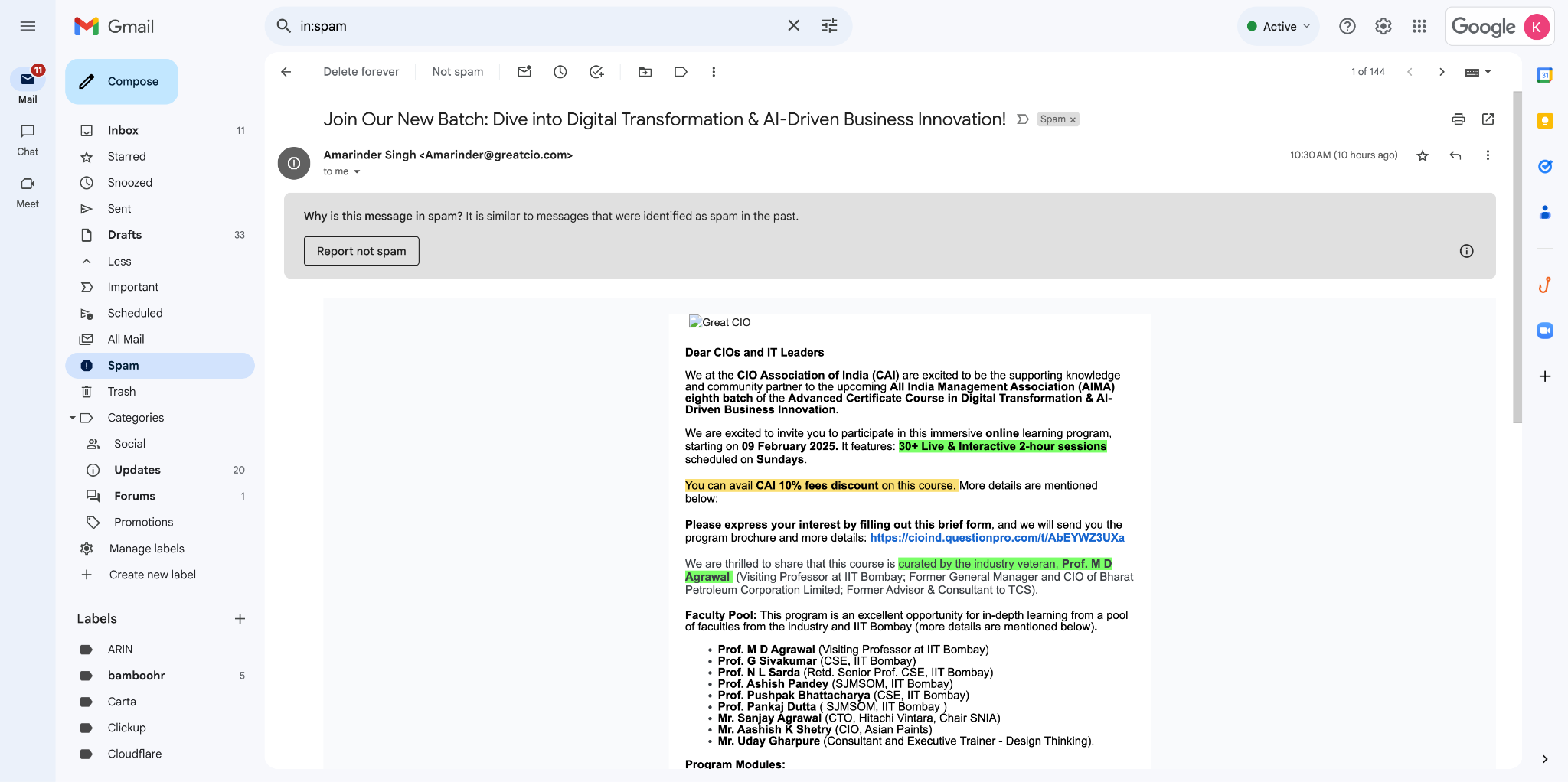
- Click the three vertical dots next to the Reply button.
- Select "Show original."
- A new window will display the full headers.
- Verify that the SPF, DKIM, and DMARC results all show "PASS".
The header shows SPF: FAIL — the sending server is not authorized in the domain's SPF record.
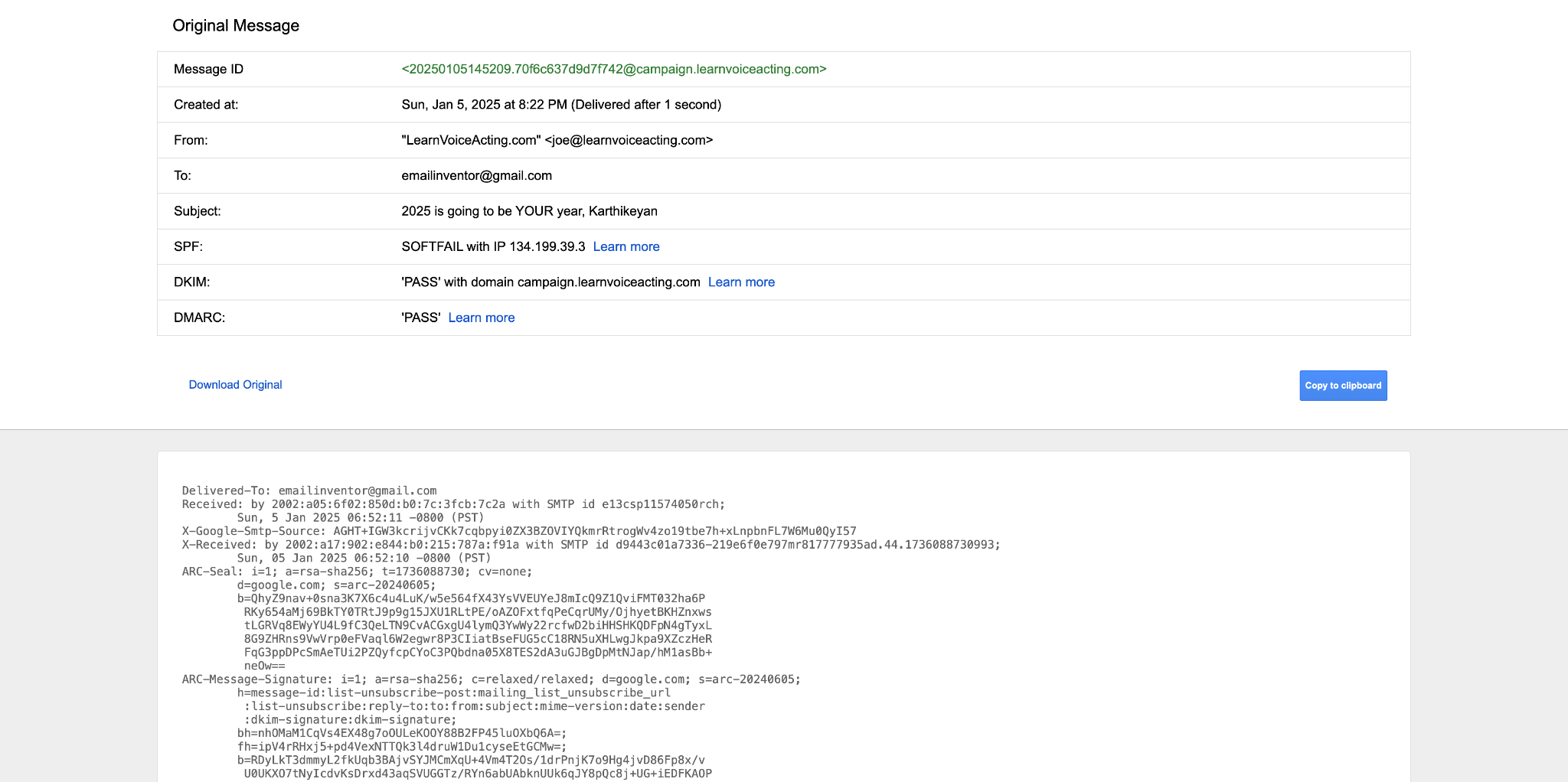
The header shows DMARC: FAIL — even though SPF or DKIM may pass on their own, the alignment with the From-address domain is broken.
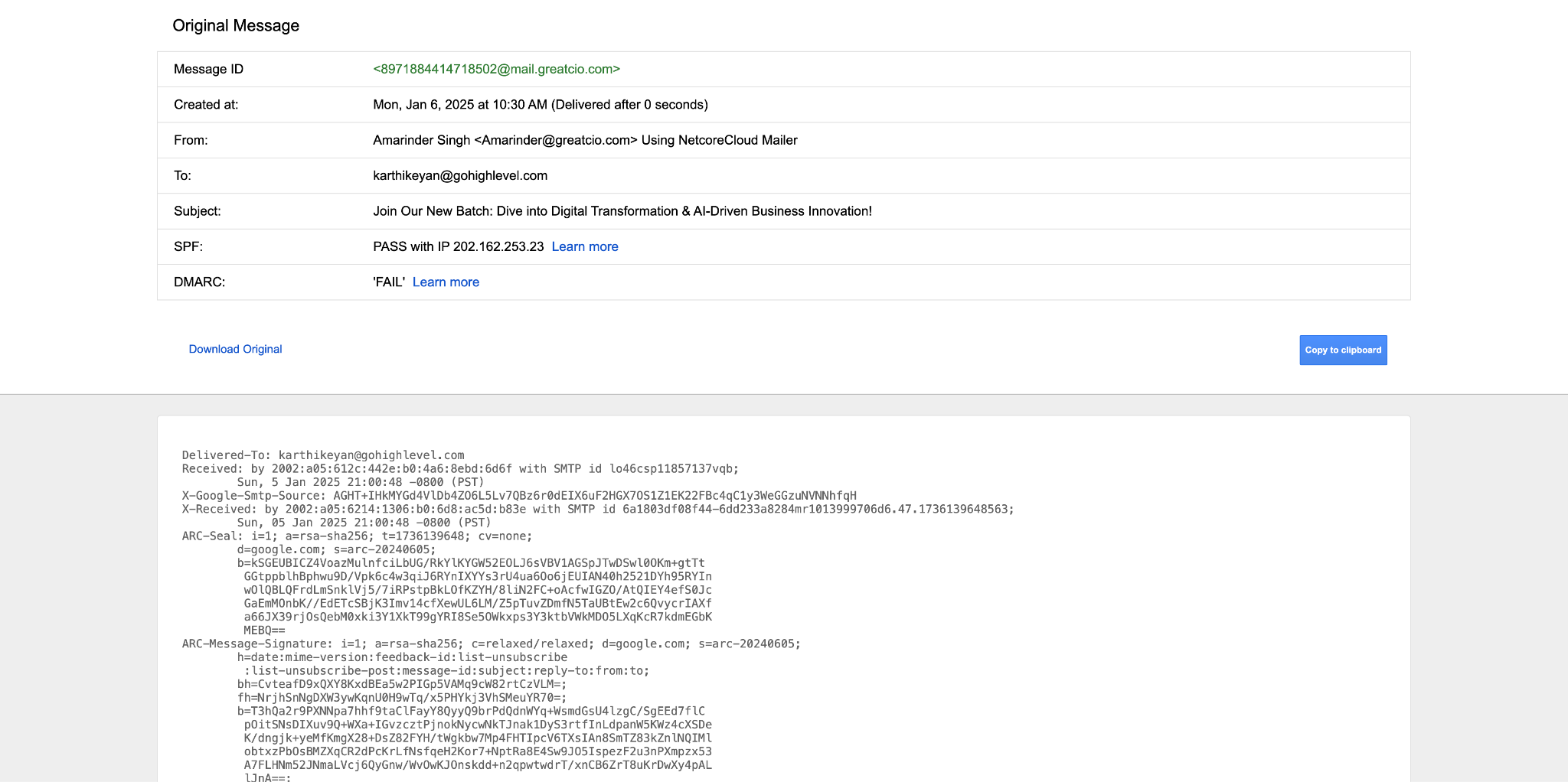
If all three (SPF, DKIM, DMARC) show PASS, the header is clean — move on to the domain reputation check in Section 13.
Fixing Email Header (Authentication) Failures
Add the SPF and DKIM records provided by your SMTP provider to your domain's DNS, then re-verify the domain inside the platform's Email Service settings. Allow up to 24 hours for DNS propagation before testing again.
When the sending domain differs from the From-address domain and either has a DMARC policy of "Reject" or "Quarantine", authentication will fail.
Solution:
- Send emails from the same domain as the From address.
- Or update the DMARC policy to "none" (
v=DMARC1; p=none;).
When both domains are the same and the policy still fails, there's typically a misconfiguration on the DMARC record itself.
Solution:
- Use Dmarcian to inspect the DMARC record for the domain — it will return a complete diagnostic report.
- Update the DMARC record on both the root and sending subdomains to:
v=DMARC1; p=none;
If the email header looks good (SPF, DKIM, and DMARC all PASS) but emails still hit spam, the issue is no longer authentication — move to the domain reputation lookup in the next section.
Check Domain Reputation with Google Postmaster Tools
If authentication passes but emails still land in spam, the next step is checking your domain reputation. A bad or low reputation will route messages straight to the spam folder regardless of authentication status. Full setup instructions are in the Google Postmaster Tools guide.
Go to Settings → Email Service → Postmaster Tools → Google Postmaster Tool.
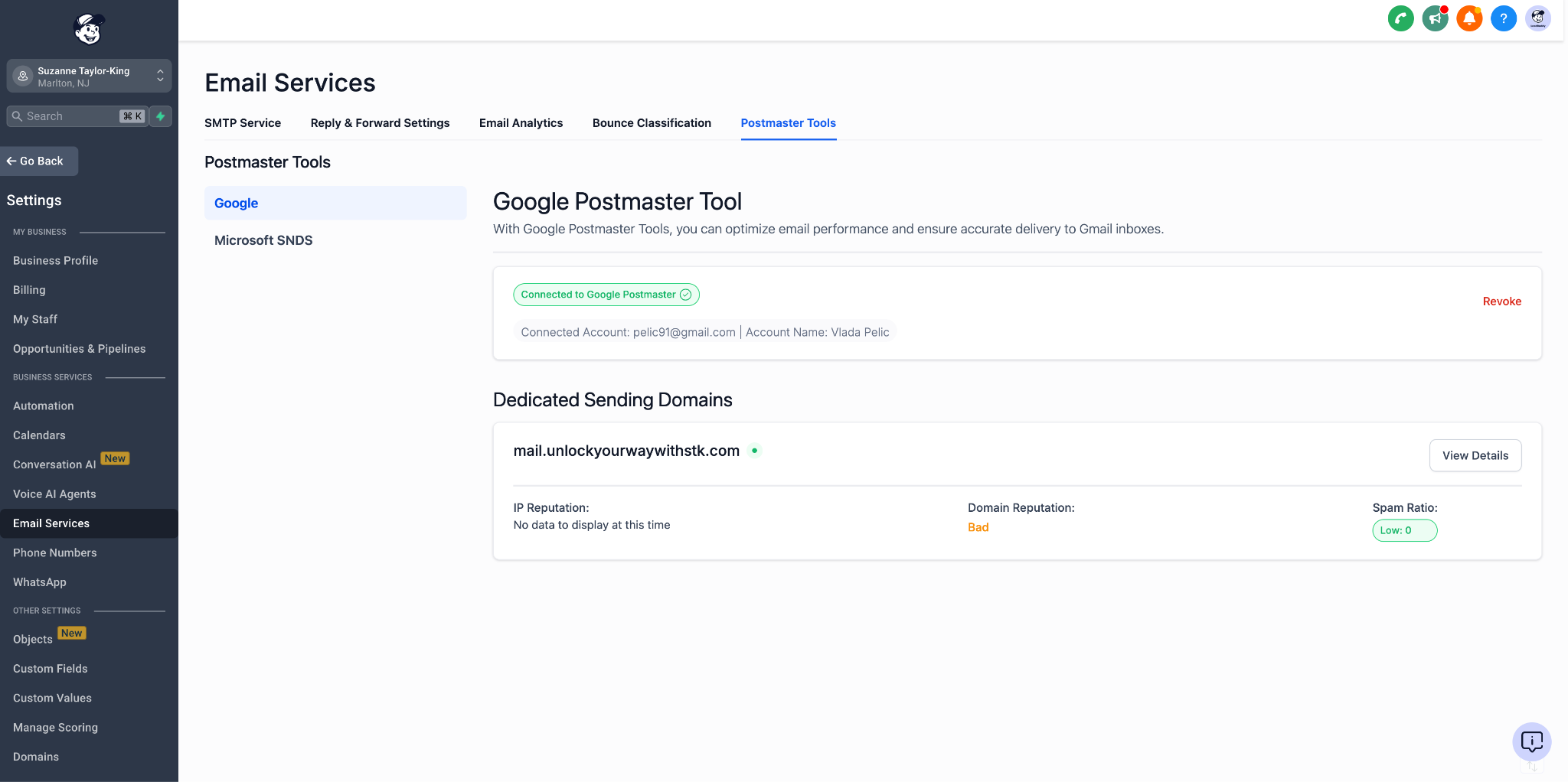
Explore the Postmaster dashboard: domain reputation, IP reputation, spam rate, authentication results, and delivery errors. Look for anything in the Bad or Low category.
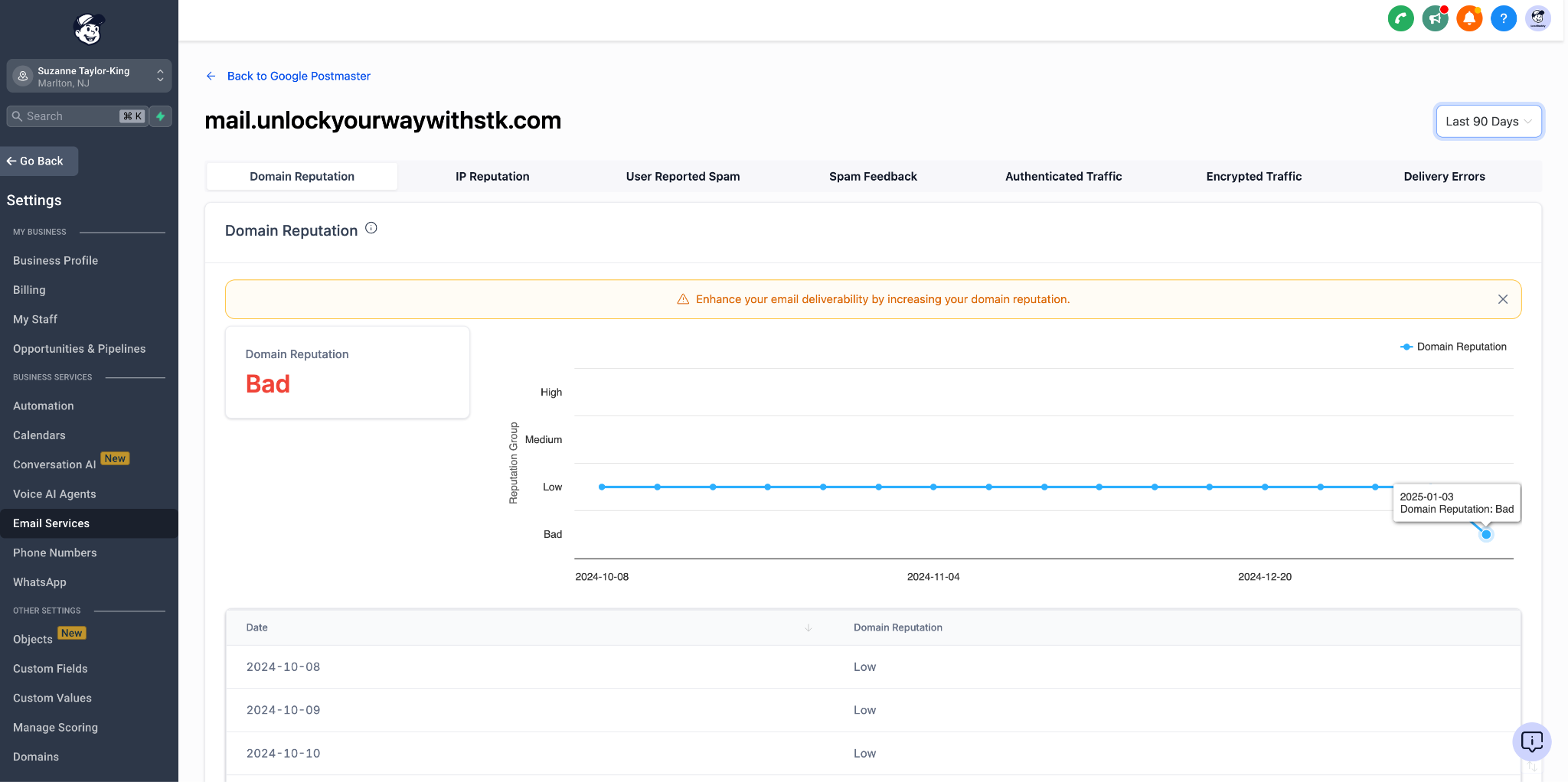
A frequent reason for "Bad" reputation: recipients are marking your emails as spam at an elevated rate. This is the single most damaging signal for sender reputation.
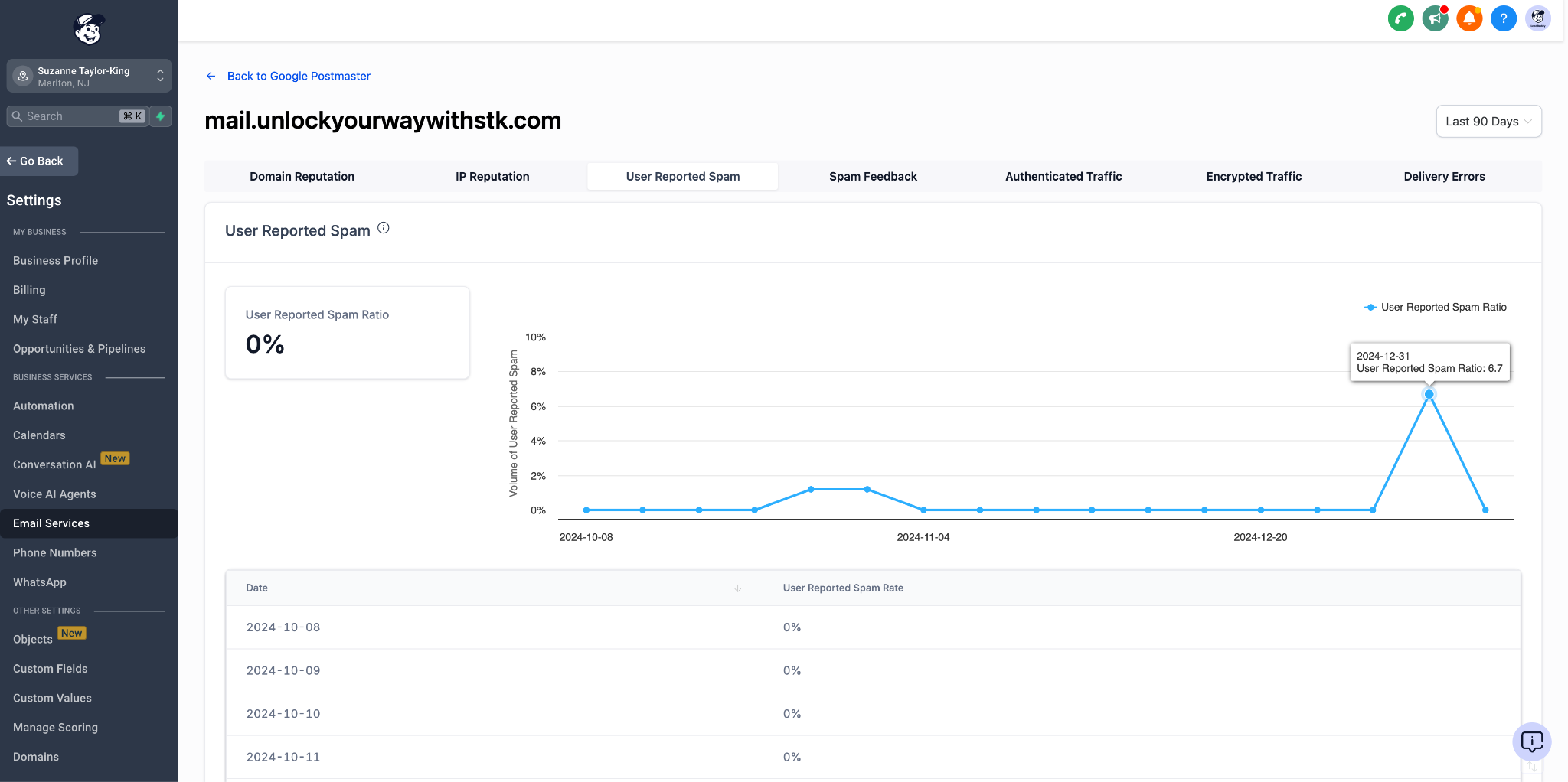
- Stop all cold email immediately — cold sends are the most common cause of spam complaints.
- Warm up the domain following the Email Sending Guide: Best Practices & Warm-Up.
- Send only to engaged recipients for several weeks while reputation recovers.
- Audit content for anything that might invite complaints (misleading subject lines, no unsubscribe link, frequency too high).
Frequently Asked Questions
Was this article helpful?
That’s Great!
Thank you for your feedback
Sorry! We couldn't be helpful
Thank you for your feedback
Feedback sent
We appreciate your effort and will try to fix the article