Meta Pixel tracking in HighLevel helps you measure customer activity across funnels, websites, stores, and checkout experiences. With improved browser-side tracking and Meta's Conversions API (CAPI), you can capture conversion events more reliably, reduce duplicate tracking, and improve advertising attribution.
TABLE OF CONTENTS
- What is Meta Pixel Tracking in HighLevel?
- Key Benefits of Enhanced Meta Pixel Tracking
- Supported Meta Pixel Events
- Browser Pixel and Conversions API (CAPI)
- Enhanced Purchase Tracking
- How to Set Up Meta Pixel Tracking in HighLevel
- Troubleshooting Meta Pixel Tracking
- Frequently Asked Questions
- Related Articles
What is Meta Pixel Tracking in HighLevel?
Meta Pixel tracking captures customer interactions and sends event data to Meta for conversion reporting and campaign optimization. HighLevel supports tracking through both the browser pixel and server-side Conversions API (CAPI), providing more reliable data throughout the customer journey.
The enhanced functionality supports five standard events: PageView, ViewContent, InitiateCheckout, AddPaymentInfo, and Purchase.
Key Benefits of Enhanced Meta Pixel Tracking
Improved tracking provides a clearer understanding of how customers interact with your pages and progress through checkout. Coordinating browser and server events also helps reduce duplicate conversion reporting.
Accurate Event Tracking: Capture customer actions across supported pages and checkout experiences.
Improved Attribution: Use browser and server-side tracking for more reliable conversion reporting.
Reduced Duplicate Events: Prevent extra events from anchor links and improve deduplication.
Better Checkout Insights: Monitor checkout initiation, payment interactions, and purchases.
Detailed Purchase Data: Send order values, currency, content IDs, and hashed customer information.
Supported Meta Pixel Events
Each standard Meta event tracks a particular customer action. Understanding these triggers helps ensure your conversion reports accurately reflect customer behavior.
| Event | When It Fires |
|---|---|
| PageView | Every page load across supported funnels and websites |
| ViewContent | Visits to store product-listing, product-detail, and offer pages |
| InitiateCheckout | When a customer begins checkout through supported order forms or cart checkout |
| AddPaymentInfo | When a customer reaches a qualifying payment interaction |
| Purchase | When a purchase is completed through supported order confirmation, upsell, or thank-you elements |
Important: Clicking anchor links or scroll-to-section buttons does not generate additional PageView or ViewContent events unless the page reloads.
For detailed checkout triggering behavior, see How InitiateCheckout and AddPaymentInfo Work in Meta Pixel Tracking.
Browser Pixel and Conversions API (CAPI)
Browser Pixel and CAPI work together to improve event tracking reliability. Browser tracking captures actions directly from the visitor's browser, while CAPI sends supported event information through a server connection. When matching browser and server events represent the same customer action, Meta can use event identifiers to deduplicate them and reduce inflated conversion counts.
Enhanced Purchase Tracking
Enhanced Purchase events provide more detailed transaction information to improve conversion reporting and attribution. Supported purchase data includes:
Order value and currency.
Product or funnel content IDs.
Actual order IDs, joined when multiple orders apply.
SHA256-hashed email, first name, last name, and phone number.
These details help Meta associate purchase activity with advertising interactions. Hashed customer data remains subject to applicable privacy and consent requirements.
How to Set Up Meta Pixel Tracking in HighLevel
Proper event configuration helps prevent duplicate conversions and inconsistent reports. HighLevel recommends using the Events tab for supported standard Meta events rather than creating the same events through custom scripts.
Open Meta Events Manager and locate your Pixel ID or Dataset ID.
In HighLevel, navigate to Sites → Funnels or Websites.
Open the relevant funnel or website and access its Events tab.
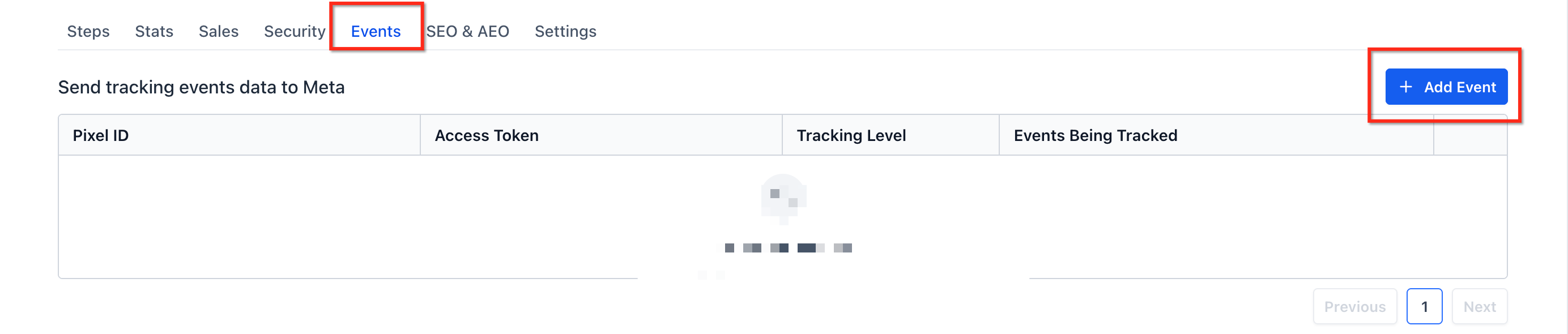
Configure the supported Meta events and applicable tracking connection.
Save your changes.
Test the published pages and checkout experience using Meta Events Manager.
Important: Adding the same events through both the Events tab and custom scripts can produce inconsistent tracking results. Review existing tracking scripts before configuring duplicate events.
For manual tracking guidance, see Add Tracking Code/Script to Funnels and Websites.
Troubleshooting Meta Pixel Tracking
Checking event activity in Meta Events Manager helps identify missing or duplicate events. Before changing your configuration, review whether each event is associated with the correct page, checkout action, or purchase.
| Issue | Recommended Action |
|---|---|
| Duplicate PageView events | Check for overlapping tracking scripts and actual page reloads |
| Missing ViewContent events | Verify that the page is a supported product or offer page |
| Unexpected InitiateCheckout events | Review page-level versus funnel-level triggering |
| Missing Purchase events | Verify completed orders and inspect Meta event diagnostics |
| Duplicate Purchase events | Review Events-tab settings, custom scripts, and CAPI configurations |
Frequently Asked Questions
Q: Does ViewContent fire on every page?
No. ViewContent is limited to supported store product-listing, product-detail, and offer pages.
Q: Do anchor links trigger additional PageView events?
No. Anchor links and scroll-to-section actions do not generate additional events unless they cause a new page load.
Q: Why might InitiateCheckout numbers change?
Improved checkout tracking can capture customer intent earlier, potentially increasing recorded checkout events.
Q: Does CAPI guarantee accurate attribution for every purchase?
No. CAPI improves event delivery, but attribution also depends on available customer data, event matching, consent, and Meta's reporting rules.
Q: Should I configure the same events using custom scripts?
No. For the supported events, HighLevel recommends using the Events tab to prevent inconsistent tracking.
Q: Does this article cover Meta Pixel tracking for event ticketing?
No. RSVP registrations and ticket purchases are covered separately in the Meta Pixel Tracking for Events article.
Related Articles
Was this article helpful?
That’s Great!
Thank you for your feedback
Sorry! We couldn't be helpful
Thank you for your feedback
Feedback sent
We appreciate your effort and will try to fix the article