WhatsApp Coexistence: Number Already Associated with Another WABA
Why the new onboarding flow blocks Coexistence setup, and what to check before you try again.
Known Error
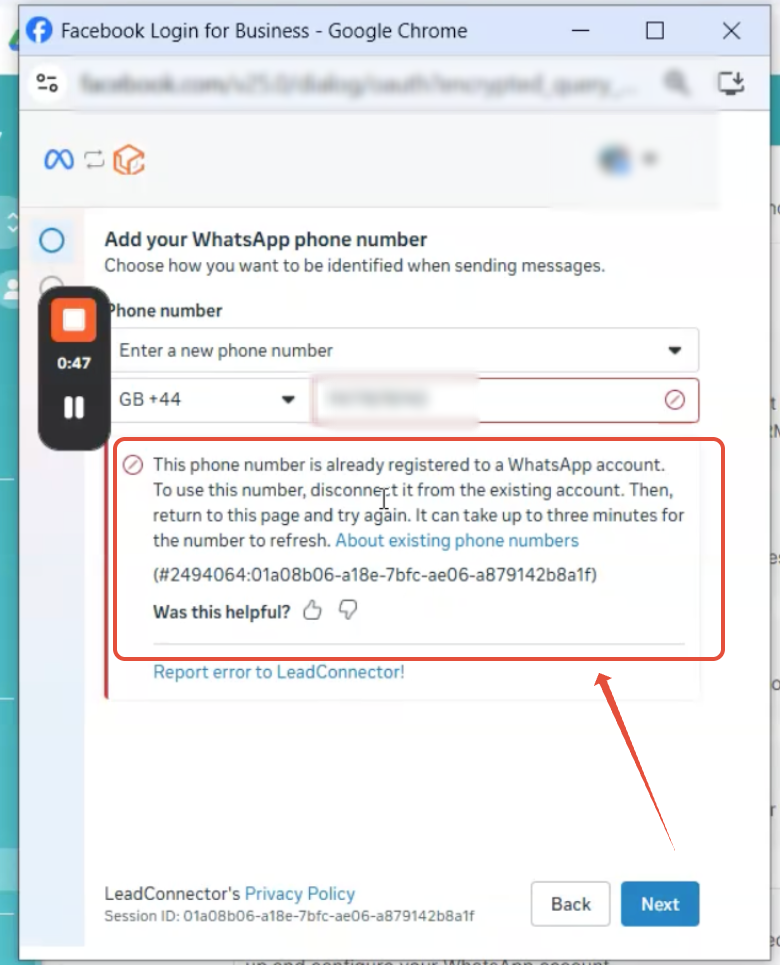
"This phone number is already associated with another WhatsApp Business Account"
This appears during Coexistence onboarding when the number already has a Cloud API WABA association — even if the number looks like it is only connected to the WhatsApp Business mobile app.
Table of Contents
Overview
When connecting an existing WhatsApp Business App number using WhatsApp Coexistence, you may encounter an error indicating that the phone number is already associated with another WhatsApp Business Account (WABA).
This can occur even when the number appears to only be connected to the WhatsApp Business mobile app.
This article explains why this happens in the new onboarding flow and what to check before attempting Coexistence onboarding again.
What Has Changed in the New Onboarding Flow
The onboarding flow used to let you pick your WhatsApp Business Account manually. That step may no longer appear, which changes how the error surfaces.
Previous Flow
You could manually select the WhatsApp Business Account (WABA) you wanted to use during setup.
New Flow
The selection step may not appear. When you enter your phone number, its existing WABA associations are checked automatically in the background.
If the same phone number has already been added to a Cloud API WABA, that account may be identified and selected automatically. Because the number is already associated with the Cloud API WABA, the Coexistence onboarding process is blocked.
Why you may not see the cause

The background check happens before any account picker is shown, so there is no on-screen step that reveals which WABA was matched. The only symptom is the error itself — which is why the association has to be verified in your Business Portfolio rather than in the onboarding flow.
Error: Number Is Associated with Another WABA
During onboarding, you may receive an error indicating that your phone number is already associated with another WABA.
How to Resolve the Issue
Complete these checks before restarting the Coexistence onboarding process.
Important: Do not remove a WABA or phone number association that is actively being used for another WhatsApp integration. Confirm that the WABA is no longer required before making changes.
Frequently Asked Questions
Q: My number is only in the WhatsApp Business app. Why do I still get this error?
The WhatsApp Business app on your phone and the Cloud API WABA record are two separate things. A number can have been added to a Cloud API WABA at some point — during an earlier integration, a trial, or a setup by another admin — and that association stays on record even though day-to-day messaging happens in the app. The onboarding check looks at the WABA record, not the app.
Q: How do I find which WABA my number is linked to?
Open your Business Portfolio / Business Manager and review the WhatsApp Business Accounts listed under your business. Each WABA shows the phone numbers registered to it. Check every WABA your business owns , the association may sit under an older or unused account rather than the one you expect.
Q: Why can't I just pick the right WABA during setup any more?
The manual WABA selection step may no longer appear in the new onboarding flow. The account is now matched automatically from the phone number you enter, which is why a stale association has to be cleared up front rather than worked around during onboarding.
Was this article helpful?
That’s Great!
Thank you for your feedback
Sorry! We couldn't be helpful
Thank you for your feedback
Feedback sent
We appreciate your effort and will try to fix the article