HighLevel mobile users can now message existing WhatsApp contacts by username, even when no phone number is stored for the contact. When a contact has both a matching WhatsApp username and phone number, mobile combines them into one clear recipient instead of displaying duplicate options.
The app also evaluates the WhatsApp 24-hour messaging window and scheduling limits against the correct username destination. This creates a more consistent WhatsApp experience between mobile and web.
This feature is available in mobile app version 4.23.0 or higher and is in Production. It is supported in HighLevel, LeadConnector, and white-label mobile apps.
What is WhatsApp Username Messaging on Mobile?
WhatsApp Username Messaging on Mobile allows users to select and message an existing WhatsApp contact by their @username, even when that contact does not have a phone number stored in HighLevel. This supports WhatsApp's username-based contact model while keeping recipient selection and messaging behavior consistent across mobile and web.
Previously, a username-only contact could appear unavailable in the mobile app. If a contact had both a phone number and a matching WhatsApp username, the To selector could also display them as separate recipient options.
- Username-only WhatsApp contacts can be selected as recipients.
- Matching phone numbers and usernames are consolidated into one recipient entry.
- The @username appears as the primary destination.
- The associated phone number appears underneath when available.
- Messaging-window and scheduling rules evaluate the correct username destination.
Important: This feature does not provide arbitrary WhatsApp username search. It allows users to message WhatsApp username contacts that are already known or captured in the account.
Key Benefits of WhatsApp Username Messaging on Mobile
Username support removes a mobile messaging gap for contacts who do not share their phone number and simplifies recipient selection when multiple WhatsApp identifiers belong to the same contact.
- Reach More Contacts: Message existing WhatsApp username-only contacts without requiring a phone number.
- One Clear Choice: Matching username and phone destinations appear as one recipient instead of duplicate entries.
- Fewer Selection Errors: Consolidated recipient information makes it easier to choose the correct WhatsApp destination.
- Correct Timing: The 24-hour WhatsApp messaging window is evaluated against the correct username destination.
- Accurate Scheduling: WhatsApp scheduling limits apply to the selected username destination.
- Consistent Experience: Mobile username handling and merge behavior align with supported web behavior.
- Fewer Dead Ends: Known contacts are no longer unavailable on mobile solely because they do not have a phone number on file.
How WhatsApp Username Contacts Work
WhatsApp usernames allow supported contacts to communicate without relying solely on a visible phone number. Once HighLevel knows the username-based WhatsApp identity for a contact, that identity can be used as the messaging destination where supported.
A WhatsApp username contact may have:
- A WhatsApp username with no phone number.
- A WhatsApp username plus a matching phone number.
- Existing WhatsApp conversation history associated with the username destination.
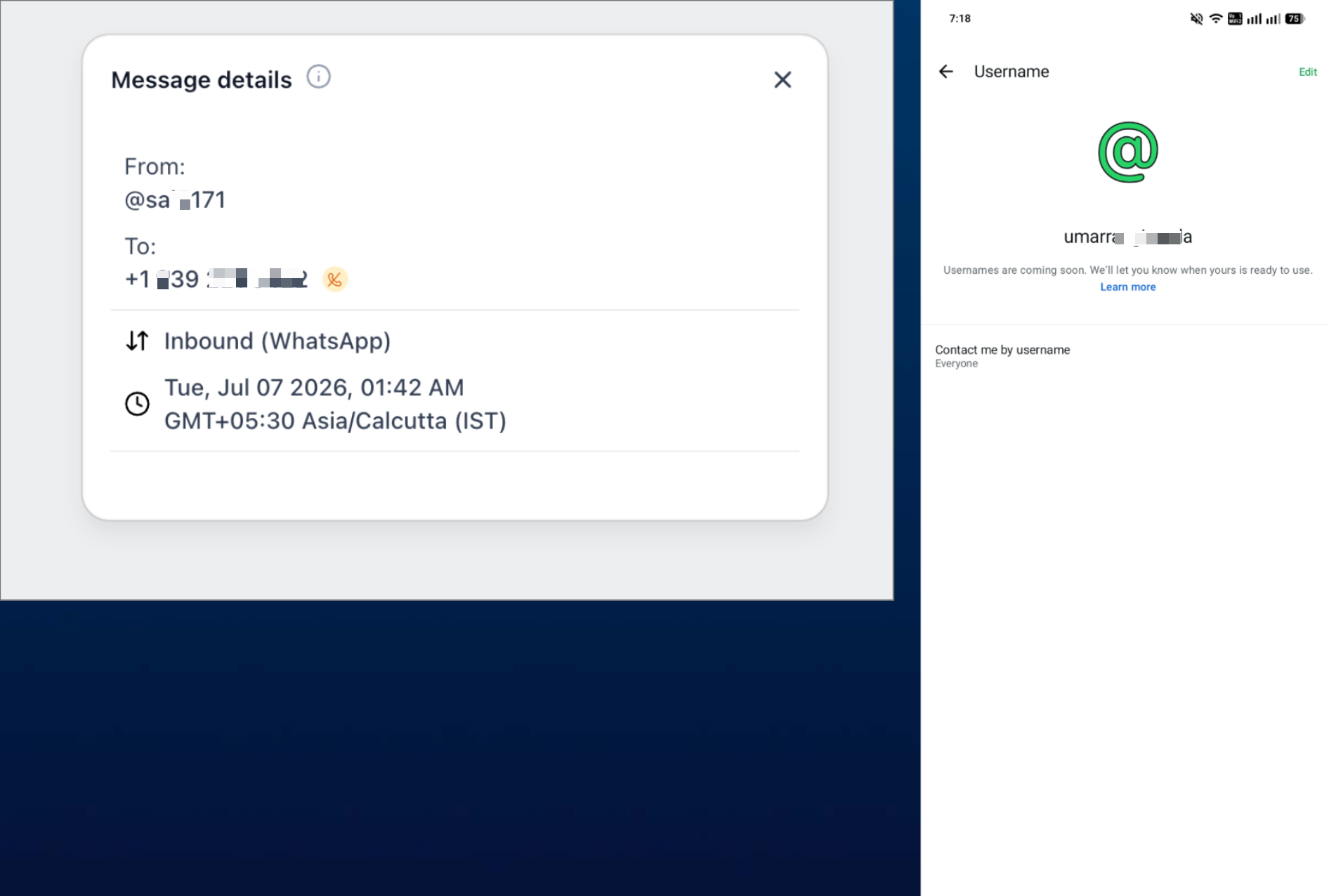
Note: This screenshot provides background context for WhatsApp username identification. Recipient selection for this release occurs in the supported mobile app.
How WhatsApp Username Contacts Appear on Mobile
The mobile To selector adapts the recipient display based on the WhatsApp information stored for the contact. This makes username-only contacts reachable while reducing duplicate choices for contacts with multiple identifiers.
Username-Only Contacts
When a known WhatsApp contact has a username but no phone number, the mobile app can display the @username as the recipient destination. A missing phone number by itself no longer makes the known username contact unavailable.
Contacts With a Matching Username and Phone Number
When the WhatsApp username and phone number represent the same contact destination, the mobile app combines them into one recipient row.
- @username appears as the primary identifier.
- The matching phone number appears underneath.
Key behavior: Recipient merging changes how the destination appears in the To selector. It does not delete the contact's stored phone number.
WhatsApp Messaging Window, Templates, and Scheduling
Username messaging follows the same WhatsApp communication rules as other supported WhatsApp conversations. A username changes how the recipient is identified; it does not bypass the customer service window, template requirements, or scheduling restrictions.
24-Hour Customer Service Window
The 24-hour customer service window determines when an eligible free-form WhatsApp reply can be sent. With this mobile update, the window is evaluated against the correct username destination.
WhatsApp Templates
When a free-form message is not permitted because the customer service window has closed, an approved WhatsApp template is required when applicable. Selecting an @username does not bypass template approval or messaging requirements.
Scheduled Messages
Scheduling now evaluates the correct username destination. For free-form WhatsApp messages, the applicable customer service window must remain open at the scheduled send time. If the send falls outside the permitted free-form window, use an approved WhatsApp template when required.
Username Contact Capture vs. Mobile Username Messaging
Username contact capture and mobile username messaging handle different parts of the WhatsApp contact journey. Contact capture creates or identifies the username-based contact, while mobile messaging allows users to select that known destination when communicating from the app.
| Capability | Purpose |
|---|---|
| Username Contact Capture | Creates or identifies a username-based contact through supported WhatsApp activity. |
| Mobile Username Messaging | Lets users select the known username contact as a WhatsApp recipient from mobile. |
| Recipient Merging | Combines a matching username and phone number into one recipient option. |
| Window Evaluation | Applies WhatsApp messaging rules to the correct username destination. |
Can You Message Any WhatsApp Username?
No. This release does not introduce arbitrary WhatsApp username lookup or cold outreach by username. The @username must already represent a WhatsApp contact known to the account through supported WhatsApp activity.
Availability and Requirements
Confirming the mobile version and recipient requirements first helps prevent outdated app behavior from being mistaken for a WhatsApp or contact configuration problem.
| Requirement | Details |
|---|---|
| Minimum mobile version | 4.23.0 or higher |
| Status | Production |
| HighLevel mobile app | Supported |
| LeadConnector mobile app | Supported |
| White-label mobile apps | Supported |
| Recipient requirement | Existing WhatsApp username contact known to the account |
| Phone number required | No, for a known username-only contact |
| Messaging rules | Normal WhatsApp messaging-window and template requirements continue to apply |
How To Message WhatsApp Contacts by Username on Mobile
No separate username-messaging configuration is required. Once the supported mobile version is installed and the WhatsApp username contact is already known to the account, the destination can be selected directly through Conversations.
Step 1: Verify the Mobile App Version
Version 4.23.0 or higher contains the username-recipient handling introduced with this release. Checking the version first helps rule out outdated app behavior.
- Check the installed mobile app version.
- Update the app if it is below 4.23.0.
- Reopen the app after updating.
Step 2: Open Conversations
Conversations provides access to the WhatsApp recipient selector and the contact's existing messaging history.
- Open the applicable sub-account in the mobile app.
- Go to Conversations.
- Open an existing conversation or start a new message.
Step 3: Open the To Selector
The To selector displays the known destinations available for the contact. Username-aware recipient handling allows an existing WhatsApp username to remain selectable even when no phone number is stored.
- Tap the To selector.
- Search for the contact.
- Locate the applicable @username.
If a matching phone number is also known, it appears underneath the username rather than as a separate duplicate recipient.
Step 4: Select the Username Destination
Selecting the username tells the mobile app which known WhatsApp destination should receive the message and which messaging-window state should be evaluated.
- Tap the appropriate @username.
- Confirm the intended contact is selected.
- Review the available message composer.
Step 5: Compose the Message
The message type available depends on the contact's current WhatsApp messaging window. Username support does not change the underlying WhatsApp communication requirements.
- Use an eligible free-form message while the customer service window is open.
- Use an approved WhatsApp template when a template is required.
Step 6: Send or Schedule the Message
Sending or scheduling uses the selected username destination and its corresponding WhatsApp timing state.
- Review the selected recipient.
- Send the message immediately, or use scheduling when available.
- If scheduling a free-form message, make sure the intended send remains within the permitted WhatsApp messaging window.
Troubleshooting WhatsApp Username Messaging on Mobile
Most username-messaging issues can be isolated by checking the mobile version, confirming the contact is already known as a WhatsApp username contact, and reviewing the normal WhatsApp messaging-window requirements.
| Issue | What to Check |
|---|---|
| The username-only contact appears unavailable | Confirm the mobile app is version 4.23.0 or higher and that the contact is already recognized as a WhatsApp username contact. |
| The username does not appear in the To selector | Verify that supported WhatsApp activity previously captured or identified the username for the contact. |
| The phone and username still appear separately | Update the mobile app and verify the phone number and username represent the same known WhatsApp contact. |
| A free-form message cannot be sent | Check whether the contact's 24-hour WhatsApp customer service window is still open. |
| A scheduled message cannot be sent at the selected time | Confirm the intended send remains inside the permitted WhatsApp window or use an approved template when required. |
| A template is unavailable | Verify that the appropriate WhatsApp template is approved and available for the account. |
| Mobile behavior differs from web | Confirm the mobile app is version 4.23.0 or higher, then reopen the conversation. |
| A white-label app still shows the previous behavior | Confirm the installed white-label app build includes the applicable release. |
Frequently Asked Questions
Was this article helpful?
That’s Great!
Thank you for your feedback
Sorry! We couldn't be helpful
Thank you for your feedback
Feedback sent
We appreciate your effort and will try to fix the article