Number Intelligence helps HighLevel evaluate incoming callers and validate phone numbers before the first outbound SMS. It combines Spam Detection, Name Lookup, and Number Validation into one setting so businesses can identify suspicious callers, recognize unknown contacts, and avoid sending SMS to numbers that cannot receive them. The three functions are enabled or disabled together within the HighLevel Phone System.
TABLE OF CONTENTS
- What is Number Intelligence?
- Key Benefits of Number Intelligence
- How Number Intelligence Works
- Spam Detection for Incoming Calls
- Name Lookup for Incoming Calls
- Number Validation for Outbound SMS
- Number Intelligence Pricing
- Number Intelligence for New Sub-Accounts
- How To Setup Number Intelligence
- Frequently Asked Questions
What is Number Intelligence?
Number Intelligence is a bundle of phone-number checks that supports both voice and SMS activity in HighLevel. Two of its features operate on applicable incoming U.S. calls, while Number Validation checks numbers worldwide before an applicable first outbound SMS is sent.
Number Intelligence includes:
Spam Detection: Checks applicable incoming U.S. calls for spam signals and can mark suspicious callers as Spam Likely.
Name Lookup: Attempts to retrieve available caller-name information for applicable incoming U.S. calls.
Number Validation: Checks a phone number before the first outbound SMS to determine whether the destination is valid and capable of receiving the message.
A helpful way to think about the bundle is:
Incoming calls → Spam Detection + Name Lookup
First outbound SMS → Number Validation
Key Benefits of Number Intelligence
Number Intelligence gives your team additional context before answering calls and helps prevent unnecessary SMS attempts. Because all three capabilities work together, businesses can improve both inbound-call handling and outbound-messaging efficiency from one setting.
Identify suspicious callers: Flag potentially risky incoming calls as Spam Likely so your team can respond appropriately.
Recognize unknown callers: Retrieve available caller-name information for applicable incoming U.S. calls.
Avoid unnecessary SMS attempts: Validate numbers before the first outbound SMS and prevent the message from being sent when the destination fails validation.
Improve contact context: Add available caller-name information when a matching contact does not already contain a completed name.
Support SMS deliverability: Reduce attempts to send SMS to numbers that are not capable of receiving them.
Simplify configuration: Manage Spam Detection, Name Lookup, and Number Validation through one bundled setting.
How Number Intelligence Works
Each Number Intelligence function runs at a different point in the customer communication journey. Understanding when each check occurs makes it easier to interpret the result and understand why a particular lookup or validation was performed.
| Feature | Trigger | Coverage | Result |
|---|---|---|---|
| Spam Detection | Applicable incoming call from an unknown number | U.S. | Checks for spam signals and can display Spam Likely |
| Name Lookup | Applicable incoming call where caller-name information is needed | U.S. | Retrieves available caller-name information |
| Number Validation | Before the first outbound SMS to the number | Worldwide | Checks whether the number is valid and capable of receiving SMS |
Current HighLevel pricing documentation continues to describe Number Intelligence as a three-function bundle that is turned on or off together.
Spam Detection for Incoming Calls
Spam Detection gives your team an early signal when an applicable incoming U.S. caller may be suspicious. It identifies and labels potential spam, but it does not automatically block every call that receives the label.
For Spam Detection, an unknown number is a number that is not already saved as a contact in HighLevel.
When an applicable call is identified as suspicious:
The incoming call can display Spam Likely.
The result can appear in supported call logs and phone experiences.
Your team can use the result when deciding how to handle the caller.
Additional HighLevel tools can be used if you want to quarantine or block repeat unwanted callers.
Number Intelligence itself provides the detection signal. HighLevel's inbound-spam documentation explains how Spam Detection can be combined with Custom Dispositions, Workflows, Inbound Voice DND, and optional IVR filtering when businesses want stronger spam-call controls.
For advanced spam-call handling, see How to Reduce Inbound Spam Calls. How to Reduce Inbound Spam Calls
Name Lookup for Incoming Calls
Name Lookup helps your team recognize applicable incoming U.S. callers when HighLevel does not already have complete caller-name information. This can provide useful context before or during a conversation and can improve the completeness of the contact record.
Name Lookup can run when:
The incoming number is not linked to an existing contact.
A matching contact exists, but the contact's name field is empty.
This differs slightly from Spam Detection, which treats an unknown caller as a number that is not already saved as a contact.
When caller-name information is available, HighLevel can use the result to provide more context about the incoming caller.
Number Validation for Outbound SMS
Number Validation helps prevent HighLevel from attempting the first SMS to a destination that cannot successfully receive it. Unlike Spam Detection and Name Lookup, Number Validation is an outbound messaging check and supports phone numbers worldwide.
Validation does not run simply because a contact is created or imported.
Instead, HighLevel performs the applicable validation before the first outbound SMS is sent.
The flow is:
First SMS is prepared → Number Validation checks the destination → Validation passes or fails → SMS is sent or prevented
If the destination fails validation, the SMS is not sent. HighLevel's existing Number Intelligence documentation specifically identifies landline numbers as an example where the first message is prevented from being sent.
This helps reduce unnecessary SMS attempts and supports healthier messaging practices.
For broader guidance, see Best Practices for SMS Deliverability and Avoiding SMS Restrictions.
Number Intelligence Pricing
Number Intelligence uses usage-based pricing, so charges occur when applicable checks are performed. Keeping pricing in one place makes it easier to understand how each component is billed without duplicating the same information throughout the article.
Current documented pricing is:
Spam Detection: $0.005 per applicable test.
Name Lookup: $0.01 per applicable lookup.
Number Validation: $0.005 per applicable validation.
Number format lookups required to support calls: Free.
The Number Intelligence bundle is enabled or disabled as a whole. You cannot currently enable only Spam Detection, only Name Lookup, or only Number Validation.
For broader Phone System rates and billing information, see Phone System Pricing & Billing Guide. Phone System Pricing & Billing Guide
Number Intelligence for New Sub-Accounts
Agency-level default phone preferences help agencies standardize how new sub-accounts are configured. If you want Number Intelligence enabled automatically when new sub-accounts are created, you can configure that preference from Agency Settings.
Agency admins can manage the default from:
Agency Settings → Phone Integration → Account Creation
Enable Automatically Enable Number Intelligence to make Number Intelligence part of the starting phone configuration for newly created sub-accounts.
Changing this setting affects new sub-accounts only. It does not retroactively enable or disable Number Intelligence for existing sub-accounts.
For more information, see Understanding Default Phone Preferences for New Sub-Accounts. Understanding Default Phone Preferences for New Sub-Accounts
How To Setup Number Intelligence
Enabling Number Intelligence activates Spam Detection, Name Lookup, and Number Validation together. Review all three functions before changing the setting so you understand how disabling the bundle affects both incoming calls and outbound SMS validation.
Log in to the applicable HighLevel sub-account.
Go to Settings.
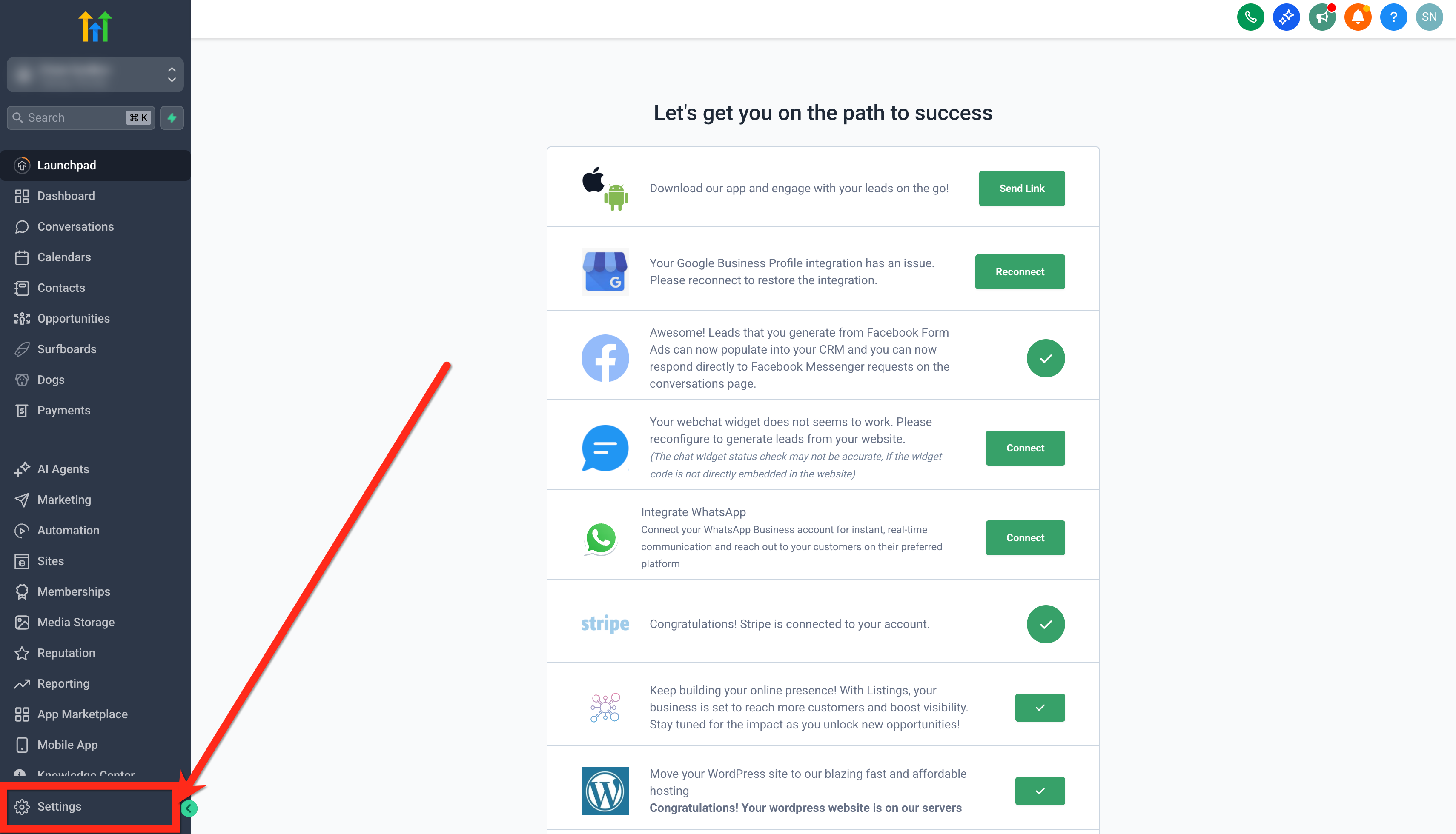
Open Phone System.
Go to Additional Settings → Number Intelligence.
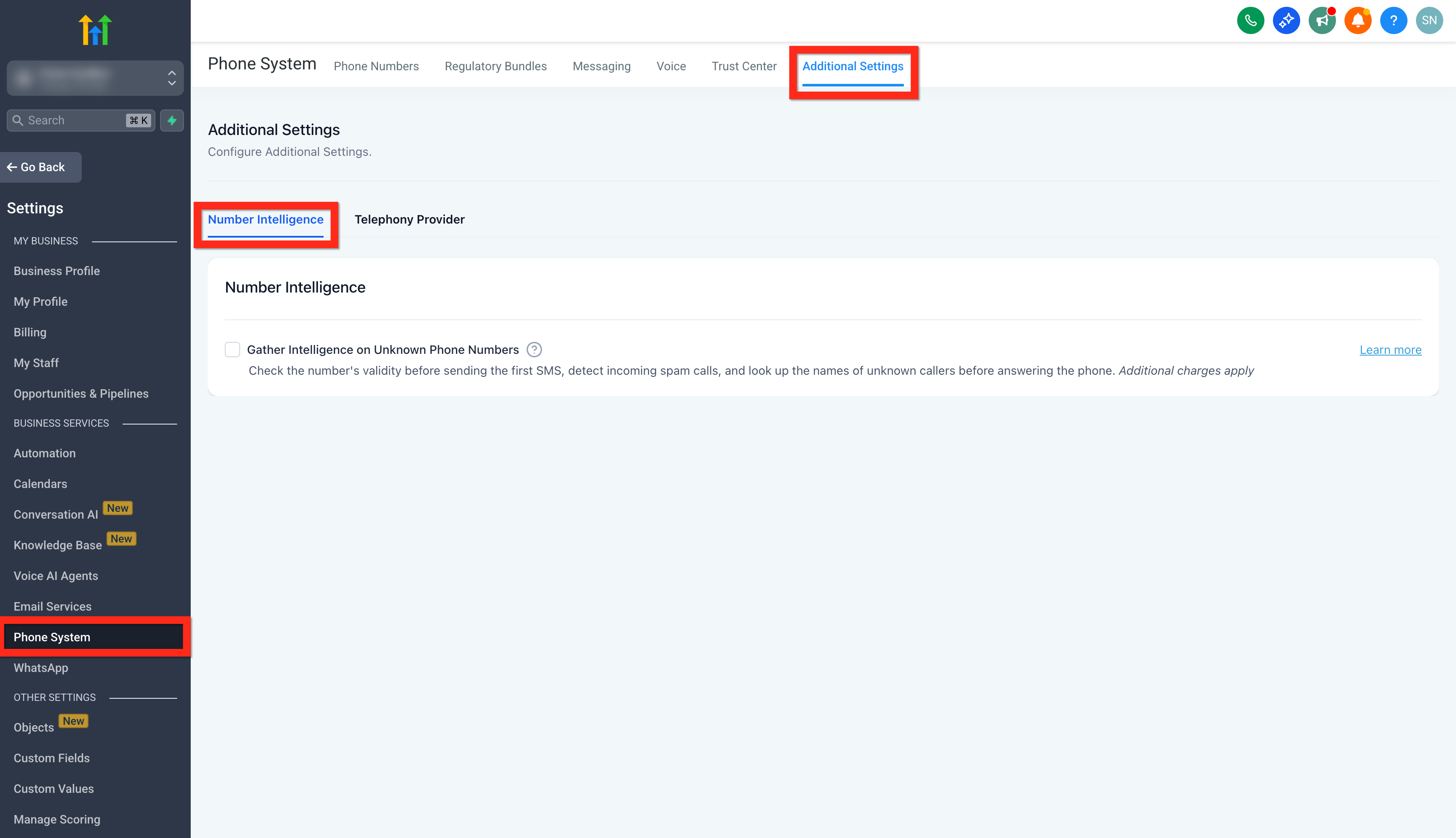
Locate Gather Intelligence on Unknown Phone Numbers.
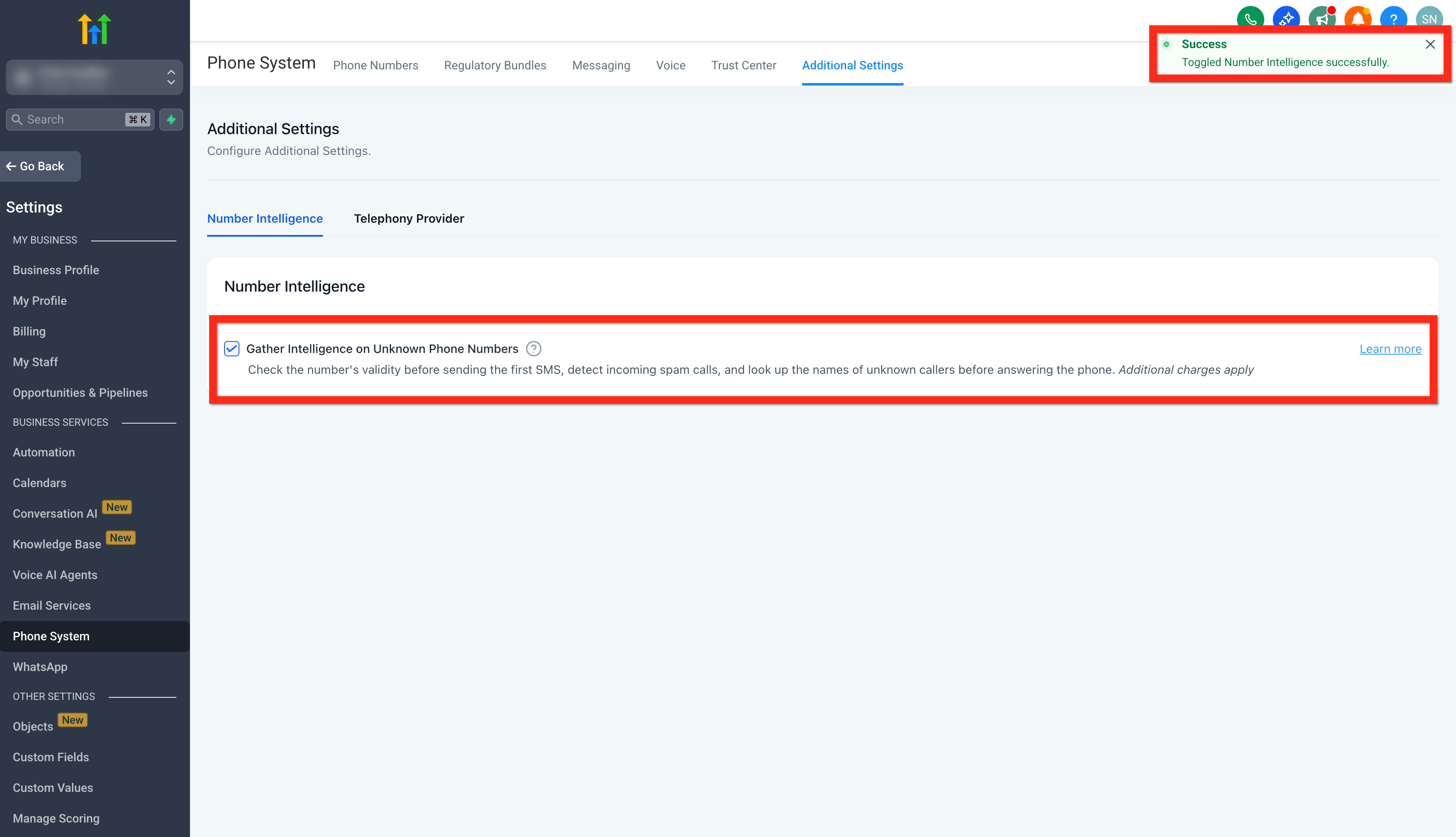
Select the setting to enable Number Intelligence, or clear it to disable the bundle.
Save your changes if prompted.
The same general navigation remains documented in HighLevel's current inbound-spam guidance.
Important: Disabling Number Intelligence stops all three functions:
Spam Detection
Name Lookup
Number Validation
They cannot currently be controlled independently.
Frequently Asked Questions
Q: Does Number Intelligence automatically block Spam Likely calls?
No. Spam Detection identifies and labels potentially suspicious incoming calls. If you want to block or quarantine repeat spam callers, HighLevel supports additional approaches using dispositions, workflows, Inbound Voice DND, and optional IVR filtering.
Q: When does Number Validation run?
Number Validation runs before the applicable first outbound SMS is sent to the phone number. It does not run simply because the contact was created or imported.
Q: What happens if Number Validation fails?
The SMS is not sent when the destination fails validation.
Q: Why can Name Lookup run for a contact that already exists?
Name Lookup can still run when a matching contact exists but the contact's name field is empty.
Q: Can I enable Spam Detection without enabling Number Validation?
No. Spam Detection, Name Lookup, and Number Validation are part of the same Number Intelligence bundle and are currently turned on or off together.
Q: Does Number Intelligence work internationally?
Number Validation supports numbers worldwide. Spam Detection and Name Lookup are documented for applicable U.S. incoming calls.
Q: Is Number Intelligence the same as Voice Integrity?
No. Number Intelligence's Spam Detection evaluates applicable incoming callers. Voice Integrity is a separate HighLevel feature used to help address the reputation of eligible outbound business phone numbers.
Q: Can an agency automatically enable Number Intelligence for new sub-accounts?
Yes. Agency admins can enable Automatically Enable Number Intelligence under Agency Settings → Phone Integration → Account Creation. The setting applies to newly created sub-accounts and does not retroactively change existing ones.
Related Articles
- How to Reduce Inbound Spam Calls Open article
- Phone System Pricing & Billing Guide Open article
- Workflow Trigger - Number Validation
- Understanding Default Phone Preferences for New Sub-Accounts Open article
- Best Practices for SMS Deliverability and Avoiding SMS Restrictions
- Improve Your Phone Number's Reputation with Voice Integrity
Was this article helpful?
That’s Great!
Thank you for your feedback
Sorry! We couldn't be helpful
Thank you for your feedback
Feedback sent
We appreciate your effort and will try to fix the article