WhatsApp Number Shows "Retry Registration"
Why the Retry Registration button appears next to your WhatsApp number, and how to complete the registration.
Table of Contents
What You Will See
Go to Settings → Communications → WhatsApp → Numbers. If registration for a number was not completed, a Retry Registration button appears in the Actions column on that number's row.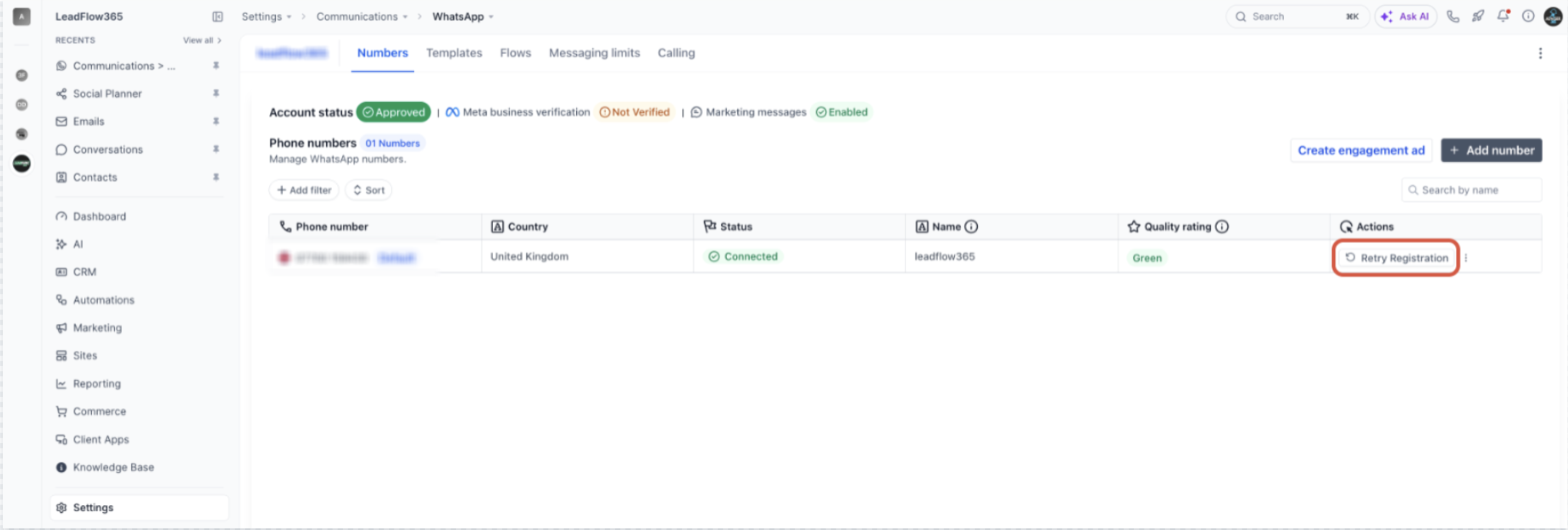
Why This Happens
The most common cause is that the number is still registered in the WhatsApp app or the WhatsApp Business app on a phone.
When you connect a number through the standard sign-up method, Meta requires that the number does not have an active WhatsApp or WhatsApp Business app account. While the app account exists, the registration cannot finish, so the CRM shows Retry Registration.
Want to keep using the WhatsApp Business app? You do not have to delete it. Connect the number through the Coexistence method instead, which lets the WhatsApp Business app and the CRM share the same number and keeps your chat history.↗ WhatsApp Coexistence Method — full setup guide
Before You Fix It
Deleting the WhatsApp account is permanent. The steps below delete the account for that number in the app, including its chat history. Once the number is registered for the CRM, it cannot be used in the WhatsApp Business app again unless it is first removed from the platform.
How to Fix It
Open the App That Holds the Number
On the phone that uses the number, open WhatsApp or WhatsApp Business.
Delete the Account
Go to Settings → Account and select Delete my account (some app versions say Delete account). Enter the phone number and follow the on-screen steps to confirm.
If the number is used in both WhatsApp and WhatsApp Business, or on more than one phone, make sure no active account remains on any of them.
Wait a Few Minutes
Meta notes that it can take up to about 3 minutes after deletion for the number to become available again.
Click Retry Registration
In the CRM, go to Settings → Communications → WhatsApp → Numbers and click Retry Registration in the Actions column.
Verify the Number With the Code
Meta sends a one-time passcode (OTP) to the number by SMS or voice call. Enter it to finish the registration. Once it completes, the Retry Registration button no longer appears for that number.
Tip: After registration completes, send a test message to an internal contact and reply to it, to confirm messages flow both ways.
Troubleshooting
When contacting Support, include: your Location ID, the WhatsApp number, whether it was previously used in WhatsApp or WhatsApp Business, the steps you already tried, and a screenshot of the Numbers tab.
Frequently Asked Questions
Q: Why does Retry Registration appear?
Most often because the number still has an active WhatsApp or WhatsApp Business app account. Numbers connected through the standard sign-up method must not have one.
Q: Will I lose my chats if I delete the account?
Yes. Deleting the account removes its chat history from the app. Back up your chats first, or use the Coexistence method if you want to keep the WhatsApp Business app and its history.
Q: Can I use the same number in the WhatsApp Business app and in the CRM?
Yes, but only through the Coexistence method with the WhatsApp Business app. With the standard connection, the number cannot also be active in the app.
Q: Does this also apply to the regular WhatsApp app?
Yes. A number registered in the regular WhatsApp app must also have that account deleted before it can be registered through the standard method.
Q: Is "deactivating" the account enough?
WhatsApp does not offer a temporary deactivation for this purpose. Use Delete my account in the app, which removes the app registration from the number.
Was this article helpful?
That’s Great!
Thank you for your feedback
Sorry! We couldn't be helpful
Thank you for your feedback
Feedback sent
We appreciate your effort and will try to fix the article