Voice AI can now answer incoming WhatsApp calls in HighLevel, helping businesses respond to customers when their team is busy or unavailable. You can choose whether calls are answered by your team, automatically routed to Voice AI, or handled by Voice AI when nobody picks up. Each WhatsApp number can have its own answering preferences, giving you greater flexibility over how incoming calls are managed.
What is Voice AI for WhatsApp Calls?
Voice AI for WhatsApp Calls lets businesses route incoming WhatsApp calls to existing HighLevel Voice AI agents. With three answering modes - Team only, Team, then Voice AI, and Voice AI only - businesses can decide when their team or Voice AI handles incoming calls.
For example, you can let your team answer first and have Voice AI automatically step in if nobody picks up within 20 seconds.
WhatsApp Call Answering Modes
WhatsApp call answering modes determine whether incoming calls are handled by team members, Voice AI, or a combination of both. Choosing the appropriate mode helps businesses manage call volume while ensuring customers have an opportunity to connect with someone when they call.
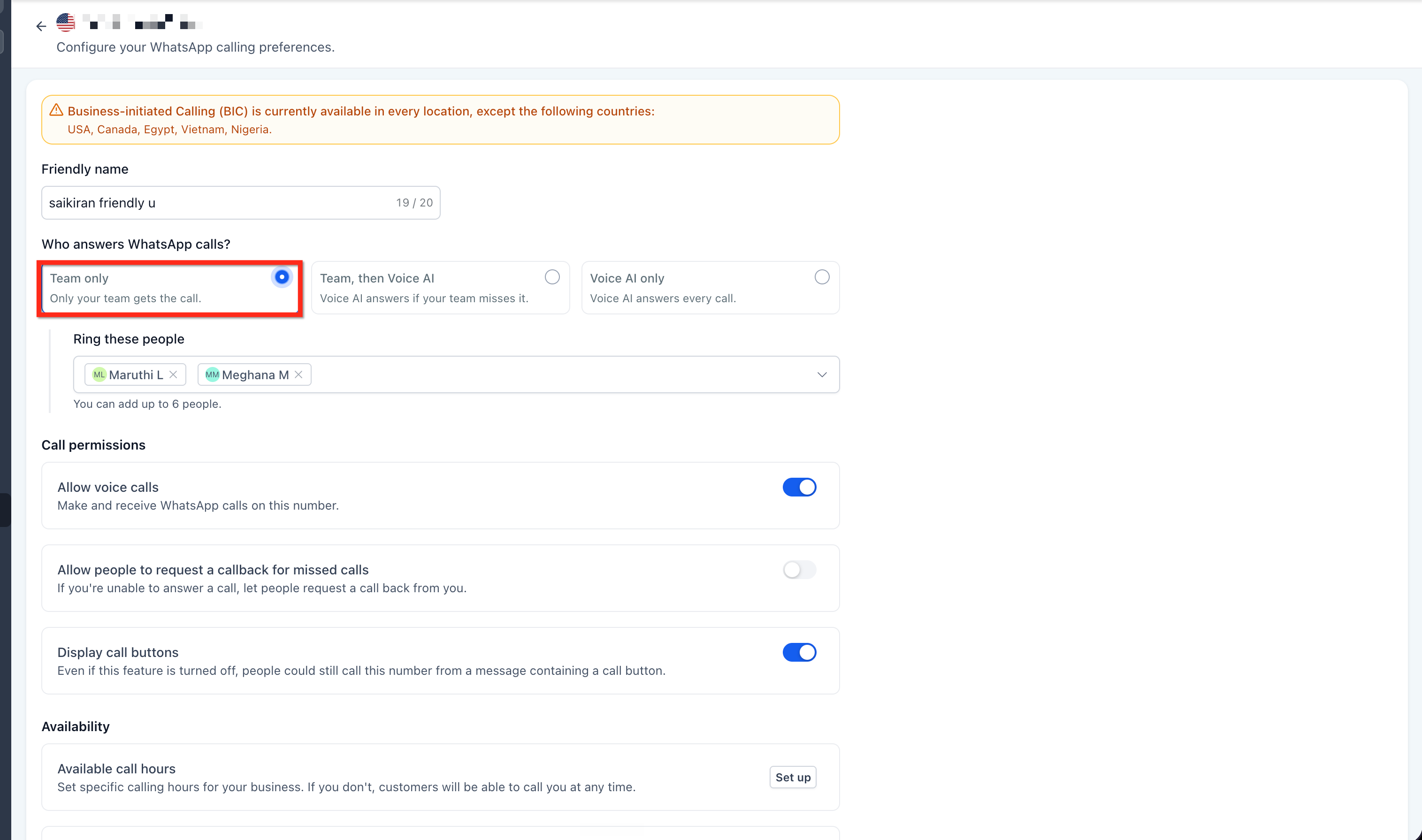
Team only
Team only allows incoming WhatsApp calls to ring your selected team members without involving Voice AI. This mode is ideal for businesses that prefer their staff to handle incoming calls directly.
- Incoming calls ring the selected team members.
- You can select up to six team members.
- Voice AI does not answer calls in this mode.
Team, then Voice AI
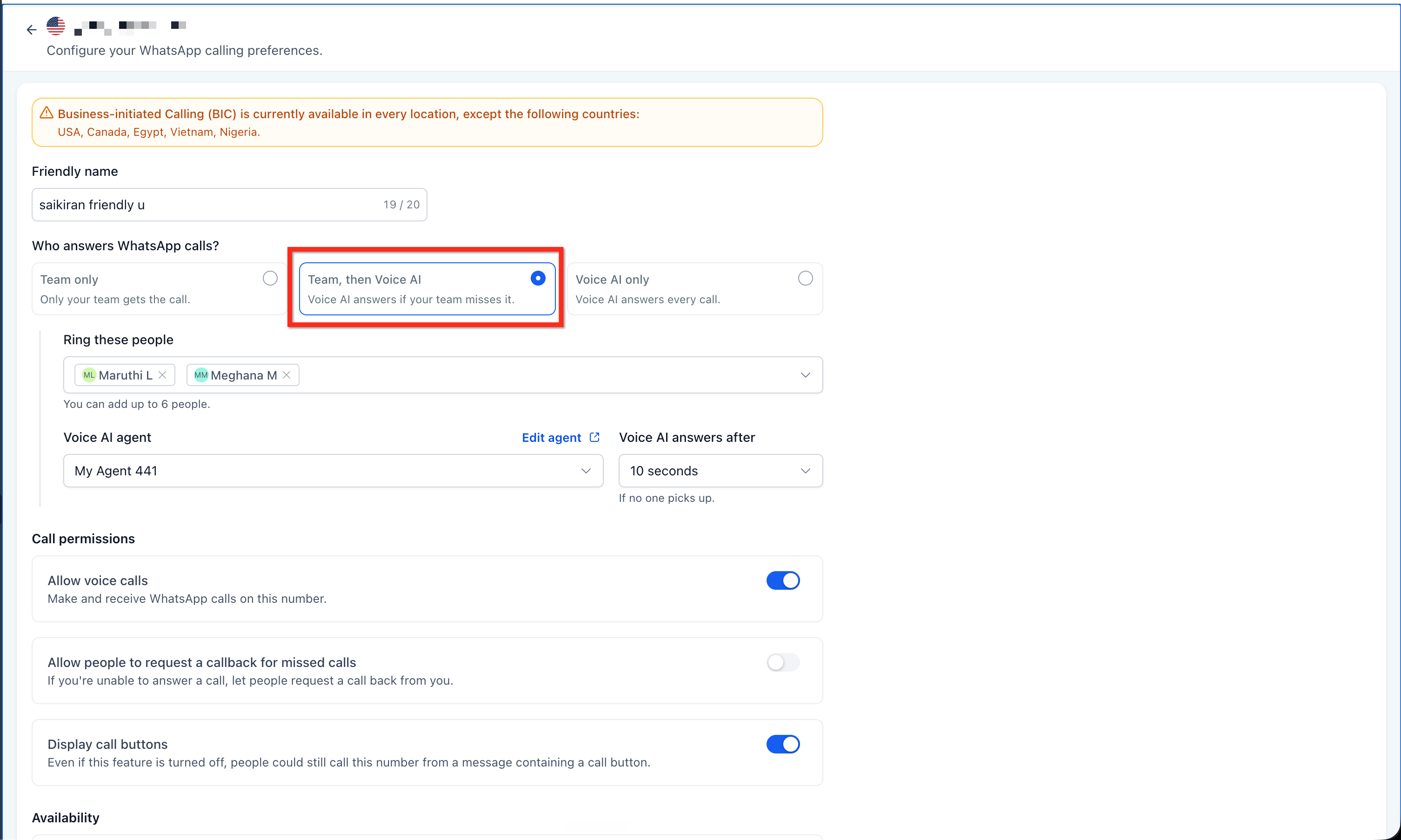
Team, then Voice AI gives your team the first opportunity to answer incoming WhatsApp calls. If nobody picks up within the configured wait time, the selected Voice AI agent automatically answers the call.
This mode is useful for businesses that want to prioritize human interaction while ensuring unanswered calls are handled by Voice AI.
- Team members: Select up to six team members who should receive incoming calls.
- Voice AI agent: Choose an existing Voice AI agent to answer calls when your team is unavailable.
- Voice AI answers after: Set how long the call should ring your team before Voice AI takes over. Available options are 10, 15, 20, or 30 seconds, with 20 seconds as the default.
Voice AI only
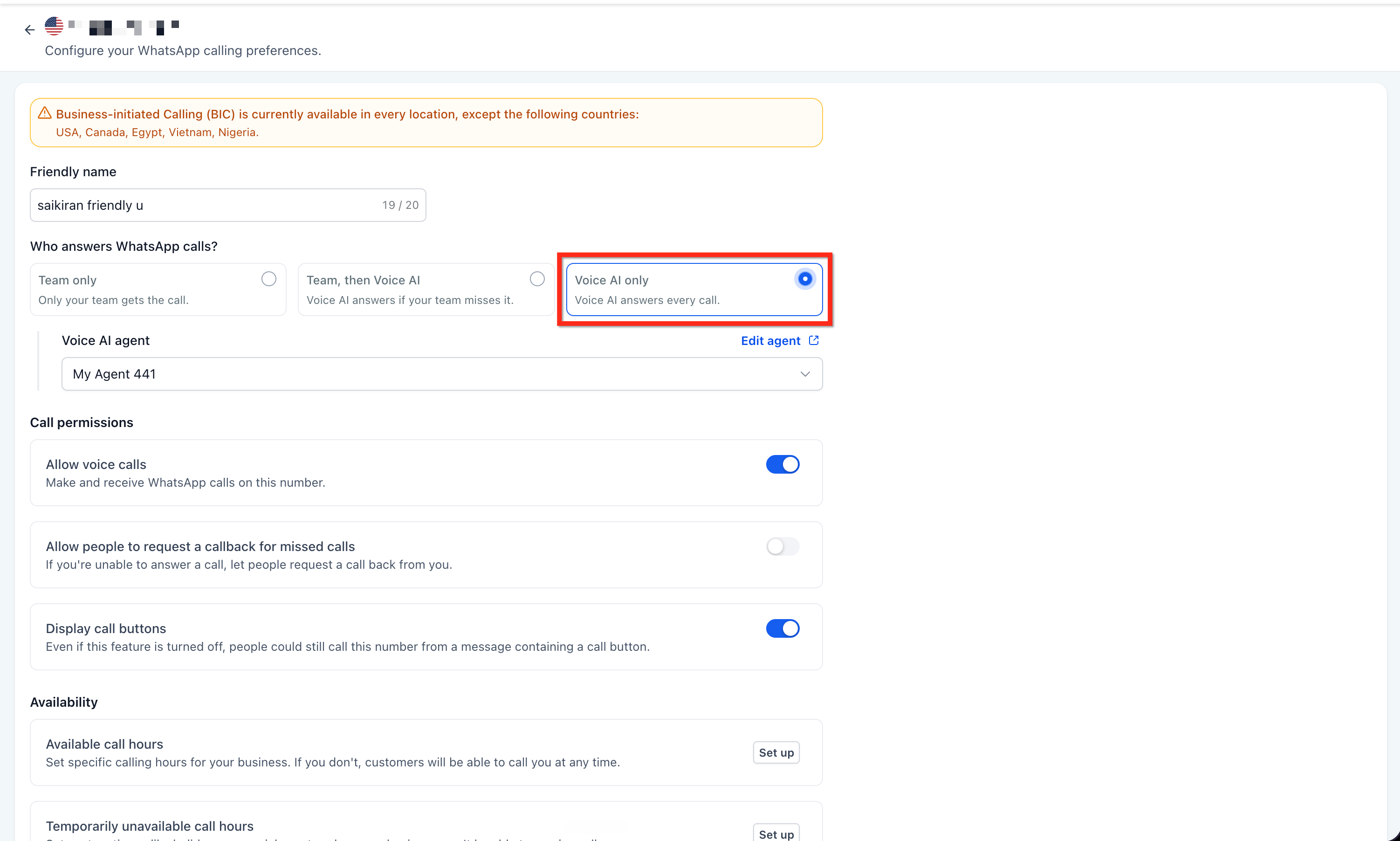
Voice AI only routes incoming WhatsApp calls directly to your selected Voice AI agent without ringing team members first. This mode is suitable for businesses that prefer automated call handling.
- Incoming calls are routed directly to Voice AI.
- Select an existing Voice AI agent to handle calls.
- Team-member selection and answer-delay settings are not required.
How to Set Up Voice AI for WhatsApp Calls
Configuring Voice AI for WhatsApp Calls allows you to control how incoming calls are answered for each connected WhatsApp number. Before starting, ensure WhatsApp Calling is available for your number and that you have an existing Voice AI agent ready to handle calls.
In your sub-account, go to Settings > WhatsApp > Calling and open the number you want to configure.
Make sure Allow voice calls is enabled.
Under Who answers WhatsApp calls?, select Team, then Voice AI or Voice AI only.
Select your Voice AI agent from the dropdown.
If you selected Team, then Voice AI, choose the team members to ring (up to six) and set Voice AI answers after.
Click Save.
Frequently Asked Questions
Q: Can I configure different answering modes for different WhatsApp numbers?
Yes. Each WhatsApp number has its own calling preferences. You can configure one number to use Team, then Voice AI and another to use Voice AI only without affecting the other number's settings.
Q: Do I need to create a separate Voice AI agent for WhatsApp calls?
No. You can select an existing Voice AI agent from the Voice AI agent dropdown. Use Edit agent to access its configuration if changes are needed.
Q: Can I switch between Team only, Team, then Voice AI, and Voice AI only after setup?
Yes. You can change the answering mode at any time by returning to the WhatsApp number's calling settings and saving your updated preferences.
Q: What happens if my team doesn't answer an incoming WhatsApp call?
If you're using Team, then Voice AI, the selected Voice AI agent automatically answers after the configured wait time (10, 15, 20, or 30 seconds). If you're using Team only, Voice AI does not answer the call.
Related Articles
- WhatsApp Calling in HighLevel
- WhatsApp Voice Calling in HighLevel
- How to Create Voice AI Agents
- Voice AI - How to Configure Inbound Call Flow
Was this article helpful?
That’s Great!
Thank you for your feedback
Sorry! We couldn't be helpful
Thank you for your feedback
Feedback sent
We appreciate your effort and will try to fix the article