The Actions Platform in HighLevel connects Agent Studio directly to your CRM so your AI agents can not only answer questions, but also take real, trackable actions like sending messages, tagging contacts, and updating fields. This guide walks through what the Actions Platform is, why it matters, and how to start using it safely in your automations.
TABLE OF CONTENTS
- What is Actions Platform?
- Key Benefits of Actions Platform
- Out-of-the-Box CRM Actions
- Agentic Nodes and Decision-Making
- Sequential Nodes and Structured Workflows
- Triggers and Real-Time Starts
- Content Generation with Actions Platform
- How To Set up Actions for Agents
- Frequently Asked Questions
What is Actions Platform?
The Actions Platform is a set of built-in CRM actions that Agent Studio agents can call in real time, letting your AI update records, send communications, and trigger internal workflows without requiring custom code or external integrations.
Instead of having your AI simply “talk” to leads, the Actions Platform turns your agents into true digital assistants that can execute outcomes: send follow-up SMS, apply tags, create fields, or notify your team, all from within the same Agent Studio canvas. Agent Studio already provides a visual node-based builder for AI agents that can respond to events, route conversations, and connect to tools; the Actions Platform adds a standardized way to perform CRM-side actions as part of those flows.
Key Benefits of Actions Platform
The Actions Platform is designed to make AI-driven workflows more powerful, more consistent, and easier to maintain.
- Real-time CRM updates: Agents can instantly tag contacts, create fields, and log activity as soon as someone submits a form, sends a chat, or triggers a workflow—no polling scripts or manual updates.
- Smarter follow-ups and nurture: By sending SMS and email directly from an agent, you can respond to hot leads immediately with contextual messages that reflect the conversation the AI just had.'
- Less custom plumbing: Many use cases that previously required API calls or complex workflow stacks can now be handled by a single agent that both reasons and acts, using standard, out-of-the-box actions.
- Consistent data hygiene: Tags, custom fields, and custom values can be created and updated by the agent in a structured way, helping keep reporting and segmentation clean over time.
- White-label friendly: Actions run behind the scenes in the CRM, so your agency can offer “AI employees” that take meaningful actions without exposing HighLevel-specific branding to your clients.
- Built for agentic AI: Combined with Agent Studio’s nodes (AI Agent, Sequential, Router, etc.), the Actions Platform lets you build “agentic” flows—agents that decide what to do next and then carry out the steps end-to-end.
Out-of-the-Box CRM Actions
The Actions Platform ships with a set of prebuilt, white-label friendly actions that cover the most common CRM tasks. These are designed to be configured quickly inside Agent Studio so agents can interact with your data safely and predictably.
You’ll typically access these actions from nodes that support taking actions (for example, agentic or sequential-style nodes) by choosing the specific CRM operation you want the agent to perform and mapping in variables from the conversation.
Commonly available actions include:
Send SMS
Have your agent send an SMS to the current contact using your existing LC Phone or Twilio setup. This is ideal for instant confirmations, reminders, or follow-ups after a form submission or chat. SMS usage continues to follow your existing Phone System pricing and A2P compliance rules.
Example: “Thanks for booking a call, {first_name}! Here’s your confirmation link: {calendar_link}”
Send emails (with templates)
Trigger transactional or nurturing emails from within an agent, optionally using existing email templates. This keeps your branding and layout consistent while the AI customizes subject lines or body snippets using variables.
Tag a contact
Apply tags based on conversation outcomes—such as “Hot Lead,” “Needs Follow-Up,” “Requested Demo”—so other workflows, pipelines, or reports can react appropriately.
Create new tags in the CRM
Allow the agent to create new tags when needed (if you choose to enable that behavior). This is helpful when your strategy calls for highly specific campaign or topic tags that may not exist at build time.
Create custom fields and custom values
Capture structured data that comes up during AI conversations and store it as custom fields (for example, “Preferred product,” “Budget range,” or “Onboarding stage”). Agent Studio already supports working with variables and custom values throughout your graph; the Actions Platform lets you turn those values into persistent CRM data.
Send internal notifications
Notify team members via internal alerts when high-value events occur—like a lead asking to talk to sales, or a VIP contact submitting a specific form. These notifications help humans step in exactly when they’re needed.
Generate content like blog and Facebook posts
Use the AI’s content generation capabilities as part of a repeatable process: draft a blog post, social media caption, or ad copy and then either store it in custom fields, send it to a team inbox for review, or email it to yourself or a client.
Agentic Nodes and Decision-Making
Agentic AI is about more than answering questions—it’s about deciding what to do next and then carrying out the necessary steps. In HighLevel, Agent Studio provides the building blocks for this style of automation, including AI Agent nodes, routers, and nodes that execute sequences of steps.
With the Actions Platform available inside these nodes:
- An AI node can interpret user intent or context.
- Router and other logic tools can choose the right branch.
- Action-capable nodes can then execute the exact CRM action required.
- This pattern allows you to build robust flows like:
- If a lead expresses high intent, tag them and send an instant SMS plus a calendar link.
- If a customer requests a refund, notify your support team and apply a “Refund Requested” tag for reporting.
- If someone asks for pricing, generate a personalized follow-up email that recaps what they asked in chat.
Sequential Nodes and Structured Workflows
Sequential nodes in Agent Studio let you group multiple steps that must run in a specific order—perfect for repeatable mini-workflows like onboarding, qualification, or multi-step follow-ups.
When combined with the Actions Platform, sequential flows can:
- Run a series of CRM actions back-to-back (for example, set custom fields → tag contact → send email).
- Mix reasoning steps (like AI-based routing) with concrete actions (like SMS or internal notifications).
- Return to the main conversation flow once the “action sequence” is complete, thanks to Sequential Node integration with routing and other tools.
Example use cases:
New lead sequence
Create or update the contact record.
Apply a “New Lead” tag.
Send an SMS confirmation.
Send an internal notification if budget or interest level exceeds a threshold.
Post-support follow-up
Ask how satisfied the user is.
For low satisfaction, route to a human and apply an escalation tag.
For high satisfaction, send a review request email and add a “Review Nurture” tag.
Triggers and Real-Time Starts
The Actions Platform operates whenever an Agent Studio agent runs, so trigger configuration is the key to deciding when AI should start taking actions.
Agent Studio Triggers support real-time, event-driven starts for agents, including:
Form submitted – Start an agent whenever a specific form is submitted.
Lead tag added or removed – Kick off actions when tags change on a contact.
Chat message – Launch an agent when a new chat message arrives.
Beyond triggers attached to the agent’s Start node, you can also:
Invoke agents from Workflows using the “Invoke Agent Studio Agent” workflow action, so that standard workflow automations can hand off complex reasoning or actions to an agent mid-flow.
Route Ask AI queries into agents so conversational chats can trigger more complex multi-step processes built in Agent Studio.
Because the Actions Platform runs inside these agents, any trigger that starts an agent can also initiate Actions Platform operations—for example, sending an SMS on form submission, tagging a contact when they type a key phrase in chat, or generating content in response to a workflow event.
Content Generation with Actions Platform
Content generation actions let your agents move beyond short replies and into reusable assets that your team or other automations can leverage.
Inside Agent Studio, you can already generate text, images, or other media using dedicated nodes. With Actions
Platform wired in, you can:
Generate and send
Draft a blog outline or full article and email it to yourself or a client.
Generate a Facebook or Instagram caption and send it as an internal notification for social teams to approve.
Generate and store
Create long-form copy and store it in custom fields or notes on the contact, so other workflows or humans can reuse it later.
Save multiple content variations tagged by type or campaign for A/B testing.
Generate and branch
Use AI routing to decide which type of content to generate (e.g., “blog vs. social post” based on user request) and then trigger the appropriate action.
This pattern turns your agents into lightweight content production pipelines that still keep humans in control of publishing and final approval.
How To Set up Actions for Agents
Configuring the Actions Platform is largely about wiring the right nodes, triggers, and variables together so your agents can safely perform CRM actions.
Follow these high-level steps to get started:
Confirm access and prerequisites
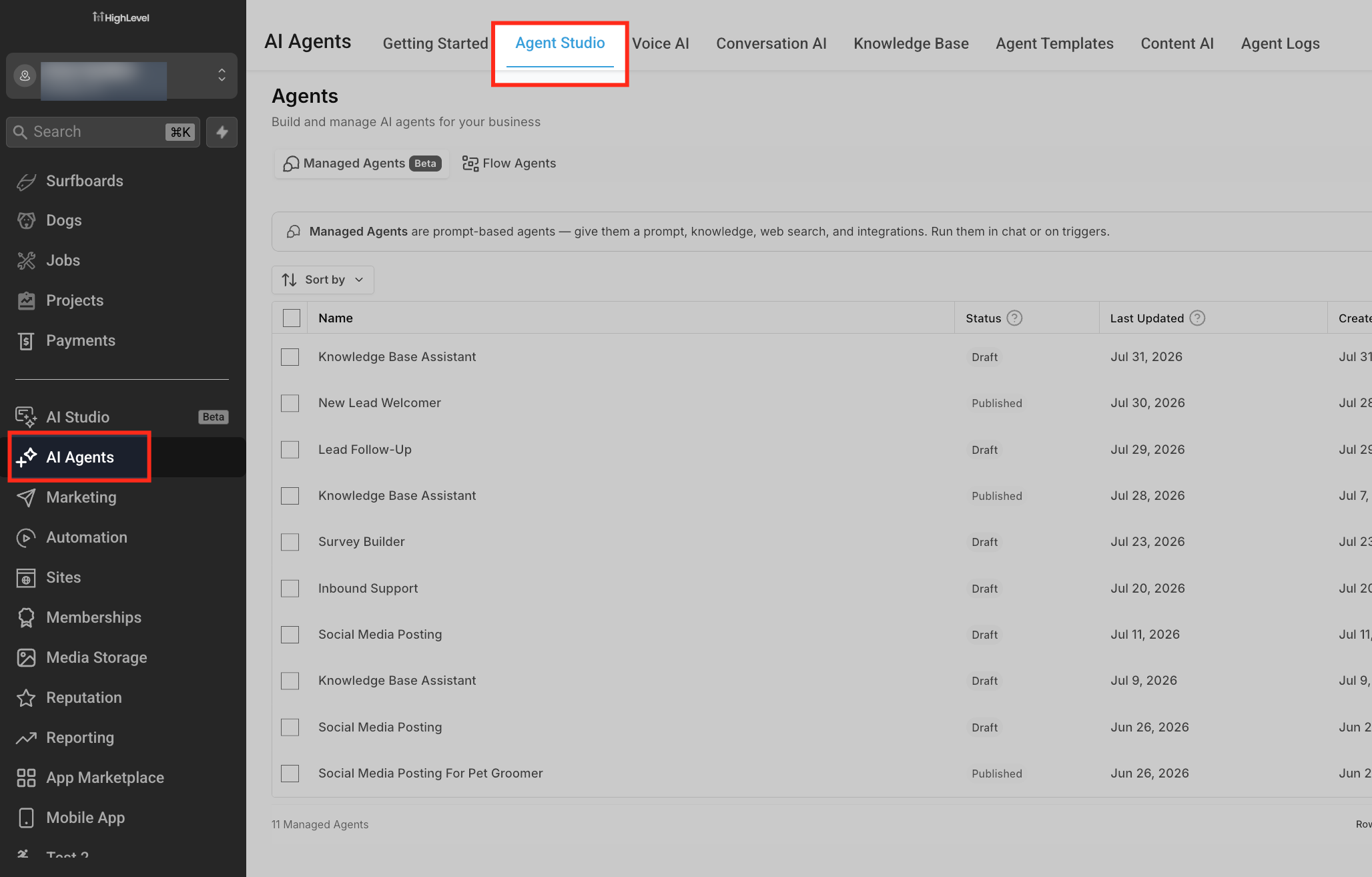
Ensure you have access to AI Agents → Agent Studio in the correct sub-account. Agent Studio is currently available to agency admins and agency users with appropriate permissions.
Make sure your basic SMS/Phone and email configuration is already working in HighLevel so outbound actions can succeed.
Open or create an Agent Studio agent
Go to AI Agents → Agent Studio from the left navigation.
Either create a new agent (optionally from a template) or open an existing agent where you want to add CRM actions.
Identify where actions should occur in your flow
On the canvas, decide at which point the agent should take a concrete action (e.g., after a qualification question, after summarizing a chat, or after a Router decision).
Common patterns include: end of a Sequential node, after an AI Router selects an intent, or right after collecting key data from the user.
Add or configure an action-capable node
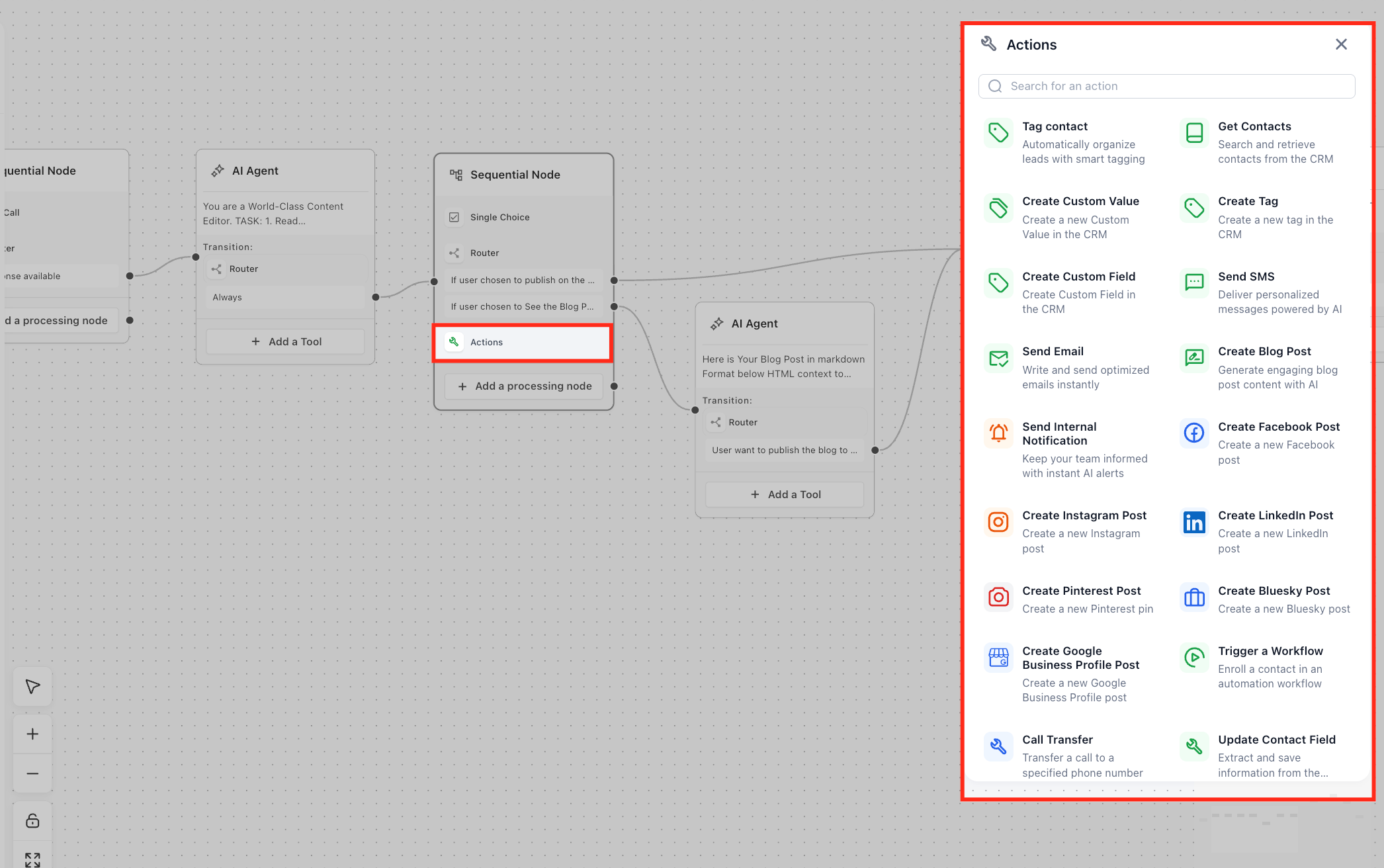
Insert the appropriate node that can call Actions Platform operations (for example, a node configured to “perform an action” or execute a sequence of CRM updates).
In the node’s configuration panel, choose the action type you want the agent to perform (e.g., Send SMS, Send Email, Tag Contact, Create Custom Field, Send Internal Notification).
Map variables and custom values
Use Agent Studio variables and custom values to dynamically populate fields like contact name, email, phone, or any contextual data captured earlier in the conversation.
Example mappings:
SMS message: “Hi , thanks for requesting pricing for .”
Custom field value: Set “Interest Level” to .
Attach or confirm triggers
If this is a new agent, configure triggers from the agent’s Start node (e.g., Form submitted, Lead tag added, Chat message).
If you want existing Workflows to invoke this agent, add the Invoke Agent Studio Agent action in your workflow and point it at the published agent.
For conversational assistants (Ask AI), connect the agent using the Ask AI × Agent Studio integration if appropriate.
Test your agent and actions
Use Agent Studio’s built-in testing tools and execution timeline to simulate the trigger and confirm that the right actions fire with correct data.
Validate:
SMS or emails are sent with the expected content.
Tags and custom fields are applied correctly.
Internal notifications go to the desired recipients.
Publish and monitor
Once you’re satisfied, publish the agent so it can respond to real triggers in Production.
Monitor contact timelines, workflow logs, and Agent Studio execution logs to ensure actions behave as expected and adjust as needed.
Frequently Asked Questions
Q: Does the Actions Platform replace traditional Workflows in HighLevel?
A: No. The Actions Platform complements Workflows. You can still use standard workflow actions, and you can now also call Agent Studio agents (which use Actions Platform) from workflows using the “Invoke Agent Studio Agent” action when you need AI reasoning plus CRM actions in the same flow.
Q: How are SMS and email charges handled when actions send messages?
A: When an agent sends SMS or emails via the Actions Platform, usage is billed through your existing messaging configuration (LC Phone/Twilio for SMS and your configured email provider). The Actions Platform does not change your underlying carrier or email pricing; it simply automates when and how those messages are sent.
Q: Can I control which actions an agent is allowed to take?
A: Yes. You decide which nodes and actions to add to your Agent Studio flow. You can gate actions behind Router logic, conditions, or variables so that tags are only applied, notifications only sent, or fields only updated when specific criteria are met.
Q: Is the Actions Platform available in every sub-account automatically?
A: Actions Platform capabilities are tied to Agent Studio availability and your AI product access. Agent Studio is currently available for agency admins and authorized users; if you don’t see the options to configure actions in your agents, contact your agency admin or HighLevel Support to confirm eligibility.
Q: Can agents create or update contacts in bulk using Actions Platform?
A: Actions typically run per trigger or per agent execution (for example, per form submission or per chat), making them ideal for real-time, one-to-one automation. For bulk updates, imports, or mass tagging, you’ll usually still rely on workflows, lists, or import tools instead of trying to process thousands of records through a single agent.
Q: How can I review what an agent did using Actions Platform?
A: Actions that send SMS or email and update tags or fields will appear wherever HighLevel normally records those events (such as contact timelines and workflow logs). You can also use Agent Studio’s execution logs and debugging tools to see exactly which nodes and actions ran for a given conversation.
Q: Is Actions Platform white-label friendly for agency resellers?
A: Yes. The built-in actions are designed to appear as normal CRM operations within sub-accounts, so your clients experience automated messages, tags, and updates without seeing separate “Actions Platform” branding.
- Agent Studio Overview & Beginner Guide (help.gohighlevel.com)
- How to Use the AI Agent Studio in HighLevel (help.gohighlevel.com)
- How to Set Up Agent Studio Triggers for Real-Time Starts (help.gohighlevel.com)
- Workflow Action – Invoke Agent Studio Agent (help.gohighlevel.com)
- Agent Studio Template Library: Build AI Agents Faster with Reusable Templates (help.gohighlevel.com)
- Build Smarter Conversation Flows in Agent Studio with AI Routing (help.gohighlevel.com)
Was this article helpful?
That’s Great!
Thank you for your feedback
Sorry! We couldn't be helpful
Thank you for your feedback
Feedback sent
We appreciate your effort and will try to fix the article