Improve personalization and reduce repetitive messaging by generating multiple content variations from one template.
TABLE OF CONTENTS
- What is Spintax
- Why Use Spintax?
- Spintax and Email Deliverability
- Common Use Cases/ Examples:
- How to Use Spintax:
- Using Custom Values Inside Spintax
What is Spintax
Spintax allows you to create multiple variations of a message using a single template. HighLevel automatically selects one of the available options each time the content is sent, helping make messages feel more natural and less repetitive.
Spintax can be used in almost all email builders, across :
Conversations
Bulk Actions
Workflows
Email Builder
Why Use Spintax?
Spintax is especially useful for cold email outreach, follow-ups, appointment reminders, and automated conversations. Spintax helps you in:
Create unique message variations automatically
Reduce repetitive content across campaigns
Personalize messages at scale
Test different messaging styles
Improve engagement with more natural communication
Spintax and Email Deliverability
When every recipient receives the exact same email, mailbox providers may identify the content as highly repetitive.
Spintax helps create variations in your messages by rotating words, phrases, and sentences. This can help reduce content uniformity across large campaigns.
For example, instead of sending: Hey {{contact.firstname}}, you can use - {SPIN| Hi|Hello|Hey}
Important
Spintax should be used thoughtfully. Modern email providers can recognize simple word substitutions, so changing only greetings may have limited impact.
For the best results:
Spin complete phrases or sentences instead of single words.
Combine Spintax with personalization and Custom Values.
Keep all variations natural and conversational.
Use Spintax to support testing and content variation, not as a replacement for good email practices.
Common Use Cases/ Examples:
- Greetings
{SPIN| Hey|Hi|Hello} {{contact.first_name}} - Appointment Reminders
{SPIN|Just a reminder|Friendly reminder|Quick reminder} about your appointment tomorrow. - Follow-Up Messages
{SPIN|Checking in|Following up|Wanted to circle back} on our previous conversation. - Calls to Action
{SPIN|Would you like to learn more?|Interested in hearing more?|Want to schedule a quick call?} - Email Content Variations
{SPIN|Thanks for your interest|Appreciate your time|Thanks for connecting with us}
How to Use Spintax:
- Open the email editor in HighLevel
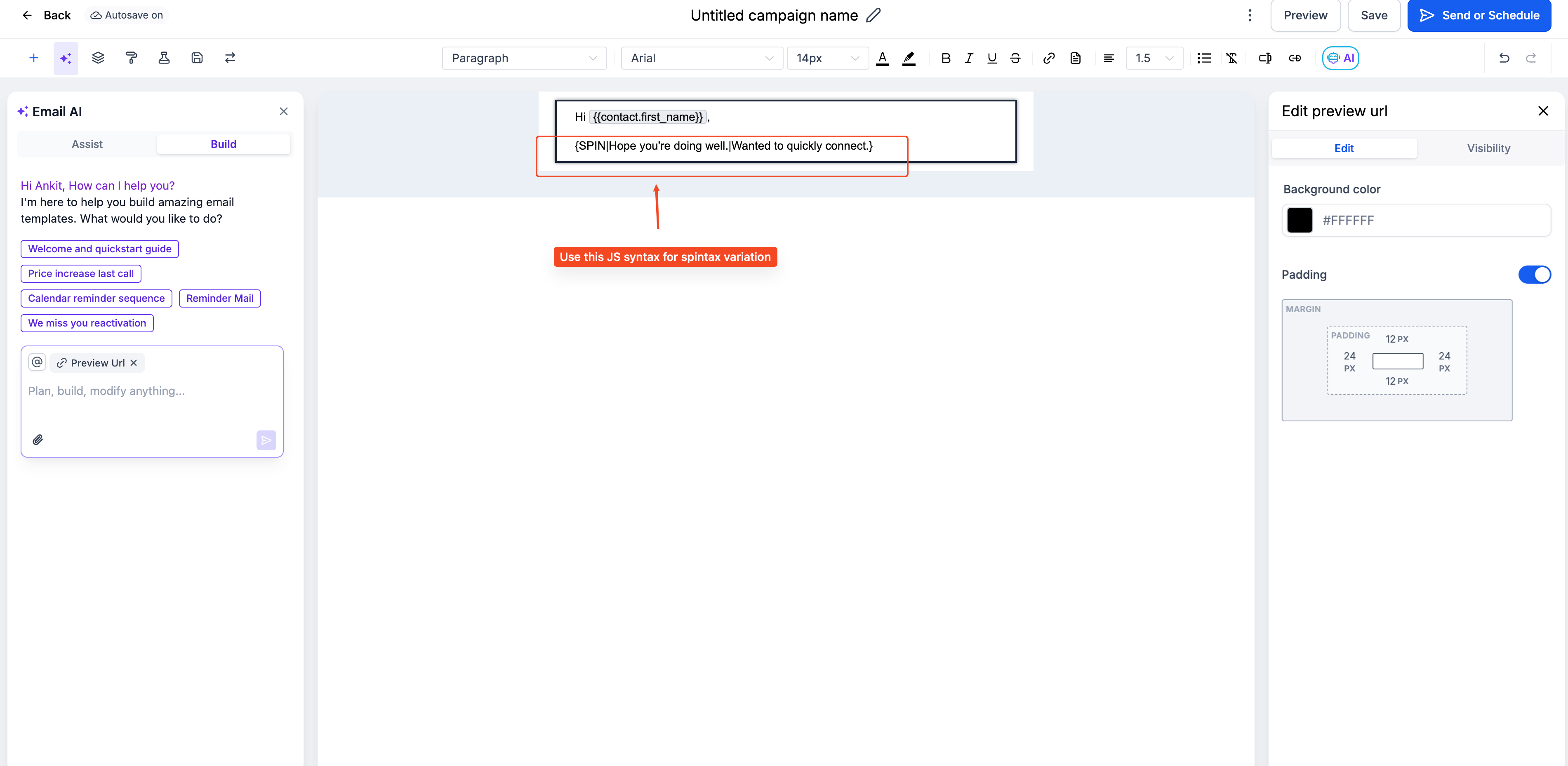
Add your content variations inside curly braces after the keyword "SPIN"
{SPIN|}and separate each option with a pipe|.Example:
{SPIN|Hey|Hello|Hi} {{contact.first_name}}
- Save your message or template.
- When the message is sent, HighLevel automatically selects one of the options at random.
Was this article helpful?
That’s Great!
Thank you for your feedback
Sorry! We couldn't be helpful
Thank you for your feedback
Feedback sent
We appreciate your effort and will try to fix the article