When an A2P 10DLC Campaign is rejected, HighLevel displays the rejection reason and the corrections required before you can resubmit.
This guide explains how to view required fixes, understand A2P rejection and vetting error codes, determine whether a Campaign can be resubmitted, and resolve common issues related to consent, websites, business information, use cases, and messaging content.
TABLE OF CONTENTS
- What are Required Fixes?
- Why A2P Campaign Vetting Happens
- How to View Your Required Fixes
- Before You Resubmit
- Rejection Codes & Required Fixes
- Part 1: Rejection Types Eligible for Resubmission
- Part 2: Rejection Types Ineligible for Resubmission
- Part 3: New Granular Error Codes (Effective March 23, 2026)
- Campaign Vetting Fees and Resubmission Notes
- Handling the "Maximum 3 Tries Exhausted" Error
- Frequently Asked Questions
What are Required Fixes?
Every rejection reason includes a "View required fixes →" link. Clicking it opens a detailed modal that breaks down the issue into four clear fields:
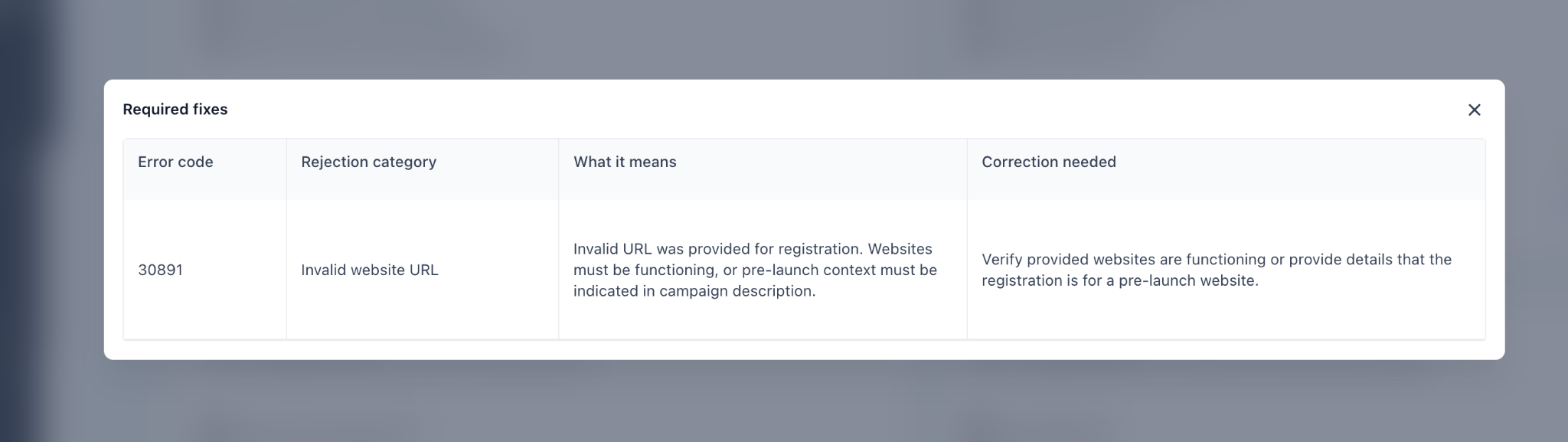
| Field | Description |
|---|---|
| Error code | The specific code returned by the carrier |
| Rejection category | A human-readable label for the violation (e.g., Invalid website URL) |
| What it means | A concise explanation of why the submission failed |
| Correction needed | The exact steps required to fix the issue before resubmitting |
Why A2P Campaign Vetting Happens
A2P 10DLC Campaigns are reviewed before approval to help reduce spam, fraud, and unwanted messaging across carrier networks. Campaign vetting helps carriers confirm that the submitted use case, opt-in method, sample messages, and business information are complete, accurate, and aligned with the messages the business plans to send.
Newly submitted Campaigns may remain in Pending status until review is complete. If a Campaign does not meet carrier or registration partner requirements, it may be rejected and require corrections before it can be approved.
The View required fixes modal provides rejection guidance based on how you registered your A2P campaign. For Chat Widget Setup, the instructions focus on changes you can make to your website, other SMS opt-in forms, and policy links, without requiring changes to consent wording or form fields automatically generated by HighLevel. For Manual Setup, the instructions address the opt-in methods and consent information you submitted. Where applicable, the modal also provides exact compliance wording and identifies issues that require changes to your brand registration before resubmission.
How to View Your Required Fixes
- Go to Settings → Phone System → Trust Center. Open Brands & Campaigns, then select the Campaigns tab. Locate the Campaign with a Rejected status. Click View required fixes → next to each rejection reason.

- Navigate to your A2P Campaign submission in the portal.
- Locate the rejected campaign and find the listed rejection reason(s).
- Click "View required fixes →" next to the rejection reason.
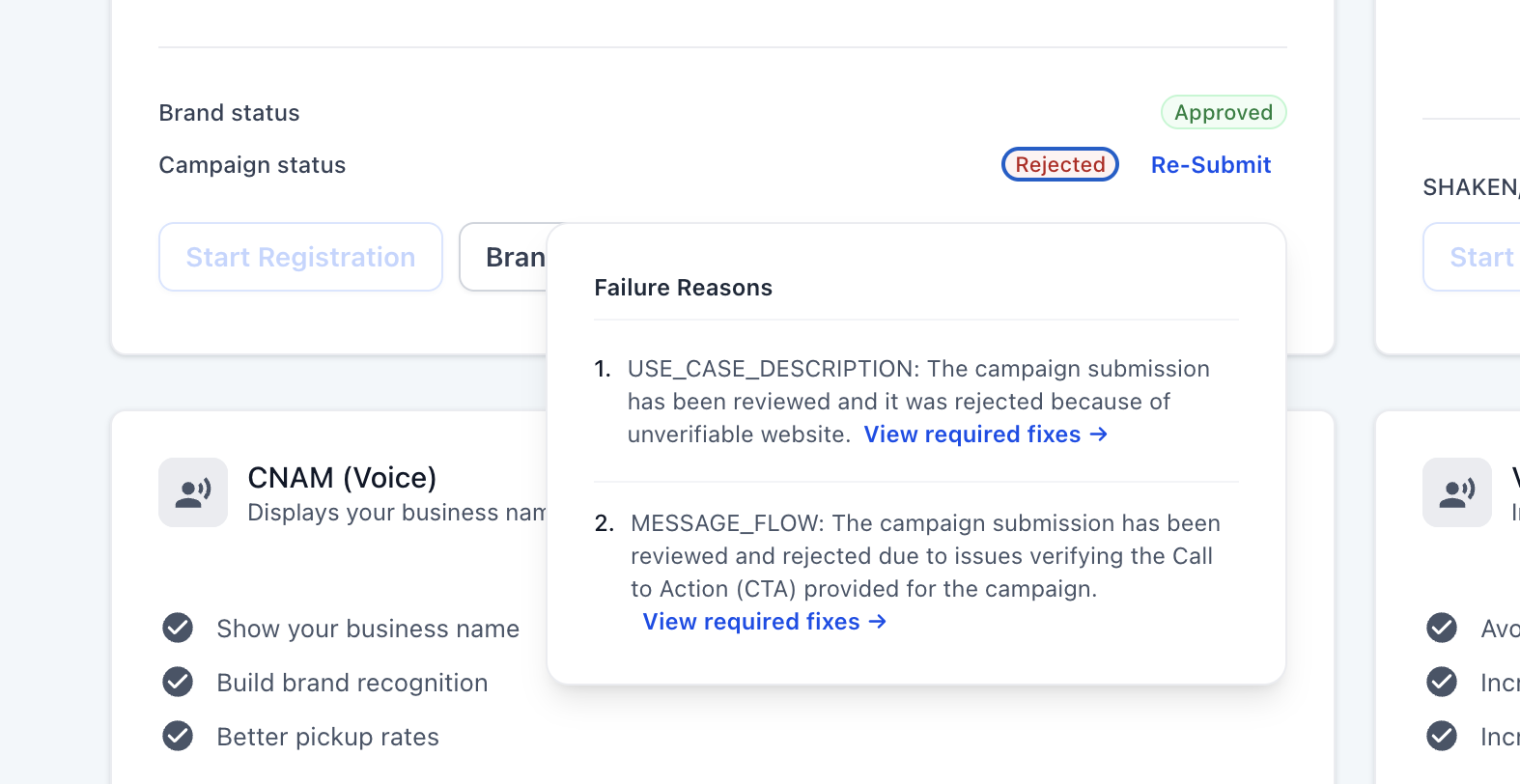
- Review each of the four fields in the modal carefully.
- Make the corrections indicated under "Correction needed."
- Resubmit your campaign once all issues are resolved.
Tip: A campaign may have more than one rejection reason. Make sure you click "View required fixes →" for each listed reason and address all issues before resubmitting.Before You Resubmit
If your Campaign is rejected, review all rejection reasons before making changes. A Campaign can have more than one rejection reason, and all listed issues should be corrected before resubmitting.
Some rejection reasons can be fixed by updating the existing Campaign submission. Other issues may require creating a new Campaign, especially if the required correction involves a field that cannot be edited during resubmission.
For example, the Campaign use case and Opt-in message may not be editable during resubmission. If one of these fields needs to be changed, you may need to create and submit a new Campaign.
If the rejection is related to disallowed, forbidden, or high-risk content, the Campaign may not be eligible for standard correction and resubmission.
IMPORTANT: Before resubmitting, review your entire Campaign—not only the field identified in the rejection. Verify that your Campaign description, use case, sample messages, website, opt-in flow, Privacy Policy, and Terms & Conditions are accurate and consistent. Fix all listed rejection reasons before resubmitting.
Rejection Codes & Required Fixes
| If your Campaign is... | What to do |
|---|---|
| Pending | Wait for the review to finish. Do not resubmit or create another Campaign while review is in progress. |
| Rejected with a correctable error | Open View required fixes →, correct every listed issue, review the full Campaign, and resubmit. |
| Rejected and a required field cannot be edited | Correct the underlying issue and create a new Campaign if necessary. |
| Rejected for forbidden/high-risk content | Do not resubmit the same Campaign. Review the applicable messaging restrictions. |
| Approved but SMS is not working | Verify that the sending number is linked to the approved Campaign and troubleshoot the SMS error separately. |
Part 1: Rejection Types Eligible for Resubmission
The rejection codes below can be resolved and resubmitted. Take the corrective action outlined for each code, update your campaign registration with the corrected information, and resubmit for review.
Opt-In & Consent
| Error Code | What It Means | Correction Needed |
|---|---|---|
| 30909 | Your Call-to-Action / Message Flow cannot be verified by reviewers. | Provide complete CTA information and all methods end-users use to consent. If behind a login, provide hosted screenshots. |
| 30913 | Marketing consent must be collected separately from informational / transactional consent. | Add separate consent for promotional messages. If you only send transactional messages, clarify this in your campaign description. |
| 30917 | You selected multiple opt-in methods but did not describe all of them. | Update your opt-in workflow description to cover every method listed. |
| 30923 | Messaging consent is bundled into mandatory terms or agreements. | Ensure opt-in is a separate, optional action. Consumers must be able to decline messaging and still use your service. |
| 30924 | Consent language is missing required disclosures (frequency, opt-out, rates). | Add all four required elements near the opt-in checkbox: message type, frequency, "message and data rates may apply," and STOP instructions. |
| 30925 | Opt-in form is missing a checkbox, or the checkbox is pre-selected. | Add an unchecked-by-default checkbox specifically for SMS consent. |
| 30931 | Opt-in form mechanics prevent consumers from declining messaging. | Add an explicit skip option or unchecked checkbox. A single button must not grant all permissions including messaging. |
| 30932 | Privacy policy indicates opt-in data is shared with third parties for marketing. | Update your privacy policy to explicitly state that mobile information will not be shared with third parties for marketing purposes. |
| 30896 | Opt-in message workflow is not sufficient for the campaign type, consent is missing, or opt-in is shared with third parties. | Verify opt-in meets CTIA guidelines. All methods of opt-in must be listed. If collected through a paper form or behind a login, provide a hosted link to an image of the opt-in. If on a website, provide a link — it must include a privacy policy and terms of service. Ensure opt-in is not shared with third parties. |
| 30887 | Campaign indicated collecting and processing consumer opt-outs, but the workflow is unclear, missing keywords, or missing an opt-out message. | Verify the opt-out workflow is accurate and update the Message Flow description with the opt-out process. Add opt-out keywords and update the opt-out message to include: acknowledgement of the request, confirmation no further messages will be sent, and your brand name. |
| 30890 | HELP message reply does not contain a brand name, phone number, or email address. | Verify the subscriber HELP message contains a brand name, phone number, or email address. The message must guide customers on who to contact after replying "HELP." |
Website
| Error Code | What It Means | Correction Needed |
|---|---|---|
| 30919 | Website lacks sufficient business information or messaging disclosure. | Add: company name, description of services, contact information, privacy policy, and mention of your SMS messaging program. |
| 30920 | Website is just a form (lead capture, sign-up) without business context. | Add business context around your form: company name, what your business does, and contact information. |
| 30921 | Website requires a login — reviewers cannot access it. | Create a publicly accessible page describing your business and messaging program. |
| 30922 | Website does not meet verification requirements (under construction, non-standard URL). | Provide a functioning, standard URL. If pre-launch, note this in your campaign description and provide screenshots. |
| 30891 | An invalid URL was provided for registration. Websites must be functioning. | Verify the provided website is functioning, or include detail in the campaign description clarifying that the registration is for a pre-launch website. |
| 30907 | Website URL does not match the campaign description or brand information. | Confirm the website aligns with both the registered brand and campaign details. |
| 30908 | A compliant privacy policy was not provided in the Message Flow or could not be located on the website. | Verify the privacy policy is accessible to end-users and include a direct link to it within the Message Flow. |
| 30888 | An age gate is not present on the website or opt-in flow. | Verify and add a robust age gate to your website or opt-in policy. |
Business Identity
| Error Code | What It Means | Correction Needed |
|---|---|---|
| 30914 | Sole proprietor campaign content does not match the registered name. | Align campaign description, sample messages, and website with the sole proprietor name you registered. |
| 30915 | Registered as sole proprietor but using a corporate name (LLC, Inc.). | Re-register as a standard brand using your EIN and corporate information. |
| 30918 | DBA (Doing Business As) name does not match the legal name on file. | Update brand registration to include your DBA name before resubmitting. |
| 30926 | Campaign references multiple companies or brands. | Register separate campaigns for each brand. Each brand needs its own campaign. |
| 30927 | Opt-in evidence shows a different company than the one registered. | Ensure opt-in evidence (screenshots, URLs) shows the exact company name matching this campaign's brand registration. |
| 30971 | Contact email uses a personal domain (Gmail, Yahoo) instead of an official business domain. | Register and use a business email address (e.g., name@yourcompany.com). |
| 30972 | Contact person listed is not an authorized representative of the business. | Update the contact to an authorized representative of the registered business. |
| 30881 | Brand support email is either invalid or associated with a public domain email provider. | Verify the brand support email is valid and uses a business domain — not a public email provider. |
| 30894 | Campaign registration is not associated with the correct brand. | Verify brand information is valid and accurately associated with the campaign. |
| 30903 | Brand does not meet the Sole Proprietor (EIN) criteria set by TCR and mobile carriers. | Register the brand as a standard brand and register a standard campaign use case that aligns with the brand's classification. |
Campaign Use Case
| Error Code | What It Means | Correction Needed |
|---|---|---|
| 30910 | Registration fields contain non-English language. | Campaign registration fields must be in English. Provide English translations of sample messages alongside the originals. |
| 30911 | Same text was copy-pasted across multiple registration fields, or all sample messages are identical. | Each field (description, sample messages, message flow) must contain unique content. Each sample message must be distinct. |
| 30912 | Use case appears to be personal/P2P messaging, not A2P. | Describe what software or platform triggers the messages and how it serves your customers. |
| 30916 | Selected lead generation but described lead nurture (or vice versa). | Lead generation = initial outreach to acquire new leads. Lead nurture = ongoing engagement with existing leads. Choose the one that accurately matches your campaign. |
| 30928 | Social influencer / public figure communications are not a valid use case. | Register as a business entity and frame your campaign around a business use case (e.g., e-commerce, event notifications). |
| 30929 | Emergency alert notifications are not permitted through A2P 10DLC. | Emergency alerts are not a valid A2P 10DLC use case. Contact support for alternatives. |
| 30930 | Your brand has reached the 100-campaign limit. | Deregister unused campaigns in the console to free up capacity. |
| 30886 | Campaign description does not thoroughly explain the campaign's purpose or does not match the use case. | Verify the campaign description is accurate and detailed. |
| 30893 | Sample messages are not provided, unclear, or the content does not match the campaign use case. | Verify your sample messages are accurate, detailed, and match your campaign use case and description. - Use Sample Message #1 for Promotional/Marketing content. - Use Sample Message #2 for Transactional/Informational content. - For mixed messaging, include at least one sample in each category. - Indicate templated fields with brackets (for example, [First Name]). - Include your business name in at least one message and opt-out language in at least one message. |
| 30892 | Sample messages include a public URL shortener or a non-secured URL. | Remove all public URL shorteners (e.g., bit.ly) from sample messages. Use full, direct HTTPS URLs only. |
| 30889 | Embedded phone number is selected but not reflected in sample messages. | Verify the embedded phone number selection is accurate. Update sample messages to include the embedded phone number, or update the embedded phone number selection. |
Registration & Brand
| Error Code | What It Means | Correction Needed |
|---|---|---|
| 30895 | Campaign is for direct lending or a loan arrangement and is missing the direct lending content attribute. | Verify that direct lending or loan arrangement is selected for campaign registration. If the campaign is not related to direct lending, update the campaign description accordingly. |
| 30898 | Same EIN is used for multiple brands. | Only register the minimum number of brands per EIN. Do not resubmit until brand registration is updated. |
| 30995 | Account has reached the maximum Messaging Services phone number limit. | Contact Support. |
Part 2: Rejection Types Ineligible for Resubmission
The rejection codes below are due to forbidden messaging categories and are not eligible for resubmission.
SHAFT Content Violations
These codes apply to campaign descriptions, sample messages, website content, and any linked URLs.
| Error Code | Rejection Category | What It Means |
|---|---|---|
| 30953 | SHAFT – Sex | Submission included nudity, pornography, sex toys, or other adult content. |
| 30954 | SHAFT – Hate | Submission included hateful speech, profanity, violent content, incitement to violence, or similar speech. |
| 30955 | SHAFT – Alcohol | Submission included alcohol promotions. |
| 30956 | SHAFT – Alcohol (Age Gate) | Submission included alcohol content without a robust 21+ age gate. |
| 30957 | SHAFT – Firearms | Submission included content related to firearms, fireworks, or explosives. |
| 30958 | SHAFT – Tobacco / Vape | Submission included cigarettes, cigars, tobacco products, vape, vape juice, or similar items. |
Disallowed Content
| Error Code | Rejection Category | What It Means |
|---|---|---|
| 30940 | Disallowed | Cannabis, CBD, marijuana, or illegal substances. |
| 30941 | Disallowed | Prescription drugs or controlled substances. |
| 30942 | Disallowed | Loan marketing (payday, auto title, personal loans). |
| 30943 | Disallowed | Third-party debt collection. |
| 30944 | Disallowed | Gambling or betting. |
| 30945 | Disallowed | Sweepstakes or contests. |
| 30946 | Disallowed | Stock alerts or investment signals. |
| 30947 | Disallowed | Cryptocurrency trading or token promotions. |
| 30948 | Disallowed | High-risk investment opportunities (forex, binary options). |
| 30949 | Disallowed | Debt reduction or consolidation services. |
| 30950 | Disallowed | Credit repair services. |
| 30951 | Disallowed | Third-party lead generation or multi-level marketing (MLM). |
| 30952 | Disallowed | Non-federally compliant use case. |
High Risk
| Error Code | Rejection Category | What It Means |
|---|---|---|
| 30959 | High Risk | Fraudulent or misleading content detected. |
| 30960 | High Risk | Campaign identified as a known phishing campaign. |
| 30961 | High Risk | Website or URL has a high-risk domain reputation. |
| 30962 | High Risk | Deceptive marketing practices (false urgency, bait-and-switch, fake endorsements). |
| 30963 | High Risk | Campaign uses public URL shorteners (bit.ly, tinyurl, etc.). |
| 30964 | High Risk | Campaign URLs use HTTP instead of HTTPS. |
Legacy Codes (Pre-March 23, 2026)
The following general codes were replaced by the granular codes above starting March 23, 2026. You may still see these on older rejections.
| Error Code | Rejection Category | What It Means |
|---|---|---|
| 30882 | Terms & Conditions | Campaign does not meet carrier Terms and Conditions. |
| 30883 | Content Violation – SHAFT | Submission included restricted content: sex, hate speech, alcohol, firearms, tobacco, or marijuana/CBD. |
| 30884 | Spam / Phishing | Spam/fraud team flagged the number, business, or traffic for spam or phishing. |
| 30885 | High Risk | Spam/fraud team flagged the number, business, or traffic for fraud, deceptive marketing, or third-party data sharing. |
| 30897 | Disallowed Content | Submission included disallowed content types or evidence of third-party data sharing in the privacy policy or terms. |
Part 3: New Granular Error Codes (Effective March 23, 2026)
Starting March 23, 2026, new granular error codes provide more precise rejection reasons compared to previous general codes. Instead of receiving a broad code like 30883, 30884, 30885, or 30897, you'll now receive a code that specifically identifies the issue.
The general catch-all code 30883 (covering SHAFT categories: Sex, Hate, Alcohol, Firearms, and Tobacco) now has distinct error codes per category. These content restrictions apply to campaign descriptions, sample messages, website content, and any linked URLs. Specific high-risk and disallowed codes also replace the general 30884 and 30885 codes.
Opt-In & Consent
| Error Code | What It Means | Correction Needed |
|---|---|---|
| 30909 | Your Call-to-Action / Message Flow cannot be verified by reviewers. | Provide complete CTA information and all methods end-users use to consent. If behind a login, provide hosted screenshots. |
| 30913 | Marketing consent must be collected separately from informational / transactional consent. | Add separate consent for promotional messages. If you only send transactional messages, clarify this in your campaign description. |
| 30917 | You selected multiple opt-in methods but did not describe all of them. | Update your opt-in workflow description to cover every method listed. |
| 30923 | Messaging consent is bundled into mandatory terms or agreements. | Ensure opt-in is a separate, optional action. Consumers must be able to decline messaging and still use your service. |
| 30924 | Consent language is missing required disclosures (frequency, opt-out, rates). | Add all four near the opt-in checkbox: message type, frequency, "message and data rates may apply," and STOP instructions. |
| 30925 | Opt-in form is missing a checkbox, or the checkbox is pre-selected. | Add an unchecked-by-default checkbox specifically for SMS consent. |
| 30931 | Opt-in form mechanics prevent consumers from declining messaging. | Add an explicit skip option or unchecked checkbox. A single button must not grant all permissions including messaging. |
| 30932 | Privacy policy indicates opt-in data is shared with third parties for marketing. | Update your privacy policy to explicitly state that mobile information will not be shared with third parties for marketing purposes. |
Website
| Error Code | What It Means | Correction Needed |
|---|---|---|
| 30919 | Website lacks sufficient business information or messaging disclosure. | Add: company name, description of services, contact information, privacy policy, and mention of your SMS messaging program. |
| 30920 | Website is just a form (lead capture, sign-up) without business context. | Add business context around your form: company name, what your business does, and contact information. |
| 30921 | Website requires a login — reviewers cannot access it. | Create a publicly accessible page describing your business and messaging program. |
| 30922 | Website does not meet verification requirements (under construction, non-standard URL). | Provide a functioning, standard URL. If pre-launch, note this in your campaign description and provide screenshots. |
Business Identity
| Error Code | What It Means | Correction Needed |
|---|---|---|
| 30914 | Sole proprietor campaign content does not match the registered name. | Align campaign description, sample messages, and website with the sole proprietor name you registered. |
| 30915 | Registered as sole proprietor but using a corporate name (LLC, Inc.). | Re-register as a standard brand using your EIN and corporate information. |
| 30918 | DBA (Doing Business As) name does not match the legal name on file. | Update brand registration to include your DBA name before resubmitting. |
| 30926 | Campaign references multiple companies or brands. | Register separate campaigns for each brand. Each brand needs its own campaign. |
| 30927 | Opt-in evidence shows a different company than the one registered. | Ensure opt-in evidence (screenshots, URLs) shows the exact company name matching this campaign's brand registration. |
| 30971 | Contact email uses a personal domain (Gmail, Yahoo) instead of an official business domain. | Register and use a business email address (e.g., name@yourcompany.com). |
| 30972 | Contact person listed is not an authorized representative of the business. | Update the contact to an authorized representative of the registered business. |
Use Case
| Error Code | What It Means | Correction Needed |
|---|---|---|
| 30910 | Registration fields contain non-English language. | Campaign registration fields must be in English. Provide English translations of sample messages alongside the originals. |
| 30911 | Same text was copy-pasted across multiple registration fields, or all sample messages are identical. | Each field (description, sample messages, message flow) must contain unique content. Each sample message must be distinct. |
| 30912 | Use case appears to be personal / P2P messaging, not A2P. | Describe what software or platform triggers the messages and how it serves your customers. |
| 30916 | Selected lead generation but described lead nurture (or vice versa). | Lead generation = initial outreach to acquire new leads. Lead nurture = ongoing engagement with existing leads. Choose the one that accurately matches. |
| 30928 | Social influencer / public figure communications are not a valid use case. | Register as a business entity and frame your campaign around a business use case (e.g., e-commerce, event notifications). |
| 30929 | Emergency alert notifications are not permitted through A2P 10DLC. | Emergency alerts are not a valid A2P 10DLC use case. Contact support for alternatives. |
| 30930 | Your brand has reached the 100-campaign limit. | Deregister unused campaigns in the console to free up capacity. |
SHAFT Content Violations (Ineligible for Resubmission)
| Error Code | What It Means |
|---|---|
| 30953 | Sex or adult content. |
| 30954 | Hate speech, violence, or offensive content. |
| 30955 | Alcohol promotions. |
| 30956 | Alcohol content without a robust 21+ age gate. |
| 30957 | Firearms, fireworks, or explosives. |
| 30958 | Tobacco or vape products. |
Disallowed Content (Ineligible for Resubmission)
| Error Code | What It Means |
|---|---|
| 30940 | Cannabis, CBD, marijuana, or illegal substances. |
| 30941 | Prescription drugs or controlled substances. |
| 30942 | Loan marketing (payday, auto title, personal loans). |
| 30943 | Third-party debt collection. |
| 30944 | Gambling or betting. |
| 30945 | Sweepstakes or contests. |
| 30946 | Stock alerts or investment signals. |
| 30947 | Cryptocurrency trading or token promotions. |
| 30948 | High-risk investment opportunities (forex, binary options). |
| 30949 | Debt reduction or consolidation services. |
| 30950 | Credit repair services. |
| 30951 | Third-party lead generation or multi-level marketing (MLM). |
| 30952 | Non-federally compliant use case. |
High Risk (Ineligible for Resubmission)
| Error Code | What It Means |
|---|---|
| 30959 | Fraudulent or misleading content detected. |
| 30960 | Campaign identified as a known phishing campaign. |
| 30961 | Website or URL has a high-risk domain reputation. |
| 30962 | Deceptive marketing practices (false urgency, bait-and-switch, fake endorsements). |
| 30963 | Campaign uses public URL shorteners (bit.ly, tinyurl, etc.). |
| 30964 | Campaign URLs use HTTP instead of HTTPS. |
Registration Issue
| Error Code | What It Means | Correction Needed |
|---|---|---|
| 30995 | Account has reached the maximum Messaging Services phone number limit. | Contact Support. |
Campaign Vetting Fees and Resubmission Notes
A2P 10DLC Campaign vetting may include verification or review fees. These fees and any applicable recurring Campaign fees can vary by registration type, Campaign type, and current carrier requirements.
For the most current pricing details, see: A2P 10DLC Messaging Fees: Registration, Monthly, and Carrier Costs.
Eligible Campaign rejections may be corrected and resubmitted. Some rejection types, such as disallowed or high-risk content, may be handled differently and may not qualify for standard resubmission.
Review the rejection reason carefully before resubmitting or creating a new Campaign.
Handling the "Maximum 3 Tries Exhausted" Error
If you see the error "Maximum 3 tries exhausted", please fill out this form once you have collected the CP 575 Form. It means the registration attempts have failed due to mismatched or invalid business details.
Next Steps:
- Obtain your CP 575 EIN Confirmation Letter (or request a 147c letter from the IRS if the CP 575 is unavailable).
Upload your business registration form in your support communication with us.
Email or send a screenshot of your CP 575 form to the HighLevel team.
We will submit this documentation on your behalf for Brand approval.
Important Tips:
Ensure the legal business name and EIN number exactly match what’s shown on the CP 575 form.
- Do not use the business name found on W2 or W9 forms, as they may differ.
If the business name spans multiple lines on your CP 575/147c letter, you must enter all lines above the address line during registration.
Example:
ABC Holding Group Inc.
Division of Regional Services
123 Main Street
New York, NY 10001
The legal name to enter would be: ABC Holding Group Inc. Division of Regional Services
Frequently Asked Questions
Q: Can I resubmit immediately after making corrections?
Yes, for eligible rejection codes. Once you've addressed all listed rejection reasons, you can resubmit your campaign directly from the portal. Note that resubmission may be subject to additional carrier review time.
Q: My campaign has multiple rejection reasons. Do I need to fix all of them?
Yes. All rejection reasons must be resolved before resubmission. Addressing only some issues will likely result in another rejection.
Q: My campaign was rejected with an ineligible code. Can I still appeal?
Yes. If you believe your rejection was made in error, contact support with the subject line "10DLC Campaign Appeal for [your business name or number]" and include the full details of your appeal.
Q: I fixed the issue but my campaign was rejected again. What should I do?
Review the new rejection reasons carefully , carriers may surface additional issues on subsequent reviews. If you believe your campaign is compliant and continue to face rejections, contact our support team for assistance.
Q: Why is my Campaign in Pending status?
Newly submitted A2P 10DLC Campaigns may remain in Pending status while they are reviewed by carriers or registration partners. If the Campaign is approved, it can move forward for A2P messaging. If it does not meet requirements, it may be rejected with required fixes.
Q:Is there a fee to resubmit a rejected Campaign?
Eligible Campaign rejections may be corrected and resubmitted. Fee handling can vary depending on the rejection type and current carrier requirements.
Was this article helpful?
That’s Great!
Thank you for your feedback
Sorry! We couldn't be helpful
Thank you for your feedback
Feedback sent
We appreciate your effort and will try to fix the article