The Default Header sets a From Name and From Email for a dedicated sending domain. Once configured, it always overrides the From Name and From Email set on any campaign or workflow sent through that domain — regardless of what was typed into the campaign or workflow itself.
This article also covers what happens as each layer is left blank: if the Default Header, the campaign/workflow From Email, and your Business Profile email are all empty, the platform still finds a way to send — using an automatically generated reply@<your-subdomain> address.
When to Use a Default Header
Set the From Name and From Email once at the domain level, and every campaign and workflow sent through that domain uses it automatically — even if a teammate types a different From Name or From Email into an individual campaign or workflow, the Default Header takes over at send time.
Industries with strict communication standards — such as finance and healthcare — can lock every outbound email to a single, approved sender identity by setting a Default Header, removing the risk of any individual campaign or workflow going out under an unapproved From Name or From Email.
Prerequisites
Before configuring a Default Header, confirm the following are in place.
Default Headers can only be set on dedicated sending domains managed within a sub-account. Agency-level domains do not support per-sub-account Default Header configuration.
You must have completed DNS setup — including CNAME, DKIM, and SPF records — for your custom sending domain (e.g., email.yourbrand.com).
A green checkmark next to your domain under Settings → Email Service → SMTP Service → Dedicated Domain and IP confirms it is validated and ready.
Setting the Default Header (From Name & From Email)
The Default Header is configured per dedicated domain within a sub-account. Navigate to the location below to access the setting.
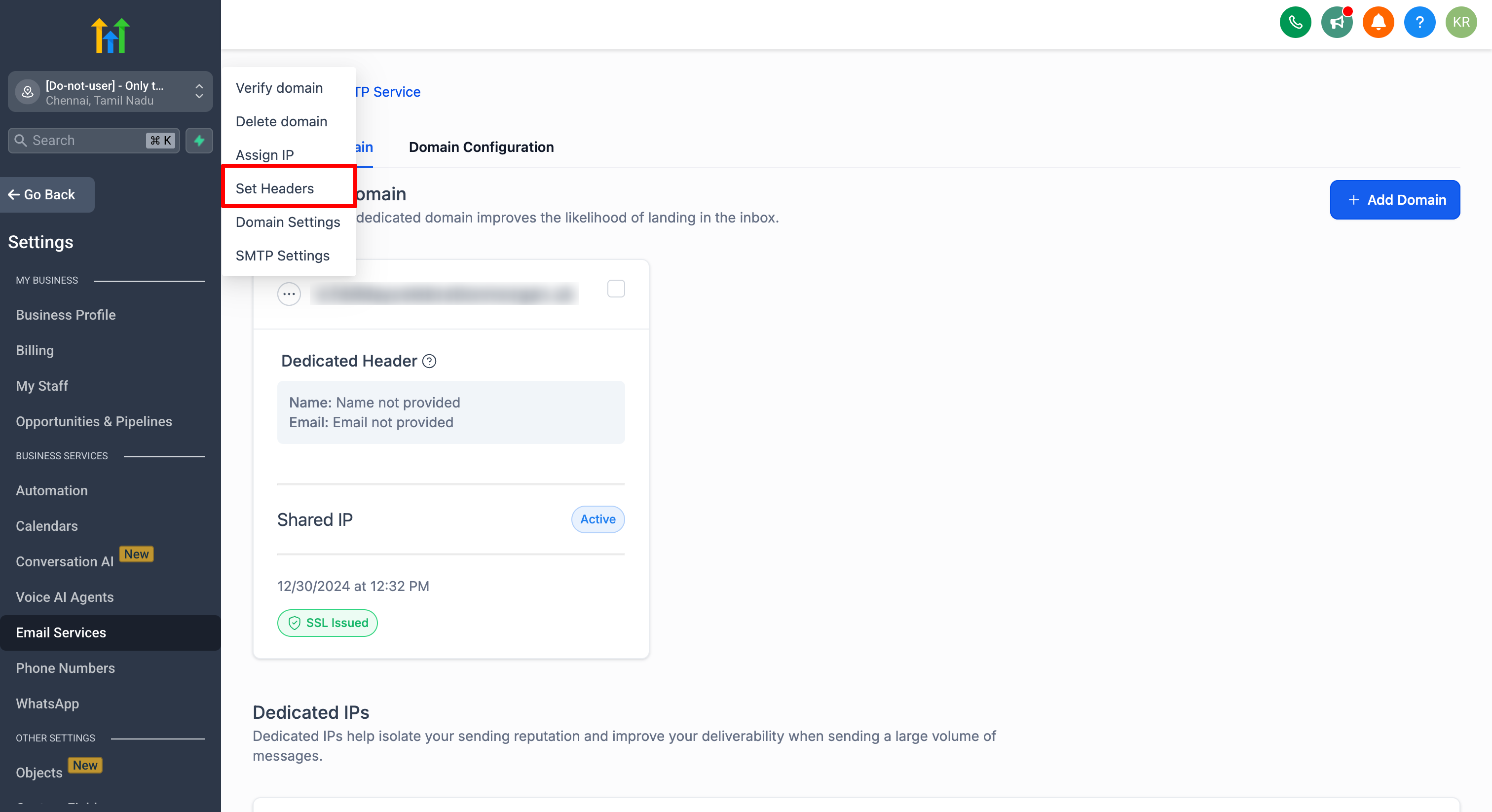
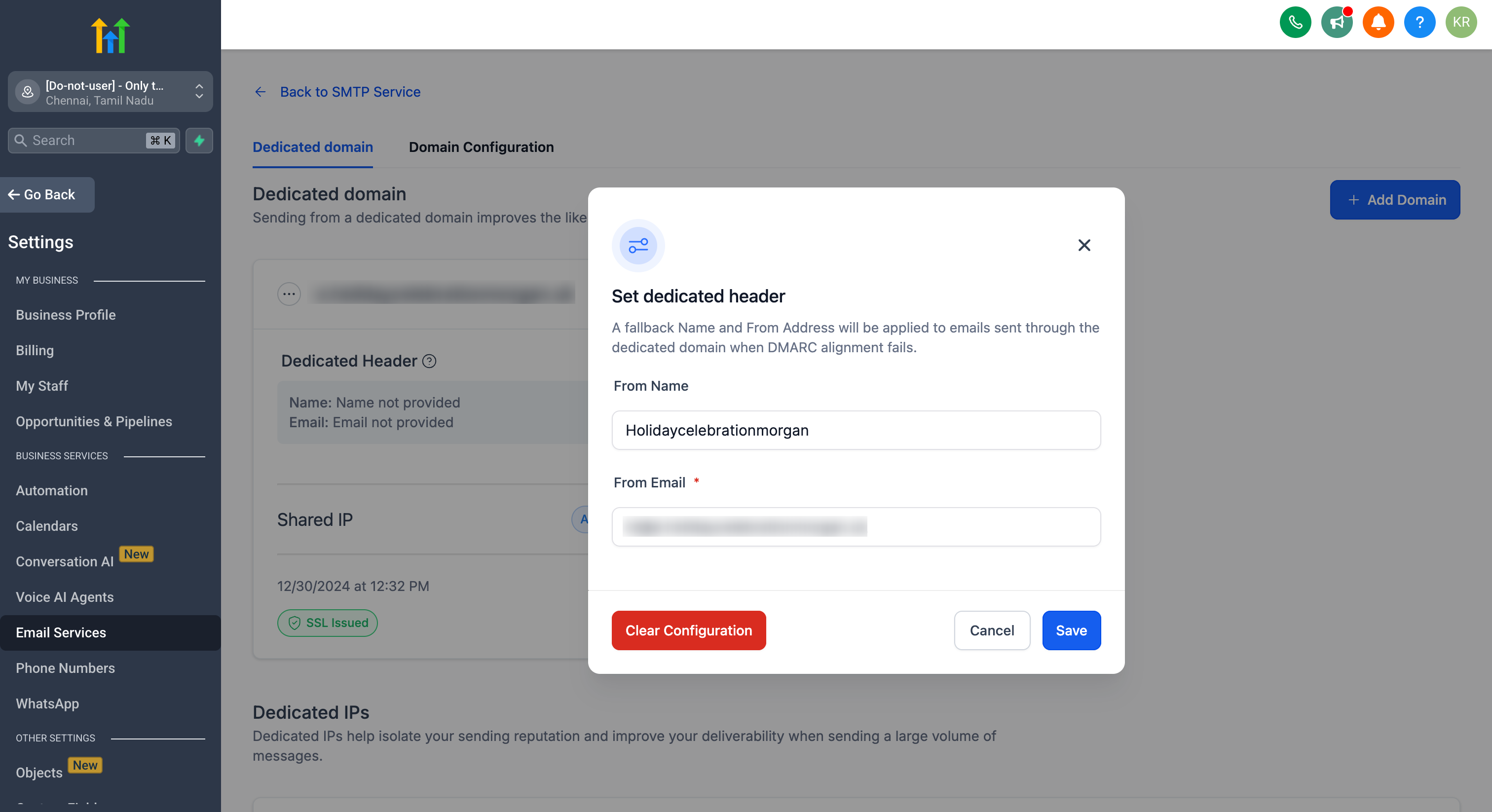
Once saved, the Default Header always overrides the From Name and From Email configured on any campaign or workflow sent through this dedicated domain — there is no condition attached, it applies to every send. If you leave the Default Header fields blank, the platform moves down the fallback chain described in Section 5.
How the Override Works in Practice
When creating a broadcast or workflow email, you can still set a campaign-level From Name and From Email as usual. This is what will be used only if no Default Header is configured for the sending domain.
At the moment the email sends, the platform checks whether a Default Header is saved for the dedicated domain. If one is set, it takes priority automatically — the campaign's or workflow's own From Name and From Email are ignored, not just used as a backup.
- If a Default Header is set, recipients always see that From Name and From Email — regardless of what was entered on the campaign or workflow.
- Because the address comes from your authenticated sending domain, the email stays DMARC-compliant and is less likely to be rejected or flagged as spam.
The Full Fallback Chain When Everything Is Blank
A Default Header is only the first check the platform makes. Every email needs a valid From Name and From Email to send, so the platform works down a four-tier fallback chain until it finds one — even if every field along the way was left empty.
If a Default Header is saved for the sending domain, it is used — always. Nothing below this tier is ever checked.
If the Default Header is left blank, the platform uses whatever From Name and From Email was typed directly into that specific campaign or workflow.
If both the Default Header and the campaign/workflow From Email are left blank, the platform checks the Business Email saved under your Business Profile. If one is present, that address is used as the From Email for the send.
If all three of the above are blank — no Default Header, no campaign/workflow From Email, and no Business Profile email — the platform automatically generates a From address using your active, validated sending subdomain, in the format reply@<your-subdomain>, and uses it to send the email. This guarantees a send never fails purely for lack of a configured sender address.
| Priority | Source Checked | Used When… |
|---|---|---|
| 1 | Default Header | It is set for the domain (always wins if present) |
| 2 | Campaign / Workflow From Name & Email | Default Header is blank |
| 3 | Business Profile — Business Email | Default Header AND campaign/workflow From Email are both blank |
| 4 | Auto-generated reply@<subdomain> | Default Header, campaign/workflow From Email, AND Business Profile email are all blank |
This chain exists so a send is never blocked purely because a From address wasn't configured somewhere — not so you can skip configuring one. Reaching Tier 4 means recipients see a generic reply@ address instead of your brand's name, which looks less trustworthy and can hurt open rates. Set at least a Business Email in your Business Profile as a safety net beneath your Default Header.
Example: Three Scenarios Side by Side
Setup
| Setting | Value |
|---|---|
| Dedicated Sending Domain | email.yourbrand.com (validated) |
| Business Profile — Business Email | hello@yourbrand.com |
| Campaign From Name / Email (when filled in) | Jane from YourBrand / jane@email.yourbrand.com |
What Recipients See in Each Scenario
From: YourBrand Support <support@email.yourbrand.com>
The campaign's "Jane from YourBrand" name and address are ignored completely, even though they were correctly configured and properly aligned to the domain.
From: Jane from YourBrand <jane@email.yourbrand.com>
With no Default Header saved for the domain, the campaign's own From Name and From Email are used as configured (Tier 2).
From: YourBrand <hello@yourbrand.com>
With both of those blank, the platform falls to Tier 3 and uses the Business Email saved in the Business Profile.
From: reply@email.yourbrand.com
With every layer above empty, the platform falls all the way to Tier 4 and auto-generates a reply@ address on your active, validated sending subdomain so the email still sends.
How to Confirm It Worked
- Save a Default Header whose From Name and From Email differ from a campaign's configured values, then send a test — confirm the Default Header wins.
- Clear the Default Header and the campaign's From Email, but keep a Business Email saved — send a test and confirm the Business Email is used.
- Clear all three (Default Header, campaign/workflow From Email, and Business Profile email) and send a test — confirm the From address comes back as reply@ your validated subdomain.
Best Practices & Considerations
Because the Default Header overrides every campaign and workflow sent through the domain, confirm this is the sender identity you want used across the board before saving it. Any campaign-level From Name or From Email your team configures afterward will be ignored while the Default Header is active.
Since Tier 3 of the fallback chain uses the Business Email in your Business Profile, keep that field filled in even if you rely on a Default Header day-to-day. It's the difference between a send falling back to your business's own address versus falling all the way to an auto-generated reply@ address.
The Default Header's From Email can be any address on your sending domain, but ensure that mailbox is actively monitored or aliased correctly (e.g., support@yourbrand.com forwarding to the right team) so customer replies don't go unread. This applies just as much to an auto-generated reply@ address — check that mailbox too if you ever land on Tier 4.
Send a small internal test to confirm the Default Header is being applied. Check that the From Name and From Email recipients actually see match your Default Header configuration — not whatever was typed into the campaign or workflow, and not a fallback tier you didn't intend to reach.
A Default Header silently overrides whatever From Name and From Email a teammate configures at the campaign or workflow level. Make sure anyone building campaigns or workflows on this domain knows a Default Header is active, so they aren't confused when their custom From address never actually gets used.
If you manage multiple brands or departments, create separate sub-accounts — each with its own dedicated domain and Default Header — for fully isolated sending control and reputation management.
Frequently Asked Questions
Was this article helpful?
That’s Great!
Thank you for your feedback
Sorry! We couldn't be helpful
Thank you for your feedback
Feedback sent
We appreciate your effort and will try to fix the article