Toll-Free Verification registers a toll-free number, the end business using it, and the business's messaging use case with participating carriers. Verification is required before an LC Phone toll-free number can send SMS or MMS to recipients in the United States or Canada.
A successful submission depends on consistent business information, a live public web presence, a specific use-case description, representative message samples, and verifiable proof of how recipients consent to receive messages.
This guide covers the complete in-app verification flow and includes an in-page A2P opt-in appendix so you can prepare compliant consent evidence without relying on a separate article.
Only toll-free numbers with a Verified (Approved) status can send SMS/MMS traffic to recipients in the United States and Canada. Restricted (Unverified), Pending Verification, and Rejected numbers remain blocked for messaging until approval.
An unverified toll-free send can return Error 30032. Error 30007 indicates carrier filtering and can also appear when message content, consent, sender identification, or other compliance elements do not meet carrier expectations. Applicable messaging charges can still apply to accepted delivery attempts.
Toll-Free Verification applies to messaging. It does not prevent the number from being used for voice calling.
What is Toll-Free Number Verification?
Toll-Free Verification confirms who is sending business messages from a toll-free number, what types of messages recipients will receive, and how those recipients provide consent. The review helps carriers distinguish legitimate application-to-person messaging from unwanted or abusive traffic.
The requirement applies to SMS and MMS sent from US or Canada toll-free numbers to recipients in the United States and Canada. Each toll-free number must have its own approved verification record before messaging is enabled.
Toll-Free Verification is not A2P 10DLC registration. A2P 10DLC applies to eligible US local 10-digit numbers, while Toll-Free Verification applies to toll-free messaging. Both processes require accurate sender identity, transparent messaging use cases, and documented recipient consent.
Key Benefits of Toll-Free Verification
Verification gives carriers the information needed to evaluate the sender and messaging program before traffic is allowed. A complete and accurate submission also reduces preventable review delays.
- Messaging Eligibility: Enables an approved toll-free number to send SMS/MMS to US and Canada recipients.
- Improved Deliverability: Reduces the risk of traffic being blocked solely because the toll-free number is unverified.
- Carrier Transparency: Connects the end business, use case, message samples, and opt-in method to the sending number.
- Consent Accountability: Documents how recipients agree to receive the specific messages described in the submission.
- Faster Troubleshooting: Provides a clear status and verification record when messaging is blocked or rejected.
- Brand Trust: Supports responsible messaging practices that protect recipients and the sender's number reputation.
What You Need Before You Begin
A business tax ID or EIN is not required to complete Toll-Free Verification.
Prepare the end business's legal name, public website or social profile, business contact information, physical business location, messaging use case, opt-in evidence, and representative sample messages.
| Prepare | What Reviewers Need to Confirm |
|---|---|
| LC Phone toll-free number | The number appears in the correct sub-account and shows Verification Required. |
| Legal entity or end-business name | The named business is the organization the recipient is actually engaging with and is consistent across the submission. |
| Live public website or public social profile | The public page represents the same end business and supports the stated products, services, and messaging use case. |
| Business contact and location | A real point of contact and physical business address can be associated with the sender. |
| Estimated monthly volume and use-case categories | The selected categories and volume accurately describe expected traffic. |
| Opt-in method and public proof URL | The evidence clearly shows where and how recipients provide consent for the stated message types. |
| Detailed use-case description | The explanation identifies the audience, message purpose, opt-in source, and sending workflow. |
| Representative sample messages | Examples match the selected categories and include the business name, context, and opt-out language when applicable. |
| Additional business fields, if prompted | DBA, entity type, registration authority, registration number, and registration country can be supplied when the flow requires them. |
A business tax ID is not required in every Toll-Free Verification submission. HighLevel can request additional registration information based on the business type and verification details.
Do not submit the agency, software platform, or reseller as the legal entity unless that organization is the actual end sender, creates the message content, and sends on its own behalf.
Broken-link fallback resolved: The consent guidance previously linked as a separate A2P Opt-In Guide is included directly in Appendix A — A2P Opt-In Guide below.
How to Verify a Toll-Free Number
The in-app flow collects business identity, location, messaging use case, opt-in proof, and sample content in three stages. Complete every field using information that is accurate, public, and consistent with the end business.
Step 1: Open the Toll-Free Verification Form
- Open the sub-account that owns the toll-free number.
- Go to Settings → Phone System.
- Open Manage Numbers.
- Click Verification Required beneath the applicable toll-free number.
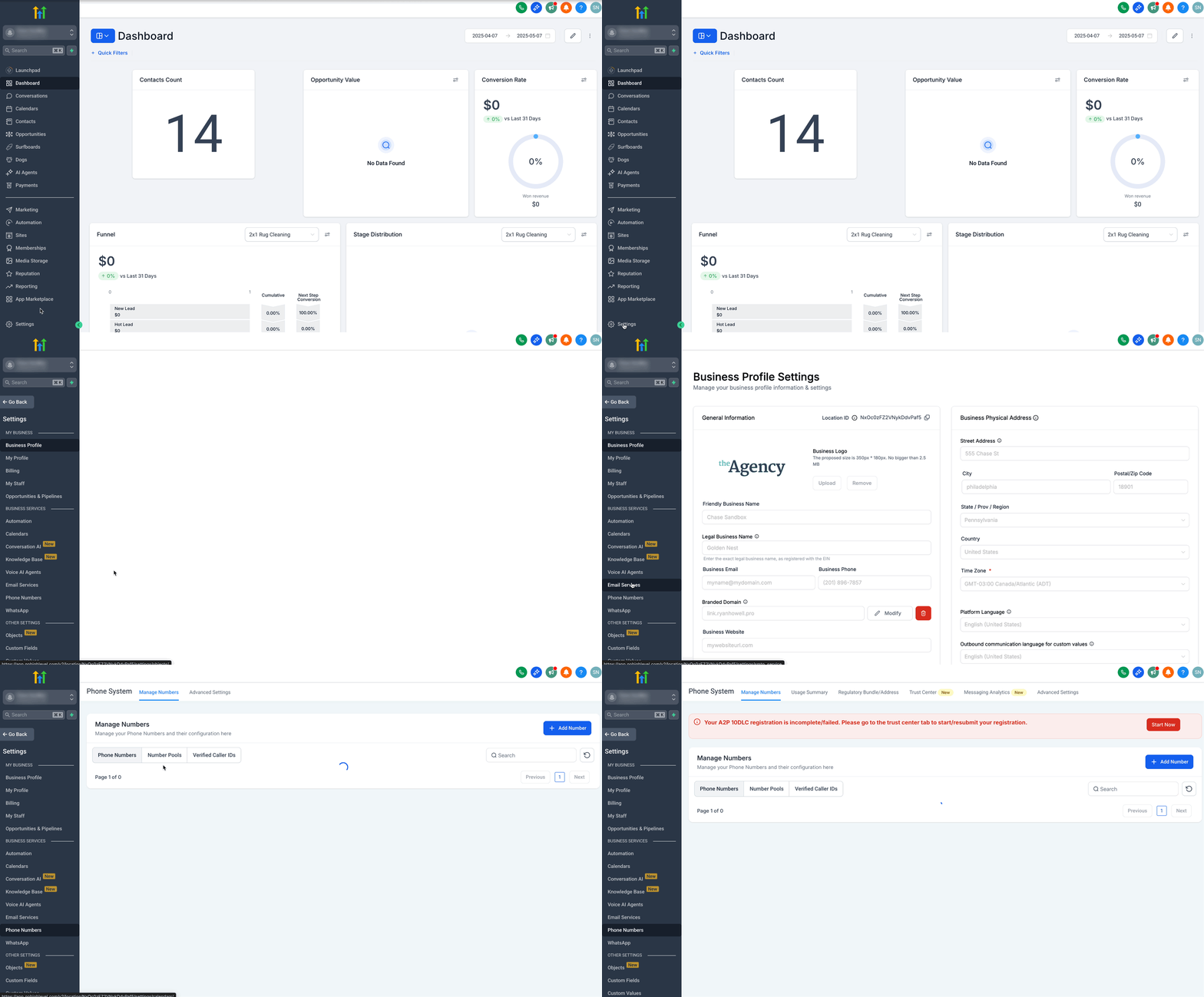
Open Phone System from the sub-account Settings area, then select Manage Numbers.
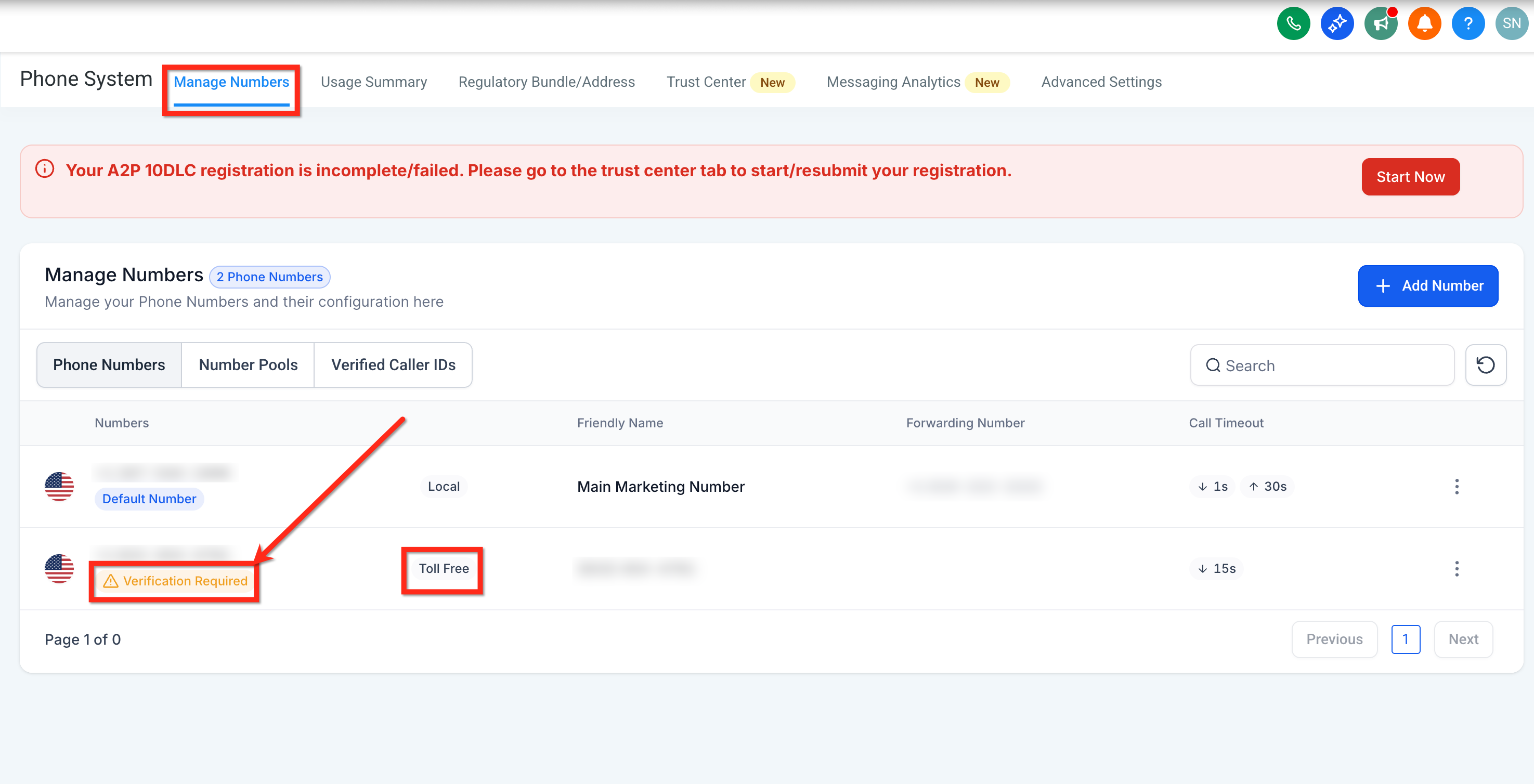
Select Verification Required for the toll-free number you want to register.
Step 2: Enter Business and Contact Information
Enter the identity and contact information for the end business that recipients recognize as the sender.
1. Legal Entity Name: Enter the business name represented on the public website.
2. Website URL: Enter the end business's live public website. If the business does not maintain a website, use an eligible public business profile.
3. Contact: Enter the first name, last name, email, country code, and phone number for the responsible business contact.
An EIN or business registration number is not required for this step.
Avoid mismatched branding. A private, inactive, unrelated, or reseller-branded website can prevent reviewers from confirming the end business and may lead to rejection.
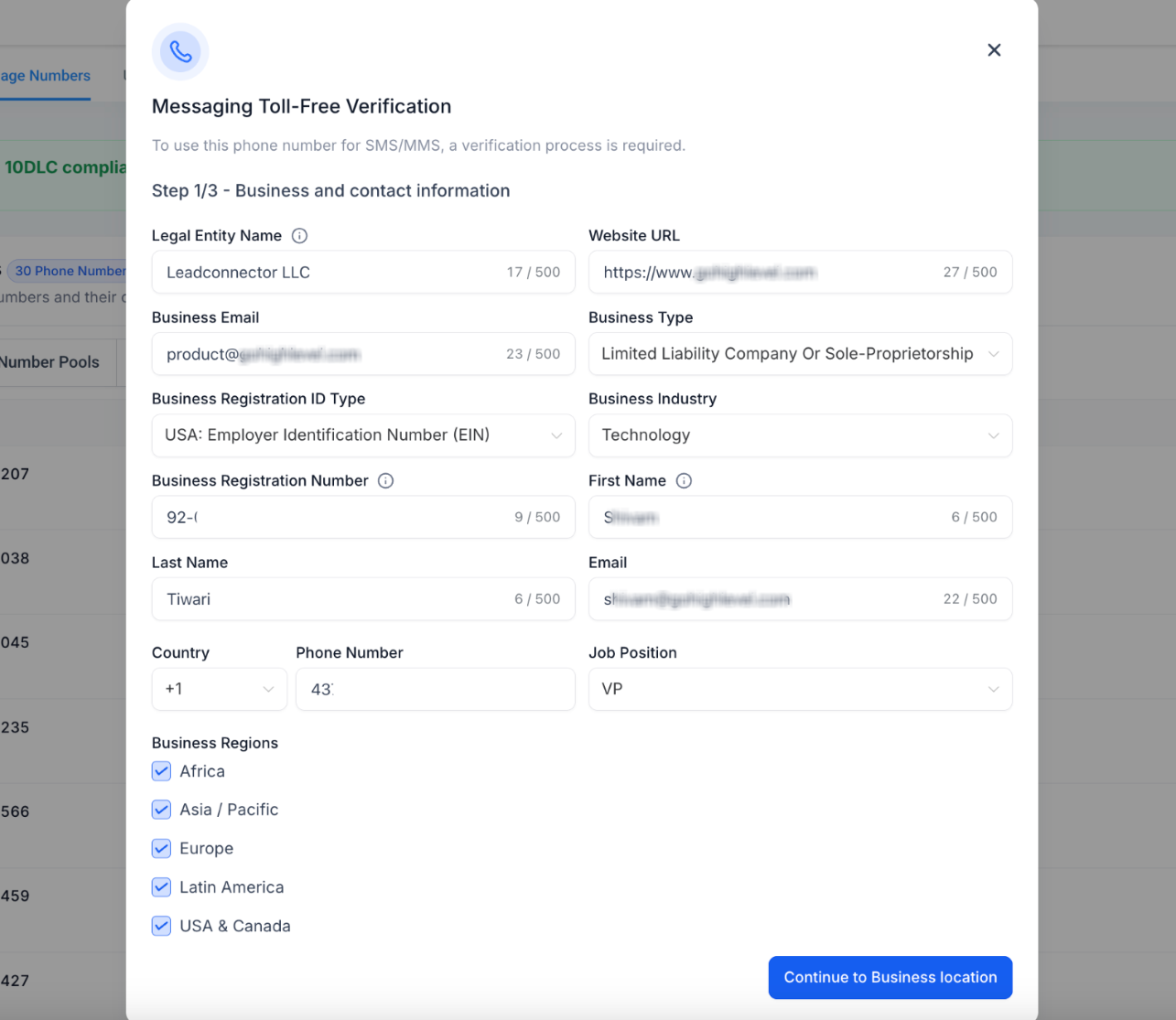
Enter the end business's legal identity, public website, and responsible contact information.
Step 3: Enter the Business Location
Enter the physical location of the end business the recipient is engaging with. Use a complete address that can be associated with the same business named in the previous step.
- Select the Country.
- Enter the State, province, or region.
- Enter Address Line 1.
- Enter the City.
- Enter the Postal or ZIP code.
- Click Continue to Messaging Use Case.
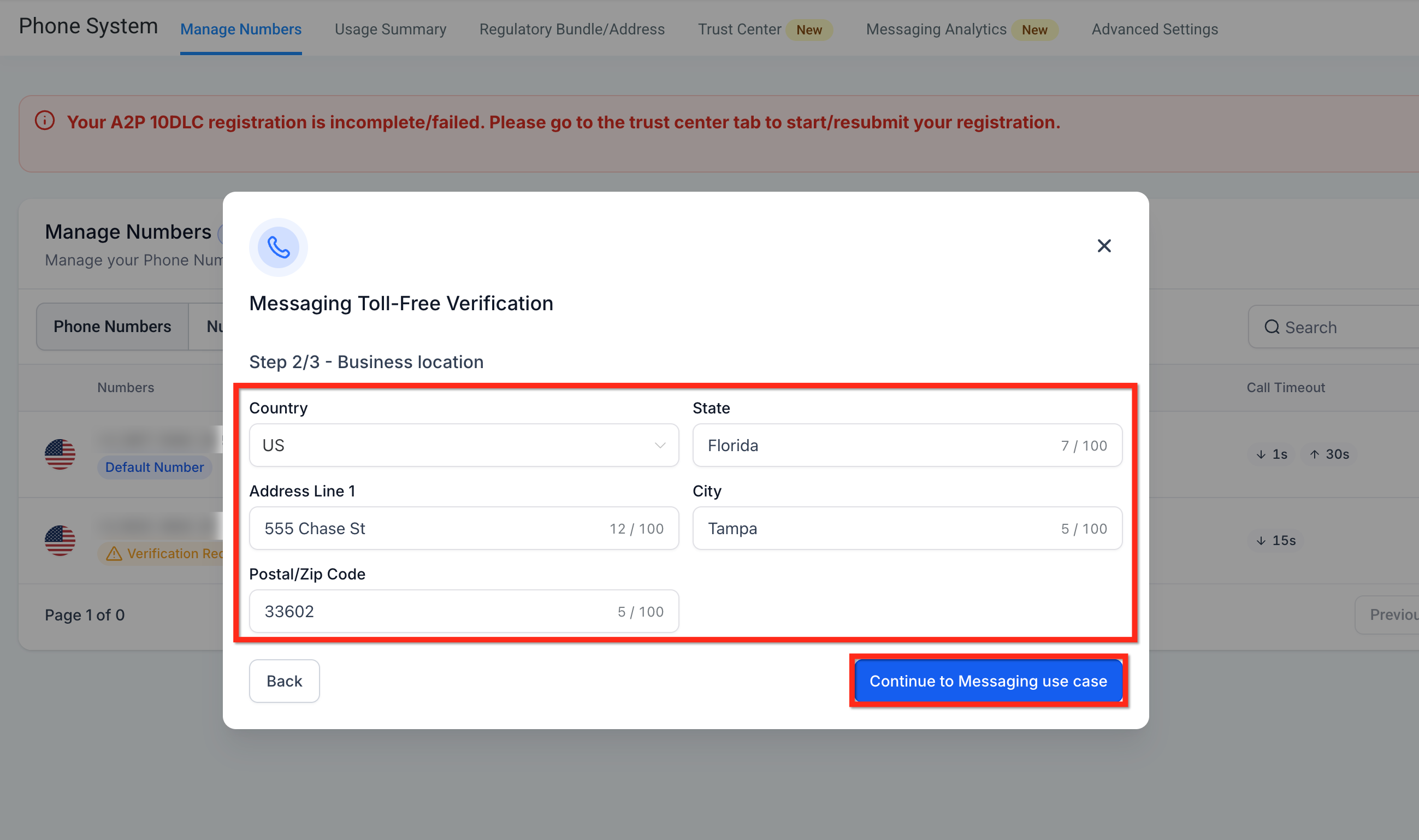
Complete the physical business location before continuing to the messaging use case.
Step 4: Describe the Messaging Use Case and Opt-In
The use-case stage must explain what will be sent, who will receive it, how consent is collected, and what evidence proves that process. Every selection should describe the program that will actually run on the toll-free number.
- Select the expected Estimated Monthly Volume.
- Select the actual Opt-In Type: Mobile/QR Code, Paper Form, Verbal, Via Text, or Web Form.
- Select every applicable Use Case Category. Include Marketing when promotional content will be sent.
- Provide a public Opt-In Workflow Image URL that shows the full consent flow.
- Write a specific Use Case Description that identifies the audience, message purpose, opt-in source, and sending workflow.
- Enter representative Message Content that matches the selected categories and includes the recognizable business name and opt-out language when applicable.
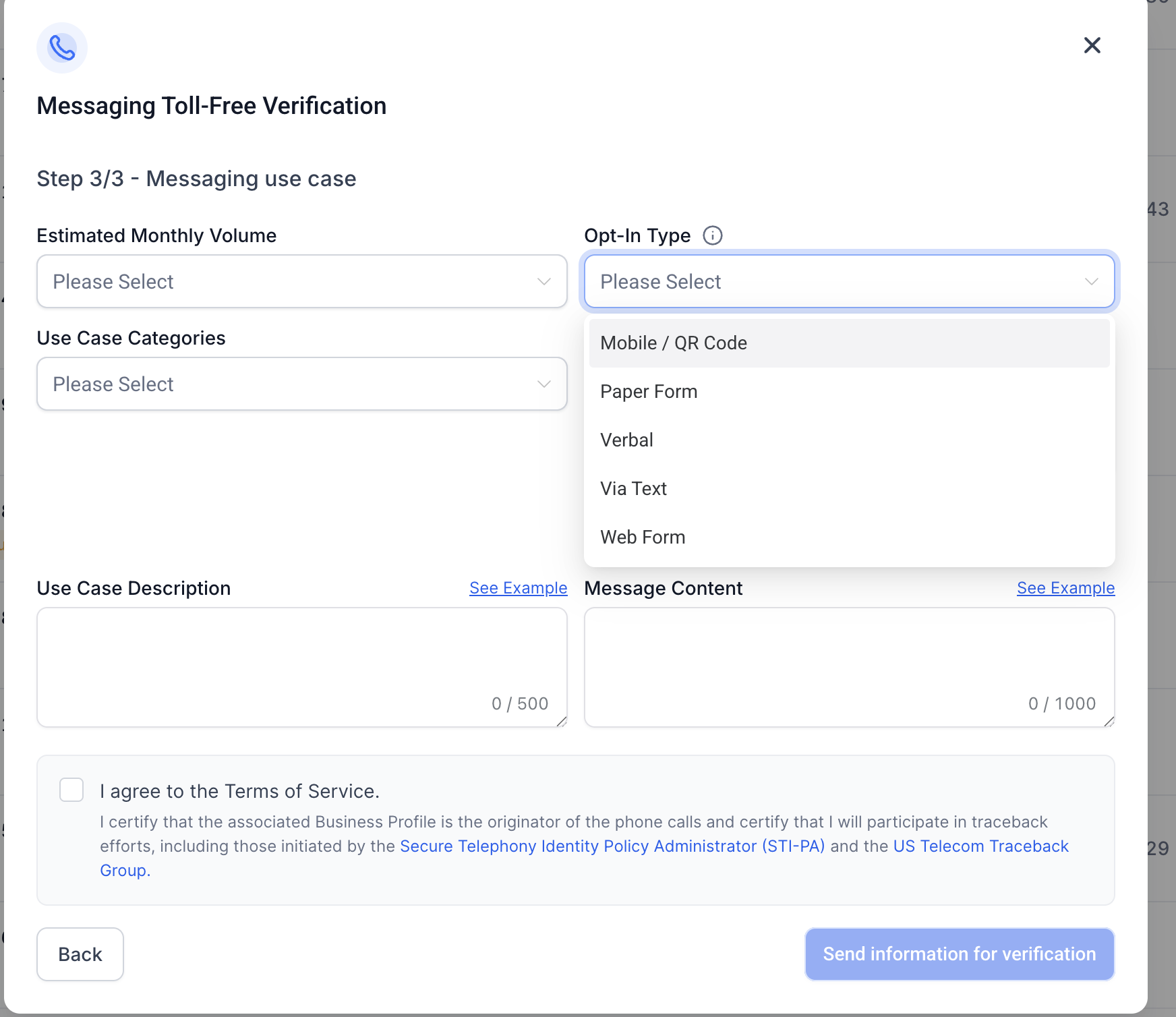
Select the opt-in type that matches the evidence and consent process described in the submission.
“This toll-free number sends appointment confirmations, rescheduling notices, and service follow-ups to customers of [Business Name] who explicitly opt in through our public appointment form. Messages are sent from HighLevel after a booking or service event. Recipients can reply HELP for assistance or STOP to opt out.”
“[Business Name]: Your appointment is confirmed for [date/time]. Reply C to confirm or call [support number] for help. Reply STOP to opt out.”
Step 5: Review and Submit
- Confirm that the business identity, website, location, categories, consent proof, description, and sample messages all match.
- Open the public opt-in evidence URL in a private or incognito browser window to confirm that no login is required.
- Select I agree to the Terms of Service.
- Click Send Information for Verification.
- Complete KYC or identity verification if HighLevel prompts the authorized user to do so.
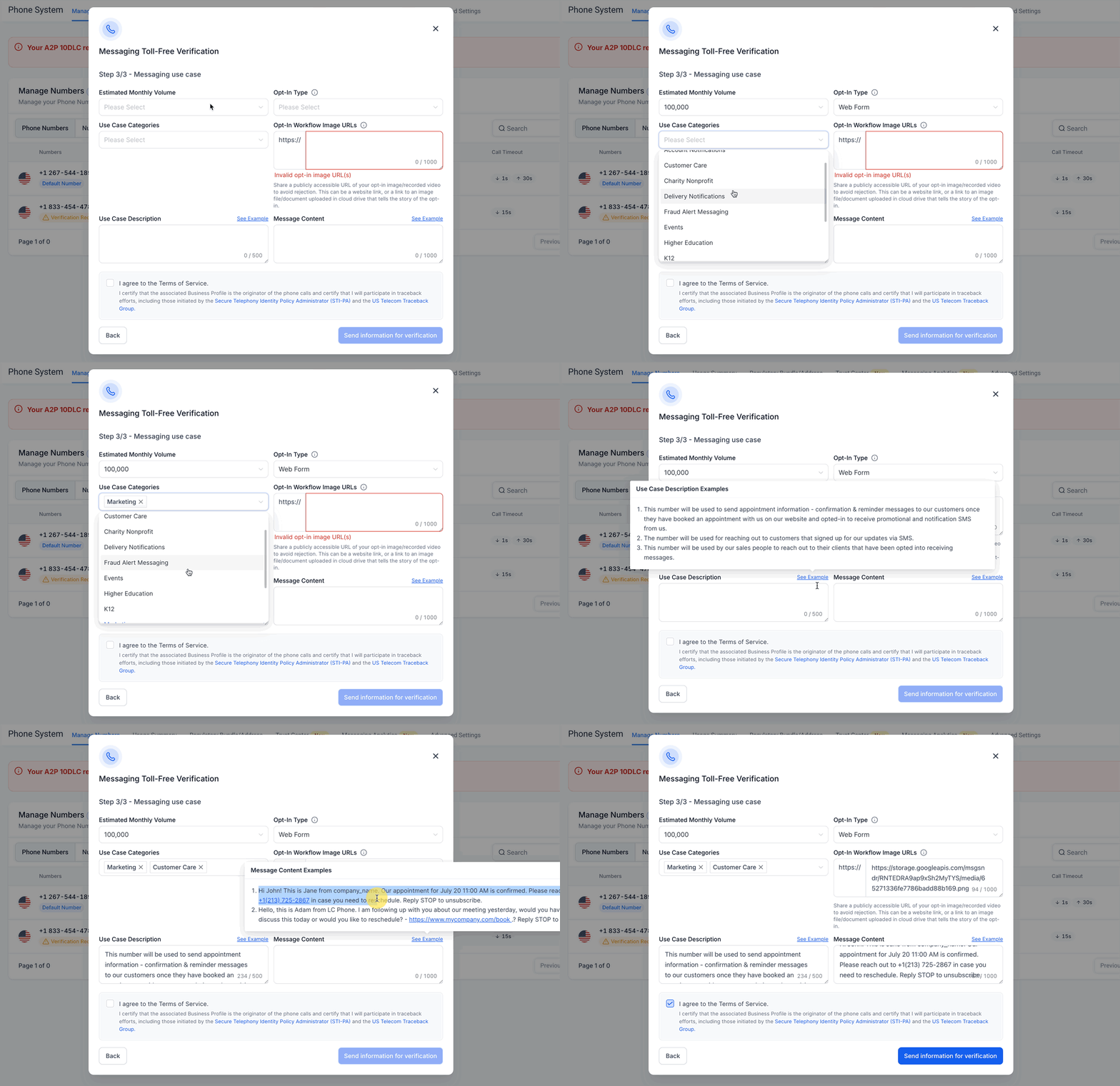
Review the completed use case, accept the Terms of Service, and send the information for verification.
Appendix A — A2P Opt-In Guide
Business messaging sent through an application is application-to-person, or A2P, traffic. Toll-Free Verification reviews the same foundational questions: who is sending, what recipients will receive, and how the business can prove that each recipient knowingly agreed to those messages.
Core Consent Rules
- Consent must belong to the end business. Do not use purchased, rented, shared, or transferred contact lists as proof of opt-in.
- Consent must be affirmative. A recipient must take a clear action to agree to messaging.
- Consent must be optional. A person must be able to submit a form or complete a purchase without being forced to accept promotional messages.
- Checkboxes cannot be pre-selected. The recipient must select the desired consent option.
- Marketing and non-marketing consent must be separate. Use distinct choices when both message categories are offered.
- The disclosure must be complete. Identify the business, describe the message type, disclose frequency, state that message and data rates may apply, and provide HELP and STOP instructions when applicable.
- The submitted method must match reality. The selected opt-in type, evidence URL, use-case description, website, and actual workflow must tell the same story.
- Opt-outs must be honored. Stop messaging a recipient after a valid opt-out unless the recipient later completes a valid resubscription process.
Legal note: The wording below is an operational example, not legal advice. Adapt disclosures to the actual sender, message types, frequency, support process, and applicable law.
Web Form Opt-In
A web form should show the SMS consent choice next to the phone-number collection experience, with visible links to the business's Privacy Policy and Terms and Conditions. The phone-number field can be required, but SMS consent must remain optional.
| Consent Type | Example Wording |
|---|---|
| Marketing | I consent to receive marketing text messages about special offers, discounts, and service updates from [Business Name] at the phone number provided. Message frequency may vary. Message and data rates may apply. Text HELP for assistance. Reply STOP to opt out. |
| Non-Marketing | I consent to receive non-marketing text messages from [Business Name] about [specific use case, such as appointment reminders or order updates]. Message frequency may vary. Message and data rates may apply. Text HELP for assistance. Reply STOP to opt out. |
- Keep marketing and non-marketing consent in separate unchecked boxes.
- Make each consent box optional rather than a condition of submitting the form.
- Place visible Privacy Policy and Terms and Conditions links near the form or in its footer.
- Make sure the Privacy Policy explains the use of mobile information and does not permit sharing text-message opt-in data or consent with third parties for their marketing.
- Use the same business name and message categories in the form, verification submission, website, and sample messages.
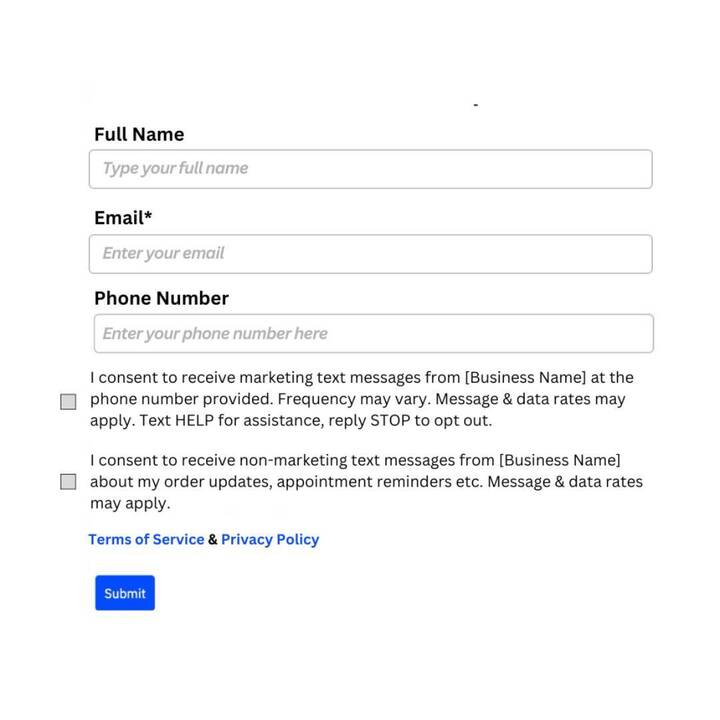
Example of separate, optional SMS consent choices with visible legal-policy links.
Verbal Opt-In
Before asking for agreement, the representative or IVR should identify the business, explain the message types and expected frequency, disclose message and data rates, provide HELP and STOP instructions, and direct the recipient to the Terms and Privacy Policy.
Example: “[Business Name] can send you appointment reminders and service updates by text. Message frequency varies. Message and data rates may apply. Reply HELP for help or STOP to opt out. Our terms are available at [Terms URL] and our privacy policy is available at [Privacy URL]. Do you agree to receive these messages?”
Record the phone number, date and time, representative or IVR flow, disclosure version, recipient response, and any call recording or system log used as evidence.
Paper Form Opt-In
The paper form should display the same required disclosures and provide a clear place for the recipient to affirm consent. Retain a dated copy or scan and provide a publicly accessible redacted sample as verification evidence.
Via Text and Mobile/QR Code Opt-In
Campaign collateral should explain the keyword or QR-code action, identify the business, describe the message program, disclose frequency and rates, include HELP and STOP instructions, and point to the Terms and Privacy Policy.
- A QR code that opens a web form must lead to a form that follows the web-form rules above.
- A QR code that opens the phone's messaging app should prefill only the intended keyword or opt-in message.
- Provide a public image of the printed sign, advertisement, landing page, or other collateral that contains the complete opt-in instructions.
Opt-In Evidence and Recordkeeping
The verification URL must be accessible to a reviewer without signing in. Show the full context of the opt-in, not only a cropped checkbox or phone-number field.
- Store the full consent text shown to the recipient.
- Store the recipient phone number and the date and time of consent.
- Store the opt-in method and source page, form, campaign, call, paper record, keyword, or QR code.
- Store the IP address, form submission ID, call recording, or comparable evidence when available.
- Keep a link or reference to the consent record on the contact record when your process supports it.
- Retain opt-out and resubscription events so the current consent status can be demonstrated.
Hosting proof in HighLevel: Upload the screenshot or document to Media Storage, open the asset menu, select Get Link, and test the URL in a private browser window before adding it to the verification form.
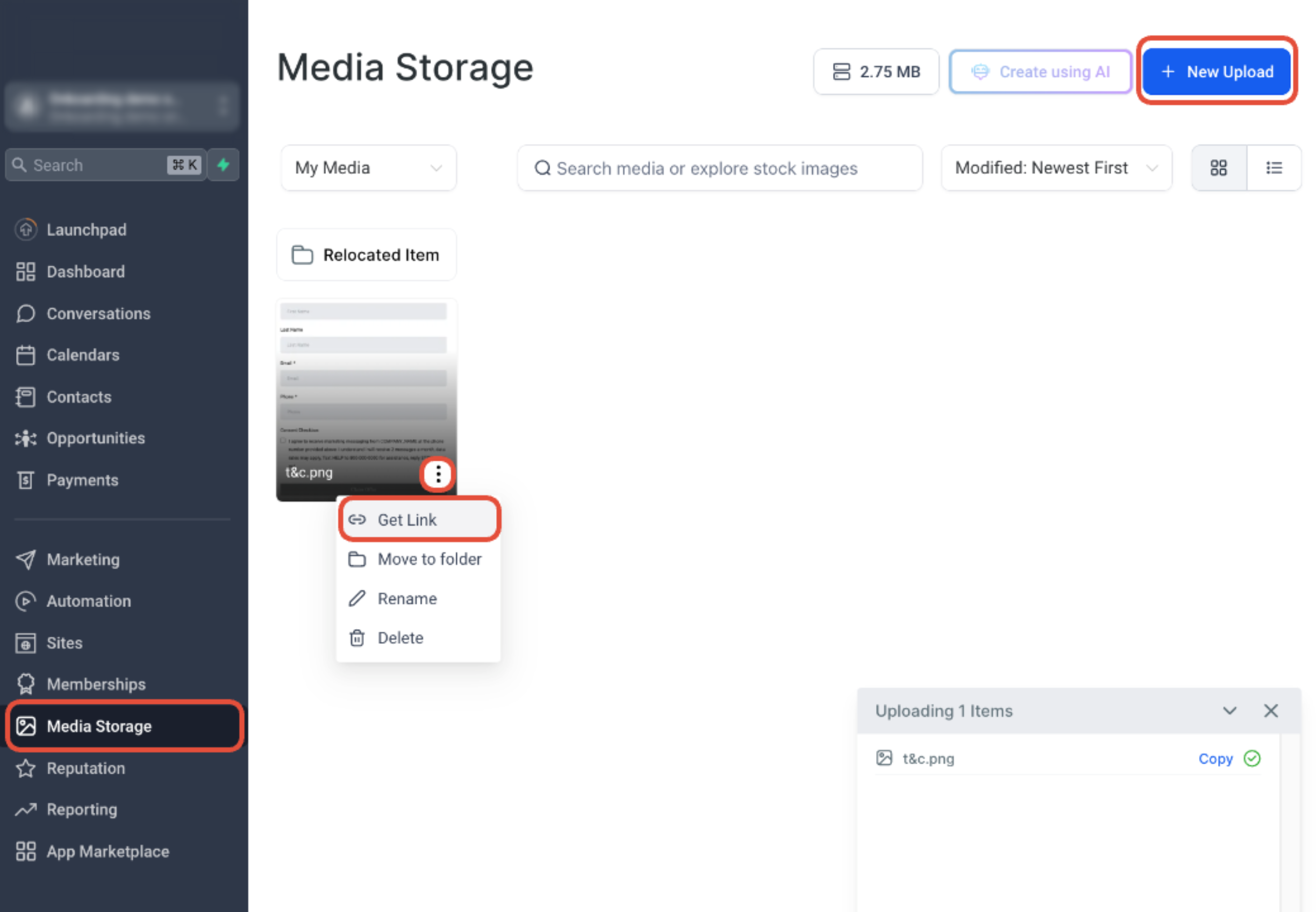
Use Media Storage to upload opt-in evidence and obtain a public link for the verification submission.
Monitor Verification Status
The status beneath the toll-free number determines whether US and Canada messaging is available. Review can take up to four to six weeks, although some submissions finish sooner; approval timing is not guaranteed.
| Verification Status | US/Canada Messaging | What It Means |
|---|---|---|
| Restricted (Unverified) | Blocked | The number has not been submitted or does not have an approved verification. |
| Pending Verification | Blocked | The request is under review. Wait for approval before sending SMS/MMS. |
| Verified (Approved) | Allowed | The number can send SMS/MMS subject to current carrier, platform, consent, and content policies. |
| Rejected | Blocked | Review the reason, correct the submission, and resubmit or request an appeal when eligible. |
Do not test production messaging while the status is Restricted, Pending, or Rejected. Resolve the verification requirement first, then send a controlled test after the number shows Verified (Approved).
Political Election Campaign Use Cases
Political Election Campaign messaging has an additional identity-verification requirement. The extra credential connects the toll-free messaging program to a verified political organization.
Beginning February 17, 2026, new political toll-free verifications—and existing approved toll-free numbers used for political election messaging—require a valid Campaign Verify Auth Token. HighLevel does not issue this token; it must be obtained through Campaign Verify and entered when the Political Election Campaign category is selected.
Learn about Campaign Verify requirements for political toll-free messaging →
Troubleshooting and Rejection Prevention
Most verification problems come from inconsistent business identity, inaccessible websites or proof URLs, incomplete consent disclosures, mismatched use cases, or sample messages that do not represent the actual program.
| Problem | What to Check | Recommended Action |
|---|---|---|
| Verification Required is not visible | Correct sub-account, toll-free number type, LC Phone ownership, and page refresh. | Confirm the number belongs to the location and is identified as Toll Free, then refresh Manage Numbers. |
| Website cannot be verified | The page is live, public, business-matched, and not password-protected. | Publish or correct the site. Use a public business social profile only when no formal website exists. |
| Opt-in evidence URL is rejected | The link is public, opens directly, shows the full consent flow, and matches the selected opt-in type. | Upload a clear screenshot or document to Media Storage, copy its public link, and test it in incognito mode. |
| Consent flow is not compliant | Unchecked optional boxes, separate marketing and non-marketing consent, sender name, message types, frequency, rates, HELP, STOP, Terms, and Privacy Policy. | Correct the live opt-in asset and replace the evidence URL before resubmitting. |
| Use case and samples do not align | Categories, description, opt-in wording, website, and sample messages describe the same program. | Rewrite vague descriptions and replace samples that omit the sender identity, context, or applicable opt-out language. |
| Error 30032 | The sending toll-free number is not Verified (Approved). | Complete or correct Toll-Free Verification and wait for approval before retrying. |
| Error 30007 | Carrier filtering caused by content, sender identity, consent, or another policy signal. | Review the exact message, opt-in evidence, sender identification, links, and current messaging policy before resending. |
| Rejected and resubmission is unavailable | Rejection reason, number, business identity, proof URL, and submitted use case. | Contact HighLevel Support and use the subject “Toll-Free Verification Rejection Appeal for [Business Name or Number].” |
- Sub-account name and Location ID
- Affected toll-free number in E.164 format
- Current verification status and rejection reason
- Legal entity name and public business URL
- Public opt-in evidence URL
- Screenshot or screen recording of the issue
- Example failed messages and error codes, when messaging was attempted
Frequently Asked Questions
Was this article helpful?
That’s Great!
Thank you for your feedback
Sorry! We couldn't be helpful
Thank you for your feedback
Feedback sent
We appreciate your effort and will try to fix the article