Error: The "From" Number Is Not SMS-Capable
This article explains the "From number is not SMS-capable" error and provides step-by-step solutions for verifying number capabilities, ownership, A2P registration status, and proper formatting in HighLevel.
This error indicates that the selected sender cannot be used for the attempted message. If the message was accepted for sending but failed later with a carrier or delivery error, use the general SMS delivery troubleshooting guidance instead.
What Is the Error?
The "From number is not SMS-capable" error occurs when HighLevel or the connected phone provider rejects an outbound SMS because the sender number cannot be used for text messaging. This validation happens before the message is sent to the carrier network.
The error can appear in Conversations, workflow send actions, campaign message logs, or API responses. It indicates a configuration or capability issue with the From number itself, not a delivery or carrier rejection after the message was accepted.
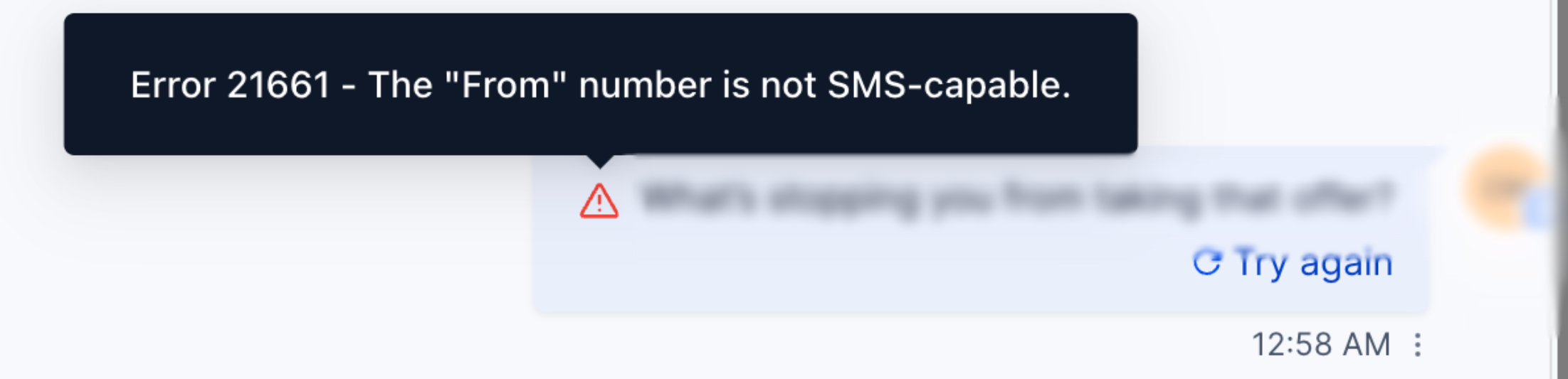
This error is distinct from carrier delivery failures that occur after a message is accepted. If you see error codes related to carrier filtering, spam detection, or destination unreachable, refer to the general SMS delivery troubleshooting resources.
Quick Fix Checklist
These checks address the most common reasons HighLevel or the connected phone provider rejects a sender number before an SMS is sent. Start here before changing phone-system settings or purchasing another number.
Common Causes & How to Resolve
The following scenarios are the most frequent causes of the "From number is not SMS-capable" error. Review each to identify and resolve the configuration issue.
Some phone numbers are provisioned for voice only and cannot send or receive text messages. This is common with older numbers, certain porting scenarios, or numbers purchased without messaging capability.
How to check:
- LC Phone: Navigate to Settings → Phone Numbers, open the number details, and confirm that Messaging is enabled.
- Twilio / BYOT: Log in to your Twilio console, locate the number, and verify that Capabilities includes SMS.
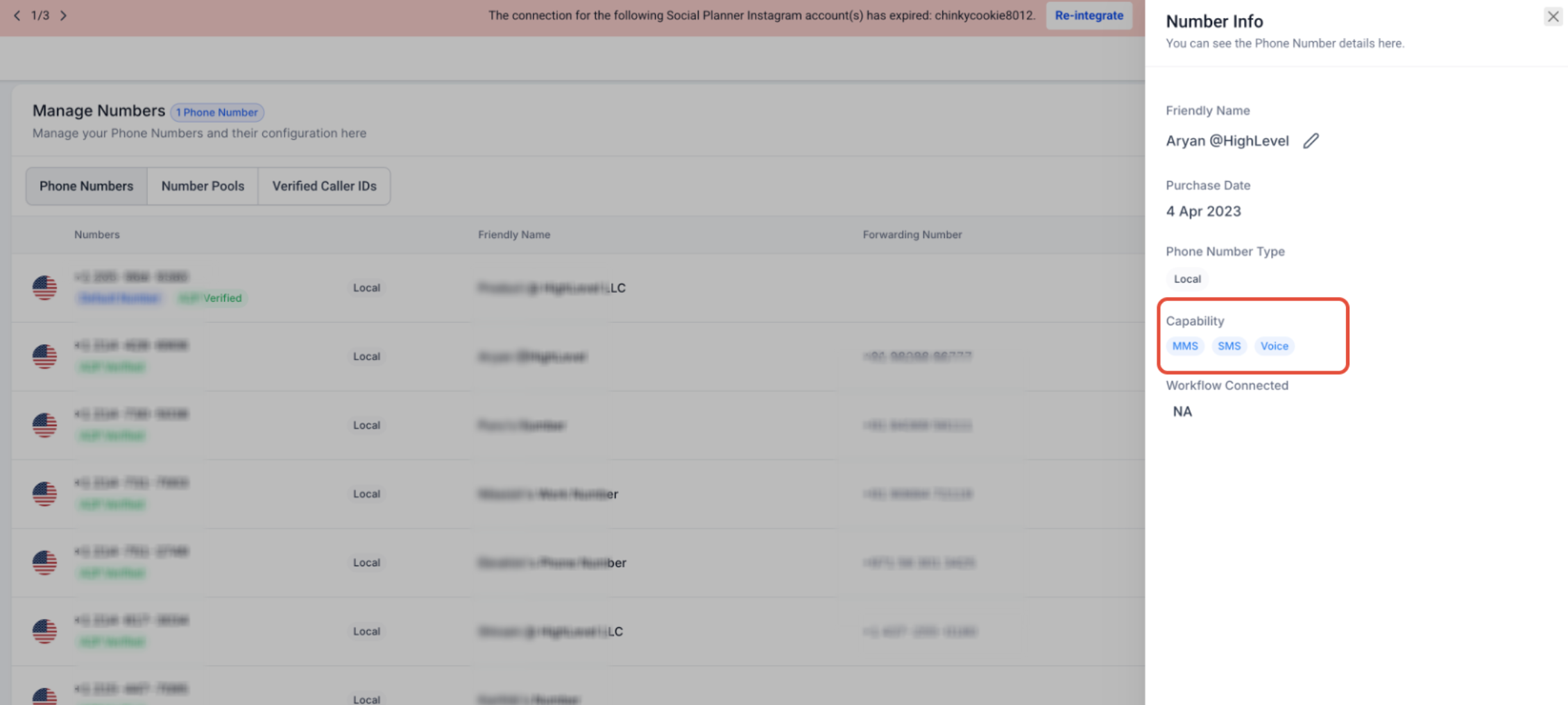
Solution: If the number does not support SMS, enable messaging capability (if available) or select a different SMS-capable number. If the number was recently purchased or ported, allow 24–48 hours for carrier provisioning to complete.
The sender must be provisioned or hosted for messaging in the current HighLevel location or connected phone account and must be valid for the destination being messaged. Using a number that belongs to a different location, a disconnected Twilio account, or an incompatible sender type for the destination will trigger this error.
Common scenarios:
- The number was hosted to a different HighLevel location and is no longer available in the current location.
- The Twilio account or API credentials associated with the number have been disconnected or changed.
- The sender type is not supported for the destination country (e.g., using a US local number to message an international recipient that requires an alphanumeric sender ID).
- A short code is being used to message a destination in a different country. Short codes are country-specific and generally cannot be used for cross-country messaging.
Solution: Verify the number is provisioned in the current location's phone system or connected Twilio account. For hosted numbers, confirm the number is correctly assigned to the active location. For international messaging, confirm the destination country's supported sender requirements before selecting the From value.
In the United States, local 10-digit numbers used for application-to-person (A2P) messaging must be registered with an approved Brand and Campaign. If the number is not properly associated with an active A2P Campaign, messaging may fail or be restricted.
How to check:
- LC Phone: Navigate to Settings → Phone Numbers, select the number, and confirm it is linked to an approved Brand and Campaign. If the Campaign status is pending or rejected, the number cannot be used for A2P messaging.
- Twilio / BYOT: Log in to your Twilio console, verify the number is attached to a Messaging Service, and confirm the Messaging Service is associated with an approved A2P Campaign. Check the Campaign approval status in the Twilio Trust Hub.
Solution: If A2P registration is incomplete, complete the Brand and Campaign registration process. If the Campaign is approved but the number is not assigned, attach the number to the appropriate Messaging Service (Twilio) or assign it to the Campaign in HighLevel (LC Phone). Note that A2P registration issues may produce different error messages depending on carrier validation. If this check passes but the error persists, review the exact messaging error code.
If a number was recently ported, hosted to a new location, or moved between phone accounts, HighLevel may still reference the old configuration. This can cause sender validation to fail even though the number is active in the new account.
Solution: Re-select the active number in Conversations sender settings, Campaigns and Workflows sender configuration, default messaging settings, user-assigned numbers, and any external integration that stores the sender number. After updating the sender reference, test an outbound message to confirm the new number is recognized.
When a From number is entered manually in a workflow, API request, or integration, it must use E.164 international format, which includes a + symbol, the country code, and the full phone number with no spaces or special characters (e.g., +15551234567).
Solution: If the sender is manually entered or dynamically referenced, verify the format matches E.164. For standard Conversations and campaign messages, the From dropdown automatically formats the number correctly, so manual formatting is not required.
Special Cases and Number Types
Certain sender types have additional requirements or restrictions that can contribute to the "From number is not SMS-capable" error. Review the following if you are using toll-free numbers, short codes, or messaging internationally.
An SMS-capable toll-free number may still experience delivery restrictions if Toll-Free Verification is incomplete. While toll-free numbers can technically send messages without verification, carriers increasingly filter or block unverified toll-free traffic. If the sender passes capability checks but messages still fail, review Toll-Free Verification status and the returned messaging error code.
Short codes are country-specific and generally cannot be used for cross-country messaging. Use a sender type supported for the destination country. If you attempt to send from a US short code to a Canadian or international recipient, the message will fail with a sender validation error.
Messaging sender requirements vary by destination country. Some countries require registered sender IDs, approved number types, or Alphanumeric Sender IDs. For example, certain countries do not accept long-code A2P messaging and require an approved alphanumeric sender or short code. Confirm the destination country's supported sender requirements before changing the From value. If the sender type is not supported for the destination, you will need to provision an approved sender for that country.
Frequently Asked Questions
Was this article helpful?
That’s Great!
Thank you for your feedback
Sorry! We couldn't be helpful
Thank you for your feedback
Feedback sent
We appreciate your effort and will try to fix the article