The Workflows API lets developers and agencies create, manage, publish, and monitor HighLevel workflows programmatically. You can build workflows from external applications, deploy automation across multiple sub-accounts, and review execution logs and performance statistics without manually managing every workflow in the builder.
Important: The Workflows API is currently available in private beta for selected sub-accounts. Contact HighLevel Support to request access. Sub-accounts without access receive a403error with the codeWORKFLOW_API_NOT_ENABLED_FOR_LOCATION.
TABLE OF CONTENTS
- What Is the Workflows API?
- Key Benefits of the Workflows API
- Before You Start
- Available Workflows API Endpoints
- How to Test API Requests
- How to Create and Publish Workflows Using the API
- How to Update Existing Workflows Safely
- How to Monitor Workflow Execution Logs and Statistics
- API Rate Limits
- Common Use Cases
- Frequently Asked Questions
- Related Resources
- Need Help?
What Is the Workflows API?
The Workflows API provides a way to manage HighLevel workflows through external applications and integrations.
You can use it to create workflows, retrieve their configurations, modify workflow steps, change publishing status, and delete workflows.
The API also provides access to execution logs and statistics, allowing developers to track activity, investigate failures, and measure workflow performance.
Workflows created through the API appear in the HighLevel Workflow Builder and can be managed like other workflows.
Key Benefits of the Workflows API
Automate workflow creation: Build and deploy workflows directly from external applications.
Manage workflows at scale: Distribute standardized workflows across supported sub-accounts.
Validate before publishing: Identify configuration errors before activating workflows.
Prevent conflicting updates: Use version checks to protect changes made in the Workflow Builder.
Monitor workflow execution: Retrieve execution history, failures, and aggregated statistics.
Control API permissions: Assign scopes based on the actions each integration requires.
Before You Start
To use the Workflows API, you need an eligible HighLevel sub-account and an authorized access token.
Confirm that your sub-account has access to the Workflows API private beta.
In your HighLevel sub-account, navigate to Settings → Private Integrations.
Create a private integration and locate the workflow permissions under Scopes.
Enable the permissions required for your integration.
Generate and securely store your access token.
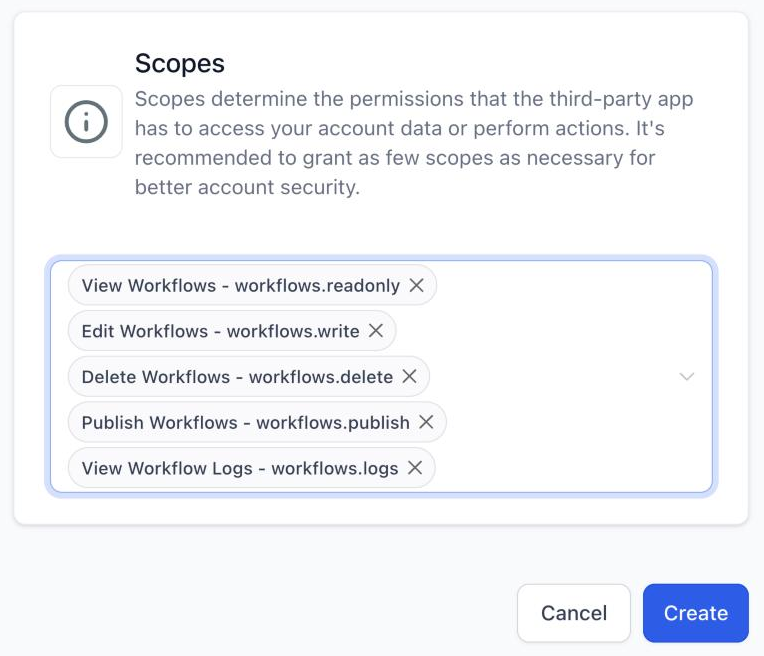
The following permissions are available:
| Permission | API Scope | Purpose |
|---|---|---|
| View Workflows | workflows.readonly | Retrieve workflow information and available step types |
| Edit Workflows | workflows.write | Create, validate, and modify workflows |
| Publish Workflows | workflows.publish | Publish workflows or return them to draft status |
| Delete Workflows | workflows.delete | Delete existing workflows |
| View Workflow Logs | workflows.logs | Access execution logs and statistics |
API requests require the appropriate authorization token, the Version: v3 header, and the sub-account's locationId.
Note: The API domain remains services.leadconnectorhq.com for HighLevel API requests. Do not replace it with the HighLevel Help Center or application domain.
Available Workflows API Endpoints
The Workflows API provides ten endpoints for managing and monitoring workflows.
| Function | Method | Endpoint |
|---|---|---|
| Get Step Types | GET | /workflows/step-types |
| Validate Workflow Definition | POST | /workflows/definition/validate |
| Search Workflows | POST | /workflows/search |
| Create Workflow | POST | /workflows/ |
| Get Workflow Definition | GET | /workflows/{workflowId}/definition |
| Update Workflow Definition | PUT | /workflows/{workflowId}/definition |
| Update Workflow Status | PUT | /workflows/{workflowId}/status |
| Delete Workflow | DELETE | /workflows/{workflowId} |
| Get Workflow Logs | GET | /workflows/{workflowId}/logs |
| Get Workflow Log Statistics | GET | /workflows/{workflowId}/logs/aggregate |
For endpoint parameters, request schemas, and response examples, refer to the HighLevel Workflows API Documentation.
How to Test API Requests
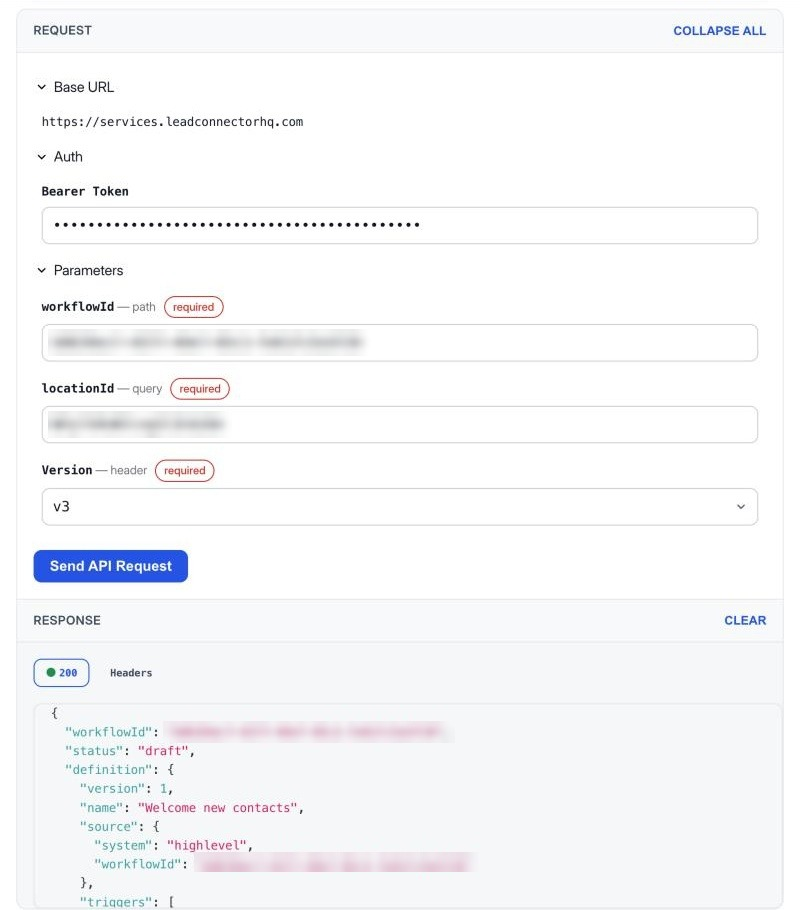
The HighLevel Developer Portal includes an interactive request panel for testing the Workflows API.
Open the Workflows API Documentation.
Select the endpoint you want to test, such as Get Workflow Definition.
Enter your access token in the Bearer Token field.
Provide the required parameters, including
workflowIdandlocationId, where applicable.Select
v3in the Version field.Click Send API Request.
Review the response displayed in the documentation panel.
Important: Requests submitted from the API documentation execute against the selected sub-account. Use a test workflow before performing operations that modify or delete data.
How to Create and Publish Workflows Using the API
Follow these steps to create and activate a workflow programmatically.
Retrieve available step types. Use Get Step Types to identify supported workflow triggers, actions, and their required properties.
Prepare the workflow definition. Configure the workflow's name, triggers, actions, connections, and settings.
Validate the definition. Use Validate Workflow Definition to check the configuration before saving it.
Create the workflow. Submit the definition using Create Workflow. The new workflow is created in draft status.
Publish the workflow. Use Update Workflow Status to publish the workflow after it passes validation.
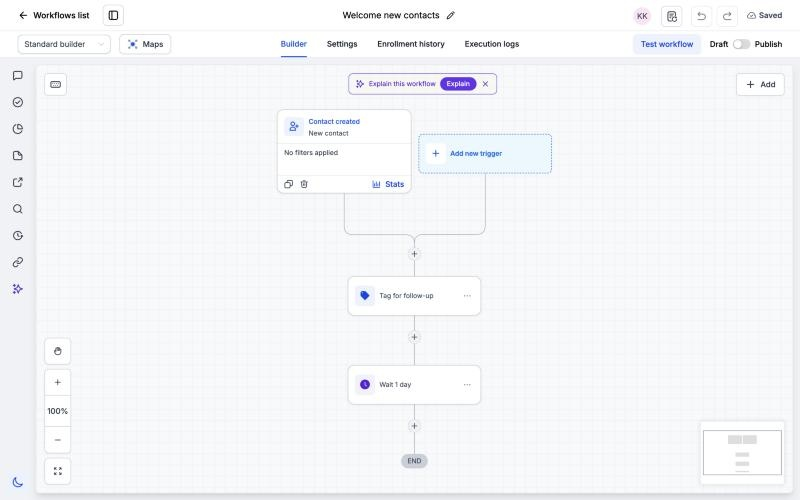
To publish a workflow, submit the following status value:
{
  "status": "published"
}
Understanding Validation Results
The validation endpoint returns information about errors and warnings found in the workflow definition.
Errors: Problems that prevent the workflow from being saved or published.
Warnings: Potential configuration issues that require attention but do not necessarily prevent saving.
Step references: Information that helps developers identify which step or configuration path caused an issue.
Review validation results, correct the reported issues, and validate again before proceeding.
How to Update Existing Workflows Safely
The Workflows API supports updating existing workflow definitions without rebuilding the workflow manually.
Use the following process:
Retrieve the current workflow using Get Workflow Definition.
Return the workflow to draft status before modifying its definition.
Update the necessary properties while retaining the other required workflow details.
Submit the complete definition through Update Workflow Definition.
Validate and publish the updated workflow.
Version Conflict Protection
The API uses version checks to prevent outdated updates from overwriting newer workflow configurations.
When submitting an update, include the current workflow version returned by the API.
If another user changes the workflow after you retrieve its definition, the API rejects the outdated request.
Retrieve the latest version, review the changes, and submit the updated definition again.
Important: Updating a workflow definition replaces the existing definition. Preserve any steps and connections that must remain in the workflow.
How to Monitor Workflow Execution Logs and Statistics
The Workflows API provides two endpoints for monitoring workflow activity.
Get Workflow Logs
Use this endpoint to retrieve execution records for a workflow.
Execution logs help you identify:
Contacts who entered a workflow.
Steps executed during workflow runs.
Steps that failed or produced errors.
Execution status for individual contacts.
Activity associated with specific workflow steps.
Get Workflow Log Statistics
Use this endpoint to retrieve aggregated information about workflow execution.
You can analyze:
Workflow enrollments.
Step execution outcomes.
Failures across workflow steps.
Reasons contacts exited workflows.
Trends across selected time periods.
For example, developers can retrieve failure counts by step and use execution logs to investigate the affected contacts.
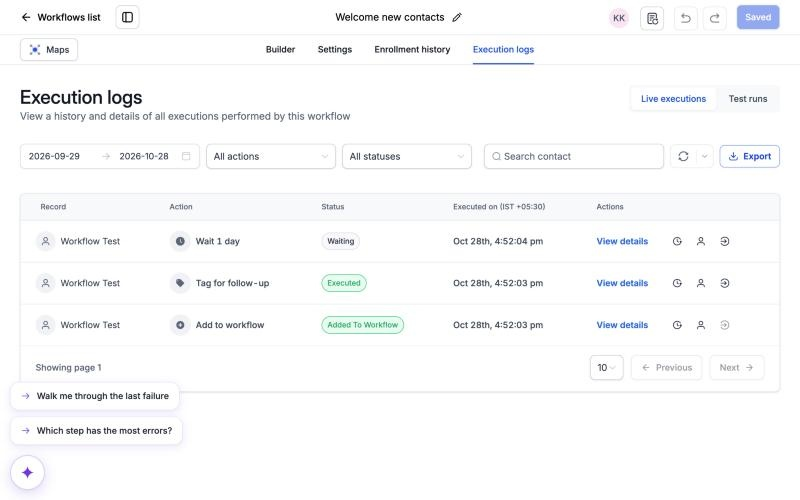
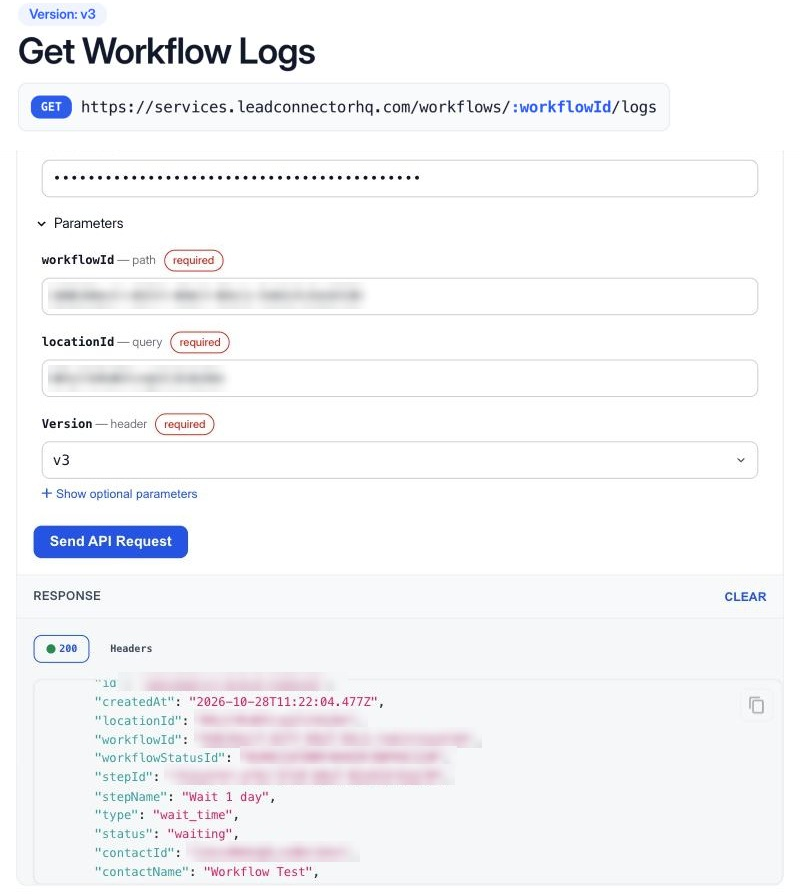
The API supports date filters and grouping options for analyzing workflow performance.
Note: Execution log requests support date ranges of up to 30 days and access records from the available 60-day history.
API Rate Limits
Workflows API requests are subject to HighLevel's public API limits and additional endpoint-specific restrictions.
The documented limits include:
| Request Type | Limit |
|---|---|
| Standard public API requests | 100 requests per 10 seconds and 200,000 per day per sub-account |
| Workflow reads | 30 requests per 10 seconds per sub-account |
| Workflow writes | 10 requests per 10 seconds per sub-account |
| Workflow Logs | 20 requests per 10 seconds and 60 per minute |
| Workflow Log Statistics | 5 requests per 10 seconds, 10 per minute, and 1,000 per day |
Requests that exceed applicable limits return an HTTP 429 response.
Plan integrations around these limits and implement appropriate retry handling.
Common Use Cases
1. Deploy Standardized Workflows Across Sub-Accounts
Agencies can use the Workflows API to distribute standard automation configurations across eligible client sub-accounts.
For example, an agency can retrieve the workflow definition from a template sub-account, create the corresponding workflow in each client sub-account, and publish it.
This reduces repeated manual configuration when deploying similar workflows.
2. Monitor Workflow Failures
Developers can use workflow execution logs and statistics to identify issues affecting automated processes.
For example, an integration can retrieve failure counts, identify affected workflow steps, and generate reports for the team.
3. Create Workflows From External Applications
Applications integrated with HighLevel can create workflows based on events or actions in external systems.
For example, an application can generate an onboarding workflow when a new customer completes registration.
The application can validate the workflow definition, create the workflow, and publish it through the API.
Frequently Asked Questions
Q. Who can access the Workflows API?
The Workflows API is currently available to selected sub-accounts participating in the private beta. Contact HighLevel Support to request access.
Q. Why am I receiving a 403 error?
A 403 response with WORKFLOW_API_NOT_ENABLED_FOR_LOCATION indicates that the sub-account does not have private-beta access.
Other authorization errors may result from token permissions or sub-account access restrictions.
Q. Can I create and publish workflows entirely through the API?
Yes. Eligible integrations can create workflow definitions, validate them, save them as drafts, and publish them programmatically.
Q. Can I edit an existing published workflow?
Yes. Change the workflow to draft status, retrieve its current definition, apply your updates, and publish it again.
Q. Does the API prevent conflicting workflow updates?
Yes. Version checks reject outdated updates instead of silently overwriting newer changes.
Q. Can I view workflow execution history?
Yes. Get Workflow Logs provides execution-level information, while Get Workflow Log Statistics provides aggregated counts.
Q. Can I add contacts to workflows using these endpoints?
No. Adding or removing contacts from workflows uses the appropriate Contacts API endpoints.
Q. Does workflow validation save or publish a workflow?
No. Validation checks the submitted definition and returns errors or warnings without saving the workflow.
Related Resources
Need Help?
If you encounter errors while using the Workflows API, contact HighLevel Support.
Include the endpoint, HTTP response status, error message, and any available validation details or trace ID. Avoid sharing access tokens or other sensitive credentials.
Was this article helpful?
That’s Great!
Thank you for your feedback
Sorry! We couldn't be helpful
Thank you for your feedback
Feedback sent
We appreciate your effort and will try to fix the article