Add Funds to Your Wallet Using ACH Direct Debit
HighLevel agencies can now fund their wallet using ACH direct debit (US bank transfer) in addition to credit or debit cards. This payment method is specifically designed for high-value top-ups and offers significant cost savings compared to card payments.
This article explains ACH eligibility requirements, cost differences, processing times, and step-by-step instructions for adding funds to your wallet using ACH direct debit.
What is ACH Direct Debit for Wallet Top-Ups?
ACH (Automated Clearing House) direct debit is a bank-to-bank electronic payment method that allows HighLevel agencies to transfer funds from their US bank account directly into their agency wallet. This method is specifically optimized for high-value deposits and provides a cost-effective alternative to credit or debit card payments.
When you select ACH as your payment method in the "Add balance" modal, funds are withdrawn from your bank account and deposited into your HighLevel wallet after a settlement period of 3–10 business days. This longer processing time is offset by significantly lower transaction fees compared to instant card payments.
ACH direct debit is available exclusively to agency-level accounts and is not accessible in location (sub-account) wallets.
Key Benefits
ACH direct debit offers several advantages for agencies making large wallet deposits:
Eligibility Requirements
To use ACH direct debit for wallet top-ups, your account must meet the following criteria:
Your agency must be based in the United States. ACH direct debit is not available to agencies located outside the US or to international bank accounts.
ACH top-ups require a minimum deposit of $1,000. This threshold ensures the payment method is used for its intended purpose: high-value transactions where cost savings are most meaningful.
ACH direct debit is available exclusively in the agency wallet. Location (sub-account) users will not see this payment option when attempting to add funds to their location wallet.
Cost Comparison: ACH vs. Card Payments
Understanding the cost difference between ACH and card payments helps you make informed decisions about which payment method to use for wallet top-ups. The table below illustrates processing fees for common deposit amounts:
The $5 maximum fee cap means ACH becomes exponentially more cost-effective as deposit amounts increase. For deposits of $625 or more (where 0.8% equals $5), you pay only $5 regardless of the total amount.
How to Add Funds Using ACH Direct Debit
Follow these steps to top up your agency wallet using ACH direct debit:
From your agency account, go to Settings → Billing. Click the "Wallet & Transactions" tab to view your current wallet balance.
Click the "+ Add" button in the top-right corner of the Wallet & Transactions section. The "Add balance" modal will open, displaying your current balance and the subtitle "Add money to your wallet manually via card or ACH direct debit."
In the "Amount" field (showing "$ Enter amount" as placeholder text), type the dollar amount you want to add to your wallet. You must enter at least $1,000 to unlock the ACH payment option.
Under "Payment Method," you'll see two radio button options:
- Pay with credit/debit card — Shows "Charged instantly to your default card on file" (selected by default)
- Pay with ACH direct debit — Shows "3-10 business days" with a "$1000+" badge (only visible when amount is $1,000 or more)
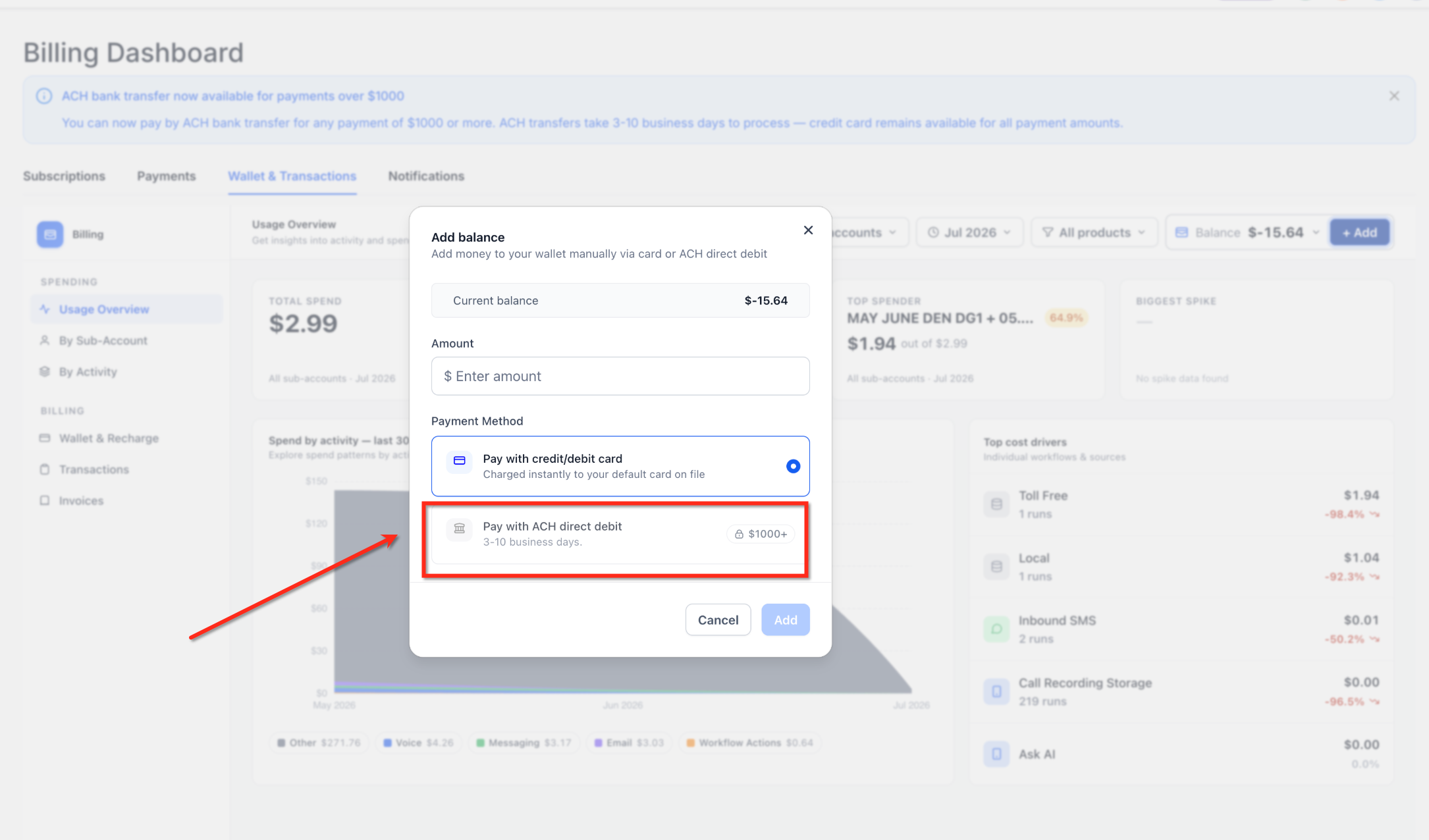
Select the "Pay with ACH direct debit" option to proceed with bank transfer.
Click the "Add" button at the bottom-right of the modal to proceed. You'll be directed to a secure bank connection flow where you can authorize the ACH withdrawal from your US bank account. Follow your bank's authentication process to complete the setup.
Once authorized, your ACH transfer will be initiated. Funds typically settle within 3–10 business days. You can monitor the transaction status in your Wallet & Transactions tab. Your wallet balance will update automatically once the transfer completes.
Ensure your bank account has sufficient funds to cover the deposit amount plus the 0.8% processing fee (max $5). Failed ACH transfers due to insufficient funds may result in processing delays or additional bank fees.
Frequently Asked Questions
Was this article helpful?
That’s Great!
Thank you for your feedback
Sorry! We couldn't be helpful
Thank you for your feedback
Feedback sent
We appreciate your effort and will try to fix the article