The Activity tab in the HighLevel mobile app gives users a quick way to review a contact’s history while working from their phone. Instead of switching to the web app or searching across multiple tools, users can open a contact and view recent forms, calls, appointments, and other contact events in one chronological feed. This helps sales, support, and service teams understand what has already happened before taking the next step.
TABLE OF CONTENTS
- What is the Contact Activity Tab on Mobile?
- Key Benefits of the Contact Activity Tab on Mobile
- Activity Timeline
- Activity Filters
- Activity Details
- Mobile and Web Activity Differences
- How To Setup the Contact Activity Tab on Mobile
- Frequently Asked Questions
- Related Articles
What is the Contact Activity Tab on Mobile?
The Contact Activity tab is a mobile contact profile view that displays a chronological timeline of activity connected to a specific contact. It helps users understand recent engagement, previous interactions, and important contact events directly from the HighLevel mobile app.
The Activity tab appears inside a contact profile in the HighLevel mobile app. It gives users a mobile-friendly way to scan a contact’s timeline, review stored activity, and open supported activity items for additional details.
Activities may include events such as:
- Form submissions
- Calls
- Appointments
- Page visits
- Trigger link clicks
- Surveys or quizzes
- Payment-related activity
- Other contact events stored in HighLevel
Key Benefits of the Contact Activity Tab on Mobile
Mobile access to contact activity helps teams make informed decisions without waiting until they are back at a desktop. A clear activity timeline reduces guesswork and gives users the context they need before calling, messaging, qualifying, or supporting a contact.
- Save Time: Scan one activity feed instead of searching through multiple tools, tabs, or notes.
- Close Faster: Review recent engagement, such as calls, forms, and appointments, before reaching out to a lead.
- Serve Contacts Better: Give sales and support teams the same factual history so they can respond with better context.
- Stay Mobile-First: Review and qualify contacts directly from the HighLevel mobile app.
- Reduce Errors: Make decisions based on recorded contact activity instead of memory or assumptions.
Activity Timeline
The activity timeline gives users a chronological view of what has happened with a contact. This helps users quickly understand the contact’s journey and identify the most recent actions before following up.
The Activity tab organizes contact events in a timeline-style view. Users can scroll through the feed to review past interactions and activity records associated with the contact.
Activity Filters
Filters help users narrow long activity timelines so they can find the most relevant contact events faster. This is especially useful for contacts with a large history of calls, form submissions, appointments, or other engagement.
When the activity list is long, use the available filters in the Activity tab to narrow the timeline. Filter options may vary based on the mobile app experience and supported activity types.
Activity Details
Activity details give users more context about a specific timeline item when additional information is available. This helps users understand the meaning behind an activity without leaving the mobile contact profile.
Users can tap supported activity items to open more details. The amount of detail shown depends on the activity type and whether richer mobile details are currently supported for that event.
Mobile and Web Activity Differences
The mobile Activity tab is designed for fast, on-the-go contact context. Some activity details may differ from the web experience while HighLevel continues improving parity between mobile and desktop activity views.
The web contact activity experience may include details or interaction options that are not yet fully available on mobile. The mobile Activity tab should be used as a quick way to review contact history while working from iOS or Android.
How To Setup the Contact Activity Tab on Mobile
The Activity tab does not require a complex setup process. Users only need access to the HighLevel mobile app, the correct location, and permissions to view the contact information and activity available to them.
To view a contact’s activity on mobile:
- Open the HighLevel mobile app on iOS or Android.
- Navigate to Contacts.
- Select the contact you want to review.
- Open the Activity tab from the contact profile.
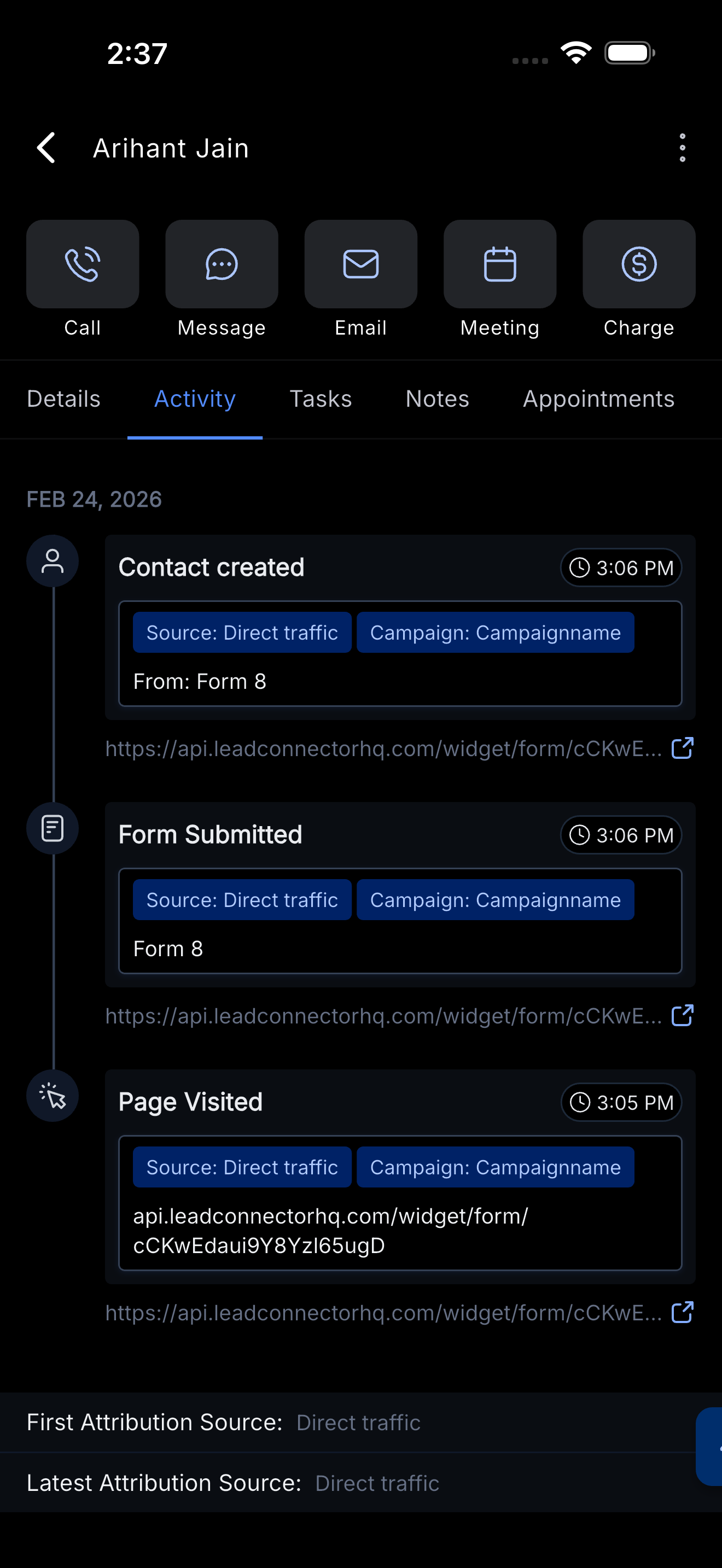
- Scroll the timeline to review contact events.
- Use available filters to narrow the list when needed.
- Tap an activity item to view additional details when supported.
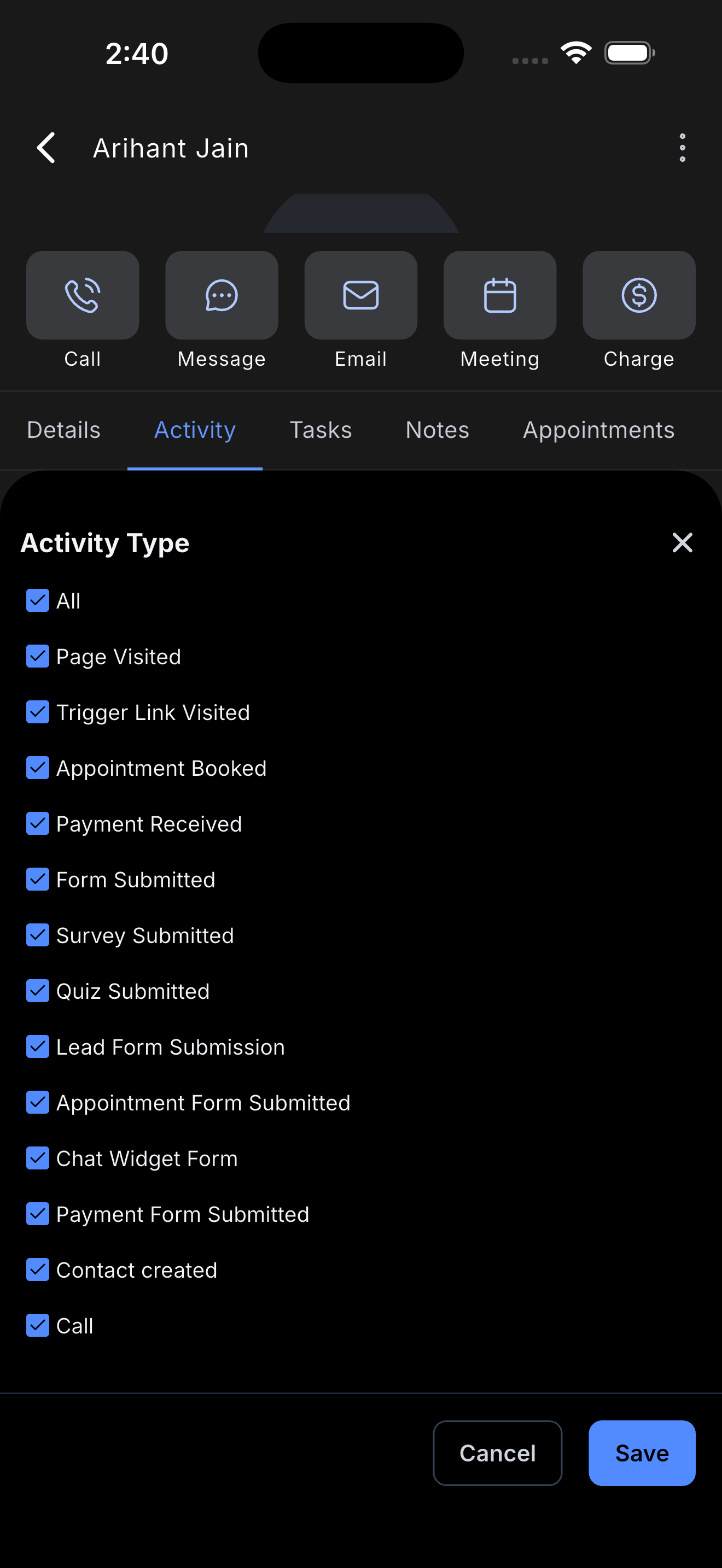
- Use the timeline context to plan your next action, such as calling, messaging, booking an appointment, or following up.
Frequently Asked Questions
Q: Is the Activity tab available on both iOS and Android?
Yes. The release applies to the HighLevel mobile app on iOS and Android.
Q: What activities can I see in the mobile Activity tab?
Activities may include forms, calls, appointments, and other contact events stored in HighLevel. The exact activity shown can depend on the contact’s history, supported activity types, and user permissions.
Q: Why do I not see an expected activity on mobile?
Activity visibility depends on your permissions, the data stored for that contact, and whether that activity type is currently supported on mobile. Check the web contact record if you need to compare activity visibility.
Q: Can I filter the contact activity timeline?
Yes. Use the available filters in the Activity tab to narrow long activity lists. Filter options may vary based on supported mobile functionality.
Q: Can I tap an activity to see more details?
Yes, when the activity type supports additional details on mobile. Some activity items may show richer details than others.
Q: Does the mobile Activity tab match the web activity timeline exactly?
Not always. HighLevel is continuing to improve parity with web activity and expand richer details on mobile.
Q: Can I edit or delete activities from the mobile Activity tab?
The release note only confirms viewing, filtering, and opening supported activity details. Do not assume edit or delete options are available unless they appear in your mobile app.
Q: Do all users see the same contact activity?
Not necessarily. What a user sees may depend on their permissions and the activity data available for that contact.
Related Articles
- Unified Contacts Workspace in Mobile App
- Activity Section Upgrade
- The Contact Details Page
- Conversations - Activity Cards
- Outbound Calling Using the HighLevel Mobile App
- Trigger Links - Overview
Was this article helpful?
That’s Great!
Thank you for your feedback
Sorry! We couldn't be helpful
Thank you for your feedback
Feedback sent
We appreciate your effort and will try to fix the article