The SLA Performance Dashboard in HighLevel helps you measure how consistently your team is meeting Conversation SLA response-time goals. It gives Admins a clear view of SLA adherence, response speed, and performance across users and channels. This makes it easier to identify delays, improve accountability, and support faster, more consistent customer responses.
TABLE OF CONTENTS
- What is the SLA Performance Dashboard?
- Key Benefits of the SLA Performance Dashboard
- SLA Metrics Explained
- User and Channel Performance
- SLA Reporting Rules and Access
- How To Use the SLA Performance Dashboard
- Build Custom SLA Dashboards and Reports
- Frequently Asked Questions
- Related Articles
What is the SLA Performance Dashboard?
The SLA Performance Dashboard is a reporting view in Conversations that shows how well your team is performing against configured Conversation SLAs. It helps you track key SLA outcomes, monitor response behavior, and understand where performance is strong or where improvement is needed.
Instead of relying only on individual inbox activity, the dashboard brings SLA performance into one place. Admins can review high-level metrics, compare results across users and channels, and use those insights to improve response coverage and team efficiency.
Key Benefits of the SLA Performance Dashboard
- Centralized visibility: Review SLA performance in one place instead of relying on manual checks across conversations.
- Faster issue detection: Identify when response times are slipping by monitoring SLA outcomes and average response times.
- User accountability: Understand how individual team members are performing against SLA expectations.
- Channel insights: Compare performance across channels to see where delays happen most often.
- Better decision-making: Use reporting insights to improve workflows, response coverage, and team performance.
SLA Metrics Explained
Understanding how each SLA metric is calculated helps teams interpret dashboard results correctly. These definitions make it easier to evaluate performance, explain results internally, and avoid confusion when comparing SLA data over time.
| Metric | Description |
|---|---|
| SLA Met % | The percentage of messages that were responded to within the defined SLA time. For example, if SLA is applied to 100 messages and 60 receive a response before the SLA expires, the SLA Met % is 60%. Messages where the SLA is still active, meaning neither met nor breached, are excluded from this calculation. |
| SLA Breached % | The percentage of messages that were not responded to within the SLA time. Only messages where the SLA outcome is determined, either met or breached, are included. |
| Average Response Time | The average time taken to respond to messages where a reply was sent. Only messages with completed SLA evaluation are included. |
| SLA Met Messages | The total number of messages that received a response within the SLA time. |
| SLA Breached Messages | The total number of messages that did not receive a response before the SLA time expired. |
| SLA Tracked Messages | The total number of messages where SLA has been applied and the outcome has been determined. This includes only messages where the SLA is either met or breached. Messages where the SLA is still active are not included. |
User and Channel Performance
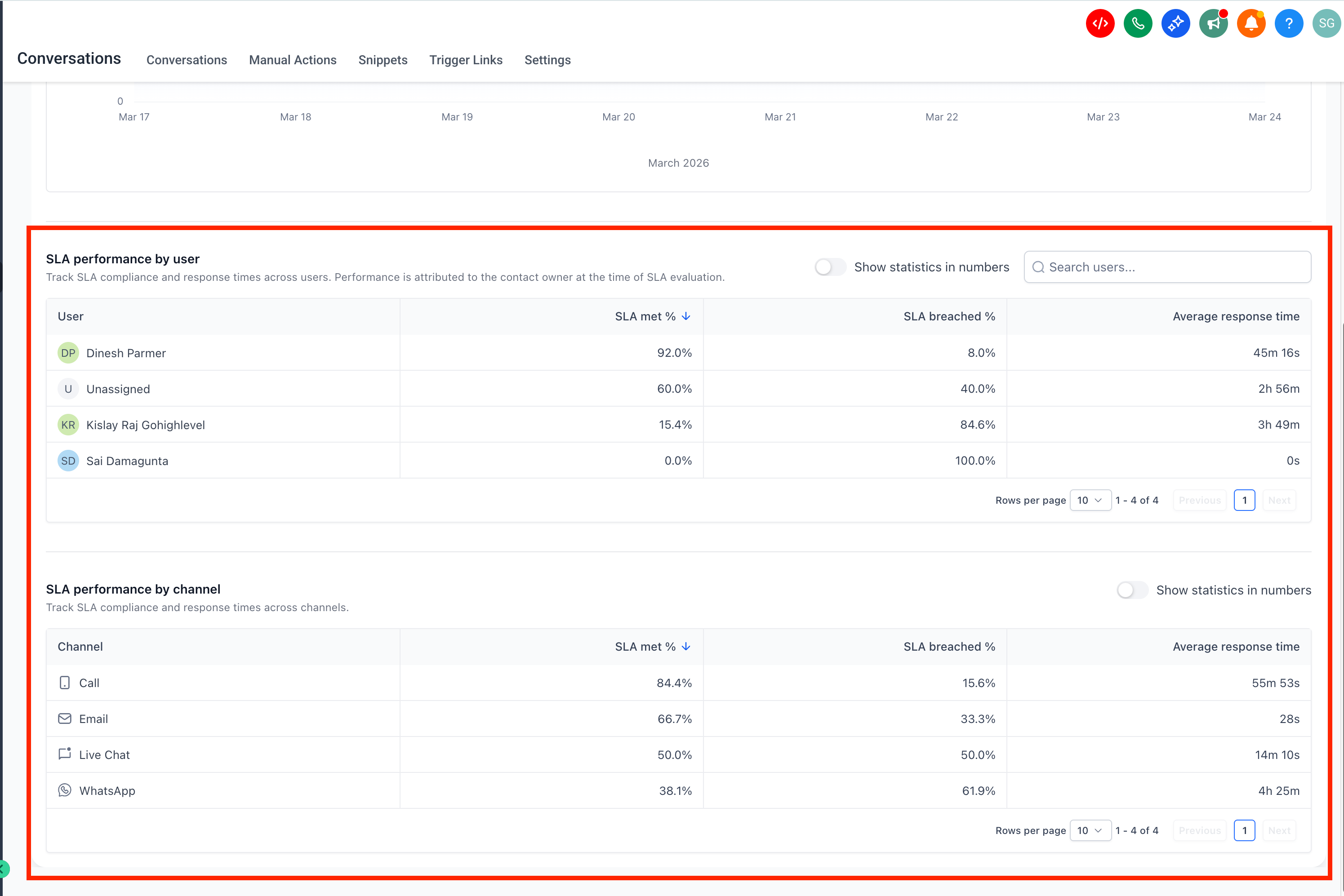
Performance breakdowns help you move from general reporting to actionable insights. Reviewing results by user and channel makes it easier to see where delays are happening and where support, process changes, or workload adjustments may be needed.
The dashboard includes user-level and channel-level reporting so Admins can compare performance across team members and communication channels. This helps identify strong performers, uncover coaching opportunities, and reveal which channels may need better coverage or faster follow-up processes.
User and channel reporting can help you:
- Recognize team members who consistently meet SLA expectations
- Identify users who may need coaching or workload support
- Compare response performance across channels
- Spot patterns that may require workflow or staffing adjustments
SLA Reporting Rules and Access
Knowing how SLA data is counted is essential for interpreting the dashboard accurately. These rules explain which messages are included, how ownership is assigned, who can view the report, and when dashboard data becomes available.
- Only messages with completed SLA evaluation, either met or breached, are included in reports.
- Conversations marked as read without a reply are excluded.
- SLA performance is attributed to the user assigned at the time of evaluation.
- Only Admins can access SLA Performance reports.
- Data for the SLA Performance Dashboard is available starting May 23, 2026.
How To Use the SLA Performance Dashboard
A clear review process helps teams get more value from SLA reporting. Starting with high-level results and then moving into detailed breakdowns makes it easier to understand overall performance and identify where action is needed.
- Go to your HighLevel sub-account and confirm that Conversation SLAs are already configured.
The existing Conversation SLA article explains how to define response-time goals for incoming conversations. - Open the dashboard from the Conversations analytics area.
Navigate to Conversations → Analytics → SLA Performance.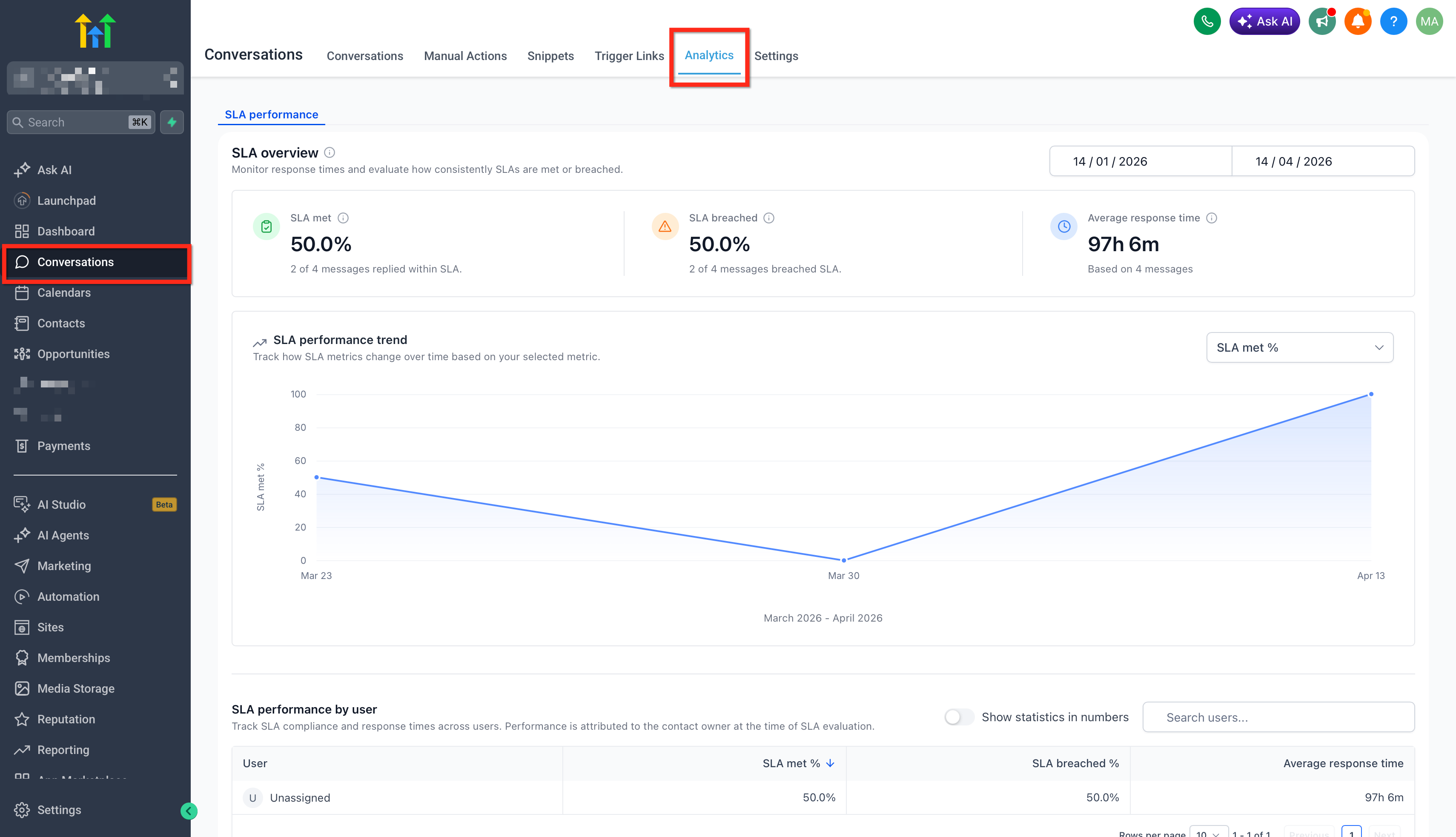
- Select a time range and review the overview metrics
Review the dashboard using a relevant reporting window so you can evaluate current performance and overall SLA adherence. Start with SLA Met %, SLA Breached %, and Average Response Time to understand overall responsiveness before moving into detailed breakdowns.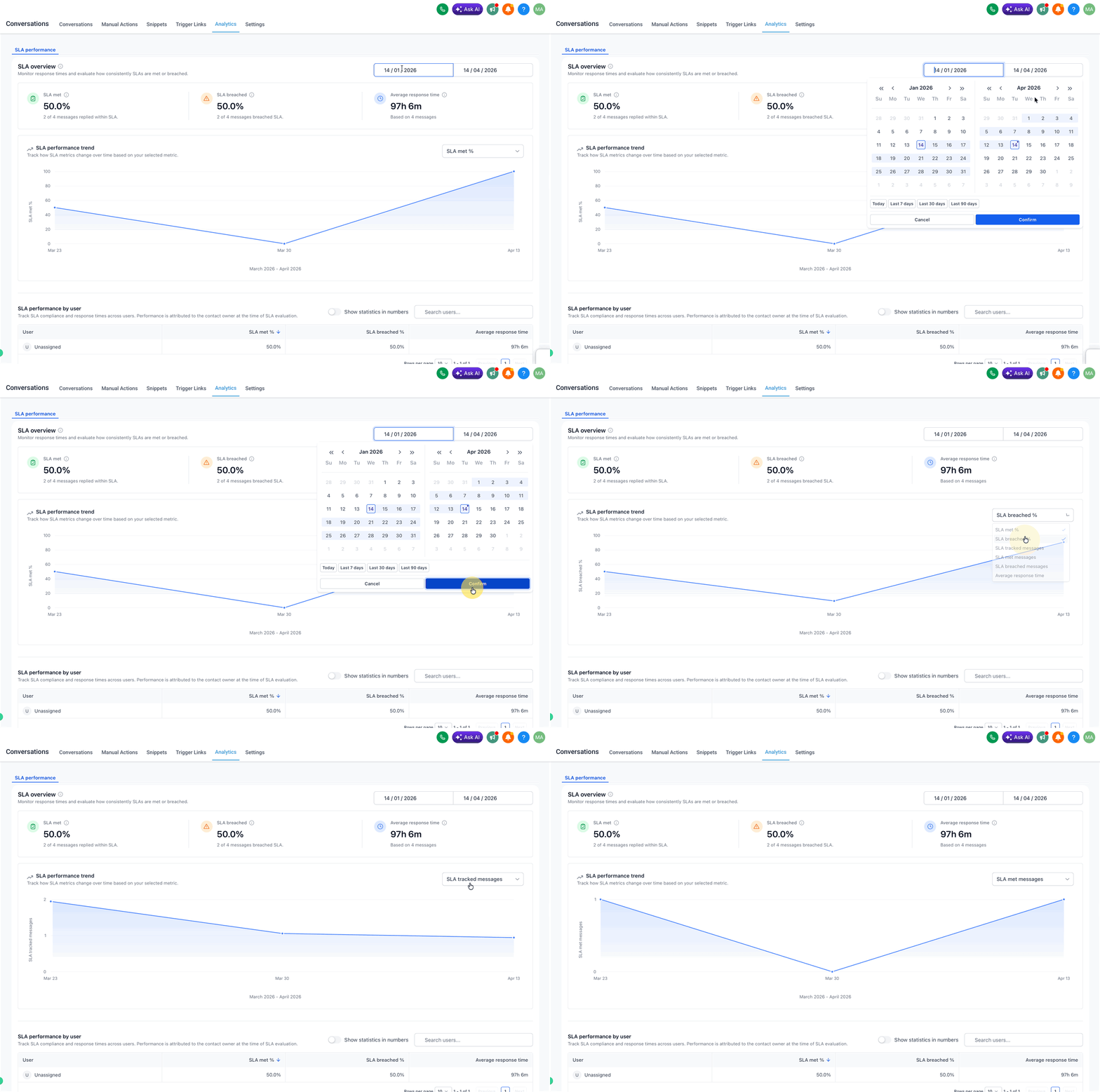
- Analyze user-level and channel-level performance.
Use these views to identify where delays are happening and where operational changes may be needed.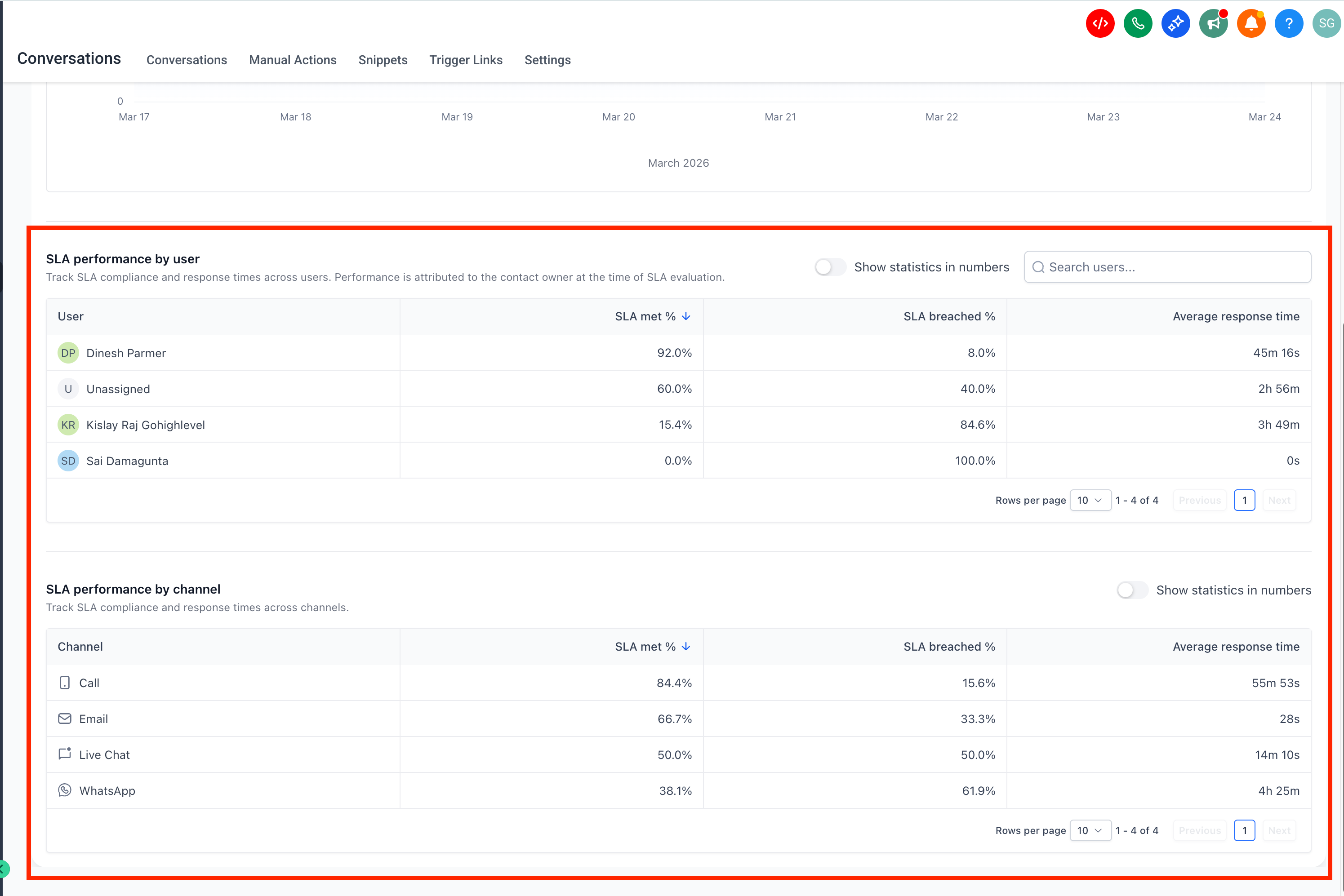
Build Custom SLA Dashboards and Reports
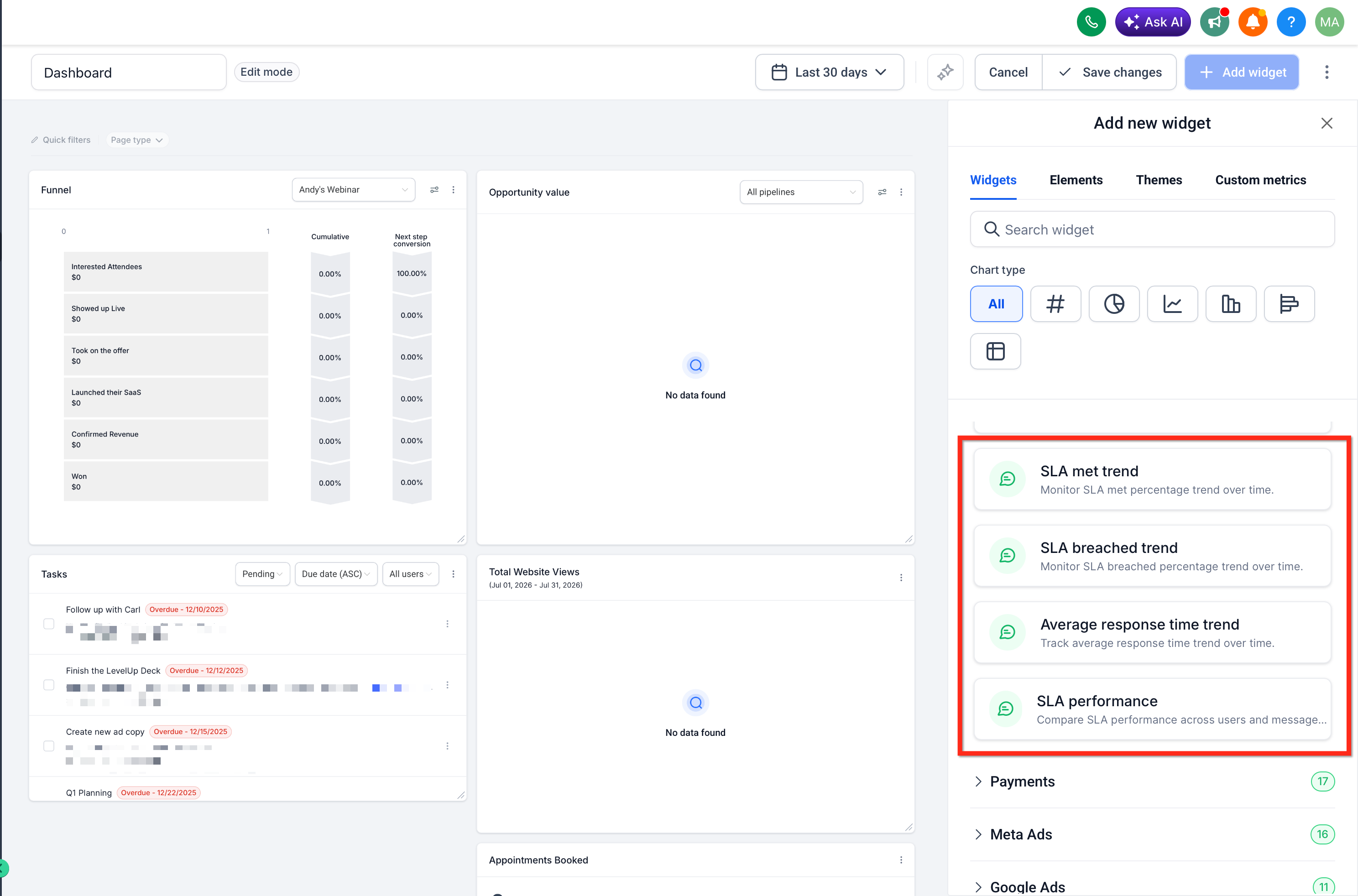
In addition to the SLA Performance Dashboard in Conversations, you can also create customized SLA reporting views using SLA widgets in Dashboards and Custom Reports. SLA widgets let you tailor how Conversation SLA data is displayed for internal teams or client reporting. You can choose the metric you want to show, adjust the chart type, group results by assigned user or message channel, apply filters, and include SLA performance data alongside other Conversations reporting widgets.
This is useful when you want to build a custom SLA health dashboard, compare performance across users or channels, or schedule SLA reports for clients. To create a customized reporting view, go to Dashboards or Reporting → Custom Reports and add SLA widgets from the Conversations widget section. For detailed setup steps, refer to the SLA Widgets for Dashboards & Reporting article.
Frequently Asked Questions
Q. What does the SLA Performance Dashboard measure?
It measures how well your team is meeting Conversation SLA response-time goals by showing SLA outcomes, response times, and performance across users and channels.
Q. Who can access the SLA Performance Dashboard?
Only Admins can access SLA Performance reports.
Q. Are all messages included in the dashboard?
No. Only messages with a completed SLA evaluation, either met or breached, are included in the report.
Q. Are conversations marked as read counted in SLA reporting?
No. Conversations marked as read without a reply are excluded.
Q. How is SLA performance assigned when multiple users work a conversation?
SLA performance is attributed to the user assigned at the time of evaluation.
Q. What does SLA Tracked Messages mean?
It is the total number of messages where SLA was applied and the outcome was determined as either met or breached.
Related Articles
Was this article helpful?
That’s Great!
Thank you for your feedback
Sorry! We couldn't be helpful
Thank you for your feedback
Feedback sent
We appreciate your effort and will try to fix the article