Make your Voice AI Agent feel more natural for every caller by automatically translating the initial greeting when you change the agent’s language. This update helps you launch multilingual voice experiences faster, reduces manual setup, and creates a more localized first impression. If you create or edit Voice AI Agents in HighLevel, this feature helps streamline setup while keeping your greeting aligned with the selected language.
TABLE OF CONTENTS
- What is Voice AI Auto-Translated Greeting Message?
- Key Benefits of Voice AI Auto-Translated Greeting Message
- How the Auto-Translated Greeting Works
- Where to Find the Initial Greeting Message
- How To Setup Voice AI Auto-Translated Greeting Message
- Best Practices for Using Auto-Translated Greetings
- Frequently Asked Questions
- Related Articles
What is Voice AI Auto-Translated Greeting Message?
When you update your Voice AI Agent’s language, HighLevel can automatically translate the initial greeting message into the selected language. This helps ensure the first thing your caller hears matches the language configured for the agent, creating a smoother and more personalized experience from the start. The greeting remains part of the agent setup flow, so users can review and adjust it before saving if needed.
Key Benefits of Voice AI Auto-Translated Greeting Message
Automatically translating the greeting helps reduce setup friction and improves consistency across multilingual Voice AI experiences. It is especially useful for businesses serving customers in different regions or languages, where the first message can shape the overall caller experience.
Faster setup: Reduces the need to manually rewrite the initial greeting every time you change the agent language.
Better caller experience: Helps customers hear a greeting in the language selected for the Voice AI Agent.
More consistent localization: Keeps the first interaction aligned with your multilingual Voice AI settings.
Less room for error: Minimizes the chance of forgetting to update the greeting after switching languages.
Flexible customization: Lets you review and refine the translated greeting to better match your brand tone.
How the Auto-Translated Greeting Works
The auto-translated greeting works as part of the Voice AI Agent language configuration. When the language is changed, the initial greeting updates automatically so the opening message better reflects the selected language. This helps maintain consistency between the agent’s language setting and what callers hear first.
The feature applies when creating or editing a Voice AI Agent.
The translation is triggered when the agent language is changed.
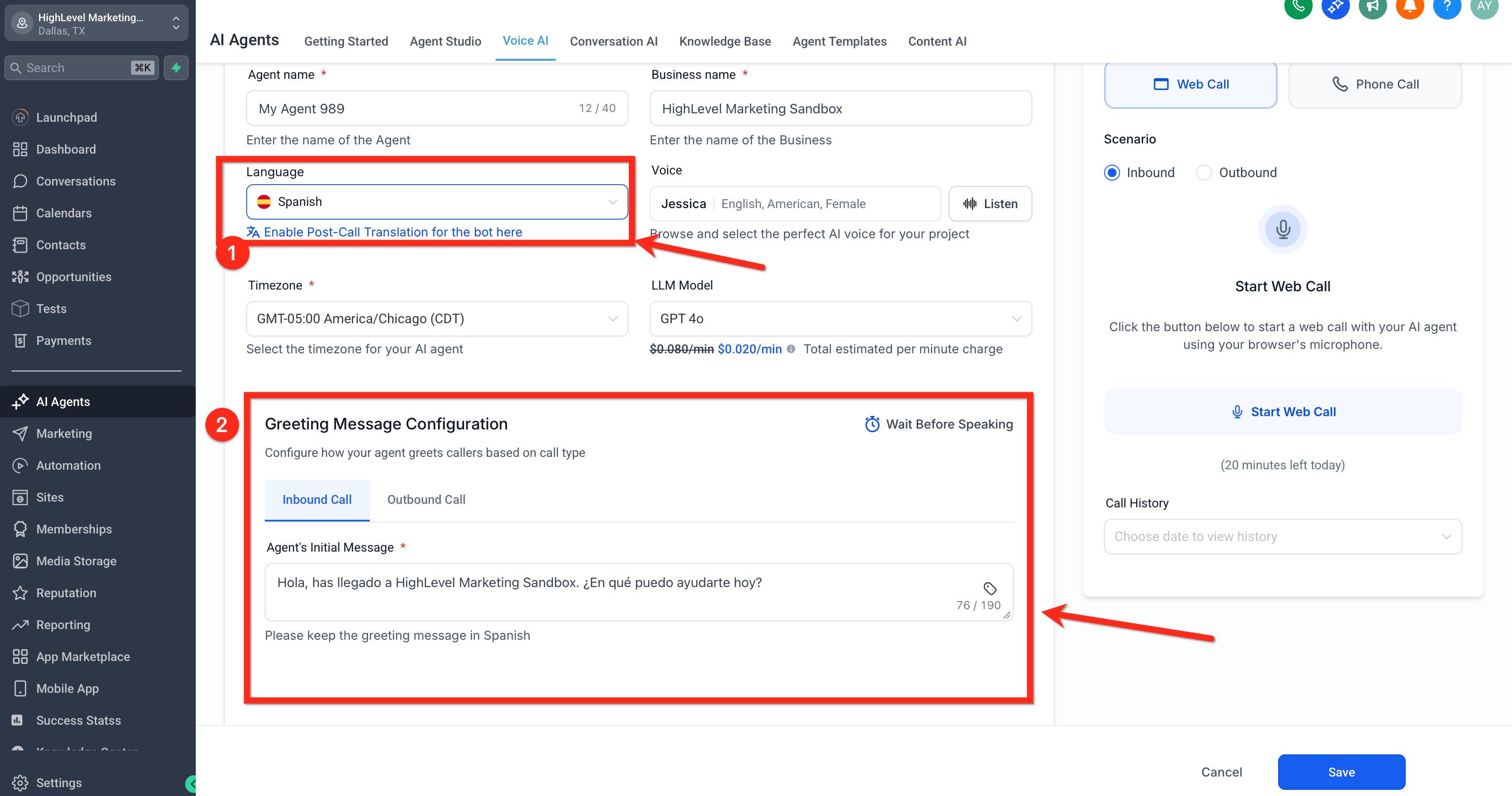
The updated greeting appears in the Initial Greeting Message field.
You can review the translated message before saving the agent.
[Screenshot: Voice AI Agent settings page showing the Language dropdown and the Initial Greeting Message field before the language change.]
Where to Find the Initial Greeting Message
The Initial Greeting Message is part of the Voice AI Agent setup experience in HighLevel. Knowing where this field lives makes it easier to confirm that the translated greeting matches your intended caller experience and brand voice before the agent goes live.
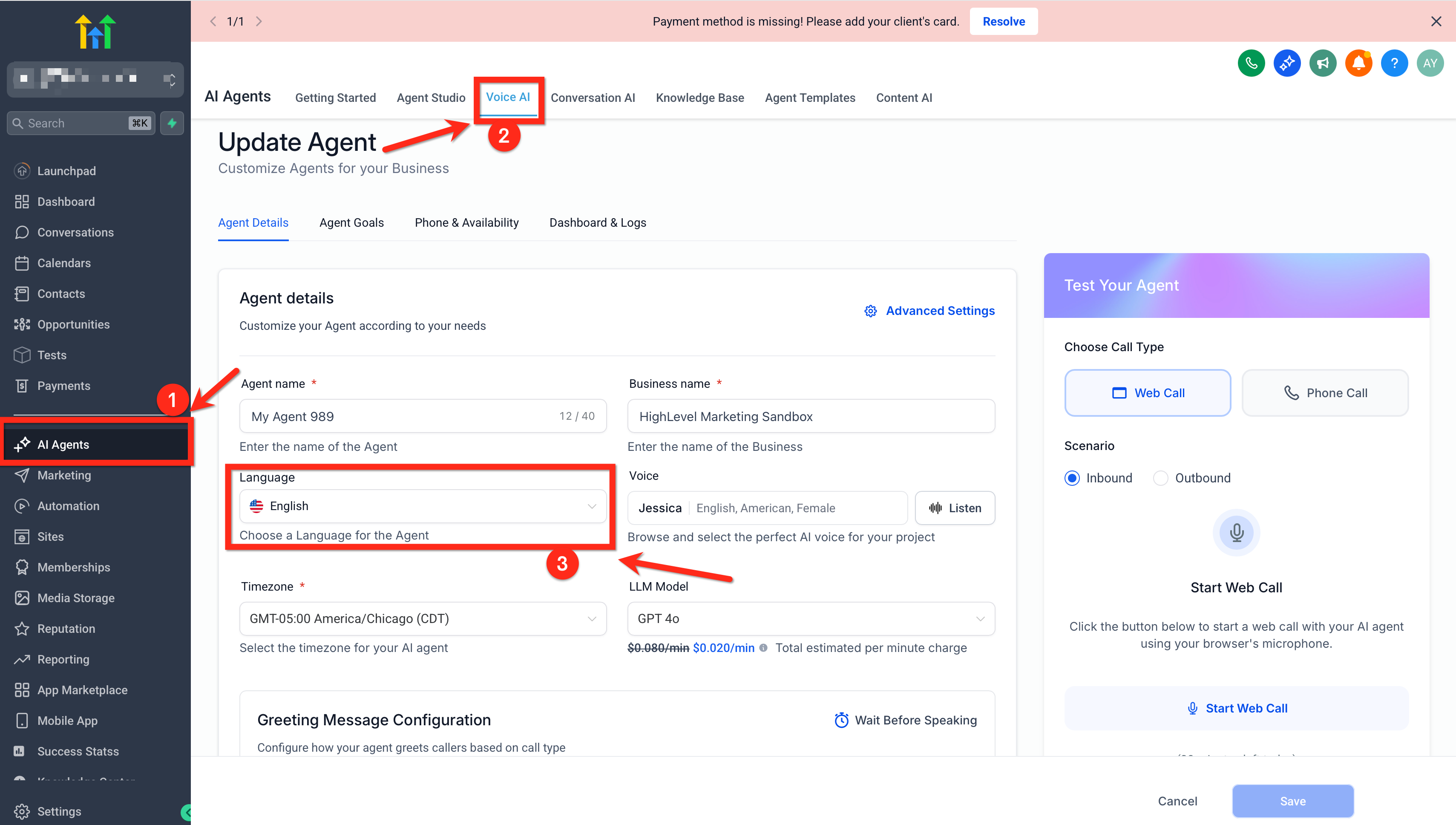
Navigate to your Voice AI Agent in HighLevel.
Open the agent you want to create or edit.
Go to the agent details or setup area where the greeting message is configured.
Locate the Initial Greeting Message field.
How To Setup Voice AI Auto-Translated Greeting Message
Proper setup helps make sure your Voice AI Agent greets callers in the correct language from the very first interaction. Reviewing the translated greeting before saving is important because it gives you a chance to confirm tone, clarity, and brand alignment.
Go to AI Employee > Voice AI in your HighLevel account.
Create a new Voice AI Agent or open an existing one for editing.
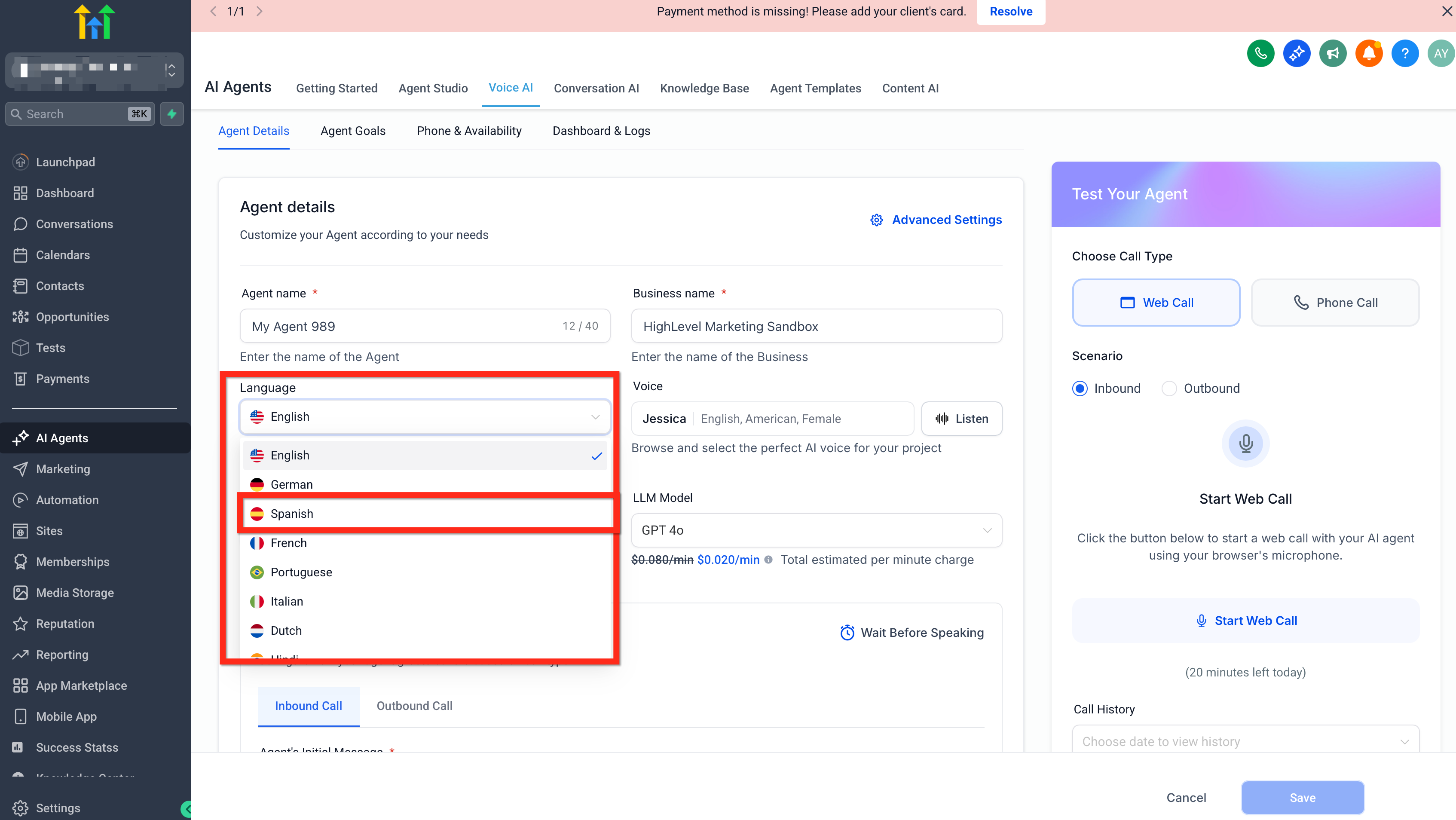
Find the Language setting for the agent.
Select the language you want the agent to use.
Review the Initial Greeting Message field.
Confirm that the greeting has been automatically translated into the selected language.
Edit the translated greeting if you want to personalize the wording or match your brand tone more closely.
Save the agent.
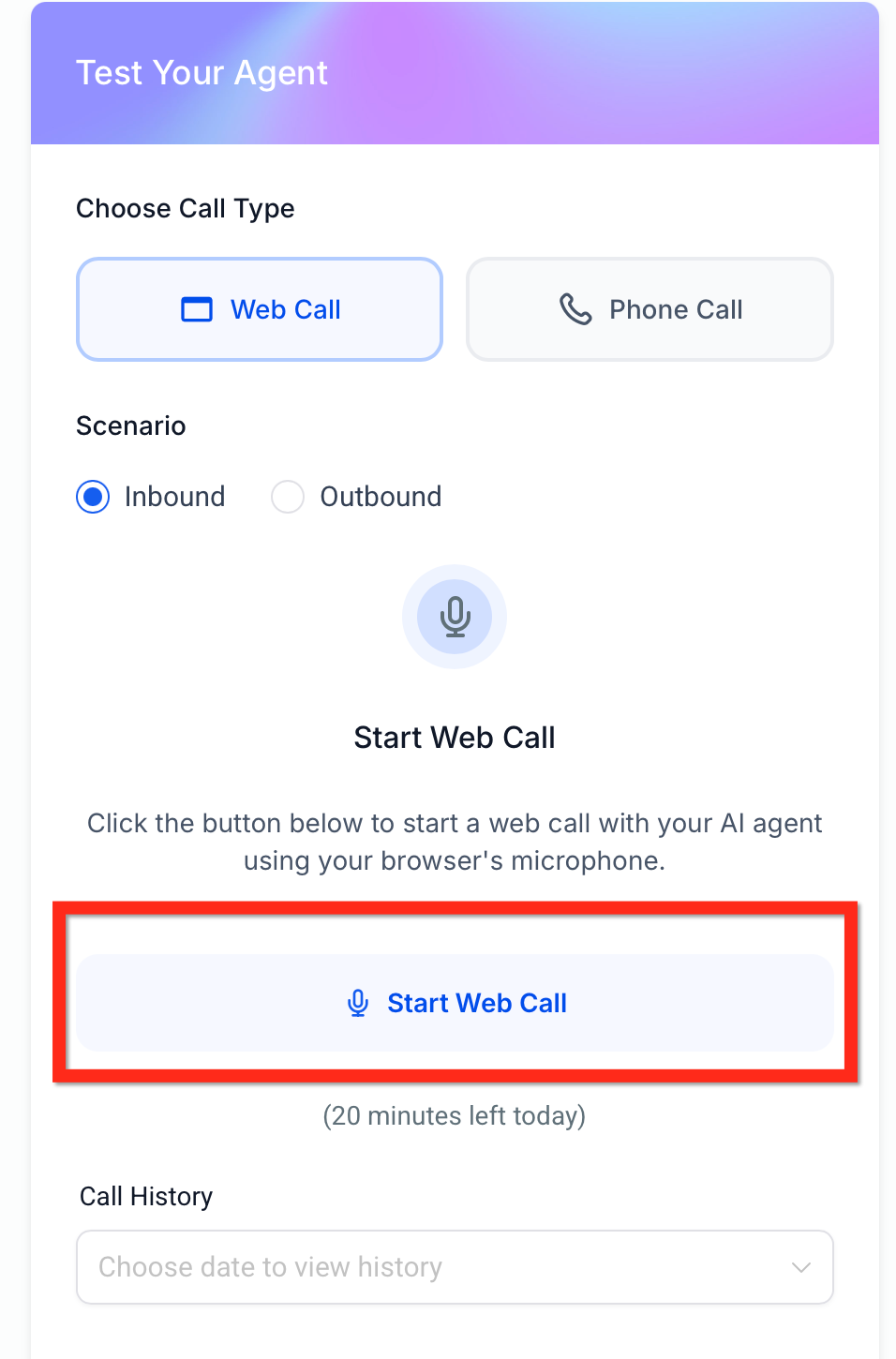
Run a test call using Phone Call or Web Call to verify that the greeting sounds correct for callers.
Best Practices for Using Auto-Translated Greetings
A translated greeting is most effective when it sounds natural, clear, and appropriate for your audience. Taking a moment to review the greeting after translation can help you maintain professionalism and improve the overall caller experience. This is especially important for businesses with a specific brand voice or region-specific phrasing.
Review the translated greeting before publishing the agent.
Adjust the greeting to reflect your business name, tone, and preferred phrasing.
Test the greeting with a real or web-based call before going live.
Make sure the selected voice matches the chosen language and audience.
Recheck the greeting any time you switch the agent language again.
Frequently Asked Questions
Q: What happens when I change the language of my Voice AI Agent?
The initial greeting message is automatically translated to match the newly selected language.
Q: Do I still need to manually translate the greeting?
In most cases, no. HighLevel automatically translates the initial greeting when you change the agent language, but you can still review and edit it before saving.
Q: Can I customize the translated greeting?
Yes. The greeting remains editable, so you can adjust wording, tone, or branding as needed.
Q: Is this feature available when editing an existing agent?
Yes. The feature is live for users creating or editing their Voice AI Agents.
Q: Should I test the translated greeting before going live?
Yes. Testing helps confirm pronunciation, clarity, and the overall caller experience in the selected language.
Q: Does this feature translate call transcripts and summaries too?
No. This feature is for the agent’s initial greeting during setup. Transcript and summary translation is a separate Voice AI feature.
Q: Does the selected voice matter when using translated greetings?
Yes. Choosing a voice that fits the selected language can help create a more natural and localized caller experience.
Related Articles
Was this article helpful?
That’s Great!
Thank you for your feedback
Sorry! We couldn't be helpful
Thank you for your feedback
Feedback sent
We appreciate your effort and will try to fix the article