Customers who purchased a domain through HighLevel may need help releasing or transferring that domain after their account has been cancelled. This article explains when to use the domain release request form, what information to prepare, and how the request reaches the correct support queue. Use this process when you can no longer manage the purchased domain from inside your HighLevel account.
TABLE OF CONTENTS
- What is Releasing a Purchased Domain from a Cancelled Account?
- Key Benefits of Releasing a Purchased Domain from a Cancelled Account
- When To Use the Domain Release Request Form
- What Happens After You Submit the Form?
- How To Request Release of a Purchased Domain from a Cancelled Account
- Frequently Asked Questions
- Related Articles
What is Releasing a Purchased Domain from a Cancelled Account?
A purchased domain release request allows customers with cancelled accounts to ask HighLevel Support for help releasing or transferring a domain that was originally purchased through HighLevel. Domains purchased through HighLevel are managed directly inside the platform while the account is active.
HighLevel’s purchased domain configuration allows users to manage DNS records from the Purchased Domains area, including records such as A, CNAME, AAAA, MX, and TXT. When an account is cancelled and the customer can no longer access normal domain management settings, the domain release request form gives them a direct way to submit the request to Support.
Key Benefits of Releasing a Purchased Domain from a Cancelled Account
This process helps customers protect domain access after cancellation and gives Support the information needed to review the request efficiently.
- Clear Request Path: Customers with cancelled accounts can use one dedicated form instead of searching through general domain articles or opening unrelated tickets.
- Direct Support Routing: Form submissions route directly to the appropriate ticket queue for review.
- Better Customer Visibility: Adding this process to domain documentation helps customers find the correct next step when they cannot access in-app domain settings.
- Reduced Confusion: The form helps distinguish cancelled-account release requests from active-account domain configuration or Cloudflare-specific transfer-out workflows.
- Improved Domain Ontinuity: Customers can request help with domains they purchased through HighLevel, including domains registered for multiple years.
When To Use the Domain Release Request Form
The domain release request form is intended for customers who purchased a domain through HighLevel and need assistance after their account has been cancelled.
Use the form when:

Your HighLevel account has been cancelled.

You purchased the domain through HighLevel.

You can no longer access the account to manage the purchased domain.

You need to request help releasing or transferring the domain.

You are trying to regain control of a domain that remains associated with a cancelled account.
Do not use this form for general DNS setup if your account is still active. Active accounts should manage purchased domains from Subaccount > Settings > Domains > Purchased Domains, where DNS records and domain connections can be configured directly.
What Happens After You Submit the Form?
Submitting the form creates a request for HighLevel Support to review. The request is routed directly to the appropriate ticket queue for follow-up.
After Submission:
- HighLevel Support reviews the request details.
- Support may verify account, domain, or ownership information.
- Support will follow up through the ticket process if additional information is required.
- The domain release or transfer request will be handled based on the domain and account status.
Submitting the form does not instantly release or transfer the domain. It starts the review process with Support.
How To Request Release of a Purchased Domain from a Cancelled Account
A completed release request gives Support the details needed to locate the domain and review the cancelled-account scenario.
- Open the domain release request form:
https://www.gohighlevel.com/domain-transfer - Enter the requested contact and account information.
- Provide the purchased domain name that needs to be released or transferred.
- Add any details that may help Support identify the cancelled account, such as the account email, agency name, or sub-account name.
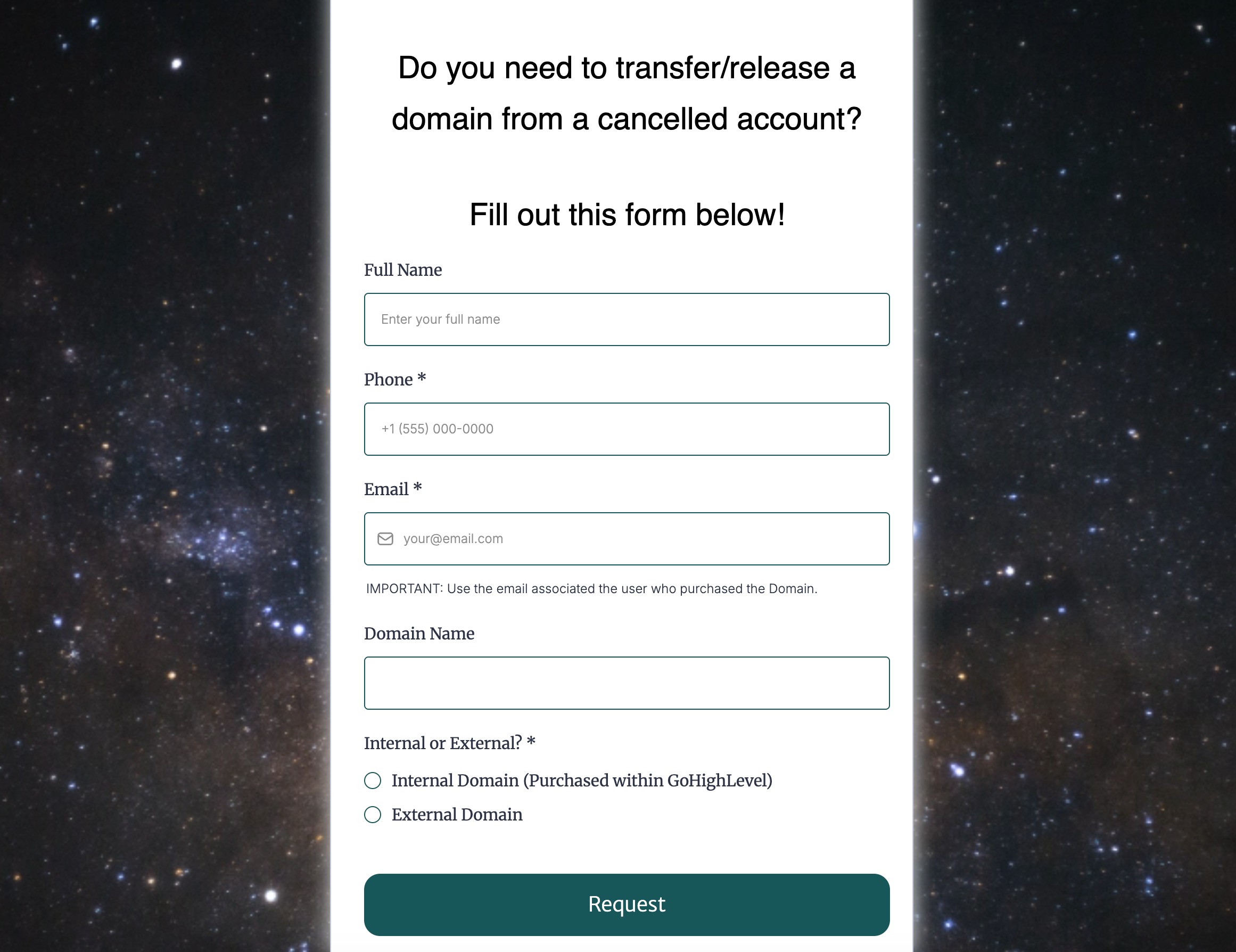
- Submit the form.
- Watch for follow-up from Support if more information is needed.
Frequently Asked Questions
Q: Who should use the domain release request form?
Customers should use the form if their account has been cancelled and they need help releasing or transferring a domain purchased through HighLevel.
Q: Can I use this form if my account is still active?
No. If your account is still active, manage your purchased domain from Subaccount > Settings > Domains > Purchased Domains.
Q: Does submitting the form automatically transfer my domain?
No. Submitting the form creates a support request for review. Support may need to verify account, domain, or ownership details before taking action.
Q: Can I use this form for a domain connected from another registrar?
No. This process is for domains purchased through HighLevel. Domains purchased from another registrar should be managed through that registrar.
Q: What if I purchased the domain for multiple years?
You can still submit the form if the domain was purchased through HighLevel and your account has been cancelled. Multi-year registration affects the registration term, but cancelled-account release requests should still go through the domain release request form.
Q: What information should I include in the form?
Include the domain name, account email, agency or sub-account name if known, and any details requested in the form to help Support locate the correct account.
Q: Is this the same as transferring a domain to Cloudflare?
No. The Cloudflare transfer-out process is a specific transfer workflow. Cancelled-account release or transfer requests should use the domain release request form.
Q: Can Support release any domain from my cancelled account?
Support will review the request based on the domain and account details provided. Additional verification may be required.
Related Articles
- How to Purchase Domain Step by Step
- Configure & Connect Purchased Domains
- LC Domain: Multiple Year Domain Purchase
- Domains - Transfer-In Process
Was this article helpful?
That’s Great!
Thank you for your feedback
Sorry! We couldn't be helpful
Thank you for your feedback
Feedback sent
We appreciate your effort and will try to fix the article