Funnel & Website AI is HighLevel’s AI-powered page creation and editing experience for funnel and website pages. It can generate pages from prompts, guided inputs, URLs, and images, then help you continue refining the page through conversational requests.
You can revise existing content and design, add new sections, or regenerate selected parts of the page while keeping standard builder controls available for manual refinement. This gives both beginners and experienced builders a faster way to create and iteratively improve pages without starting from scratch.
TABLE OF CONTENTS
- What is Funnel & Website AI?
- Key Benefits of Funnel & Website AI
- Choose Your AI Creation Path: Assist or Build
- Chat Mode and Side-by-Side Editing
- Import from a Link or Image
- AI-Powered SEO Suggestions
- How To Use Funnel & Website AI
- Important Notes
- Frequently Asked Questions
- Related Articles
What is Funnel & Website AI?
Funnel & Website AI is HighLevel’s AI-powered page creation experience for building funnel and website pages from prompts, guided inputs, URLs, and images. It helps users generate layouts, copy, visuals, and page structure more quickly while still keeping builder controls available for manual refinement. This matters because it gives both beginners and experienced builders a faster way to launch polished pages without starting from scratch.
Available Funnel & Website AI Tools:
| Path/Feature | Description |
|---|---|
| Assist | Helps users generate pages with guided presets and structured inputs such as business niche, goal, audience, tone, and layout preferences. |
| Build | Gives users more creative freedom by letting them describe exactly what they want the AI to create. |
| Chat-based editing | Makes it easier to update copy, sections, layout ideas, and design direction in real time while working inside the page builder. |
| Ask AI + Settings Side-by-Side | Keeps AI assistance and builder controls close together so users can refine content and styling without constantly switching views. |
| Import from a Link or Image | Helps users create pages inspired by a public URL or image reference. |
| SEO Support | Helps generate page titles, descriptions, and content suggestions that support stronger page optimization. |
Key Benefits of Funnel & Website AI
Funnel & Website AI helps users move from an initial idea to a refined page faster. Its conversational editing tools also make it easier to improve specific parts of a page without rebuilding unaffected content.
- Faster page creation: Generate page structure, copy, visuals, and layout direction without starting from scratch.
- Guided or flexible creation: Choose structured Assist inputs or describe exactly what you want with Build.
- Granular AI revisions: Revise copy, theme, or design at the section or page level, or regenerate content when a broader change is needed.
- Add new sections: Insert new sections, such as pricing, testimonials, or FAQs, without regenerating the rest of the page.
- Builder-native editing: Continue adjusting AI-applied styling, including colors and typography, with standard builder controls.
- Background generation: Page generation can continue even after you close the browser or temporarily lose your connection.
- Reference-based generation: Use links or images to provide visual or structural direction.
- SEO assistance: Generate SEO suggestions that you can review and refine before publishing.
Choose Your AI Creation Path: Assist or Build
Funnel & Website AI gives users two primary ways to create a funnel page, depending on how much guidance or control they want. Choosing the right path at the start helps generate more relevant results and makes the building process smoother from the beginning. The current HighLevel experience presents these two paths directly inside the Ask AI panel.
| Mode | Best For |
|---|---|
| Assist | Users who want guided inputs and help shaping the page |
| Build | Users who know what they want and prefer direct prompting |
1. Assist
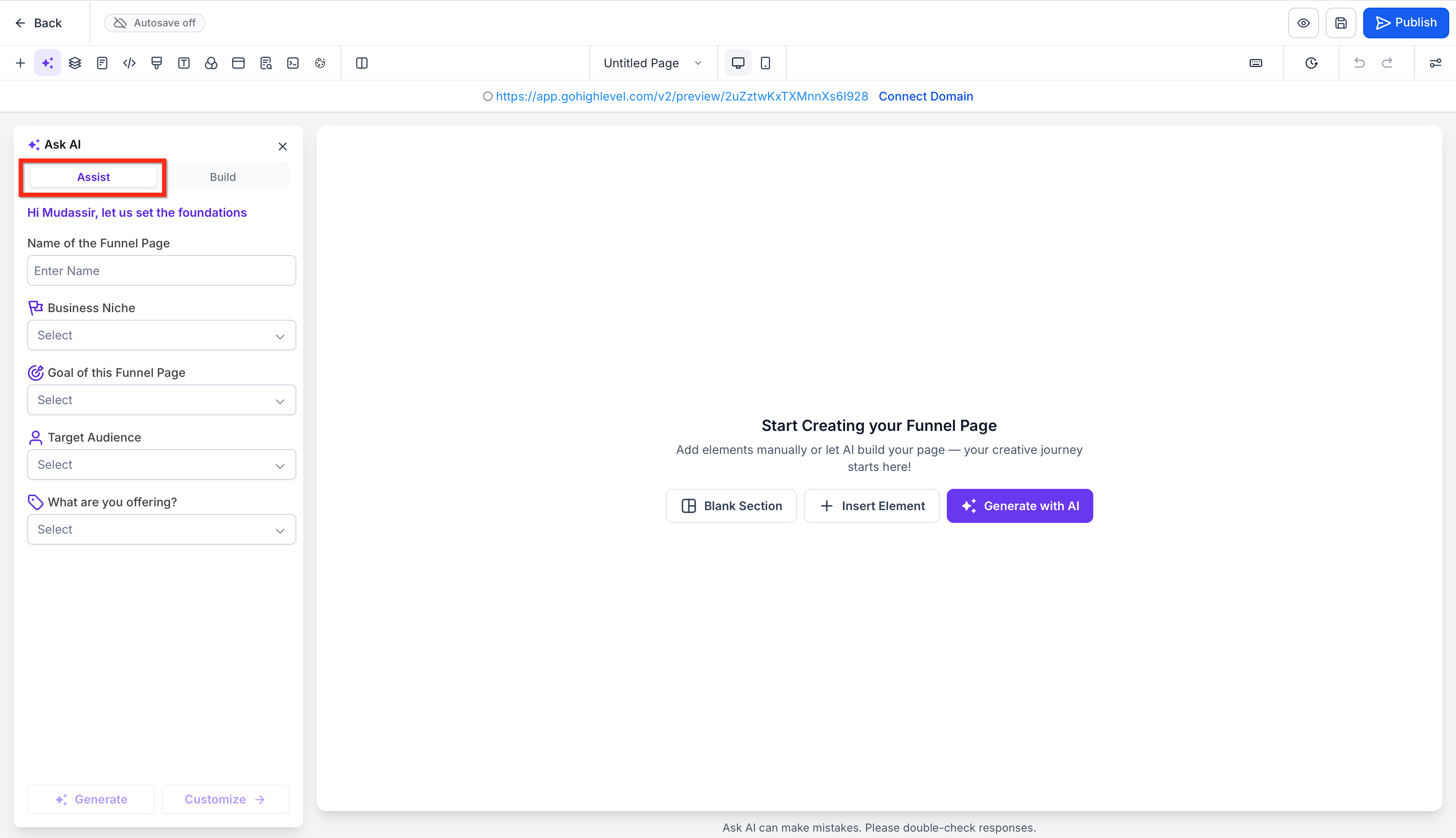
Assist is the guided path for users who want HighLevel to help shape the page before generation. It uses structured inputs like the funnel page name, business niche, page goal, target audience, and offer details to create a more tailored starting point. This option is especially helpful when you want direction, want to move quickly, or are not sure how to phrase a detailed prompt yourself.
Users can fill in fields such as:
- Name of the funnel page
- Business niche
- Goal of the funnel page
- Target audience
- What is being offered
Once those details are entered, users can generate the page directly or continue customizing before generation.
2. Build
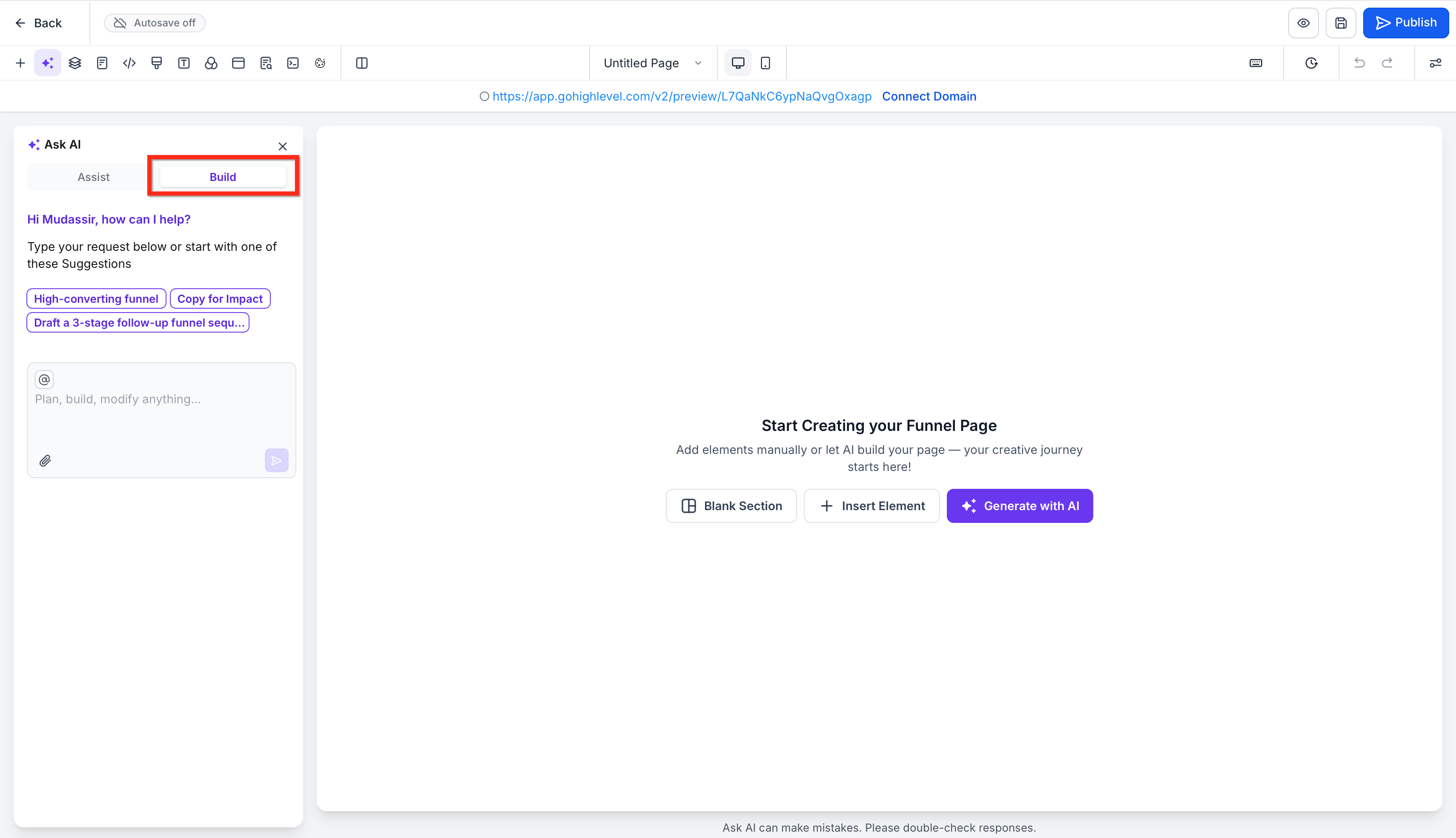
Build is the flexible path for users who already have a clear vision for the funnel. Instead of following guided fields, users can type a direct request and ask the AI to plan, build, or modify the page based on their instructions. This is ideal for users who want more creative freedom, have a specific campaign structure in mind, or want to describe copy and design direction in their own words.
Build also includes suggested prompt starters to help users move faster, such as creating a high-converting funnel or improving copy for impact.
Chat Mode and Side-by-Side Editing
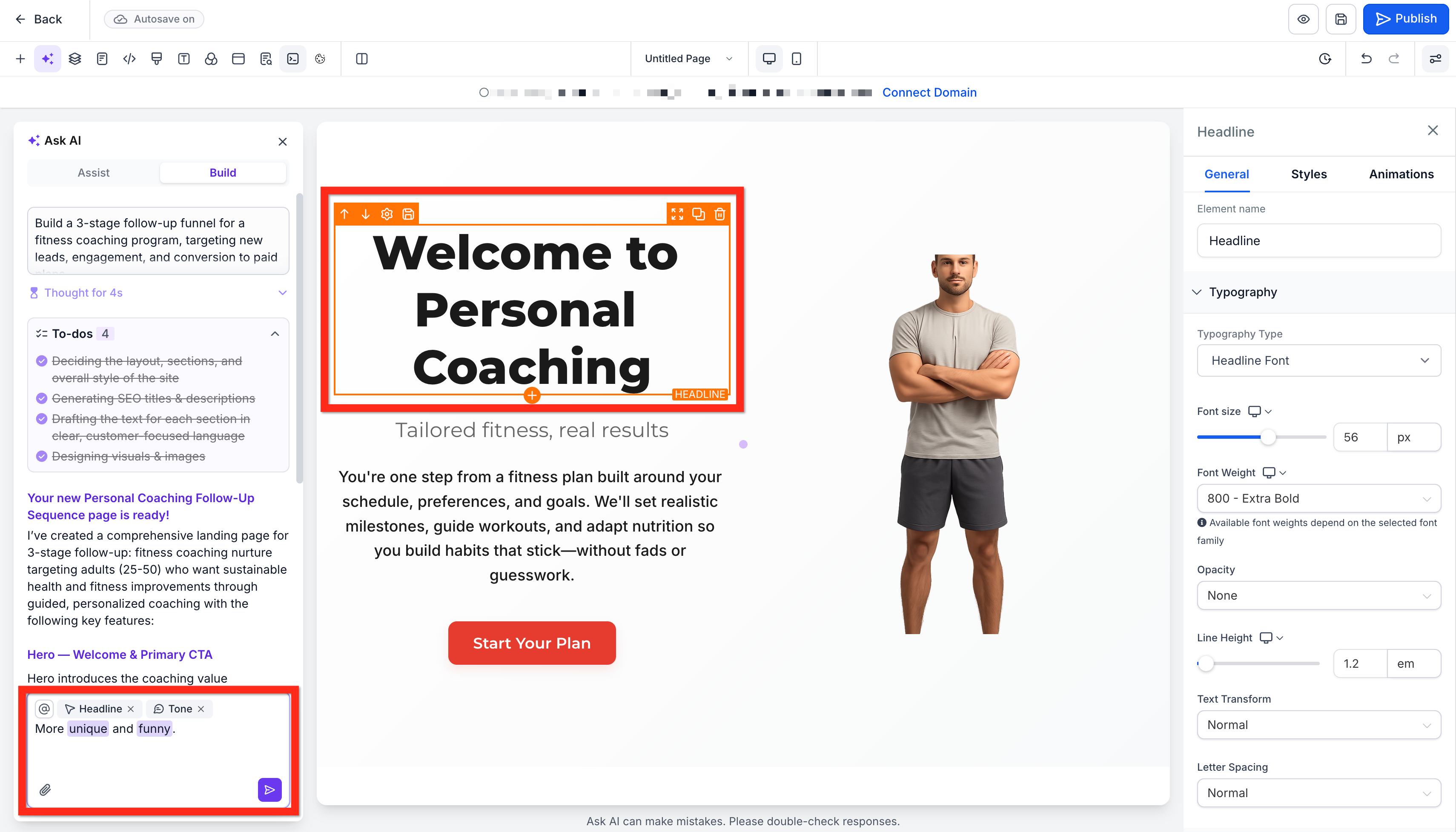
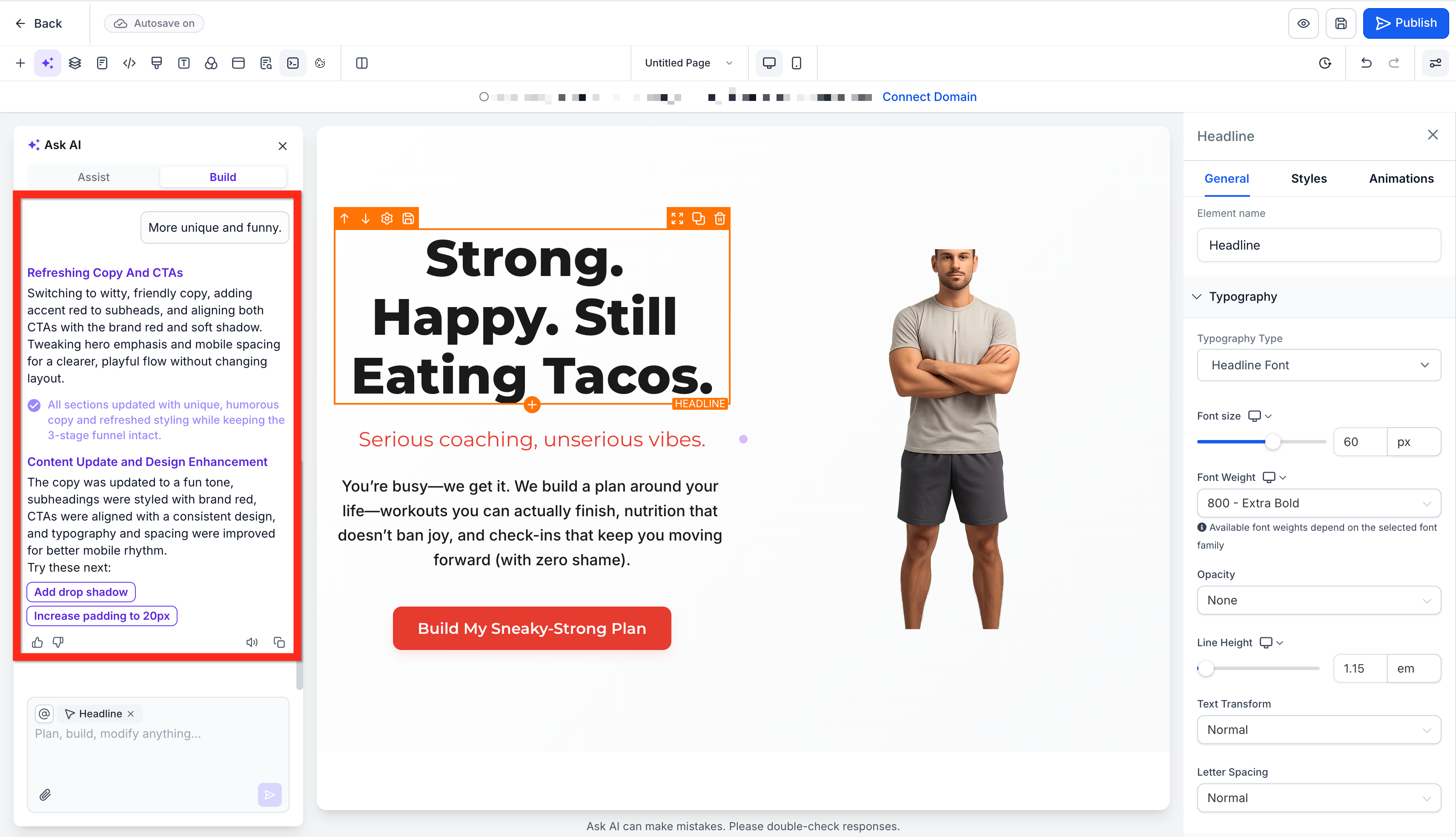
Chat-based editing helps you refine an existing page without manually rebuilding each element. Use conversational requests to target the type of change you want while keeping the standard builder controls available alongside the AI experience.
You can ask Funnel & Website AI to make several types of changes:
- Revise copy: Update messaging in a section or across the page while keeping the broader design intact.
- Revise the theme: Adjust the visual theme while preserving the existing content.
- Redesign: Change the design of a specific section or the full page when you want a different visual direction.
- Regenerate: Create a new version of a section or page when broader changes are needed.
- Add a new section: Insert new content, such as a pricing table, testimonial section, or FAQ section, without regenerating the rest of the page.
AI-applied colors and typography remain editable through the standard builder controls. You can continue using those controls alongside chat-based changes to fine-tune the final result.
Import from a Link or Image
Import from a link or image helps users create pages inspired by an existing visual reference. This can be useful when you want to capture a style, structure, or creative direction without starting from zero.
Users can use this workflow to:
- Take inspiration from a public webpage
- Recreate the feel of a design direction
- Build around a brand style shown in an image
- Speed up ideation when they already know the look they want
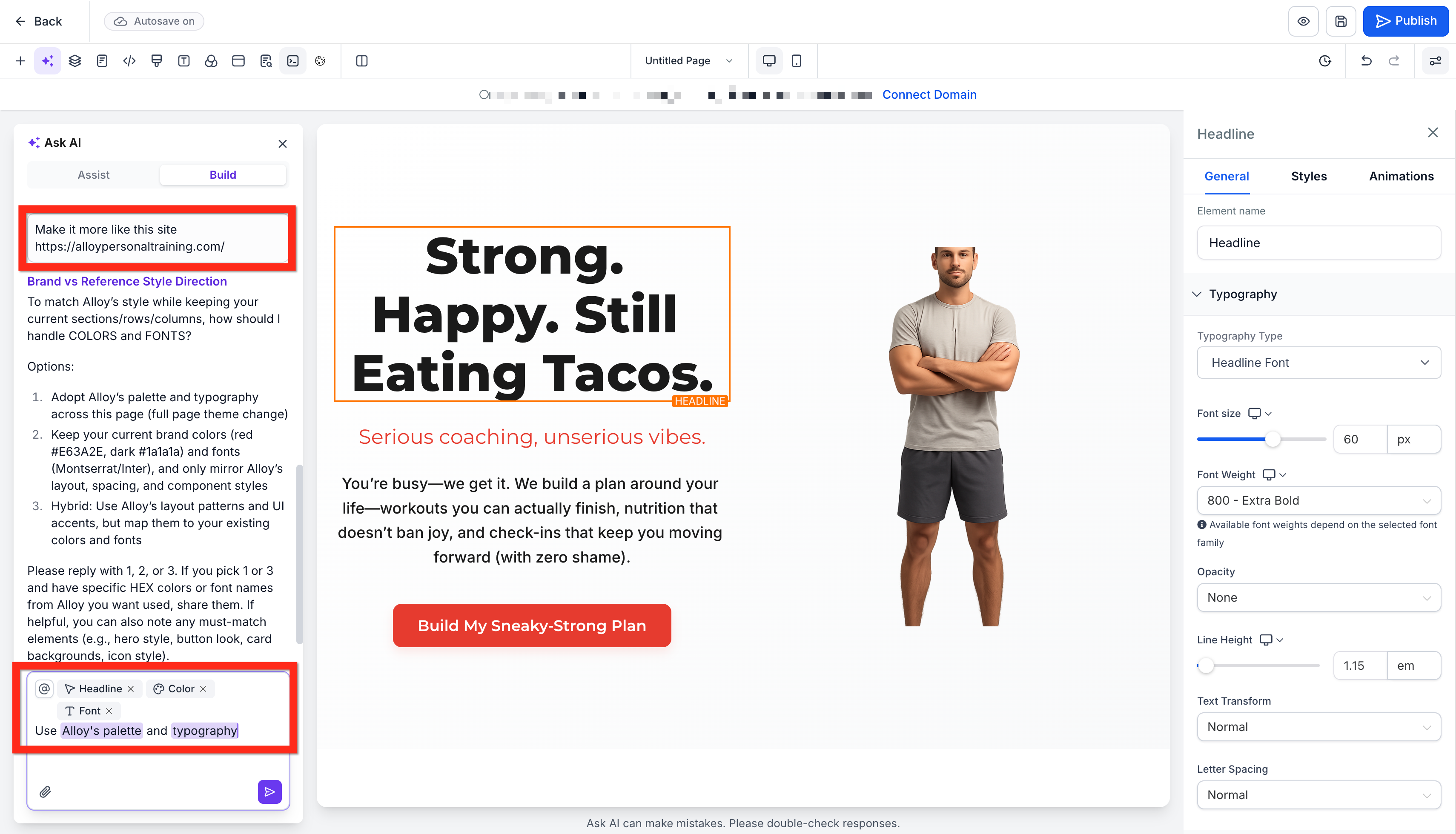
Important: Importing from a link or image provides the AI with a reference for generating the page. It does not create an exact clone of the original page or guarantee that every design element, layout, interaction, or piece of content will be reproduced.AI-Powered SEO Suggestions
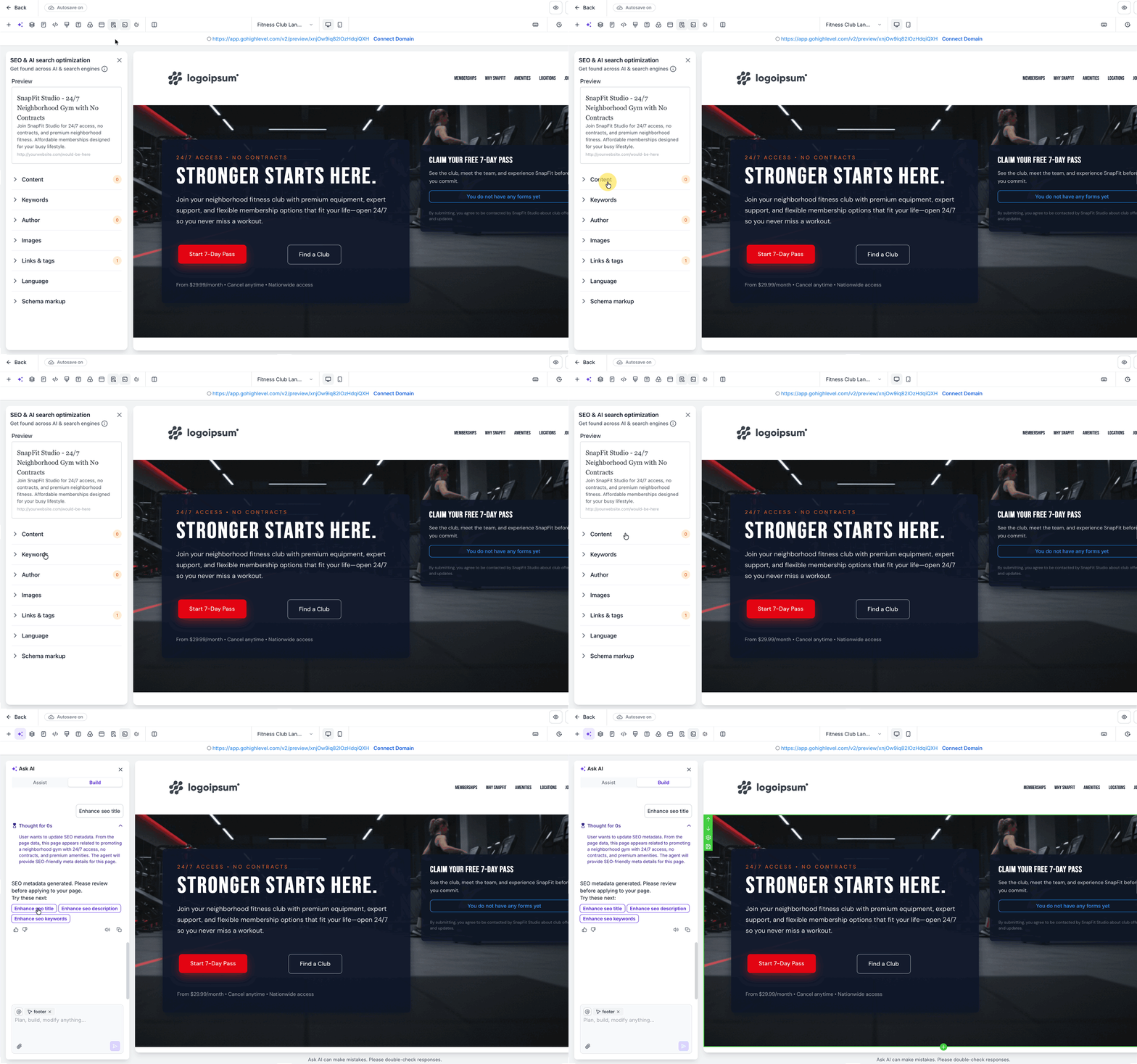
Funnel & Website AI can help users move faster on SEO by generating suggested titles, descriptions, and content direction during page creation. That gives users a stronger starting point when preparing a page for search visibility.
AI-generated SEO suggestions should still be reviewed before publishing. This matters because page goals, brand language, and search intent may require manual refinement.
Helpful follow-up tasks after AI generation:
- Review the page title for clarity and relevance
- Refine the meta description for search intent
- Confirm headings match the page purpose
- Update page copy to reflect your brand voice
- Add any custom metadata needed before publishing
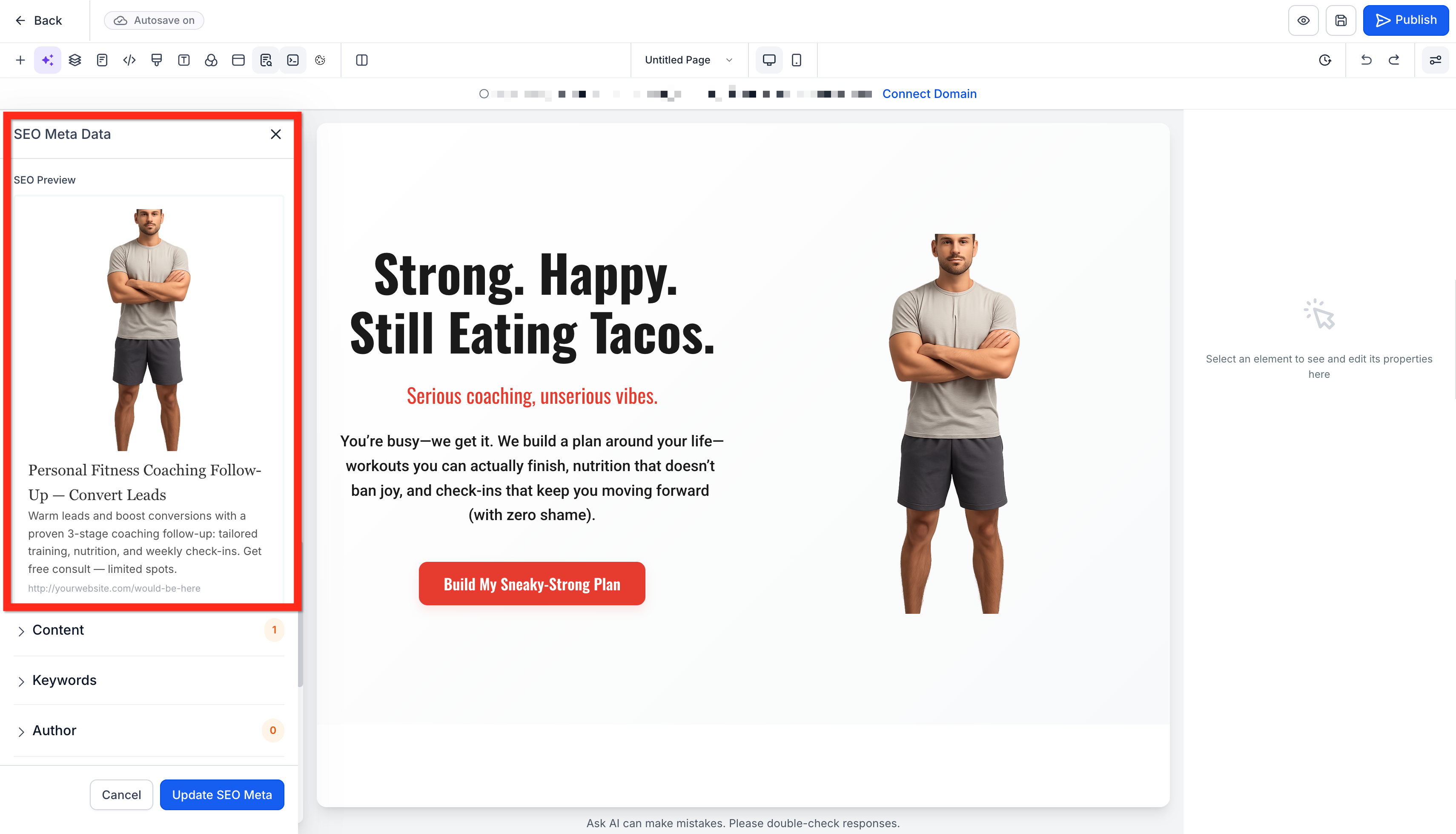
Note: AI-generated SEO content is a starting point. Review page titles, descriptions, headings, keywords, and page copy for accuracy, search intent, and brand relevance before publishing.
How To Use Funnel & Website AI
A strong setup process helps users get better first-generation results and reduces the need for excessive edits later. Starting with the right mode, inputs, and expectations makes the AI output more relevant and easier to refine.
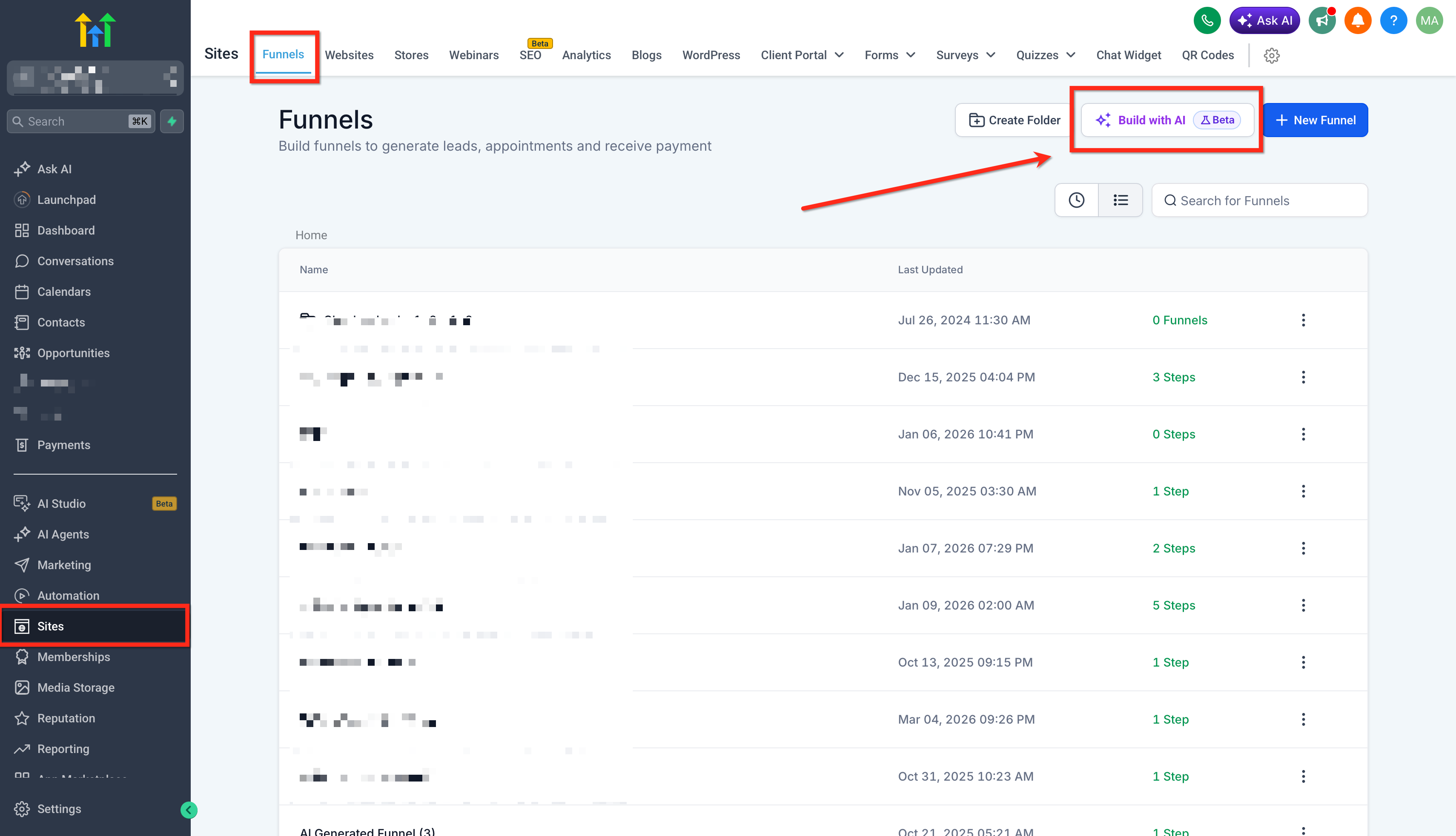
- Navigate to Sites → Funnels or Websites in your HighLevel sub-account. Click Build with AI to create a new funnel or website asset OR Open an existing Website or Funnel.
- Choose your AI creation path:
After opening the AI experience, use Assist or Build to create the initial page. Once inside the builder, use the available AI chat alongside standard builder controls to refine the generated page.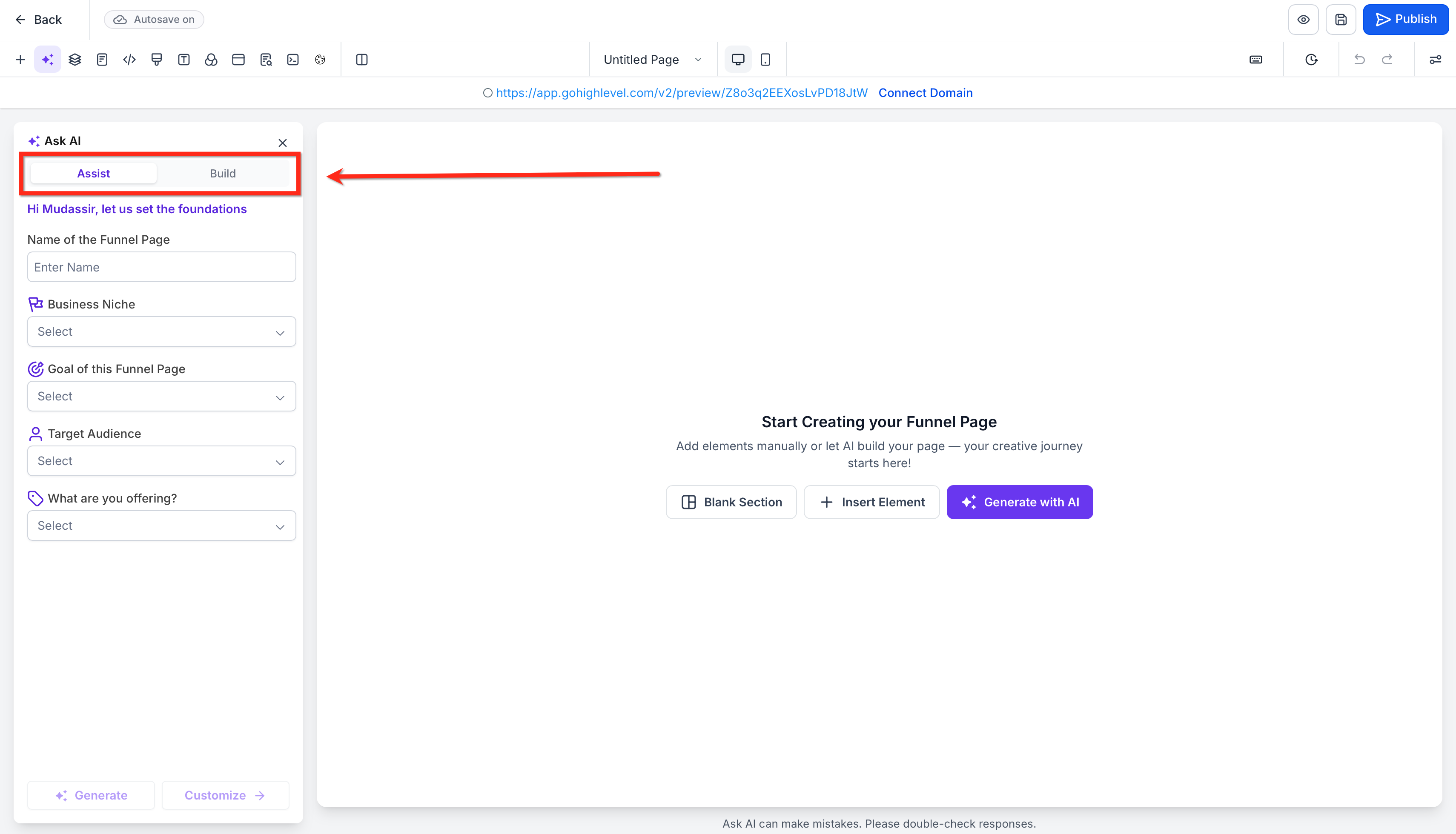
- If you choose Assist, enter your funnel page name, business niche, page goal, target audience, and offer details.
If you choose Build, enter a detailed prompt that explains the page purpose, audience, messaging, and desired style.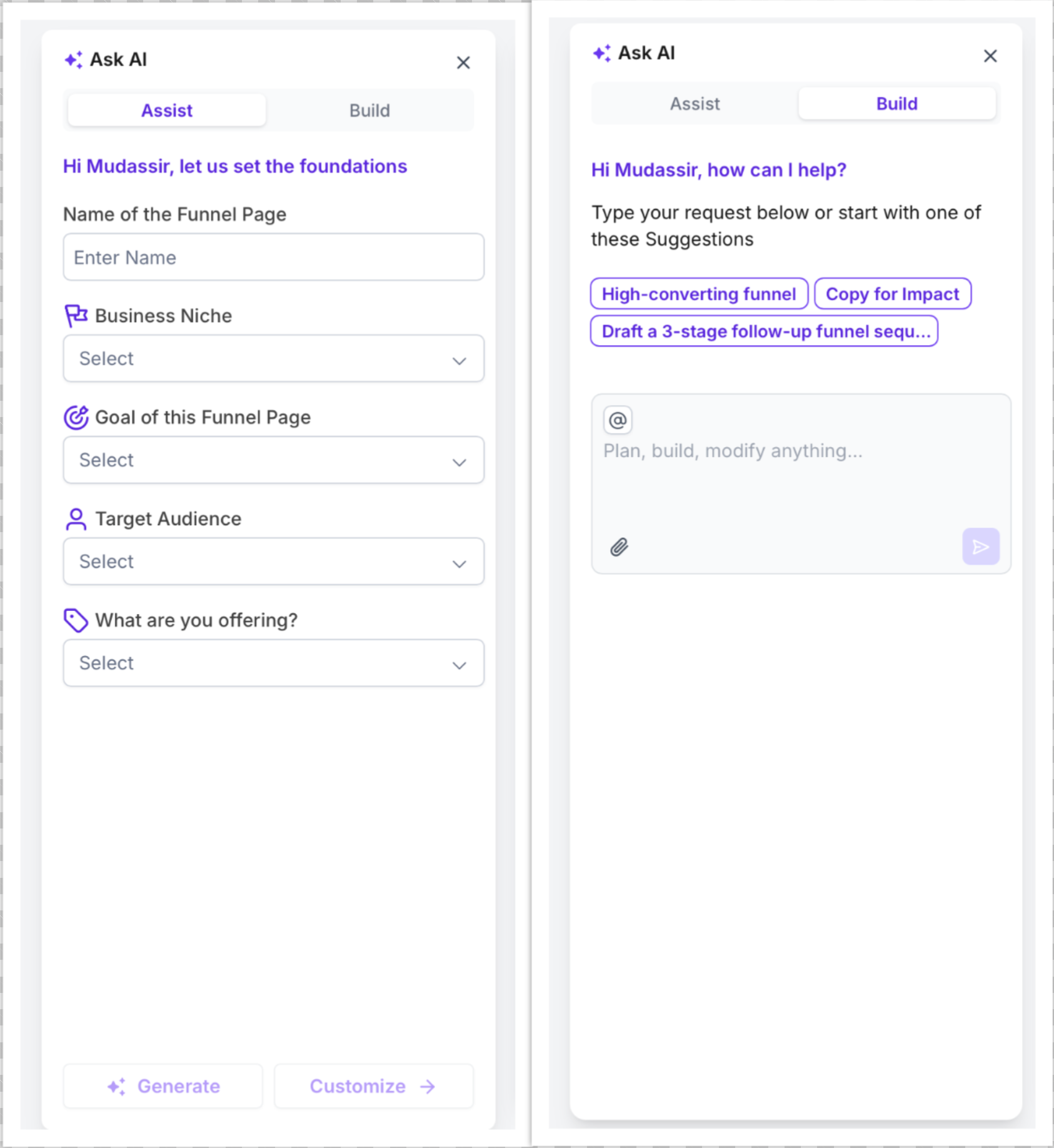
- Use Ask AIchat and the builder settings to refine the page. You can request changes to copy, theme, or design, regenerate a section or page, or ask AI to add a new section without rebuilding the rest of the page.
Continue using the standard builder controls when you want to manually adjust content, colors, typography, images, spacing, or other supported page settings.
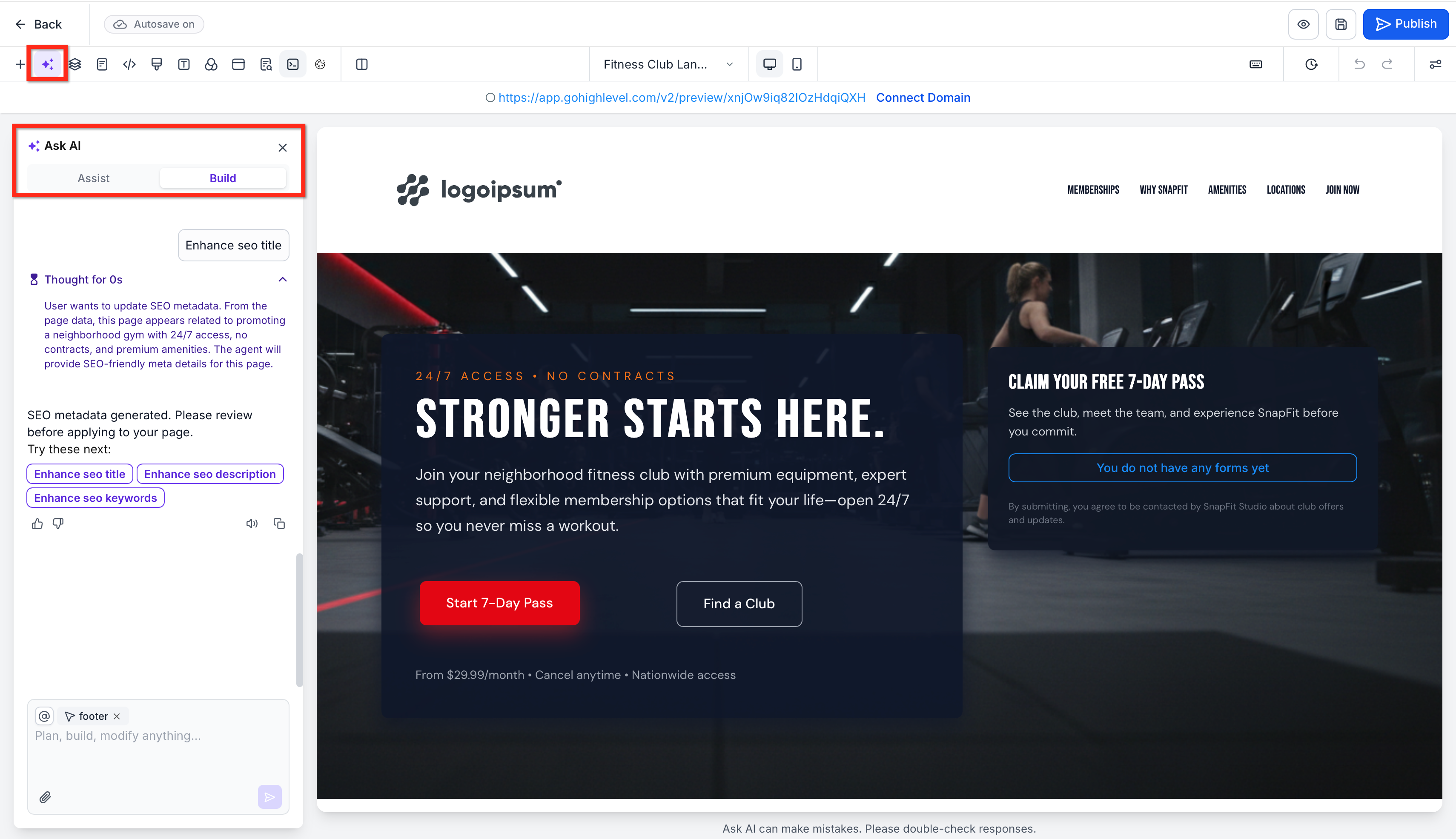
- Review the page’s SEO fields, then complete any final edits before publishing.
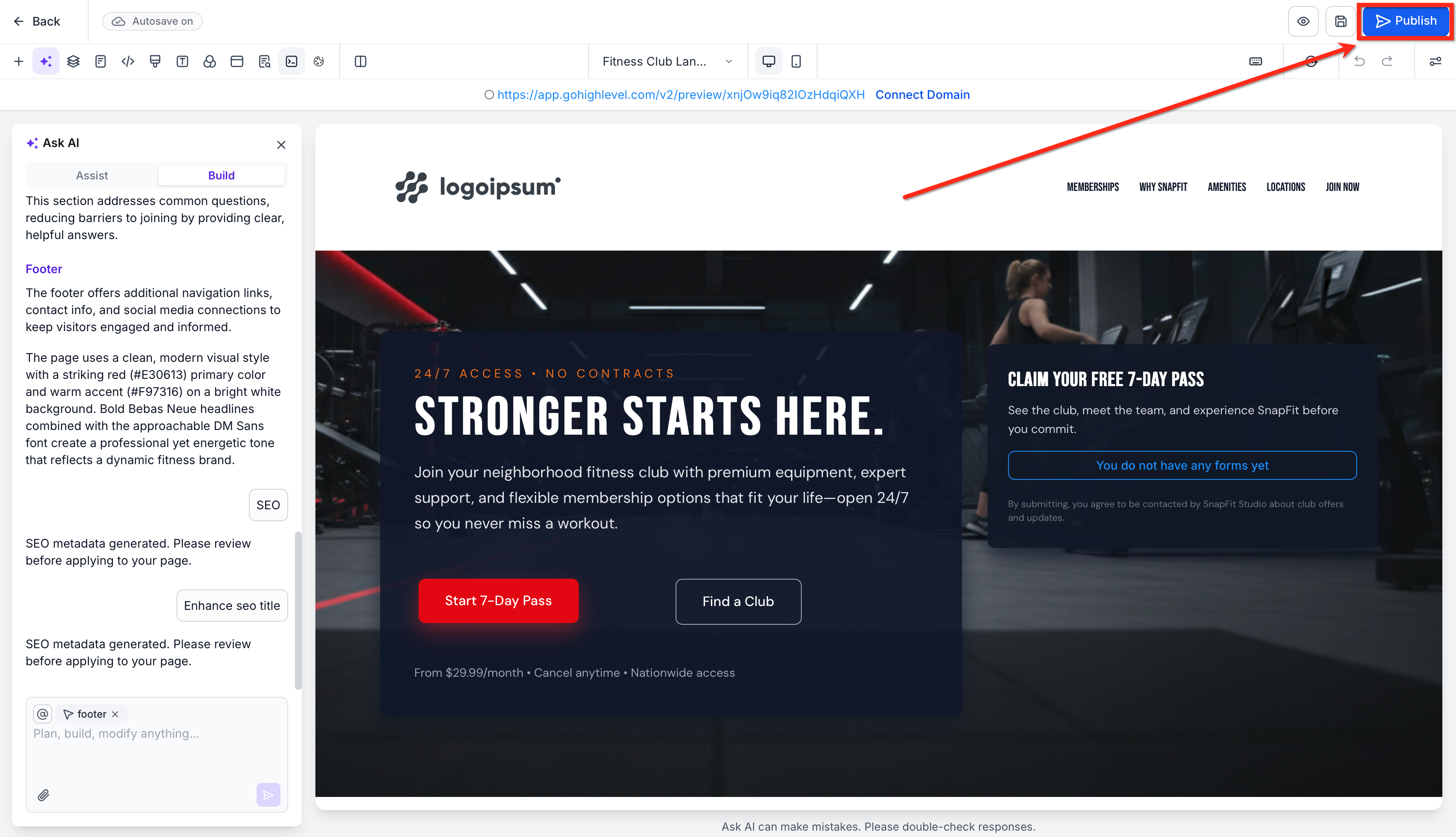
- Publish the page once your content, layout, and settings are ready.
Important Notes
- Review AI-generated content before publishing: Verify generated copy, claims, contact information, offers, links, images, and other business-specific information for accuracy.
- Reference-based generation is not exact cloning: A link or image provides creative and structural direction but does not guarantee an identical reproduction.
- SEO suggestions require review: AI-generated titles, descriptions, and content suggestions should be refined for your target audience, search intent, and brand.
- You can continue editing manually: AI-generated pages remain editable using the standard Funnel and Website Builder controls.
- Check current AI usage limits: Funnel & Website AI is currently available without additional AI usage charges, subject to usage limits. Refer to the AI Product Pricing article for current details.
Frequently Asked Questions
Q: When should I use Assist instead of Build?
Use Assist when you want a guided starting point and would benefit from presets or structured inputs. Use Build when you already have a clear page concept and want to describe it directly.
Q. Can Funnel & Website AI edit an existing page?
Yes. The current article explicitly allows users to open an existing Funnel or Website and use AI tools to refine it.
Q: Does importing from a link or image work the same way as cloning a funnel or website?
No. AI reference-based creation is best treated as inspiration-driven generation.
Q: Can I still manually edit the page after AI generates it?
Yes. The AI experience is meant to speed up creation, but users can continue refining the page using chat-based edits and standard builder settings.
Q: Will the AI-generated SEO content be enough on its own?
It is a strong starting point, but it should still be reviewed for accuracy, search intent, and brand voice before publishing. HighLevel also supports manual metadata updates.
Q: Do I need design experience to use Funnel & Website AI?
No. One of the main benefits of the tool is that it reduces design complexity by generating layouts, copy, and page structure for you.
Related Articles
Was this article helpful?
That’s Great!
Thank you for your feedback
Sorry! We couldn't be helpful
Thank you for your feedback
Feedback sent
We appreciate your effort and will try to fix the article