Workflow Premium Features allow sub-accounts to use supported premium triggers, actions, Marketplace Apps, and LC Apps inside workflows.
Agencies can enable these features for sub-accounts, rebill usage to clients, and optionally offer Workflow Pro plans that include bundled premium executions at discounted rates.
TABLE OF CONTENTS
- What Are Workflow Premium Features?
- What Counts as a Premium Execution?
- Free Premium Executions
- Standard Premium Execution Pricing
- Workflow Pro Plans
- Enable Workflow Premium Features
- Enable Rebilling for a Sub-Account
- Configure Your Markup
- How Rebilling Works
- Agency Usage Cost
- Client Rebilling
- Agency and Sub-Account Wallets
- Resell Workflow Pro
- How Sub-Accounts Purchase Workflow Pro
- What Happens When the Execution Limit Is Reached?
- Frequently Asked Questions
- Related Articles
What Are Workflow Premium Features?
Workflow Premium Features include supported workflow triggers and actions that incur premium execution charges.
Examples can include:
Inbound Webhooks
Custom Webhooks
Google Sheets actions
Slack actions
Marketplace Apps
LC Apps
Other supported premium workflow triggers and actions
Important: Some workflow features can use separate pricing models. Always refer to the individual feature documentation when pricing differs from standard premium execution pricing.
What Counts as a Premium Execution?
A premium execution occurs when a supported premium workflow trigger or action runs.
Premium executions can include:
Premium workflow triggers
Premium workflow actions
Marketplace App actions
LC App actions
Standard workflow actions do not consume Workflow Pro premium execution allowances. Some AI-related workflow features may also use separate pricing and should be reviewed individually.
Free Premium Executions
Each eligible sub-account receives:
100 free lifetime premium executions
After the free executions are used, standard premium execution charges apply unless the sub-account has an active Workflow Pro plan.
Note: The 100 free executions are lifetime executions and do not reset monthly.
Standard Premium Execution Pricing
Without a paid Workflow Pro plan, premium workflow executions are charged at the standard pay-per-execution rate.
Current standard pricing:
$0.01 per premium execution
For sub-accounts with a Workflow Pro plan, included executions and discounted overage rates apply based on the selected plan.
Workflow Pro Plans
Workflow Pro provides monthly bundles of premium executions at discounted rates.
Current plans include:
| Plan | Monthly Price | Included Executions | Overage Rate |
|---|---|---|---|
| Free | $0 | 100 lifetime | $0.01/execution |
| Starter | $10/month | 10,000/month | $0.008/execution |
| Growth | $25/month | 30,000/month | $0.006/execution |
| Scale | $50/month | 65,000/month | $0.004/execution |
Paid Workflow Pro execution allowances reset at the beginning of each billing cycle.
Unused monthly executions do not roll over to the next billing cycle.
If the included execution allowance is exceeded, workflows continue running and the applicable overage rate is charged.
Enable Workflow Premium Features
To enable Workflow Premium Features for your agency:
From Agency View, go to Settings.
Open Company settings.
Locate Workflow - Premium Features.
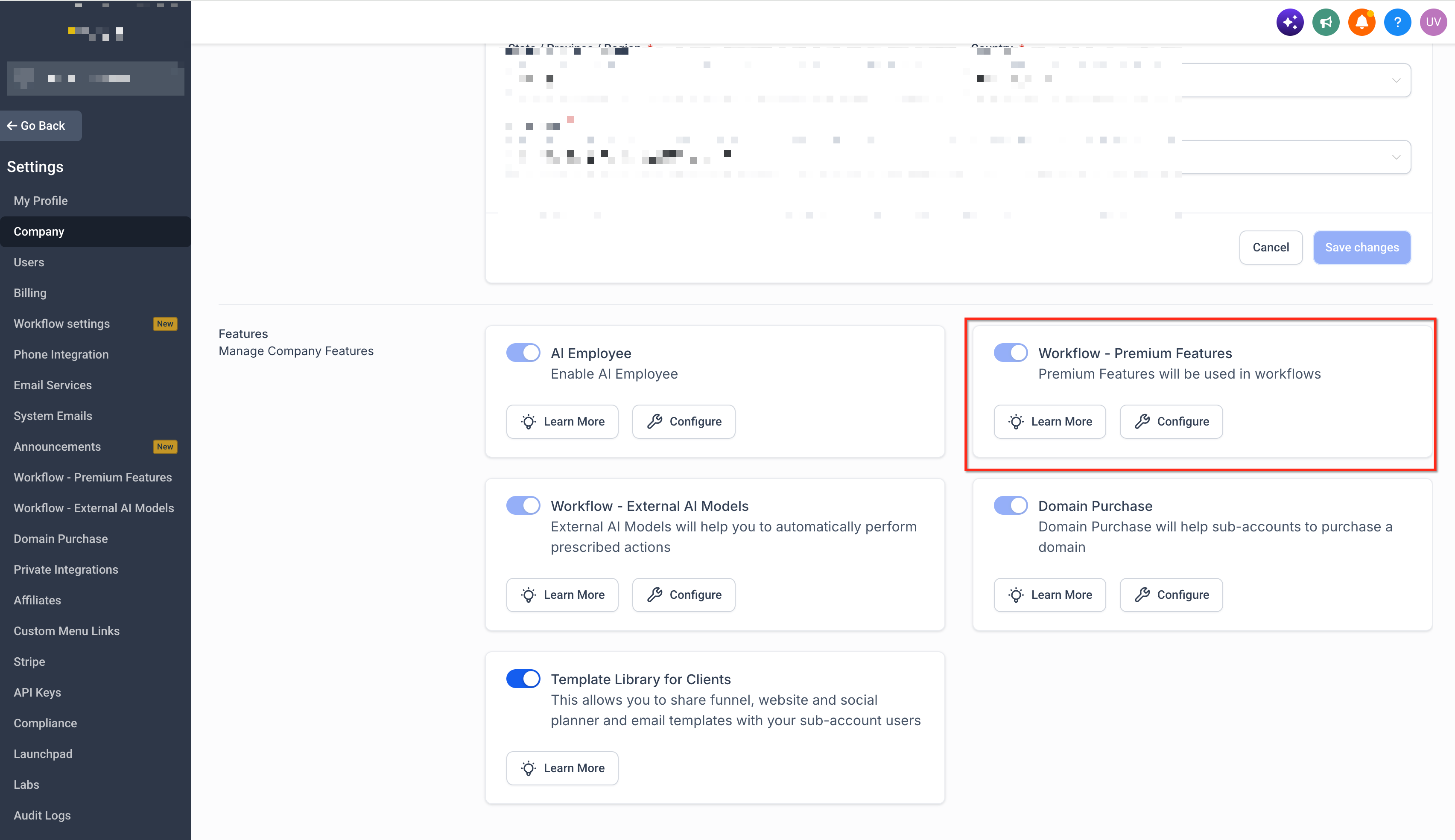
Enable the feature.
Save your changes.
Once enabled, eligible sub-accounts can use supported premium workflow triggers and actions.
Note: Feature availability and billing configuration are separate. Enabling Workflow Premium Features does not automatically mean that rebilling is configured for every sub-account.
Enable Rebilling for a Sub-Account
Agencies can rebill premium workflow usage to individual sub-accounts.
To configure rebilling:
From Agency View, go to Sub-Accounts.
Locate the applicable sub-account.
Click the More Options menu.
Select Manage Client.
Open the Rebilling section.
Locate Workflow - Premium Features.
Enable rebilling.
Configure the markup.
Save your changes.
Once enabled, premium workflow usage can be charged to the client based on the configured rebilling settings.
Configure Your Markup
You can apply a markup to premium workflow usage when rebilling clients.
For example:
If the underlying cost is:
$0.01 per execution
and you configure a 2x multiplier, the client is charged:
$0.02 per execution
The difference between the underlying cost and the client-facing charge becomes your agency's gross profit.
Important: A multiplier and a margin percentage are not the same. For example, charging 5x the underlying cost represents a 400% markup over cost, not a 500% margin.
How Rebilling Works
When rebilling is enabled, premium execution usage creates two billing relationships.
Agency Usage Cost
The agency is charged for the underlying premium workflow usage based on the applicable execution rate.
Client Rebilling
The client is charged according to the price or markup configured by the agency. This allows agencies to recover the underlying usage cost and optionally add a markup.
Agency and Sub-Account Wallets
Premium workflow charges can involve both agency-level and sub-account-level billing. Depending on the account configuration:
The agency is responsible for the underlying workflow execution charges.
Rebilling allows those charges to be passed to the client.
Client-facing charges are based on the markup configured by the agency.
Review the sub-account's rebilling configuration to confirm how premium workflow charges are being passed through.
Resell Workflow Pro
Agencies can also offer Workflow Pro plans to sub-accounts. To configure Workflow Pro reselling:
From Agency View, go to Reselling.
Locate Workflow Pro.
Enable reselling.
Configure the markup or client-facing price.
Save your changes.
The configured pricing determines what clients pay when purchasing a Workflow Pro plan.
How Sub-Accounts Purchase Workflow Pro
Sub-account users can review and purchase Workflow Pro plans from their Workflow settings.
Open the applicable sub-account.
Go to Automation → Workflows.
Open Global Workflow Settings.
Locate Workflow Pro Plans.
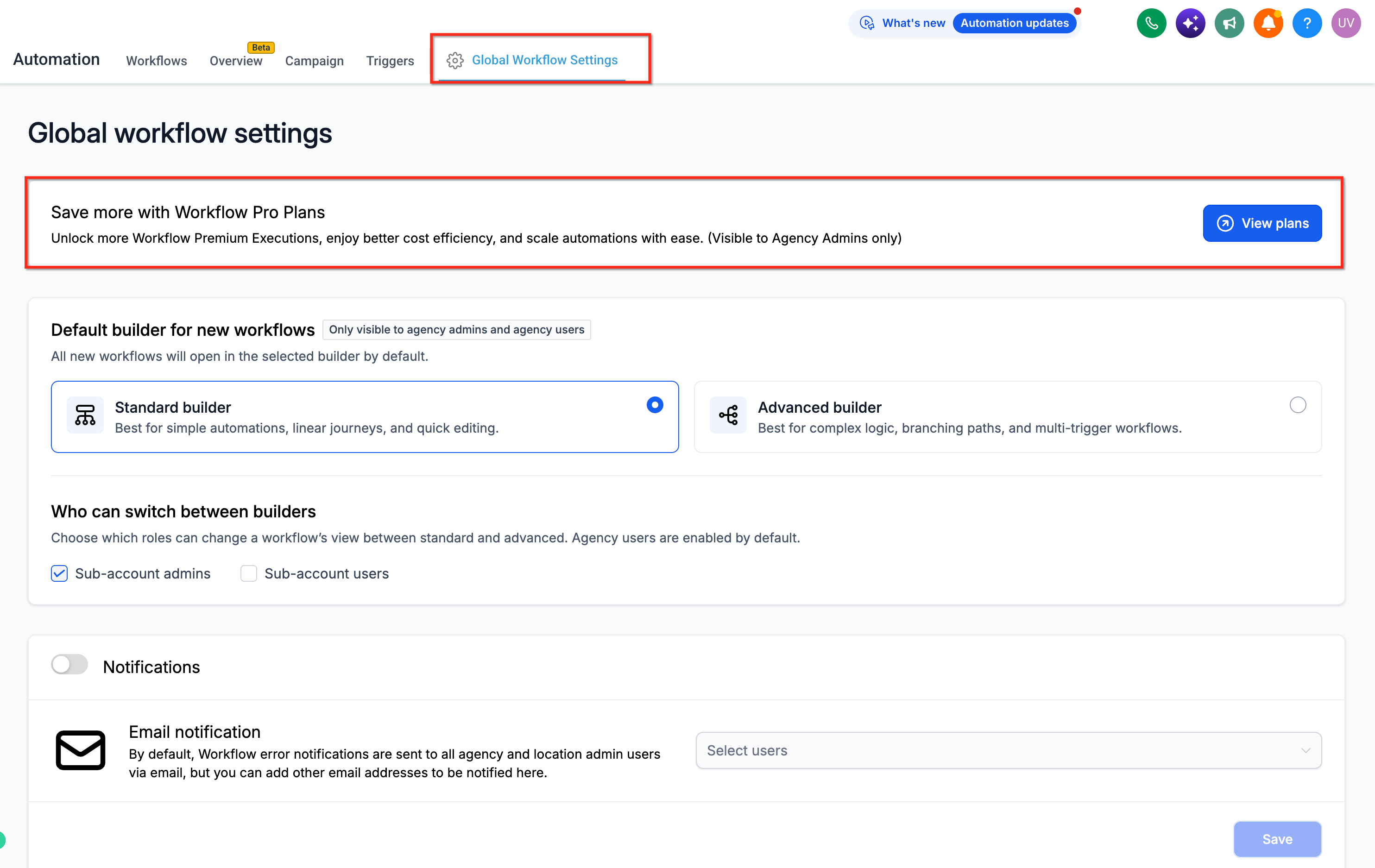
Click View Plans.
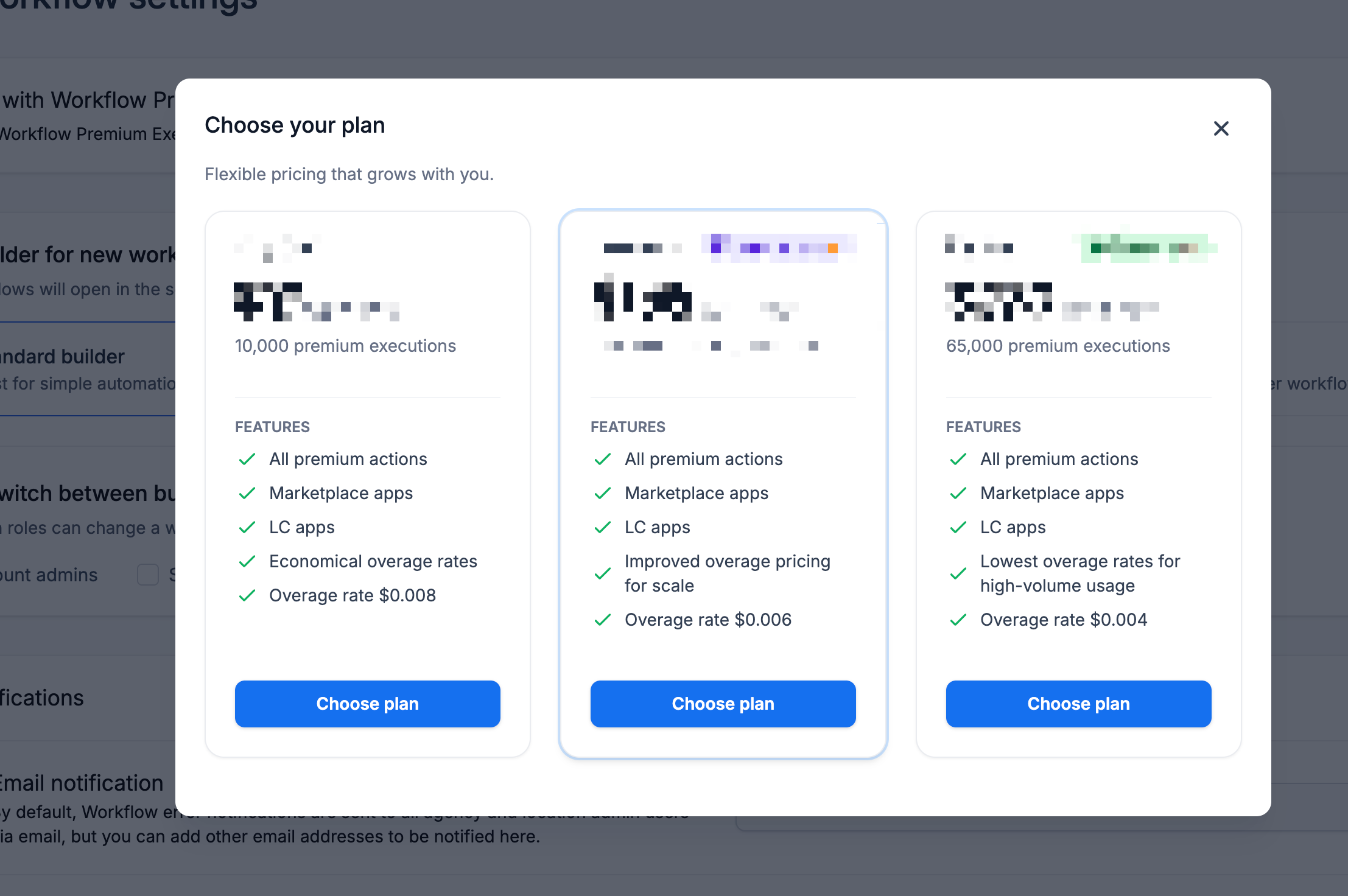
Select the preferred plan.
Complete the purchase.
Once the plan is active, the included premium execution allowance applies to eligible premium workflow executions.
What Happens When the Execution Limit Is Reached?
Workflow Pro plans do not stop workflows when the included execution allowance is exhausted.
Instead:
The included monthly executions are used first.
Additional premium executions are billed at the plan's applicable overage rate.
Workflows continue running normally.
This prevents workflows from stopping unexpectedly because the monthly included allowance was consumed.
Frequently Asked Questions
Do the 100 free executions reset every month?
No. The 100 free executions are lifetime premium executions for the eligible sub-account.
Do Workflow Pro executions reset monthly?
Yes. Paid Workflow Pro plans include a monthly execution allowance that resets each billing cycle.
Do unused Workflow Pro executions roll over?
No. Unused included executions generally do not roll over to the next billing cycle.
What happens if a sub-account exceeds its Workflow Pro allowance?
The workflows continue running. Additional premium executions are charged at the applicable overage rate for the selected plan.
Can agencies rebill premium workflow usage?
Yes. Rebilling can be enabled for eligible sub-accounts from:
Agency View → Sub-Accounts → Manage Client → Rebilling → Workflow - Premium Features
Can agencies resell Workflow Pro plans?
Yes. Agencies can configure Workflow Pro reselling from:
Agency View → Reselling → Workflow Pro
Are all workflow actions billed as premium executions?
No. Standard workflow actions do not count as premium executions. Supported Premium Triggers, Premium Actions, Marketplace Apps, and LC Apps are generally included in premium execution usage.
Some features can use separate pricing models.
Related Articles
Was this article helpful?
That’s Great!
Thank you for your feedback
Sorry! We couldn't be helpful
Thank you for your feedback
Feedback sent
We appreciate your effort and will try to fix the article