A2P 10DLC registration verifies who is sending business text messages, what type of messages are being sent, and how recipients consent to receive them. This guide explains Brand and Campaign registration, the information you should prepare, current HighLevel setup options, and what happens after submission. It also explains how to diagnose a rejection, review required fixes, resubmit when eligible, and get help from Support when a registration continues to fail.
- What is A2P 10DLC?
- Key Benefits of A2P 10DLC Registration
- Who Needs A2P 10DLC Registration?
- Brand and Campaign Registration
- Before You Start
- How To Setup A2P 10DLC Registration
- What Happens After Submission
- If Your Brand or Campaign Is Rejected
- A2P 10DLC Fees and Sending Considerations
- Frequently Asked Questions
- Related Articles
What is A2P 10DLC?
A2P 10DLC establishes a verified relationship between the business sending a text message, the messaging purpose, and the recipients who consented to receive those messages. Understanding these components is important because carriers evaluate the entire registration—not simply whether every required field was completed.
A2P 10DLC (Application-to-Person 10-Digit Long Code) is the carrier registration framework used for business SMS and MMS messages sent to U.S. recipients from standard 10-digit local phone numbers.
In HighLevel, registration is completed through Settings > Phone System > Trust Center. HighLevel provides the registration workflow, while carriers and their registration partners make the final approval or rejection decision.
A2P: Application to Person. HighLevel is the application and the recipient receiving the SMS or MMS is the person.
10DLC: 10-Digit Long Code, the standard local phone numbers used for business messaging in the United States.
The Campaign Registry (TCR): The registry used within the A2P ecosystem to identify Brands and Campaigns and provide carriers with information about messaging senders and use cases.
Key Benefits of A2P 10DLC Registration
Proper A2P registration helps carriers understand who is sending messages and why recipients should receive them. Accurate registration also reduces avoidable compliance problems and gives businesses a defined path for resolving registration failures.
- Business verification: Associates messaging activity with a verified business or qualified Sole Proprietor identity.
- Clear messaging purpose: Identifies the Campaign use case and types of messages recipients should expect.
- Consent transparency: Documents how contacts opt in and what consent language they see.
- Improved troubleshooting: Rejected Campaigns provide required-fix details that explain what failed and what must change.
- Scalable messaging: Approved Standard Brands can support multiple numbers and messaging-volume options based on business needs.
Who Needs A2P 10DLC Registration?
Registration requirements depend on the phone-number type and where messages are being delivered. Identifying the messaging route before registration prevents businesses from completing the wrong verification process.
A2P 10DLC registration is required when a business sends SMS or MMS messages to U.S. recipients using standard 10-digit local phone numbers. This includes appointment reminders, customer-care messages, account notifications, marketing messages, and other application-generated business communications.
- Canada → United States: A2P registration is required.
- Canada → Canada, number purchased before March 26, 2025: A2P registration is not required for Canada-only messaging.
- Canada → Canada, number purchased on or after March 26, 2025: Complete A2P registration or Persona verification before Canada-only messaging.
See Updated Messaging Policies for Canadian 10DLC Numbers for current requirements.
Toll-Free numbers do not use A2P 10DLC Brand and Campaign registration. They follow a separate Toll-Free verification process. See the Toll-Free Number Verification Guide.
Brand and Campaign Registration
A2P registration separates business identity from messaging behavior. A Brand answers who is sending messages, while a Campaign explains what is being sent, why it is being sent, and how recipients provided consent.
Standard Brand
Use Standard Brand registration if your business has an EIN, Tax ID, Business Number, or another accepted business registration number. U.S. businesses should use the legal business name and EIN exactly as shown on official records.
Sole Proprietor Brand
Sole Proprietor registration is intended for individuals or very small businesses with only one employee that do not have an EIN, Tax ID, Business Number, or registered business entity. A business that has a Tax ID should register as a Standard Brand instead.
For complete eligibility and country-specific registration-number requirements, see Registering Your A2P Brand.
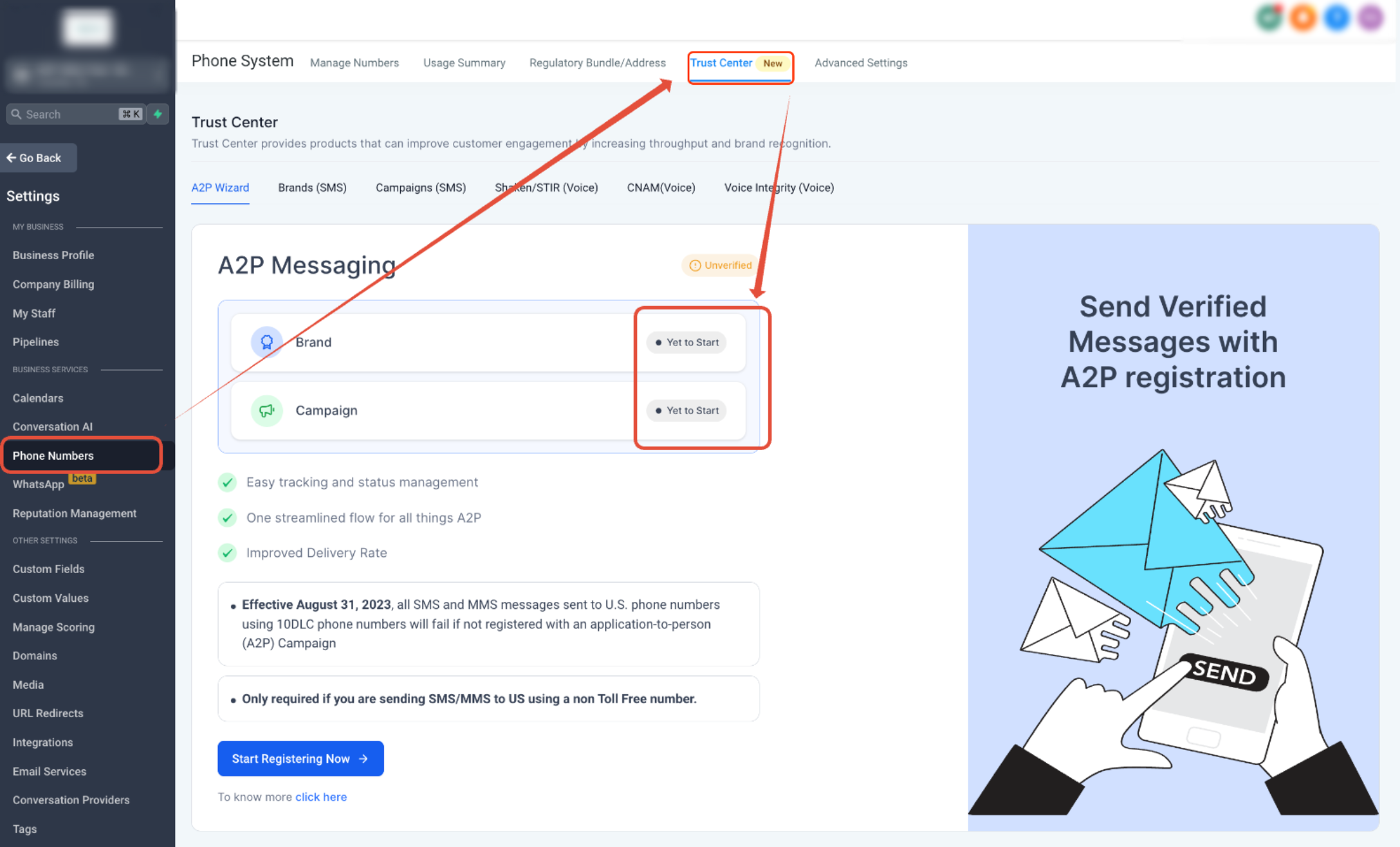
Screenshot: A2P Brand and Campaign registration flow in Trust Center.
Before You Start
Registration is most successful when the information submitted in Trust Center matches your real business records, website, messaging purpose, and consent process. Preparing these items before starting reduces preventable mismatches and repeat submissions.
| Area | Prepare |
|---|---|
| Business identity | Exact legal business name, accepted registration number or Tax ID, business type, industry, registered address, and region of operation. |
| Authorized contact | Name, reachable phone number, monitored email address, job title, and position. |
| Website | A live, publicly accessible website that clearly identifies the business and matches the Brand registration. |
| Messaging purpose | The Campaign use case, clear description of what messages are sent, and realistic sample messages. |
| User consent | The actual opt-in method, consent language, message frequency disclosure, HELP/STOP information, Privacy Policy, and Terms & Conditions. |
For Standard U.S. Brands, the legal business name and EIN should match official IRS records. If available, uploading the CP-575 can help populate the business name, EIN, and registered address accurately. Newly issued EIN information may also require time to propagate to verification systems.
How To Setup A2P 10DLC Registration
Completing the Brand first and then carefully matching the Campaign details to your real consent flow gives reviewers a consistent registration to evaluate. HighLevel now provides both a guided Chat Widget path and a Manual Setup path depending on how your business collects SMS consent.
- Open Trust Center.
Go to Settings > Phone System > Trust Center. - Start A2P registration.
Under the A2P Messaging (SMS) area, select the option to begin registration. - Select the correct Brand path.
Indicate whether the business has a Tax ID or accepted registration number. This determines whether the registration follows the Standard Brand or Sole Proprietor path. - Enter the Brand information exactly.
Complete the legal business details, address, registration number, contact information, and any verification step requested by HighLevel. - Continue to Campaign registration.
After the Brand is eligible to continue, complete Campaign Details. If you are creating an additional Campaign later, go to Trust Center > Brand & Campaigns > Campaigns > Create Campaign. - Select your messaging volume.
Standard Brands can choose the applicable Low Volume or High Volume option. Sole Proprietor registrations use the applicable single-number path. - Choose Chat Widget Setup or Manual Setup.
Campaign registration opens with the HighLevel Chat Widget Setup by default. Use this option when the widget will collect SMS consent. Switch to Manual Setup if you use another consent method, such as an existing website form, paper form, lead form, QR code, kiosk, or verbal consent. - Complete the Campaign and consent information.
Confirm that the Campaign use case, description, sample messages, business website, consent workflow, opt-in language, Privacy Policy, and Terms & Conditions are accurate and consistent. - Run the compliance review and submit.
Select Review Application. If the AI Compliance Review identifies an issue, correct it and run the review again. Submit the Campaign after the required compliance checks pass.
For the complete field-by-field walkthrough, see A2P Campaign Registration: Step-by-Step Guide.
What Happens After Submission
Your Campaign status determines the correct next action. Waiting when a Campaign is still under review, correcting required fixes after rejection, and verifying number association after approval prevents unnecessary duplicate submissions.
| Status | What It Means | What To Do |
|---|---|---|
| Pending | The registration is still being reviewed. | Wait for the review to finish. Do not create another Campaign simply because the current Campaign is still Pending. |
| Rejected | One or more issues were identified during review. | Open every rejection reason and review View required fixes → before changing or resubmitting the Campaign. |
| Approved | The Brand and Campaign have passed review. | Confirm each applicable local number is linked to the Campaign and displays the green A2P Verified label. |
Go to Settings > Phone System > Phone Numbers and confirm the number displays A2P Verified. If it does not, link the number to the approved Campaign before sending SMS or MMS. Carrier systems may also require several business days to fully receive updated registration information after approval.
See How to Link a Phone Number to an Approved A2P Campaign for detailed instructions.
If Your Brand or Campaign Is Rejected
A rejection does not always mean information was missing. Carrier review also checks whether your business identity, use case, sample messages, website, consent workflow, and policy pages are accurate and consistent with one another. Reviewing the actual rejection details before resubmitting prevents repeated blind submissions.
Completion and compliance are different. A Campaign can contain values in every required field and still be rejected if those values conflict with official business records, the selected use case, the website, sample messages, or the way recipients actually opt in.
Brand Rejection vs. Campaign Rejection
| Registration | Common Problems | First Action |
|---|---|---|
| Brand | Legal business name or EIN mismatch, incorrect registered address, wrong Brand type, recently issued EIN information not yet available to verification systems, or invalid contact/verification details. | Compare the Brand submission directly against official business records and correct the mismatch before resubmitting. |
| Campaign | Use-case mismatch, incomplete Campaign description, unrealistic sample messages, unverifiable opt-in flow, missing consent disclosures, website mismatch, inaccessible Privacy Policy or Terms, DBA inconsistencies, or prohibited/high-risk content. | Open every rejection reason and select View required fixes → to see the exact correction requested. |
How to View the Exact Campaign Rejection Reason
HighLevel displays structured required-fix information for rejected Campaigns so you can understand what failed before resubmitting.
- Go to Settings > Phone System > Trust Center.
- Open your A2P Brand and Campaign information.
- Locate the rejected Campaign.
- Review every displayed rejection reason.
- Select View required fixes → next to each reason.
- Review the Error code, Rejection category, What it means, and Correction needed.
- Correct all applicable issues before resubmitting.
Do not correct only one visible field and immediately resubmit. Review the Campaign description, use case, sample messages, website, consent process, Privacy Policy, Terms & Conditions, and business naming together. A subsequent review can identify additional issues.
Common Campaign Rejection Categories
| Category | What to Review |
|---|---|
| Opt-In & Consent | Confirm the opt-in method is verifiable, optional, accurately described, and contains the required messaging disclosures. |
| Website | Verify the site is live, publicly accessible, identifies the business, matches the Brand, and contains accessible Privacy Policy and Terms pages. |
| Business Identity | Check legal name, DBA, Brand type, authorized contact information, and whether the same business appears throughout the submission and opt-in evidence. |
| Campaign Use Case | Make sure the selected use case, description, sample messages, and actual messaging purpose agree with one another. |
| Sample Messages | Use realistic examples that identify the sender, represent the selected use case, and include applicable opt-out language. |
| Restricted or High-Risk Content | Review whether the business, website, Campaign description, or sample messages fall into a prohibited or high-risk category. Some rejection types are not eligible for normal resubmission. |
For individual rejection codes and their exact correction requirements, see A2P Campaign Rejections, Required Fixes & Vetting Errors.
When You May Need a New Campaign
Some Campaign fields cannot always be edited during a resubmission. If the required correction involves a locked field—such as the Campaign use case or certain opt-in information—you may need to create and submit a new Campaign instead of editing the rejected one. Follow the instructions shown in the required-fix details before creating another Campaign.
What HighLevel Support Can Help With
Support can help you understand the registration status, review the information in your submission, identify applicable required fixes, and help you correct or resubmit a Campaign when appropriate. If the registration requires a new Campaign, Support can also help clarify the next steps.
- Review your visible Brand or Campaign status and rejection information.
- Help you understand required fixes.
- Help troubleshoot Campaign registration or resubmission.
- Help determine whether a new Campaign is required.
- Assist with an appeal when you believe an eligible Campaign rejection was made in error.
Support cannot guarantee approval or override a carrier or registration partner's final compliance decision.
Before Contacting Support
Collecting the following information helps Support review the correct registration without unnecessary back-and-forth:
- Brand name and current Brand status
- Campaign name and current Campaign status
- Exact rejection reason, error code, and rejection category
- Screenshots of the rejection and required fixes
- Business website and opt-in URL or consent evidence
- Campaign use case and sample messages
- Affected phone number
- Sub-account details and any relevant registration identifiers shown in Trust Center
To contact Support, use the Help (?) button in HighLevel and request A2P assistance through Agent Chat or the available support options.
If you believe an ineligible Campaign rejection was made in error, contact Support and include the full details of the appeal. The documented subject-line format is 10DLC Campaign Appeal for [your business name or number].
A2P 10DLC Fees and Sending Considerations
A2P registration can include initial registration and vetting charges, recurring Campaign fees, and carrier messaging charges. Because industry pricing and carrier requirements can change, use the current pricing displayed in HighLevel and the dedicated pricing article rather than relying on older fee tables.
See A2P 10DLC Messaging Fees: Registration, Monthly, and Carrier Costs for the current fee schedule.
Frequently Asked Questions
Was this article helpful?
That’s Great!
Thank you for your feedback
Sorry! We couldn't be helpful
Thank you for your feedback
Feedback sent
We appreciate your effort and will try to fix the article