WhatsApp Billing & Pricing Guide
A comprehensive overview of WhatsApp pricing, billing, and rebilling for agencies and sub-accounts in HighLevel.
Upcoming Billing Change
Service Messages & In-Window Utility Messages Become Billable — Effective 1 October 2026
From 1 October 2026, all service messages and utility messages sent inside an open 24-hour customer service window will be charged on a per-message basis. The first 1,000 service messages per phone number, per month remain free, and that allowance resets at the start of each month. Per-message rate card updates and nine newly-standalone markets also take effect on the same date.
Table of Contents
October 2026 Billing Changes [Effective 1 October 2026]
Two categories of messages that are currently free will become billable from 1 October 2026. Both changes apply on a per-message basis, consistent with how template messages are already charged.
Change 1 — Service Messages Become Billable
Change 2 — In-Window Utility Messages Become Billable
Before vs. After at a Glance
| Message Scenario | Through 30 Sep 2026 | From 1 Oct 2026 |
|---|---|---|
| Service message (free-form, inside an open CSW) | Free | Charged per message first 1,000 / number / month free |
| Utility template inside an open CSW | Free | Charged per message |
| Utility template outside a CSW | Charged per message | Charged per message |
| Marketing template | Charged per message | Charged per message |
| Authentication template | Charged per message | Charged per message |
| Any message inside a Free Entry Point (CTWA) window | Free | Free |
How the 1,000 free service messages work

• The allowance is tracked per WhatsApp phone number, not per sub-account or per contact.
• The first 1,000 service messages delivered from that number in a calendar month are free.
• Once the number passes 1,000, every additional service message that month is charged per message.
• The counter resets to zero at the start of the next month.
Change 3 — Rate Card Updates
Per-message rates change in the following markets from 1 October 2026. Markets marked * are also moving out of their regional "Rest Of" pricing bucket — see Change 4 below.
| Category | Direction | Markets |
|---|---|---|
| Marketing | Increase | Kuwait*, Mexico, Morocco*, Saudi Arabia, United Arab Emirates, Rest of Middle East, Rest of Asia Pacific |
| Utility | Increase | Kazakhstan*, Kuwait*, Morocco*, Oman*, Pakistan, Peru, South Africa, Ukraine* |
| Utility | Decrease | Bangladesh*, Iraq*, Nepal*, Sri Lanka* |
* Market is being moved out of its respective "Rest Of" pricing region to be standalone on the rate card.
The nine markets with utility rate updates were given four months' notice rather than the usual one month.
Change 4 — Newly-Standalone Markets
Six markets moved out of their respective "Rest Of" pricing region on 1 July 2026 — Hong Kong, Singapore, Hungary, Poland, Romania and Qatar. From 1 October 2026, a further nine markets become standalone on the rate card:
For those markets, this means:
| Charge | Until 30 September 2026 | As of 1 October 2026 |
|---|---|---|
| Rate charged | Rate of respective "Rest Of" pricing region | Rate of the newly-standalone market |
What "standalone" means for your bill

Until 30 September 2026 a message to one of these countries is priced at its regional "Rest Of" rate.

From 1 October 2026 the country has its own line on the rate card, with its own per-message rate.
What you should do before 1 October 2026

• Review your rebilling multiplier. Service and in-window utility volume that cost you nothing will start carrying a per-message cost.
• Audit high-volume support flows. Sub-accounts that rely heavily on free-form support replies are the most exposed to the change.
• Keep using Click to WhatsApp ads. Free Entry Point conversations stay free for the full 72-hour window.
• Watch your per-number volume. Numbers that stay under 1,000 service messages a month are unaffected.
Overview of WhatsApp Billing
WhatsApp in HighLevel now uses a per-message pricing model, charging businesses for each delivered message rather than a flat fee per 24-hour conversation window. This shift offers greater transparency and control over messaging costs, enabling more precise budgeting and strategy.
Messages are categorized into Marketing, Utility, Authentication, and Service types — each with its own pricing logic and strategic use cases.
By aligning your outreach with these categories, you can take full advantage of cost-saving opportunities while maintaining high-quality engagement. Note that from 1 October 2026, two previously free categories — service messages and in-window utility messages — become billable, per-message rate card updates take effect in several markets, and nine markets move out of their regional "Rest Of" bucket to become standalone. See October 2026 Billing Changes.
Key Benefits of WhatsApp's Pricing Structure
Transparent, Granular Billing
Messages are individually categorized into Marketing, Utility, and Service types — letting you clearly understand charges and design strategies without hidden costs.
Optimized Rebilling for Agencies
Per-message billing simplifies client rebilling, enables transparent invoicing, and unlocks new monetization opportunities by mapping charges directly to client campaigns.
A Monthly Free Service Allowance
From 1 October 2026, the first 1,000 service messages per phone number each month are free, with the allowance resetting every month — so lower-volume support numbers keep sending at no cost.
Cost-Efficient Entry Points
- Conversations initiated through Click-to-WhatsApp (CTWA) ads are free of cost for the full 72-hour window.
- Service messages are free through 30 September 2026, and from 1 October 2026 the first 1,000 per phone number each month remain free.
- Utility messages sent inside the 24-hour customer service window are free through 30 September 2026.
- User-initiated WhatsApp calling is available globally and is completely free of cost.
WhatsApp Messaging Rates by Market/Country
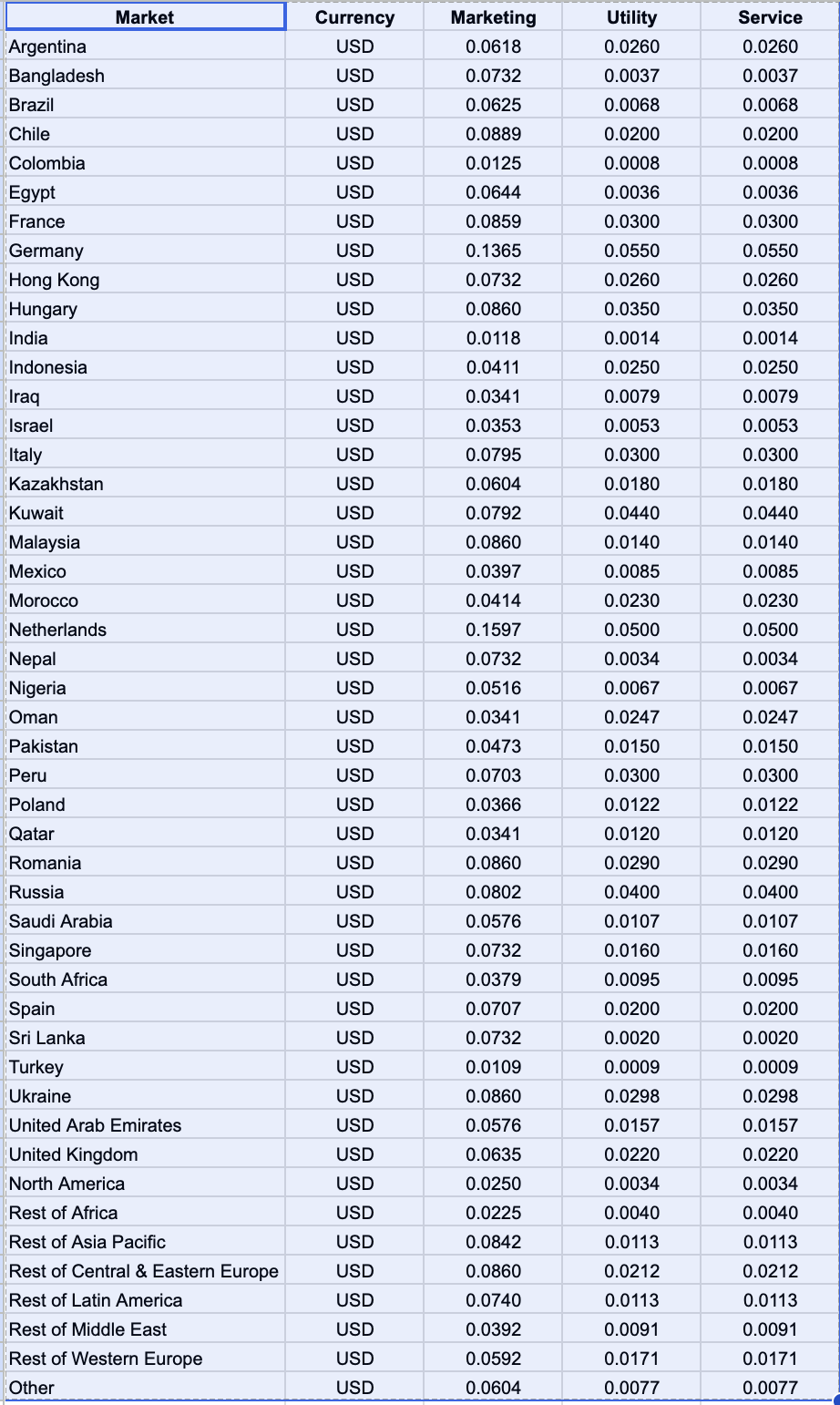
Understanding conversation rates by market or country helps businesses plan communication costs effectively. Rates vary depending on the type of message (Marketing, Utility, or Service) and the region where the message is sent.
Service column applies through 30 September 2026. Service conversations are free in all markets up to and including 30 September 2026. From 1 October 2026, service messages are charged on a per-message basis, with the first 1,000 service messages per phone number, per month free. Utility messages sent inside an open customer service window also become billable on that date at the market Utility rate shown below. Per-message rate card updates also take effect on 1 October 2026, and nine markets move out of their regional "Rest Of" bucket to become standalone. The Marketing and Utility rates in the table below apply through 30 September 2026 for the affected markets. See October 2026 Billing Changes.
| Market | Currency | Marketing | Utility | Service through 30 Sep 2026 |
|---|---|---|---|---|
| Argentina | $US | $0.0649 | $0.0273 | FREE |
| Brazil | $US | $0.0656 | $0.0071 | FREE |
| Chile | $US | $0.0933 | $0.0210 | FREE |
| Colombia | $US | $0.0131 | $0.0008 | FREE |
| Egypt | $US | $0.0676 | $0.0038 | FREE |
| France | $US | $0.0902 | $0.0315 | FREE |
| Germany | $US | $0.1433 | $0.0578 | FREE |
| India | $US | $0.0124 | $0.0015 | FREE |
| Indonesia | $US | $0.0432 | $0.0263 | FREE |
| Israel | $US | $0.0371 | $0.0056 | FREE |
| Italy Updated Jul 2026 | $US | $0.0835 | $0.0315 | FREE |
| Malaysia | $US | $0.0903 | $0.0147 | FREE |
| Mexico Rate change 1 Oct 2026 | $US | $0.0320 | $0.0089 | FREE |
| Netherlands | $US | $0.1677 | $0.0525 | FREE |
| Nigeria | $US | $0.0542 | $0.0070 | FREE |
| Pakistan Utility Updated Jul 2026 Rate change 1 Oct 2026 | $US | $0.0497 | $0.0105 | FREE |
| Peru Rate change 1 Oct 2026 | $US | $0.0738 | $0.0210 | FREE |
| Russia | $US | $0.0842 | $0.0420 | FREE |
| Saudi Arabia Updated Jul 2026 Rate change 1 Oct 2026 | $US | $0.0526 | $0.0112 | FREE |
| South Africa Rate change 1 Oct 2026 | $US | $0.0398 | $0.0080 | FREE |
| Spain Updated Jul 2026 | $US | $0.0742 | $0.0210 | FREE |
| Turkey Utility Down Jul 2026 | $US | $0.0114 | $0.0009 | FREE |
| United Arab Emirates Rate change 1 Oct 2026 | $US | $0.0524 | $0.0165 | FREE |
| United Kingdom Updated Jul 2026 | $US | $0.0667 | $0.0231 | FREE |
| North America (US & Canada) | $US | $0.0263 | $0.0036 | FREE |
| Hong Kong New Jul 2026 | $US | $0.0769 | $0.0273 | FREE |
| Singapore New Jul 2026 | $US | $0.0769 | $0.0168 | FREE |
| Hungary New Jul 2026 | $US | $0.0903 | $0.0368 | FREE |
| Poland New Jul 2026 | $US | $0.0384 | $0.0128 | FREE |
| Romania New Jul 2026 | $US | $0.0903 | $0.0305 | FREE |
| Qatar New Jul 2026 | $US | $0.0358 | $0.0126 | FREE |
| Rest of Africa | $US | $0.0236 | $0.0042 | FREE |
| Rest of Asia Pacific Rate change 1 Oct 2026 | $US | $0.0769 | $0.0119 | FREE |
| Rest of Central & Eastern Europe | $US | $0.0903 | $0.0223 | FREE |
| Rest of Latin America | $US | $0.0777 | $0.0119 | FREE |
| Rest of Middle East Rate change 1 Oct 2026 | $US | $0.0358 | $0.0096 | FREE |
| Rest of Western Europe | $US | $0.0622 | $0.0180 | FREE |
| Other | $US | $0.0634 | $0.0081 | FREE |
Rows highlighted in green are named markets added in July 2026. Updated rates are shown in red. The Service column reflects pricing through 30 September 2026; from 1 October 2026 service messages are charged per message after the first 1,000 per phone number each month. Rows tagged Rate change 1 Oct 2026 have a per-message rate update taking effect on that date.
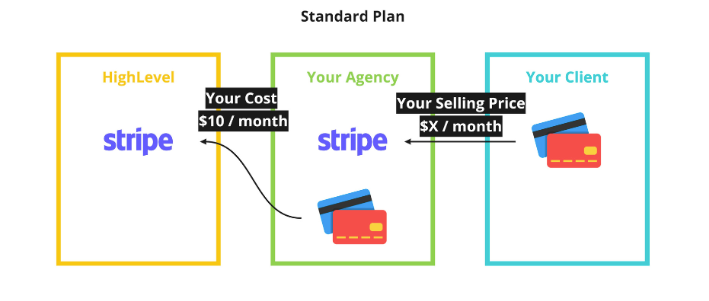
WhatsApp Subscription Charges for Agencies
Understanding subscription charges is essential for agencies and locations to plan their WhatsApp usage and billing effectively.
Agency Charge
$10 / month per sub-account
Charged to the agency for each WhatsApp-enabled sub-account
WhatsApp Messaging Rates
Understanding WhatsApp's messaging rates is critical for managing costs effectively. Rates vary based on the template category (Marketing, Utility, Service) and the country/region where the message is sent.
- Payment Processing Fees: A 5% Stripe fee is added to these rates, which should be considered when setting up rebilling.
- Regional Variations: Rates differ significantly by region, so plan campaigns with regional costs in mind.
- New Billable Categories from 1 Oct 2026: Service messages (beyond the first 1,000 per phone number each month) and in-window utility messages become chargeable — factor this into your multiplier.
- Rate Card Updates from 1 Oct 2026: Per-message rates change in several markets, and nine markets become standalone with their own rate — see October 2026 Billing Changes.
Rate Application Example
Assume a Marketing message is sent to the U.S.

• Base rate: $0.0263
• Multiplier: 1.5X
• Final cost to the client: $0.0263 × 1.5 = $0.0395
WhatsApp Message-Based Pricing
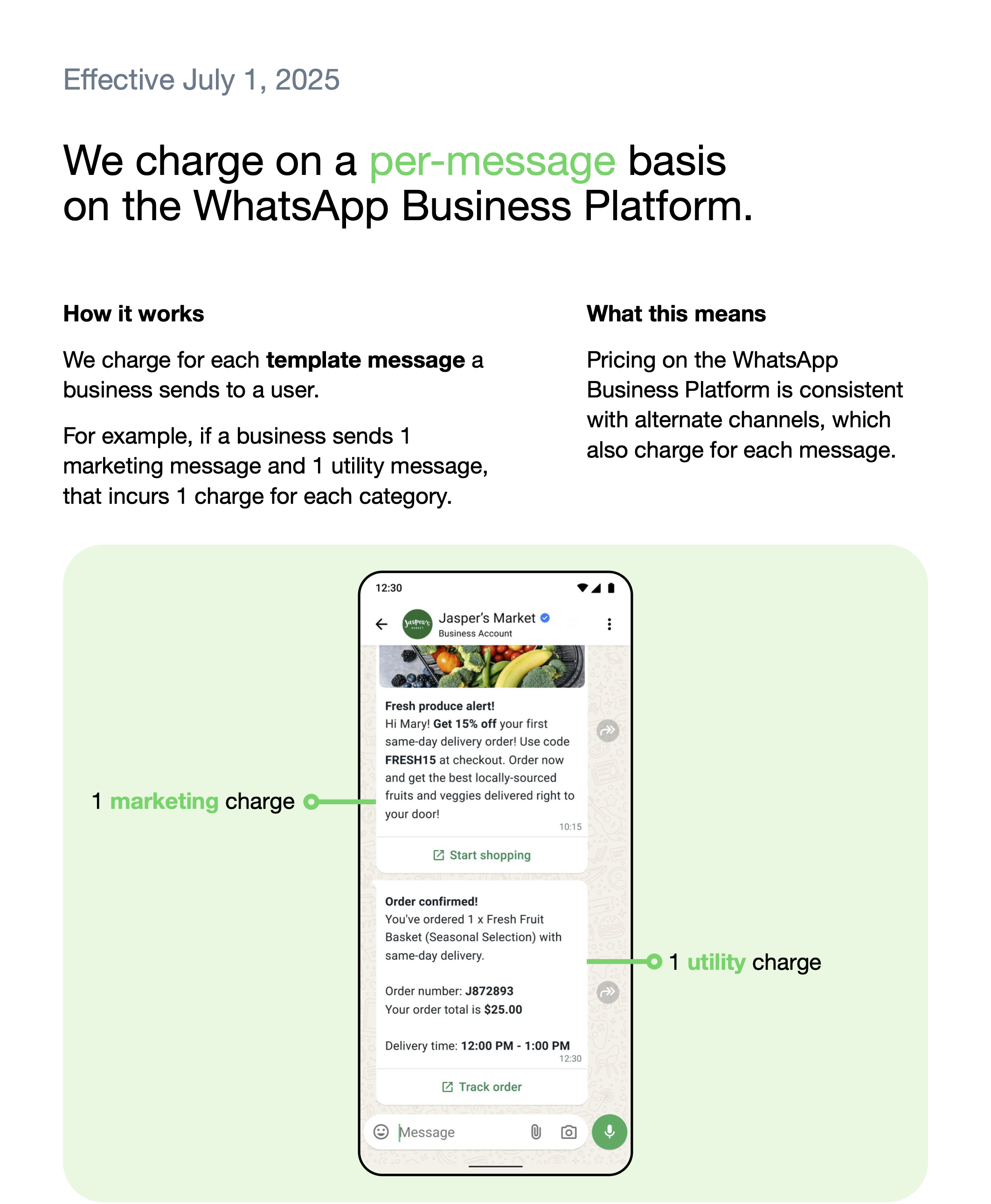
Starting July 1, 2025, WhatsApp adopts a message-based pricing model that charges businesses for each delivered message, rather than per conversation. Below are the primary message categories:
1. Marketing Messages
- Definition: Outbound promotional messages — product offers, announcements, re-engagement campaigns.
- Pricing: Charged per delivered message, regardless of customer service window status.
- Use Cases: Sales promotions, event invitations, abandoned cart reminders.
2. Utility Messages
- Definition: Transactional messages relating to a specific agreed-upon transaction or update.
- Charged per message when sent outside an open customer service window.
- Free if delivered within an active 24-hour customer service window initiated by the user — through 30 September 2026 only.
- From 1 October 2026: utility messages sent in response to users inside an open customer service window are charged per message, the same as those sent outside the window.
- Use Cases: Order confirmations, shipping updates, appointment reminders.
3. Service Conversations
- Definition: Used to resolve customer inquiries and issues.
- Opened by: Free-form messages (any message that is not a template).
- Cost through 30 September 2026: Completely free — no charges apply.
- Cost from 1 October 2026: Charged per message, consistent with template messages. The first 1,000 service messages per phone number, per month are free, and the allowance resets each month.
IMPORTANT: Each category has specific initiation methods.

• Marketing, utility, and authentication conversations can ONLY be opened with template messages.
• Service conversations can ONLY be opened with free-form messages.

To learn how to choose an appropriate category when creating your WhatsApp templates, see Template Categorization Guidelines.
Template Messages vs. Non-Template Messages
| Is it billable? | |||||
| Message type | Category | When can it be sent? | Outside CSW* | Inside CSW* | Inside FEP** window |
|---|---|---|---|---|---|
| Template messages | Marketing | Anytime | Yes | Yes | No |
| Authentication | Anytime | Yes | Yes | No | |
| Utility | Anytime | Yes | No (through 30 Sep 2026) Yes (from 1 Oct 2026) | No | |
| Non-template (free-form) | Service | Only inside an open CSW* | N/A | No (through 30 Sep 2026) Yes (from 1 Oct 2026, after the first 1,000 per number each month) | No |
* CSW = Customer Service Window ** FEP = Free Entry Point
Service Conversations
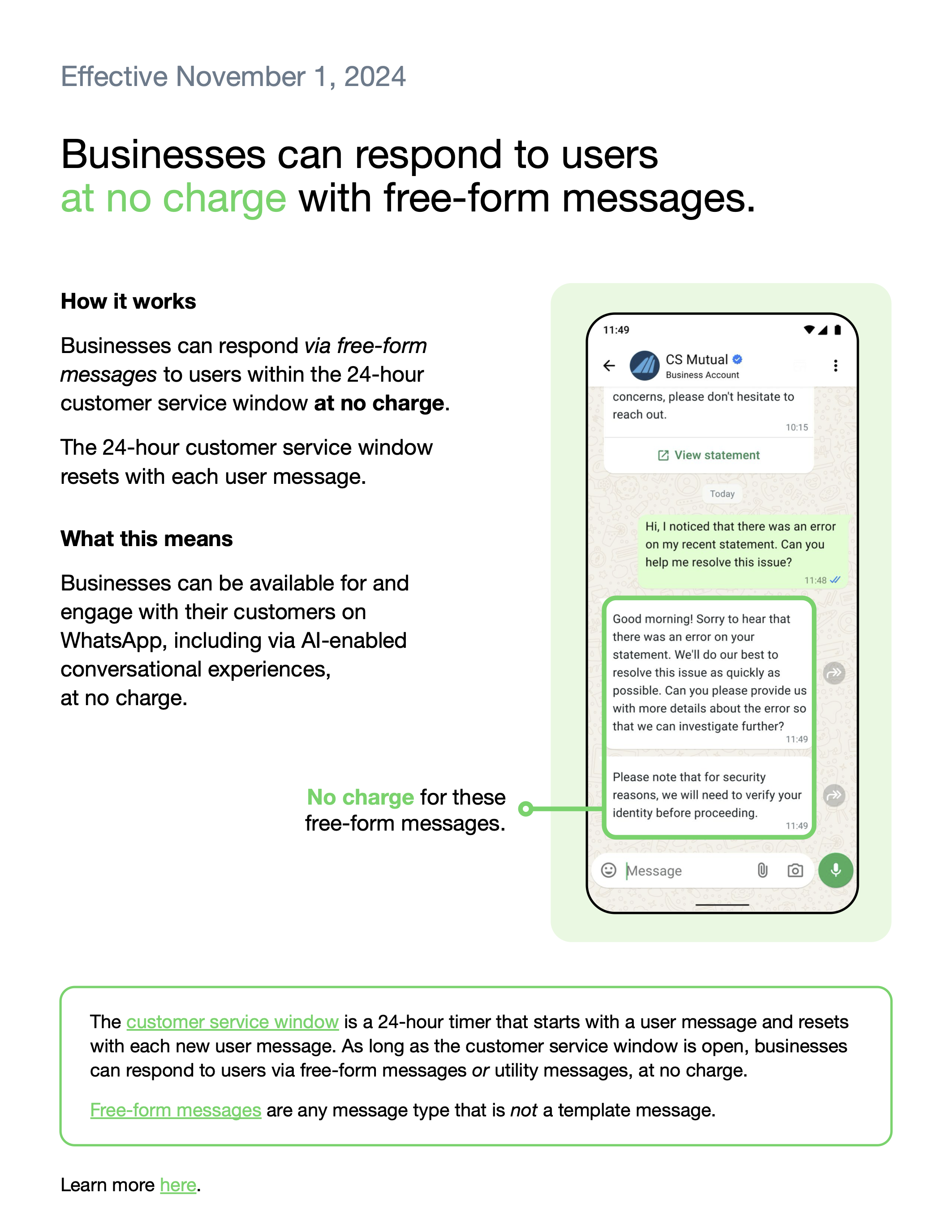
This 24-hour timer begins when a customer messages you. During this window, free-form messages can be sent without opening additional conversations.
- Used to resolve customer inquiries and issues.
- Service conversations are initiated when a free-form message is delivered to a customer, provided no other conversation of any type is open.
- These conversations rely on an active customer service window between you and the customer.
The customer service window is a 24-hour timer that starts with a user message and resets with each message.

Free-form messages are any message type that is not a template.
Change from 1 October 2026

Through 30 September 2026, businesses can respond to users inside an open customer service window via free-form messages or utility messages at no charge.

From 1 October 2026:
• Service messages are charged per message — the first 1,000 per phone number, per month are free, and the counter resets monthly.
• Utility messages sent inside the window are charged per message at the market Utility rate.
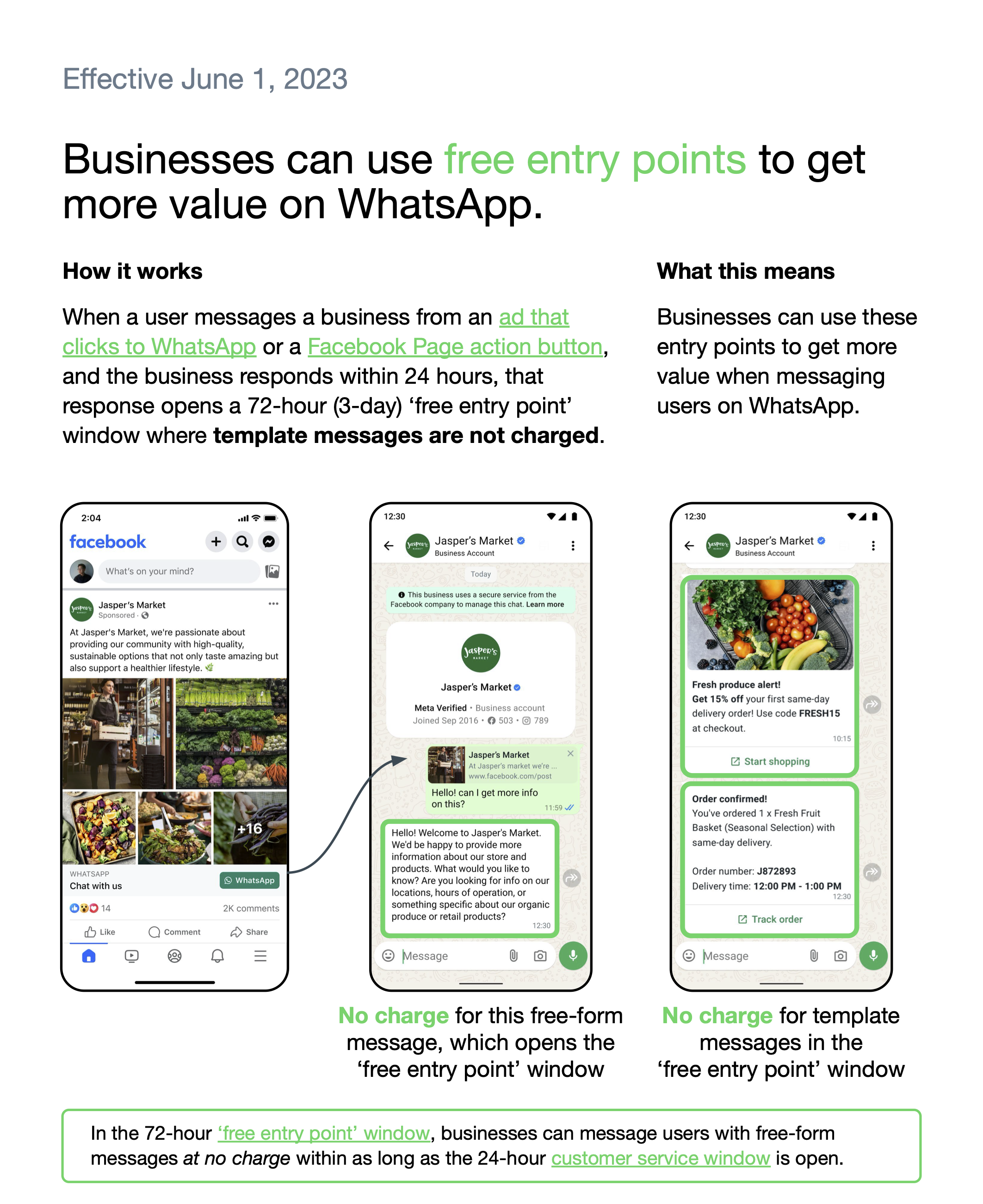
Free Entry Point Conversations
Free entry point conversations provide cost-saving opportunities for businesses by allowing free communication for a limited duration. They are not affected by the 1 October 2026 changes and remain free.
Example of Free Entry Point Conversation

If a customer messages you via a Click to WhatsApp Ad at 10 am and you respond at 10 pm the same day:

• The free entry point conversation starts at 10 pm and lasts for 72 hours.
WhatsApp Calling Pricing
WhatsApp Calling rates are charged per minute and vary by market. Rates listed below are in USD and apply to business-initiated calls. User-initiated (inbound) calls are free of charge.
User-Initiated Calls
Free
No charge when customer calls your business
Business-Initiated Calls
Per minute
Rate depends on destination market
Example: A 56-second call = 9.33 pulses → rounded up to 10 pulses.
Fractional pulses are always counted as one full pulse. Calls are billed in 6-second pulses.
Call Rates by Market (USD per minute)
| Market | Country Code | Currency | Rate per Minute |
|---|---|---|---|
| Argentina | +54 | USD | $0.0106 |
| Brazil | +55 | USD | $0.0113 |
| Chile | +56 | USD | $0.0127 |
| Colombia | +57 | USD | $0.0117 |
| France | +33 | USD | $0.0104 |
| Germany | +49 | USD | $0.0108 |
| India | +91 | USD | $0.0056 |
| Indonesia | +62 | USD | $0.0254 |
| Israel | +972 | USD | $0.0133 |
| Italy | +39 | USD | $0.0127 |
| Malaysia | +60 | USD | $0.0113 |
| Mexico | +52 | USD | $0.0099 |
| Netherlands | +31 | USD | $0.0066 |
| Pakistan | +92 | USD | $0.0125 |
| Peru | +51 | USD | $0.0127 |
| Russia | +7 | USD | $0.0102 |
| Saudi Arabia | +966 | USD | $0.0133 |
| South Africa | +27 | USD | $0.0113 |
| Spain | +34 | USD | $0.0135 |
| United Arab Emirates | +971 | USD | $0.0133 |
| United Kingdom | +44 | USD | $0.0104 |
| Rest of Africa | Various | USD | $0.0108 |
| Rest of Asia Pacific | Various | USD | $0.0120 |
| Rest of Central & Eastern Europe | Various | USD | $0.0100 |
| Rest of Latin America | Various | USD | $0.0122 |
| Rest of Middle East | Various | USD | $0.0133 |
| Rest of Western Europe | Various | USD | $0.0108 |
| Other | Various | USD | $0.0139 |
| Egypt | +20 | USD | N/A |
| Nigeria | +234 | USD | N/A |
| Turkey | +90 | USD | N/A |
| North America (US & Canada) | +1 | USD | N/A |
Business-Initiated Calling is NOT available if your business phone number is registered in: United States, Canada, Egypt, Vietnam, or Nigeria.

Note: The country restriction applies to your business phone number. Your customers can be located in any supported country.
Rebilling WhatsApp Messages
Rebilling applies to all WhatsApp services, including messaging and calling, giving agencies the flexibility to set their own pricing for clients and create additional revenue opportunities.
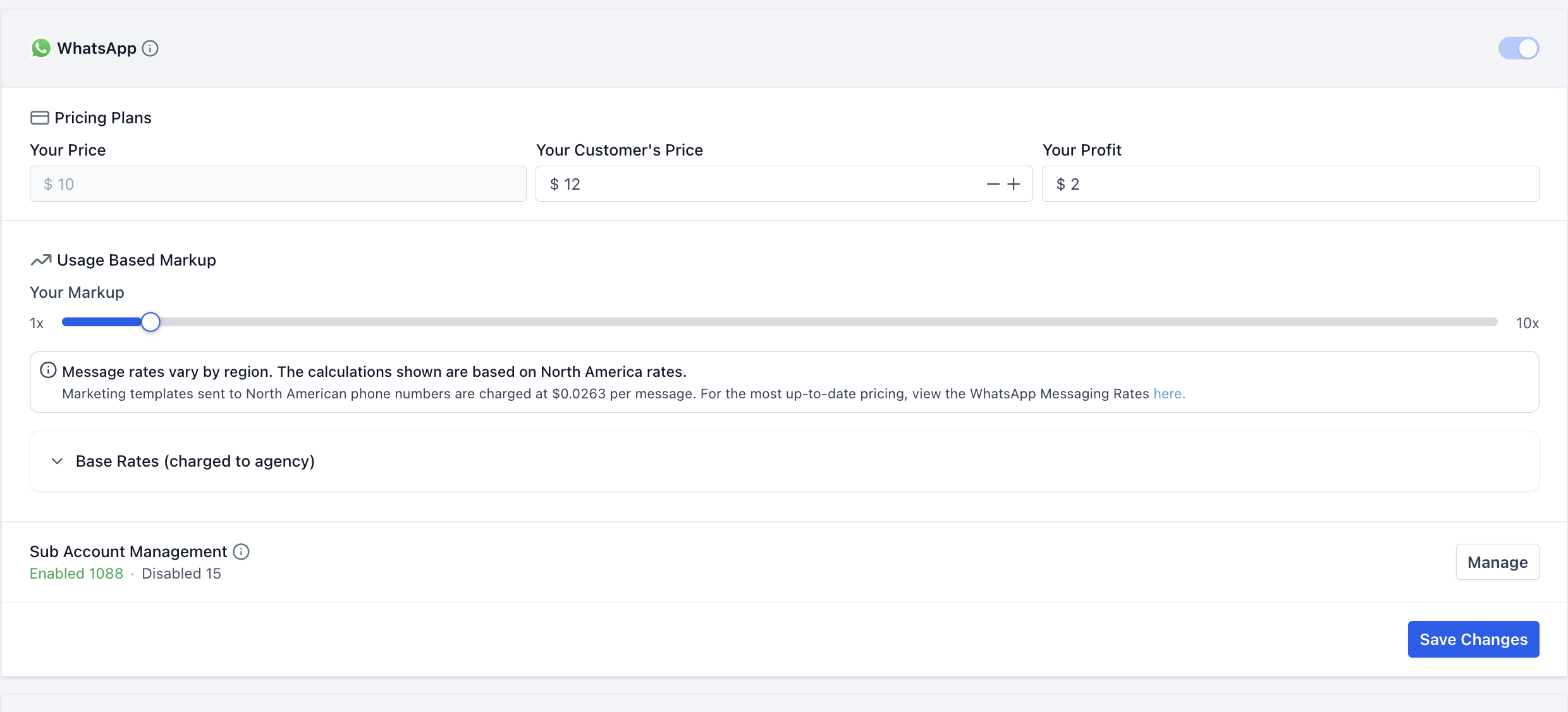
- Base rate for a Marketing message in the US: $0.0263
- Multiplier set to 1.5X: Client is charged $0.0395 per message
 How to enable WhatsApp rebilling at the agency level
- From Agency View, go to Settings>Reselling.
- Under the Subscription tab, select WhatsApp.
- Enable the WhatsApp toggle.
- Set Your Customer’s Price for the WhatsApp subscription.
- Under Usage Based Markup, choose the markup (1x–10x) you want to apply to WhatsApp usage, including messaging and calling.
- Under Sub Account Management, click Manage to select the sub-accounts for which WhatsApp rebilling should be enabled.
- Click Save Changes to apply the configuration for all new subaccounts.
Click here for a more in-depth setup guide for WhatsApp messaging and rebilling!
Frequently Asked Questions
Q: What is changing on 1 October 2026?
Four things change on that date — two categories become billable, and the rate card itself is updated:
- Service messages — all service messages will be charged on a per-message basis, consistent with how template messages are charged. These have not been charged since 1 November 2024.
- In-window utility messages — utility messages sent in response to users within an open 24-hour customer service window will be charged on a per-message basis. These have not been charged since 1 July 2025.
- Rate card updates — per-message rates increase or decrease in a number of markets.
- Newly-standalone markets — nine markets move out of their regional "Rest Of" pricing bucket and get their own rate.
Q: How does the 1,000 free service message allowance work?
The first 1,000 service messages per phone number are free each month. The allowance is counted per WhatsApp phone number — not per sub-account or per contact — and resets at the start of the following month. Once a number exceeds 1,000 service messages in a month, each additional service message is charged per message.
Q: Are utility messages inside the customer service window still free?
They are free through 30 September 2026. From 1 October 2026, a utility message is charged per message whether it is sent inside or outside an open customer service window.
Q: Do the October 2026 changes affect Free Entry Point (Click to WhatsApp) conversations?
No. Free Entry Point conversations remain free. Once triggered, no charges apply to any message type sent within the 72-hour window.
Q: Which markets have rate changes on 1 October 2026?
- Marketing increases — Kuwait, Mexico, Morocco, Saudi Arabia, United Arab Emirates, Rest of Middle East, Rest of Asia Pacific.
- Utility increases — Kazakhstan, Kuwait, Morocco, Oman, Pakistan, Peru, South Africa, Ukraine.
- Utility decreases — Bangladesh, Iraq, Nepal, Sri Lanka.
Q: What does it mean for a market to become "standalone"?
A standalone market has its own line on the rate card instead of being priced under a regional "Rest Of" bucket. Until 30 September 2026 messages to these countries are charged at their regional rate. From 1 October 2026 each has its own per-message rate. Nine markets become standalone on that date: Bangladesh, Iraq, Kazakhstan, Kuwait, Morocco, Nepal, Oman, Sri Lanka and Ukraine — following the six that became standalone on 1 July 2026.
Q: What are the different conversation categories?
- Marketing: For promotional messages and retargeting campaigns.
- Utility: For user-requested updates such as delivery or payment notifications.
- Authentication: For verifying users with one-time passcodes.
- Service: For resolving customer inquiries or issues — free through 30 September 2026, then charged per message beyond the monthly free allowance.
Q: Which markets were affected by the July 2026 pricing update?
The following rate changes apply from July 2026 billing:
- Italy, Saudi Arabia, Spain, United Kingdom — Marketing rate increase.
- Pakistan — Utility rate increase (+84%).
- Turkey — Utility rate decrease (-84%).
- Hong Kong, Singapore, Hungary, Poland, Romania, Qatar — New dedicated rates (previously billed under regional rates).
Q: What is a customer service window?
A customer service window is a 24-hour timer that starts when a customer messages you and resets with each new message from them. It determines which message types you are allowed to send. Through 30 September 2026 it also makes free-form and utility messages free; from 1 October 2026 those messages become billable.
Q: What is a free entry point conversation?
Free entry point conversations are initiated when a customer contacts you via a Click to WhatsApp Ad or Facebook Page Call-to-Action button, and you respond within 24 hours. It lasts for 72 hours and allows sending all types of messages without additional charges.
Q: Do I need to change my rebilling settings before October 2026?
Rebilling continues to work the same way — but message volume that previously cost nothing will start carrying a per-message cost, and the underlying per-message rate changes in several markets. Agencies should review their multiplier and any fixed-price client agreements before 1 October 2026, especially for sub-accounts with heavy support-conversation volume or traffic to the markets listed above.
Q: Are WhatsApp calls charged per minute or per call?
Business-initiated calls are charged per minute in 6-second pulses, based on the destination market. User-initiated (inbound) calls are completely free of charge. Business-initiated calling is not available in Egypt, Nigeria, Turkey, Vietnam, the United States, or Canada.
Q: Can multiple conversations be open with the same customer?
Yes. Multiple conversations can be open if a new template message of a different category is sent within 24 hours, or if a service conversation exists and a template message is sent within 24 hours.
Was this article helpful?
That’s Great!
Thank you for your feedback
Sorry! We couldn't be helpful
Thank you for your feedback
Feedback sent
We appreciate your effort and will try to fix the article