HighLevel Wallet Public APIs provide a secure and simplified way to access wallet balances, transactions, usage analytics, and billing information. With nine API endpoints now available on Blade Platform, developers can easily integrate wallet data, track spending, and manage wallet operations across agencies and sub-accounts.
TABLE OF CONTENTS
- What Are Wallet Public APIs in HighLevel?
- Key Benefits of Wallet Public APIs
- Available Wallet Public API Endpoints
- Authentication and API Permissions
- How to Set Up and Use Wallet Public APIs
- Migrating from Existing SaaS Wallet APIs
- Frequently Asked Questions
- Related Articles
What Are Wallet Public APIs in HighLevel?
HighLevel Wallet Public APIs allow developers to access wallet balances, transactions, usage analytics, and billing information through dedicated API endpoints. With the migration to Blade Platform, nine Wallet APIs are now available in production, offering improved security, simplified integration, and better visibility into wallet spending across agencies and sub-accounts.
The release includes four migrated APIs and five new APIs, along with dedicated permissions for secure access to wallet information.
Key Benefits of Wallet Public APIs
Wallet Public APIs simplify how developers retrieve financial information and integrate wallet data into external applications. They also provide greater visibility into wallet usage while maintaining secure, account-specific access.
Simplified Integration: Access wallet information through consistent
/walletAPI endpoints.Better Spending Visibility: Monitor monthly usage, top spending products, and sub-account expenses.
Secure Access: Use dedicated API scopes and token-based authentication to control permissions.
Agency-Level Reporting: Retrieve agency-wide usage summaries and sub-account billing information.
Safer Credit Operations: Use idempotency and positive amount validation for complimentary credits.
Easier Migration: Transition from deprecated SaaS Wallet APIs while preserving existing response structures.
Available Wallet Public API Endpoints
HighLevel provides nine Wallet API endpoints for retrieving wallet information, analyzing spending, and managing complimentary credits. Four existing endpoints have been migrated to Blade Platform, while five new endpoints expand reporting capabilities.
Migrated Wallet APIs
| Method | Endpoint | Purpose |
|---|---|---|
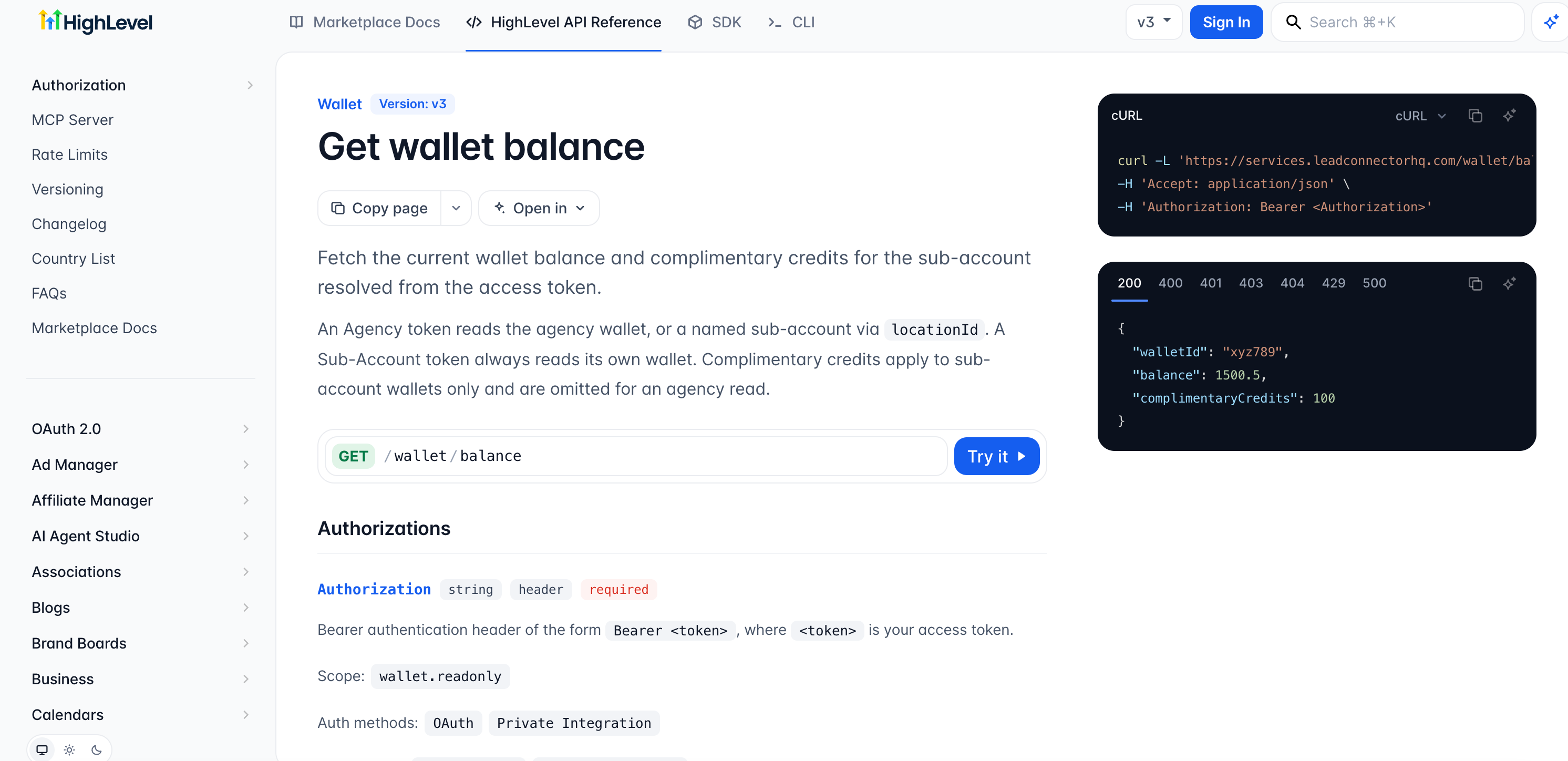
| GET | /wallet/balance | Retrieve wallet balance |
| POST | /wallet/transactions | List wallet transactions |
| GET | /wallet/transactions/{transactionId} | Retrieve transaction details |
| POST | /wallet/balance/complimentary-credits | Add complimentary credits to a sub-account wallet |
New Wallet APIs
| Method | Endpoint | Purpose |
|---|---|---|
| GET | /wallet/usage-records | Retrieve monthly usage records |
| GET | /wallet/usage-records/top-products | Identify top spending products |
| GET | /wallet/usage-records/by-location | View spending by sub-account |
| GET | /wallet/usage-summary | Retrieve agency-wide usage summaries |
| GET | /wallet/billing-summary | Retrieve sub-account billing summaries |
For endpoint-specific parameters and request details, refer to the Wallet API Documentation.
Authentication and API Permissions
Wallet Public APIs use token-based authentication and dedicated scopes to protect wallet information. The appropriate token and permissions are required to access each supported endpoint.
| API Scope | Purpose |
|---|---|
wallet.readonly | Read wallet balances, transactions, usage, and billing information |
wallet.write | Perform supported wallet write operations, such as adding complimentary credits |
Supported access:
Agency Tokens: Access applicable agency and sub-account wallet data. Supported endpoints may use the
locationIdquery parameter.Sub-Account Tokens: Access authorized wallet data belonging to their sub-account.
Tenant Isolation: Wallet ownership validation helps prevent unauthorized access.
Note: Token compatibility and required permissions depend on the specific endpoint.
How to Set Up and Use Wallet Public APIs
Setting up Wallet Public APIs requires a supported access token, the appropriate Wallet API scopes, and a correctly configured request. Following these steps helps ensure secure access to the intended wallet data.
Open the API Documentation: Visit the HighLevel Wallet API Documentation and select the endpoint you want to use.
Configure Authentication: Create or open your HighLevel integration and obtain a supported access token with the required Wallet API permissions.
Select API Scopes: Use
wallet.readonlyfor supported read operations orwallet.writefor supported wallet modifications.Configure Your Request: Enter the documented API URL and HTTP method in your API client. Include the necessary authentication headers and request parameters.
Send and Verify: Submit your request and review the response to confirm that the correct wallet information is returned.
For example, the wallet balance endpoint uses:
GET /wallet/balance
Authorization: Bearer YOUR_ACCESS_TOKEN
Use the documented API base URL and any additional headers or parameters required by the endpoint.
Migrating from Existing SaaS Wallet APIs
Existing SaaS Wallet APIs have been deprecated following their migration to Blade Platform. Developers should update their integrations to use the new /wallet endpoints to benefit from improved security and expanded capabilities.
Key migration details:
Existing SaaS Wallet endpoints remain functional during the migration period.
Migrated endpoints retain their existing response structures.
New Wallet APIs use dedicated
wallet.readonlyandwallet.writescopes.Agency tokens can use
locationIdon applicable endpoints to access sub-account data.Existing integrations should be tested after updating endpoint URLs and authentication configuration.
Important: No retirement date for the deprecated SaaS APIs was specified in the release announcement.
Frequently Asked Questions
Q: Are all Wallet Public APIs available in production?
Yes. All nine Wallet Public API endpoints are live in production.
Q: Can I continue using the existing SaaS Wallet APIs?
Yes. Existing endpoints remain functional during the migration period but are deprecated.
Q: Do I need to change how I process API responses after migrating?
The four migrated endpoints retain their existing response structures. However, developers should test their integrations after migration.
Q: Can I access multiple sub-account wallets using an agency token?
Agency tokens can access applicable sub-account wallet data using the supported locationId query parameter, subject to authorization and endpoint permissions.
Q: How are duplicate complimentary credit operations prevented?
The complimentary credits endpoint supports idempotency to help prevent duplicate processing when requests are retried.
Q: Can I add negative complimentary credits?
No. Complimentary credit operations require positive amounts.
Related Articles
Was this article helpful?
That’s Great!
Thank you for your feedback
Sorry! We couldn't be helpful
Thank you for your feedback
Feedback sent
We appreciate your effort and will try to fix the article