Keeping Company records organized helps teams manage Contacts, Opportunities, and account information efficiently. Preemptive Duplicate Detection for Companies in HighLevel identifies potential duplicate records as you enter a Company name or domain. This helps prevent accidental duplicates and keeps related information together.
TABLE OF CONTENTS
- What is Duplicate Detection for Companies?
- Key Benefits of Duplicate Detection for Companies
- How to Enable and Use Duplicate Detection for Companies
- How Company Duplicate Detection Works
- Reviewing Potential Duplicate Companies
- Frequently Asked Questions
- Related Articles
What is Duplicate Detection for Companies?
Preemptive Duplicate Detection for Companies is a Labs feature that identifies potentially duplicate Companies during manual Company creation.
As you enter a Company name or domain in the Add Company panel, HighLevel checks for existing records with similar information. When a possible match is found, the message "This company may already exist" appears with suggested Companies.
You can open an existing Company or dismiss the suggestions and continue creating a new record.
Key Benefits of Duplicate Detection for Companies
Detecting potential duplicates before creating a Company helps maintain accurate CRM data and prevents account information from being spread across multiple records.
Early Detection: Identify potential duplicates before saving a new Company.
Flexible Name Matching: Recognize partial names, punctuation differences, and common typos.
Domain Matching: Find existing Companies using their domains, even without entering a name.
Better Data Organization: Keep related Contacts, Opportunities, and account information together.
Flexible Record Creation: Review suggestions or continue creating a distinct Company.
How to Enable and Use Duplicate Detection for Companies
Enabling this Labs feature allows your team to review possible duplicates while creating Companies, reducing the risk of splitting account information across multiple records.
Step 1: Enable the Feature in Labs
Open the appropriate HighLevel sub-account.
Navigate to Settings → Labs.
Find Preemptive Duplicate Detection for Companies.
Enable the feature.
Step 2: Add a Company
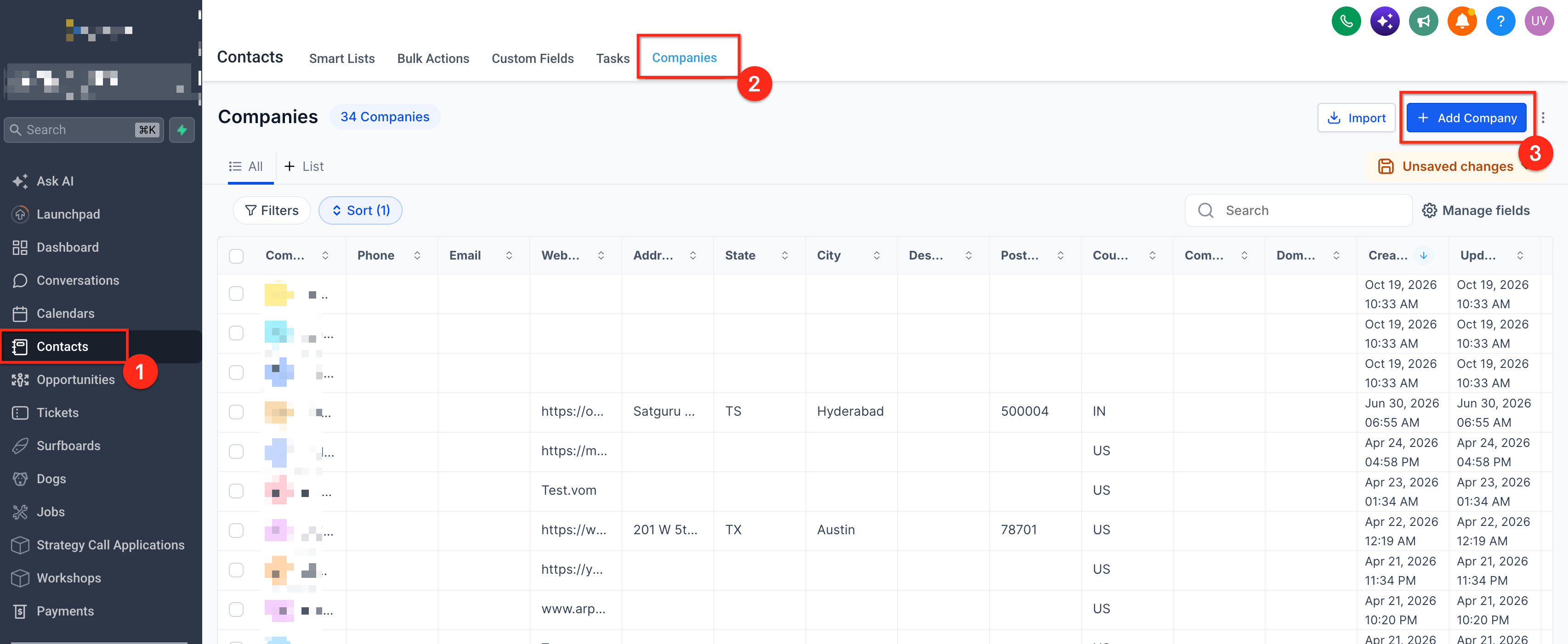
Go to Contacts → Companies.
Click Add Company.
Enter at least two characters in Company Name or Domain name.
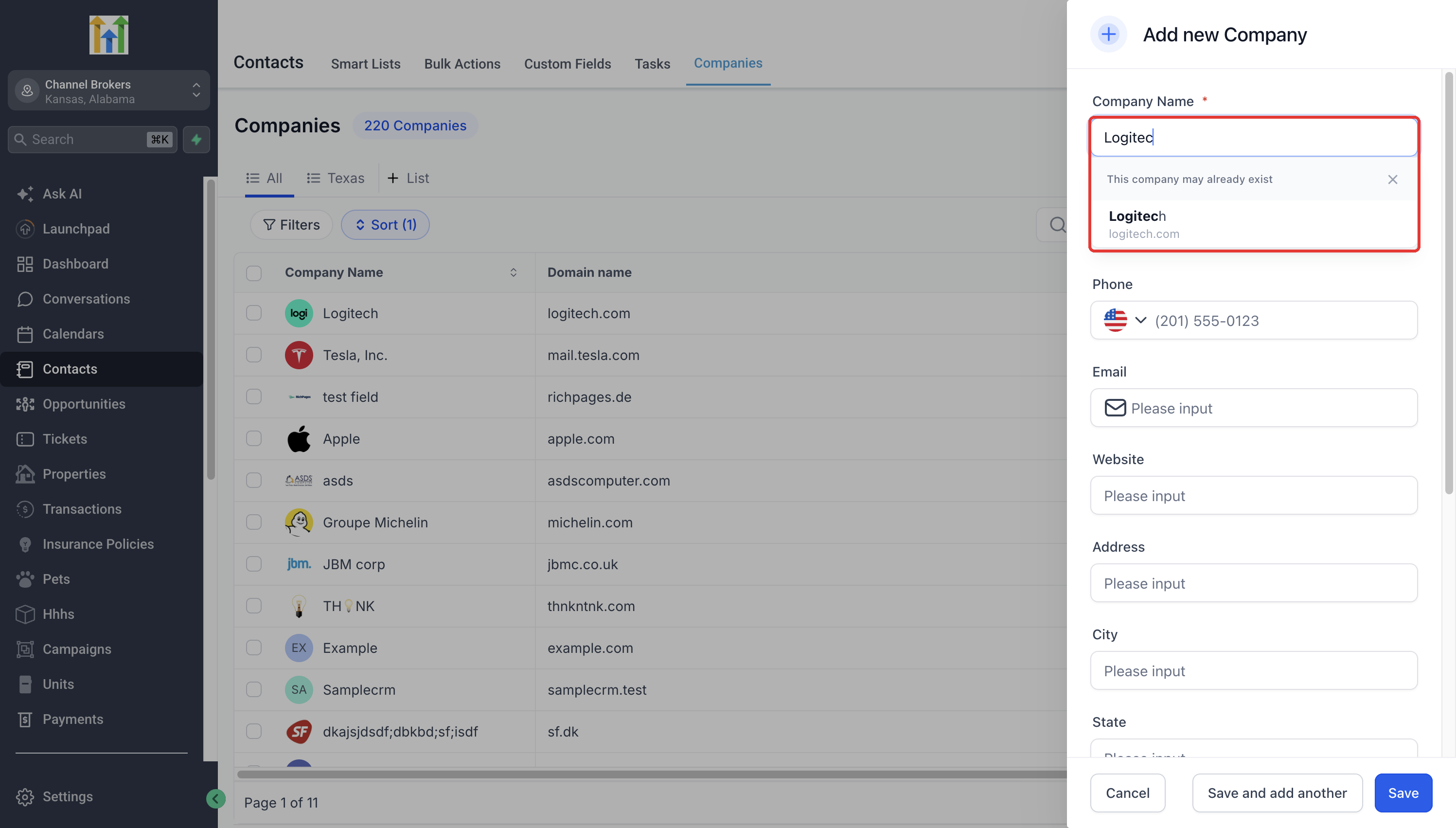
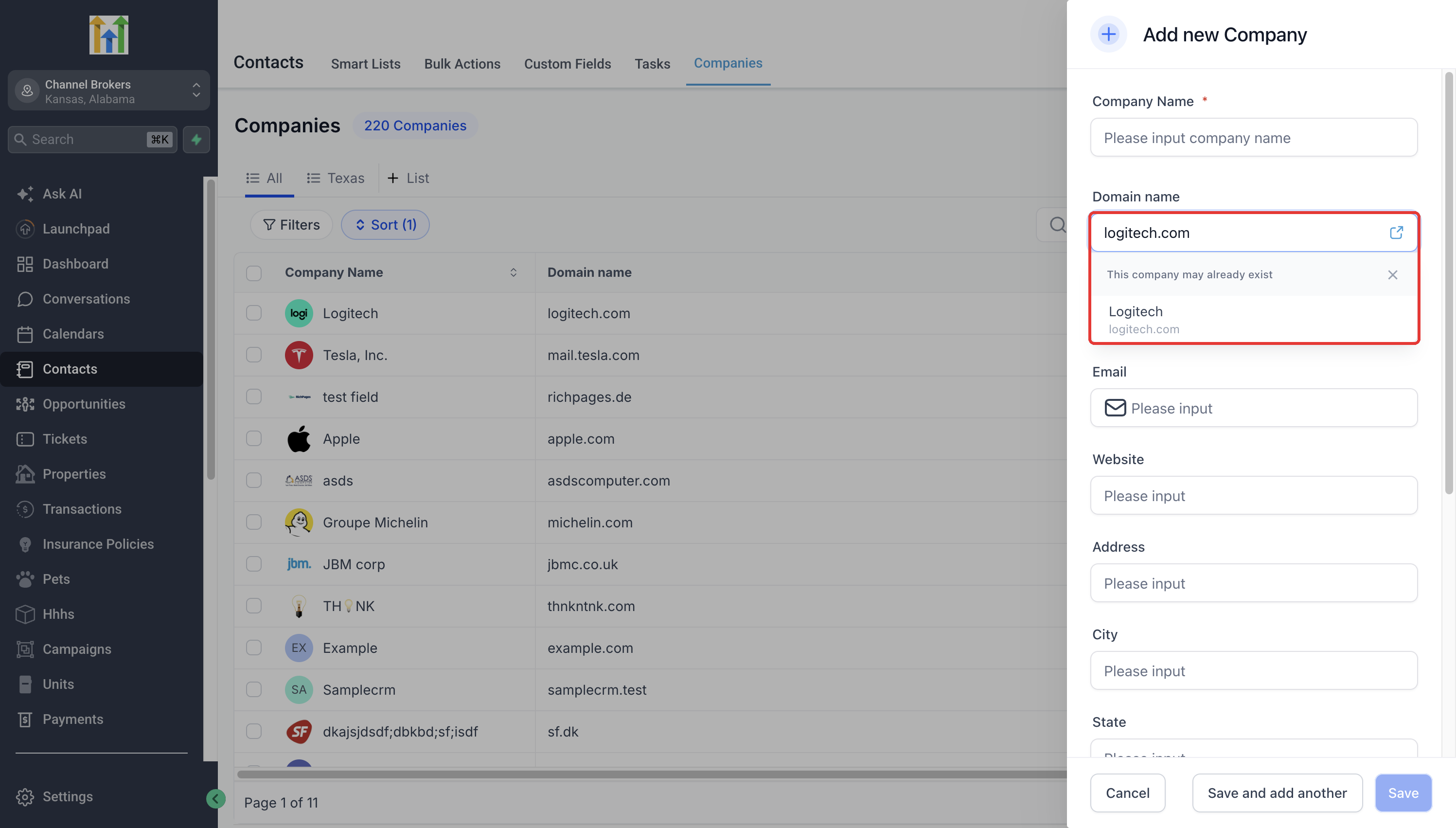
Review any duplicate suggestions that appear.
Step 3: Review the Suggestions
Select a matching Company to open its existing record.
Review the Company's details to confirm it is the correct business.
If the suggested Company is different, dismiss the suggestions.
Complete the required fields and click Save to create a distinct Company, subject to applicable validation rules.
How Company Duplicate Detection Works
HighLevel checks Company names and domains as you type, helping you identify existing records without manually searching the Companies list.
Entering at least two characters in the Company Name or Domain name field can trigger duplicate suggestions.
For example:
| Entered Information | Existing Company |
|---|---|
| Tesla Inc | Tesla, Inc. |
| Logitec | Logitech |
| logitech.com | Company with the same domain |
When a match is found, HighLevel displays "This company may already exist" along with suggested Companies.
Note: Suggestions do not automatically merge records or guarantee that every duplicate will be detected.
Reviewing Potential Duplicate Companies
Similar names or domains do not always indicate the same business. Reviewing suggested Companies helps avoid creating unnecessary duplicates while keeping distinct accounts separate.
If the Company already exists: Select the suggested Company to open and review its record.
If the Company is different: Dismiss the suggestions and continue creating a new Company.
If no suggestions appear: Try a more complete Company name or domain, or search the Companies list manually.
Important: Dismissing suggestions does not override other Company restrictions. If Automatically prevent duplicate companies is enabled, domain uniqueness rules may still prevent saving.
Learn more in Company domain name field and duplicate prevention.
Frequently Asked Questions
Q: Does this feature automatically merge duplicate Companies?
No. It only suggests potential matches during Company creation. Existing records are not merged.
Q: Can I create a Company even if a duplicate is suggested?
Yes. You can dismiss the suggestions and continue, provided other Company validation rules allow the record to be saved.
Q: Why isn't an existing Company appearing in the suggestions?
Very short entries or significant spelling differences may prevent a match. Try entering a fuller Company name or domain.
Q: Does this feature detect duplicates created in the past?
It can suggest existing Company records during new Company entry, but it does not scan or clean up historical duplicates.
Q: Does duplicate detection work for Contacts, Opportunities, or Custom Objects?
No. This release applies only to manual Company creation through the Add Company panel.
Q: Does this feature work during Company CSV imports?
No. CSV imports use separate duplicate-handling rules. See Bulk Import Companies.
Q: Why can't I find the feature in Labs?
Check that you are in the correct sub-account and have the necessary permissions. Your agency administrator may need to enable access.
Related Articles
Was this article helpful?
That’s Great!
Thank you for your feedback
Sorry! We couldn't be helpful
Thank you for your feedback
Feedback sent
We appreciate your effort and will try to fix the article