Marketplace Uninstall Feedback helps developers understand why users uninstall their Marketplace apps. When a user removes an app, they can optionally choose a reason and share additional comments. Developers can review this anonymous feedback inside the Developer Marketplace to identify churn drivers, improve app quality, and make better product decisions.
TABLE OF CONTENTS
- What is Marketplace Uninstall Feedback?
- Key Benefits of Marketplace Uninstall Feedback
- User-Side Uninstall Feedback Experience
- Viewing Uninstall Feedback in the Developer Dashboard
- Response Breakdown by Reason
- Individual Responses with Context
- Filtering Uninstall Feedback
- Frequently Asked Questions
What is Marketplace Uninstall Feedback?
Marketplace Uninstall Feedback is a Marketplace insights feature that collects optional, anonymous feedback from users when they uninstall an app. Instead of only knowing that an uninstall happened, developers can now understand the reason behind the uninstall and identify patterns across users, app versions, and time periods.
Feedback may include a predefined uninstall reason, an optional written comment, and contextual metadata such as user type, app version, and submission date.
Key Benefits of Marketplace Uninstall Feedback
Uninstall feedback helps developers turn churn events into actionable product insights. By reviewing feedback directly in the Developer Marketplace, teams can better understand what users need, where friction exists, and which areas may require improvement.
- Churn visibility: Understand why users uninstall your app, not just that they uninstalled.
- Product improvement insights: Identify bugs, missing features, usability issues, and onboarding problems.
- Pricing feedback: See whether users are uninstalling because the app feels too expensive.
- Support quality signals: Spot cases where users leave due to poor support experiences.
- Version-based analysis: Compare uninstall feedback across app versions to evaluate the impact of updates.
- Retention improvement: Use feedback trends to prioritize changes that may reduce future uninstalls.
User-Side Uninstall Feedback Experience
When users uninstall a Marketplace app, they may see an optional feedback modal before confirming the uninstall. This experience is designed to be quick and low-friction so users can share useful feedback without being required to complete a long form.
Users can select one or more predefined uninstall reasons, including:
- It’s too expensive
- Missing features
- Found a bug / Not working right
- Difficult to set up or use
- Switched to another app
- Poor support from the developer
- No longer needed
- Other
Agency users may also see Whitelabel breach as an uninstall reason.
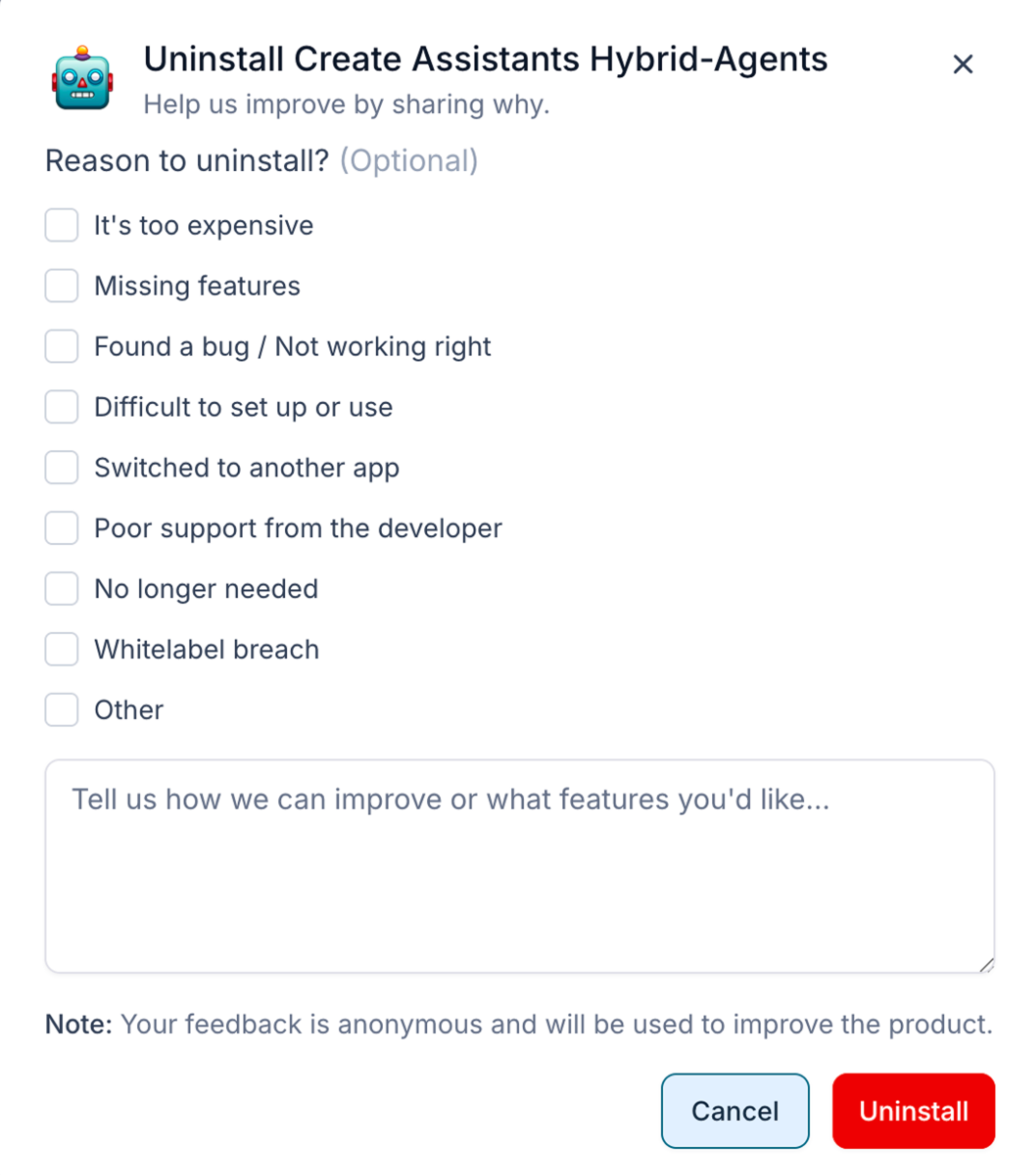
Users can also provide optional written feedback in the comment box. Feedback is anonymous and optional, which helps encourage honest responses while keeping the uninstall process simple.
Viewing Uninstall Feedback in the Developer Dashboard
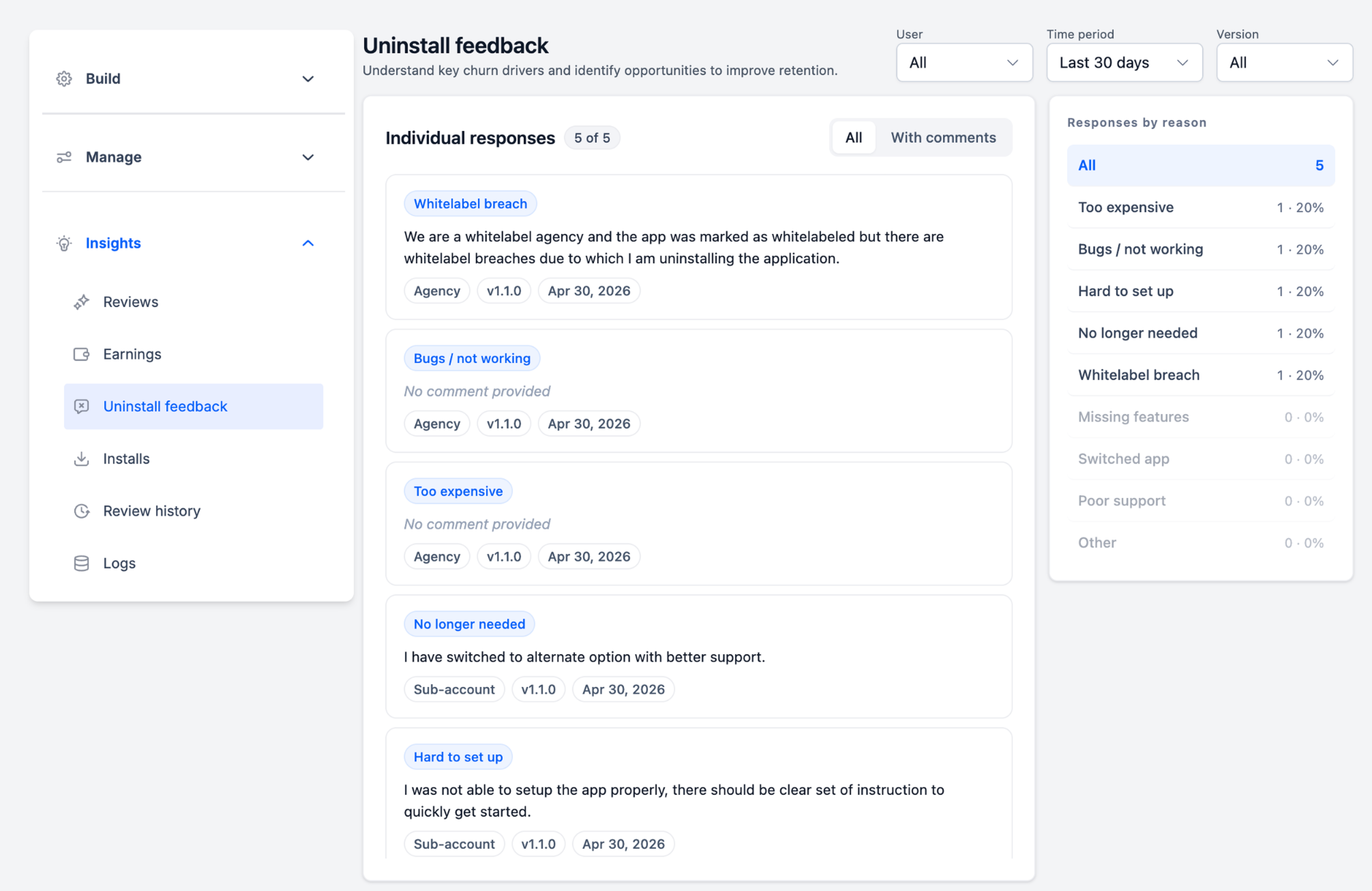
The Uninstall feedback dashboard gives developers a centralized place to review uninstall responses and identify common churn drivers. This helps teams move from individual uninstall events to broader patterns that can guide product, pricing, onboarding, and support improvements.
To view uninstall feedback:
- Open the Developer Marketplace.
- Select the app you want to review.
- Go to Insights.
- Select Uninstall feedback.
IMPORTANT: Please note that this feature can be found only on developer portal i.e. marketplace.gohighlevel.com
From this page, developers can review:
- Individual uninstall responses
- Selected uninstall reasons
- Optional written comments
- User type, such as agency or sub-account
- App version
- Submission date
- Aggregated response counts and percentages
Response Breakdown by Reason
The response breakdown helps developers quickly identify the most common uninstall reasons. Instead of reviewing every response manually, developers can use the summary panel to see which issues appear most often.
The dashboard displays uninstall reasons with:
- Total response count
- Percentage of total responses
- Reason categories
- A selectable view for narrowing the response list
Common reasons may include pricing, bugs, setup difficulty, missing features, switching to another app, poor support, no longer needed, whitelabel breach, or other.
Use this breakdown to prioritize the issues that affect the largest number of uninstalling users.
Individual Responses with Context
Individual responses provide the detailed context behind each uninstall reason. These responses are especially useful when users add comments explaining what went wrong, what they expected, or what would have helped them stay.
Each response may include:
- Selected uninstall reason
- Optional written comment
- User type
- App version
- Date submitted
Developers can use individual responses to identify specific improvement opportunities, such as unclear setup instructions, recurring bugs, missing workflows, pricing concerns, or support issues.
Filtering Uninstall Feedback
Filters help developers narrow uninstall feedback so they can focus on specific segments or timeframes. This makes it easier to compare feedback before and after product updates, review feedback from different user types, or isolate issues tied to a specific app version.
Available filters include:
- User: Review feedback by user type.
- Time period: Focus on recent responses or a selected reporting window.
- Version: Review feedback tied to a specific app version.
- All / With comments: Switch between all responses and responses that include written comments.
For example, if uninstall feedback increases after a new release, filtering by version can help identify whether the issue is related to that release.
Frequently Asked Questions
Q: Is uninstall feedback required from users?
No. Feedback is optional. Users can uninstall an app without selecting a reason or adding a comment.
Q: Is uninstall feedback anonymous?
Yes. The uninstall feedback experience states that feedback is anonymous.
Q: Where can developers view uninstall feedback?
Developers can view feedback in the Developer Marketplace under Insights → Uninstall feedback.
Q: What uninstall reasons can users select?
Users can choose from predefined reasons such as pricing, missing features, bugs, setup difficulty, switching to another app, poor support, no longer needed, or other.
Q: Why does Whitelabel breach appear as an uninstall reason?
The Whitelabel breach reason appears for agency users. It helps developers identify when an agency may be uninstalling because the app did not meet white-label expectations.
Q: Can developers see written comments?
Yes. If a user adds optional written feedback, developers can view it in the individual response list.
Q: Can developers filter uninstall feedback?
Yes. Developers can filter feedback by user type, time period, and app version.
Q: Is Uninstall Feedback the same as Marketplace reviews?
No. Marketplace reviews are public app feedback, while Uninstall Feedback is anonymous uninstall feedback shown to developers in the Insights dashboard.
Q: Is Uninstall Feedback the same as the App Uninstall API?
No. Uninstall Feedback helps developers understand why users uninstall. The App Uninstall API helps developers manage app uninstall workflows and reduce unnecessary webhook activity.
Was this article helpful?
That’s Great!
Thank you for your feedback
Sorry! We couldn't be helpful
Thank you for your feedback
Feedback sent
We appreciate your effort and will try to fix the article