Note: This update is now live.
Overview
We’ve introduced Services (v2) Reporting, a dedicated module within the Reporting Dashboard for all service-based insights. This replaces the earlier service-related widgets that were part of the Calendars/Meetings module.
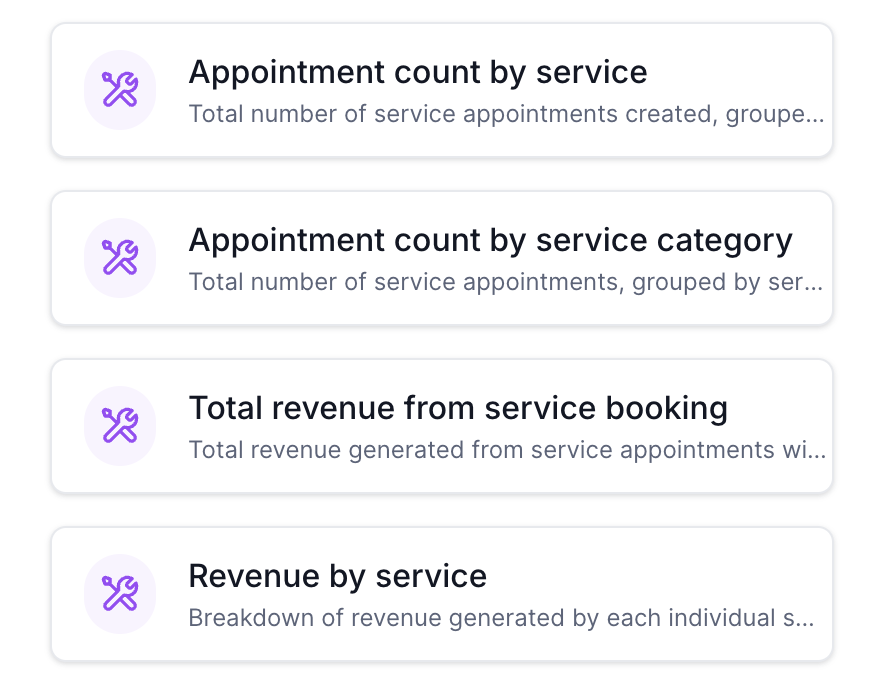
The new module (identified by purple icons) provides a more structured and scalable way to track appointments, revenue, staff performance, and more.
What’s New in Services (v2)
The Services (v2) module includes a wide range of widgets, such as:
Appointment count by service
Appointment count by service category
Total revenue from service booking
Revenue by service
Revenue by service category
Average order value (services)
Top grossing staff (services)
Top performing service locations
Cancelled service revenue
Coupon redemptions (services)
Revenue from coupons (services)
Top coupon codes (services)
These widgets are designed to give you deeper visibility into service performance and revenue trends.
What Changed from the Previous Setup
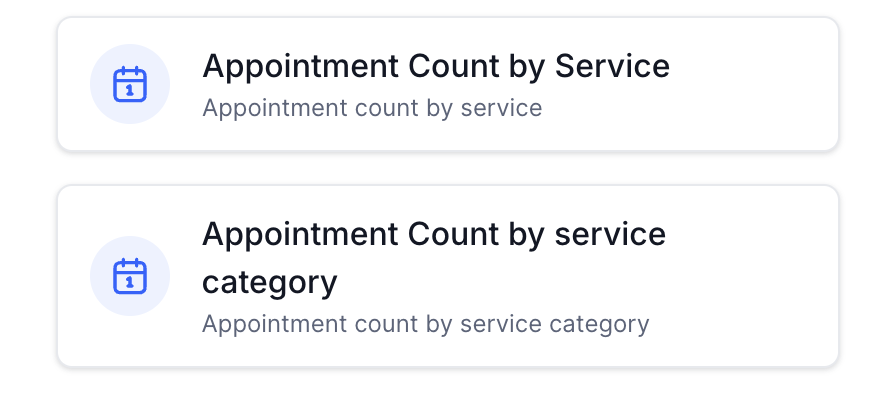
Previously, service-based reporting was available through two widgets under the Calendars/Meetings module:
Appointment Count by Service
Appointment Count by Service Category
These older widgets (shown with standard calendar icons) are being moved to Services (v2) and will no longer function in their current form after the update.
Old:
 New:
New:
Action Required (If You Used Old Widgets)
If you previously added the older service widgets to your dashboard, you will need to update them.
Steps to Update
Go to your Reporting Dashboard
Locate and delete the following widgets:
Appointment Count by Service (old)
Appointment Count by Service Category (old)
Click Add Widget
Navigate to the Services (v2) module (purple icon section)
Add the relevant new widgets based on your reporting needs
Save your dashboard
Important Notes
The old widgets will stop displaying data after the release
Your underlying data is not affected
You must use the new Services (v2) widgets to continue viewing service-related reports
Was this article helpful?
That’s Great!
Thank you for your feedback
Sorry! We couldn't be helpful
Thank you for your feedback
Feedback sent
We appreciate your effort and will try to fix the article