HighLevel’s Services Calendar Support in Conversation AI allows businesses to book service appointments directly inside a conversation instead of sending customers through a traditional booking form. This makes it easier for leads and customers to describe what they need in natural language while the AI guides them through the booking flow. When set up correctly, the feature works with supported service configurations such as staff selection, add-ons, and variations. It is especially useful for service-based businesses that want a faster and more conversational booking experience.
TABLE OF CONTENTS
- What is Services Calendar Support in Conversation AI?
- Key Benefits of Services Calendar Support in Conversation AI
- Supported Service Booking Capabilities
- Controlling Which Services the Bot Can Book
- Custom Booking Instructions
- Service Menus and Related Service Setup
- How To Setup Services Calendar Support in Conversation AI
- Frequently Asked Questions
- Related Articles
What is Services Calendar Support in Conversation AI?
Services Calendar Support in Conversation AI extends HighLevel’s appointment booking capabilities so AI can book eligible service appointments directly in chat. Instead of only sharing a booking link, the bot can work with supported Services Calendar configurations to help customers choose a service and complete the booking flow conversationally. This reduces friction, keeps the interaction inside the same conversation, and helps businesses offer a more guided booking experience.
Service booking in Conversation AI supports public-facing services and can work with staff selection, add-ons, and variations when those items are already configured in HighLevel. This setup builds on HighLevel’s broader appointment-booking functionality in Conversation AI and brings that same experience to service-based scheduling.
Key Benefits of Services Calendar Support in Conversation AI
- Conversational booking: Customers can describe the service they want in natural language instead of completing a traditional booking form.
- Uses existing service setup: The bot can work with supported service configurations such as public-facing services, staff selection, add-ons, and variations that are already configured in HighLevel.
- Faster customer experience: Keeping the booking flow inside the conversation reduces extra steps and can help lower drop-off during scheduling.
- More control over AI booking: Users can choose which services AI manages and add custom booking instructions to guide the conversation.
- Supports the booking lifecycle: Appointment-booking experiences in Conversation AI can also support actions such as rescheduling, canceling, sending a booking link, workflow triggers, and conversation transfer depending on configuration.
Supported Service Booking Capabilities
This feature is most valuable when your service setup already reflects how appointments should be offered, assigned, and managed. Clear service configuration helps the AI understand what to book and helps reduce confusion during the conversation.
With Services Calendar Support in Conversation AI, service booking supports:
- Public-facing services: Only public-facing services can be selected for this booking flow. Private services are not supported.
- Staff selection: AI can work with supported staff-selection settings already configured for the service.
- Add-ons and variations: If your services include add-ons or variations, those can be part of the conversational booking experience.
- Service-based appointment routing: The AI can help map a customer’s request to the appropriate service option when the services are configured clearly.
Important: Online payment is not collected by the bot during the booking flow.
Controlling Which Services the Bot Can Book
Choosing which services AI can handle is important because it helps you keep booking automation limited to the services that are ready for conversational scheduling. This also improves accuracy by narrowing the AI’s choices and giving it clearer service definitions to work with.
When setting up appointment booking in Conversation AI, select the Services option and then choose the public-facing services the AI should handle.
To improve booking accuracy:
- Use clear service names
- Write service descriptions that make each option distinct
- Keep customer-facing explanations in your bot prompt when you want AI to explain or recommend services
- Use service details to help the AI classify intent more accurately during routing
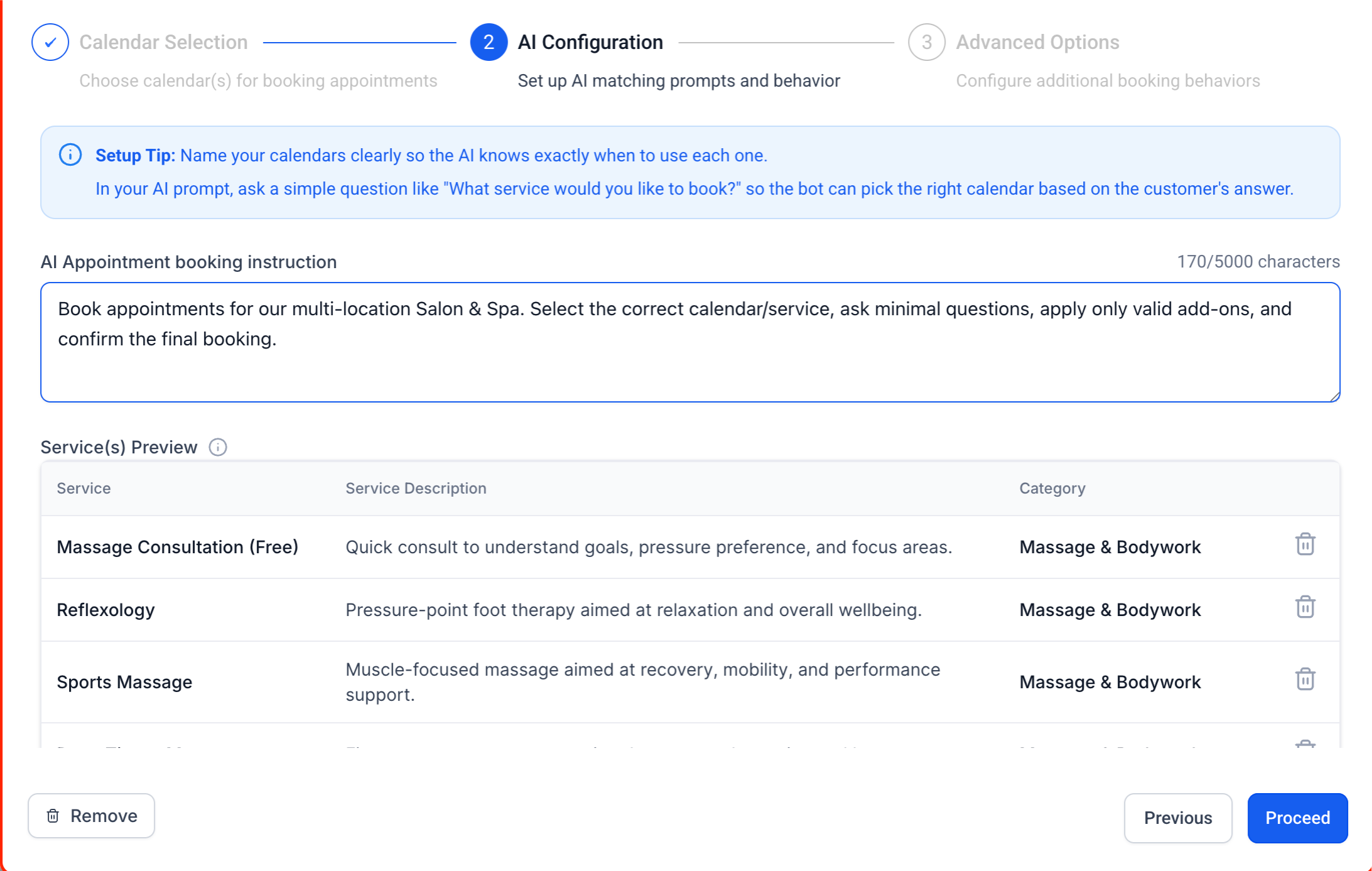
This is an important distinction: service or calendar descriptions help with intent classification, while your bot prompt should contain the guidance you want the AI to use when talking to customers about those services.
Custom Booking Instructions
Custom instructions help shape how the AI handles service-booking conversations so the experience matches your business rules and customer expectations. They are especially useful when customers need extra guidance, clarification, or policy reminders before confirming an appointment.
You can use custom booking instructions to help the bot:
- ask clarifying questions before offering times
- explain service differences in a customer-friendly way
- follow booking rules or qualification steps
- share policy reminders such as cancellation expectations
- collect useful details before the appointment is booked
Keep in mind that service or calendar descriptions are best used for routing and classification, while prompt instructions are better for customer-facing explanations and conversation handling.
Screenshot description: Show the bot prompt or booking instructions area with example guidance for how AI should handle service selection and qualification.
Service Menus and Related Service Setup
Service Menus can help organize multiple services into one branded experience, but they are not required to use this feature. Understanding the difference between Service Menus, Services, and Service Calendars helps prevent setup confusion and makes it easier to decide which supporting tools your booking flow actually needs.
| Feature | Purpose |
|---|---|
| Service Calendars | Used to manage service-based scheduling in HighLevel. |
| Services | Define the service options customers can book, including supported items such as variations, add-ons, and resources. |
| Service Menus | Display multiple services together in one branded experience, while each service remains connected to its own underlying Service Calendar configuration. |
How To Setup Services Calendar Support in Conversation AI
A clean setup is essential because the AI can only book what has already been configured correctly in HighLevel. Completing the setup in the right order helps ensure the bot sees the correct services, follows supported booking rules, and routes customers accurately.
- Create and configure your services or Service Calendars
Set up the services you want customers to book in HighLevel first. Make sure your service details, staff-related setup, add-ons, variations, resources, duration, and other service settings are fully configured before enabling AI booking.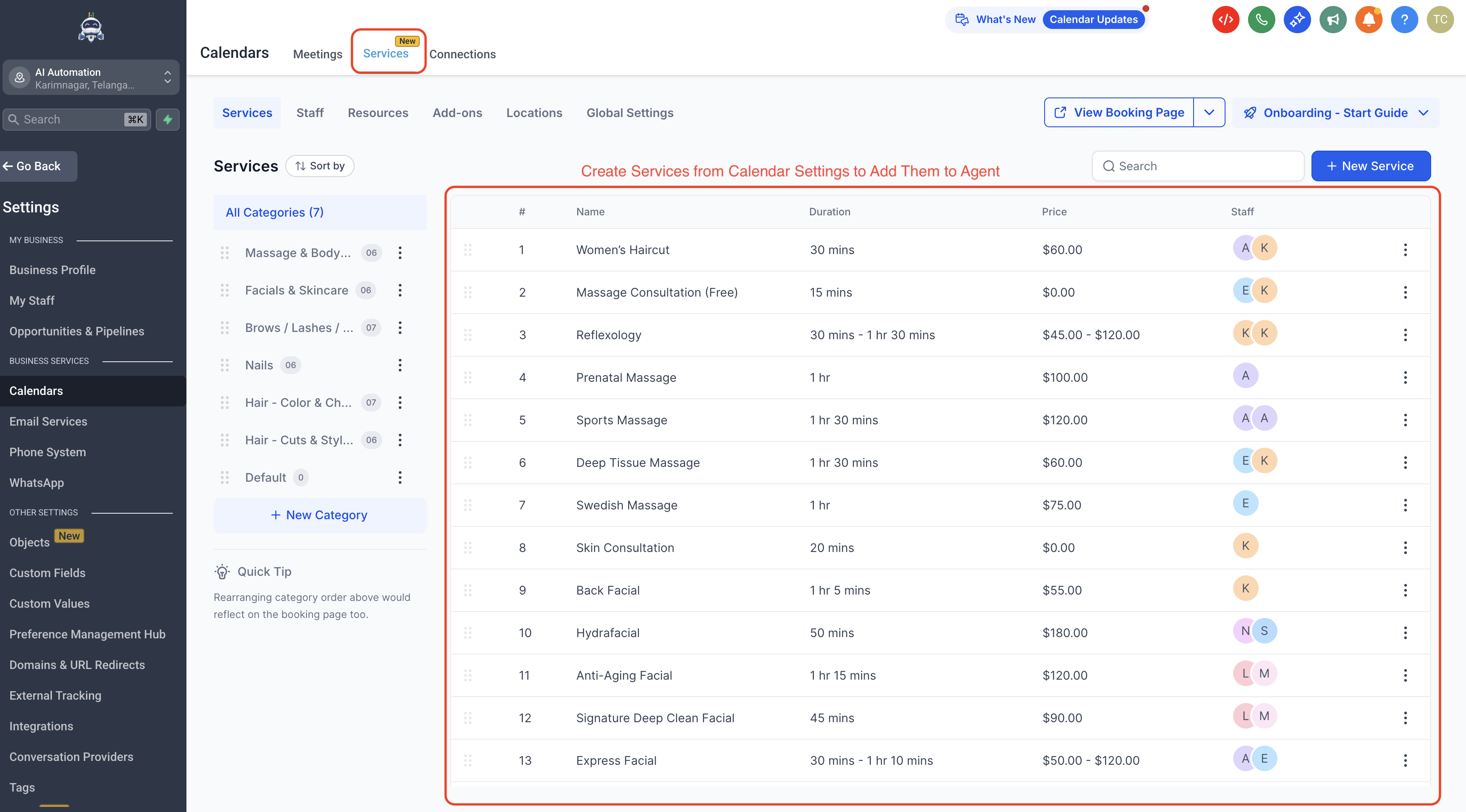
- Enable Appointment Booking in Conversation AI
In your prompt-based Conversation AI bot, open the Appointment Booking configuration and select the Services option. Then choose the public-facing services the AI should handle.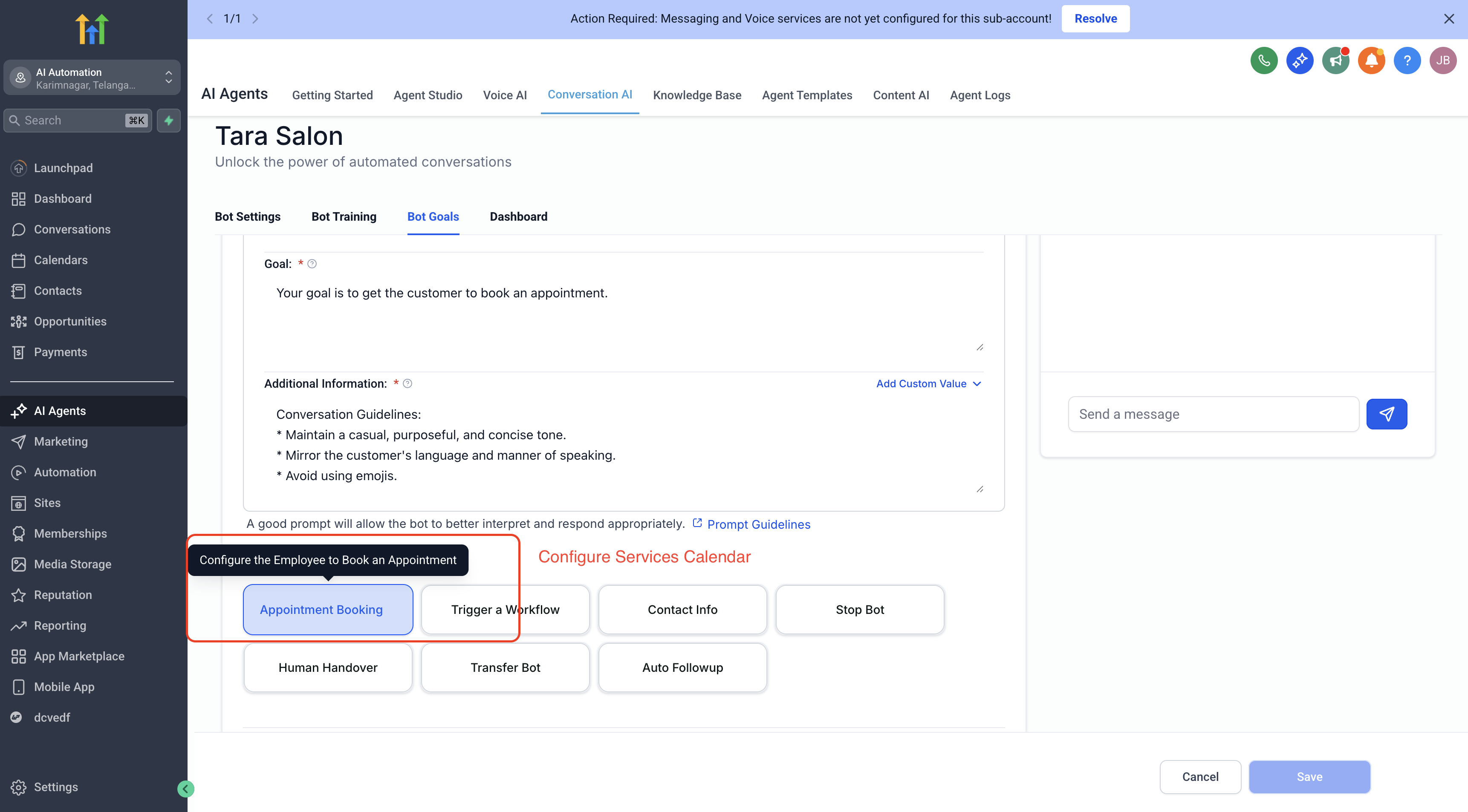
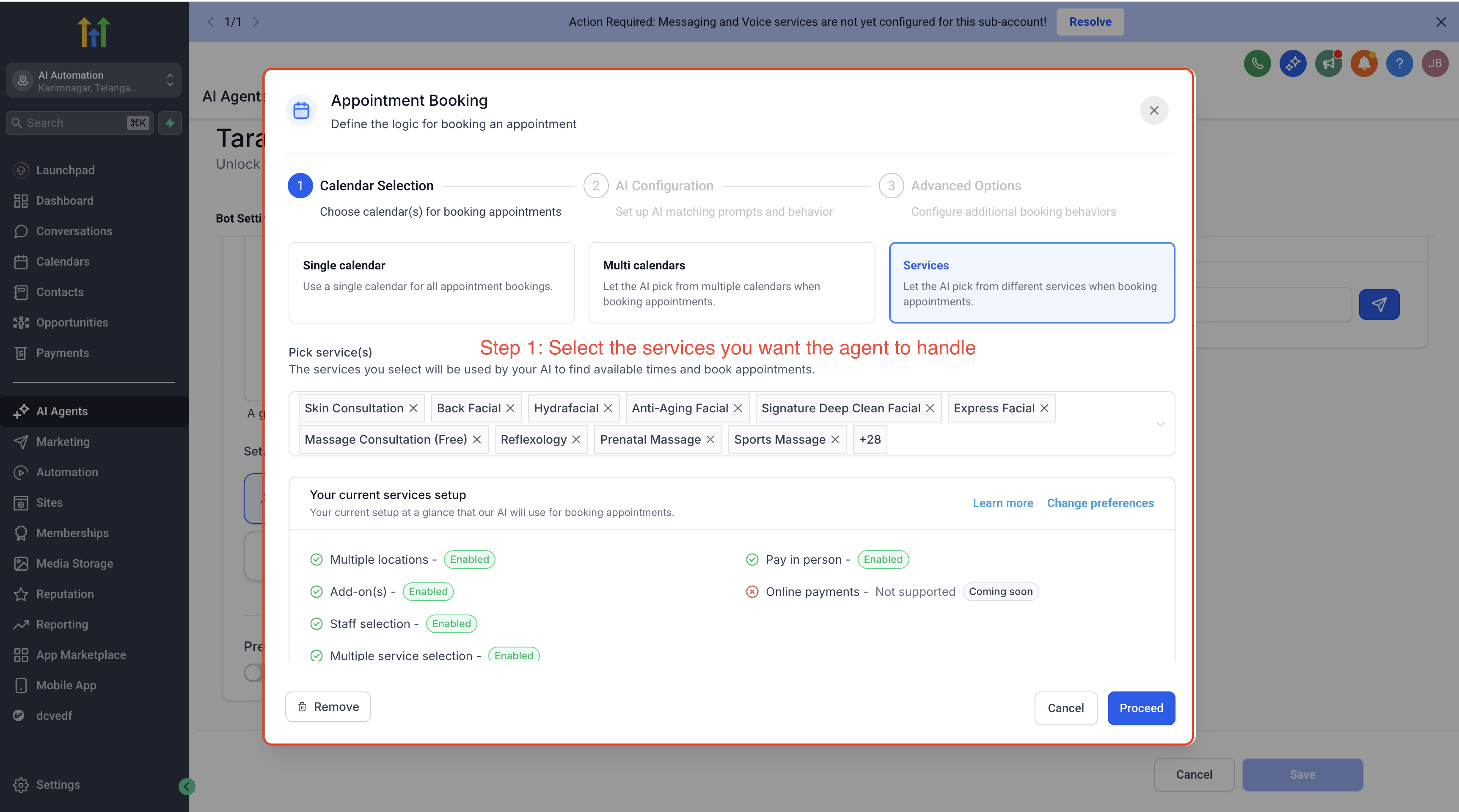
- Add booking guidance to the bot prompt
Use your prompt and any custom booking instructions to tell the AI how to talk about the services, how to ask clarifying questions, and how to handle service-selection scenarios. Calendar or service descriptions help with intent classification, but customer-facing guidance belongs in the prompt.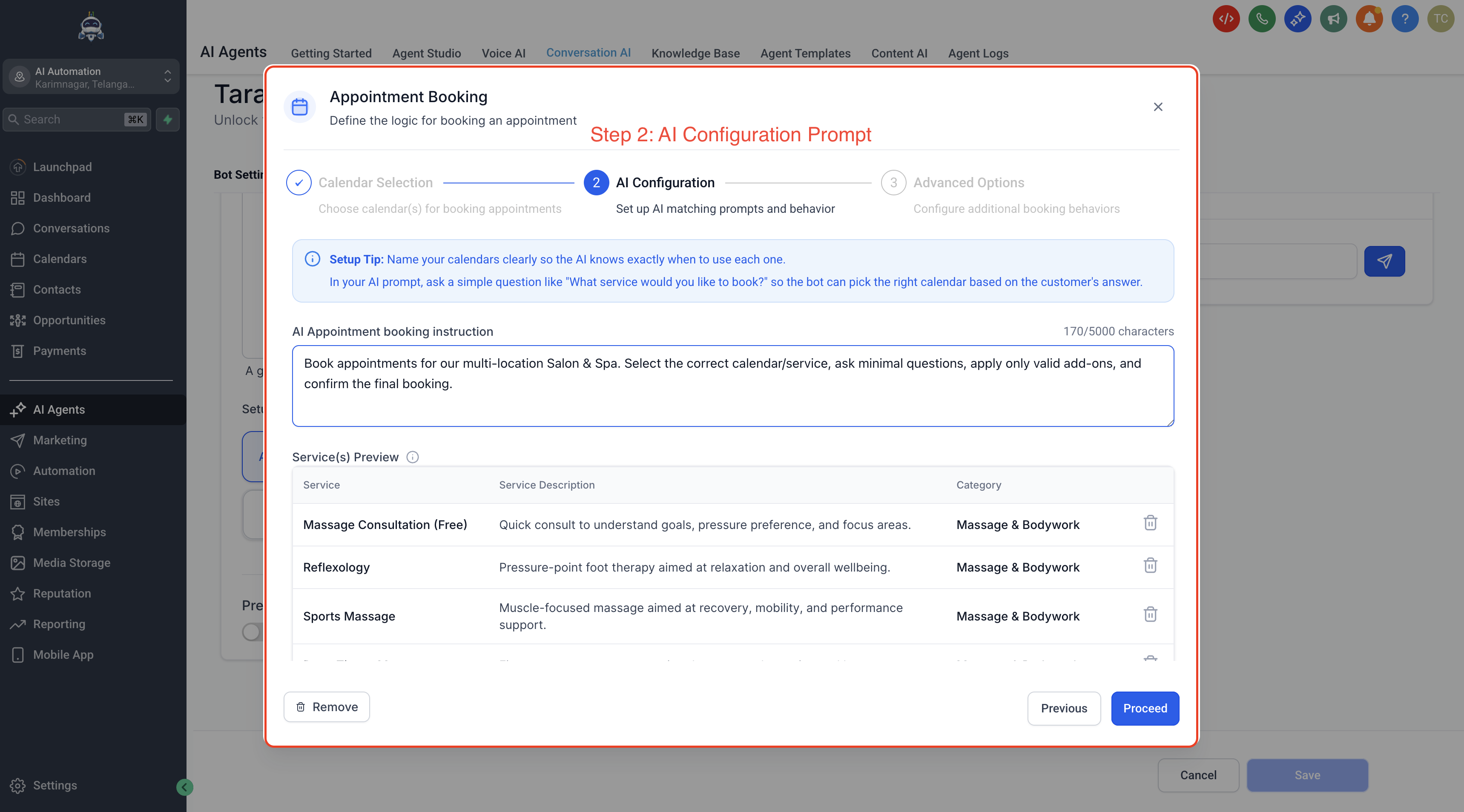
- Review additional appointment-booking actions
Configure any related actions you want to support, such as rescheduling, canceling, sending a booking link, workflow triggers, or conversation transfer, based on your business process.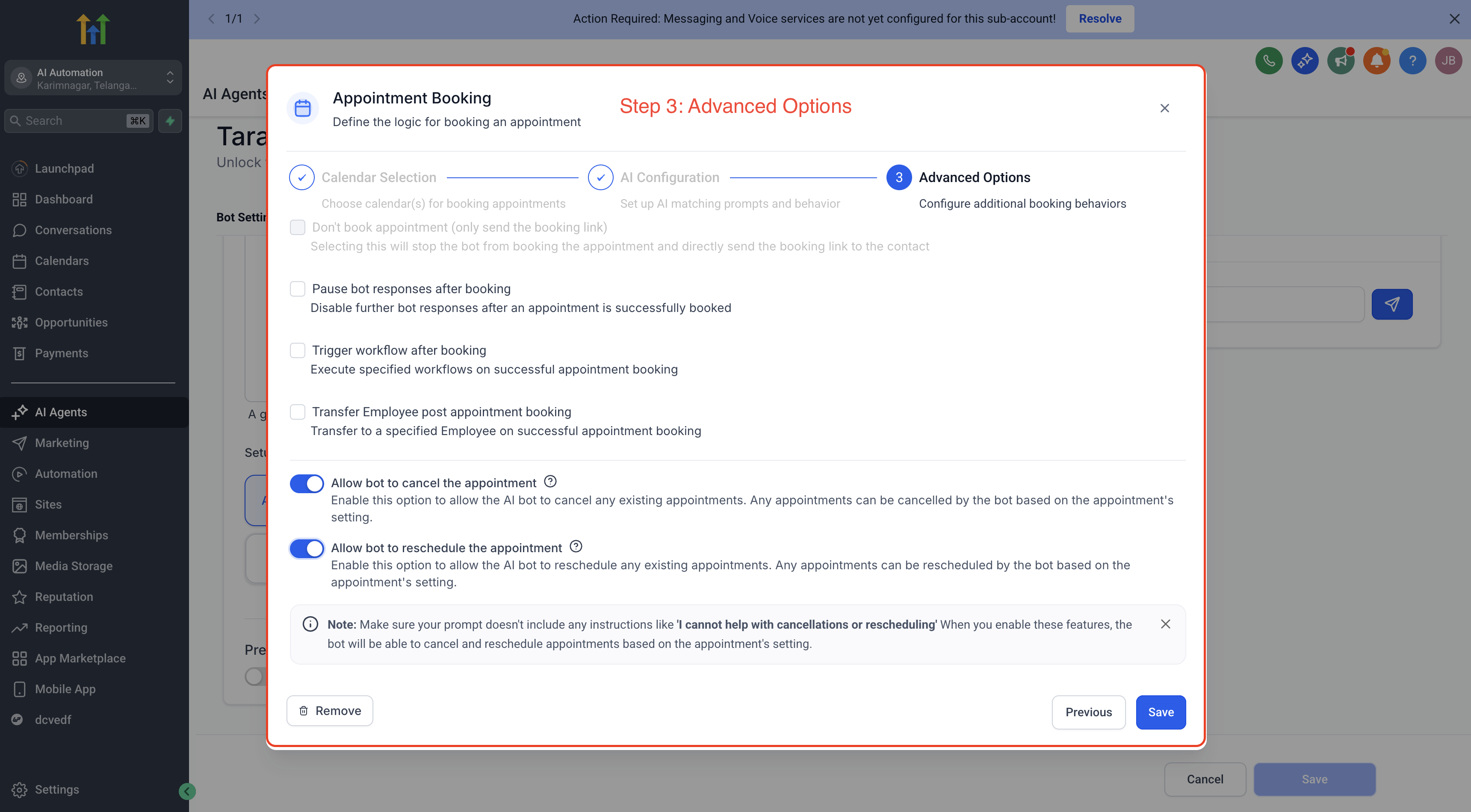
- Test the booking experience
Run test conversations to confirm that the bot recognizes the correct services, handles service details clearly, and creates bookings as expected. Testing is especially important when multiple services have similar names or overlapping use cases.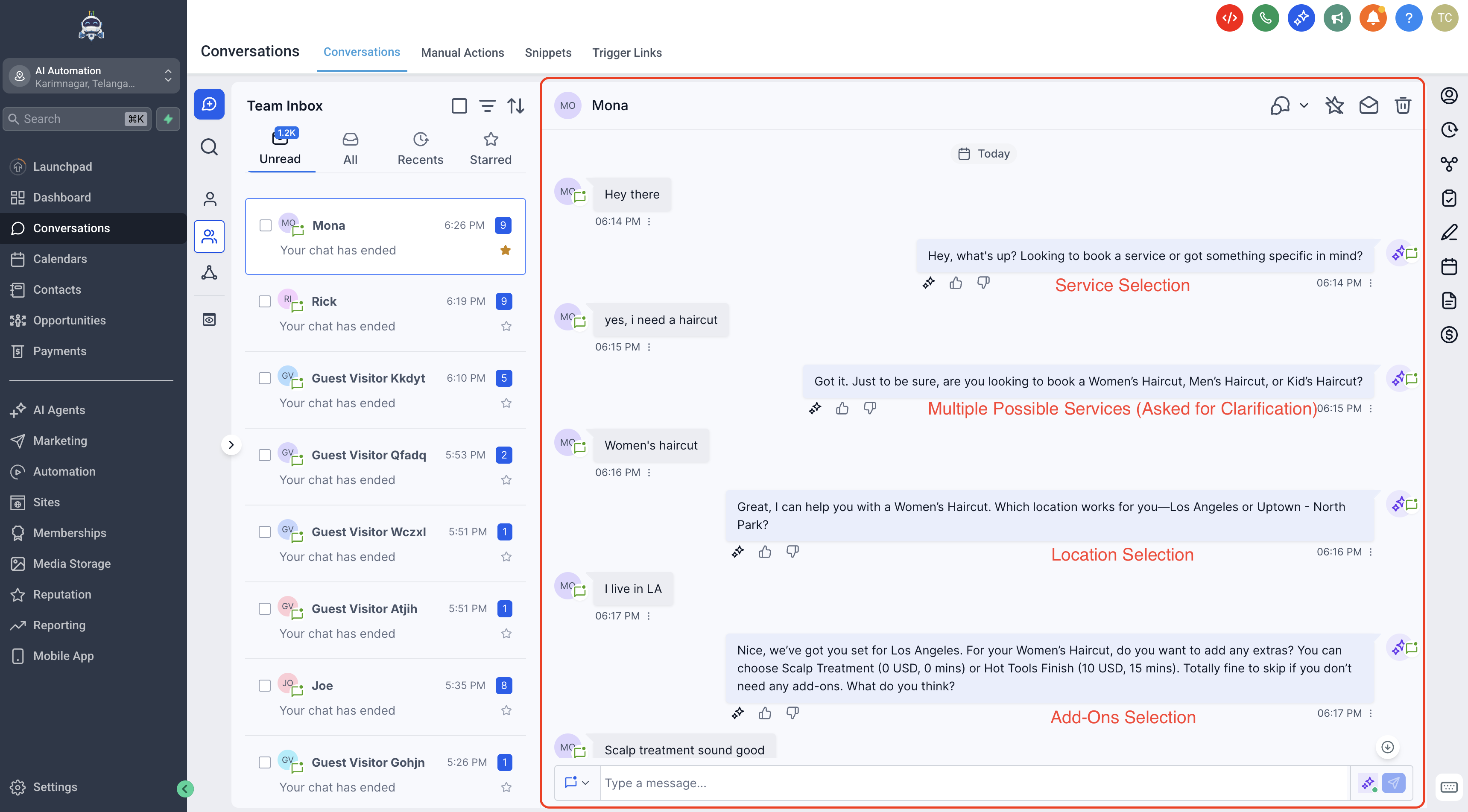
Frequently Asked Questions
Q: Do I need Service Calendars or Services configured before enabling this feature?
Yes. Set up the services you want to offer before configuring the bot for service booking. Your service setup is the foundation that Conversation AI uses for this booking experience.
Q: Can the bot book private services?
No. The current booking flow supports public-facing services only.
Q: Can the bot collect online payment during the booking conversation?
No. Online payment is not collected by the bot during the booking flow.
Q: Can I choose which services AI is allowed to book?
Yes. During setup, you choose the public-facing services the AI should manage.
Q: Do I need a Service Menu to use this feature?
No. Service Menus are an optional tool for organizing multiple services, but they are not required to enable service booking in Conversation AI.
Q: What should I update if the bot is choosing the wrong service?
Review the selected services, make the service names and descriptions more distinct, and improve the prompt instructions used to guide the bot.
Q: Can the booking flow include add-ons and variations?
Yes. The booking flow can include add-ons and variations when those are already configured.
Q: Can Conversation AI also support rescheduling or canceling appointments?
Yes, depending on how your appointment-booking experience is configured.
Related Articles
Was this article helpful?
That’s Great!
Thank you for your feedback
Sorry! We couldn't be helpful
Thank you for your feedback
Feedback sent
We appreciate your effort and will try to fix the article