Automatically create a Marketing Audit Report for new or updated contacts so your team can qualify leads faster and start more personalized outreach. This workflow action uses contact details like business name and website to generate an audit you can review, share, and use in sales conversations.
TABLE OF CONTENTS
- What is the Generate Marketing Audit Workflow Action
- Action Name
- Action Description
- Prerequisites
- How It Works
- Duplicate Prevention
- Where to Find the Generated Audit
- Example
- Frequently Asked Questions
- Related Articles
What is the Generate Marketing Audit Workflow Action
The Marketing Audit Report Generation workflow action allows you to automatically create a Marketing Audit Report for every new lead (contact) added to your sub-account. With workflow automation, you can instantly enrich new contacts, understand their online presence, and personalize follow-up outreach — all without manual effort.
To use this action, ensure the Prospecting Tool is enabled and subscribed on your sub-account.
Note: Previously, marketing audits could only be generated for leads created inside the Prospecting Tool. With this new workflow action, you can now generate audits for any contact from any source — Facebook Ads, funnels, forms, imports, integrations, webinars, or any other channel.Action Name
Generate Marketing Audit Report
Action Description
This workflow action automatically generates a Marketing Audit Report for a contact by using the details available in their profile, such as:
- Business Name
- Website URL
- Address
- Phone Number
The more complete the contact’s information is, the more accurate and detailed the audit will be.
What is Marketing Audit Report
The Marketing Audit Report is a powerful, automated snapshot of a business’s local marketing presence. It analyzes key areas like business listings accuracy, website performance, Google Business Profile , SEO rankings, and online reputation.
These insights help you identify gaps in your online presence, understand what’s impacting your growth, and take informed next steps — making the report useful for improving performance, onboarding new customers, or planning future marketing efforts.
Prerequisites
- Your sub-account must have an active Prospecting Tool subscription.
- Ensure that the Prospecting Tool is enabled in your account.
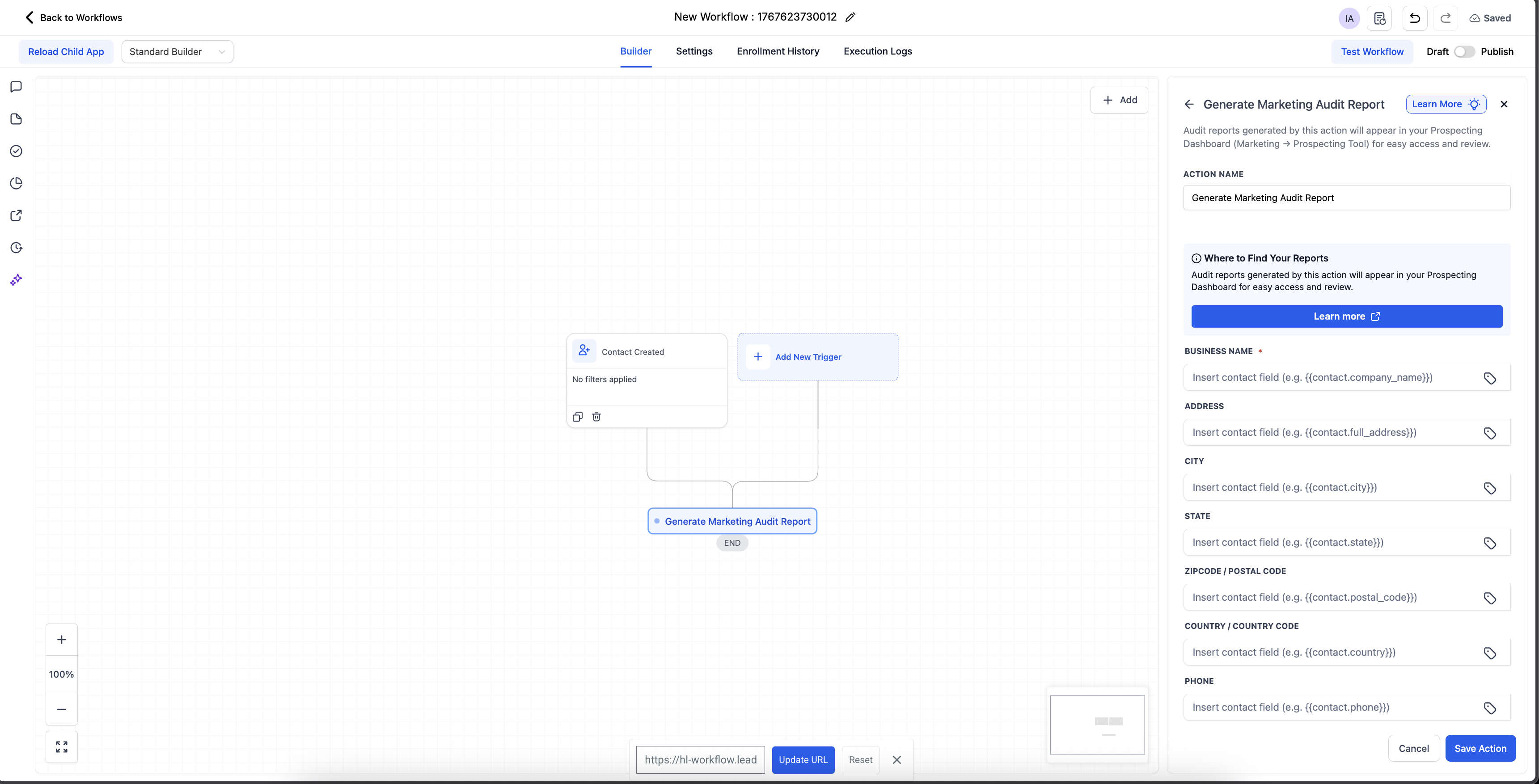
- Add the action into a workflow that triggers when a contact is available (recommended trigger: Contact Created).
How It Works
- A contact enters your workflow.
- The Generate Marketing Audit Report action runs automatically.
- Prospecting Tool uses the contact’s available business information such as business name, website, email etc to recoganize the right business entity and then run detailed audit for it.
- The generated report is attached to that prospect inside the Prospecting Tool.
Duplicate Prevention
For contacts originally created by the Prospecting Tool, we automatically prevents:
- Duplicate marketing audit reports
- Re-triggering the same audit workflows
This ensures clean data and avoids unnecessary audit generation for leads already handled by the Prospecting Tool.
Where to Find the Generated Audit
Once the workflow runs:
- Navigate to Marketing → Prospecting Tool (if can't see 'Prospecting' tab: it's probably prospecting is not enabled for your account).
- Open the Prospecting tab.
- Search for the specific prospect/contact.
- You’ll see the newly generated Marketing Audit Report for that contact.
Example
Use Case: Audit Every New Lead Automatically
You want to audit all new contacts coming in — from Facebook Ads, funnels, events, referrals, imports, or anywhere else.
- Create a workflow with Trigger: Contact Created.
- Add the Generate Marketing Audit Report action.
- Publish the workflow.
Now, every new contact added to your CRM will automatically:
- Have its business details analyzed
- Receive a custom Marketing Audit Report
- Appear inside the Prospecting Tool for review
This gives your team immediate insights and helps tailor outreach to each lead’s current marketing performance.
Frequently Asked Questions
Q: Can I export the Marketing Audit Report as a PDF and customize it?
HighLevel supports PDF export customization in the Prospecting Tool so your audit PDFs can match your branding. For more information on exporting and customizing these reports, click here.
Q: Can I share the report with a prospect in another language?
Yes. Multilingual Prospect Report Sharing can localize the Marketing Audit Report. You can choose a language when generating a share link or sending via Email/SMS
Related Articles
Was this article helpful?
That’s Great!
Thank you for your feedback
Sorry! We couldn't be helpful
Thank you for your feedback
Feedback sent
We appreciate your effort and will try to fix the article