Services notifications let you keep customers and team members informed throughout the service booking journey using Email, In-App, SMS, and WhatsApp. You can configure notifications for key booking events, choose recipients, customize messages, and use supported custom values from one centralized Services notification setting.
Note: This feature is currently available in Private Beta.
TABLE OF CONTENTS
- Overview
- What’s New with Services Notifications
- Delivery Channels
- Template Customization
- Localized Default Notification Templates
- Service-Specific Custom Values
- Smart Consolidation of Notifications
- How to Configure Service Notifications
- How Service Notifications Are Used
- What Did Not Change
- Frequently Asked Questions
- Related Articles
Overview
Service notifications provide a built-in alternative to workflow-based messaging for service bookings. Instead of relying on generic calendar notifications, Services notifications allow you to define event-specific messaging that automatically applies to all service bookings.
This update introduces new notification triggers, recipient options, template customization, and service-specific custom values—along with smart notification consolidation to prevent duplicate messages.
What’s New with Services Notifications
Notification Triggers
You can configure notifications for the following service booking events:
Appointment Booked (Unconfirmed)
Sent when a customer books a service with an unconfirmed status.
Appointment Booked (Confirmed)
Sent when a booking is auto-confirmed or manually approved.
Cancellation
Sent when a service booking is canceled.
Reschedule
Sent when a booking is moved to a new date or time.
Reminder
Pre-appointment reminders to help reduce no-shows.
Follow-Up
Post-appointment messages used to engage customers or collect feedback.
Recipient Options
Each notification can be sent to one or more of the following recipients:
The Contact
The customer who booked the service.
The Assigned User
The staff member assigned to the service.
Additional Email Addresses
Internal recipients such as front-desk staff, managers, or other team members.
Delivery Channels
Choose the communication channel that best fits each stage of the service booking journey. Services notifications support:
- Email: Send booking updates and appointment communications by email.
- In-App: Notify assigned users inside HighLevel.
- SMS: Send booking updates by text message.
- WhatsApp: Send booking confirmations, reminders, follow-ups, and other supported appointment communications through WhatsApp.
You can configure the appropriate channel for each notification event based on how you want to communicate with customers and your team.
Template Customization
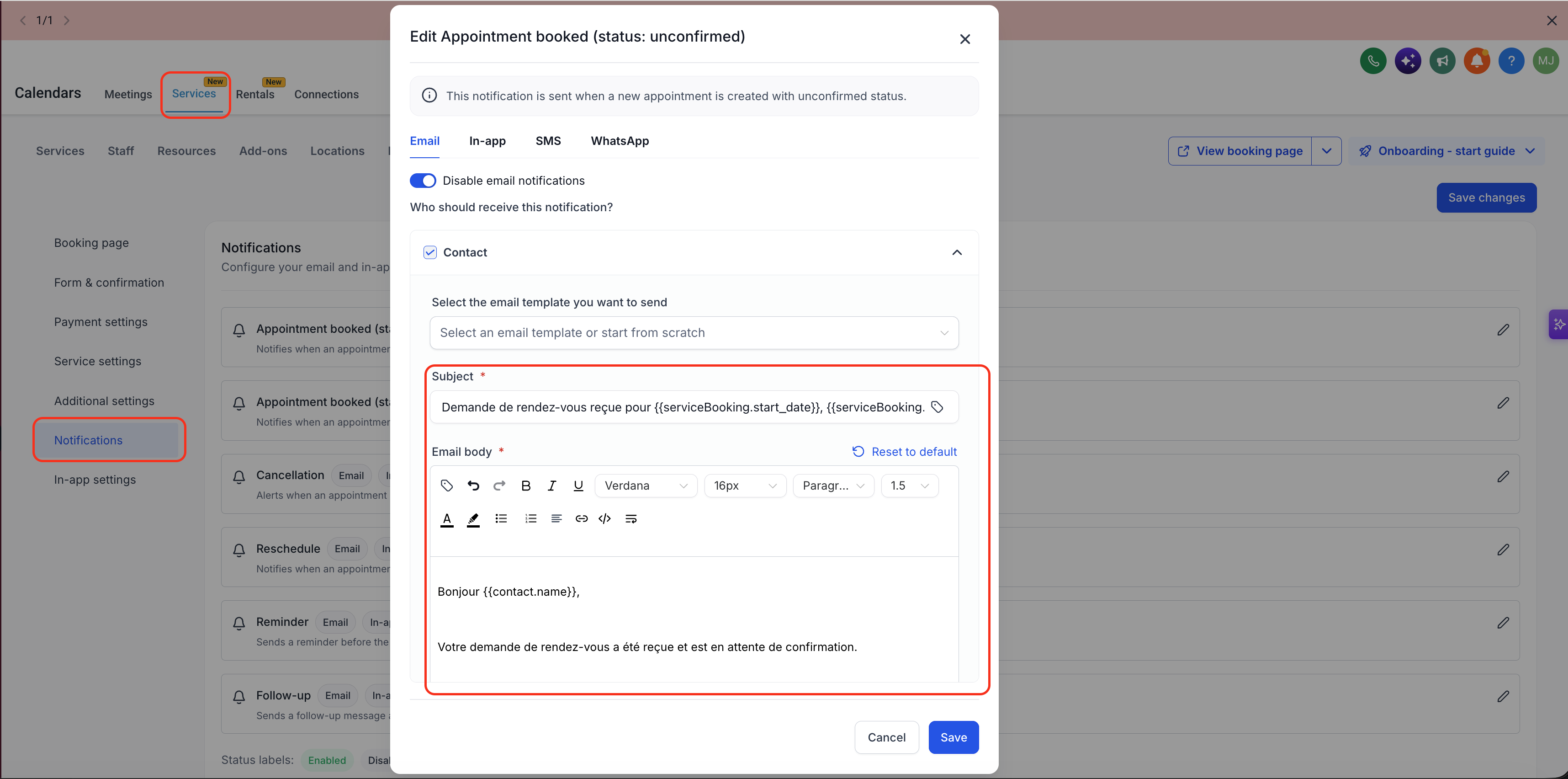
Services notifications include a built-in editor that allows you to:
Customize subject lines
Edit message content
Adjust formatting and layout
You can also choose from pre-created templates to speed up setup and maintain consistent messaging.
Localized Default Notification Templates
Default notification templates use the Business Profile Platform Language across supported Email, SMS, and WhatsApp channels.
- New Services locations: No action required. Default templates are automatically localized.
- Existing Services locations: Go to Global Settings → Notifications and select Reset to default on the relevant template to load the localized version.
Customized templates remain unchanged unless manually reset.
Service-Specific Custom Values
Services notifications support custom values specific to service bookings, including:
Service Name
Duration
Price
Add-ons
Assigned staff details
Additional service attributes
These values ensure notifications accurately reflect the booked service.
Smart Consolidation of Notifications
When a booking includes multiple services, only one notification is sent for the overall service booking.
This prevents customers and team members from receiving multiple redundant emails for the same appointment.
How to Configure Service Notifications
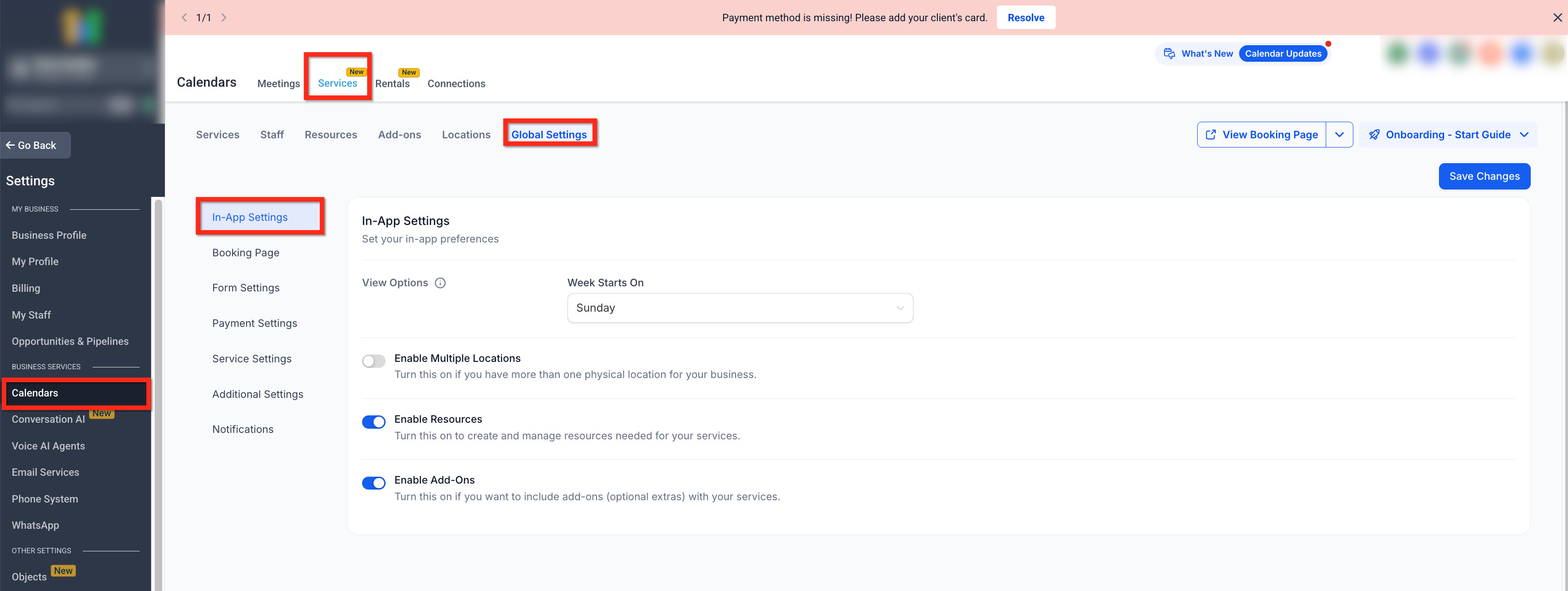
To configure notifications for Services:
Navigate to
Calendar Settings → Services → Global Settings → Notifications
Select the desired notification trigger
Customize the notification template
- Select the delivery channel you want to configure, such as Email, In-App, SMS, or WhatsApp.
Choose the recipients
Insert service-specific custom values
Save your changes
How Service Notifications Are Used
Once configured:
Notifications trigger automatically based on service events
Templates are reused consistently across bookings
Consolidation logic is applied automatically for multi-service bookings
No workflows are required for standard service communications
What Did Not Change
This update does not:
Replace workflow-based notifications
Affect non-service calendar appointments
Change appointment availability or booking rules
Apply outside Services (Private Beta)
Frequently Asked Questions
Q: Is this available for all calendar appointments?
No. These notifications apply only to bookings made using Services.
Q: Can I send both email and in-app notifications?
Services notifications support Email, In-App, SMS, and WhatsApp. Configure the channel that fits each service booking event and communication need.
Q: Are notifications sent per service or per booking?
Notifications are consolidated per booking. Multi-service bookings send one notification.
Q: Do I still need workflows for service notifications?
No. Services notifications provide a built-in option for common booking communications, though workflows remain available if needed.
Q: Is this feature available to all accounts?
No. Services notifications are currently in Private Beta.
Related Articles
Was this article helpful?
That’s Great!
Thank you for your feedback
Sorry! We couldn't be helpful
Thank you for your feedback
Feedback sent
We appreciate your effort and will try to fix the article