This article mainly aims to guide the users on how to create a product using the public API provided by Highlevel. It also delves down for the cases and several types which the users can take the advantage of while creating a product.
TABLE OF CONTENTS
Products
Products are the one of the main entities in Highlevel using which, users can sell the products that they want to sell through many forms of selling channels, using E-commerce Stores, Invoices, Estimates, and more.
Types of Products
In Highlevel, products are majorly of two type products:
- Products with price
- Products with Variants
Products with Price
These types of products are simple products which don't have any variants to them. Any product which doesn't require variants (or) has only 1 variant classification can be created in this format. Best example would be Poster with possible sizes
Products with Variants
This type of products are the products which have multiple variations for a single product. Best example would be a T-shirt where there might be multiple colors and sizes
Create Product using Public API
Authorization
In order to perform CRUD (Create, Read, Update and Delete) entities related to Highlevel using Public API, we need access token. The authorization process is explained in the below link:
https://marketplace.gohighlevel.com/docs/Authorization/authorization_doc
Creation of Product
For creating a product we are going to utilize the following Public APIs
- Create a Product - https://marketplace.gohighlevel.com/docs/ghl/products/create-product
- Create a Price for Product - https://marketplace.gohighlevel.com/docs/ghl/products/create-price-for-product
It is advised to follow the order of the content in order to create a Product
Create Product
First we need to create a product using the Create a Product API . Let us see the basic properties required for Creation of Product
- name - name of the product
- locationId - for which sub-account this product is created
- description - brief description for the product which will be useful in the sales channels to exhibit the product
- productType - let us keep it as
DIGITAL - image - Featured image which will be displayed by default to the end customer
- availableInStore - whether a product should be made available for E-commerce Stores or not
- medias - array
- id - unique identifier for media
- title - title for the media
- url - source url of the media
- type - currently only image is supported
- isFeatured - set to
trueif needs to be displayed to the end customer
- variants - only required if you are trying to create a variant product
- id - unique ID for variant
- name - Name of the variant
- options - array
- id - unique ID for variant option (will be required for creation of Price)
- name - name of the option
Example Payload for Product with Price:
{
  "name": "High Speed Memory Drive",
  "description": "A high speed memory drive with latest safety features and breath taking design",
  "locationId": "<sub-account_ID>",
  "availableInStore": true,
  "productType": "PHYSICAL",
  "image": "https://via.placeholder.com/150",
  "medias": [
    {
      "id": "550e8400-e29b-41d4-a716-446655440000",
      "title": "High Speed Memory Drive",
      "url": "https://via.placeholder.com/150",
      "type": "image",
      "isFeatured": true
    }
  ]
}
Example Payload for Product with Variants:
{
  "name": "T-shirt",
  "description": "Latest t-shirt with latest design and quality",
  "locationId": "<sub_account_id>",
  "availableInStore": true,
  "productType": "PHYSICAL",
  "image": "https://via.placeholder.com/150",
  "medias": [
    {
      "id": "550e8400-e29b-41d4-a716-446655440000",
      "title": "T-shirt",
      "url": "https://via.placeholder.com/150",
      "type": "image",
      "isFeatured": true
    }
  ],
  "variants": [
    {
      "id": "550e8400-e29b-41d4-a716-446655440000",
      "name": "Color",
      "options": [
        {
          "id": "550e8400-e29b-41d4-a716-446655440002",
          "name": "Red"
        },
        {
          "id": "550e8400-e29b-41d4-a716-446655440001",
          "name": "Blue"
        },
        {
          "id": "550e8400-e29b-41d4-a716-446655440003",
          "name": "Green"
        }
      ]
    },
    {
      "id": "550e8400-e29b-41d4-a716-446655440111",
      "name": "Size",
      "options": [
        {
          "id": "550e8400-e29b-41d4-a716-446655440112",
          "name": "Small"
        },
        {
          "id": "550e8400-e29b-41d4-a716-446655440113",
          "name": "Medium"
        },
        {
          "id": "550e8400-e29b-41d4-a716-446655440114",
          "name": "Large"
        }
      ]
    }
  ]
}
Note: For Variant Product, keep in track of the option Ids as they will be playing an important role while creating price
Upon creating a product, we will get a response which will have the property _id which is the created productId. That will be used to create price for a product
Create Price for a Product
We will be using the Create Price for a Product API to create a price for product. Here are the basic properties required for creating a price for a product
- product - Id of the product for which it is created
- locationId - sub-account Id
- name - Name of the Price
- type - As we support recurring products as well, the available values are
one_timeandrecurring - currency - Currency of the Price
- amount - Amount relevant to the currency
- description - Description for the Price
- variantOptionIds - required for a product with variants
- For an example if the variant combination is
Red/Small, then variantOptionIds values should be as follows -
- For an example if the variant combination is
["550e8400-e29b-41d4-a716-446655440002","550e8400-e29b-41d4-a716-446655440112"]- where
550e8400-e29b-41d4-a716-446655440002is forRedand550e8400-e29b-41d4-a716-446655440112is forSmall - For Product with Variants, variantOptionIds are required in order to render product correctly, absence of this property will render the variant combinations incorrectly
- trackInventory - If the inventory needs to be tracked, then set to
true - availableQuantity - Available Quantity, applicable if trackInventory is
true - allowOutOfStockPurchases - Allow purchases of the product even if it is out of stock, only applicable if trackInventory is
true - sku - SKU of the price (or) variant
- isDigitalProduct -
trueif it is a Digital Product - shippingOptions - shipping properties for
PHYSICALproduct ( will be useful for shipping integrations )- weight - weight options
- value - value of the weight
- unit - metric unit. Supported values -
kg, g, lb, oz
- dimensions - dimensions of the Physical Product
- height - number
- width - number
- length - number
- unit - unit supported for dimensions - Supported values -
cm, in, m
- weight - weight options
Example Payload for Simple Price (Without Variants):
    {
  "product": "66b6021be68f7a98102ba272",
  "locationId": "<sub_account_id>",
  "name": "256 GB",
  "type": "one_time",
  "currency": "USD",
  "amount": 100,
  "description": "256 GB of storage",
  "sku": "PS-256GB",
  "isDigitalProduct": false,
  "shippingOptions": {
    "weight": {
      "value": 100,
      "unit": "g"
    },
    "dimensions": {
      "length": 10,
      "width": 10,
      "height": 10,
      "unit": "cm"
    }
  }
}
Example Payload for Price for Product With Variants
{
  "product": "66b6021be68f7a98102ba272",
  "locationId": "<sub_account_id>",
  "name": "Red / Small",
  "type": "one_time",
  "currency": "USD",
  "amount": 100,
  "description": "Red / Small",
  "sku": "PS-RED-SMALL",
  "isDigitalProduct": false,
  "variantOptionIds": ["550e8400-e29b-41d4-a716-446655440002","550e8400-e29b-41d4-a716-446655440112"],
  "shippingOptions": {
    "weight": {
      "value": 100,
      "unit": "g"
    },
    "dimensions": {
      "length": 10,
      "width": 10,
      "height": 10,
      "unit": "cm"
    }
  }
}
Note: Variant Option Ids are required for correct rendering of the product variations
Add Image to a variant through Public API
Example Payload for Product Media Update with PriceIds
{
  "name": "T-shirt",
  "description": "Latest t-shirt with latest design and quality",
  "locationId": "<sub_account_id>",
  "availableInStore": true,
  "productType": "PHYSICAL",
  "image": "https://via.placeholder.com/150",
  "medias": [
    {
      "id": "550e8400-e29b-41d4-a716-446655440000",
      "title": "T-shirt",
      "url": "https://via.placeholder.com/150",
      "type": "image",
      "priceIds": ["<created_price_Id>"],
      "isFeatured": true
    }
  ],
  "variants": [
   {...existing variants data}
  ]
}
As of now, we support only one image mapped to one priceId, mapping multiple priceIds to a single image will cause problems in rending the products
Products and E-commerce Public APIs
HighLevel's Products Public API supports product management and e-commerce integrations through endpoints for bulk product updates, inventory, store visibility, collections, and reviews.
The available capabilities include:
Bulk Product Updates: Update multiple product records in a single API request.
Inventory Management: Retrieve product inventory information and update stock quantities.
Store Product Visibility: Retrieve product store statistics and include or exclude products from stores.
Product Collections: Retrieve, create, update, and delete product collections.
Product Reviews: Retrieve, update, and delete product reviews, and retrieve review counts by moderation status.
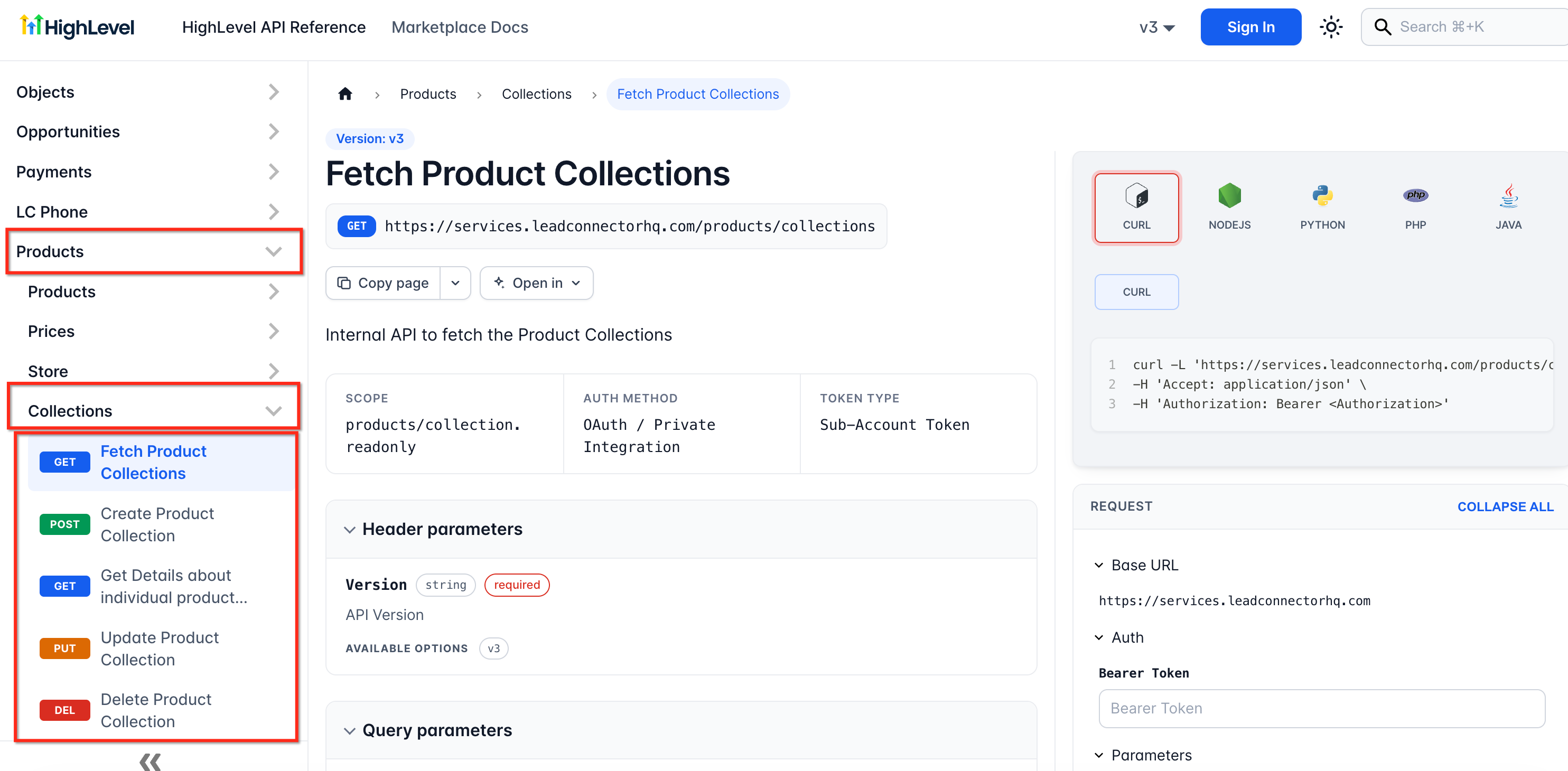
Developers can use these endpoints to manage product-related resources through external integrations.
For endpoint specifications, authentication requirements, supported API versions, and request examples, refer to the HighLevel Developer Marketplace API Documentation.
Conclusion
Using the above APIs we were able to create a basic ONE TIME Physical product with simple price and also with variants. The flexibility doesn't stop here, as Highlevel supports recurring Products as well, you can refer to the Price API documentation in detail and make use of the properties specifically provided for recurring products
Was this article helpful?
That’s Great!
Thank you for your feedback
Sorry! We couldn't be helpful
Thank you for your feedback
Feedback sent
We appreciate your effort and will try to fix the article