What is Prospecting Reselling for Sub-Accounts?
HighLevel agencies can resell Premium Prospecting to client sub-accounts, giving clients access to Prospecting while allowing the agency to control the client-facing price. Agencies can configure the offer from Agency View and make Premium Prospecting available to eligible sub-accounts. This article explains how to configure, price, and resell Premium Prospecting, how clients subscribe, and how billing works.
Prospecting reselling allows an agency to offer Premium Prospecting as an additional service to its clients. Instead of requiring every client to arrange Prospecting independently, the agency can configure a reselling offer and determine how much the client pays for access.
Note: This article focuses specifically on reselling Premium Prospecting to client sub-accounts. Prospecting may also be available through other activation methods, including direct purchase, Agency Premium subscription sharing, and the Free Prospecting tier for eligible Agency Sub-Accounts.
Key Benefits of Reselling the Prospecting Tool
Reselling Premium Prospecting gives agencies a way to expand the services available to clients while managing the offer and client-facing pricing from HighLevel. Understanding these benefits can help you determine when reselling is the appropriate activation method for a sub-account.
Additional revenue opportunity: Set the client-facing resale price for Premium Prospecting and incorporate the service into your agency's offering.
Centralized configuration: Manage the Prospecting offer for client sub-accounts from Agency View.
Flexible client pricing: Configure the resale price and use available customization options when a client requires a different offer.
Integrated client experience: Give subscribed clients access to Prospecting alongside the CRM and automation tools available in their sub-account.
Simplified subscription management: Manage eligible location-level reselling subscriptions using HighLevel's billing controls.
Ways to Enable Premium Prospecting for a Sub-Account
Premium Prospecting can be activated for a sub-account through more than one subscription path. Choosing the appropriate method helps ensure the subscription and billing arrangement match how your agency intends to provide Prospecting.
Premium Prospecting can be made available through the following methods:
Agency reselling: Your agency configures a Prospecting offer and client-facing resale price. This is the method covered in this article.
Direct sub-account purchase: Premium Prospecting can be purchased directly for a sub-account.
Agency Premium subscription sharing: An agency with an Agency Premium Prospecting subscription can link
an eligible sub-account to that subscription.
For a complete comparison of sub-account activation methods, see Prospecting at Sub Accounts: Complete Guide Benefits & Setup.
Prerequisites for Reselling the Prospecting Tool
Your agency's reselling and payment configuration determines how client purchases are processed. Confirming these requirements before creating the offer helps prevent billing or activation issues when a sub-account subscribes.
Before configuring the Prospecting offer:
Make sure your agency has access to Prospecting reselling in HighLevel.
Confirm that the agency's supported reselling and payment configuration is set up.
Make sure the sub-account you want to sell Premium Prospecting to is eligible for the offer.
HighLevel's current reselling infrastructure supports payment configurations beyond the older Stripe-only workflow. Agencies using SaaS V2 should review Reselling and Rebilling through SaaS V2 Payment Providers for the applicable payment-provider behavior.
Important: Do not assume that connecting an Agency Stripe account is the only supported payment configuration. The applicable payment flow depends on your agency's current HighLevel reselling setup.
Prospecting Reselling Pricing
Premium Prospecting has a HighLevel cost that is separate from the resale price your agency presents to its client. Keeping these amounts distinct makes it easier to understand the agency's cost and the client-facing subscription amount.
Premium Prospecting is currently documented at $29/month. When reselling Prospecting, your agency can configure the amount presented to the client as the resale price.
Think of the two amounts separately:
Premium Prospecting cost: The applicable HighLevel cost for Premium Prospecting.
Client resale price: The amount your agency configures for the client-facing Prospecting offer.
For additional details about Premium functionality and pricing, see Free vs Premium Prospecting in HighLevel.
Note: Eligible Agency Sub-Accounts may have access to the Prospecting Free Tier for internal agency use. The Free Tier is separate from the Premium Prospecting reselling workflow described here. See Prospecting Free Tier in Agency Sub-Accounts for eligibility and setup information.
Standard and Custom Prospecting Offers
Prospecting offers determine how Premium Prospecting is presented to your sub-accounts. A standard offer provides your normal reselling configuration, while client-specific customization gives you additional flexibility when a particular sub-account requires different pricing or availability.
Use your standard Prospecting offer when the same resale configuration is appropriate for your clients. When a specific client needs a different offer, use the available customization controls for that sub-account.
This is useful when you want to:
Offer a client a different resale price.
Control whether the Prospecting offer is available to a particular sub-account.
Tailor the Prospecting offer without changing the standard configuration used elsewhere.
How to Set Up Prospecting for Reselling
Properly configuring the Prospecting offer determines what eligible sub-accounts see and how much they are charged when they subscribe. Complete the agency-side configuration before directing a client to purchase Premium Prospecting.
Log in to HighLevel and remain in Agency View.
Navigate to the area where your agency manages Reselling.
Locate Prospecting in the available reselling products.
Enable the Prospecting offer for reselling.
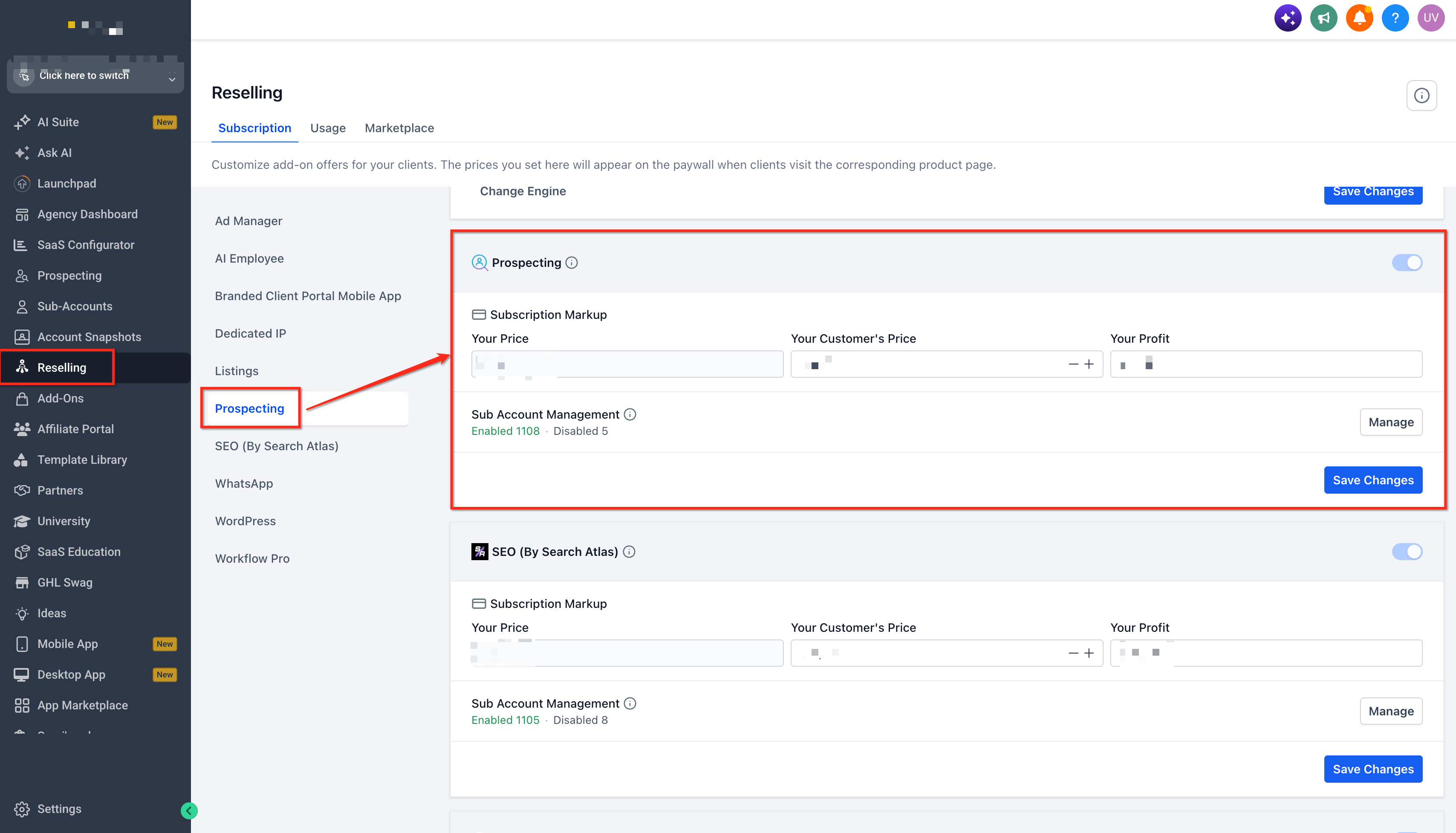
Review the Premium Prospecting cost and locate the client-facing pricing controls.
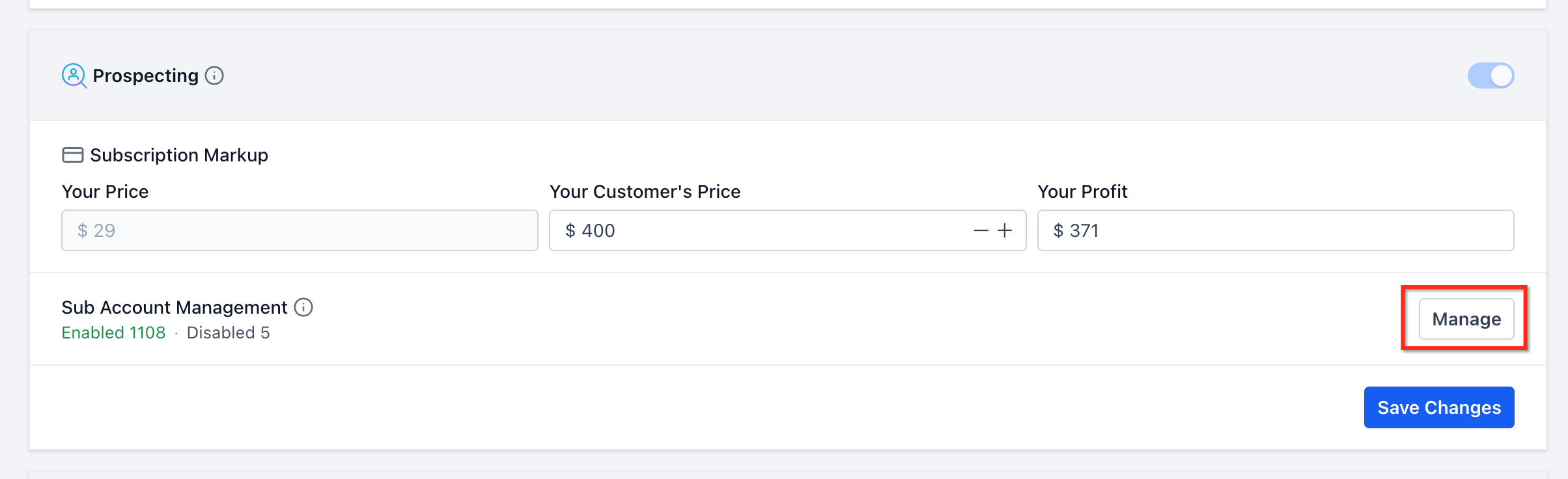
Enter the resale price you want to charge clients for Premium Prospecting.
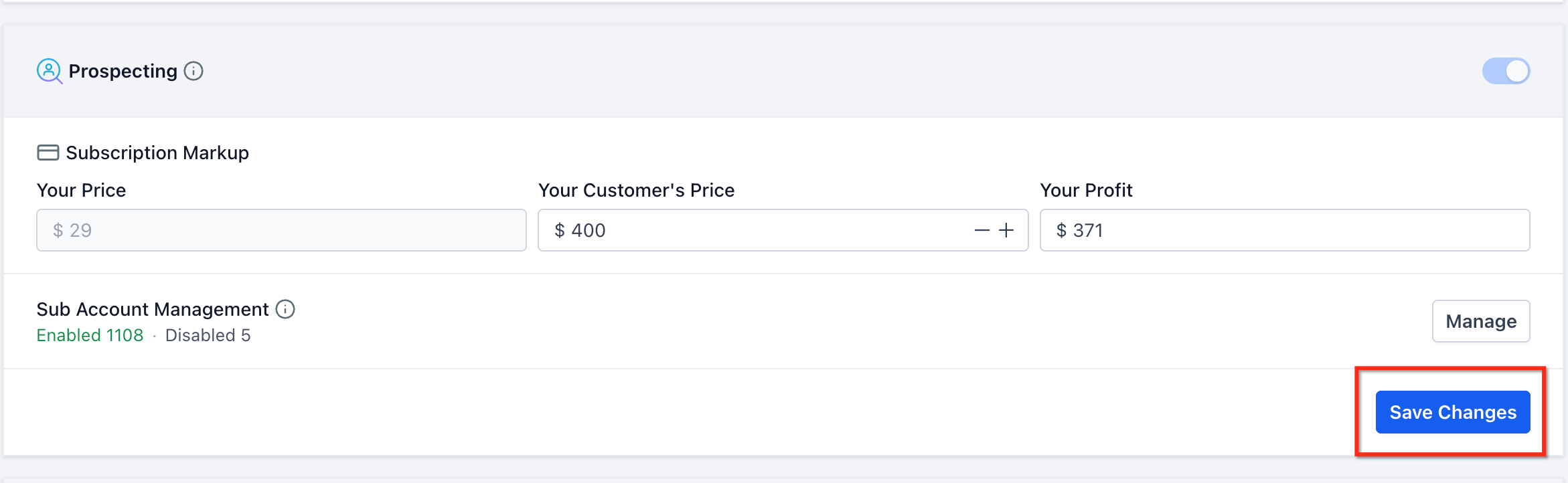
Save or apply the pricing configuration.
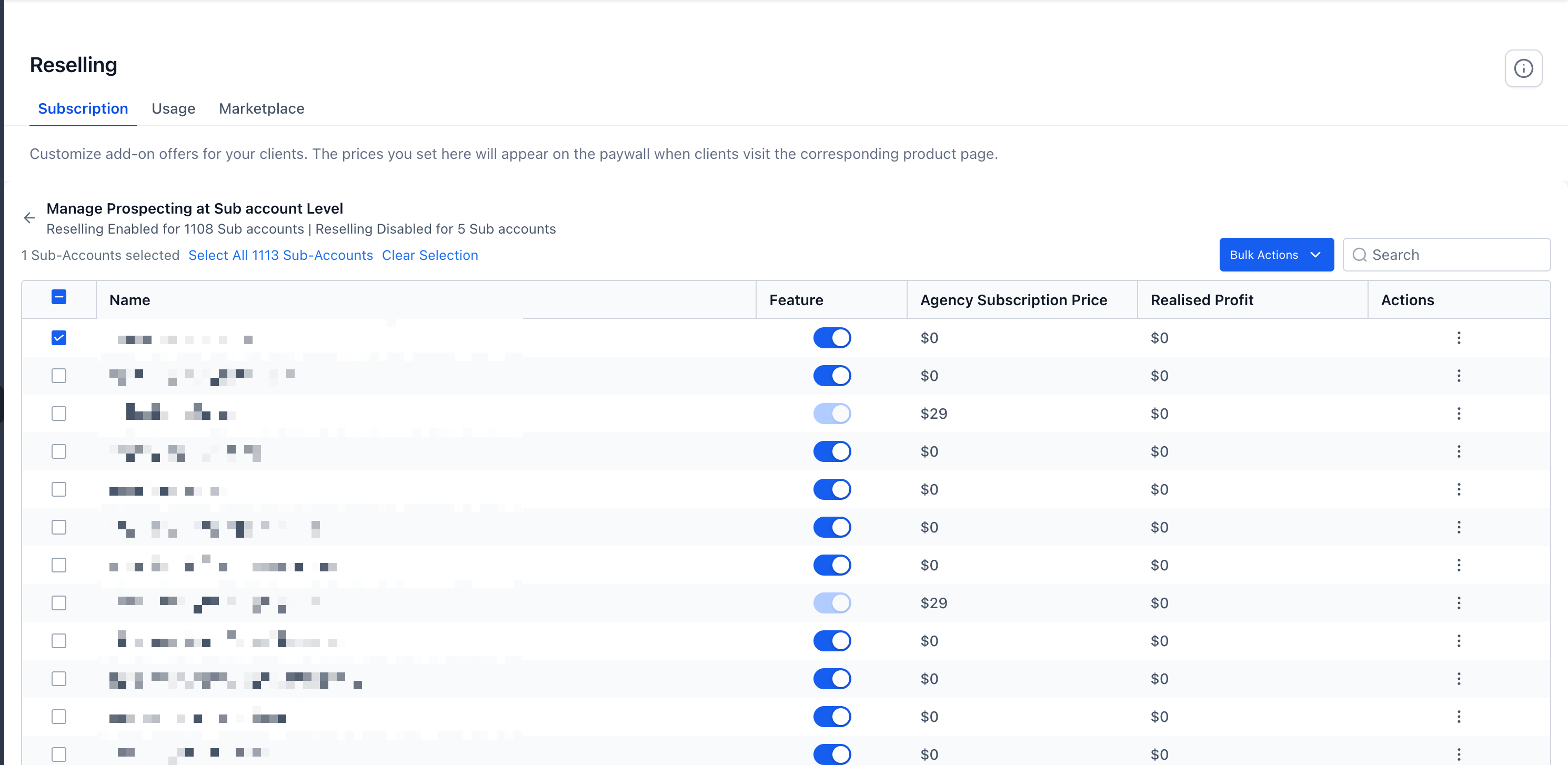
If a particular sub-account requires a different offer, open the available client-specific customization controls.
Select the applicable sub-account.
Configure the client-specific Prospecting offer as needed.
Save or apply the custom offer.
Disable a Prospecting Offer Before Purchase
Controlling offer availability lets an agency prevent a sub-account from purchasing Prospecting when the service should not be offered to that client. Disabling an unsold offer is different from canceling a subscription that the client has already purchased.
Use the applicable offer control to turn off Prospecting for the selected sub-account before the client purchases it.
Important: Turning off the Prospecting offer applies to availability before purchase. If the sub-account already has an active reselling subscription, manage the active subscription through the applicable billing and cancellation controls instead.
See How to Cancel Location Subscriptions from the Agency Billing Page for the current agency-side cancellation process.
How Sub-Accounts Purchase Prospecting
Once the agency makes the offer available, the sub-account can complete the Premium Prospecting subscription from its account. The client-facing purchase flow uses the resale price configured by the agency rather than requiring the agency user to activate the service manually for the client.
From the sub-account:
Navigate to Prospecting.
Review the Premium Prospecting offer presented in the account.
Click Subscribe Now to begin the subscription process.
Review the subscription information displayed during checkout.
Complete the required payment or billing steps.
Click Continue when prompted to complete the activation.
After activation, the sub-account can access its available Premium Prospecting functionality.
For detailed instructions on using Prospecting after activation, see Prospecting at Sub Accounts: Complete Guide Benefits & Setup.
If your agency already has prospects at the Agency level that need to be used in the newly activated sub-account, see Prospecting Tool – Migrate Prospects from Agency to Sub-Account.
How Prospecting Billing Works
Prospecting reselling involves both a client-facing transaction and the corresponding HighLevel cost to the agency. Separating these two billing relationships makes it easier to understand why the amount paid by the client may differ from the underlying Premium Prospecting cost.
The billing relationship can be understood as:
Client → Agency: The sub-account pays the client-facing resale amount configured by the agency through the applicable reselling/payment setup.
Agency → HighLevel: The agency is responsible for the applicable Premium Prospecting cost under HighLevel's billing configuration.
The exact payment flow can depend on the agency's current reselling and payment-provider configuration. For example, newer SaaS V2 configurations can use supported payment-provider and sub-account wallet functionality.
Managing the offer and managing an active subscription are also separate actions. Turning off an offer controls whether an unsubscribed client can purchase it. An existing subscription should instead be managed using the applicable cancellation controls.
Frequently Asked Questions
Q: Can a sub-account access Prospecting without purchasing it through my agency?
Yes. HighLevel documents multiple activation paths for sub-account Prospecting, including direct purchase and eligible Agency Premium subscription sharing. Eligible Agency Sub-Accounts may also have access to the Free Prospecting tier.
Q: What is the difference between Free and Premium Prospecting?
Free and Premium Prospecting have different eligibility and feature availability. The reselling workflow in this article specifically applies to Premium Prospecting. See Free vs Premium Prospecting in HighLevel for the current feature comparison.
Q: Can my agency charge clients a different amount from HighLevel's Premium Prospecting cost?
Yes. Prospecting reselling allows the agency to configure a client-facing resale price. The agency's underlying Premium Prospecting cost and the amount presented to the client are separate.
Q: Can I create a different Prospecting offer for a specific client?
HighLevel provides client-specific customization controls for Prospecting reselling, allowing agencies to tailor an offer for a particular sub-account without relying solely on the standard offer configuration.
Q: Can I turn off the Prospecting offer after a client has subscribed?
Turning off an offer controls its availability before purchase. Once a client has an active reselling subscription, use the applicable billing cancellation controls to manage that subscription rather than treating it as an unsold offer.
Q: How can an active resold Prospecting subscription be canceled?
Eligible location-level reselling subscriptions can be managed through HighLevel's billing cancellation controls. Depending on the applicable subscription and cancellation flow, options may include cancellation immediately or at the end of the billing cycle. Refer to HighLevel's current subscription cancellation documentation before canceling an active service.
Q: Can I use an Agency Premium Prospecting subscription with a sub-account instead of reselling it?
HighLevel provides an Agency Premium subscription-sharing option for eligible use cases. See How to Share Agency Prospecting Premium Subscription with a Sub-Account for the requirements and limitations of that method.
Related Articles
Prospecting at Sub Accounts: Complete Guide Benefits & Setup
How to Share Agency Prospecting Premium Subscription with a Sub-Account
Prospecting Tool – Migrate Prospects from Agency to Sub-Account
How to Reach Out to Prospect Leads Generated via the Prospecting Tool
How to Cancel Location Subscriptions from the Agency Billing Page
Was this article helpful?
That’s Great!
Thank you for your feedback
Sorry! We couldn't be helpful
Thank you for your feedback
Feedback sent
We appreciate your effort and will try to fix the article