When you add a website as a training source, Conversation AI can crawl and extract content from the pages you provide. Reviewing and editing that crawled website content helps keep AI responses accurate, relevant, and aligned with your current business information. This article explains how to review, update, identify, and refresh website content used by Conversation AI.
TABLE OF CONTENTS
- What is Website Content Review for Conversation AI?
- Key Benefits of Reviewing and Editing Website Content
- Website Sources and Crawled Content
- When to Edit Crawled Website Content
- Identifying Edited Website Content
- Refreshing or Re-Crawling Website Content
- Reviewing Source Usage From Conversations
- How To Setup Website Content Review for Conversation AI
- Frequently Asked Questions
- Related Article
What is Website Content Review for Conversation AI?
Website Content Review allows you to view and edit the content HighLevel extracted from a website source used by Conversation AI. This helps you improve the source material your AI agent may reference when answering customer questions. Since website pages can include outdated details, irrelevant text, formatting issues, or missing context, reviewing crawled content gives you more control over the information Conversation AI uses.
Website content can come from Web Crawler sources used in Bot Training or Knowledge Base workflows. The Web Crawler can be used to train bots from exact URLs, paths, domains, and supported web-based sources, helping Conversation AI provide more context-specific responses.
Key Benefits of Reviewing and Editing Website Content
Reviewing crawled content helps ensure Conversation AI uses clean, current, and customer-ready information. This is especially useful when your website includes pages with old promotions, duplicate content, complex formatting, or information that should not be used in customer conversations.
- Improved Accuracy: Update outdated or incomplete website details so Conversation AI has better source content to reference.
- More Relevant Responses: Remove unrelated page content, navigation text, or extra website copy that may not help answer customer questions.
- Better Customer Experience: Keep responses aligned with your services, policies, pricing, locations, hours, and support instructions.
- Greater Control: Manually adjust crawled website content without changing the live website itself.
- Easier Maintenance: Identify edited sources and review them before refreshing or re-crawling website content.
Website Sources and Crawled Content
Website sources are one type of knowledge source that can help Conversation AI respond to customer questions. HighLevel Knowledge Bases can also include other source types such as FAQs, rich text, tables, file uploads, web crawler sources, and web search sources. Conversation AI can retrieve relevant information from these sources before generating a response.
Crawled website content may include information from pages, sections, and interactive website elements depending on how the website is structured. The Enhanced Web Crawler is designed to capture more content from modern websites, including content in tabs, accordions, lazy-loaded sections, and similar interactive page areas.
When to Edit Crawled Website Content
Crawled content should be reviewed whenever the information on your website may not be ideal for AI responses. A clean source helps Conversation AI answer more consistently and reduces the chance that customers receive outdated or irrelevant information.
Consider editing crawled content when you notice:
- Old pricing, expired offers, or outdated promotions
- Incorrect business hours, locations, or service details
- Website copy that is too broad, vague, or unclear
- Duplicate content from headers, footers, menus, or repeated page sections
- Missing context that would help Conversation AI answer customer questions
- Content that should remain on the website but should not be used by the AI agent
Editing crawled content updates the source content available to Conversation AI. It does not update or publish changes to your live website.
Identifying Edited Website Content
Edited website sources are marked so you can tell when content has been manually changed after the original crawl. This helps you track which sources contain custom edits and which sources still reflect the original crawled website data.
Use the edited indicator to review important sources before refreshing or re-crawling them. This is especially helpful when a source contains manually revised service details, pricing explanations, policy language, or other customer facing information that should be preserved.
Refreshing or Re-Crawling Website Content
Refreshing or re-crawling a website source retrieves the latest content directly from the website. This is useful when your live website has been updated and you want Conversation AI to use newer page information. However, refreshing a website source may overwrite previously edited content and replace it with newly crawled website data.
Auto Refresh can also re-crawl and retrain web URL sources on a daily, weekly, or monthly cadence. Use this carefully for sources that require manual edits, since scheduled refreshes are designed to keep Knowledge Base content synced with the latest website content.
Reviewing Source Usage From Conversations
Reviewing crawled content is best for proactively cleaning up website source material before or after bot testing. When troubleshooting a specific AI response, use AI Response Info in Conversations to see which prompts, intents, actions, and data sources contributed to the response.
AI Response Info can show the sources used for an AI response, including Knowledge Chunks and FAQs. It can also allow users to edit knowledge base entries, such as FAQs or website data, from the conversation view when available.
How To Setup Website Content Review for Conversation AI
Proper setup ensures you are editing the correct website source and that saved changes are available for Conversation AI to reference. Review the source carefully before saving so the AI agent can rely on accurate, customer-ready information.
- Navigate to your Conversation AI Bot Training or Knowledge Base settings.
- Locate the website URL in the list of imported website or Web Crawler sources.
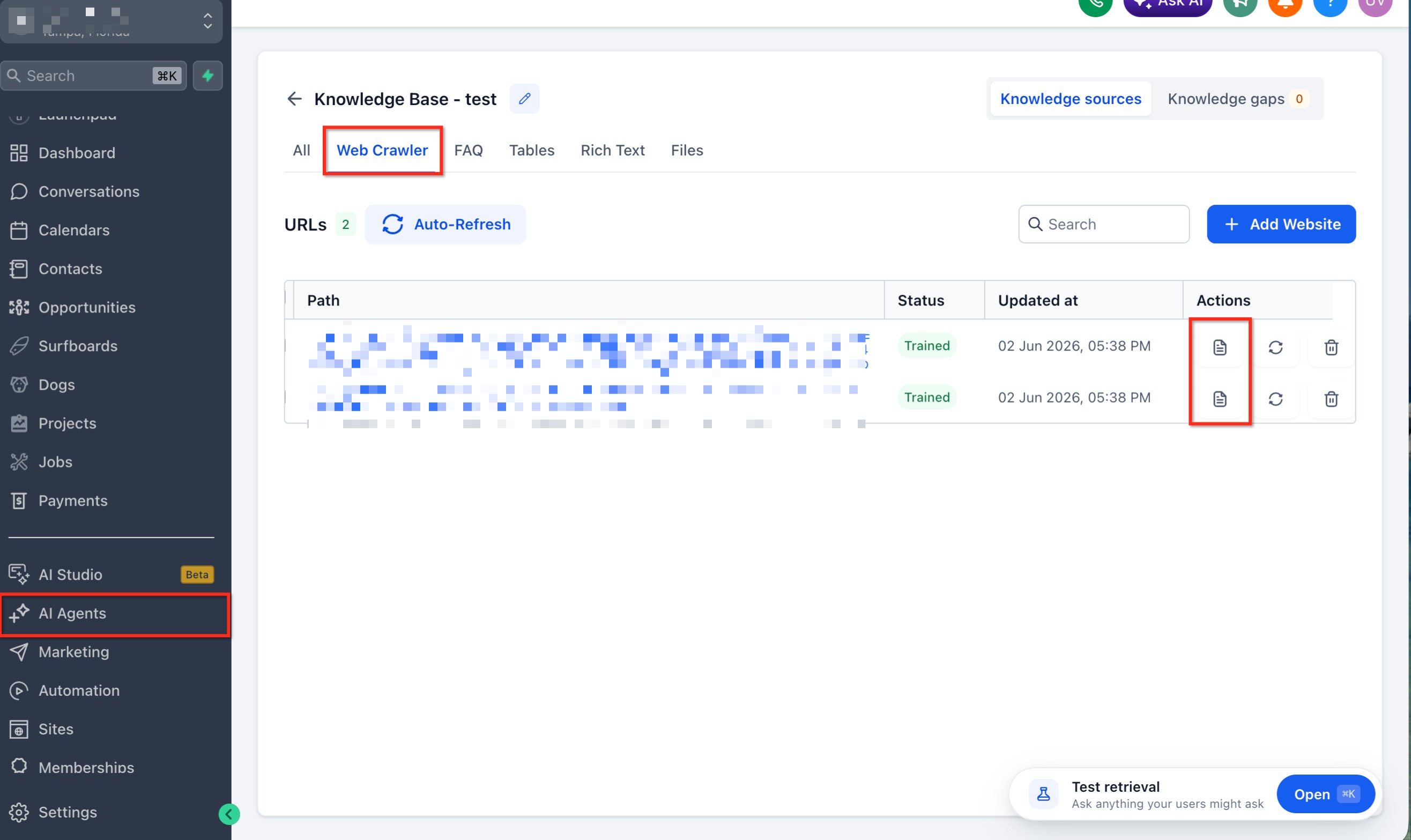
- Click the content review icon next to the website entry.
- Review the extracted website content.
- Remove outdated, irrelevant, duplicated, or unclear information.
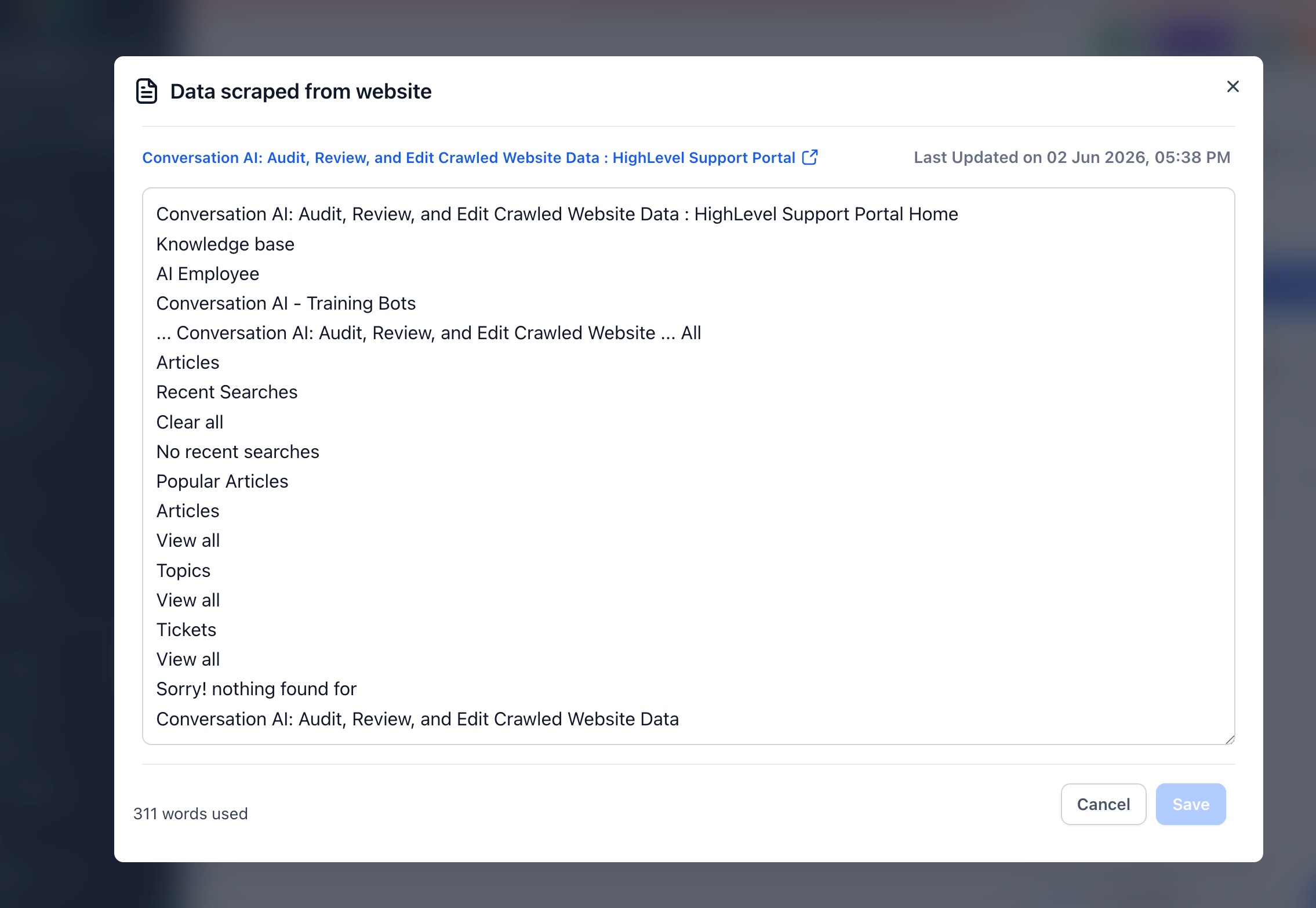
- Add missing context where needed so the content is easier for Conversation AI to use.
- Save your changes.
- Confirm the website source shows an edited indicator, if available.
- Test Conversation AI with customer-style questions to confirm the updated content is being used as expected.
Once saved, the updated content becomes available for Conversation AI to use when generating responses.
Frequently Asked Questions
Q: Does editing crawled website content change my live website?
No. Editing crawled website content only updates the source content available for Conversation AI. It does not change, publish, or edit your live website.
Q: When should I edit crawled website content instead of updating my website?
Edit crawled content when the live website is correct for visitors but needs cleanup for AI responses. Update your website when the public page itself contains incorrect or outdated information.
Q: What happens after I save edited website content?
The saved content becomes available for Conversation AI to use when generating future responses.
Q: Will refreshing a website source remove my manual edits?
Refreshing or re-crawling may overwrite previously edited content and replace it with newly crawled website data. Review and copy important manual edits before refreshing.
Q: Can I undo edits after saving?
There may not be a one-click undo option. You can manually re-edit the content, or refresh/re-crawl the website source to retrieve updated content from the live website. Keep in mind that refreshing may replace manual edits.
Q: How do I know which website content was used in a specific AI response?
Use AI Response Info in Conversations to view source details for an AI-generated message, including sources such as Knowledge Chunks and FAQs.
Q: Why does the crawled content include text from tabs, accordions, or hidden sections?
The Enhanced Web Crawler can capture content from interactive website elements such as tabs, accordions, lazy-loaded areas, and similar page sections.
Q: Should I use Auto Refresh for sources with manual edits?
Use caution. Auto Refresh is designed to keep web URL sources updated by re-crawling them on a set schedule. If a source contains important manual edits, review how refresh behavior affects that source before enabling an automatic schedule.
Related Articles
Was this article helpful?
That’s Great!
Thank you for your feedback
Sorry! We couldn't be helpful
Thank you for your feedback
Feedback sent
We appreciate your effort and will try to fix the article